2011 MERCEDES-BENZ SLS AMG audio
[x] Cancel search: audioPage 197 of 436
Selecting Music Files
iCOMAND displays the data stored on the
iPod ®
, MP3 player or USB mass storage
device in the storage structure used in the
medium in question.
Selecting by Skipping to a Track
XTo skip forwards or backwards to a
track: Slide o m p .
or
XPress the 0049 or 0048 button.
i
Skipping forwards skips to the next track.
Skipping backwards skips to the beginning
of the current track if the track has been
playing for more than 8 seconds. If the
track has been playing for less than 8
seconds, it skips to the start of the previous
track. If you have selected a playback
option other than Normal Track
Sequence , the track sequence is random.
Selecting by Manual Track Number Entry
XTo make an entry: Press the 00E4 button.
An input menu appears. The number of
possible input places depends on the
number of tracks stored.XTo enter a track number: Press a number
key, such as 006C.
The number is entered in the first position
in the input line.
i If an invalid number is entered, COMAND
will ignore it and it will not be displayed.
XEnter more numbers if desired.XTo confirm your entry: Press the n
button.
The selected track is played.Fast forward/rewindXWhen the main area is highlighted, slide
and hold o m p until the desired position
has been reached.
or
XPress and hold the 0049 or 0048 button
until the desired position has been
reached.
Selecting a Category/Playlist/Folder
iPods and MP3 Players
You can select tracks by category for iPods
and by folder for MP3 players.
Depending on the connected device, the
categories may include:
R Current track list
R Playlists (e.g. All, My top 25 or Music
videos )
R Artists
R Albums
R Podcasts
R Audiobooks
R Genres
R Composers
i Some playback categories contain the
All entry. Further entries of this type can
follow depending on the hierarchy level.
After selecting a title at the track level, the
entire content of the category selected will
be played.
USB Devices
For USB mass storage devices, you can select
folders and also playlists (if available).
COMAND can also display the album name
and artist (“metadata”) during playback, if
this information has previously been entered.
Playlists are shown in the display with a
particular icon. When you open the playlist,
the selected tracks are opened and playback
begins.
For USB mass storage devices, you can
determine whether metadata from the tags in
Audio195COMAND APSBA 197 USA, CA Edition A 2011; 1; 27, en-UShereepeVersion: 3.0.3.52010-03-24T15:31:10+01:00 - Seite 195Z
Page 198 of 436
the coded music data should be displayed or
whether the file name and directory should be
displayed during playback.
XSelect Media Interface £ Display
Metadata.
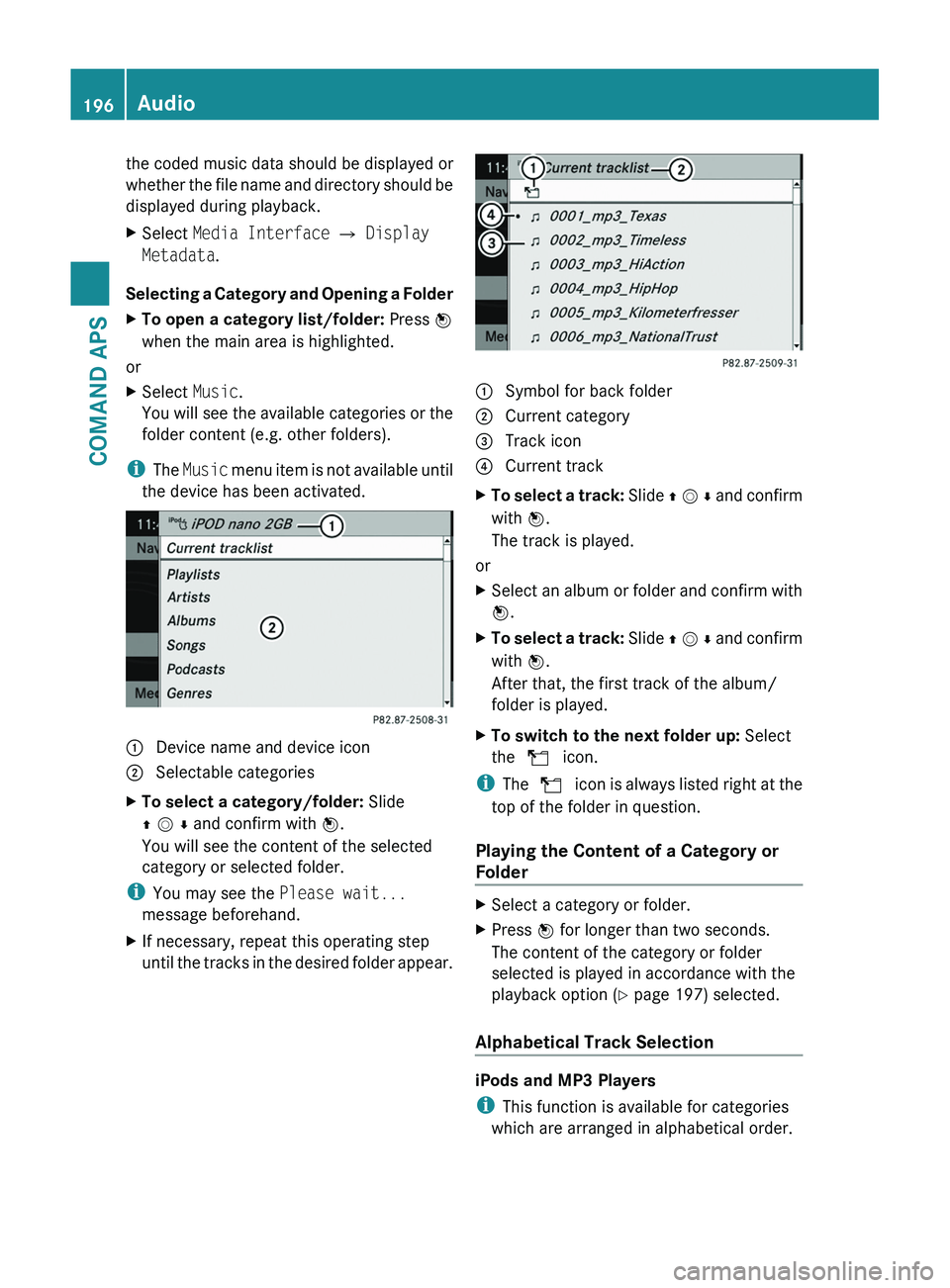
Selecting a Category and Opening a Folder
XTo open a category list/folder: Press n
when the main area is highlighted.
or
XSelect Music.
You will see the available categories or the
folder content (e.g. other folders).
iThe Music menu item is not available until
the device has been activated.
1 Device name and device icon2 Selectable categoriesXTo select a category/folder: Slide
q m r and confirm with n.
You will see the content of the selected
category or selected folder.
iYou may see the Please wait...
message beforehand.
XIf necessary, repeat this operating step
until the tracks in the desired folder appear.1 Symbol for back folder2 Current category3 Track icon4 Current trackXTo select a track: Slide q m r and confirm
with n.
The track is played.
or
XSelect an album or folder and confirm with
n.
XTo select a track: Slide q m r and confirm
with n.
After that, the first track of the album/
folder is played.
XTo switch to the next folder up: Select
the Q icon.
iThe Q icon is always listed right at the
top of the folder in question.
Playing the Content of a Category or
Folder
XSelect a category or folder.XPress n for longer than two seconds.
The content of the category or folder
selected is played in accordance with the
playback option (Y page 197) selected.
Alphabetical Track Selection
iPods and MP3 Players
iThis function is available for categories
which are arranged in alphabetical order.
196AudioCOMAND APS
BA 197 USA, CA Edition A 2011; 1; 27, en-UShereepeVersion: 3.0.3.52010-03-24T15:31:10+01:00 - Seite 196
Page 199 of 436
This function is not available within
playlists, for example.XSelect a category, e.g. artists.
The available artists appear.XPress the corresponding number key once
or repeatedly to select the initial letter of
the desired artist. For example, to select an
artist whose name begins with C, press the
number key "2" three times.
You see the available letters at the bottom
edge of the display.
After a message, the first entry in the list
which matches the letter entered is
highlighted.
i If there is no entry which matches the
letter which has been entered, the last
entry in the list which matches a previous
letter is highlighted.
USB Devices
i This function is available for directories
which are arranged in alphabetical order.
This function is not available within
playlists.
XPress the number key in question once or
repeatedly in a directory to select the initial
letter of the desired artist.
For example, to select an artist whose
name begins with C, press the number key
“2” three times.
You see the available letters at the bottom
edge of the display.
If the directory only contains folders,
COMAND searches for folders. The first
entry in the list that matches the letter is
highlighted.
If this does not happen, COMAND searches
for tracks. After a message, the first entry
in the list which matches the letter entered
is highlighted.
i If there is no entry which matches the
letter which has been entered, the last
entry in the list which matches a previous
letter is highlighted.
Selecting the Active Partition (USB
Devices Only)
You can select this function for USB devices
when the storage device is partitioned. Up to
four partitions (primary or logical and FAT-
formatted) are supported.
i The Windows formatting program
supports FAT partitions with either FAT16
or FAT32.
XSelect Media Interface £ Select
Active partition .
Playback Options
The following options are available to you:
R Normal Track Sequence:
You hear the tracks in their normal order
(numerical or alphabetical).
R Random Tracks:
You hear all tracks in random order.
R Random Categories or Random Folder
(in the case of USB devices when Folder
has been selected):
You hear the tracks in the current active
category or folder and any subfolders in
random order.
XTo select an option: Select Media
Interface in the basic display.
The option list appears. A R dot indicates
the option selected.XSelect an option.
Audio Aux
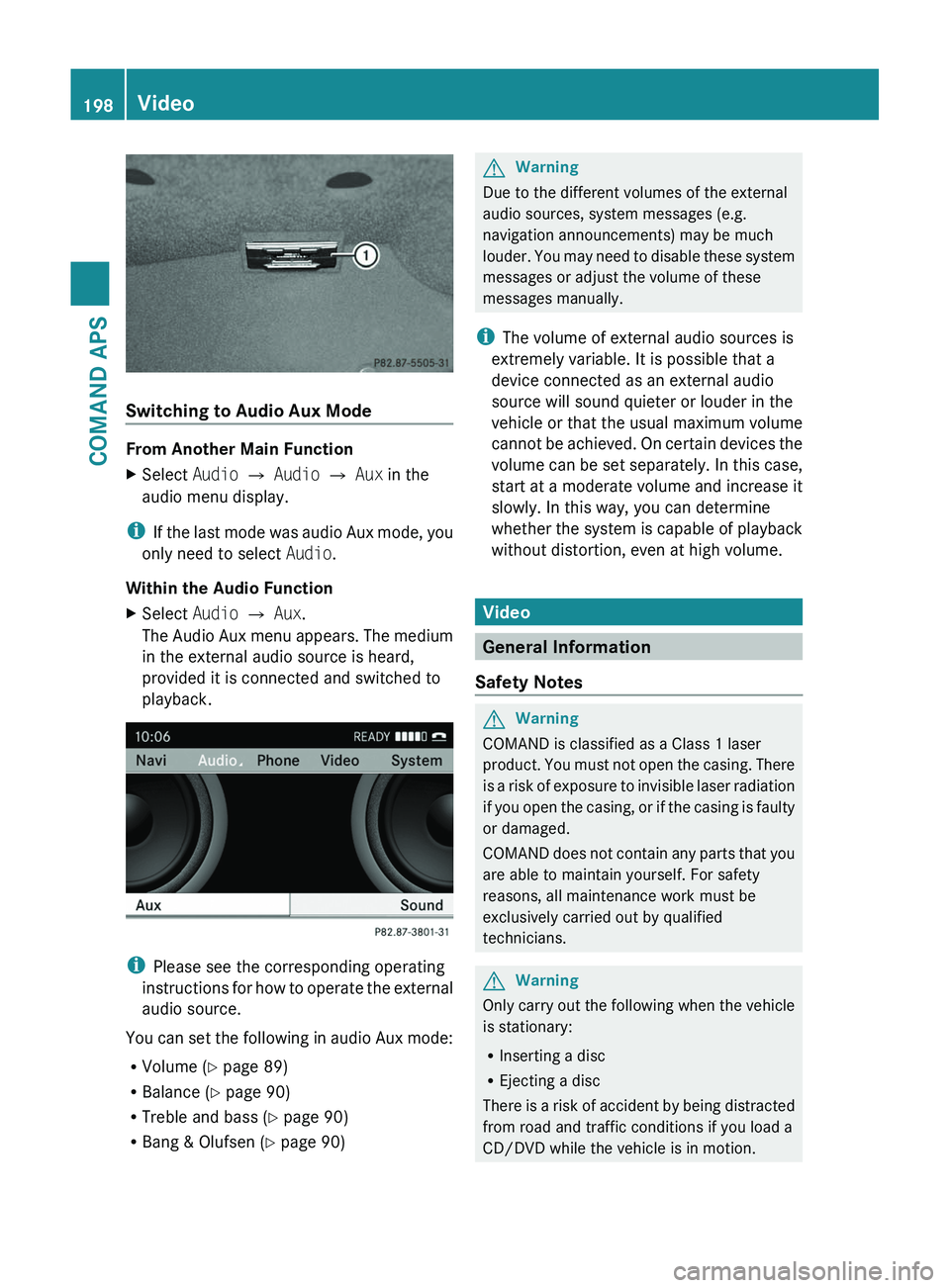
An external audio source (Aux) can be
connected to COMAND via the adapter
socket 1 located inside the glovebox.
Audio197COMAND APSBA 197 USA, CA Edition A 2011; 1; 27, en-UShereepeVersion: 3.0.3.52010-03-24T15:31:10+01:00 - Seite 197Z
Page 200 of 436
Switching to Audio Aux Mode
From Another Main Function
XSelect Audio £ Audio £ Aux in the
audio menu display.
iIf the last mode was audio Aux mode, you
only need to select Audio.
Within the Audio Function
XSelect Audio £ Aux.
The Audio Aux menu appears. The medium
in the external audio source is heard,
provided it is connected and switched to
playback.
iPlease see the corresponding operating
instructions for how to operate the external
audio source.
You can set the following in audio Aux mode:
RVolume (Y page 89)
RBalance (Y page 90)
RTreble and bass (Y page 90)
RBang & Olufsen (Y page 90)
GWarning
Due to the different volumes of the external
audio sources, system messages (e.g.
navigation announcements) may be much
louder. You may need to disable these system
messages or adjust the volume of these
messages manually.
iThe volume of external audio sources is
extremely variable. It is possible that a
device connected as an external audio
source will sound quieter or louder in the
vehicle or that the usual maximum volume
cannot be achieved. On certain devices the
volume can be set separately. In this case,
start at a moderate volume and increase it
slowly. In this way, you can determine
whether the system is capable of playback
without distortion, even at high volume.
Video
General Information
Safety Notes
GWarning
COMAND is classified as a Class 1 laser
product. You must not open the casing. There
is a risk of exposure to invisible laser radiation
if you open the casing, or if the casing is faulty
or damaged.
COMAND does not contain any parts that you
are able to maintain yourself. For safety
reasons, all maintenance work must be
exclusively carried out by qualified
technicians.
GWarning
Only carry out the following when the vehicle
is stationary:
RInserting a disc
REjecting a disc
There is a risk of accident by being distracted
from road and traffic conditions if you load a
CD/DVD while the vehicle is in motion.
198VideoCOMAND APS
BA 197 USA, CA Edition A 2011; 1; 27, en-UShereepeVersion: 3.0.3.52010-03-24T15:31:10+01:00 - Seite 198
Page 201 of 436
Vehicle Equipment
iThis Operator’s Manual describes all
features, standard or optional, potentially
available for your vehicle at the time of
purchase. Please be aware that your
vehicle might not be equipped with all
features described in this manual.
Automatic Picture Switch-off
The video picture is only displayed if the
gearshift lever is in “P” position.
When the gearshift lever is moved out of the
“P” position, the following message is
displayed: In order not to distract
you from the traffic situation, the
picture is faded out while the
vehicle is in motion.
When the gearshift lever is moved back into
the “P” position, the picture switches back
on.
Notes on Storage Media
i When playing copied discs, problems may
occur with the playback. A wide variety of
disc-writing software and writers are
available. Due to this variety we cannot
guarantee that the system will be able to
play discs that you have written/copied
yourself.
! Do not affix stickers or labels to the discs,
as they could peel off and damage
COMAND. Stickers can cause the disc to
bend, which can result in read errors and
disc recognition problems.
! COMAND is designed to hold discs which
comply with the EN 60908 standard. You
can therefore only use discs with a
maximum thickness of 1.3 mm.
If you insert thicker discs, e.g. those that
contain data on both sides (DVD on one
side and audio data on the other), they
cannot be ejected and can damage
COMAND.
Do not use discs with a diameter of 8 cm,
even with an adapter. Only use round discs
with a diameter of 12 cm.
Notes on the Care of Discs
R Only hold discs by the edge.
R Handle discs with care in order to prevent
malfunctions during playback.
R Avoid scratching, leaving fingerprints and
dust on the discs.
R Clean the discs occasionally with a
commercially available cleaning cloth.
Always wipe in a straight line from the
inside outwards, never in a circular motion.
R The discs must only be labelled using pens
specially designed for this purpose.
R After use, replace the discs into the sleeve.
R Protect the discs from heat and direct
sunlight.
DVD Playback Conditions
Some DVDs may not comply with the NTSC
or PAL TV playback standards. Sound, picture
and other playback problems may occur
when you play such DVDs.
As standard, COMAND can play video DVDs
which meet the following criteria:
R Region code 1 or region code 0 (all regions)
i With a video DVD having another region
code, a corresponding message will be
displayed.
R PAL or NTSC TV standard
Information on this can usually be found
either on the DVD itself or on the DVD sleeve.
i The factory setting for COMAND is region
code 1. An authorized Mercedes-Benz
Center can change this setting up to five
times. This will enable you to play video
DVDs with other region codes, provided
that they have been made to the PAL or
NTSC TV standard.
Video199COMAND APSBA 197 USA, CA Edition A 2011; 1; 27, en-UShereepeVersion: 3.0.3.52010-03-24T15:31:10+01:00 - Seite 199Z
Page 203 of 436
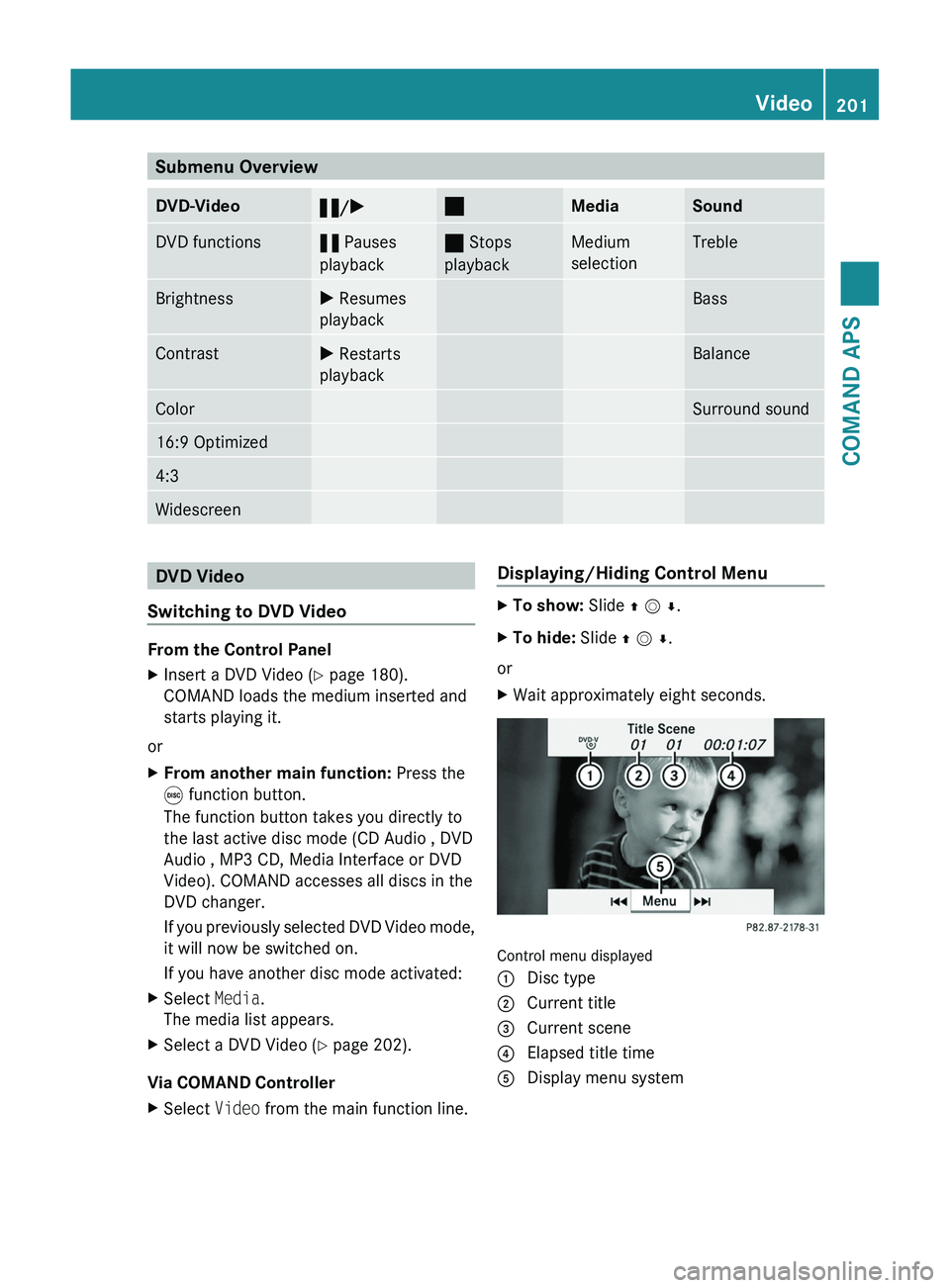
Submenu OverviewDVD-Video«/X±MediaSoundDVD functions« Pauses
playback
± Stops
playback
Medium
selection
TrebleBrightnessX Resumes
playback
BassContrastX Restarts
playback
BalanceColorSurround sound16:9 Optimized4:3WidescreenDVD Video
Switching to DVD Video
From the Control Panel
XInsert a DVD Video (Y page 180).
COMAND loads the medium inserted and
starts playing it.
or
XFrom another main function: Press the
\0005 function button.
The function button takes you directly to
the last active disc mode (CD Audio , DVD
Audio , MP3 CD, Media Interface or DVD
Video). COMAND accesses all discs in the
DVD changer.
If you previously selected DVD Video mode,
it will now be switched on.
If you have another disc mode activated:
XSelect Media.
The media list appears.
XSelect a DVD Video (Y page 202).
Via COMAND Controller
XSelect Video from the main function line.Displaying/Hiding Control MenuXTo show: Slide q m r.XTo hide: Slide q m r.
or
XWait approximately eight seconds.
Control menu displayed
1 Disc type2 Current title3 Current scene4 Elapsed title time5 Display menu systemVideo201COMAND APSBA 197 USA, CA Edition A 2011; 1; 27, en-UShereepeVersion: 3.0.3.52010-03-24T15:31:10+01:00 - Seite 201Z
Page 204 of 436
Displaying/Hiding Menu SystemXTo show: Press n.
or
XWhen the control menu is shown, select
Menu.
XTo hide: Slide q m and select Full
screen.
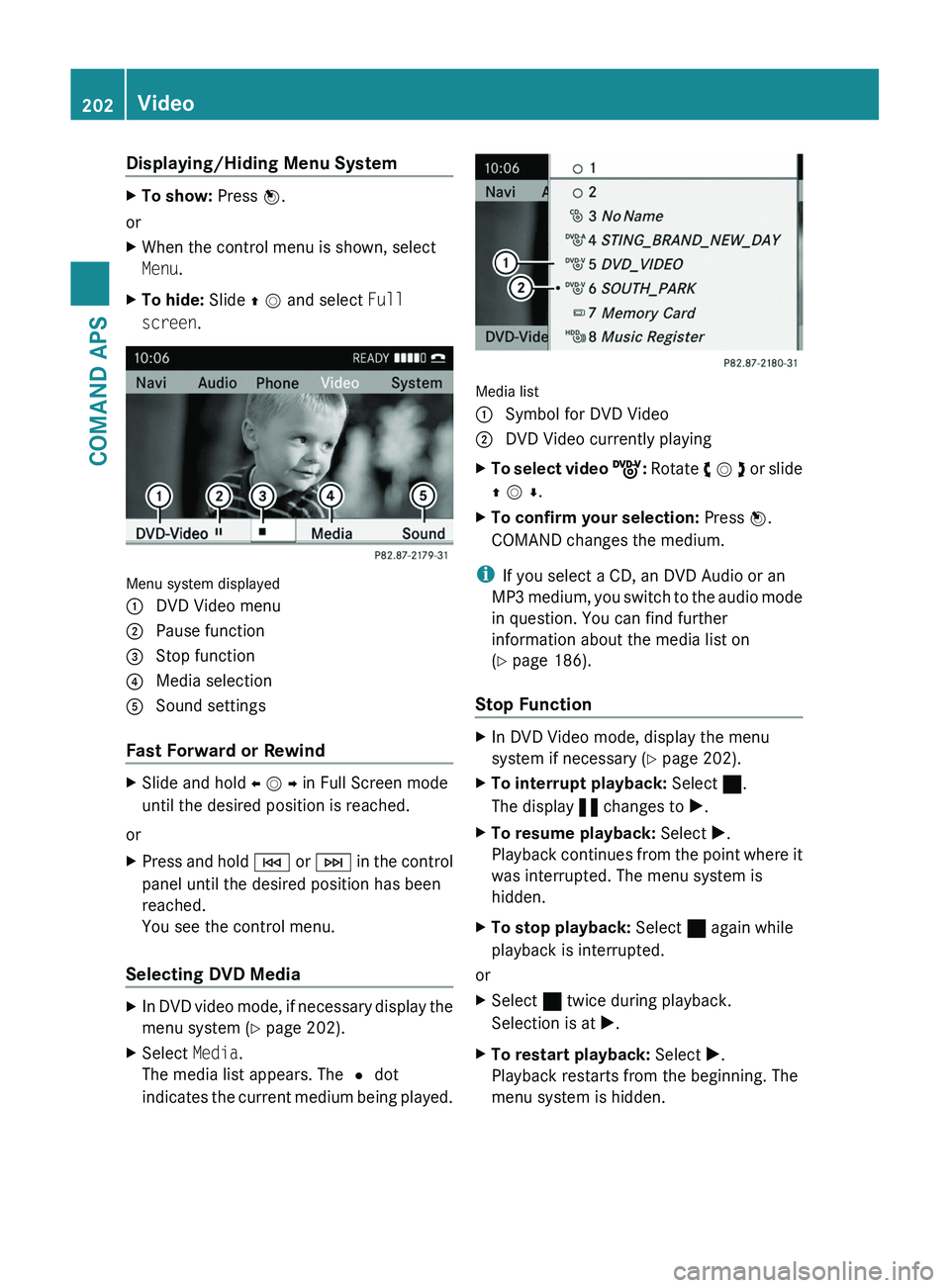
Menu system displayed
1 DVD Video menu2 Pause function3 Stop function4 Media selection5 Sound settings
Fast Forward or Rewind
XSlide and hold o m p in Full Screen mode
until the desired position is reached.
or
XPress and hold \000H or \000I in the control
panel until the desired position has been
reached.
You see the control menu.
Selecting DVD Media
XIn DVD video mode, if necessary display the
menu system (Y page 202).
XSelect Media.
The media list appears. The R dot
indicates the current medium being played.
Media list
1 Symbol for DVD Video2 DVD Video currently playingXTo select video ý: Rotate y m z or slide
q m r.
XTo confirm your selection: Press n.
COMAND changes the medium.
iIf you select a CD, an DVD Audio or an
MP3 medium, you switch to the audio mode
in question. You can find further
information about the media list on
(Y page 186).
Stop Function
XIn DVD Video mode, display the menu
system if necessary (Y page 202).
XTo interrupt playback: Select ±.
The display « changes to X.
XTo resume playback: Select X.
Playback continues from the point where it
was interrupted. The menu system is
hidden.
XTo stop playback: Select ± again while
playback is interrupted.
or
XSelect ± twice during playback.
Selection is at X.
XTo restart playback: Select X.
Playback restarts from the beginning. The
menu system is hidden.
202VideoCOMAND APS
BA 197 USA, CA Edition A 2011; 1; 27, en-UShereepeVersion: 3.0.3.52010-03-24T15:31:10+01:00 - Seite 202
Page 207 of 436
Setting the Language and Audio Format
iThis function is not available on all DVDs.
Where available, you can set the DVD menu
language and the audio language or audio
format. The number of possible settings is
dependent on the DVD content. It is
possible that the settings may also be
accessed in the DVD menu (Y page 203).
XDisplay the menu system if necessary
(Y page 202).
XSelect DVD-Video £ DVD Functions.XSelect Menu Language or Audio
Language.
Both of these will bring up a selection menu
after a few seconds. The R dot in front of
an entry indicates the currently selected
language.
XTo change the setting: Rotate y m z or
slide q m r until the desired setting is
reached.
XTo save the setting: Press n.
Subtitles and Camera Angle
iThese functions are not available on all
DVDs. The number of subtitle languages
and camera angles available depends on
the content of the DVD. The settings may
also be accessed in the DVD menu
(Y page 203).
XDisplay the menu system if necessary
(Y page 202).
XSelect DVD-Video £ DVD Functions.XSelect Subtitles or Camera Angle.
Both of these will bring up a selection
menu. The R dot in front of an entry
indicates the current setting.
XTo change the setting: Rotate y m z or
slide q m r until the desired setting is
reached.
XTo save the setting: Press n.Interactive Content
DVDs may have interactive content (e.g. a
video game).
In a video game, for example, you can control
the play by selecting or triggering actions. The
type and number of actions is dependent on
the DVD.
XTo select an action: Slide q m r or
o m p.
XTo trigger an action: Press n.
A menu appears and the first entry,
Select, is highlighted.
XPress n.
or
XIn DVD Video mode, if necessary display
the control menu (Y page 202).
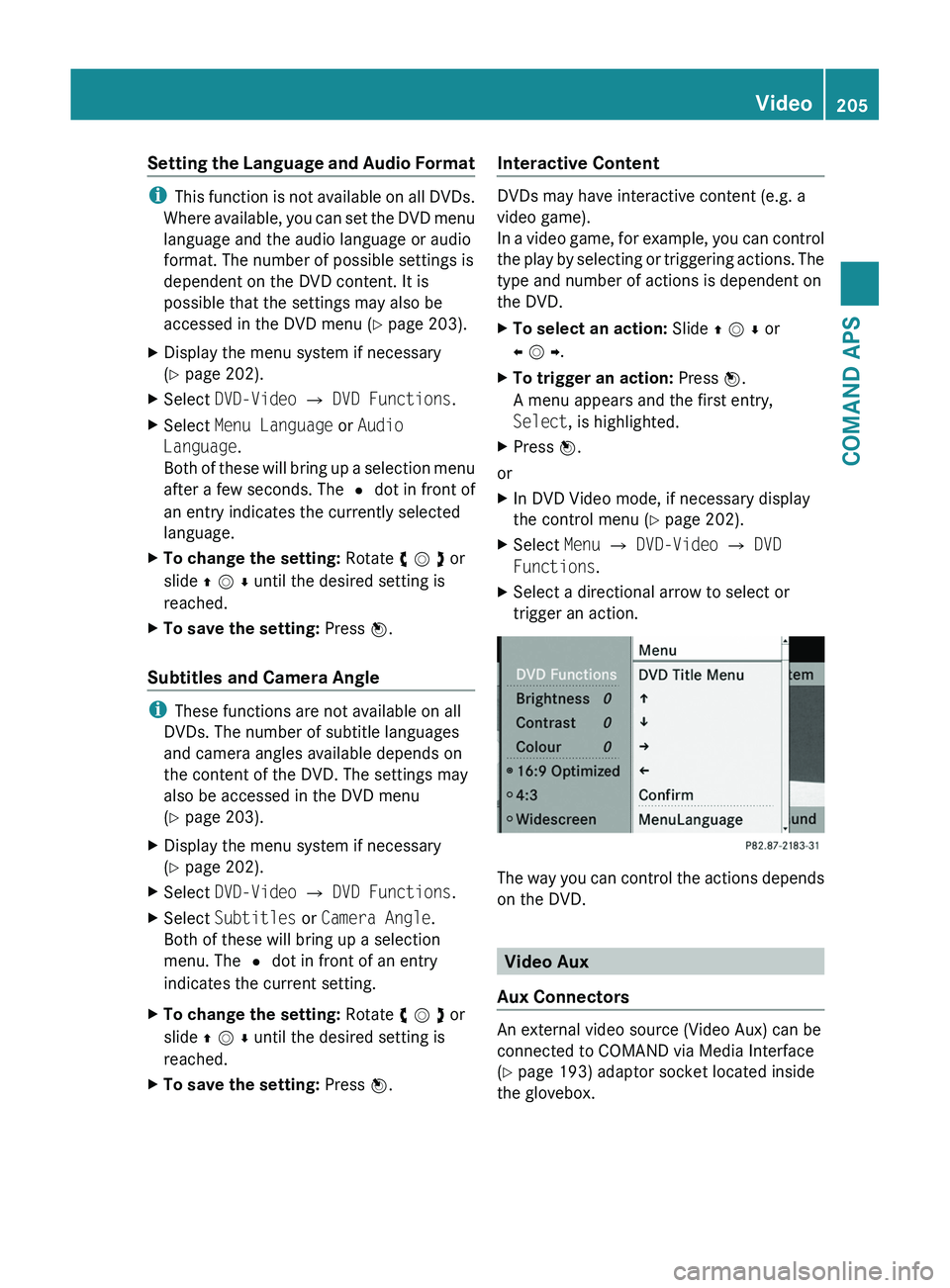
XSelect Menu £ DVD-Video £ DVD
Functions.
XSelect a directional arrow to select or
trigger an action.
The way you can control the actions depends
on the DVD.
Video Aux
Aux Connectors
An external video source (Video Aux) can be
connected to COMAND via Media Interface
(Y page 193) adaptor socket located inside
the glovebox.
Video205COMAND APSBA 197 USA, CA Edition A 2011; 1; 27, en-UShereepeVersion: 3.0.3.52010-03-24T15:31:10+01:00 - Seite 205Z