Page 59 of 821

59
Safety Connect (If Equipped)
nSystem components
Microphone
LED light indicators
“SOS” button
nServices
Subscribers have the following Safety Connect services available:
lAutomatic Collision Notification*
In case of either airbag deployment or severe rear-end collision, the system is designed
to automatically call the response center. The responding agent receives the vehicle’s
location and attempts to speak with the vehicle occupants to assess the level of emer-
gency. If the occupants are unable to communicate, the agent automatically treats the
call as an emergency, contacts the nearest emergency services provider to describe the
situation, and requests that assistance be sent to the location.
*: U.S. Patent No. 7,508,298 B2
lStolen Vehicle Location
If your vehicle is stolen, Safety Connect can work with local authorities to assist them in
locating and recovering the vehicle. After filing a police report, call the Safety Connect
response center at 1-800-25-LEXUS (1-800-255-3987) and follow the prompts for
Safety Connect to initiate this service.
In addition to assisting law enforcement with recovery of a stolen vehicle, Safety-Con-
nect-equipped vehicle location data may, under certain circumstances, be shared with
third parties to locate your vehicle. Further information is available at Lexus.com.
Safety Connect is a subscription-based telematics service that uses Global Positioning
System (GPS) data and embedded cellular technology to provide safety and security
features to subscribers. Safety Connect is supported by Lexus’ designated response
center, which operates 24 hours per day, 7 days per week.
Safety Connect service is available by subscription on select, telematics hardware-
equipped vehicles.
1
2
3
Page 78 of 821
TABLE OF CONTENTSIndex
4
3-3.Using the Bluetooth® audio
system
Bluetooth® audio system ......... 342
Using the Bluetooth® audio
system ............................................ 345
Operating a Bluetooth®
enabled portable player ........ 350
Setting up a Bluetooth®
enabled portable player ......... 354
Bluetooth® audio system
setup ................................................ 361
3-4. Using the hands-free
phone system
(for mobile phones)
Hands-free system for
mobile phones ............................ 362
Using the hands-free system
(for mobile phones) .................. 366
Making a phone call .................... 374
Setting a mobile phone .............. 379
Security and system setup ....... 385
Using the phone book............... 389
3-5. Using the interior lights
Interior lights list............................ 396
Page 92 of 821
18
B
Telephone switches ∗ *1P. 367
Talk switch ∗ *1P. 367
Multi-information switch P. 173Audio remote
control switches *1P. 339
C
Head-up display
main switch ∗
P. 181
Display position adjustment switch ∗ P. 181
Display contrast
adjustment switch ∗
P. 181
Distance switch ∗ P. 208Side camera switch ∗, *2
Pictorial indexInstrument panel
Horn P. 165
SRS driver airbag P. 109
Cruise control switch P. 204, 208
Page 97 of 821

23
Scrapping of your Lexus
The SRS airbag and seat belt pretensioner devices in your Lexus contain explosive
chemicals. If the vehicle is scrapped with the airbags and seat belt pretensioners left
as they are, this may cause an accident such as fire. Be sure to have the systems of
the SRS airbag and seat belt pretensioner removed and disposed of by a qualified
service shop or by your Lexus dealer before you scrap your vehicle.
Perchlorate Material
Special handling may apply, See www.dtsc.ca.gov/hazardouswaste/perchlorate.
Your vehicle has components that may contain perchlorate. These components may
include airbag, seat belt pretensioners, and wireless remote control batteries.
CAUTION
nGeneral precautions while driving
Driving under the influence: Never drive your vehicle when under the influence of
alcohol or drugs that have impaired your ability to operate your vehicle. Alcohol
and certain drugs delay reaction time, impair judgment and reduce coordination,
which could lead to an accident that could result in death or serious injury.
Defensive driving: Always drive defensively. Anticipate mistakes that other drivers
or pedestrians might make and be ready to avoid accidents.
Driver distraction: Always give your full attention to driving. Anything that distracts
the driver, such as adjusting controls, talking on a cellular phone or reading can
result in a collision with resulting death or serious injury to you, your occupants or
others.
nGeneral precaution regarding children’s safety
Never leave children unattended in the vehicle, and never allow children to have or
use the key.
Children may be able to start the vehicle or shift the vehicle into neutral. There is
also a danger that children may injure themselves by playing with the cigarette
lighter, the windows, the moon roof, or other features of the vehicle. In addition, heat
build-up or extremely cold temperatures inside the vehicle can be fatal to children.
Page 356 of 821
286
3-2. Using the audio system
nUsing mobile phones
Interference may be heard through the audio system’s speakers if a mobile phone is
being used inside or close to the vehicle while the audio system is operating.
CAUTION
nCertification
lPa r t 1 5 o f t h e F CC Ru l e s
FCC Warning:
Any unauthorized changes or modifications to this equipment will void the user’s
authority to operate this device.
lLaser products
Page 393 of 821
323
3-2. Using the audio system
3
Interior features
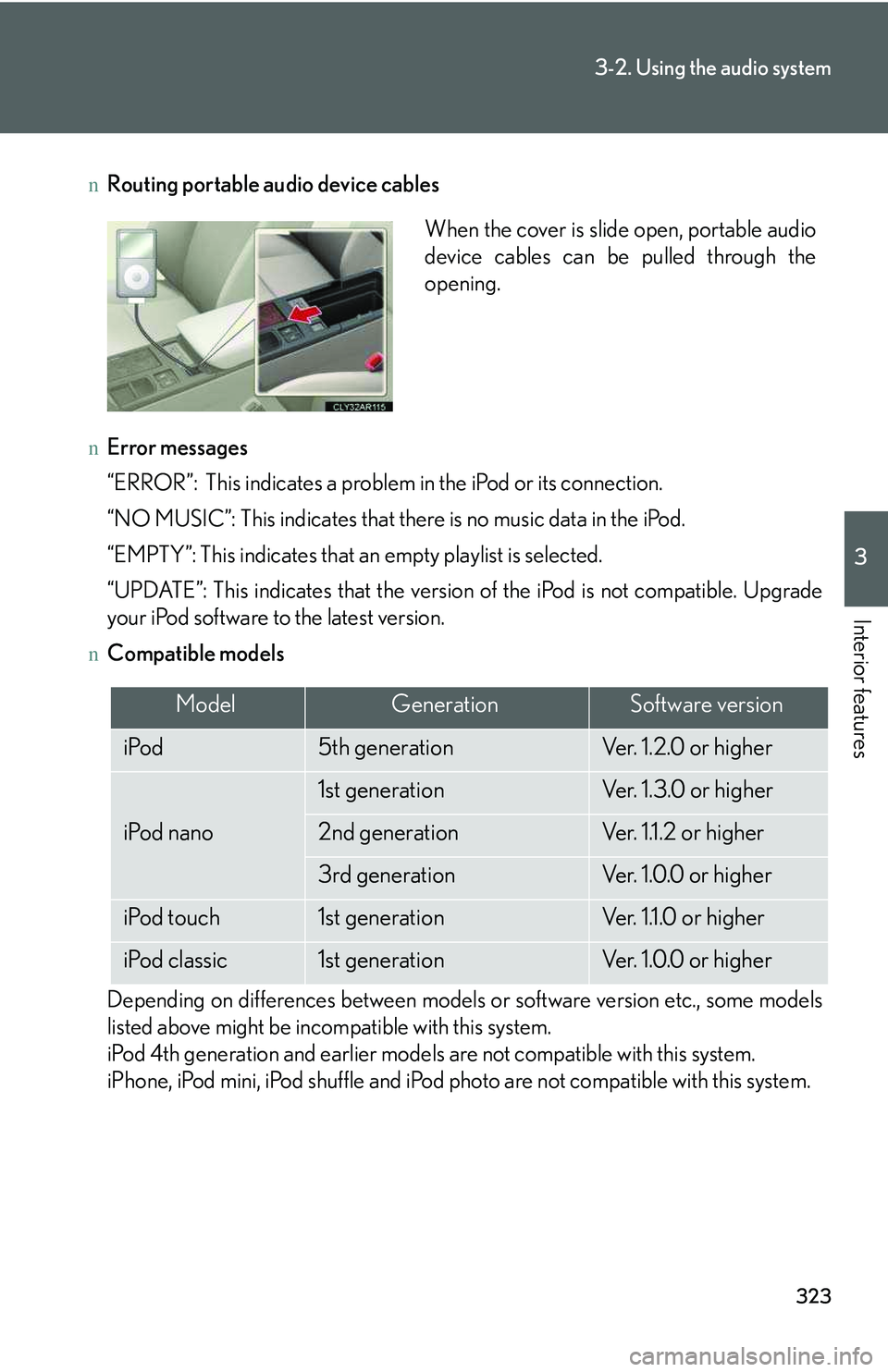
nRouting portable audio device cables
nError messages
“ERROR”: This indicates a problem in the iPod or its connection.
“NO MUSIC”: This indicates that there is no music data in the iPod.
“EMPTY”: This indicates that an empty playlist is selected.
“UPDATE”: This indicates that the version of the iPod is not compatible. Upgrade
your iPod software to the latest version.
nCompatible models
Depending on differences between models or software version etc., some models
listed above might be incompatible with this system.
iPod 4th generation and earlier models are not compatible with this system.
iPhone, iPod mini, iPod shuffle and iPod photo are not compatible with this system.
When the cover is slide open, portable audio
device cables can be pulled through the
opening.
ModelGenerationSoftware version
iPod5th generationVe r. 1 . 2 . 0 o r h i g h e r
iPod nano
1st generationVe r. 1 . 3 . 0 o r h i g h e r
2nd generationVer. 1.1.2 or higher
3rd generationVe r. 1 . 0 . 0 o r h i g h e r
iPod touch1st generationVer. 1.1.0 or higher
iPod classic1st generationVe r. 1 . 0 . 0 o r h i g h e r
Page 418 of 821
348
3-3. Using the Bluetooth® audio system
Guidance for registration completion is heard.
If the portable player has a Bluetooth® phone, the phone can be regis-
tered at the same time. A voice guidance instruction to register a Blue-
tooth® phone is heard.
Select “Yes” or “No” using a voice command or .
(Bluetooth® phone →P. 364)
Menu list of the Bluetooth® audio system
nNormal operation
First menuSecond
menuThird menuOperation detail
“Setup”
“BTA
Setup”
“Pair Audio”Registering a portable player
“Connect”Selecting a portable player to
be used
“Change Name”Changing the registered name
of a portable player
“List Audios”Listing the registered portable
players
“Set Passkey”Changing the passkey
“Delete Audio”Deleting a registered portable
player
“System
Setup”
“Guidance Vol”Setting voice guidance volume
“Device Name”Displaying the Bluetooth®
device address and name
“Initialize”Initializing the system
STEP7
Page 419 of 821
349
3-3. Using the Bluetooth® audio system
3
Interior features
nWhen using a voice command
For numbers, say a combination of single digits from zero to nine.
Say the command correctly and clearly.
nSituations that the system may not recognize your voice
lWhen driving on rough roads
lWhen driving at high speeds
lWhen air is blowing out of the vents onto the microphone
lWhen the air conditioning fan emits a loud noise
nOperations that cannot be performed while driving
lOperating the system with
lRegistering a portable player to the system
nChanging the passkey
→P. 3 5 9


