2011 Lexus ES350 air condition
[x] Cancel search: air conditionPage 3 of 563

TABLE OF CONTENTS
ES350_U
1
1Before drivingAdjusting and operating features such as door locks, mir-
rors, and steering column.
2When drivingDriving, stopping and safe-driving information.
3Interior featuresAir conditioning and audio systems, as well as other interior
features for a comfortable driving experience.
4Maintenance
and careCleaning and protecting your vehicle, performing do-it-your-
self maintenance, and maintenance information.
5When trouble
arisesWhat to do if the vehicle needs to be towed, gets a flat tire,
or is involved in an accident.
6Vehicle
specificationsDetailed vehicle information.
7For ownersReporting safety defects for U.S. owners, and seat belt and
SRS airbag instructions for Canadian owners
IndexAlphabetical listing of information contained in this manual.
Page 5 of 563

1
2
3
4
5
6
7
ES350_U
3
2-2. Instrument clusterGauges and meters ..................... 136
Indicators and warning lights................................................. 138
Multi-information display........... 142
2-3. Operating the lights and windshield wipers
Headlight switch ............................ 147
Fog light switch ................................ 151
Windshield wipers and washer............................................. 152
2-4. Using other driving systems Cruise control ................................ 155
Dynamic radar cruise control............................................. 158
Intuitive parking assist ................... 171
Driving assist systems................... 177
PCS (Pre-Collision System) ............ 182
2-5. Driving information Cargo and luggage ...................... 187
Vehicle load limits ......................... 190
Winter driving tips .......................... 191
Trailer towing .................................. 197
Dinghy towing ............................... 204 3-1. Using the air conditioning
system and defogger
Automatic air conditioning system ........................................... 208
Rear window and outside rear view
mirror defoggers ........................ 215
3-2. Using the audio system Audio system type ........................ 216
Using the radio............................... 219
Using the CD player................... 226
Playing back MP3 and WMA discs.................................. 233
Operating an iPod....................... 240
Operating a USB memory....... 247
Optimal use of the audio system ............................................ 256
Using the AUX port .................. 258
Using the steering wheel audio switches ............................ 259
3Interior features
Page 7 of 563
1
2
3
4
5
6
7
ES350_U
5
4-1. Maintenance and careCleaning and protecting the vehicle exterior................... 362
Cleaning and protecting the vehicle interior .................... 365
4-2. Maintenance Maintenance requirements .... 368
General maintenance ................ 370
Emission inspection and maintenance (I/M)
programs ...................................... 373
4-3. Do-it-yourself maintenance Do-it-yourself service precautions .................................. 374
Hood.................................................. 378
Positioning a floor jack............... 379
Engine compartment................... 381
Tires ................................................... 394
Tire inflation pressure................ 403
Wheels.............................................. 407
Air conditioning filter................. 409
Electronic key battery ................... 411
Checking and replacing fuses ................................................. 413
Headlight aim (vehicles with discharge headlights) .............. 422
Light bulbs ....................................... 424 5-1. Essential information
Emergency flashers .................... 434
If your vehicle needs to be towed ............................................. 435
If you think something is wrong .............................................. 441
Fuel pump shut off system ........ 442
Event data recorder.................... 443
5-2. Steps to take in an emergency If a warning light turns on or a warning buzzer
sounds... ........................................ 445
If a warning message is displayed....................................... 455
If you have a flat tire..................... 467
If the engine will not start .......... 476
If the shift lever cannot be shifted from P .............................. 478
If you lose your keys .................... 479
If the electronic key does not operate properly .............. 480
If the vehicle battery is discharged .................................. 483
If your vehicle overheats ........... 486
If the vehicle becomes stuck............................................... 489
If your vehicle has to be stopped in an emergency ...... 490
4Maintenance and care5When trouble arises
Page 17 of 563

ES350_U
15
A Without navigation system
Navigation system*1
Clock P. 326
Audio system
P. 216
Air conditioning
system
P. 208
Rear window and out-
side rear view mirror
defoggers
P. 215
Security indicator
P. 79, 81
Emergency flasher
switch
P. 434
Audio system*1
Security indicator
P. 79, 81
Emergency flasher
switch
P. 434
Air conditioning
system
*1
With navigation system
∗: If equipped
*1: Refer to “Navigation System Owner's Manual”.
Rear window and
outside rear view
mirror defoggers
P. 215
Clock P. 326
Page 32 of 563

30
1-2. Opening, closing and locking the doors and trunk
ES350_U
■Operation signals
Doors: A buzzer sounds and the emergency flashers flash to indicate that the doors
have been locked/unlocked. (Locked: Once; Unlocked: Twice)
Trunk: A buzzer sounds to indicate that the trunk has been unlocked.
Windows and standard moon roof: A buzzer sounds to indicate that the windows
and standard moon roof are operating.
■Door lock buzzer
If a door is not fully closed, a buzzer sounds for 10 seconds if an attempt to lock the
door is made. Fully close the door to stop the buzzer, and lock the vehicle once
more.
■Conditions affecting operation
The smart access system with push-button start uses weak radio waves. In the fol-
lowing situations, the communication between the electronic key and the vehicle
may be affected, preventing the smart access system with push-button start and
wireless remote control from operating properly:
(Ways of coping: →P. 4 8 0 )
●When the electronic key battery is depleted
●Near a TV tower, electric power plant, gas station, radio station, large display,
airport or other facility that generates strong radio waves or electrical noise
●When carrying a portable radio, mobile phone, cordless phone or other wire-
less communication devices
●When the electronic key is in contact with, or is covered by the following metal-
lic objects
• Cards to which aluminum foil is attached
• Cigarette boxes that have aluminum foil inside
• Metallic wallets or bags
• Coins
• Hand warmers made of metal
• Media such as CDs and DVDs
●When multiple electronic keys are in the vicinity
Page 90 of 563

88
1-7. Safety information
ES350_UThe main SRS airbag system components are shown above. The SRS
airbag system is controlled by the airbag sensor assembly. The airbag
sensor assembly consists of a safing sensor and an airbag sensor.
In certain types of severe frontal or side impacts, the SRS airbag system
triggers the airbag inflators. A chem
ical reaction in the inflators quickly
fills the airbags with non-toxic gas to help restrain the motion of the occu-
pants.
■If the SRS airbags deploy (inflate)
●Bruising and slight abrasions may result from contact with a deploying (inflating)
SRS airbag.
●A loud noise and white powder will be emitted.
●Parts of the airbag module (steering wheel hub, airbag cover and inflator) as
well as the seats, and parts of the front pillar, rear pillar and roof side rail, may be
hot for several minutes. The airbag itself may also be hot.
●The windshield may crack.
●For Safety Connect subscribers, if the SRS airbags deploy or in the event of a
severe rear-end collision, the system is designed to send an emergency call to
the response center, notifying them of the vehicle’s location (without needing to
push the “SOS” button) and an agent will attempt to speak with the occupants
to ascertain the level of emergency and assistance required. If the occupants
are unable to communicate, the agent automatically treats the call as an emer-
gency and helps to dispatch the necessary emergency services. ( →P. 353)
■SRS airbag deployment conditions (front airbags)
●The SRS front airbags will deploy in the event of an impact that exceeds the set
threshold level (the level of force corresponding to an approximately 12 - 18
mph [20 - 30 km/h] frontal collision with a fixed wall that does not move or
deform).
However, this threshold velocity will be considerably higher if the vehicle strikes
an object, such as a parked vehicle or sign pole, which can move or deform on
impact, or if the vehicle is involved in an underride collision (e.g. a collision in
which the front of the vehicle “underrides”, or goes under, the bed of a truck, etc.).
●It is possible that in some collisions where the forward deceleration of the vehi-
cle is very close to the designed threshold level, the SRS front airbags and the
seat belt pretensioners may not activate together.
Page 91 of 563
89
1-7. Safety information
1
Before driving
ES350_U
■SRS airbag deployment conditions (side and curtain shield airbags)
The SRS side airbags and curtain shield airbags will deploy in the event of an impact
that exceeds the set threshold level (the level of force corresponding to the impact
force produced by an approximately 3300 lb. [1500 kg] vehicle colliding with the
vehicle cabin from a direction perpendicular to the vehicle orientation at an
approximate speed of 12 - 18 mph [20 - 30 km/h]).
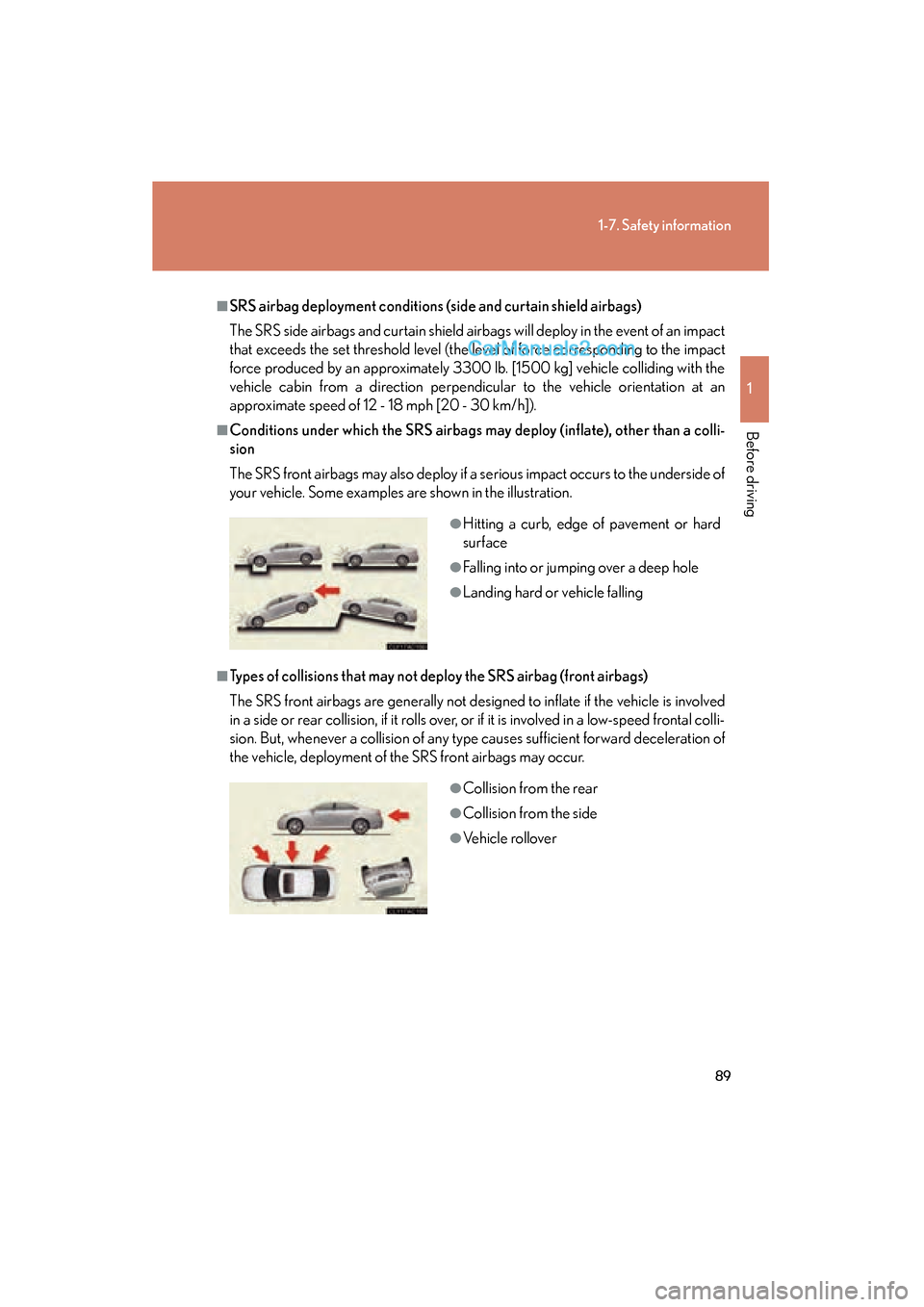
■Conditions under which the SRS airbags may deploy (inflate), other than a colli-
sion
The SRS front airbags may also deploy if a serious impact occurs to the underside of
your vehicle. Some examples are shown in the illustration.
■Types of collisions that may not deploy the SRS airbag (front airbags)
The SRS front airbags are generally not designed to inflate if the vehicle is involved
in a side or rear collision, if it rolls over, or if it is involved in a low-speed frontal colli-
sion. But, whenever a collision of any type causes sufficient forward deceleration of
the vehicle, deployment of the SRS front airbags may occur.
●Hitting a curb, edge of pavement or hard
surface
●Falling into or jumping over a deep hole
●Landing hard or vehicle falling
●Collision from the rear
●Collision from the side
●Vehicle rollover
Page 99 of 563

97
1
1-7. Safety information
Before driving
ES350_U
Front passenger occupant classification system
Your vehicle is equipped with a front passenger occupant classification sys-
tem. This system detects the conditions of the front passenger seat and
activates or deactivates the devices for front passenger.
SRS warning light
Front passenger’s seat belt reminder light
“AIR BAG OFF” indicator light
“AIR BAG ON” indicator light
With navigation system
Without navigation system