Page 100 of 563
98
1-7. Safety information
ES350_U
Condition and operation in the front passenger occupant classification system
■Adult*1
■Child *3 or child restraint system*4
Indicator/
warning light
“AIR BAG ON” and “AIR BAG OFF” indicator lights“A I R B A G ON”
SRS warning light Off
Front passenger’s seat belt reminder light Flashing
*2
DevicesFront passenger airbag
Activated
Side airbag on the right side
passenger seatsCurtain shield airbag in the front passenger side
Front passenger knee airbag
Front passenger’s seat belt pretensioner
Indicator/
warning light
“AIR BAG ON” and “AIR BAG OFF” indicator lights“A I R B A G OFF”*5
SRS warning light Off
Front passenger’s seat belt reminder light Flashing
*2
DevicesFront passenger airbag
Deactivated
Side airbag on the right side
passenger seatsCurtain shield airbag in the front passenger sideActivated
Front passenger knee airbag Deactivated
Front passenger’s seat belt pretensioner Activated
Page 177 of 563

175
2-4. Using other driving systems
2
When driving
ES350_U
■Sensor detection information
●Certain vehicle conditions and the surrounding environment may affect the
ability of the sensor to correctly detect obstacles. Particular instances where this
may occur are listed below.
• There is dirt, snow or ice on the sensor.
• The sensor is frozen.
• The sensor is covered in any way.
• The vehicle is leaning considerably to one side.
• On an extremely bumpy road, on an incline, on gravel, or on grass
• The vicinity of the vehicle is noisy due to vehicle horns, motorcycle engines,air brakes of large vehicles, or other loud noises producing ultrasonic waves.
• There is another vehicle equipped with parking assist sensors in the vicinity.
• The sensor is coated with a sheet of spray or heavy rain
• The vehicle is equipped with a fender pole or wireless antenna.
• Towing eyelets are installed.
• The bumper or sensor receives a strong impact.
• The vehicle is approaching a tall or curved curb.
• In harsh sunlight or intense cold weather
In addition to the examples above, there are instances in which, because of their
shapes, signs and other objects may be judged by the sensor to be closer than they
are.
●The shape of the obstacle may prevent the sensor from detecting it. Pay particu-
lar attention to the following obstacles.
• Wires, fences, ropes etc.
• Cotton, snow and other materials that absorb radio waves
• Sharply-angled objects
• Low obstacles
• Tall obstacles with upper sections projecting outwards in the direction of your
vehicle
Page 194 of 563
192
2-5. Driving information
ES350_U
■Before driving the vehicle
Perform the following according to the driving conditions.
● Do not try to forcibly open a window or move a wiper that is fro-
zen. Pour warm water over the frozen area to melt the ice. Wipe
away the water immediately to prevent it from freezing.
● To ensure proper operation of the climate control system fan,
remove any snow that has accumulated on the air inlet vents in
front of the windshield.
● Remove any ice that has accumulated on the vehicle chassis.
● Periodically check for and remove any excess ice or snow that
may have accumulated in the wheel well or on the brakes.
■ When driving the vehicle
Accelerate the vehicle slowly and drive at a reduced speed suitable
to road conditions.
■ When parking the vehicle
Park the vehicle and move the shift lever to P without setting the
parking brake. The parking brake may freeze up, preventing it from
being released. If necessary, block the wheels to prevent inadvert-
ent sliding or creeping.
Page 204 of 563

202
2-5. Driving information
ES350_U●
Avoid sudden braking as you may sk id, resulting in jackknifing and loss
of control. This is especially true on wet or slippery surfaces.
● Avoid jerky starts or sudden acceleration.
● Avoid jerky steering and sharp turns, and slow down before making a
turn.
● Note that when making a turn, the trailer wheels will be closer than the
vehicle wheels to the inside of the turn. Compensate by making a
larger than normal turning radius.
● Crosswinds and rough roads will adversely affect handling of your
vehicle and trailer, causing sway. Periodically check the rear to prepare
for being passed by large trucks or buses, which may cause your vehi-
cle and trailer to sway. If swaying occurs, firmly grip the steering wheel,
reduce speed immediately but gradually, and steer straight ahead.
Never increase speed. If you make no extreme correction with the
steering or brakes, your vehicle and trailer will stabilize.
● Take care when passing other vehicles. Passing requires considerable
distance. After passing a vehicle, do not forget the length of your
trailer, and be sure you have plenty of room before changing lanes.
● To maintain engine braking efficiency and charging system perfor-
mance when using engine braking, do not use overdrive. Transmission
shift range position must be in 4, in the S mode.
● Due to the added load of the trailer, your vehicle's engine may over-
heat on hot days (at temperatures over 85°F [30°C]) when driving up
a long or steep grade. If the engine coolant temperature gauge indi-
cates overheating, immediately turn off the air conditioning (if in use),
pull your vehicle off the road and stop in a safe spot. See “If you vehicle
overheats”. ( →P. 486)
Page 208 of 563
206
ES350_U
3-1. Using the air conditioning system and defogger
Automatic air conditioning system ........... 208
Rear window and outside rear view
mirror defoggers.................. 215
3-2. Using the audio system Audio system type .................. 216
Using the radio ........................ 219
Using the CD player ............. 226
Playing back MP3 and WMA discs ........................... 233
Operating an iPod ................. 240
Operating a USB memory................................... 247
Optimal use of the audio system ..................................... 256
Using the AUX port.............. 258
Using the steering wheel audio switches...................... 259
Page 210 of 563

208
ES350_U
3-1. Using the air conditioning system and defogger
Automatic air conditioning system
Using the automatic modePress .The air conditioning system will begin to operate. Air outlets
and fan speed are automatically adjusted according to the
temperature setting.
Press to switch to automatic mode. Automatically switches between outside air and recirculated
air modes.
Airflow and outlets are automatically adjusted according to the tempera-
ture setting.
With navigation system
Owners of models equipped with a navigation system should refer to the
“Navigation System Owner's Manual”.
Without navigation system
Automatic mode
Driver’s side temperature
setting display
Changes the air outlets used Off
Fan speed
Airflow display
Fan speed display
Passenger’s side
temperature
setting display
Driver's side
temperature control
Air conditioning
ON/OFF switch Outside air or
recirculated air mode
Windshield defogger Passenger’s side
temperature control
Dual operation switch
STEP1
STEP2
Page 211 of 563
209
3-1. Using the air conditioning system and defogger
3
Interior features
ES350_UPress “
∧” to increase the temperature and “ ∨” to decrease the
temperature on the .
The temperature for the driver and passenger seats can be set sepa-
rately.
Adjusting the settings ■ Adjusting the temperature setting
Press “ ∧” to increase the temperature and “ ∨” to decrease the temper-
ature on the .
Press “∧” (increase) or “∨” (decrease) on the to separately adjust the
temperature for the passenger and driver sides (dual mode). Press to
return the driver and passenger side temperatures to the same setting
(simultaneous mode).
The air conditioning system switches between individual and simultaneous
modes each time is pressed.
■ Adjusting the fan speed
Press “ ∧” (increase) or “∨ ” (decrease) on .
Press to turn the fan off.
STEP3
Page 212 of 563
210
3-1. Using the air conditioning system and defogger
ES350_U■
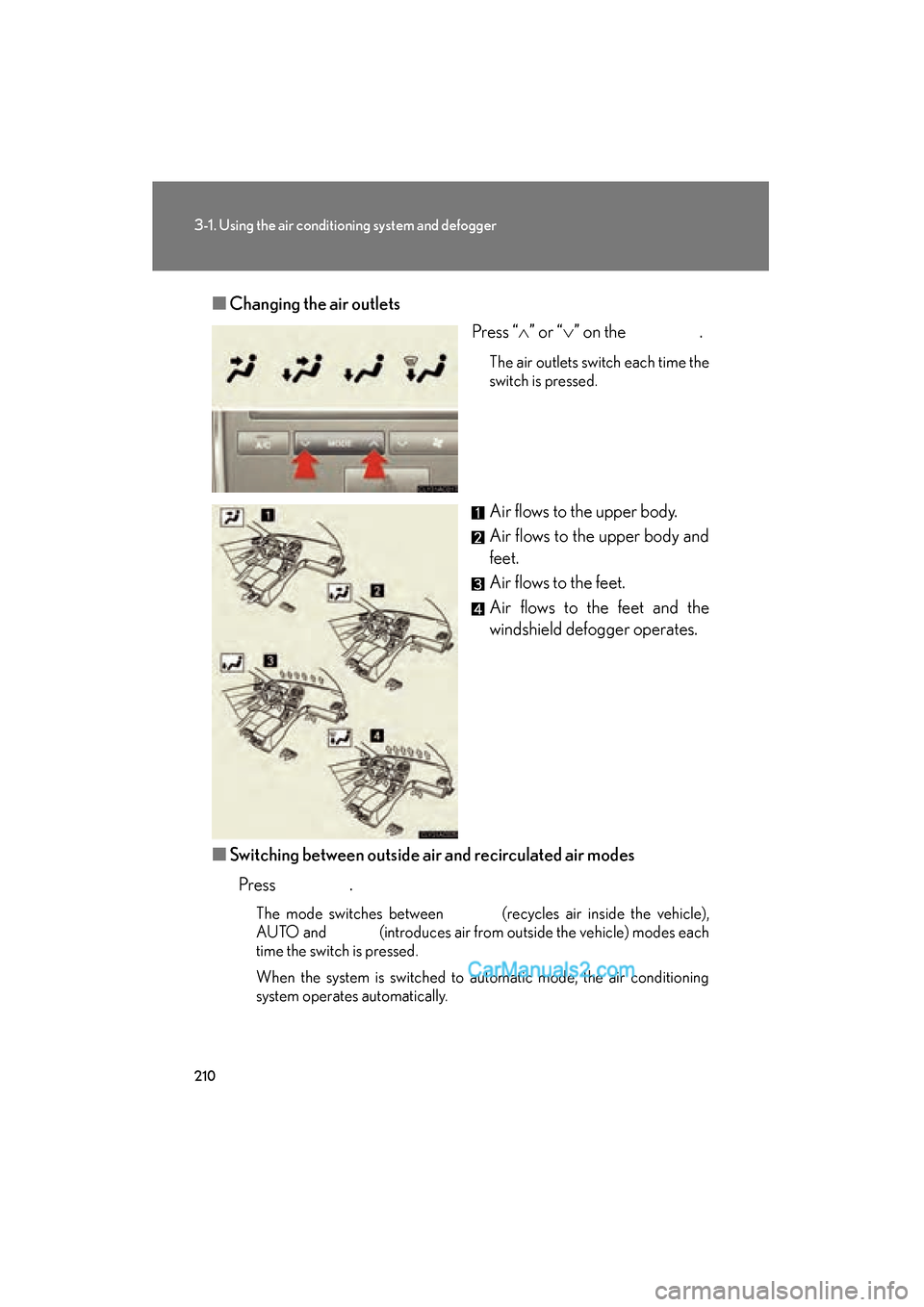
Changing the air outlets
Press “∧” or “ ∨” on the .
The air outlets switch each time the
switch is pressed.
Air flows to the upper body.
Air flows to the upper body and
feet.
Air flows to the feet.
Air flows to the feet and the
windshield defogger operates.
■ Switching between outside air and recirculated air modes
Press .
The mode switches between (recycles air inside the vehicle),
AUTO and (introduces air from outside the vehicle) modes each
time the switch is pressed.
When the system is switched to automatic mode, the air conditioning
system operates automatically.