Page 146 of 563

144
2-2. Instrument cluster
ES350_U■
Outside temperature
■ Driving range
■ Average fuel consumption
■ Average fuel consumption after refueling Displays the outside air temperature.
The temperature range that can be displayed in the fol-
lowing range.
USA: from -40 to 122 °F
Canada: from -40 to 50 °C
Displays the estimated maximum distance that can
be driven with the quantity of fuel remaining.
• This distance is computed based on your averagefuel consumption. As a result, the actual distance
that can be driven may differ from that displayed.
• When only a small amount of fuel is added to the tank, the display may not be updated.
Displays the average fuel consumption since the
function was reset.
• The function can be reset by pushing the “DISP”switch for longer than one second when the average
fuel consumption is displayed.
• Use the displayed average fuel consumption as a reference.
Displays the average fuel consumption since the
vehicle was last refueled.
Use the displayed average fuel consumption as a refer-
ence.
Page 147 of 563
145
2-2. Instrument cluster
2
When driving
ES350_U■
Current fuel consumption
■ Eco Driving Indicator Zone Display
→ P. 1 4 6
■ Eco Driving Indicator Light customization
■ Average vehicle speed
■ Elapsed time
Displays the current rate of fuel consumption.
Eco Driving Indicator Light can be deactivated. This
customization can only be performed when the vehi-
cle is stopped.
Eco Driving Indicator Light can be activated or deacti-
vated by pressing the “DISP” switch for longer than 1
second when Eco Driving Indicator Light customization
screen is displayed.
Displays the average vehicle speed since the engine
was started or the function was reset.
Displays the elapsed time since the engine was
started.
■System check display
After switching the “ENGINE START STOP” switch to IGNITION ON mode,
is displayed while system operation is checked. When the system check is
complete, is displayed before returning to the normal screen.
Page 149 of 563
147
2
When driving
ES350_U
2-3. Operating the lights and windshield wipers
Headlight switch
The headlights can be operated manually or automatically.
The daytime running
lights turn on.
The side marker, parking,
tail, license plate, day-
time running lights and
instrument panel lights
turn on.
The headlights and all
lights listed above
(except daytime running
lights) turn on.
The headlights, parking
lights and daytime run-
ning lights turn on and off
automatically.
(When the “ENGINE
START STOP” switch is
in IGNITION ON
mode)
USACanada
Page 150 of 563
148
2-3. Operating the lights and windshield wipers
ES350_U
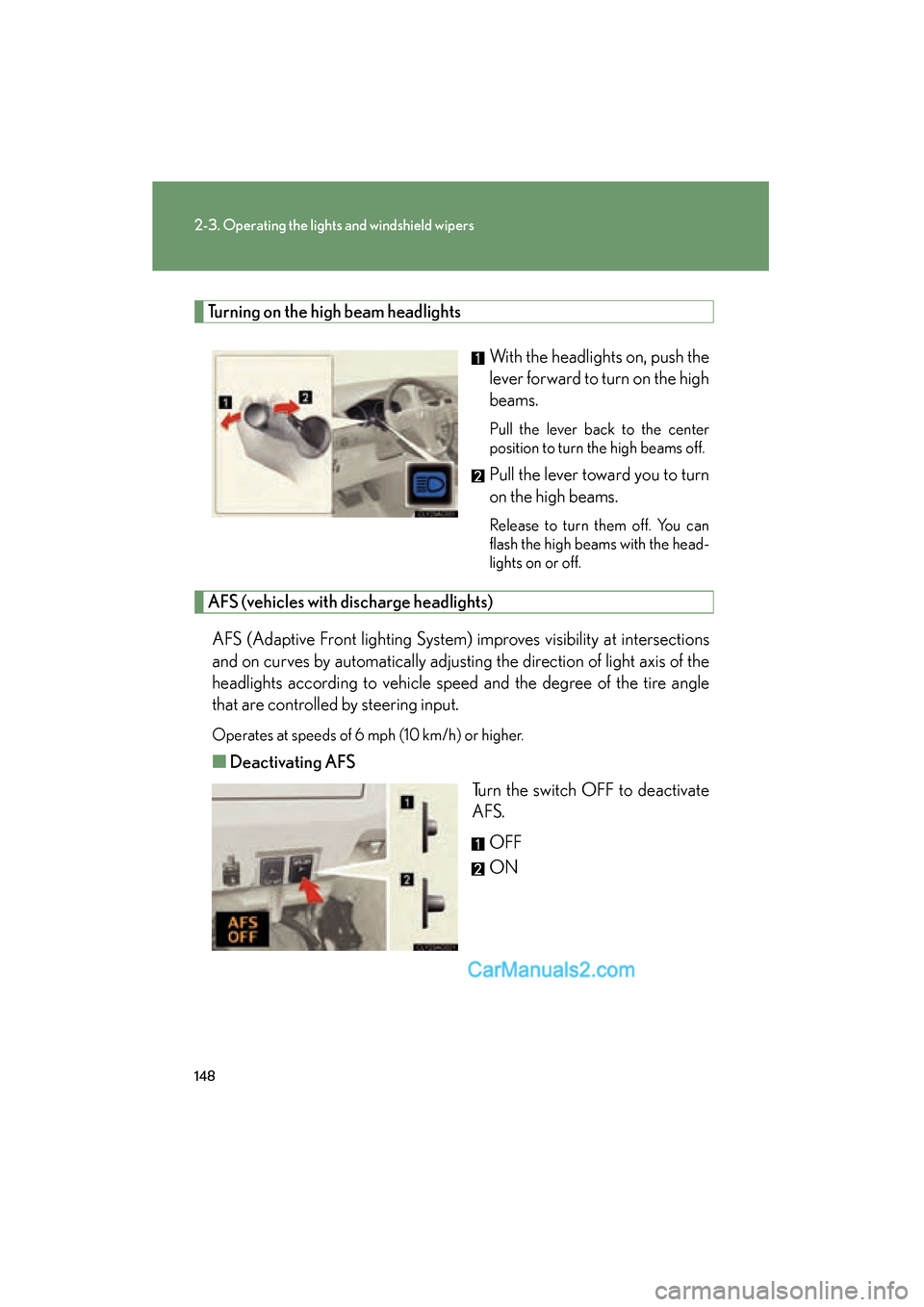
Turning on the high beam headlightsWith the headlights on, push the
lever forward to turn on the high
beams.
Pull the lever back to the center
position to turn the high beams off.
Pull the lever toward you to turn
on the high beams.
Release to turn them off. You can
flash the high beams with the head-
lights on or off.
AFS (vehicles with discharge headlights)AFS (Adaptive Front lighting System) improves visibility at intersections
and on curves by automatically adjusting the direction of light axis of the
headlights according to vehicle speed and the degree of the tire angle
that are controlled by steering input.
Operates at speeds of 6 mph (10 km/h) or higher.
■ Deactivating AFS
Turn the switch OFF to deactivate
AFS.
OFF
ON
Page 151 of 563

149
2-3. Operating the lights and windshield wipers
2
When driving
ES350_U
■Daytime running light system
●To make your vehicle more visible to other drivers, the headlights turn on auto-
matically (at a reduced intensity) whenever the engine is started and the parking
brake is released. Daytime running lights are not designed for use at night.
●Compared to turning on the headlights, the daytime running light system offers
greater durability and consumes less electricity, so it can help improve fuel
economy.
■Headlight control sensor
■Automatic light off system
●When the headlights come on: The headlights and tail lights turn off 30 seconds
after all doors are closed with the “ENGINE START STOP” switch switched to
ACCESSORY mode or turned OFF. (The light turns off immediately if
the button on the key is pressed after all doors are locked.)
●When only the tail lights come on: The tail lights turn off automatically if the
“ENGINE START STOP” switch is switched to ACCESSORY mode or turned
OFF and driver’s door is opened.
To turn the lights on again, switch to IGNITION ON mode, or turn the light switch
OFF once and then back to the
or position.
■Automatic headlight leveling system (vehicles with discharge headlights)
The level of the headlights is automatically adjusted according to the number of
passengers and the loading condition of the vehicle to ensure that the headlights do
not interfere with other road users.
■If the indicator flashes... (vehicles with discharge headlights)
It may indicate a malfunction in the system. Contact your Lexus dealer. The sensor may not function properly if an
object is placed on the sensor, or anything
that blocks the sensor is affixed to the wind-
shield.
Doing so interferes with the sensor detecting
the level of ambient light and may cause the
automatic headlight control system to mal-
function.
Page 153 of 563
151
2-3. Operating the lights and windshield wipers
2
When driving
ES350_U
Fog light switch
The fog lights improve visibility in difficult driving conditions, such as in rain
or fog. They can be turned on only when the headlights are on low beam.
To turn the front fog lights off
To turn the front fog lights on
Page 155 of 563
153
2-3. Operating the lights and windshield wipers
2
When driving
ES350_U
■The windshield wiper and washer can be operated when
The “ENGINE START STOP” switch is in IGNITION ON mode.
■Raindrop sensor
●If the temperature of the raindrop sensor is 194°F (90 °C) or higher, or 5 °F
( -1 5 °C) or lower, automatic operation may not occur. In this case, operate
the wipers in any mode other than “AUTO”.
■AUTO mode
If the wiper switch is turned to AUTO position while the “ENGINE START STOP”
switch is in IGNITION ON mode, the wiper will operate once to show that AUTO
mode is activated.
■If no windshield washer fluid sprays
Check that the washer nozzles are not blocked if there is washer fluid in the wind-
shield washer fluid reservoir.
Wash/wipe operation
Wipers operate automatically.
(With “AUTO” selected, after
operating several times, the wip-
ers operate one more time after
a short delay to prevent drip-
ping.)
●The sensor judges the amount of raindrops.
Page 160 of 563
158
2-4. Using other driving systems
ES350_U
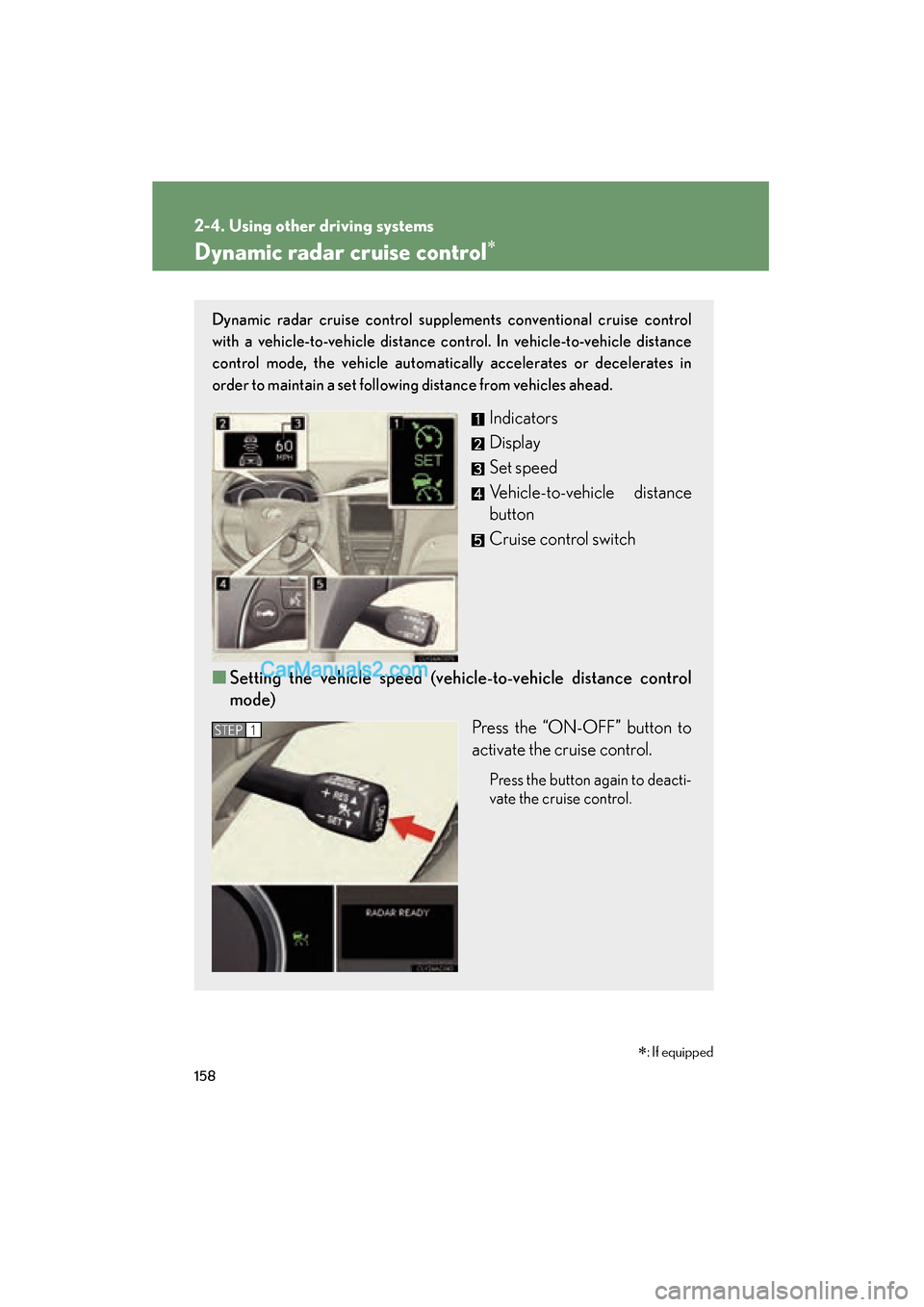
Dynamic radar cruise control∗
Dynamic radar cruise control supplements conventional cruise control
with a vehicle-to-vehicle distance control. In vehicle-to-vehicle distance
control mode, the vehicle automatically accelerates or decelerates in
order to maintain a set following distance from vehicles ahead.
Indicators
Display
Set speed
Vehicle-to-vehicle distance
button
Cruise control switch
■ Setting the vehicle speed (vehicle-to-vehicle distance control
mode)
Press the “ON-OFF” button to
activate the cruise control.
Press the button again to deacti-
vate the cruise control.
STEP1
∗: If equipped