Page 86 of 722
�Û
�Ý
�Û�Ý
CONT INUED
The multi-inf ormation display in the
instrument panel displays various
inf ormation and messages when the
ignition switch is in the ON (II)
position. Some of the messages help
you operate your vehicle more
comf ortably. Others help to keep
you aware of the periodic
maintenance your vehicle needs f or
continued trouble-f ree driving.
To change the display, press the
SEL/RESET button or INFO ( /)buttononthesteeringwheel
repeatedly until the desired
information appears (see page ).
When you turn the ignition switch to
the ON (II) position, your last
selection is displayed.
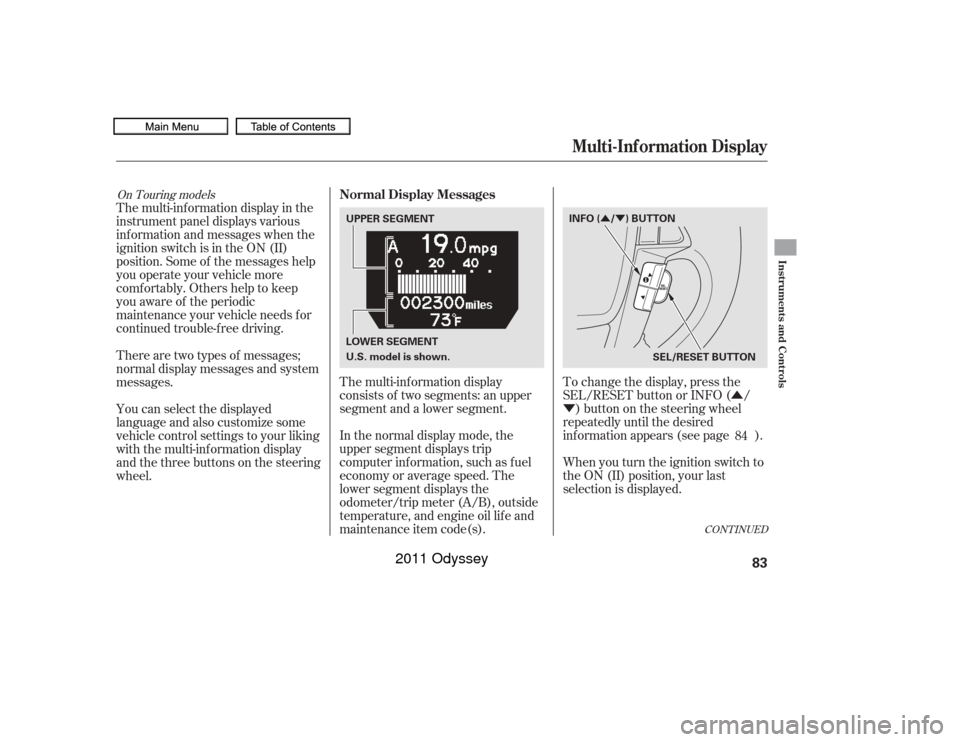
The multi-inf ormation display
consists of two segments: an upper
segment and a lower segment.
In the normal display mode, the
upper segment displays trip
computer inf ormation, such as f uel
economy or average speed. The
lower segment displays the
odometer/trip meter (A/B), outside
temperature, and engine oil lif e and
maintenance item code(s).
There are two types of messages;
normal display messages and system
messages.
You can select the displayed
language and also customize some
vehicle control settings to your liking
with the multi-information display
and the three buttons on the steering
wheel.
84On Touring models
Multi-Inf ormation Display
Normal Display Messages
Instruments and Controls
83
INFO ( / ) BUTTON
SEL/RESET BUTTON
UPPER SEGMENT
LOWER SEGMENT
U.S. model is shown.
10/07/17 09:45:40 31TK8600_088
2011 Odyssey
Page 88 of 722
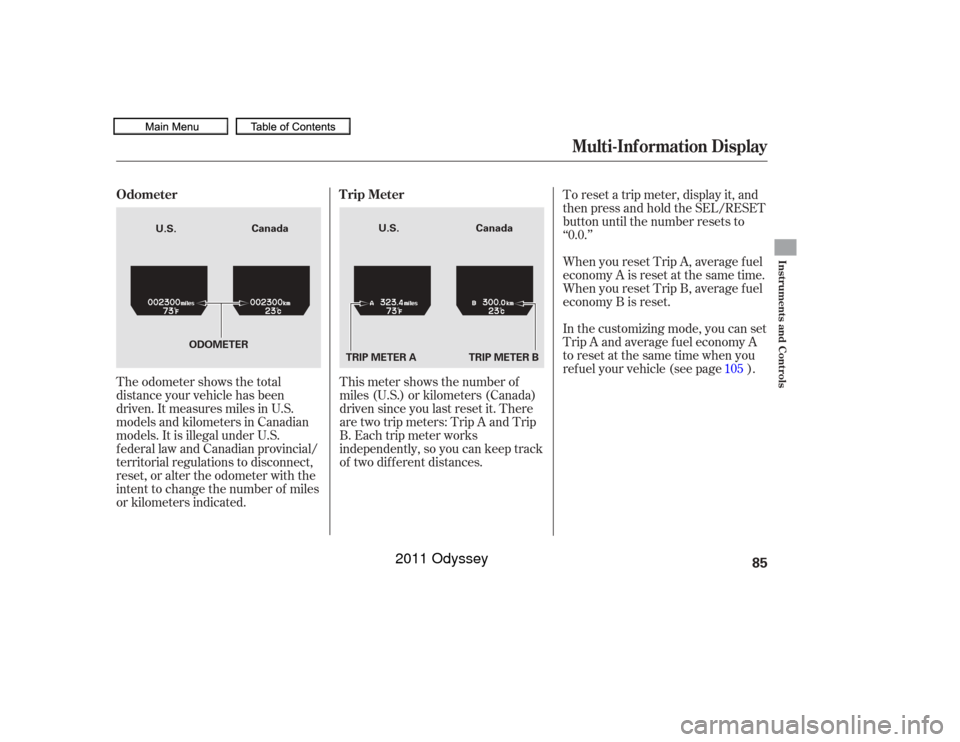
The odometer shows the total
distance your vehicle has been
driven. It measures miles in U.S.
models and kilometers in Canadian
models. It is illegal under U.S.
f ederal law and Canadian provincial/
territorial regulations to disconnect,
reset, or alter the odometer with the
intent to change the number of miles
or kilometers indicated.This meter shows the number of
miles (U.S.) or kilometers (Canada)
driven since you last reset it. There
aretwotripmeters:TripAandTrip
B. Each trip meter works
independently, so you can keep track
of two dif f erent distances. To reset a trip meter, display it, and
then press and hold the SEL/RESET
button until the number resets to
‘‘0.0.’’
When you reset Trip A, average f uel
economy A is reset at the same time.
When you reset Trip B, average f uel
economy B is reset.
In the customizing mode, you can set
Trip A and average f uel economy A
to reset at the same time when you
ref uel your vehicle (see page ).
105
Multi-Inf ormation Display
Odometer T rip Meter
Instruments and Controls
85
TRIP METER A
Canada
Canada
U.S. U.S.
TRIP METER B
ODOMETER
10/07/17 09:45:52 31TK8600_090
2011 Odyssey
Page 90 of 722
�µ�µ
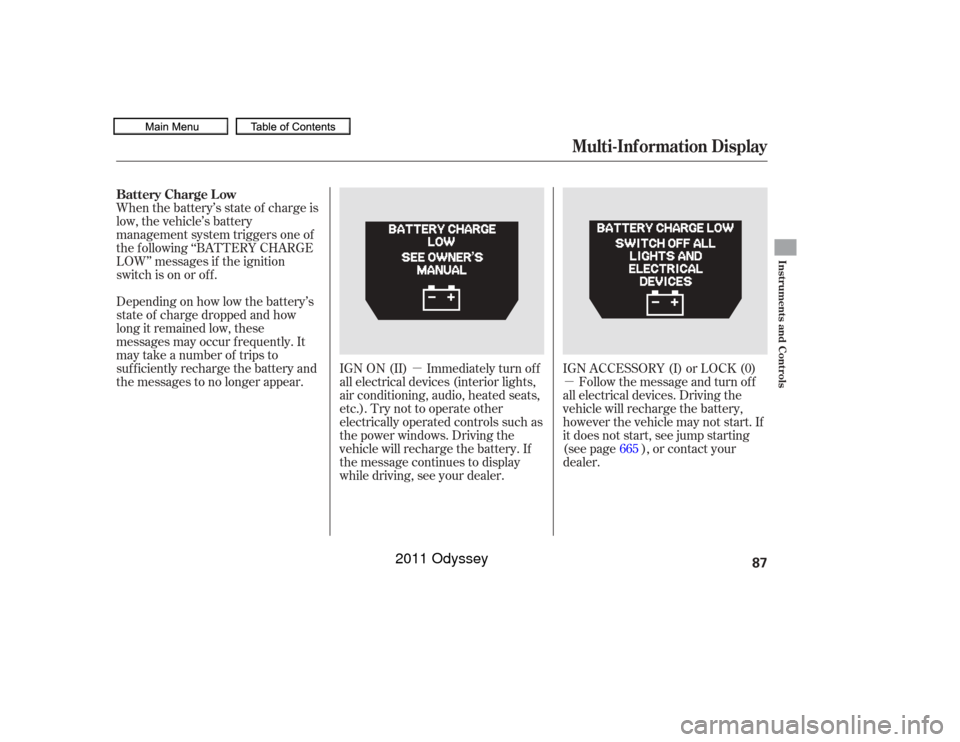
Whenthebattery’sstateof chargeis
low, the vehicle’s battery
management system triggers one of
the f ollowing ‘‘BATTERY CHARGE
LOW’’ messages if the ignition
switch is on or of f .
Depending on how low the battery’s
state of charge dropped and how
long it remained low, these
messages may occur f requently. It
may take a number of trips to
sufficiently recharge the battery and
the messages to no longer appear.
IGN ON (II) Immediately turn of f
all electrical devices (interior lights,
air conditioning, audio, heated seats,
etc.). Try not to operate other
electrically operated controls such as
the power windows. Driving the
vehicle will recharge the battery. If
the message continues to display
while driving, see your dealer.IGN ACCESSORY (I) or LOCK (0)
Follow the message and turn of f
all electrical devices. Driving the
vehicle will recharge the battery,
however the vehicle may not start. If
it does not start, see jump starting
(see page ), or contact your
dealer. 665
Multi-Inf ormation Display
Battery Charge Low
Instruments and Controls
87
10/07/17 09:46:07 31TK8600_092
2011 Odyssey
Page 92 of 722

�Û�Ý
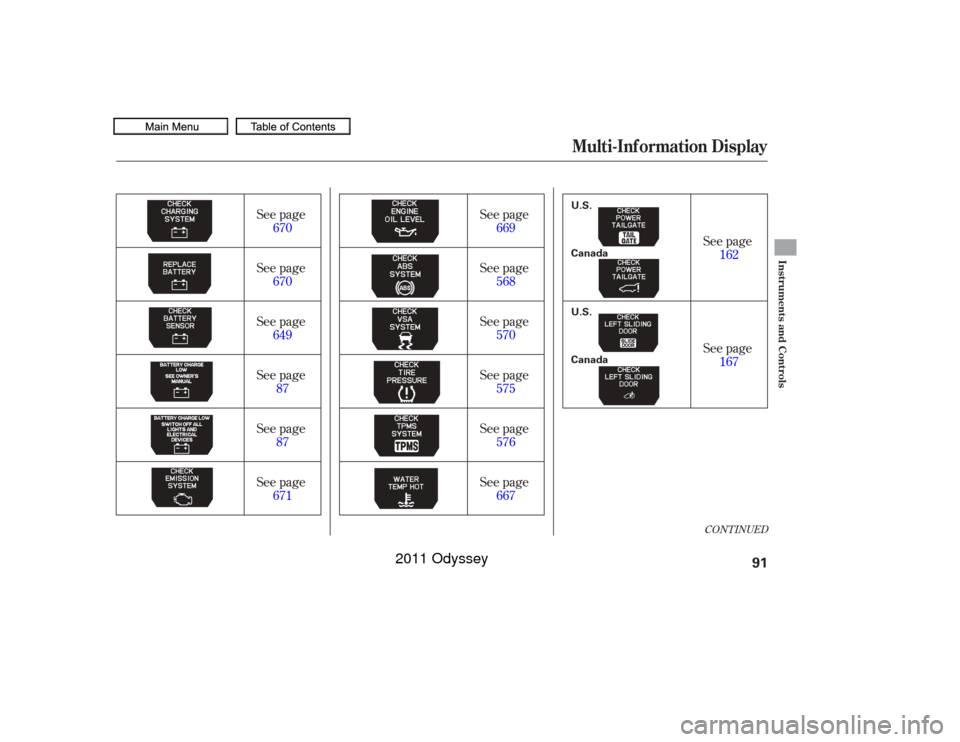
The system message(s) triggers the
appropriate indicator(s) on the
instrument panel, including the
system message indicator, to come
on. The system message indicator
does not go of f until the problem(s)
is corrected.
You will also hear a beep when the
system message comes on f or the
first time.
If there is a problem with your
vehicle, f or example the engine oil
level is low or a door is not f ully
closed, the multi-inf ormation display
will show you the problem. It does
this by interrupting the current
display with one or more messages.
This shows the accumulated
traveling time since you last reset it.
When you turn the ignition switch to
the ON (II) position, ELAPSED
TIME is reset.
If you want to reset the ELAPSED
TIME manually, go to the trip
computer’s ELAPSED TIME display,
andpressandholdtheSEL/RESET
button until the number resets.
You can customize the ELAPSED
TIME reset conditions on the multi-
inf ormation display (see page ).
This shows the average speed you
are traveling in miles per hour (mph)
forU.S.modelsorkilometersper
hour (km/h) f or Canadian models.
To reset the AVERAGE SPEED you
have traveled, press and hold the
SEL/RESET button until the
number resets.
If there are several messages, each
message is displayed f or about 5
seconds.
To switch the message(s) bef ore 5
seconds elapsed or select the normal
display, press the INFO ( / )
buttononthesteeringwheel
repeatedly.
107
Multi-Inf ormation Display
System Messages
EL A PSED T IME
A VERA GE SPEED
Instruments and Controls
89
SYSTEM MESSAGE INDICATOR
10/07/17 09:46:28 31TK8600_094
2011 Odyssey
Page 94 of 722
CONT INUED
See page87
See page 87 See page
162
See page 167
See page
670
See page 670
See page 649
See page 671 See page
669
See page 568
See page 570
See page 575
See page 576
See page 667
Multi-Inf ormation Display
Instruments and Controls
91
Canada U.S. Canada U.S.
10/07/17 09:46:52 31TK8600_096
2011 Odyssey
Page 96 of 722
�Û�Ý
CONT INUED
On Touring ModelsYou can customize some vehicle
control settings. To change the
settings, the ignition switch must be
in the ON (II) position, and the
vehicle must be stopped with the
transmission in Park.
To enter the customizing mode,
press either INFO button ( / )
repeatedly until ‘‘CUSTOMIZE
SETTINGS’’ is displayed, then press
the SEL/RESET button.
If you try to enter the customizing
mode while the vehicle is moving,
you will see a ‘‘MUST STOP AND
SHIFTTOPARKTOCHANGE
SETTINGS’’ message and you
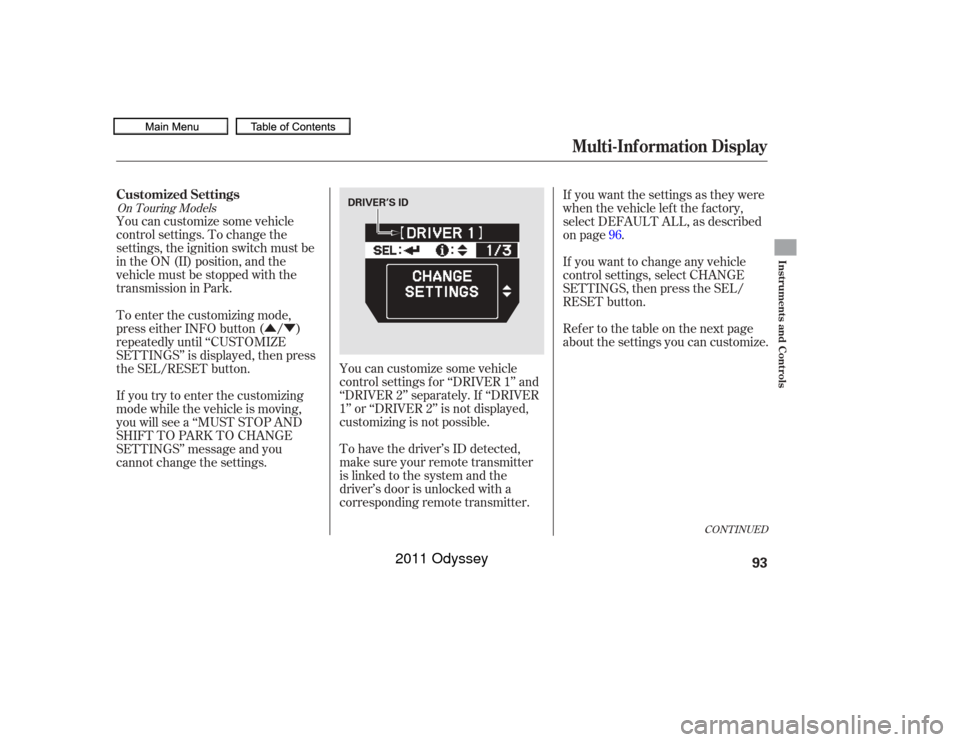
cannot change the settings.You can customize some vehicle
control settings f or ‘‘DRIVER 1’’ and
‘‘DRIVER 2’’ separately. If ‘‘DRIVER
1’’ or ‘‘DRIVER 2’’ is not displayed,
customizing is not possible.
To have the driver’s ID detected,
make sure your remote transmitter
is linked to the system and the
driver’s door is unlocked with a
corresponding remote transmitter. If you want the settings as they were
when the vehicle lef t the f actory,
select DEFAULT ALL, as described
on page .
If you want to change any vehicle
control settings, select CHANGE
SETTINGS, then press the SEL/
RESET button.
Ref er to the table on the next page
about the settings you can customize.
96
Multi-Inf ormation Display
Customized Settings
Instruments and Controls
93
DRIVER’S ID
10/07/17 09:47:14 31TK8600_098
2011 Odyssey
Page 98 of 722
Multi-Inf ormation Display
Instruments and Controls
95
10/07/17 09:47:14 31TK8600_098
�Î�Î
�Î
�Î
�Î
�Î
�Î
�Î �Î
�Î
�Î
Page
Menu Item Setting Option
Group Setup Description120
122
124
126
128
130
132
96
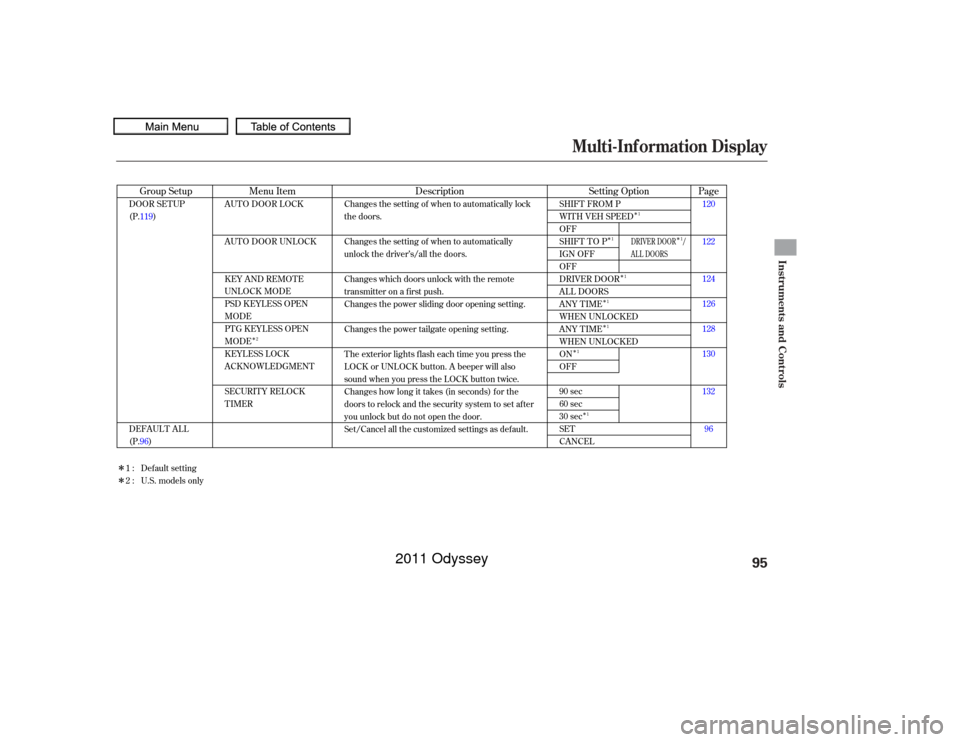
AUTO DOOR LOCK
AUTO DOOR UNLOCK
KEY AND REMOTE
UNLOCK MODE
PSD KEYLESS OPEN
MODE
PTG KEYLESS OPEN
MODE
KEYLESS LOCK
ACKNOWLEDGMENT
SECURITY RELOCK
TIMER
SHIFT FROM P
WITH VEH SPEED
OFF
SHIFT TO P
IGN OFF
OFF
DRIVER DOOR
ALL DOORS
ANY TIME
WHEN UNLOCKED
ANY TIME
WHEN UNLOCKED
ON
OFF
90 sec
60 sec
30 sec
SET
CANCEL
DOOR SETUP
(P.119)
DEFAULT ALL
(P.96) Changes the setting of when to automatically lock
the doors.
Changes the setting of when to automatically
unlock the driver’s/all the doors.
Changes which doors unlock with the remote
transmitter on a first push.
Changes the power sliding door opening setting.
Changes the power tailgate opening setting.
The exterior lights flash each time you press the
LOCK or UNLOCK button. A beeper will also
sound when you press the LOCK button twice.
Changes how long it takes (in seconds) for the
doors to relock and the security system to set after
you unlock but do not open the door.
Set/Cancel all the customized settings as default.
Default setting
1:
2 : U.S. models only
2 1
1
1
1
1
1
1 1
DRIVER DOOR /
AL L DOORS
2011 Odyssey
Page 100 of 722
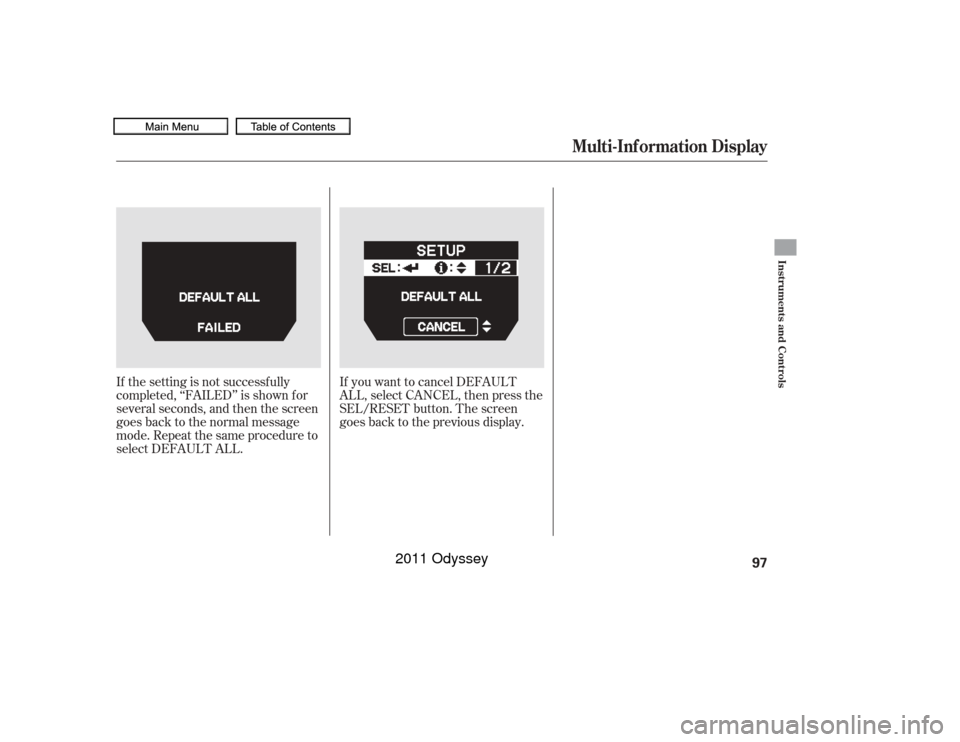
If the setting is not successf ully
completed, ‘‘FAILED’’ is shown f or
several seconds, and then the screen
goes back to the normal message
mode. Repeat the same procedure to
select DEFAULT ALL.If you want to cancel DEFAULT
ALL, select CANCEL, then press the
SEL/RESET button. The screen
goes back to the previous display.
Multi-Inf ormation Display
Instruments and Controls
97
10/07/17 09:47:36 31TK8600_102
2011 Odyssey