Page 229 of 722
�Û
�Ý
The automatic climate control
system in your vehicle maintains the
interior temperature you select. The
system also adjusts the f an speed
and airf low levels.
The climate control system f or your
vehicle can also be operated using
the voice control system. See the
navigation system manual f or
complete details.
Press the AUTO button.
Set the desired temperature with
the temperature control dial.
You can set the driver’s side
temperature, the passenger’s side
temperature, and the temperature
of the rear passenger
compartment separately.
The system automatically selects
the proper mix of conditioned
and/or heated air that will, as
quickly as possible, raise or lower
the interior temperature to your
pref erence. The system also
dehumidif ies the interior.The driver’s side temperature, the
passenger’s side temperature and
the rear passenger compartment
temperature can be set separately.
Turning each temperature control
dial on the f ront control panel
clockwise will increase the
temperature of airflow. On the rear
control panel, press the button to
increase the temperature of airf low.
Press the button to decrease it.
Each set temperature is shown in the
display. The rear set temperature is
shown in the display on the ceiling
above the second row seat outer
position.
1.
2.
3.
On vehicles with navigation system
Using A utomatic Climate Control
Voice Control System
Climate Control System
T emperat ure Cont rol
226
10/07/17 10:04:32 31TK8600_231
2011 Odyssey
Page 417 of 722
On vehicles with standard rear screenOn vehicles without navigation system
Press the REAR POWER button.
The indicator on the REAR POWER
button will come on. The rear seat
passengers can then operate the rear
system f rom the control panel in the
ceiling. The rear control panel can
also be detached and used as a
remote control, by pushing the
release button, and pulling the
remote toward you.
You can disable the rear control
panel f rom the f ront control panel.
Your vehicle is equipped with a rear
entertainment system that includes a
DVD player f or the enjoyment of the
rear passengers.
With this system, the rear
passengers can enjoy a dif f erent
entertainment source (radio, disc,
CD Library, HDD, USB, iPod
,DVD
player or XM Radio) than the f ront
seat occupants. The audio is
broadcast through the supplied
wireless headphones.
The ignition switch must be in the
ACCESSORY (I) or the ON (II)
position to operate the rear
entertainment system. Press the SETUP button and turn
the selector knob to ‘‘Rear Setup,’’
then press the selector knob. Select
the ‘‘Rear Remote On.’’ Each time
you press and release the selector
knob, this feature turn on and off. To Turn On the System
To turn of f the rear control
Rear Entertainment System414
This vehicle’s overhead mounted video
display, if so equipped, includes
mercury-containing components. Upon
removal, please reuse, recycle, or
dispose of as hazardous waste.
10/07/17 10:29:28 31TK8600_419
2011 Odyssey
Page 428 of 722
Usethe,,,orbutton to highlight Repeat,
Random, or Scan on the screen. You
can enter the highlighted f unction by
pressing the ENTER button. These
functions have the same features as
those of the f ront audio system.
When the TITLE/SCROLL button is
pressed, the title scrolls. When it is
pushed again, scrolling stops. Pressthe buttontoskiptothe
beginning of the next chapter. Press
the button to return to the
beginning of the current chapter.
Press the button again quickly
to go to the previous chapter.
To move rapidly within a chapter,
press and hold the or
button. The system will
continue to move through the
chapter. Press the button to
move forward, or the button to
move backward. Release the button
when the system reaches the point
you want.
ToselectthemenuontheDVD,
press the MENU button. Use the , , , and button
to move to the desired menu
selection, then press the ENTER
button to enter your selection.
The video screen is f or use by rear
seat passengers only. The driver and
f ront seat passenger should not try
to view the screen while driving.
Open the overhead screen by pulling
down the bottom edge of the screen
until it locks into place when f ully
extended. If you pull down the
screen too far forward, past the
second detent, the display will turn
off. Push the screen up to the second
or first detent to turn the display
back on. To close the screen, push it
up until it locks into place when f ully
closed.
Press the button when you
want to pause the DVD. Press this
button again to go back to PLAY.
To Play a Disc, CD L ibrary, HDD,
USB, or iPod
from the Rear
Control Panel To Play a DVD from the Rear
Control Panel
Rear Entertainment System
Features
425
10/07/17 10:30:58 31TK8600_430
2011 Odyssey
Page 445 of 722
Press the REAR POWER button.
The indicator on the REAR POWER
button will come on. The rear seat
passengers can then operate the rear
system f rom the control panel in the
ceiling. The rear control panel can
also be detached and used as a
remote control, by pushing the
release button, and pulling the
remote toward you.
With this system, the rear
passengers can enjoy a dif f erent
entertainment source (radio, disc,
HDD, USB, iPod
, DVD player or
XM Radio) than the front seat
occupants. The audio is broadcast
through the supplied wireless
headphones. Your vehicle is equipped with a rear
entertainment system that includes a
DVD player f or the enjoyment of the
rear passengers. The ignition switch must be in the
ACCESSORY (I) or the ON (II)
position to operate the rear
entertainment system.
On vehicles with ultrawide rear screen.
To Turn On the System
Ultrawide Rear Entertainment System442
10/07/17 10:33:29 31TK8600_447
2011 Odyssey
Page 456 of 722
Use the interf ace dial to highlight
REPEAT, RANDOM (or SHUFFLE
if your source is iPod), or SCAN on
the screen. You can enter the
highlighted f unction by pressing the
ENTER button. These f unctions
have the same features as those of
the f ront audio system.The video screen is f or use by rear
seat passengers only. The driver and
f ront seat passenger should not try
to view the screen while driving.
Open the overhead screen by
pushing the OPEN button. The
screen will swing down part-way.
Pivot the screen the rest of the way.
If you pivot the screen too f ar
f orward, past the second detent. The
display will turn of f . Pivot the screen
back to the second or first detent to
turn the display back on. To close
the screen, pivot it up until it latches.
Press the button when you
want to pause the DVD. Press this
button again to go back to PLAY. Pressthe buttontoskiptothe
beginning of the next chapter. Press
the button to return to the
beginning of the current chapter.
Press the button again quickly
to go to the previous chapter.
To move rapidly within a chapter,
press and hold the or
button. The system will
continue to move through the
chapter. Press the button to
move forward, or the button to
move backward. Release the button
when the system reaches the point
you want.
ToselectthemenuontheDVD,
press the MENU button. Use the
interface dial to turn to the desired
menu selection, then press the
ENTER button to enter your
selection.
When the TITLE/SCROLL button is
pressed, the title scrolls f or about 10
seconds. When it is pushed again,
scrolling stops. To Play a Disc, HDD, USB, or
iPod
f rom the Rear Control
Panel To Play a DVD from the Rear
Control Panel
Ultrawide Rear Entertainment System
Features
453
10/07/17 10:34:57 31TK8600_458
2011 Odyssey
Page 474 of 722
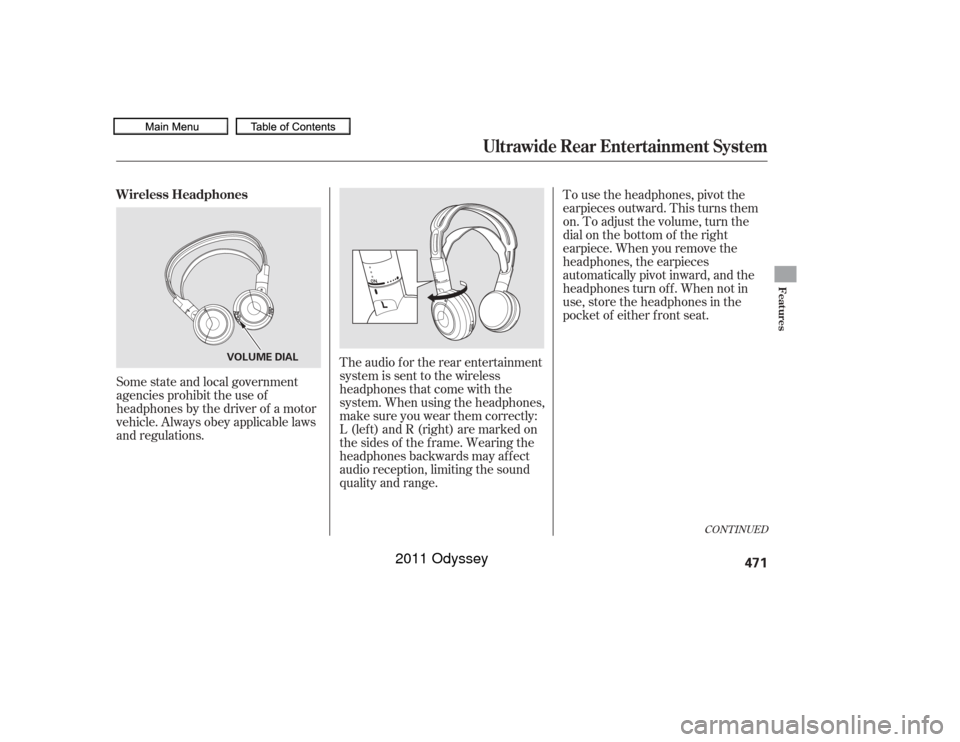
Some state and local government
agencies prohibit the use of
headphones by the driver of a motor
vehicle. Always obey applicable laws
and regulations.The audio f or the rear entertainment
system is sent to the wireless
headphones that come with the
system. When using the headphones,
make sure you wear them correctly:
L (lef t) and R (right) are marked on
the sides of the frame. Wearing the
headphones backwards may affect
audio reception, limiting the sound
quality and range. To use the headphones, pivot the
earpieces outward. This turns them
on. To adjust the volume, turn the
dial on the bottom of the right
earpiece. When you remove the
headphones, the earpieces
automatically pivot inward, and the
headphones turn of f . When not in
use, store the headphones in the
pocket of either f ront seat.
CONT INUED
Wireless Headphones
Ultrawide Rear Entertainment System
Features
471
VOLUME DIAL
10/07/17 10:37:29 31TK8600_476
2011 Odyssey
Page 476 of 722
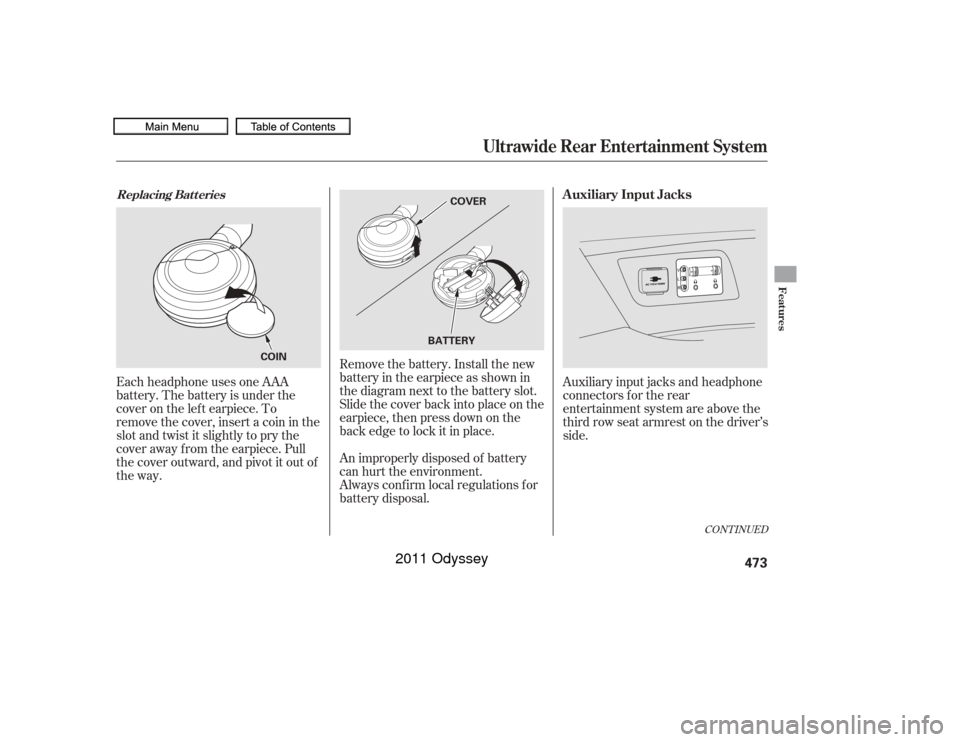
Remove the battery. Install the new
battery in the earpiece as shown in
the diagram next to the battery slot.
Slide the cover back into place on the
earpiece, then press down on the
back edge to lock it in place.
Each headphone uses one AAA
battery. The battery is under the
cover on the lef t earpiece. To
remove the cover, insert a coin in the
slot and twist it slightly to pry the
cover away f rom the earpiece. Pull
the cover outward, and pivot it out of
the way.
An improperly disposed of battery
can hurt the environment.
Always conf irm local regulations f or
battery disposal.Auxiliary input jacks and headphone
connectors f or the rear
entertainment system are above the
third row seat armrest on the driver’s
side.
CONT INUED
Replacing Bat t eries
Auxiliary Input Jacks
Ultrawide Rear Entertainment System
Features
473
COVER
BATTERY
COIN
10/07/17 10:37:46 31TK8600_478
2011 Odyssey
Page 477 of 722
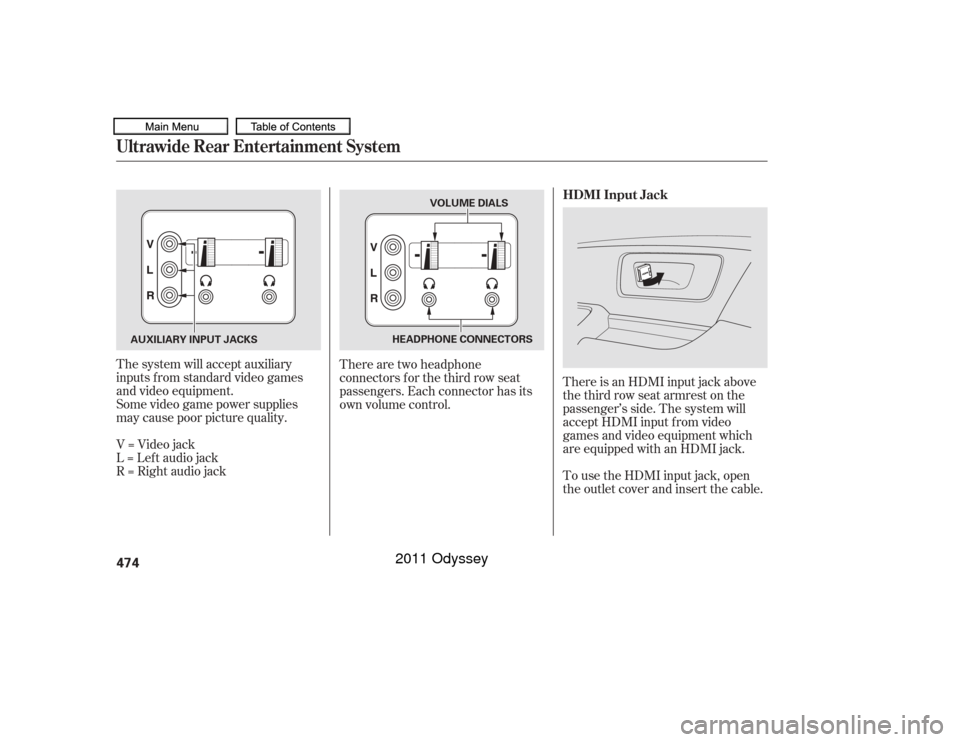
The system will accept auxiliary
inputs f rom standard video games
and video equipment.
Some video game power supplies
may cause poor picture quality.
V=Videojack
L = Lef t audio jack
R = Right audio jackThere are two headphone
connectors f or the third row seat
passengers. Each connector has its
own volume control.
There is an HDMI input jack above
the third row seat armrest on the
passenger’s side. The system will
accept HDMI input f rom video
games and video equipment which
are equipped with an HDMI jack.
To use the HDMI input jack, open
the outlet cover and insert the cable. HDMI Input JackUltrawide Rear Entertainment System474
VOLUME DIALS
HEADPHONE CONNECTORS
AUXILIARY INPUT JACKS
10/07/17 10:37:53 31TK8600_479
2011 Odyssey