Page 188 of 722
CONT INUED
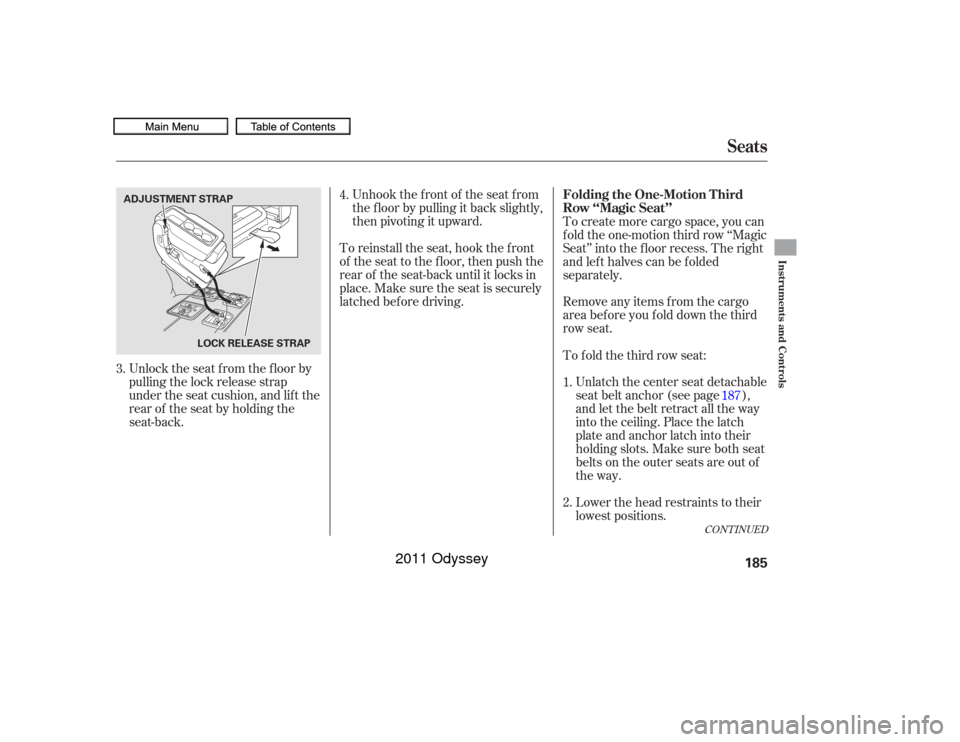
Unlock the seat f rom the f loor by
pulling the lock release strap
under the seat cushion, and lif t the
rearof theseatbyholdingthe
seat-back.Unhook the f ront of the seat f rom
the f loor by pulling it back slightly,
then pivoting it upward.
To reinstall the seat, hook the f ront
of the seat to the f loor, then push the
rear of the seat-back until it locks in
place. Make sure the seat is securely
latched bef ore driving. To create more cargo space, you can
f old the one-motion third row ‘‘Magic
Seat’’ into the floor recess. The right
and left halves can be folded
separately.
Remove any items from the cargo
areabeforeyoufolddownthethird
row seat.
Unlatch the center seat detachable
seat belt anchor (see page ),
and let the belt retract all the way
into the ceiling. Place the latch
plate and anchor latch into their
holding slots. Make sure both seat
belts on the outer seats are out of
the way.
To f old the third row seat:
Lower the head restraints to their
lowest positions.
3. 4.
1.
2.187
Seats
Folding the One-Motion T hird
Row ‘‘Magic Seat’’
Instruments and Controls
185
LOCK RELEASE STRAP
ADJUSTMENT STRAP
10/07/17 09:59:06 31TK8600_190
2011 Odyssey
Page 189 of 722
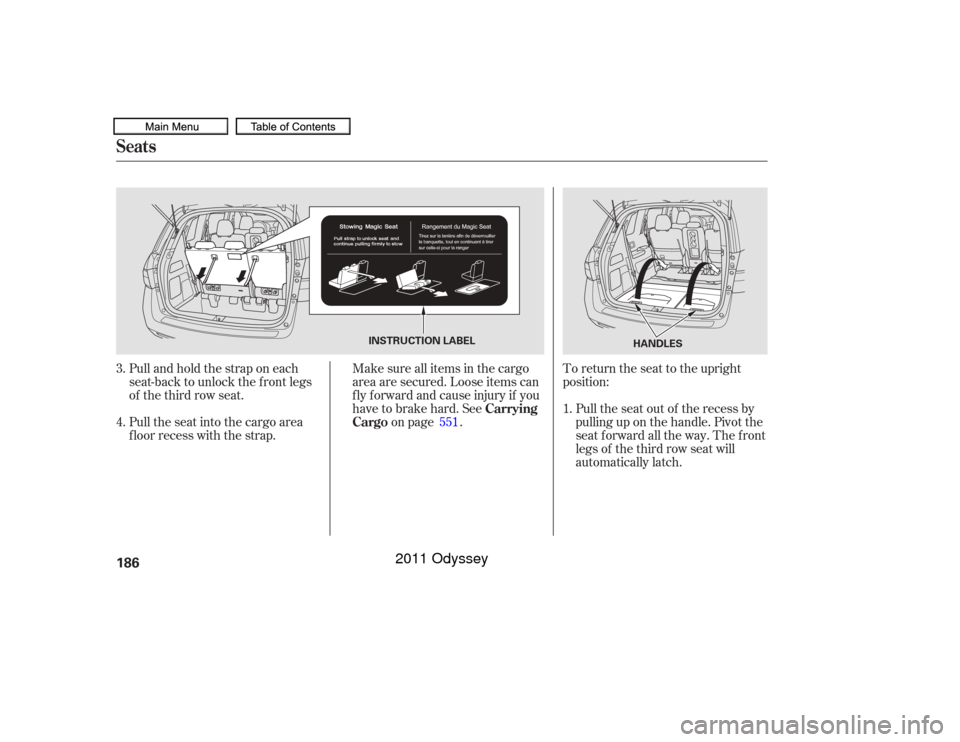
Pullandholdthestraponeach
seat-back to unlock the front legs
of the third row seat.To return the seat to the upright
position:
Pulltheseatintothecargoarea
floor recess with the strap. Pull the seat out of the recess by
pulling up on the handle. Pivot the
seat forward all the way. The front
legs of the third row seat will
automatically latch.
Make sure all items in the cargo
area are secured. Loose items can
fly forward and cause injury if you
have to brake hard. See
on page .
3.
4.
1.
551
Seats
Carrying
Cargo
186
HANDLES
INSTRUCTION LABEL
10/07/17 09:59:14 31TK8600_191
2011 Odyssey
Page 190 of 722
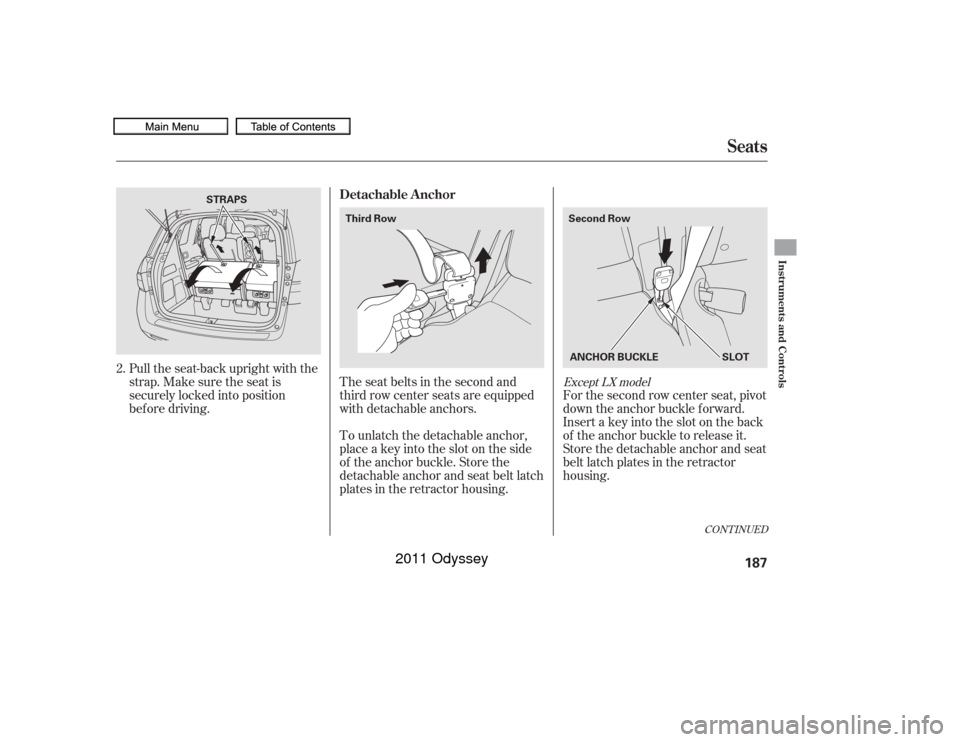
Pull the seat-back upright with the
strap. Make sure the seat is
securely locked into position
bef ore driving.To unlatch the detachable anchor,
place a key into the slot on the side
of the anchor buckle. Store the
detachable anchor and seat belt latch
plates in the retractor housing. The seat belts in the second and
third row center seats are equipped
with detachable anchors. For the second row center seat, pivot
down the anchor buckle f orward.
Insert a key into the slot on the back
of the anchor buckle to release it.
Store the detachable anchor and seat
belt latch plates in the retractor
housing.
2.
CONT INUED
Except LX model
Seats
Detachable Anchor
Instruments and Controls
187
STRAPS
Second Row
Third Row
ANCHOR BUCKLESLOT
10/07/17 09:59:22 31TK8600_192
2011 Odyssey
Page 191 of 722
When the seats are returned to the
upright position, these detachable
anchors should be latched back
properly.
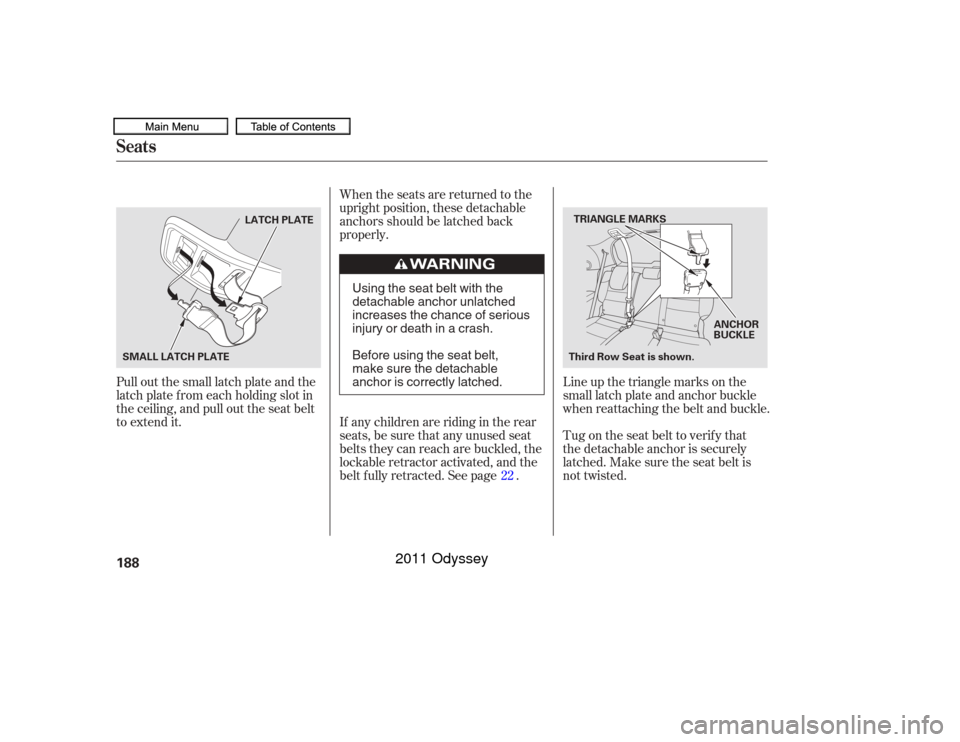
Pull out the small latch plate and the
latch plate f rom each holding slot in
the ceiling, and pull out the seat belt
to extend it. Tug on the seat belt to verify that
the detachable anchor is securely
latched. Make sure the seat belt is
not twisted. Line up the triangle marks on the
small latch plate and anchor buckle
when reattaching the belt and buckle.
If any children are riding in the rear
seats, be sure that any unused seat
belts they can reach are buckled, the
lockable retractor activated, and the
belt f ully retracted. See page . 22
Seats188
TRIANGLE MARKS
SMALL LATCH PLATE LATCH PLATE
Third Row Seat is shown.ANCHOR
BUCKLE
Using the seat belt with the
detachable anchor unlatched
increases the chance of serious
injury or death in a crash.
Before using the seat belt,
make sure the detachable
anchor is correctly latched.
10/07/17 09:59:29 31TK8600_193
2011 Odyssey
Page 205 of 722
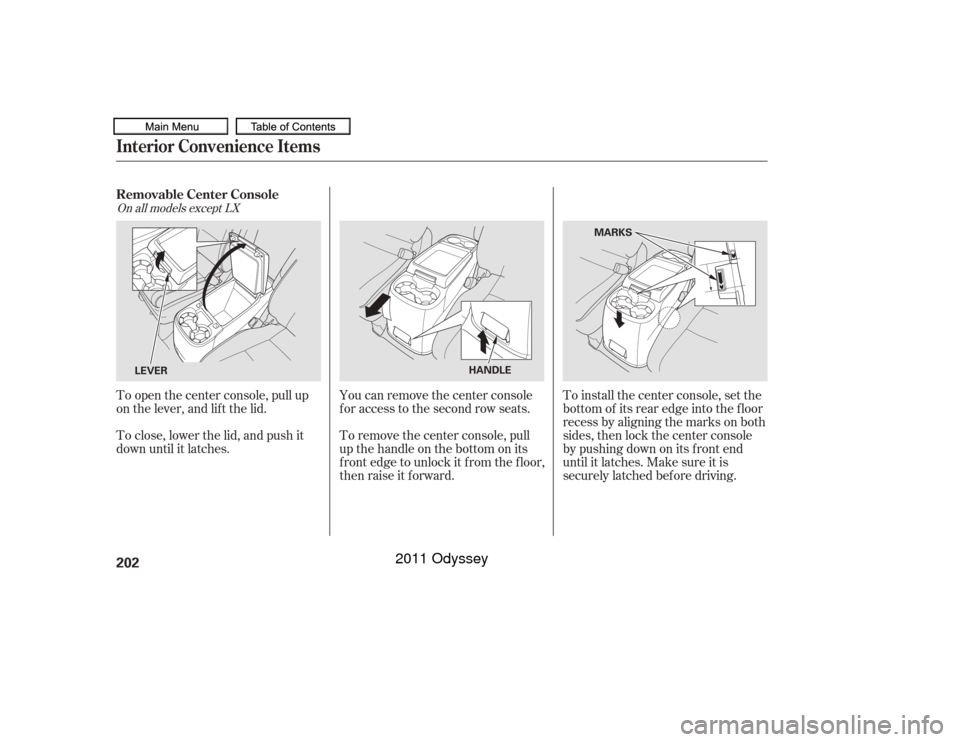
To remove the center console, pull
up the handle on the bottom on its
f ront edge to unlock it f rom the f loor,
then raise it f orward.
To close, lower the lid, and push it
down until it latches. To open the center console, pull up
on the lever, and lif t the lid.
You can remove the center console
f or access to the second row seats.To install the center console, set the
bottom of its rear edge into the floor
recess by aligning the marks on both
sides, then lock the center console
bypushingdownonitsfrontend
until it latches. Make sure it is
securely latched bef ore driving.
On all models except LXRemovable Center ConsoleInterior Convenience Items202
LEVER
HANDLEMARKS
10/07/17 10:01:14 31TK8600_207
2011 Odyssey
Page 220 of 722

The heating and air conditioning
system in your vehicle provides a
comf ortable driving environment in
all weather conditions.
The standard audio system has
many f eatures. This section
describes those f eatures and how to
use them.
Your vehicle has an anti-theft audio
system that requires a code number
to enable it.
The security system helps to
discourage vandalism and thef t of
your vehicle.
Theclimatecontrolsystemandthe
audio system have a voice control
feature. Refer to the navigation
system manual f or more inf ormation..............
Vents, Heating, and A/C . 218
...................
Rear A/C Controls . 224
...............
Climate Control System . 225
................................
Audio System .234 ..........
Playing the FM/AM Radio . 236
................................
Playing a Disc .243
.......
Disc Player Error Messages . 250
................................
Audio System .251
..........
Playing the FM/AM Radio . 252
................
Playing the XM
Radio . 260
................................
Playing a Disc .266
.......
Disc Player Error Messages . 275
...........
Playing CD Library Audio . 276
............................
PlayinganiPod
. 286
.................
iPod
Error Messages . 294
.. 295
USB Flash Memory Device Error ...................................
Messages .303
.............
Audio System . 304
............................
Wallpaper Setup .309
.................................
Display Setup .312
..........................
Setting the Clock .315
...................
Setting the Language . 317
................................
Audio System .318
..........
Playing the FM/AM Radio . 319
................
Playing the XM
Radio . 332 ................................
Playing a Disc .339
.......
Disc Player Error Messages . 351
..................
Protecting Your Discs . 352
..... 355
............................
PlayinganiPod
. 383
.................
iPod
Error Messages . 391
.. 392
.. 403
.............
Audio System . 404
............
FM/AM Radio Reception . 409
................
Remote Audio Controls . 411
......................
Auxiliary Input Jack .412
.................
Radio Thef t Protection . 413
........
Rear Entertainment System . 414
Ultrawide Rear Entertainment ........................................
System .442
.........................................
Compass .475
............................
Security System .479
...............................
Cruise Control .480
...... 483
................
Parking Sensor System . 486
....
Reaview Camera and Monitor . 493HandsFreeLink
.....495
HandsFreeLink
....516
LX model
EX, EX-L models without navigation system
BluetoothModels with navigation system Bluetooth
BluetoothBluetooth
On vehicles with navigation systemPlaying a USB Flash Memory Device
Playing a USB Flash Memory Device
HomeLink
Universal Transceiver
(Models with navigation system)
Playing Hard Disc Drive (HDD) Audio
(Models without navigation system)USB Flash Memory Device Error Messages
Features
Features
217
10/07/17 10:03:06 31TK8600_222
2011 Odyssey
Page 291 of 722
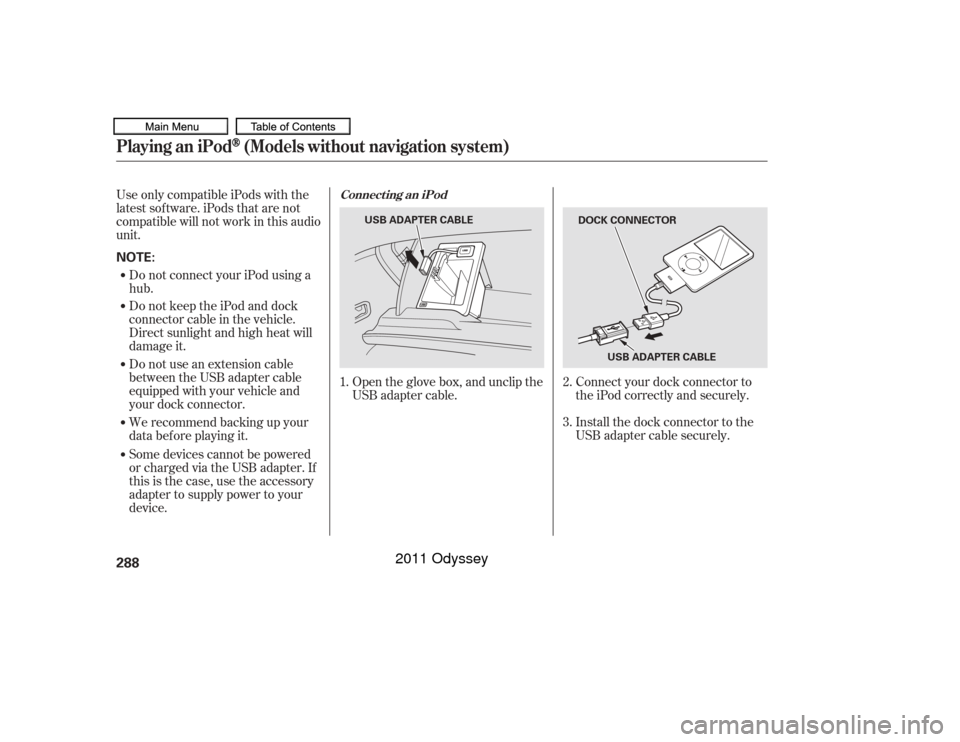
Connect your dock connector to
the iPod correctly and securely.
Install the dock connector to the
USB adapter cable securely.
Some devices cannot be powered
or charged via the USB adapter. If
this is the case, use the accessory
adapter to supply power to your
device. We recommend backing up your
data bef ore playing it. Do not use an extension cable
between the USB adapter cable
equipped with your vehicle and
your dock connector. Do not keep the iPod and dock
connector cable in the vehicle.
Direct sunlight and high heat will
damage it. Do not connect your iPod using a
hub.
UseonlycompatibleiPodswiththe
latest sof tware. iPods that are not
compatible will not work in this audio
unit.
Open the glove box, and unclip the
USB adapter cable.
1.
2.
3.
Connect ing an iPod
Playing an iPod
(Models without navigation system)
288NOTE:
DOCK CONNECTOR
USB ADAPTER CABLE
USB ADAPTER CABLE
10/07/17 10:13:03 31TK8600_293
2011 Odyssey
Page 299 of 722
Do not use a device such as a card
reader or hard drive as the device
or your f iles may be damaged.
Do not connect your USB f lash
memory device using a hub.
Do not use an extension cable to
the USB adapter cable equipped
with your vehicle.
Do not keep a USB f lash memory
device in the vehicle. Direct
sunlight and high heat will
This audio system can select and
play the audio f iles f rom a USB f lash
memory device with the same
controls used f or the in-dash disc
player. To play a USB f lash memory
device, connect it to the USB adapter
cable in the glove box, then press the
USB/AUX button. The ignition
switch must be in the ACCESSORY
(I) or ON (II) position. The recommended USB f lash
memory devices are 256 MB or
higher, and f ormatted with the FAT
f ile system. Some digital audio
players may be compatible as well.
Some USB f lash memory devices
(such as devices with security lock-
out f eatures, etc.) will not work in
this audio unit.
EX-L models without navigation system
and Canadian EX modelPlaying a USB Flash Memory Device (Models without navigation system)To Play a USB Flash Memory
Device296
NOTE:
10/07/17 10:13:56 31TK8600_301
damage it.
2011 Odyssey