Page 59 of 722
The National Highway Traffic Safety
Administration and Transport
Canada recommend that all children
aged 12 and under be properly
restrained in a back seat.
If the passenger’s front airbag
inf lates in a moderate to severe
f rontal collision, the airbag can cause
serious injuries to a child who is
unrestrained, improperly restrained,
sitting too close to the airbag, or out
of position.
A side airbag also poses risks. If any
part of a larger child’s body is in the
path of a deploying side airbag, the
child could receive possibly serious
injuries.Of course, children vary widely. And
while age may be one indicator of
when a child can saf ely ride in f ront,
there are other important f actors you
should consider.
Physically, a child must be large
enough f or the lap/shoulder belt to
properly f it (see pages and ). If
the seat belt does not f it properly,
with or without the child sitting on a
booster seat, the child should not sit
in f ront.
To saf ely ride in f ront, a child must
be able to f ollow the rules, including
sitting properly, and wearing the seat
belt properly throughout a ride.
If you decide that a child can saf ely
ride up f ront, be sure to:
Caref ully read the owner’s manual,
and make sure you understand all
seat belt instructions and all saf ety
inf ormation.
Move the vehicle seat to the rear-
most position.
Have the child sit up straight, back
against the seat, and feet on or
near the f loor.
Check that the child’s seat belt is
properly and securely positioned.
Supervise the child. Even mature
children sometimes need to be
reminded to f asten the seat belts
or sit properly.
15 54Protecting L arger ChildrenWhen Can a L arger Child Sit in
Front
Physical Size
Maturity
56
10/07/17 09:41:49 31TK8600_061
2011 Odyssey
Page 66 of 722

�Î
�Î �Î
�Î
�Î
The U.S. instrument panel is shown. Dif f erences f or the Canadian models are noted in the text.
: If equipped
Instrument Panel
Instruments and Controls
LX, EX, EX-L models
63
LOW TIRE PRESSURE INDICATOR
LIGHTS ON INDICATORDAYTIME RUNNING
LIGHTS (DRL)
INDICATOR
SEAT BELT
REMINDER
INDICATOR
LOW FUEL
INDICATOR
STARTER SYSTEM INDICATOR
CRUISE MAIN INDICATOR
CRUISE CONTROL INDICATOR
IMMOBILIZER SYSTEM
INDICATOR VSA OFF INDICATOR VEHICLE STABILITY ASSIST (VSA)
SYSTEM INDICATOR MALFUNCTION INDICATOR LAMP FUEL ECONOMY INDICATOR
MAINTENANCE MINDER INDICATOR
SIDE AIRBAG OFF INDICATOR
HIGH BEAM INDICATOR
PARKING BRAKE AND BRAKE
SYSTEM INDICATOR
TIRE PRESSURE
MONITORING
SYSTEM (TPMS)
INDICATOR
CHARGING SYSTEM INDICATOR
LOW OIL PRESSURE INDICATOR
DOOR and TAILGATE OPEN INDICATOR SECURITY SYSTEM INDICATOR
PARKING SENSOR INDICATORS
POWER SLIDING DOOR INDICATOR POWER TAILGATE INDICATOR (P.71)
(P.75)
(P.69)
(P.69)
(P.69)
(P.72) (P.66)
(P.66)
(P.74) (P.75)
(P.487)
(P.75)
(P.66)
(P.76) (P.73)
(P.76)
(P.70)
(P. 75)
(P.75)
(P.73)
(P. 73)
(P.65) (P. 74)
(P.68)
(P.67)
SUPPLEMENTAL RESTRAINT
SYSTEM (SRS) INDICATOR
(P.
67)
ANTI-LOCK BRAKE SYSTEM (ABS) INDICATOR (P.68)
10/07/19 15:50:28 31TK8600_068
2011 Odyssey
Page 67 of 722

�Î
�Î
The U.S. instrument panel is shown. Dif f erences f or the Canadian models are noted in the text.: If equippedInstrument PanelT ouring models64
FUEL ECONOMY INDICATOR SYSTEM MESSAGE INDICATOR
ANTI-LOCK BRAKE SYSTEM INDICATOR SIDE AIRBAG OFF INDICATOR
MALFUNCTION INDICATOR LAMP
VEHICLE STABILITY ASSIST (VSA)
SYSTEM INDICATOR
VSA OFF INDICATOR
IMMOBILIZER SYSTEM
INDICATOR
CHARGING SYSTEM
INDICATOR
LOW OIL PRESSURE INDICATOR
PARKING BRAKE AND BRAKE SYSTEM INDICATORSEAT BELT REMINDER INDICATOR
SUPPLEMENTAL RESTRAINT
SYSTEM INDICATOR
LOW FUEL
INDICATOR
HIGH BEAM INDICATOR SECURITY SYSTEM INDICATOR
CRUISE MAIN INDICATOR
CRUISE CONTROL INDICATORLIGHTS ON INDICATOR
FOG LIGHT
INDICATOR
BLIND SPOT INFORMATION SYSTEM INDICATOR (P.73)
(P.75)
(P.66)
(P.69) (P.69)
(P.69)
(P.66) (P.66)(P.70)
(P.68) (P.
76)
(P. 76)
(P.75) (P.75)
(P.73)
(P. 73)
(P. 74)
(P. 65)
(P. 67)
(P. 68)
(P.67)
LOW TIRE PRESSURE/TPMS INDICATOR (P.71)
DOOR and TAILGATE OPEN INDICATOR (P.75)
10/07/19 15:50:37 31TK8600_069
2011 Odyssey
Page 79 of 722

This indicator comes on when there
is a system message on the multi-
inf ormation display. Press the INFO
button on the steering wheel (see
page ) to see the message (see
page ).
Most of the time, this indicator
comes on along with other indicators
in the instrument panel such as the
seat belt reminder indicator, SRS
indicator, VSA system indicator, etc.
This indicator comes on f or a f ew
seconds when you turn the ignition
switch to the ON (II) position. It
remindsyouthatitistimetotake
your vehicle in f or scheduled
maintenance. The maintenance main
items and sub items will be displayed
in the inf ormation display. See page
f or more inf ormation on the
Maintenance Minder .
This indicator goes of f when your
dealer resets it after completing the
required maintenance service. This indicator comes on when the
security system is set. For more
inf ormation, see page .
83
90
479
599
On all models except LX
On Touring models
On LX, EX, EX-L models
Instrument Panel Indicators
Maintenance Minder
Indicator System Message
IndicatorSecurity System Indicator
76
SECURITY SYSTEM INDICATOR
TM
10/07/17 09:44:46 31TK8600_081
2011 Odyssey
Page 98 of 722
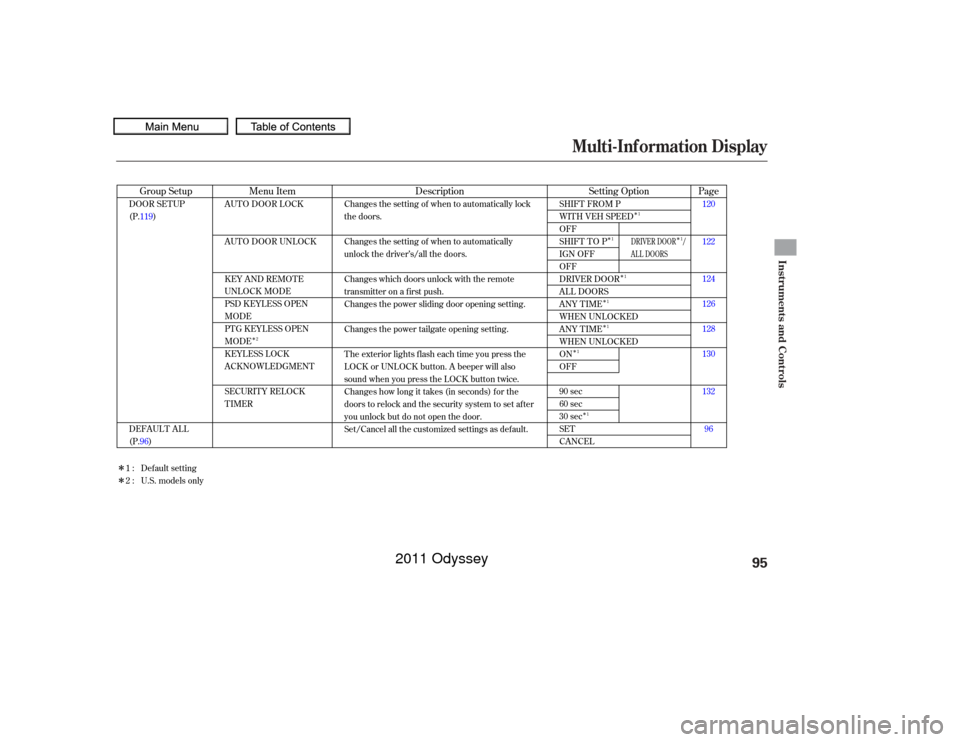
Multi-Inf ormation Display
Instruments and Controls
95
10/07/17 09:47:14 31TK8600_098
�Î�Î
�Î
�Î
�Î
�Î
�Î
�Î �Î
�Î
�Î
Page
Menu Item Setting Option
Group Setup Description120
122
124
126
128
130
132
96
AUTO DOOR LOCK
AUTO DOOR UNLOCK
KEY AND REMOTE
UNLOCK MODE
PSD KEYLESS OPEN
MODE
PTG KEYLESS OPEN
MODE
KEYLESS LOCK
ACKNOWLEDGMENT
SECURITY RELOCK
TIMER
SHIFT FROM P
WITH VEH SPEED
OFF
SHIFT TO P
IGN OFF
OFF
DRIVER DOOR
ALL DOORS
ANY TIME
WHEN UNLOCKED
ANY TIME
WHEN UNLOCKED
ON
OFF
90 sec
60 sec
30 sec
SET
CANCEL
DOOR SETUP
(P.119)
DEFAULT ALL
(P.96) Changes the setting of when to automatically lock
the doors.
Changes the setting of when to automatically
unlock the driver’s/all the doors.
Changes which doors unlock with the remote
transmitter on a first push.
Changes the power sliding door opening setting.
Changes the power tailgate opening setting.
The exterior lights flash each time you press the
LOCK or UNLOCK button. A beeper will also
sound when you press the LOCK button twice.
Changes how long it takes (in seconds) for the
doors to relock and the security system to set after
you unlock but do not open the door.
Set/Cancel all the customized settings as default.
Default setting
1:
2 : U.S. models only
2 1
1
1
1
1
1
1 1
DRIVER DOOR /
AL L DOORS
2011 Odyssey
Page 122 of 722
�Û�Ý
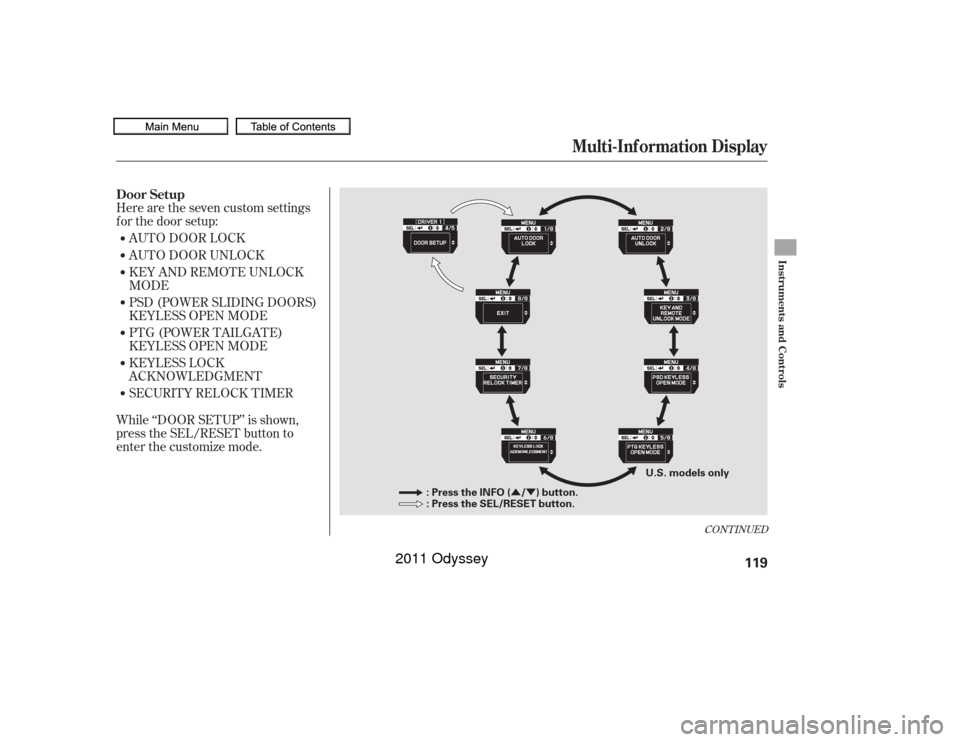
Here are the seven custom settings
f or the door setup:
While ‘‘DOOR SETUP’’ is shown,
press the SEL/RESET button to
enter the customize mode.AUTO DOOR LOCK
AUTO DOOR UNLOCK
KEY AND REMOTE UNLOCK
MODE
PSD (POWER SLIDING DOORS)
KEYLESS OPEN MODE
PTG (POWER TAILGATE)
KEYLESS OPEN MODE
KEYLESS LOCK
ACKNOWLEDGMENT
SECURITY RELOCK TIMER
CONT INUED
Door Setup
Multi-Inf ormation Display
Instruments and Controls
119
: Press the INFO ( / ) button.
: Press the SEL/RESET button.
U.S. models only
10/07/17 09:50:00 31TK8600_124
2011 Odyssey
Page 133 of 722
�Û�Ý�Û�Ý
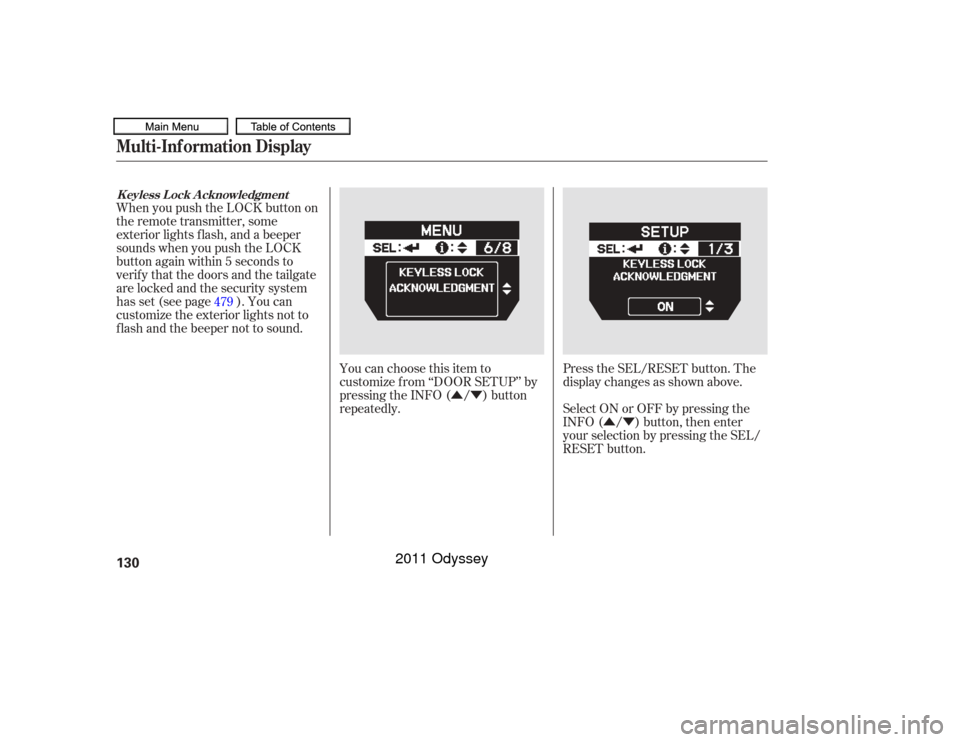
Press the SEL/RESET button. The
display changes as shown above.
You can choose this item to
customize f rom ‘‘DOOR SETUP’’ by
pressing the INFO ( / ) button
repeatedly.
When you push the LOCK button on
the remote transmitter, some
exterior lights f lash, and a beeper
sounds when you push the LOCK
button again within 5 seconds to
verify that the doors and the tailgate
arelockedandthesecuritysystem
has set (see page ). You can
customize the exterior lights not to
f lash and the beeper not to sound.
Select ON or OFF by pressing the
INFO ( / ) button, then enter
your selection by pressing the SEL/
RESET button.
479
Multi-Inf ormation DisplayK eyless L ock A cknowledgment130
10/07/17 09:51:16 31TK8600_135
2011 Odyssey
Page 135 of 722
�Û�Ý�Û�Ý
If you unlock the doors and the
tailgate with the remote transmitter,
but do not open any of the doors or
thetailgatewithin30seconds,the
doors and the tailgate automatically
relock and the security system sets.
You can change this relock time
f rom 30 seconds to 60 or 90 seconds.
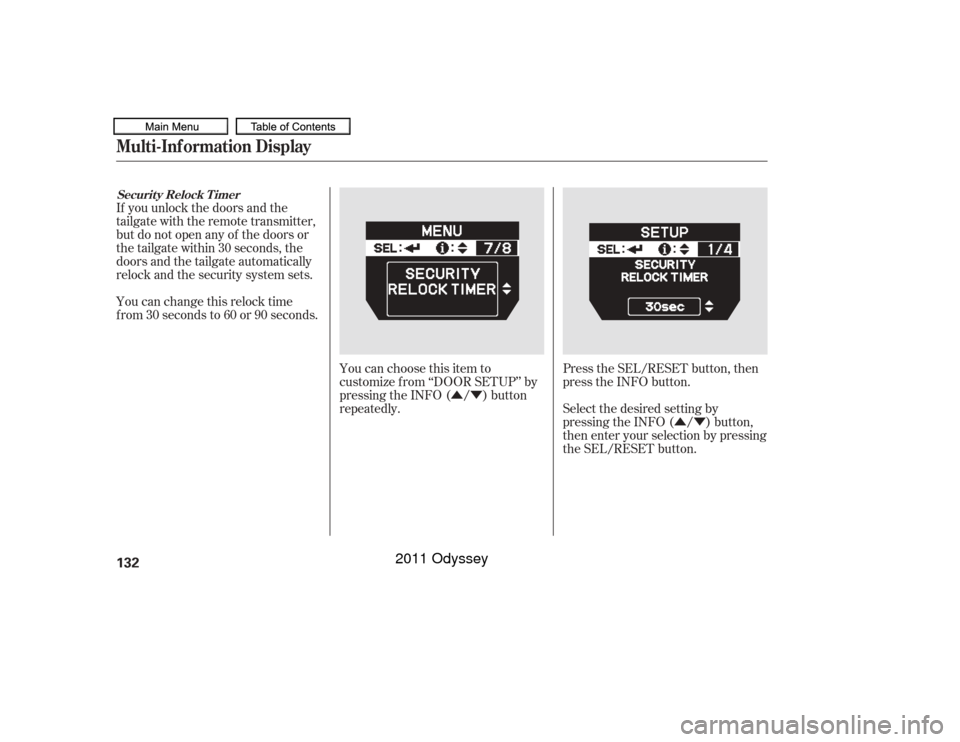
Press the SEL/RESET button, then
press the INFO button.
You can choose this item to
customize f rom ‘‘DOOR SETUP’’ by
pressing the INFO ( / ) button
repeatedly.
Select the desired setting by
pressing the INFO ( / ) button,
then enter your selection by pressing
the SEL/RESET button.
Securit y Relock T imerMulti-Inf ormation Display132
10/07/17 09:51:29 31TK8600_137
2011 Odyssey