Page 78 of 722

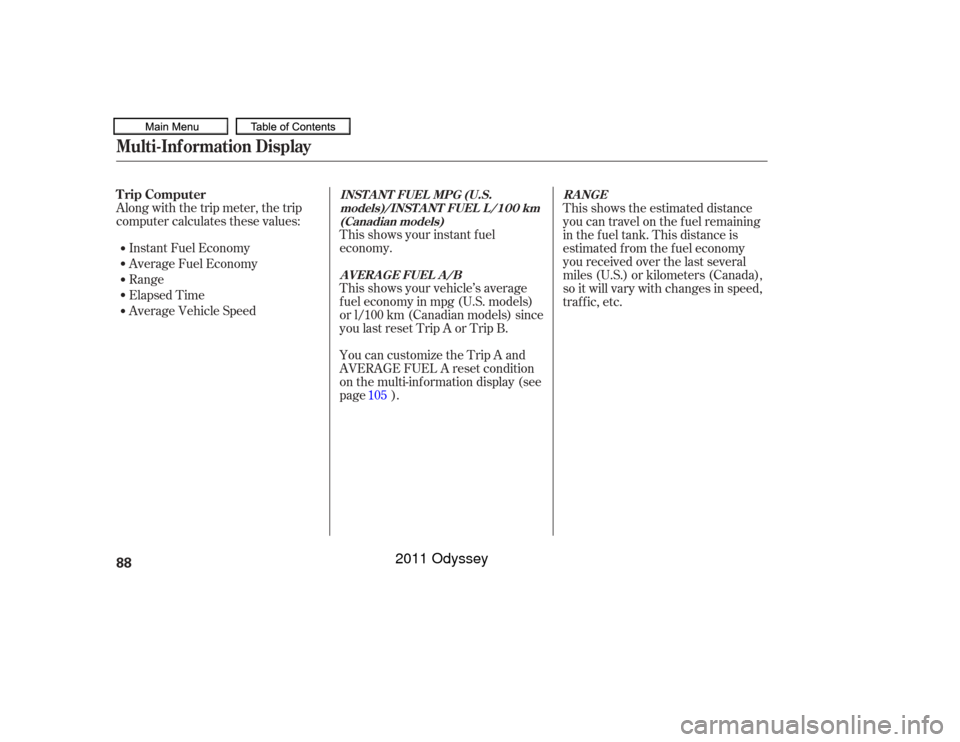
This indicator comes on when you
turn on the cruise control system by
pressing the CRUISE button on the
steering wheel (see page ).
This indicator comes on when you
set the cruise control. See pagef or inf ormation on operating the
cruise control.
This indicator comes on f or a f ew
seconds when you turn the ignition
switch to the ON (II) position. If it
comes on at any other time, there is
a problem in the power sliding door
system. With this indicator on, move
themainswitchonthedashboardto
the OFF position, and have the
system checked by your dealer as
soon as possible. You can still open
or close each sliding door manually.
For more inf ormation on the power
sliding doors, see page .
While the engine is operating in its
most economical range, this
indicator may come on and stay on.
It goes of f when your vehicle uses
extra f uel.
The door and tailgate open indicator
also appears on the multi-inf ormation
display. All the lights in the indicator come
on f or a f ew seconds when you turn
the ignition switch to the ON (II)
position. The appropriate light comes on in
this indicator if the tailgate or any
door is not closed tightly.
You will also see a ‘‘CHECK LEFT
SLIDING DOOR’’ or ‘‘CHECK
RIGHT SLIDING DOOR’’ message
on the multi-information display. 167 480
480
On Touring models On Touring models
On EX and EX-L models
Instrument Panel Indicators
Cruise Main Indicator
Cruise Control Indicator
Fuel Economy Indicator
Power Sliding
Door Indicator
Door and Tailgate Open Indicator
Instruments and Controls
75
Canada
U.S.
10/07/17 09:44:36 31TK8600_080
2011 Odyssey
Page 79 of 722

This indicator comes on when there
is a system message on the multi-
inf ormation display. Press the INFO
button on the steering wheel (see
page ) to see the message (see
page ).
Most of the time, this indicator
comes on along with other indicators
in the instrument panel such as the
seat belt reminder indicator, SRS
indicator, VSA system indicator, etc.
This indicator comes on f or a f ew
seconds when you turn the ignition
switch to the ON (II) position. It
remindsyouthatitistimetotake
your vehicle in f or scheduled
maintenance. The maintenance main
items and sub items will be displayed
in the inf ormation display. See page
f or more inf ormation on the
Maintenance Minder .
This indicator goes of f when your
dealer resets it after completing the
required maintenance service. This indicator comes on when the
security system is set. For more
inf ormation, see page .
83
90
479
599
On all models except LX
On Touring models
On LX, EX, EX-L models
Instrument Panel Indicators
Maintenance Minder
Indicator System Message
IndicatorSecurity System Indicator
76
SECURITY SYSTEM INDICATOR
TM
10/07/17 09:44:46 31TK8600_081
2011 Odyssey
Page 85 of 722

The inf ormation display in the
instrument panel shows you the
engine oil lif e and maintenance
service items when the ignition
switch is in the ON (II) position. This
inf ormation helps to keep you aware
of the periodic maintenance your
vehicle needs f or continued trouble-
f ree driving. Ref er to page f or
more inf ormation.Your vehicle’s onboard diagnostic
system will detect a loose or missing
f uel f ill cap as an evaporative system
leak. The f irst time a leak is detected
a ‘‘CHECK FUEL CAP’’ message
appears on the inf ormation display.
Turn the engine of f , and conf irm the
f uel f ill cap is installed. If it is, loosen
it, then retighten it until it clicks at
least once. The message should go
off after several days of normal
driving once you tighten or replace
the f uel f ill cap. To scroll to another
display, press the select/reset knob.
The ‘‘CHECK FUEL CAP’’ message
will appear each time you restart the
engine until the system turns the
message of f . If the system still detects a leak in
your vehicle’s evaporative emissions
system, the malf unction indicator
lamp (MIL) comes on. If the f uel f ill
cap was not already tightened, turn
the engine of f , and check or
retighten the f uel f ill cap until it
clicks at least once. The MIL should
go of f af ter several days of normal
driving once the cap is tightened or
replaced. If the MIL does not go of f ,
have your vehicle inspected by a
dealer. For more inf ormation, see
page .
599
671GaugesMaint enance MinderCheck Fuel Cap Message82
TM
10/07/17 09:45:32 31TK8600_087
2011 Odyssey
Page 88 of 722
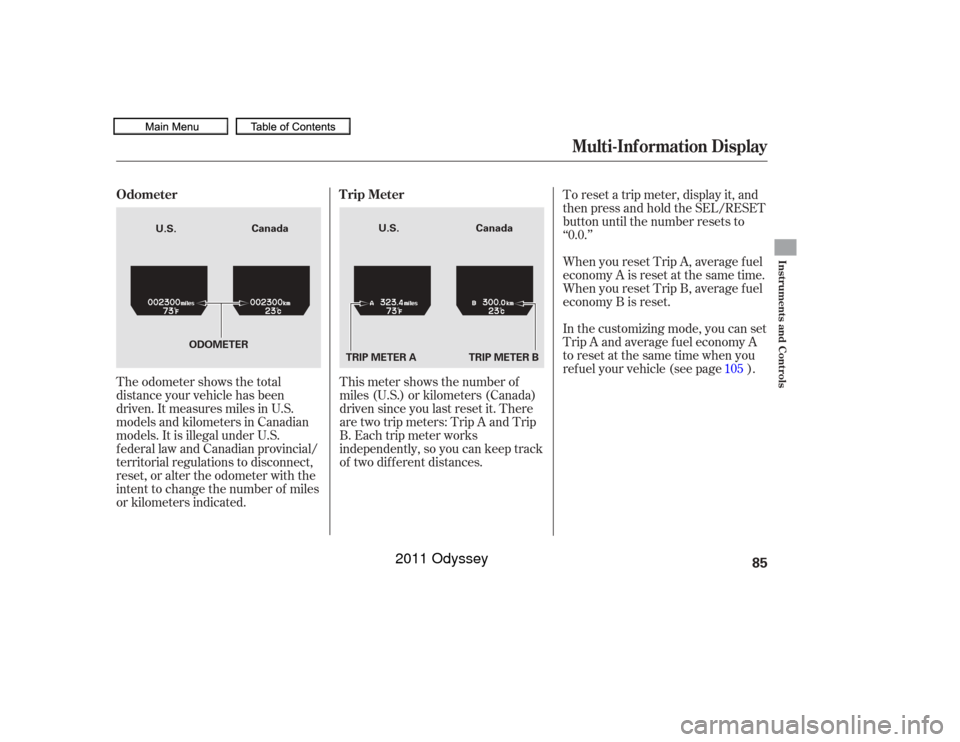
The odometer shows the total
distance your vehicle has been
driven. It measures miles in U.S.
models and kilometers in Canadian
models. It is illegal under U.S.
f ederal law and Canadian provincial/
territorial regulations to disconnect,
reset, or alter the odometer with the
intent to change the number of miles
or kilometers indicated.This meter shows the number of
miles (U.S.) or kilometers (Canada)
driven since you last reset it. There
aretwotripmeters:TripAandTrip
B. Each trip meter works
independently, so you can keep track
of two dif f erent distances. To reset a trip meter, display it, and
then press and hold the SEL/RESET
button until the number resets to
‘‘0.0.’’
When you reset Trip A, average f uel
economy A is reset at the same time.
When you reset Trip B, average f uel
economy B is reset.
In the customizing mode, you can set
Trip A and average f uel economy A
to reset at the same time when you
ref uel your vehicle (see page ).
105
Multi-Inf ormation Display
Odometer T rip Meter
Instruments and Controls
85
TRIP METER A
Canada
Canada
U.S. U.S.
TRIP METER B
ODOMETER
10/07/17 09:45:52 31TK8600_090
2011 Odyssey
Page 91 of 722
Along with the trip meter, the trip
computer calculates these values:Instant Fuel Economy
Average Fuel Economy
Range
Elapsed Time
Average Vehicle Speed This shows your instant f uel
economy.
This shows your vehicle’s average
f uel economy in mpg (U.S. models)
or l/100 km (Canadian models) since
you last reset Trip A or Trip B.
You can customize the Trip A and
AVERAGE FUEL A reset condition
on the multi-information display (see
page ). This shows the estimated distance
you can travel on the fuel remaining
in the f uel tank. This distance is
estimated f rom the f uel economy
you received over the last several
miles (U.S.) or kilometers (Canada),
so it will vary with changes in speed,
traf f ic, etc.
105Multi-Inf ormation DisplayTrip Computer
INST A NT FUEL MPG (U.S. models)/INST A NT FUEL L /100 km(Canadian models)
AVERAGE FUEL A/B RANGE
88
10/07/17 09:46:17 31TK8600_093
2011 Odyssey
Page 92 of 722

�Û�Ý
The system message(s) triggers the
appropriate indicator(s) on the
instrument panel, including the
system message indicator, to come
on. The system message indicator
does not go of f until the problem(s)
is corrected.
You will also hear a beep when the
system message comes on f or the
first time.
If there is a problem with your
vehicle, f or example the engine oil
level is low or a door is not f ully
closed, the multi-inf ormation display
will show you the problem. It does
this by interrupting the current
display with one or more messages.
This shows the accumulated
traveling time since you last reset it.
When you turn the ignition switch to
the ON (II) position, ELAPSED
TIME is reset.
If you want to reset the ELAPSED
TIME manually, go to the trip
computer’s ELAPSED TIME display,
andpressandholdtheSEL/RESET
button until the number resets.
You can customize the ELAPSED
TIME reset conditions on the multi-
inf ormation display (see page ).
This shows the average speed you
are traveling in miles per hour (mph)
forU.S.modelsorkilometersper
hour (km/h) f or Canadian models.
To reset the AVERAGE SPEED you
have traveled, press and hold the
SEL/RESET button until the
number resets.
If there are several messages, each
message is displayed f or about 5
seconds.
To switch the message(s) bef ore 5
seconds elapsed or select the normal
display, press the INFO ( / )
buttononthesteeringwheel
repeatedly.
107
Multi-Inf ormation Display
System Messages
EL A PSED T IME
A VERA GE SPEED
Instruments and Controls
89
SYSTEM MESSAGE INDICATOR
10/07/17 09:46:28 31TK8600_094
2011 Odyssey
Page 97 of 722
�Î�Î�Î
�Î �Î
�Î �Î
�Î
�Î
�µ�™�¶ �™
�µ�™�¶ �™
�ΠLOW
MIN
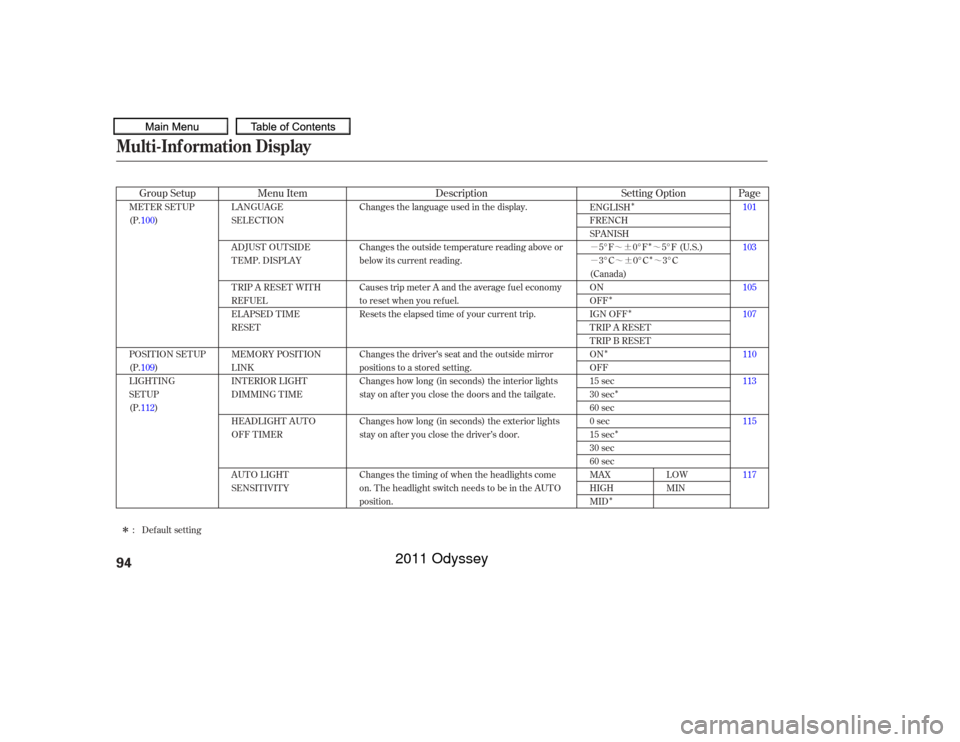
LANGUAGE
SELECTION
ADJUST OUTSIDE
TEMP. DISPLAY
TRIP A RESET WITH
REFUEL
ELAPSED TIME
RESET
MEMORY POSIT ION
LINK
INTERIOR LIGHT
DIMMING T IME
HEADLIGHT AUT O
OFF TIMER
AUTO LIGHT
SENSITIVITY Changes the language used in the display.
Changes the outside temperature reading above or
below its current reading.
Causes trip meter A and the average fuel economy
to reset when you refuel.
Resets the elapsed time of your current trip.
Changes the driver’s seat and the outside mirror
positions to a stored setting.
Changes how long (in seconds) the interior lights
stay on after you close the doors and the tailgate.
Changes how long (in seconds) the exterior lights
stay on after you close the driver’s door.
Changes the timing of when the headlights come
on. The headlight switch needs to be in the AUTO
position.
MET ER SET UP
(P.100)
POSITION SETUP
(P.109)
LIGHTING
SETUP
(P.112)
101
103
105
107
110
113
115
117
ENGLISH
FRENCH
SPANISH
5°F 0°F 5°F (U.S.)
3°C 0°C 3°C
(Canada)
ON
OFF
IGN OFF
TRIP A RESET
TRIP B RESET
ON
OFF
15 sec
30 sec
60 sec
0sec
15 sec
30 sec
60 sec
MAX
HIGH
MID
Default setting
:
Menu Item Description
Group Setup Page
Setting Option
Multi-Inf ormation Display94
10/07/17 09:47:19 31TK8600_099
2011 Odyssey
Page 98 of 722
Multi-Inf ormation Display
Instruments and Controls
95
10/07/17 09:47:14 31TK8600_098
�Î�Î
�Î
�Î
�Î
�Î
�Î
�Î �Î
�Î
�Î
Page
Menu Item Setting Option
Group Setup Description120
122
124
126
128
130
132
96
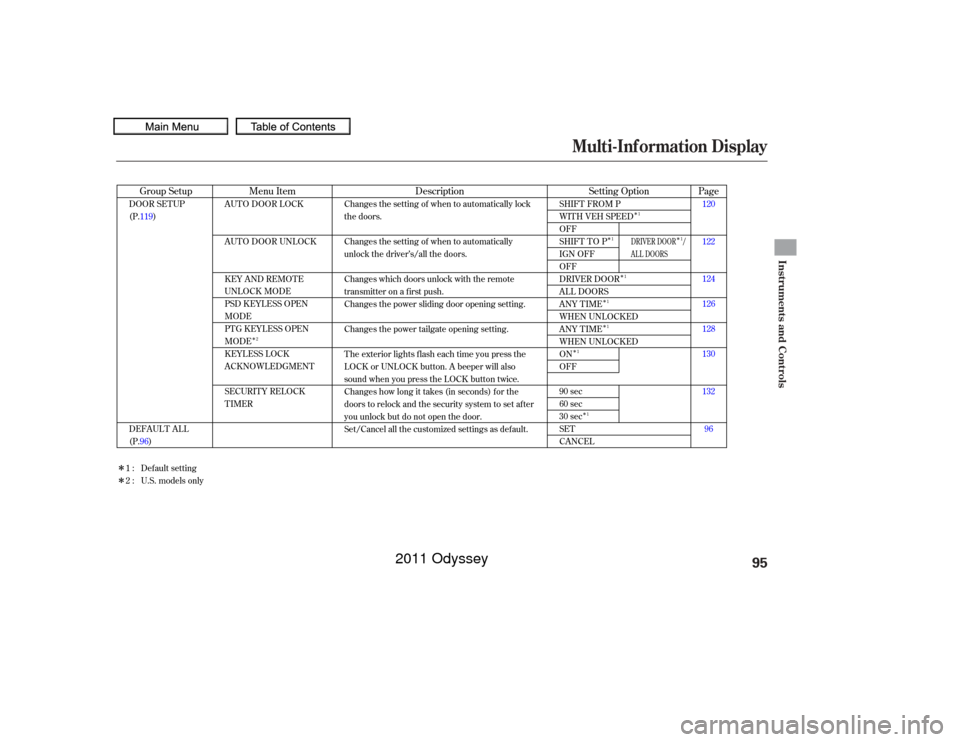
AUTO DOOR LOCK
AUTO DOOR UNLOCK
KEY AND REMOTE
UNLOCK MODE
PSD KEYLESS OPEN
MODE
PTG KEYLESS OPEN
MODE
KEYLESS LOCK
ACKNOWLEDGMENT
SECURITY RELOCK
TIMER
SHIFT FROM P
WITH VEH SPEED
OFF
SHIFT TO P
IGN OFF
OFF
DRIVER DOOR
ALL DOORS
ANY TIME
WHEN UNLOCKED
ANY TIME
WHEN UNLOCKED
ON
OFF
90 sec
60 sec
30 sec
SET
CANCEL
DOOR SETUP
(P.119)
DEFAULT ALL
(P.96) Changes the setting of when to automatically lock
the doors.
Changes the setting of when to automatically
unlock the driver’s/all the doors.
Changes which doors unlock with the remote
transmitter on a first push.
Changes the power sliding door opening setting.
Changes the power tailgate opening setting.
The exterior lights flash each time you press the
LOCK or UNLOCK button. A beeper will also
sound when you press the LOCK button twice.
Changes how long it takes (in seconds) for the
doors to relock and the security system to set after
you unlock but do not open the door.
Set/Cancel all the customized settings as default.
Default setting
1:
2 : U.S. models only
2 1
1
1
1
1
1
1 1
DRIVER DOOR /
AL L DOORS
2011 Odyssey