Page 512 of 722
�µ�µ �µ
To store a speed dial number:
To store a speed dial number during acall:
Select ‘‘Edit Speed Dial’’ f rom the
Phone Setup screen.
Select a number on the speed dial
listwhereyouwanttostorethe
number. Select ‘‘Store Speed dial.’’
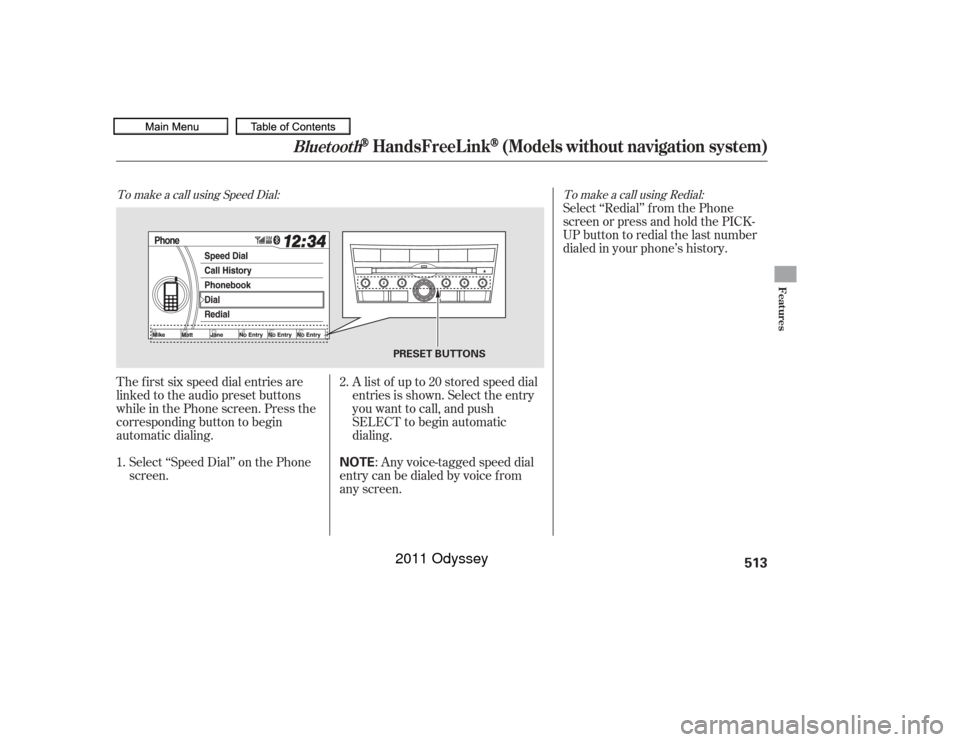
Choose a number:
By Phonebook the linked cell
phone’s imported phonebook
By Call History the last 20
numbers
By Manual Entry manual
number input
When the speed dial number is
successf ully stored, you are askedto store a voice tag f or the number
using the TALK button. Follow
the prompts.
When a voice tag is stored for the
entry, you can dial the entry by voice.
Press the TALK button and say
‘‘Call’’ and the stored name.
You can also select speed dial
directly f rom the Phone screen.
Select a ‘‘No Entry’’ f ield, and
continue f ollowing step 4. Press and hold the desired audio
preset button during a call.
The contact inf ormation f or the
active call will be stored f or the
preset button.
You can also store a speed
dial number through the ‘‘Speed
Dial’’ option on the Phone screen. 2.
4.
1.
3.
5. 1.
2.
CONT INUED
Bluetooth
HandsFreeL ink
(Models without navigation system)
Features
509
NOTE:
10/07/17 10:42:43 31TK8600_514
2011 Odyssey
Page 516 of 722
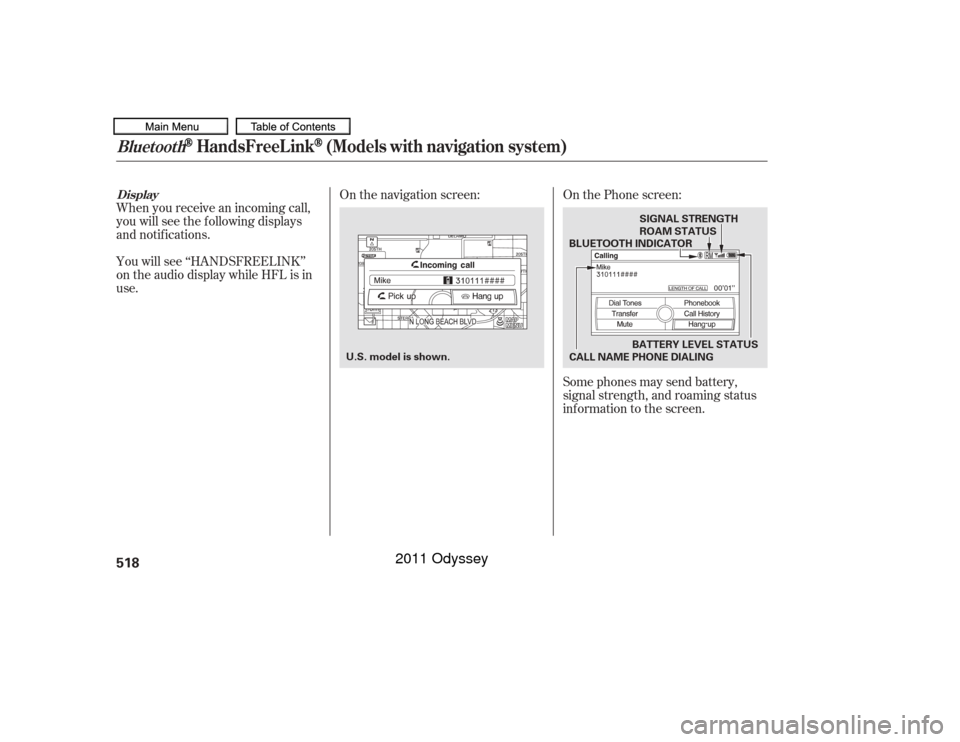
The f irst six speed dial entries are
linked to the audio preset buttons
while in the Phone screen. Press the
corresponding button to begin
automatic dialing.Select ‘‘Speed Dial’’ on the Phone
screen. Alistof upto20storedspeeddial
entries is shown. Select the entry
you want to call, and push
SELECT to begin automatic
dialing.
: Any voice-tagged speed dial
entry can be dialed by voice f rom
any screen. Select ‘‘Redial’’ f rom the Phone
screen or press and hold the PICK-
UP button to redial the last number
dialed in your phone’s history.
2.
1.To make a call using Speed Dial: To make a call using Redial:
Bluetooth
HandsFreeL ink
(Models without navigation system)
Features
513
NOTE
PRESET BUTTONS
10/07/17 10:43:20 31TK8600_518
2011 Odyssey
Page 518 of 722
As required by the FCC:This device complies with Part 15 of theFCC rules. Operation is subject to thef ollowing two conditions: (1) This devicemay not cause harmf ul interf erence, and(2) this device must accept anyinterf erence received, includinginterf erence that may cause undesiredoperation.
Changes or modif ications not expresslyapproved by the party responsible f orcompliance could void the user’sauthority to operate the equipment.
This device complies with IndustryCanada Standard RSS-210.Operation is subject to the f ollowing twoconditions: (1) this device may not causeinterf erence, and (2) this device mustaccept any interf erence that may causeundesired operation of the device.
Bluetooth
Bluetooth
An incoming call on HFL will
interrupt
Audio when it is
playing. Audio will resume when the
call is ended.
The
name and logos are
registered trademarks owned by
Bluetooth SIG, Inc. and any use of
such marks by Honda Motor Co.,
Ltd. is under license. Other
trademarks and trade names are
those of their respective owners.
If your phone has Call Waiting, a
beep sounds f or an incoming call.
Press and release the PICK-UP
button to put the original call on hold
and answer the incoming call.
To return to the original call, press
the PICK-UP button again. If you
don’t want to answer the incoming
call, disregard it and continue with
your original call. If you want to hang
up the original call and answer the
new call, press the HANG-UP button. HFL L imitations
Wireless Technology
Call Wait ing
Bluet oot h
Bluetooth
HandsFreeL ink
(Models without navigation system)
Features
515
10/07/17 10:43:37 31TK8600_520
2011 Odyssey
Page 520 of 722
�µ�µ
�µ �µ To change the volume level of
HFL, use the audio system volume
knob or the steering wheel volume
controls. Try to reduce all background
noise. If the microphone picks up
voices other than yours,
commands may be misinterpreted.
For help at any time, including a list
of available options, say ‘‘Help.’’
Refer to the navigation system
manual f or how to change the
system’s language between English,
French, and Spanish.
Press and release the Talk button
each time you want to make a
command. Af ter the beep, speak in
a clear, natural tone.
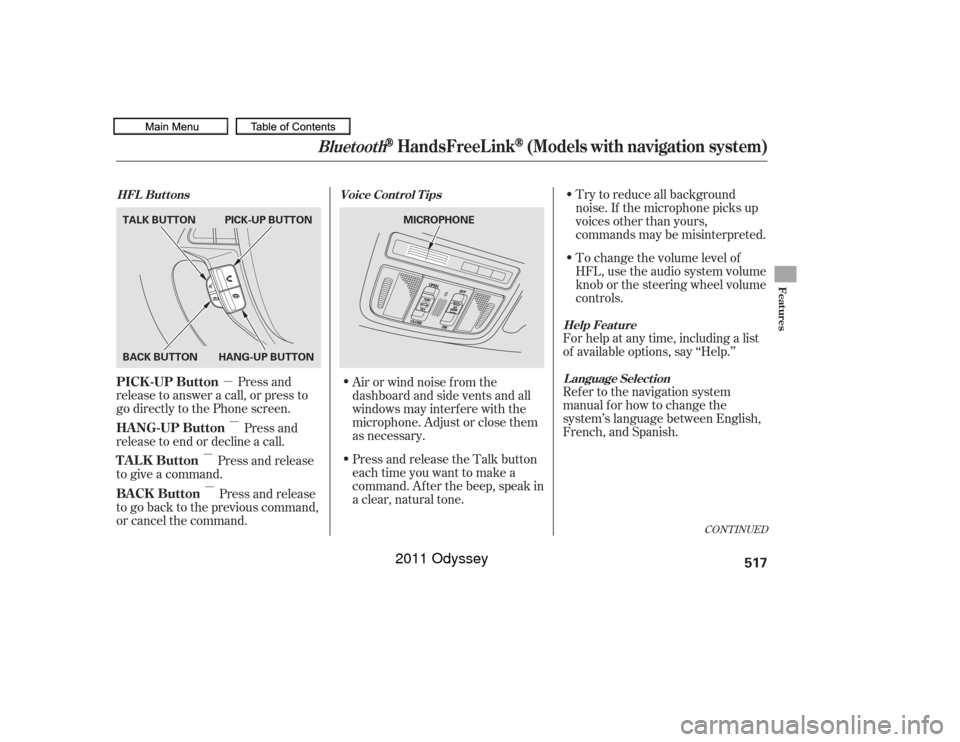
Press and
release to answer a call, or press to
go directly to the Phone screen.
Press and
release to end or decline a call.
Press and release
to give a command.
Press and release
to go back to the previous command,
or cancel the command. Airorwindnoisefromthe
dashboard and side vents and all
windows may interfere with the
microphone. Adjust or close them
as necessary.
CONT INUED
Help Feature
L anguage Select ion
Voice Cont rol T ips
HFL Buttons
PICK -UP Button
HANG-UP Button
TALK Button
BACK Button
Bluetooth
HandsFreeL ink
(Models with navigation system)
Features
517
MICROPHONE
TALK BUTTON
BACK BUTTON
HANG-UP BUTTONPICK-UP BUTTON
10/07/17 10:44:00 31TK8600_522
2011 Odyssey
Page 521 of 722
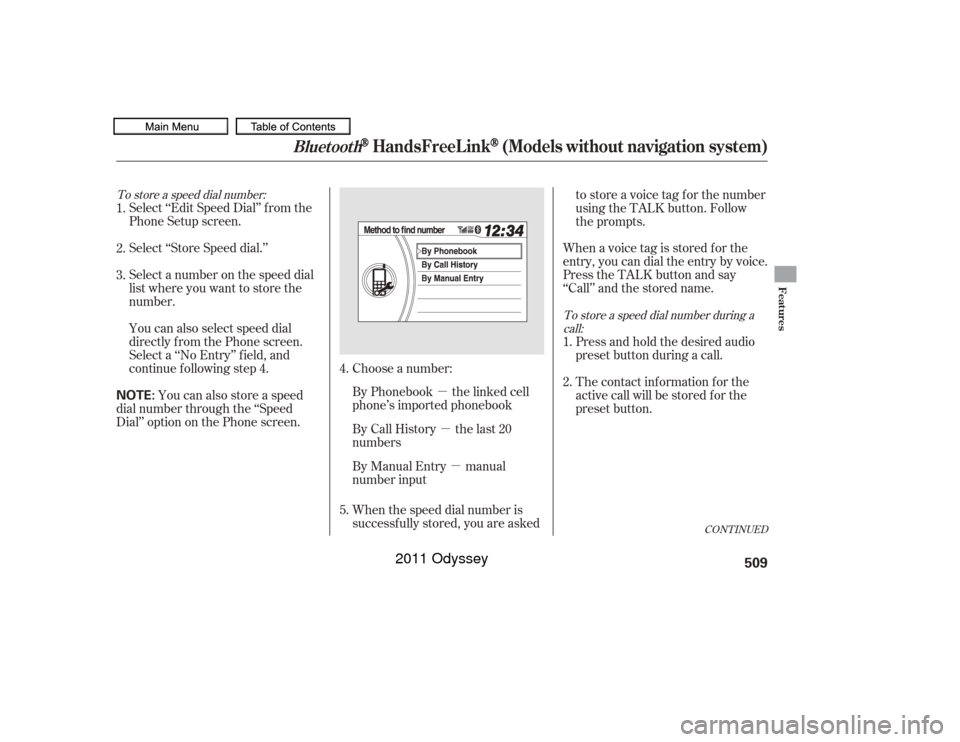
When you receive an incoming call,
you will see the f ollowing displays
and notif ications.
You will see ‘‘HANDSFREELINK’’
on the audio display while HFL is in
use.Some phones may send battery,
signal strength, and roaming status
inf ormation to the screen.
On the navigation screen:
On the Phone screen:DisplayBluetooth
HandsFreeL ink
(Models with navigation system)
518
U.S. model is shown. BATTERY LEVEL STATUS
BLUETOOTH INDICATOR
CALL NAME PHONE DIALING ROAM STATUS SIGNAL STRENGTH
10/07/17 10:44:08 31TK8600_523
2011 Odyssey
Page 540 of 722
As required by the FCC:This device complies with Part 15 of theFCC rules. Operation is subject to thef ollowing two conditions: (1) This devicemay not cause harmf ul interf erence, and(2) this device must accept anyinterf erence received, includinginterf erence that may cause undesiredoperation.
Changes or modif ications not expresslyapproved by the party responsible f orcompliance could void the user’sauthority to operate the equipment.
This device complies with IndustryCanada Standard RSS-210.Operation is subject to the f ollowing twoconditions: (1) this device may not causeinterf erence, and (2) this device mustaccept any interf erence that may causeundesired operation of the device.
Bluetooth
Bluetooth
An incoming call on HFL will
interrupt
Audio when it is
playing. Audio will resume when the
call is ended. The
name and logos are
registered trademarks owned by
Bluetooth SIG, Inc. and any use of
such marks by Honda Motor Co.,
Ltd. is under license. Other
trademarks and trade names are
those of their respective owners.
HFL L imitations
Wireless Technology
Bluet oot h
Bluetooth
HandsFreeL ink
(Models with navigation system)
Features
537
10/07/17 10:46:50 31TK8600_542
2011 Odyssey
Page 552 of 722
Your dealer has Honda accessories
that allow you to personalize your
vehicle. These accessories have
been designed and approved f or your
vehicle, and are covered by warranty.Bef ore installing any accessory:
Make sure the accessory does not
obscure any lights, or interf ere
with proper vehicle operation or
perf ormance.
Modif ying your vehicle, or installing
some non-Honda accessories, can
make it unsaf e. Bef ore you make any
modif ications or add any accessories,
be sure to read the f ollowing
inf ormation.
Be sure electronic accessories do
not overload electrical circuits
(see page ) or interf ere with
the proper operation of your
vehicle.
Although non-Honda accessories
may f it on your vehicle, they may not
meet f actory specif ications, and
could adversely af f ect your vehicle’s
handling, stability, and reliability. Bef ore installing any electronic
accessory, have the installer
contact your dealer for assistance.
If possible, have your dealer
inspect the f inal installation.
Do not install accessories on the
side pillars or across the rear
windows. Accessories installed in
theseareasmayinterferewith
proper operation of the side
curtain airbags.
When properly installed, cellular
phones, alarms, two-way radios, and
low-powered audio systems should
not interf ere with your vehicle’s
computer controlled systems, such
as your airbags, anti-lock brakes, and
tire pressure monitoring system. 673
A ccessories
A ccessories and Modif ications
Bef ore Driving
549
Improper accessories or
modifications can affect your
vehicle’s handling, stability, and
performance, and cause a
crash in which you can be hurt
or killed.
Follow all instructions in this
owner’s manual regarding
accessories and modifications.
10/07/17 10:48:27 31TK8600_554
2011 Odyssey
Page 668 of 722
�´�´
CONT INUED
Although this seems like a simple
procedure, you should take several
precautions.
You cannot start your vehicle by
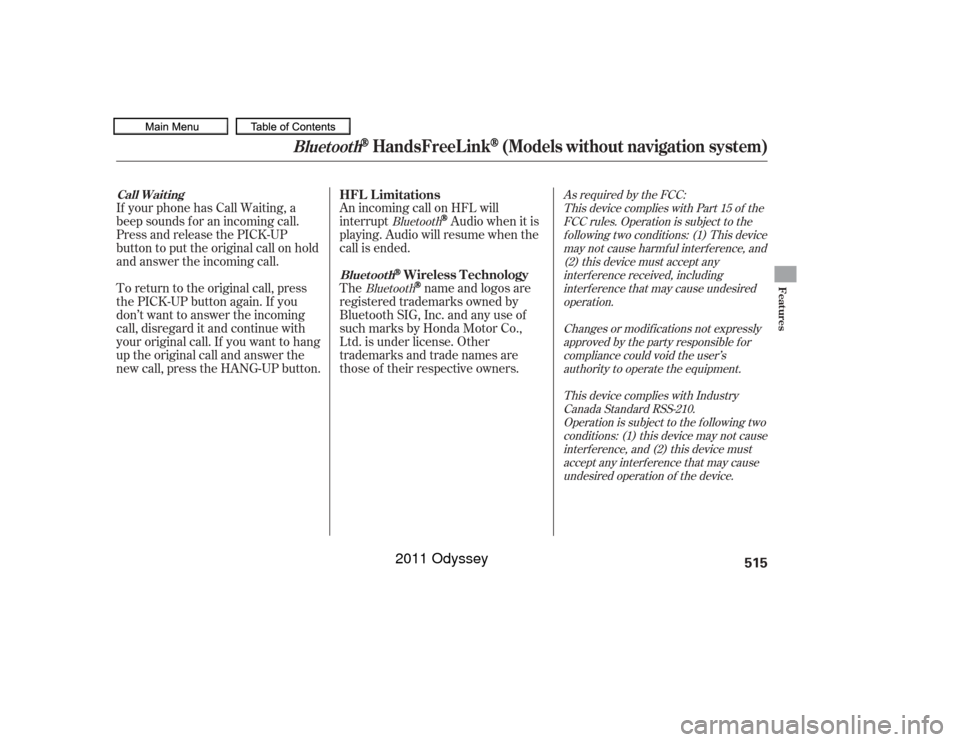
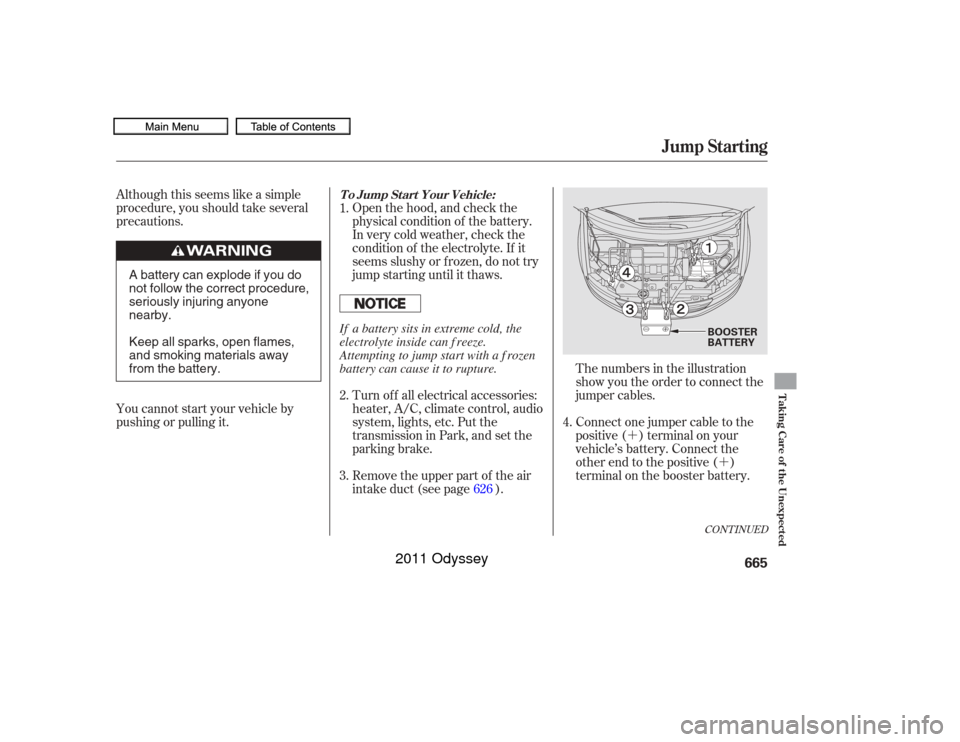
pushing or pulling it. The numbers in the illustration
show you the order to connect the
jumper cables.
Open the hood, and check the
physical condition of the battery.
In very cold weather, check the
condition of the electrolyte. If it
seems slushy or f rozen, do not try
jump starting until it thaws.
Remove the upper part of the air
intake duct (see page ).
Connect one jumper cable to the
positive ( ) terminal on your
vehicle’s battery. Connect the
other end to the positive ( )
terminal on the booster battery.
Turn of f all electrical accessories:
heater, A/C, climate control, audio
system, lights, etc. Put the
transmission in Park, and set the
parking brake.
1.
2.
3.
4.
626
To Jump Start Your Vehicle:
Jump Starting
Taking Care of the Unexpected
665
BOOSTER
BATTERY
A battery can explode if you do
not follow the correct procedure,
seriously injuring anyone
nearby.
Keep all sparks, open flames,
and smoking materials away
from the battery. If a battery sits in extreme cold, the
electrolyte inside can f reeze.
Attempting to jump start with a f rozen
battery can cause it to rupture.
10/07/17 11:03:15 31TK8600_670
2011 Odyssey