Page 68 of 333
Instrument Panel
This chapter describes the buttons, indicators, and gauges that are used during driving.
67
Indicators
................................................... 68
Multi-Information Display Warning and
Information Messages .............................. 78
Gauges and Multi-Information Display Gauges .................................................... 81
Multi-Information Display ......................... 83
Main Menu
Page 74 of 333

73
Instrument Panel
Indicators
IndicatorName On/Blinking Explanation Message
High Temperature Indicator Comes on briefly when you turn
•
the ignition switch to ON
II.
Blinks when the engine coolant
•
temperature goes up, and stays on if the temperature continues to rise. Blinks while driving
• - Drive slowly to
prevent overheating.Stays on while driving
• - Immediately
stop in a safe place and allow the engine to cool.
Overheating P.297
IMA System Indicator Comes on briefly when you turn
•
the ignition switch to ON
II.
Comes on if there is a problem
•
with the IMA system. Remains on or does not come on
•
at all - Avoid high speed driving and
have the vehicle checked by a dealer as soon as possible.
If the IMA Indicator Comes ON P.303
System Message Indicator Comes on along with a beep when
•
a problem is detected. A system message on the multi-information display appears at the same time. While the indicator is on, press the
•
(information) button to see
the message again. Refer to the Indicators information in
•
this chapter when a system message appears on the multi-information display. Take the appropriate action for the message.
The multi-information display does not
•
return to the normal screen unless the warning is canceled, or the
button is pressed.
—
Main MenuTable of Contents
Page 76 of 333

75
Instrument Panel
Indicators
IndicatorName On/Blinking Explanation Message
Lights On Indicator Comes on whenever the light
•
switch is on, or in AUTO when the exterior lights are on. If you remove the key from the
•
ignition switch while the light is on, a chime sounds when the driver’s door is opened.
—
Fog Light Indicator * Comes on when the fog lights are
•
on. ——
Turn Signal IndicatorsThe turn signal indicators blink
•
when you operate the turn signal lever.If you press the hazard warning
•
button, both indicators and all turn signals blink at the same time. Does not blink or blinks rapidly
• -
A turn signal light bulb has blown. Change the bulb immediately. Replacing Light Bulbs P.262, 263—
Immobilizer System IndicatorComes on briefly when you turn
•
the ignition switch to ON
II, then
goes off. Comes on if the immobilizer
•
system cannot recognize the key information. Blinks
• - You cannot start the engine.
Turn the ignition switch to LOCK
0, pull the key out, and then insert
the key and turn it to ON
II again.
Repeatedly blinks
• - The system may
be malfunctioning. Have the vehicle checked by a dealer.Do not attempt to alter this system
•
or add other devices to it. Electrical problems can occur.
—
*Not available on all models
Main MenuTable of Contents
Page 79 of 333
78
Instrument Panel
Indicators Multi-Information Display Warning and Information Messages
Multi-Information Display Warning and Information Messages The following messages appear only on the multi-information display. Press the
(information) button to see the message again
with the system message indicator on.
Message Condition Explanation
Appears when the fuel fill cap is loose or is not
•
installed.
Tighten the Fuel Fill Cap P.301
Appears if there is a problem with the DRL system.
•
Daytime Running Lights P.112
Canadian models only Appears when washer fluid gets low.
• Refilling washer fluid.
•
Refilling Window Washer Fluid P.257
Appears when the scheduled maintenance is due
•
soon. Consequently, “SERVICE DUE NOW” and “SERVICE
•
PAST DUE” follow.
Maintenance Minder ™
P.241
Appears when you open the driver’s door while the
•
ignition key is in ACCESSORY
I. Turn the ignition switch to LOCK
•
0, then
remove the key.
Main MenuTable of Contents
Page 80 of 333
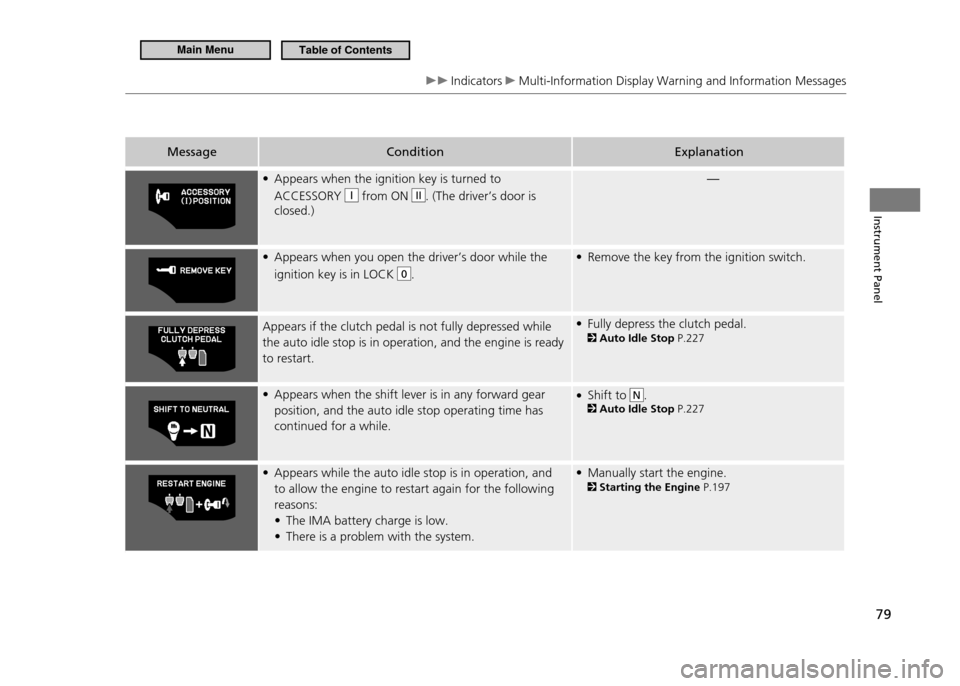
79
Instrument Panel
Indicators Multi-Information Display Warning and Information Messages
Message ConditionExplanation
Appears when the ignition key is turned to
•
ACCESSORY
from ON II. (The driver’s door is
closed.) —
Appears when you open the driver’s door while the
•
ignition key is in LOCK
0. Remove the key from the ignition switch.
•
Appears if the clutch pedal is not fully depressed while
the auto idle stop is in operation, and the engine is ready
to restart. Fully depress the clutch pedal.
•
Auto Idle Stop P.227
Appears when the shift lever is in any forward gear
•
position, and the auto idle stop operating time has continued for a while. Shift to
•
N. Auto Idle Stop P.227
Appears while the auto idle stop is in operation, and
•
to allow the engine to restart again for the following reasons:
The IMA battery charge is low.
•
There is a problem with the system.
• Manually start the engine.
•
Starting the Engine P.197
Main MenuTable of Contents
Page 81 of 333
80
Instrument Panel
Indicators Multi-Information Display Warning and Information Messages
Message ConditionExplanation
Automatic transmission (CVT) model Manual transmission model Appears while you are customizing the settings for the
•
following reasons: The shift lever is moved out of
•
P (CVT).
The parking brake is released (manual transmission).
•
Customization Procedure P.90
Main MenuTable of Contents
Page 84 of 333
83
Instrument Panel
Gauges and Multi-Information Display Multi-Information Display
Multi-Information Display
The multi-information display shows the odometer, trip meter, outside temperature, and other fuel economy information.It also displays important messages such as warnings and other helpful information.Switching the Display
■
Press the button or the SEL/RESET button to change the display.
Eco Guide feedback with Eco Drive Bar
OFF
HFL *
Customizable Setting Entry Engine Oil Life Power Flow
MonitorAverage Vehicle SpeedElapsed Time
Average Fuel Economy Records
Average Fuel Economy A
Range
SEL/RESET Button
(Information) Button Shown when
Bluetooth®
HandsFreeLink ®
is activated.
* Not available on all models
Main MenuTable of Contents
Page 108 of 333

107
Controls
Opening and Closing the Windows
Opening/Closing the Power Windows
Opening/Closing the Power Windows
The auto-reverse function stops sensing when the window is almost closed to ensure that it fully closes. The power windows can be operated for up to 10 minutes after you turn the ignition switch off.Opening either door cancels this function. Auto Reverse If a power window senses resistance when closing automatically, it will stop closing, and reverse direction. The driver’s window auto reverse function is disabled when you continuously pull up the switch.
WARNING
Closing a power window on someone’s hands or fingers can cause serious injury. Make sure your passenger is away from the window before closing it.
The power windows can be opened and closed when the ignition switch is in ON
II, using the switches on the doors. The driver side switch can be used to open and
close both windows. The main switch on the driver side must be switched off (not pushed in) to open and close the passenger’s window from the passenger side. When the main switch is turned on (pushed in), you can only operate the passenger’s window from the driver’s seat. Turn the main switch on if a child rides in the passenger’s seat.
Opening/Closing the Driver’s Window
■
■ Automatic Operation
To open: Push the switch down firmly.
To close: Pull the switch up firmly.
The window opens or closes completely. To stop the window at any time, push or pull the switch briefly.
Manual Operation
■
To open: Push the switch down lightly.
To close: Pull the switch up lightly.
Release the switch when the window reaches the desired position.
On
Main Switch
Passenger’s Window Switch
Driver’s Window Switch Off
Main MenuTable of Contents