2011 FORD EXPLORER instrument cluster
[x] Cancel search: instrument clusterPage 205 of 449
•Objects stowed in the seatback map pocket (if equipped)
•Objects placed on the occupant’s lap
•Cargo interference with the seat
•Other passengers pushing or pulling on the seat
•Rear passenger feet and knees resting or pushing on the seat
The conditions listed above may cause the weight of a properly seated
occupant to be incorrectly interpreted by the front passenger sensing
system. The person in the front passenger seat may appear heavier or
lighter due to the conditions described in the list above.
WARNING:To reduce the risk of possible serious injury:
Do not stow objects in seat back map pocket (if equipped) or
hang objects off seat back if a child is in the front passenger seat.
Do not place objects underneath the front passenger seat or between
the seat and the center console (if equipped).
Check the passenger airbag status indicator lamp for proper airbag
status.
Failure to follow these instructions may interfere with the front
passenger seat sensing system.
In case there is a problem with the
front passenger sensing system, the
airbag readiness light in the
instrument cluster will stay lit.
If the airbag readiness light is lit, do the following:
The driver and/or adult passengers should check for any objects that
may be lodged underneath the front passenger seat or cargo interfering
with the seat.
If objects are lodged and/or cargo is interfering with the seat; please take
the following steps to remove the obstruction:
•Pull the vehicle over.
•Turn the vehicle off.
•Driver and/or adult passengers should check for any objects lodged
underneath the front passenger seat or cargo interfering with the seat.
•Remove the obstruction(s) (if found).
•Restart the vehicle.
Seating and Safety Restraints
204
2011 Explorer(exp)
Owners Guide, 1st Printing
USA(fus)
Page 206 of 449

•Wait at least two minutes and verify that the airbag readiness light in
the instrument cluster is no longer illuminated
•If the airbag readiness light in the instrument cluster remains
illuminated, this may or may/not be a problem due to the front
passenger sensing system.
DO NOT attempt to repair or service the system; take your vehicle
immediately to an authorized dealer.
If it is necessary to modify an advanced front airbag system to
accommodate a person with disabilities, contact the Ford Customer
Relationship Center at the phone number shown in theCustomer
Assistancesection of thisOwner’s Guideor see your authorized dealer.
WARNING:Any alteration/modification to the front passenger
seat may affect the performance of the front passenger sensing
system.
Determining if the system is operational
The supplemental restraint system uses a warning indicator light in the
instrument cluster or a backup tone to indicate the condition of the
system. Refer to theWarning lights and chimessection in the
Instrument Clusterchapter. Routine maintenance of the airbag is not
required.
A difficulty with the system is indicated by one or more of the following:
•The readiness light (same light
for front and side airbag system)
will either flash or stay lit.
•The readiness light will not
illuminate immediately after ignition is turned on.
•A series of five beeps will be heard. The tone pattern will repeat
periodically until the problem and/or light are repaired.
If any of these things happen, even intermittently, have the supplemental
restraint system serviced at an authorized dealer immediately. Unless
serviced, the system may not function properly in the event of a
collision.
Seating and Safety Restraints
205
2011 Explorer(exp)
Owners Guide, 1st Printing
USA(fus)
Page 211 of 449

The Safety Canopy is mounted to roof side-rail sheet metal, behind the
headliner, above each row of seats. In certain lateral collisions or rollover
events, the Safety Canopy system will be activated, regardless of which
seats are occupied. The Safety Canopy is designed to inflate between the
side window area and occupants to further enhance protection provided
in side impact collisions and rollover events.
The fact that the Safety Canopy did not activate in a collision does not
mean that something is wrong with the system. Rather, it means the
forces were not of the type sufficient to cause activation. The Safety
Canopy is designed to inflate in certain side impact collisions or rollover
events, not in rear impact, frontal or near-frontal collisions, unless the
collision causes sufficient lateral deceleration or rollover.
WARNING:If the Safety
Canopy system has
deployed, the Safety Canopy will
not function again unless replaced.
The Safety Canopy system
(including the A, B, C, and D
pillar trim and headliner) must be
inspected and serviced by an
authorized dealer. If the Safety
Canopy is not replaced, it will not
function again, which will increase
the risk of injury in a future
collision.
Determining if the system is operational
The SRS uses a readiness light in the instrument cluster or a tone to
indicate the condition of the system. Refer to theAirbag readiness
section in theInstrument Clusterchapter. Routine maintenance of the
airbag is not required.
Any difficulty with the system is indicated by one or more of the following:
•The readiness airbag light (same light as for front airbag system) will
either flash or stay lit.
•The readiness light will not illuminate immediately after ignition is
turned on.
Seating and Safety Restraints
210
2011 Explorer(exp)
Owners Guide, 1st Printing
USA(fus)
Page 270 of 449
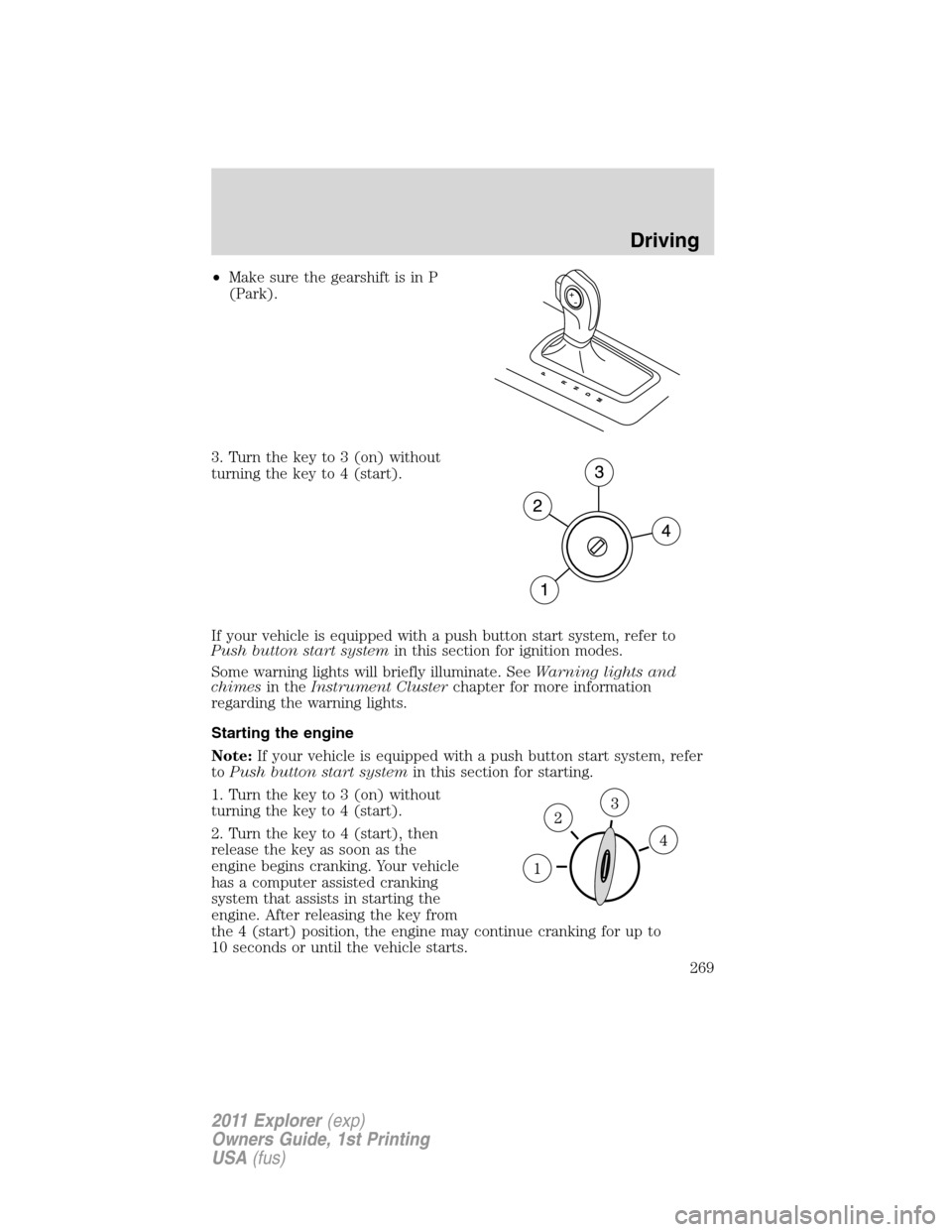
•Make sure the gearshift is in P
(Park).
3. Turn the key to 3 (on) without
turning the key to 4 (start).
If your vehicle is equipped with a push button start system, refer to
Push button start systemin this section for ignition modes.
Some warning lights will briefly illuminate. SeeWarning lights and
chimesin theInstrument Clusterchapter for more information
regarding the warning lights.
Starting the engine
Note:If your vehicle is equipped with a push button start system, refer
toPush button start systemin this section for starting.
1. Turn the key to 3 (on) without
turning the key to 4 (start).
2. Turn the key to 4 (start), then
release the key as soon as the
engine begins cranking. Your vehicle
has a computer assisted cranking
system that assists in starting the
engine. After releasing the key from
the 4 (start) position, the engine may continue cranking for up to
10 seconds or until the vehicle starts.
Driving
269
2011 Explorer(exp)
Owners Guide, 1st Printing
USA(fus)
Page 271 of 449

Note:Cranking may be stopped at any time by turning the key to the off
position.
3. After idling for a few seconds, release the parking brake, apply the
brake, shift into gear and drive.
Note:If the engine does not start on the first try, turn the vehicle to the
off position, wait 10 seconds and try Step 2 again. If the engine still fails
to start, press the accelerator to the floor and try Step 2 again, keeping
the accelerator on the floor until the engine begins to accelerate above
cranking speeds; this will allow the engine to crank with the fuel shut off
in case the engine is flooded with fuel.
Push button start system (if equipped)
If your vehicle is equipped with the
push button start system, you can
start your vehicle by pressing the
start button in combination with the
brake pedal rather than using a key.
The start button is located on the
instrument panel to the right of the
steering wheel.
In order to operate the push button
start system and start the vehicle,
your intelligent access key (IA key)
must be present inside the vehicle.
Ignition modes
1. Off — press and release the START/STOP button without applying the
brake pedal when your vehicle is in accessory or on modes or when the
engine is running.
Note:In order to switch off the engine while the vehicle is in motion,
shift to neutral and use the brakes to bring the vehicle to a safe stop.
After the vehicle has stopped, turn the engine off and shift into park.
Then, press and hold the START/STOP button for at least one second or
press the START/STOP button three times within two seconds.
2. Accessory — press and release the START/STOP button without
applying the brake pedal. This allows electrical accessories such as the
radio to operate while the engine is not running. ACCESSORY POWER
ACTIVE and PRESS BRAKE TO START will be displayed in the message
center. Refer toMessage centerin theInstrument Clusterchapter for
more information.
Driving
270
2011 Explorer(exp)
Owners Guide, 1st Printing
USA(fus)
Page 272 of 449

3. On — press and hold the START/STOP button for at least one second
without applying the brake pedal. This will power your vehicle’s electrical
system and the warning lights in the instrument cluster will illuminate,
but the engine will remain off.Note:You can start the engine from any
ignition mode.
4. Start — press the START/STOP button (for any length of time) while
applying the brake pedal.Note:The indicator light on the start button
will illuminate when the vehicle is in on mode and when the engine is
started.
There may be areas inside your vehicle where the IA key is not detected.
If the message NO KEY DETECTED appears on your message center
when you press the START/STOP button, it may be necessary to move
your IA key to another area within the vehicle. The IA key may not be
detected near the roof (between the driver or passenger sunvisor and
the roof, or in the overhead console area) or in the extreme corners of
the rear package tray, near your audio speakers. It is not recommended
that you stow the IA key in these locations. If you move the IA key to a
location where it has been detected before and you still see the NO KEY
DETECTED message, your IA key’s battery may be low or you may be in
an area with excessive radio frequency interference. If this occurs, you
can use the back-up method to start your vehicle (see below).
Back-up method of starting:Your IA key uses a radio frequency signal
to communicate with your vehicle and authorize your vehicle to start
when you press the START/STOP button and apply the brake pedal. If
excessive radio frequency interference is present in the area, or if the
battery in your IA key is low, it may be necessary to start your car by
inserting the IA key in the back-up slot, located at the front of the center
console storage compartment. Insert the IA key into the slot with
buttons facing out and with key ring up. After inserting the IA key into
the back-up slot, use the START/STOP button and brake pedal to start
your vehicle as usual. The vehicle should respond normally as long as the
IA key is in the back-up slot. Once the vehicle is started, the IA key can
be removed from the back-up slot, if desired.
Fast restart feature:The fast restart feature allows you to re-start
your vehicle within 20 seconds of switching the vehicle off, if a valid IA
key is not present when the vehicle is switched off. When you switch
your vehicle off without an IA key in the passenger compartment or
trunk, the message RESTART NOW OR KEY IS NEEDED will be
displayed in the message center. You can re-start the vehicle (by
applying the brake pedal and pressing the START/STOP button) for up
to 20 seconds, even though the IA key is not present. After 20 seconds
have expired, you can no longer start your vehicle without the IA key
present inside the vehicle.
Driving
271
2011 Explorer(exp)
Owners Guide, 1st Printing
USA(fus)
Page 275 of 449

•Be sure that areas where the vehicle is parked are clean and clear of
all combustibles such as petroleum products, dust, rags, paper and
similar items.
•Be sure that the engine block heater, heater cord and extension cord
are solidly connected. A poor connection can cause the cord to
become very hot and may result in an electrical shock or fire. Be sure
to check for heat anywhere in the electrical hookup once the system
has been operating for approximately a half hour.
•Finally, have the engine block heater system checked during your fall
tune-up to be sure it’s in good working order.
How to use the engine block heater
Ensure the receptacle terminals are clean and dry prior to use. To clean
them, use a dry cloth.
Depending on the type of factory installed equipment, your engine block
heater will use .4 to 1.0 kilowatt-hours of energy per hour of use. Your
factory installed block heater system does not have a thermostat; however,
maximum temperature is attained after approximately three hours of
operation. Block heater operation longer than three hours will not improve
system performance and will unnecessarily use additional electricity.
Make sure system is unplugged and properly stowed before driving the
vehicle. While not in use, make sure the protective cover seals the
prongs of the engine block heater cord plug.
BRAKES
Occasional brake noise is normal. If a metal-to-metal, continuous grinding
or continuous squeal sound is present, the brake linings may be worn-out
and should be inspected by an authorized dealer. If the vehicle has
continuous vibration or shudder in the steering wheel while braking, the
vehicle should be inspected by an authorized dealer.
Refer toWarning lights and
chimesin theInstrument Cluster
chapter for information on the brake
system warning light.
Four-wheel anti-lock brake system (ABS)
Your vehicle is equipped with an anti-lock braking system (ABS). This
system helps you maintain steering control during emergency stops by
keeping the brakes from locking. Noise from the ABS pump motor and
brake pedal pulsation may be observed during ABS braking and the
P!
BRAKE
Driving
274
2011 Explorer(exp)
Owners Guide, 1st Printing
USA(fus)
Page 276 of 449

brake pedal may suddenly travel a little farther as soon as ABS braking is
done and normal brake operation resumes. These are normal
characteristics of the ABS and should be no reason for concern.
Using ABS
When hard braking is required, apply continuous force on the brake
pedal. Do not pump the brake pedal since this will reduce the
effectiveness of the ABS and will increase your vehicle’s stopping
distance. The ABS will be activated immediately, allowing you to retain
steering control during hard braking and on slippery surfaces. However,
the ABS does not decrease stopping distance.
Brake assist
The brake assist system provides full braking force during panic braking
situations. It detects a rapid application of the brake pedal and uses the
ABS system to achieve maximum braking pressure. Once a panic brake
application is detected, the system will remain activated as long as the
brake pedal is pressed or ABS is engaged. The system is deactivated by
either releasing the brake pedal or coming to a complete stop. When the
system activates, noise from the ABS pump motor and brake pedal
pulsation may be observed; this is normal.
ABS warning lamp
The ABS lamp in the instrument
cluster momentarily illuminates
when the ignition is turned on. If
the light does not illuminate during
start up, remains on or flashes, the
ABS may be disabled and may need to be serviced.
Even when the ABS is disabled,
normal braking is still effective. If
your BRAKE warning lamp
illuminates with the parking brake
released, have your brake system
serviced immediately.
Brake override
This vehicle is equipped with a brake override feature. In the event the
accelerator pedal becomes stuck or entrapped, applying steady and firm
pressure to the brake pedal will both slow the vehicle and reduce engine
power. If you experience this condition, apply the brakes and bring your
vehicle to a safe stop. Turn the engine off, shift to P (Park) and apply
ABS
P!
BRAKE
Driving
275
2011 Explorer(exp)
Owners Guide, 1st Printing
USA(fus)