2011 FORD EXPLORER parking brake
[x] Cancel search: parking brakePage 269 of 449

WARNING:Do not start your vehicle in a closed garage or in
other enclosed areas. Exhaust fumes can be toxic. Always open
the garage door before you start the engine. SeeGuarding against
exhaust fumesin this chapter for more instructions.
WARNING:If you smell exhaust fumes inside your vehicle, have
your dealer inspect your vehicle immediately. Do not drive if you
smell exhaust fumes.
Important safety precautions
When the engine starts, the idle RPM runs faster to warm the engine. If
the engine idle speed does not slow down automatically, have the vehicle
checked.
If the vehicle is operated in a heavy snow storm or blowing snow
conditions, the engine air induction may become partially clogged with
snow and/or ice. If this occurs the engine may experience a significant
reduction in power output. At the earliest opportunity, clear all snow
and/or ice away for the air induction inlet.
Before starting the vehicle:
1. Make sure all occupants buckle their safety belts. For more
information on safety belts and their proper usage, refer to theSeating
and Safety Restraintschapter.
2. Make sure the headlamps and electrical accessories are off.
•Make sure the parking brake is
set.
Driving
268
2011 Explorer(exp)
Owners Guide, 1st Printing
USA(fus)
Page 271 of 449

Note:Cranking may be stopped at any time by turning the key to the off
position.
3. After idling for a few seconds, release the parking brake, apply the
brake, shift into gear and drive.
Note:If the engine does not start on the first try, turn the vehicle to the
off position, wait 10 seconds and try Step 2 again. If the engine still fails
to start, press the accelerator to the floor and try Step 2 again, keeping
the accelerator on the floor until the engine begins to accelerate above
cranking speeds; this will allow the engine to crank with the fuel shut off
in case the engine is flooded with fuel.
Push button start system (if equipped)
If your vehicle is equipped with the
push button start system, you can
start your vehicle by pressing the
start button in combination with the
brake pedal rather than using a key.
The start button is located on the
instrument panel to the right of the
steering wheel.
In order to operate the push button
start system and start the vehicle,
your intelligent access key (IA key)
must be present inside the vehicle.
Ignition modes
1. Off — press and release the START/STOP button without applying the
brake pedal when your vehicle is in accessory or on modes or when the
engine is running.
Note:In order to switch off the engine while the vehicle is in motion,
shift to neutral and use the brakes to bring the vehicle to a safe stop.
After the vehicle has stopped, turn the engine off and shift into park.
Then, press and hold the START/STOP button for at least one second or
press the START/STOP button three times within two seconds.
2. Accessory — press and release the START/STOP button without
applying the brake pedal. This allows electrical accessories such as the
radio to operate while the engine is not running. ACCESSORY POWER
ACTIVE and PRESS BRAKE TO START will be displayed in the message
center. Refer toMessage centerin theInstrument Clusterchapter for
more information.
Driving
270
2011 Explorer(exp)
Owners Guide, 1st Printing
USA(fus)
Page 276 of 449

brake pedal may suddenly travel a little farther as soon as ABS braking is
done and normal brake operation resumes. These are normal
characteristics of the ABS and should be no reason for concern.
Using ABS
When hard braking is required, apply continuous force on the brake
pedal. Do not pump the brake pedal since this will reduce the
effectiveness of the ABS and will increase your vehicle’s stopping
distance. The ABS will be activated immediately, allowing you to retain
steering control during hard braking and on slippery surfaces. However,
the ABS does not decrease stopping distance.
Brake assist
The brake assist system provides full braking force during panic braking
situations. It detects a rapid application of the brake pedal and uses the
ABS system to achieve maximum braking pressure. Once a panic brake
application is detected, the system will remain activated as long as the
brake pedal is pressed or ABS is engaged. The system is deactivated by
either releasing the brake pedal or coming to a complete stop. When the
system activates, noise from the ABS pump motor and brake pedal
pulsation may be observed; this is normal.
ABS warning lamp
The ABS lamp in the instrument
cluster momentarily illuminates
when the ignition is turned on. If
the light does not illuminate during
start up, remains on or flashes, the
ABS may be disabled and may need to be serviced.
Even when the ABS is disabled,
normal braking is still effective. If
your BRAKE warning lamp
illuminates with the parking brake
released, have your brake system
serviced immediately.
Brake override
This vehicle is equipped with a brake override feature. In the event the
accelerator pedal becomes stuck or entrapped, applying steady and firm
pressure to the brake pedal will both slow the vehicle and reduce engine
power. If you experience this condition, apply the brakes and bring your
vehicle to a safe stop. Turn the engine off, shift to P (Park) and apply
ABS
P!
BRAKE
Driving
275
2011 Explorer(exp)
Owners Guide, 1st Printing
USA(fus)
Page 277 of 449
the parking brake, and then inspect the accelerator pedal for any
interferences. If none are found and the condition persists, have your
vehicle towed to the nearest dealer.
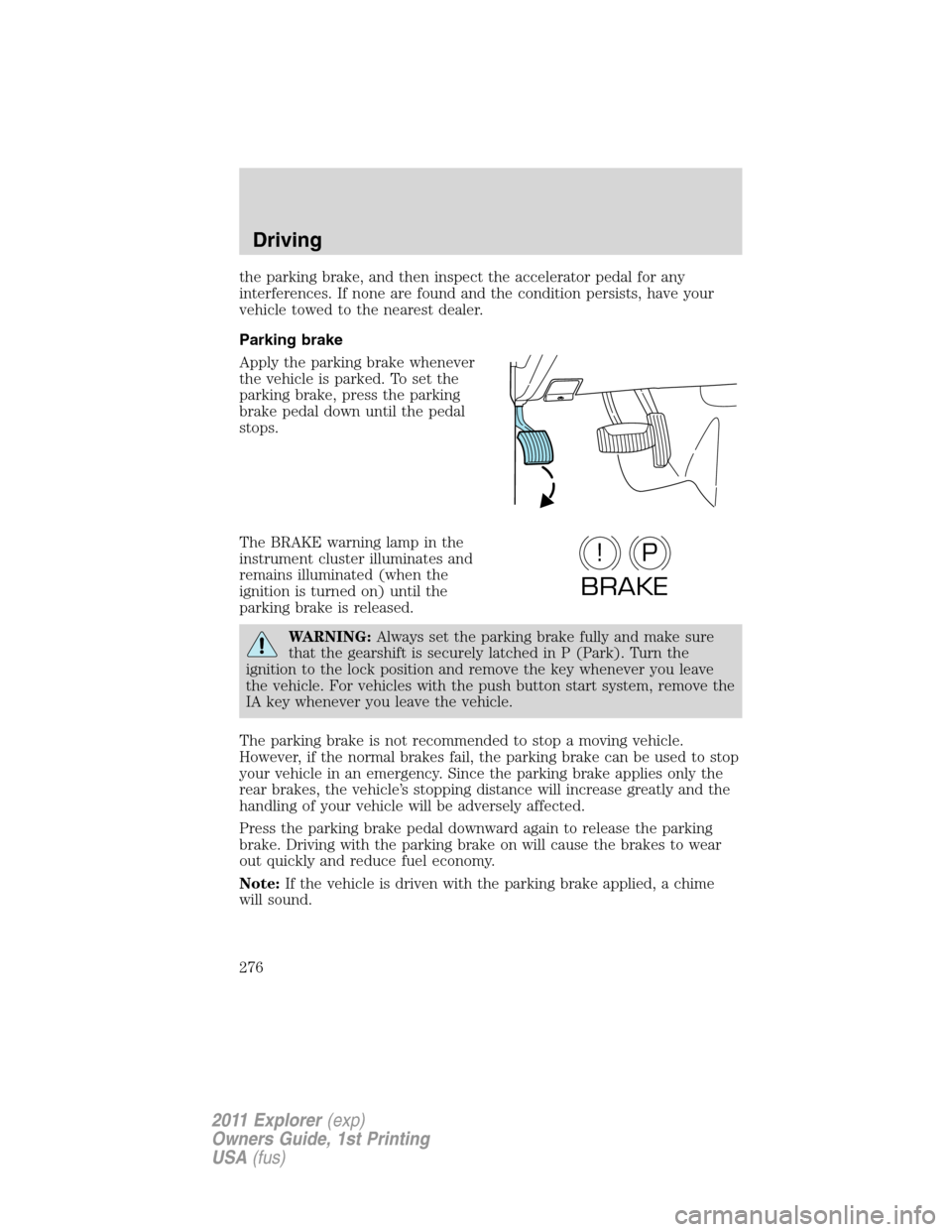
Parking brake
Apply the parking brake whenever
the vehicle is parked. To set the
parking brake, press the parking
brake pedal down until the pedal
stops.
The BRAKE warning lamp in the
instrument cluster illuminates and
remains illuminated (when the
ignition is turned on) until the
parking brake is released.
WARNING:Always set the parking brake fully and make sure
that the gearshift is securely latched in P (Park). Turn the
ignition to the lock position and remove the key whenever you leave
the vehicle. For vehicles with the push button start system, remove the
IA key whenever you leave the vehicle.
The parking brake is not recommended to stop a moving vehicle.
However, if the normal brakes fail, the parking brake can be used to stop
your vehicle in an emergency. Since the parking brake applies only the
rear brakes, the vehicle’s stopping distance will increase greatly and the
handling of your vehicle will be adversely affected.
Press the parking brake pedal downward again to release the parking
brake. Driving with the parking brake on will cause the brakes to wear
out quickly and reduce fuel economy.
Note:If the vehicle is driven with the parking brake applied, a chime
will sound.
P!
BRAKE
Driving
276
2011 Explorer(exp)
Owners Guide, 1st Printing
USA(fus)
Page 284 of 449

HILL DESCENT CONTROL™ (IF EQUIPPED)
Hill descent control allows the driver to set and maintain vehicle speed
while descending steep grades in various surface conditions.
WARNING:Hill descent control cannot control descent in all
surface conditions and circumstances, such as ice or extremely
steep grades. Hill descent control is a driver assist system and cannot
substitute for good judgment by the driver. Failure to do so may result
in loss of vehicle control, crash or serious injury.
Hill descent control can maintain vehicle speeds on downhill grades
between 3 mph (5 km/h) and 20 mph (32 km/h). Above 20 mph
(32 km/h), the system remains armed, but descent speed cannot be set
or maintained.
WARNING:Hill descent control does not provide hill hold at
zero mph (0 km/h). When stopped, the parking brake must be
applied and/or the vehicle must be placed in P (Park) or it may roll
away.
Hill descent control requires a cooling down interval after a period of
sustained use. The amount of time that the feature can remain active
before cooling varies with conditions. The system will provide a warning
in the message center and a chime will sound when the system is about
to disengage for cooling. At this time, manually apply the brakes as
needed to maintain descent speed.
Enabling hill descent control and setting the descent speed
1. Press and release the hill descent
button located in the center of the
terrain management control. A light
in the control will illuminate and
chime will sound when this feature
is activated.
2. To increase descent speed, press the accelerator pedal until the
desired speed is reached. To decrease descent speed, press the brake
pedal until the desired speed is reached.
Whether accelerating or decelerating, once the desired descent speed is
reached, remove your feet from the pedals and the chosen vehicle speed
will be maintained.
Driving
283
2011 Explorer(exp)
Owners Guide, 1st Printing
USA(fus)
Page 288 of 449

BRAKE-SHIFT INTERLOCK
This vehicle is equipped with a brake-shift interlock (BSI) feature that
prevents the gearshift lever from being moved from P (Park) when the
ignition is in the on position unless the brake pedal is pressed.
If you cannot move the gearshift lever out of P (Park) with ignition in
the on position and the brake pedal pressed, it is possible that a fuse has
blown or the vehicle’s brake lamps are not operating properly. Refer to
Fuses and relaysin theRoadside Emergencieschapter.
If the fuse is not blown and the brake lamps are working properly, the
following procedure will allow you to move the gearshift lever from P
(Park):
1. Apply the parking brake and turn
the ignition off.
2. Open the small forward storage
compartment, and remove the
rubber protective cover.
3. Using a screwdriver (or similar
tool), carefully pry off and remove
the BSI access cover.
4. Locate the brake shift interlock
lever in front of the shifter
assembly.
5. Apply the brake pedal. Gently
pull and hold the brake shift
interlock lever while pulling the
gearshift lever out of the P (Park)
position and into the N (Neutral)
position.
6. Install the BSI access cover.
7. Apply the brake pedal, start the vehicle, and release the parking
brake.
See your authorized dealer as soon as possible if this procedure
is used.
Driving
287
2011 Explorer(exp)
Owners Guide, 1st Printing
USA(fus)
Page 289 of 449

WARNING:Do not drive your vehicle until you verify that the
brakelamps are working.
WARNING:Always set the parking brake fully and make sure
the gearshift is latched in P (Park). Turn the ignition off.
WARNING:If the parking brake is fully released, but the brake
warning lamp remains illuminated, the brakes may not be
working properly. See your authorized dealer.
AUTOMATIC TRANSMISSION OPERATION
Automatic transmission adaptive learning
Your transmission is equipped with an adaptive learning strategy found in
the vehicle computer. This feature is designed to increase durability and
provide consistent shift feel over the life of the vehicle. A new vehicle or
transmission may have firm and/or soft shifts. This operation is
considered normal and will not affect function or durability of the
transmission. Over time, the adaptive learning process will fully update
transmission operation. Additionally, whenever the battery is
disconnected or a new battery installed, the strategy must be relearned.
Understanding the gearshift positions of the 6–speed automatic
transmission
Your vehicle has been designed to improve fuel economy by reducing
fuel usage while coasting or decelerating. When you take your foot off
the accelerator pedal and the vehicle begins to slow down, the torque
converter clutch locks up and aggressively shuts off fuel flow to the
engine while decelerating. This fuel economy benefit may be perceived
as a light to medium braking sensation when removing your foot from
the accelerator pedal.
Driving
288
2011 Explorer(exp)
Owners Guide, 1st Printing
USA(fus)
Page 290 of 449

P (Park)
This position locks the transmission
and prevents the front wheels from
turning.
To put your vehicle in gear:
•Press the brake pedal
•Move the gearshift lever into the
desired gear
To put your vehicle in P (Park):
•Come to a complete stop
•Move the gearshift lever and securely latch it in P (Park)
WARNING:Always set the parking brake fully and make sure
the gearshift is latched in P (Park). Turn the ignition to the off
position and remove the key whenever you leave your vehicle.
R (Reverse)
With the gearshift lever in R (Reverse), the vehicle will move backward.
Always come to a complete stop before shifting into and out of R
(Reverse).
N (Neutral)
With the gearshift lever in N (Neutral), the vehicle can be started and is
free to roll. Hold the brake pedal down while in this position.
D (Drive) with Overdrive
The normal driving position for the best fuel economy. Transmission
operates in gears one through six.
The automatic transmission shift strategy has the ability to detect hilly
terrain or mountainous areas and will provide a limited amount of grade
assist features automatically. Refer to D (Drive) with Grade assist or
SelectShift for more information.
D (Drive) with Tow on
The tow feature improves transmission operation when towing a trailer
or a heavy load. All transmission gear ranges are available when using
tow.
Tow can be activated by pressing theTOWswitch located on the
instrument panel by the headlamp control. TheTOW/HAULmessage
will illuminate in the instrument cluster.
PRNDL
Driving
289
2011 Explorer(exp)
Owners Guide, 1st Printing
USA(fus)