2011 FORD EXPLORER fuel
[x] Cancel search: fuelPage 24 of 449

Optional cluster
Shown in standard measure. Metric similar.
1.Multifunction display:This displays the fuel gauge, tachometer,
engine coolant temperature, odometer/trip meter and other vehicle
features. This is also used to configure different vehicle personalization
options and display the status of various vehicle functions. SeeUplevel
message centerin this chapter for more information.
2.Speedometer:Indicates the current vehicle speed.
3.Infotainment display:This display is used for the entertainment,
phone, navigation and climate systems. See theMyFord Touch
supplement for more information.
BASE MESSAGE CENTER (IF EQUIPPED)
WARNING:Driving while distracted can result in loss of vehicle
control, accident and injury. Ford strongly recommends that
drivers use extreme caution when using any device or feature that may
take their focus off the road. Your primary responsibility is the safe
operation of the vehicle. We recommend against the use of any handheld
device while driving and that you comply with all applicable laws.
Your vehicle’s message center is capable of monitoring many vehicle
systems and will alert you to potential vehicle problems and various
conditions with informational messages and/or warnings.
132
km/h20
0 40 60 80
100120140160180
200
80
60
40
20
0 100120140
MPH
Instrument Cluster
23
2011 Explorer(exp)
Owners Guide, 1st Printing
USA(fus)
Page 25 of 449

The message center is also used to program/configure the different
features of your vehicle. The message center display is located in the
instrument cluster.
Use the left steering wheel controls to navigate through the message center.
•Press the up/down arrow buttons
to move up/down through the
message center choices.
•Press the left/right arrow buttons
to move left/right through the
message center choices.
•Press the OK button to select
highlighted options and confirm
choices/messages.
Main menu
Scroll up/down to highlight one of the options, then press the right arrow
key or OK to enter into that menu option. Press the left arrow key as
needed to exit back to the main menu.
Trip1or2
Trip Odometer — shows the accumulated trip distance.
Trip Timer — shows the elapsed trip time. This timer will stop when
the vehicle is turned off and will restart when the vehicle is restarted.
Distance to E — shows the approximate distance the vehicle can travel
before running out of fuel.
Inst Fuel Econ — shows instantaneous fuel usage.
Average Fuel — shows the average distance traveled per unit of fuel
used for a given trip.
Fuel Used — shows the amount of fuel used for a given trip.
Press and hold OK to reset the current trip, distance time, average MPG,
and fuel used.
km/hF
E
MPH
Instrument Cluster
24
2011 Explorer(exp)
Owners Guide, 1st Printing
USA(fus)
Page 28 of 449
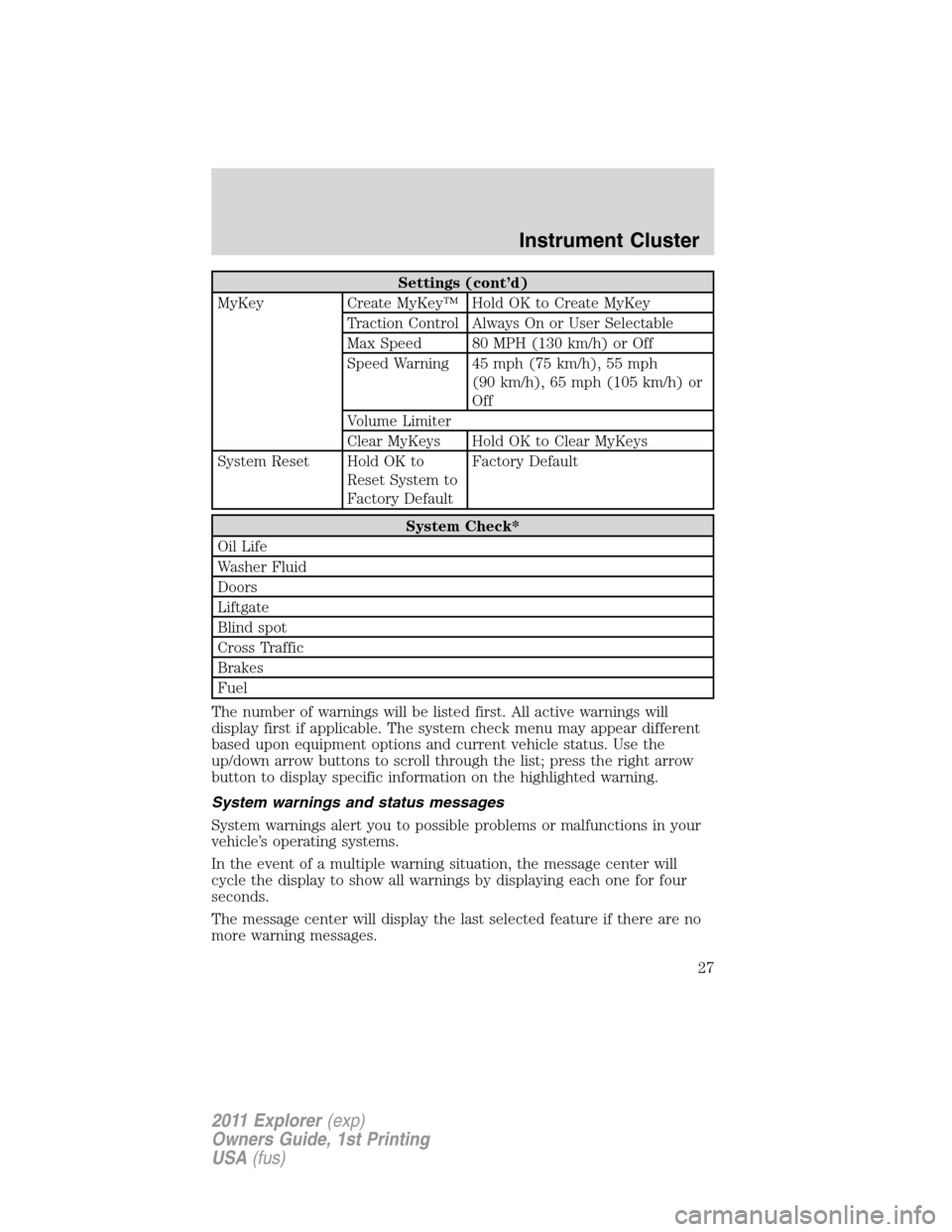
Settings (cont’d)
MyKey Create MyKey™ Hold OK to Create MyKey
Traction Control Always On or User Selectable
Max Speed 80 MPH (130 km/h) or Off
Speed Warning 45 mph (75 km/h), 55 mph
(90 km/h), 65 mph (105 km/h) or
Off
Volume Limiter
Clear MyKeys Hold OK to Clear MyKeys
System Reset Hold OK to
Reset System to
Factory DefaultFactory Default
System Check*
Oil Life
Washer Fluid
Doors
Liftgate
Blind spot
Cross Traffic
Brakes
Fuel
The number of warnings will be listed first. All active warnings will
display first if applicable. The system check menu may appear different
based upon equipment options and current vehicle status. Use the
up/down arrow buttons to scroll through the list; press the right arrow
button to display specific information on the highlighted warning.
System warnings and status messages
System warnings alert you to possible problems or malfunctions in your
vehicle’s operating systems.
In the event of a multiple warning situation, the message center will
cycle the display to show all warnings by displaying each one for four
seconds.
The message center will display the last selected feature if there are no
more warning messages.
Instrument Cluster
27
2011 Explorer(exp)
Owners Guide, 1st Printing
USA(fus)
Page 29 of 449

Types of messages and warnings:
•Some messages will appear briefly to inform you of something you
may need to take action on or be informed of.
•Some messages will appear once and then again when the vehicle is
restarted.
•Some messages will reappear after clearing or being reset if a problem
or condition is still present and needs your attention.
•Some messages can be acknowledged and reset by pressing OK. This
allows you to use the full message center functionality by clearing the
message.
DRIVER DOOR AJAR— Displayed when the driver door is not
completely closed.
LIFTGATE AJAR— Displayed when the liftgate is not completely closed.
PASSENGER DOOR AJAR— Displayed when the passenger door is
not completely closed.
REAR LEFT DOOR AJAR— Displayed when the rear left door is not
completely closed.
REAR RIGHT DOOR AJAR— Displayed when the rear right door is
not completely closed.
CHECK FUEL FILL INLET— Displayed when the fuel fill inlet may
not be properly closed. Refer toEasy Fuel™ “no cap” fuel systemin
theMaintenance and Specificationschapter.
FUEL LEVEL LOW XXX KM TO E— Displayed as an early reminder
of a low fuel condition.
FUEL LEVEL LOW XXX MI TO E— Displayed as an early reminder
of a low fuel condition.
BRAKE FLUID LEVEL LOW— Indicates the brake fluid level is low
and the brake system should be inspected immediately. Refer toBrake
fluidin theMaintenance and Specificationschapter.
CHECK BRAKE SYSTEM— Displayed when the brake system needs
servicing. If the warning stays on or continues to come on, contact your
authorized dealer as soon as possible.
CHECK CHARGING SYSTEM— Displayed when the charging system
needs servicing. If the warning stays on or continues to come on, contact
your authorized dealer as soon as possible.
PARK BRAKE ENGAGED— Displayed when the parking brake is set,
the engine is running and the vehicle is driven more than 3mph
(5 km/h). If the warning stays on after the parking brake is released,
contact your authorized dealer as soon as possible.
Instrument Cluster
28
2011 Explorer(exp)
Owners Guide, 1st Printing
USA(fus)
Page 35 of 449
OPTIONAL MESSAGE CENTER (IF EQUIPPED)
Your vehicle’s message center is capable of monitoring many vehicle
systems and will alert you to potential vehicle problems and various
conditions with informational messages and/or warnings.
The message center is also used to program/configure the different
features of your vehicle.
The message center display is located in the instrument cluster.
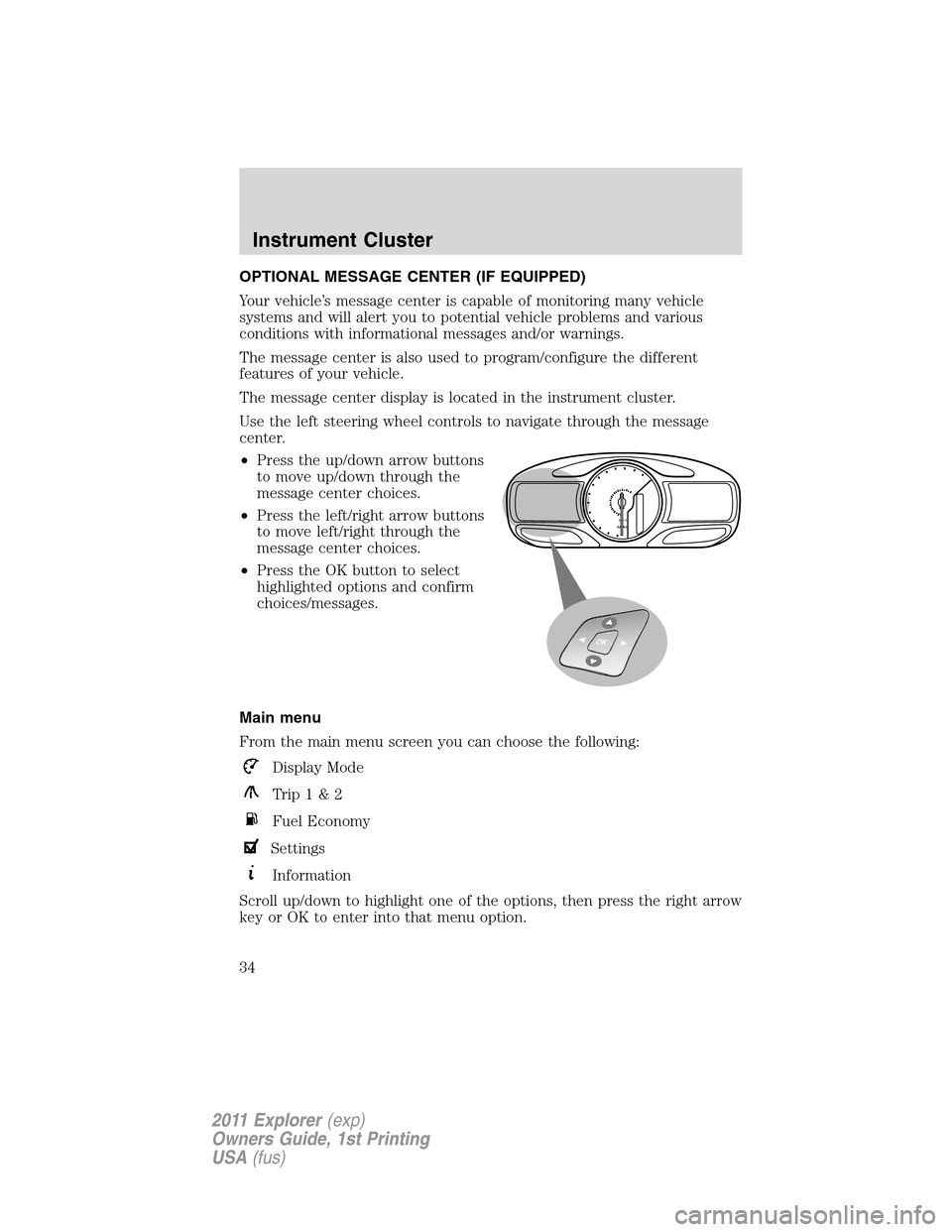
Use the left steering wheel controls to navigate through the message
center.
•Press the up/down arrow buttons
to move up/down through the
message center choices.
•Press the left/right arrow buttons
to move left/right through the
message center choices.
•Press the OK button to select
highlighted options and confirm
choices/messages.
Main menu
From the main menu screen you can choose the following:
Display Mode
Trip1&2
Fuel Economy
Settings
Information
Scroll up/down to highlight one of the options, then press the right arrow
key or OK to enter into that menu option.
km/hMPH
Instrument Cluster
34
2011 Explorer(exp)
Owners Guide, 1st Printing
USA(fus)
Page 36 of 449

Menu Control:You can choose a
different menu control operation to
suite your needs. In any screen
which shows these category icons
(other than the Main menu screen)
and:
•Standard is set– then scrolling up and down will scroll through the
main categories.
•Memory on is set– then scrolling up and down will scroll through the
last selected sub-category/screen within a main category.
To change the Menu Control between Standard or Memory On, refer to
Vehicle and Menu Controlfound in the table under theSettingssection
later in this chapter.
Display Mode
Press the right arrow on the left steering wheel mounted button when
display mode is selected. The boxes in the upper right corner of the
screen indicate that there are multiple screens that you can navigate
through. Each press of the right arrow will navigate to the next screen
until the last screen is reached. The white highlighted box indicates
which of the screens you are currently viewing:
Distance to empty (DTE) + Fuel
gauge + Bar tachometer
•Distance to empty (DTE): Shows approximate fuel level before the
fuel tank reaches empty. The value is dynamic and can change (raise
or lower) depending on driving style.
F6
4
RPM
1000+
2
0
01234.5mi
E
Instrument Cluster
35
2011 Explorer(exp)
Owners Guide, 1st Printing
USA(fus)
Page 37 of 449

•Fuel gauge: Indicates approximately how much fuel is left in the fuel
tank. The fuel gauge may vary slightly when the vehicle is in motion
or on a grade. When the fuel level becomes low (50 miles [80 km] to
empty), the level indicator will change to amber. When the fuel level
becomes critically low (0 miles [0 km] to empty), the level indicator
will change to red.
Note:When a MyKey™ is in use, low fuel warnings will display
earlier.
•Bar tachometer: Indicates the engine speed in revolutions per minute.
Driving with your tachometer pointer continuously at the top of the
scale may damage the engine.
Round analog tachometer +
Fuel gauge
For descriptions of the tachometer and fuel gauge, see the description
listed previously.
Round analog tachometer +
Fuel gauge + Engine coolant
temperature gauge
For descriptions of the tachometer
and fuel gauge, see the description
listed previously.
•Engine coolant temperature
gauge: Indicates engine coolant
temperature. At normal operating
temperature, the level indicator
will be in the normal range. If the engine coolant temperature exceeds
the normal range, stop the vehicle as soon as safely possible, switch
off the engine and let the engine cool.
i
F
E
FH
C E
Instrument Cluster
36
2011 Explorer(exp)
Owners Guide, 1st Printing
USA(fus)
Page 39 of 449

Enhanced trip display
•Trip distance — shows the accumulated trip distance
•Average fuel economy — shows the average fuel economy for a given
trip.
•Estimated amount of fuel consumed — shows the amount of fuel used
for a given trip.
•Elapsed trip time — timer stops when the vehicle is turned off and
restarts when the vehicle is restarted.
Press OK to pause the Trip 1 or 2 screen. Press again to un-pause.
Press and hold OK to reset the currently displayed trip information.
Fuel Economy
Press the right arrow on the left steering wheel mounted button when
fuel economy is selected. The boxes in the upper right corner of the
screen indicate that there are multiple screens that you can navigate
through. Each press of the right arrow will navigate to the next screen
until the last screen is reached. The white highlighted box indicates
which of the screens you are currently viewing:
Instant fuel economy
Shown with vertical bar tachometer
enabled
•This display shows a visual graph
of your instantaneous fuel
economy. Press the right arrow to
reach the other fuel displays and
press the left arrow once to
return to the previous display.
F6
4 139.5 mi Trip 1
28.5
MPG300.5 GAL
00:58:44
RPM
1000+
2
0
01234.5mi
E
F6
4
RPM
1000+
2
0
01234.5mi Inst. Fuel Economy
E
Inst
Instrument Cluster
38
2011 Explorer(exp)
Owners Guide, 1st Printing
USA(fus)