2011 CHEVROLET MALIBU buttons
[x] Cancel search: buttonsPage 175 of 382
Black plate (21,1)Chevrolet Malibu Owner Manual - 2011
Infotainment System 7-21
ignition is turned OFF, the iPod
automatically powers off and will
not charge or draw power from the
vehicle's battery.
Older iPod's that are not supported
can still be used by connecting it to
the 3.5 mm (1/8 in) auxiliary input
jack using a 3.5 mm (1/8 in) cable.
Using a USB Storage Device
or iPod
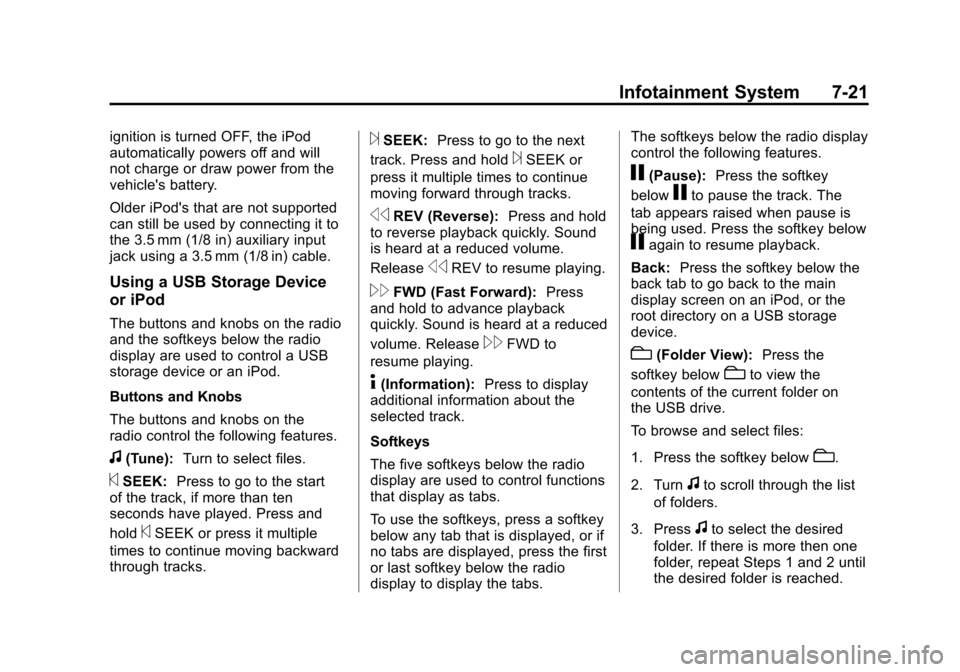
The buttons and knobs on the radio
and the softkeys below the radio
display are used to control a USB
storage device or an iPod.
Buttons and Knobs
The buttons and knobs on the
radio control the following features.
f(Tune):Turn to select files.
©SEEK:Press to go to the start
of the track, if more than ten
seconds have played. Press and
hold
©SEEK or press it multiple
times to continue moving backward
through tracks.
¨SEEK: Press to go to the next
track. Press and hold
¨SEEK or
press it multiple times to continue
moving forward through tracks.
sREV (Reverse): Press and hold
to reverse playback quickly. Sound
is heard at a reduced volume.
Release
sREV to resume playing.
\FWD (Fast Forward): Press
and hold to advance playback
quickly. Sound is heard at a reduced
volume. Release
\FWD to
resume playing.
4(Information): Press to display
additional information about the
selected track.
Softkeys
The five softkeys below the radio
display are used to control functions
that display as tabs.
To use the softkeys, press a softkey
below any tab that is displayed, or if
no tabs are displayed, press the first
or last softkey below the radio
display to display the tabs. The softkeys below the radio display
control the following features.
j(Pause):
Press the softkey
below
jto pause the track. The
tab appears raised when pause is
being used. Press the softkey below
jagain to resume playback.
Back: Press the softkey below the
back tab to go back to the main
display screen on an iPod, or the
root directory on a USB storage
device.
c(Folder View): Press the
softkey below
cto view the
contents of the current folder on
the USB drive.
To browse and select files:
1. Press the softkey below
c.
2. Turn
fto scroll through the list
of folders.
3. Press
fto select the desired
folder. If there is more then one
folder, repeat Steps 1 and 2 until
the desired folder is reached.
Page 178 of 382
Black plate (24,1)Chevrolet Malibu Owner Manual - 2011
7-24 Infotainment System
Bluetooth Controls
Use the buttons located on the
steering wheel to operate the
in‐vehicle Bluetooth system. See
Steering Wheel Controls
on
page 5‑2for more information.
b g(Push To Talk) : Press to
answer incoming calls, to confirm
system information, and to start
speech recognition.
c x(Phone On Hook): Press to
end a call, reject a call, or to cancel
an operation.
Pairing
A Bluetooth cell phone must be
paired to the Bluetooth system and
then connected to the vehicle before
it can be used. See your cell phone
manufacturers user guide for
Bluetooth functions before pairing
the cell phone. If a Bluetooth phone
is not connected, calls will be made
using OnStar
®Hands‐Free Calling,
if available. Refer to the OnStar
owner's guide for more information. Pairing Information
.Up to five cell phones can be
paired to the Bluetooth system.
.The pairing process is disabled
when the vehicle is moving.
.Pairing only needs to be
completed once, unless the
pairing information on the cell
phone changes or the cell phone
is deleted from the system.
.Only one paired cell phone can
be connected to the Bluetooth
system at a time.
.If multiple paired cell phones are
within range of the system, the
system connects to the first
available paired cell phone in the
order that they were first paired
to the system. To link to a
different paired phone, see
“Linking to a Different Phone”
later in this section.
Pairing a Phone
1. Press and hold
b
gfor
two seconds.
2. Say “Bluetooth”.
3. Say “Pair”. The system responds
with instructions and a four‐digit
PIN number. The PIN number is
used in Step 5.
4. Start the pairing process on the cell phone that you want to pair.
For help with this process, see
your cell phone manufacturers
user guide.
5. Locate the device named “Your
Vehicle” in the list on the cell
phone. Follow the instructions
on the cell phone to enter the
PIN number that was provided in
Step 3. After the PIN number is
successfully entered, the system
prompts you to provide a name
for the paired cell phone. This
Page 188 of 382
Black plate (4,1)Chevrolet Malibu Owner Manual - 2011
8-4 Climate Controls
Rear Window Defogger
The rear window defogger uses a
warming grid to remove fog or frost
from the rear window.
indicator light comes on to show
that the rear window defogger is on.
Be sure to clear as much snow from
the rear window as possible.
If driving below 80 km/h (50 mph),
the rear window defogger turns off
about 15 minutes after the button
is pressed. If turned on again, the
defogger only runs for about
seven minutes before turning off.
The defogger can also be turned
off by turning off the engine. If the vehicle's speed is maintained
above 80 km/h (50 mph), the rear
window defogger remains on once
the button is pressed.
If the vehicle has heated outside
mirrors, the surface of the outside
mirrors heat when the rear window
defogger is activated. See
Heated
Mirrors on page 2‑15.
Notice: Do not use anything
sharp on the inside of the rear
window. If you do, you could cut
or damage the warming grid, and
the repairs would not be covered
by the vehicle warranty. Do not
attach a temporary vehicle
license, tape, a decal or anything
similar to the defogger grid. Remote Start Climate Control
Operation
For vehicles with the remote start
feature, when it is activated the
climate control system heats or
cools the inside of the vehicle using
the modes that were set before the
vehicle was turned off. The climate
control knobs will remain active
during a remote start. However, the
climate control buttons will be
inactive until the ignition is turned
on by the key. If the fan is off, the
climate control system will not
operate during remote start. See
Remote Keyless Entry (RKE)
System Operation on page 2‑3.
Page 191 of 382

Black plate (7,1)Chevrolet Malibu Owner Manual - 2011
Climate Controls 8-7
windshield. The air conditioning
indicator light blinks three times if
the compressor is turned off while in
this mode.
#(Air Conditioning):Press turn
the air conditioning on and off. An
indicator light turns on to show the
air conditioning is on.
When air conditioning is selected or
is in AUTO mode, the system runs
the air conditioning automatically to
cool and dehumidify the air entering
the vehicle.
On hot days, open the windows long
enough to let hot inside air escape.
This reduces the time it takes for the
vehicle to cool down. Then keep the
windows closed for the air
conditioner to work its best.
On cool, but sunny days while using
manual operation of the automatic
system, use bi-level to deliver warm
air to the floor and cooler air to the
instrument panel outlets. To warm or
cool the air delivered, press the
temperature buttons to the desired
setting. In AUTO mode the system cools
and dehumidifies the air inside
the vehicle. Also while in AUTO
mode, the system maximizes its
performance by using recirculation
as necessary.
Heating:
On cold days when using
manual operation of the automatic
system, use floor mode to deliver air
to the floor outlets. To warm or cool
the air delivered, press
xorwto
the desired temperature setting.
To use the automatic mode, turn the
knob to AUTO and press
xorwto
adjust the temperature.
:(Outside Air): Press to turn
the outside air mode on. An
indicator light comes on to show it is
on. Air from outside the vehicle will
circulate throughout the vehicle. The
outside air mode can be used with
all modes, but it cannot be used
with the recirculation mode.
Pressing this button cancels the
recirculation mode.
h(Recirculation): Press to turn
the recirculation mode on. An
indicator light above the button
comes on to show it is on. This
mode recirculates and helps to
quickly cool the air inside the
vehicle. It can be used to help
prevent outside air and odors
from entering the vehicle. The
recirculation indicator light blinks
three times if you try to use
recirculation in a mode in which it
cannot function.
Pressing this button cancels the
auto recirculation feature. Each time
the vehicle is started, the system
reverts to the auto recirculation
function.
The recirculation mode cannot be
used with the floor, defrost, or defog
modes. If recirculation is selected in
these modes, the indicator flashes
three times and turns off to indicate
that this is not allowed. This is to
prevent window fogging.
Page 192 of 382
Black plate (8,1)Chevrolet Malibu Owner Manual - 2011
8-8 Climate Controls
When the weather is cool or damp,
operating the system in recirculation
for extended periods of time can
cause fogging of the vehicle's
windows. To clear the fog, select
either defog or defrost. Make sure
the air conditioning is on. Allow the
air conditioning to run automatically
to help dehumidify the air.
Rear Window Defogger
The rear window defogger uses a
warming grid to remove fog from the
rear window.
<(Rear):Press to turn the rear
window defogger on or off. An
indicator light comes on to show
that the rear window defogger is on.
If driving below 80 km/h (50 mph),
the rear window defogger turns off
about 15 minutes after the button is
pressed. If additional warming time
is needed, press the button again. If the vehicle's speed is maintained
above 80 km/h (50 mph), the rear
window defogger remains on once
the button is pressed.
For vehicles with heated outside
mirrors, the surface of the outside
mirrors will also heat when the rear
window defogger is activated. See
Heated Mirrors on page 2‑15.
Notice:
Do not use a razor blade
or sharp object to clear the inside
rear window. Do not adhere
anything to the defogger grid
lines in the rear glass. These
actions may damage the rear
defogger. Repairs would not be
covered by your warranty. Remote Start Climate Control
Operation
For vehicles with remote start, when
it is activated the climate control
system heats and cools the inside of
the vehicle using the previous
system settings before the vehicle
was turned off. The climate control
knobs will remain active during a
remote start. However, the climate
control buttons will be inactive until
the ignition is turned on by the key.
If the fan is off, the climate control
system will not operate during
remote start.
With the automatic climate control
system, the climate control displays
“RS”
in place of the temperature to
indicate that remote start is
activated. For best performance,
turn both the fan and mode knobs to
AUTO. If the temperature is cold
enough and the mode knob is set to
AUTO, the system begins in defrost
to clear the windows. See Remote
Keyless Entry (RKE) System
Operation on page 2‑3.
Page 229 of 382
Black plate (35,1)Chevrolet Malibu Owner Manual - 2011
Driving and Operating 9-35
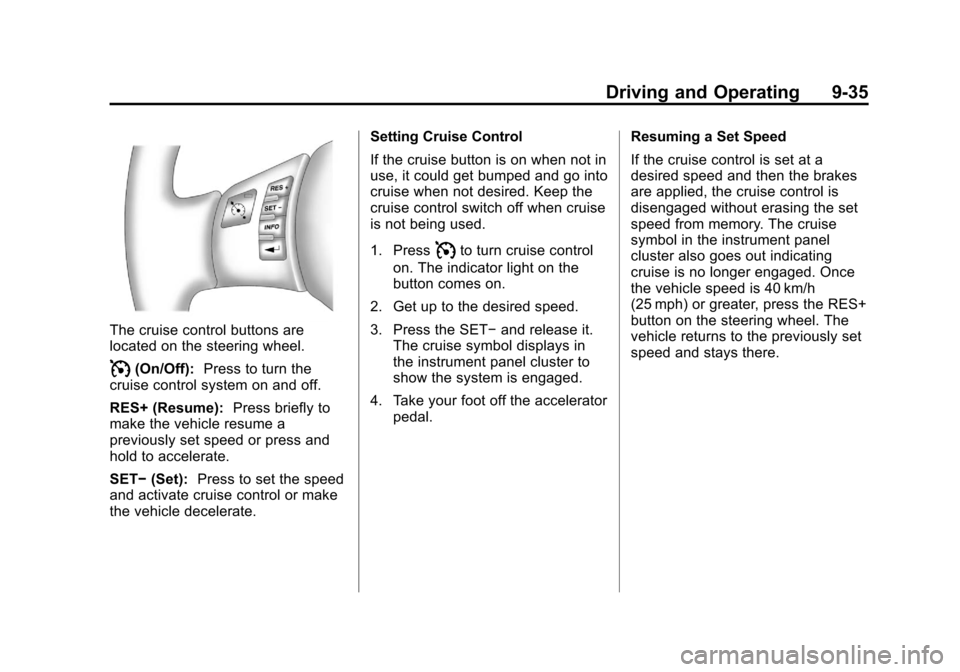
The cruise control buttons are
located on the steering wheel.
I(On/Off):Press to turn the
cruise control system on and off.
RES+ (Resume): Press briefly to
make the vehicle resume a
previously set speed or press and
hold to accelerate.
SET− (Set): Press to set the speed
and activate cruise control or make
the vehicle decelerate. Setting Cruise Control
If the cruise button is on when not in
use, it could get bumped and go into
cruise when not desired. Keep the
cruise control switch off when cruise
is not being used.
1. Press
Ito turn cruise control
on. The indicator light on the
button comes on.
2. Get up to the desired speed.
3. Press the SET− and release it.
The cruise symbol displays in
the instrument panel cluster to
show the system is engaged.
4. Take your foot off the accelerator pedal. Resuming a Set Speed
If the cruise control is set at a
desired speed and then the brakes
are applied, the cruise control is
disengaged without erasing the set
speed from memory. The cruise
symbol in the instrument panel
cluster also goes out indicating
cruise is no longer engaged. Once
the vehicle speed is 40 km/h
(25 mph) or greater, press the RES+
button on the steering wheel. The
vehicle returns to the previously set
speed and stays there.
Page 255 of 382
Black plate (13,1)Chevrolet Malibu Owner Manual - 2011
Vehicle Care 10-13
The engine oil and filter must be
changed at least once a year and,
at this time, the system must be
reset. Your dealer has trained
service people who will perform this
work and reset the system. It is also
important to check the oil regularly
over the course of an oil drain
interval and keep it at the proper
level.
If the system is ever reset
accidentally, the oil must be
changed at 5 000 km (3,000 miles)
since the last oil change.
Remember to reset the oil life
system whenever the oil is changed.How to Reset the Engine Oil
Life System
Reset the system whenever the
engine oil is changed so that the
system can calculate the next
engine oil change. To reset the
system:
1. Turn the ignition toON/RUN, with the
engine off.
2. Press and hold the DIC INFO and reset buttons, on the left
side of the steering wheel, at the
same time to enter the
personalization menu. The OIL
LIFE RESET message displays.
See Driver Information Center
(DIC)
on page 5‑23and Engine
Oil Messages on page 5‑27. 3. Press and hold the reset button
until the DIC display shows
ACKNOWLEDGED.
4. Turn the key to LOCK/OFF.
The system is reset when the
CHANGE OIL SOON message
is off.
If the CHANGE OIL SOON
message comes back on when the
vehicle is started, the engine oil life
system has not reset. Repeat the
procedure.
Automatic Transmission
Fluid
It is not necessary to check the
transmission fluid level.
A transmission fluid leak is the only
reason for fluid loss. If a leak
occurs, take the vehicle to the
dealer and have it repaired as
soon as possible.
Page 292 of 382
Black plate (50,1)Chevrolet Malibu Owner Manual - 2011
10-50 Vehicle Care
.The TPMS sensor matching
process was started but not
completed or not completed
successfully after rotating the
vehicle's tires. The DIC message
and TPMS malfunction light
should go off once the TPMS
sensor matching process is
performed successfully. See
“TPMS Sensor Matching
Process”later in this section.
.One or more TPMS sensors are
missing or damaged. The DIC
message and the TPMS
malfunction light should go off
when the TPMS sensors are
installed and the sensor
matching process is performed
successfully. See your dealer for
service.
.Replacement tires or wheels do
not match your vehicle's original
equipment tires or wheels. Tires
and wheels other than those
recommended for your vehicle
could prevent the TPMS from
functioning properly. See Buying
New Tires on page 10‑54.
.Operating electronic devices or
being near facilities using radio
wave frequencies similar to the
TPMS could cause the TPMS
sensors to malfunction.
If the TPMS is not functioning it
cannot detect or signal a low tire
condition. See your dealer for
service if the TPMS malfunction
light and DIC message comes on
and stays on.
TPMS Sensor Matching
Process
Each TPMS sensor has a unique
identification code. Any time you
replace one or more of the TPMS
sensors or rotate the vehicle's tires,
the identification codes need to be
matched to the new tire/wheel
location. The sensors are matched,
to the tire/wheel locations, in the
following order: driver side front tire,
passenger side front tire, passenger
side rear tire, and driver side rear
tire using a TPMS diagnostic tool.
See your dealer for service. The TPMS sensors can also be
matched to each tire/wheel position
by increasing or decreasing the
tire's air pressure. When increasing
the tire's pressure, do not exceed
the maximum inflation pressure
indicated on the tire's sidewall. To
decrease the tire's air-pressure use
the pointed end of the valve cap, a
pencil-style air pressure gage,
or a key.
You have two minutes to match
each tire and wheel position. If it
takes longer than two minutes to
match any tire and wheel position,
the matching process stops and you
need to start over.
The TPMS matching process is
outlined below:
1. Set the parking brake.
2. Turn the ignition switch to
ON/RUN with the engine off.
3. Press and hold the Remote Keyless Entry (RKE)
transmitter's LOCK and
UNLOCK buttons, at the same