2011 CHEVROLET COLORADO flat tire
[x] Cancel search: flat tirePage 22 of 392

Black plate (16,1)Chevrolet Colorado Owner Manual - 2011
1-16 In Brief
Performance and
Maintenance
Traction Control
System (TCS)
The traction control system limits
wheel spin. The system turns on
automatically every time the vehicle
is started.
.To turn off traction control, press
and release
don the instrument
panel.
dilluminates and the
appropriate DIC message is
displayed. See Ride Control
System Messages on page 5‑25.
.Press and release the button
again to turn on traction control.
For more information, see Traction
Control System (TCS) on
page 9‑46.
StabiliTrak®System
The Electronic Stability Control
system assists with directional
control of the vehicle in difficult
driving conditions. The system turns
on automatically every time the
vehicle is started.
.To turn off both traction control
and Electronic Stability Control,
press and hold
duntild
illuminates and the appropriate
DIC message is displayed. See
Ride Control System Messages
on page 5‑25.
.Press and release the button
again to turn on both systems.
For more information, see
StabiliTrak
®System on page 9‑47.
Tire Pressure Monitor
This vehicle may have a Tire
Pressure Monitor System (TPMS).
The TPMS warning light alerts you
to a significant loss in pressure of
one of the vehicle's tires. If the
warning light comes on, stop as
soon as possible and inflate the
tires to the recommended pressure
shown on the Tire and Loading
Information label. See Vehicle Load
Limits on page 9‑20. The warning
light will remain on until the tire
pressure is corrected.
During cooler conditions, the low tire
pressure warning light may appear
when the vehicle is first started and
then turn off. This may be an early
Page 23 of 392

Black plate (17,1)Chevrolet Colorado Owner Manual - 2011
In Brief 1-17
indicator that the tire pressures are
getting low and the tires need to be
inflated to the proper pressure.
The TPMS does not replace normal
monthly tire maintenance. It is the
driver’s responsibility to maintain
correct tire pressures.
See Tire Pressure Monitor System
on page 10‑55.
Engine Oil Life System
The engine oil life system calculates
engine oil life based on vehicle use
and displays a DIC message when
it is necessary to change the engine
oil and filter.
Resetting the Oil Life System
1. Turn the ignition to ON/RUN,
with the engine off.
2. Press and release the stem in the lower center of the
instrument cluster until the OIL
LIFE message is displayed. 3. Once the alternating OIL LIFE
and RESET messages appear,
press and hold the stem until
several beeps sound. This
confirms that the oil life system
has been reset.
4. Turn the key to LOCK/OFF.
See Engine Oil Life System on
page 10‑12.
Driving for Better Fuel
Economy
Driving habits can affect fuel
mileage. Here are some driving
tips to get the best fuel economy
possible.
.Avoid fast starts and accelerate
smoothly.
.Brake gradually and avoid
abrupt stops.
.Avoid idling the engine for long
periods of time.
.When road and weather
conditions are appropriate, use
cruise control.
.Always follow posted speed
limits or drive more slowly when
conditions require.
.Keep vehicle tires properly
inflated.
.Combine several trips into a
single trip.
.Replace the vehicle's tires with
the same TPC Spec number
molded into the tire's sidewall
near the size.
.Follow recommended scheduled
maintenance.
Roadside Assistance
Program
U.S.: 1-800-243-8872
TTY Users (U.S.): 1-888-889-2438
Canada: 1-800-268-6800
Mexico: 01-800-466-0800
As the owner of a new Chevrolet,
you are automatically enrolled in the
Roadside Assistance program.
Page 129 of 392

Black plate (17,1)Chevrolet Colorado Owner Manual - 2011
Instruments and Controls 5-17
Traction Control System
(TCS)/StabiliTrak®Light
The StabiliTrak and Traction Control
System (TCS) indicator/warning light
comes on briefly while starting the
engine.
If it does not, have the vehicle
serviced by your dealer. If the
system is working normally the
indicator light then goes off.
The light flashes while the
StabiliTrak system and TCS are
working to assist the driver with
directional control of the vehicle in
difficult driving conditions.If the StabiliTrak system and TCS
light comes on and stays on while
driving and a TRACTION FAULT or
SERVICE STAB SYS message
displays on the DIC, the vehicle
needs service.
The light also comes on steady
when the StabiliTrak system and/or
TCS are turned off. The DIC also
displays a TRAC OFF and/or STAB
SYS OFF message. If the TCS is
off, wheel spin is not limited. If the
StabiliTrak system is off, the system
does not assist the driver with
directional control of the vehicle.
The light turns off when the TCS
and StabiliTrak system are turned
back on.
See
StabiliTrak
®System on
page 9‑47, Traction Control System
(TCS) on page 9‑46 andRide
Control System Messages on
page 5‑25 for more information.
Tire Pressure Light
For vehicles with a Tire Pressure
Monitor System (TPMS), this light
comes on briefly when the engine is
started. It provides information
about tire pressures and the TPMS.
When the Light is On Steady
This indicates that one or more of
the tires are significantly
underinflated.
A tire pressure message can
accompany the light. See Tire
Messages on page 5‑26 for more
information. Stop as soon as
possible, and inflate the tires to the
pressure value shown on the Tire
and Loading Information Label. See
Tire Pressure on page 10‑53 for
more information.
Page 138 of 392

Black plate (26,1)Chevrolet Colorado Owner Manual - 2011
5-26 Instruments and Controls
Service Vehicle Messages
SERV (Service) VEH (Vehicle)
This message displays if your
vehicle needs service. Have your
vehicle serviced by your dealer as
soon as possible.
Tire Messages
LOW TIRE
This message displays if a low tire
pressure is detected in any of the
vehicle's tires. Press and release
the reset stem to acknowledge the
message and clear it from the
display. The message appears at
each ignition cycle until the tires are
inflated to the correct inflation
pressure. SeeTires on page 10‑46
and Tire Pressure on page 10‑53 for
more information on tires and the
correct inflation pressures.
SERV (Service) TPM (Tire
Pressure Monitor)
This message displays if a part on
the Tire Pressure Monitor System
(TPMS) is not working properly. The
tire pressure light also flashes and
then remains on during the same
ignition cycle. See Tire Pressure
Light on page 5‑17. Several
conditions may cause this message
to appear. See Tire Pressure
Monitor Operation on page 10‑56 for
more information. If the warning
comes on and stays on, there may
be a problem with the TPMS. See
your dealer.
Transmission Messages
SERV (Service) 4WD
(Four-Wheel Drive)
This message displays when there
is a problem with the transfer case
control system. Check the transfer
case on your vehicle and have it
serviced by your dealer. See
Four-Wheel Drive on page 9‑39 for
more information about the transfer
case. Press and release the reset
stem to acknowledge the message
and clear it from the display.
Page 181 of 392
Black plate (7,1)Chevrolet Colorado Owner Manual - 2011
Driving and Operating 9-7
Avoid sharp turns and abrupt
maneuvers. Failure to operate the
vehicle correctly off‐road could
result in loss of vehicle control or
vehicle rollover.
Off-roading involves some new
skills. That is why it is very
important that you read these
driving tips and suggestions to help
make off-road driving safer and
more enjoyable.
Before You Go Off-Roading
.Have all necessary maintenance
and service work done.
.Make sure there is enough fuel,
that fluid levels are where they
should be, and that the spare
tire is fully inflated.
.Be sure to read all the
information about
four-wheel-drive vehicles
in this manual.
.Make sure all underbody
shields, if the vehicle has them,
are properly attached.
.Know the local laws that apply to
off-roading where you will be
driving or check with law
enforcement people in the area.
.Be sure to get the necessary
permission if you will be on
private land.
Loading Your Vehicle for
Off-Road Driving
{WARNING
.Cargo on the load floor piled
higher than the seatbacks
can be thrown forward during
a sudden stop. You or your
passengers could be injured.
Keep cargo below the top of
the seatbacks.
.Unsecured cargo on the load
floor can be tossed about
when driving over rough
terrain. You or your(Continued)
WARNING (Continued)
passengers can be struck by
flying objects. Secure the
cargo properly.
.Heavy loads on the roof raise
the vehicle's center of gravity,
making it more likely to roll
over. You can be seriously or
fatally injured if the vehicle
rolls over. Put heavy loads
inside the cargo area, not on
the roof. Keep cargo in the
cargo area as far forward and
low as possible.
There are some important things to
remember about how to load your
vehicle.
.The heaviest things should be
on the floor, forward of the rear
axle. Put heavier items as far
forward as you can.
.Be sure the load is properly
secured, so things are not
tossed around.
Page 191 of 392
Black plate (17,1)Chevrolet Colorado Owner Manual - 2011
Driving and Operating 9-17
Other driving tips include:
.Keep the vehicle well ventilated.
.Keep interior temperature cool.
.Keep your eyes moving—scan
the road ahead and to the sides.
.Check the rearview mirror and
vehicle instruments often.
Hill and Mountain Roads
Driving on steep hills or through
mountains is different than driving
on flat or rolling terrain. Tips for
driving in these conditions include:
.Keep the vehicle serviced and in
good shape.
.Check all fluid levels and brakes,
tires, cooling system, and
transmission.
.Shift to a lower gear when going
down steep or long hills.
{WARNING
If you do not shift down, the
brakes could get so hot that they
would not work well. You would
then have poor braking or even
none going down a hill. You could
crash. Shift down to let the engine
assist the brakes on a steep
downhill slope.
{WARNING
Coasting downhill in N (Neutral)
or with the ignition off is
dangerous. The brakes will have
to do all the work of slowing down
and they could get so hot that
they would not work well. You
would then have poor braking or
even none going down a hill. You
could crash. Always have the
engine running and the vehicle in
gear when going downhill.
.Stay in your own lane. Do not
swing wide or cut across the
center of the road. Drive at
speeds that let you stay in your
own lane.
.Top of hills: Be alert —
something could be in your
lane (stalled car, accident).
.Pay attention to special road
signs (falling rocks area, winding
roads, long grades, passing or
no-passing zones) and take
appropriate action.
Winter Driving
Driving on Snow or Ice
Drive carefully when there is snow
or ice between the tires and the
road, creating less traction or grip.
Wet ice can occur at about 0°C
(32°F) when freezing rain begins to
fall, resulting in even less traction.
Avoid driving on wet ice or in
freezing rain until roads can be
treated with salt or sand.
Page 195 of 392
Black plate (21,1)Chevrolet Colorado Owner Manual - 2011
Driving and Operating 9-21
{WARNING
Do not load the vehicle any
heavier than the Gross
Vehicle Weight Rating
(GVWR), or either the
maximum front or rear Gross
Axle Weight Rating (GAWR).
If you do, parts on the vehicle
can break, and it can change
the way the vehicle handles.
These could cause you to lose
control and crash. Also,
overloading can shorten the
life of the vehicle.Tire and Loading Information
Label
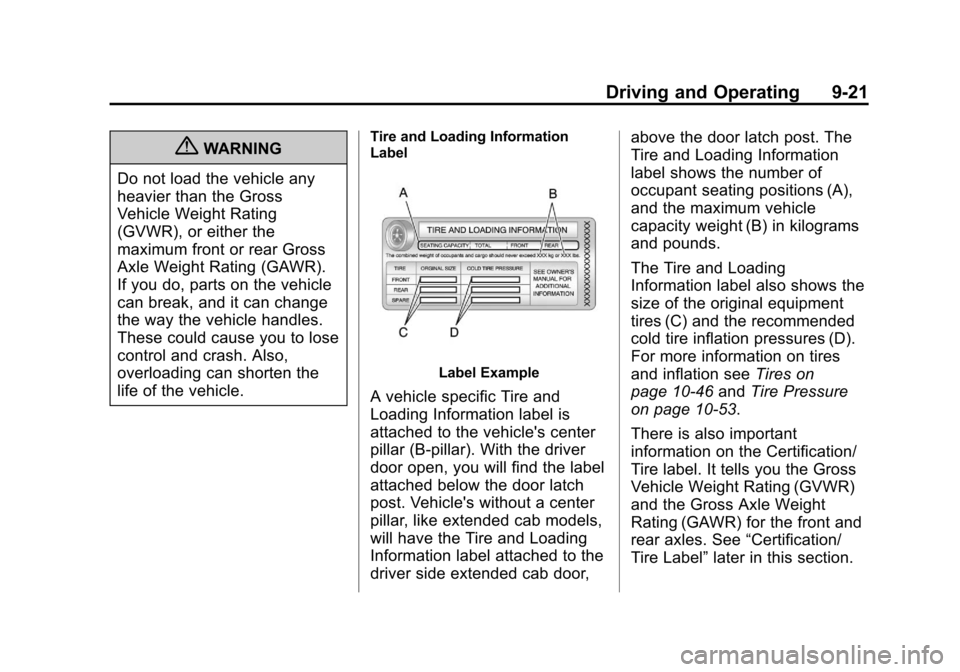
Label Example
A vehicle specific Tire and
Loading Information label is
attached to the vehicle's center
pillar (B‐pillar). With the driver
door open, you will find the label
attached below the door latch
post. Vehicle's without a center
pillar, like extended cab models,
will have the Tire and Loading
Information label attached to the
driver side extended cab door, above the door latch post. The
Tire and Loading Information
label shows the number of
occupant seating positions (A),
and the maximum vehicle
capacity weight (B) in kilograms
and pounds.
The Tire and Loading
Information label also shows the
size of the original equipment
tires (C) and the recommended
cold tire inflation pressures (D).
For more information on tires
and inflation see
Tires on
page 10‑46 andTire Pressure
on page 10‑53.
There is also important
information on the Certification/
Tire label. It tells you the Gross
Vehicle Weight Rating (GVWR)
and the Gross Axle Weight
Rating (GAWR) for the front and
rear axles. See “Certification/
Tire Label” later in this section.
Page 213 of 392
Black plate (39,1)Chevrolet Colorado Owner Manual - 2011
Driving and Operating 9-39
Drive Systems
Four-Wheel Drive
If the vehicle has four-wheel
drive, you can send the engine's
driving power to all four wheels for
extra traction. To get the best
performance out of four-wheel
drive, you must be familiar with its
operation. Read this section before
using four-wheel drive. You should
use two-wheel drive high for most
normal driving conditions.
Notice:Driving on clean, dry
pavement in four-wheel drive for
an extended period of time can
cause premature wear on the
vehicle's powertrain. Do not drive
on clean, dry pavement in
Four-Wheel Drive for extended
periods of time. Notice:
If the vehicle has
four-wheel drive and the different
size spare tire is installed on the
vehicle, do not drive in four-wheel
drive until you can have your flat
tire repaired and/or replaced. You
could damage the vehicle, and
the repair costs would not be
covered by your warranty. Never
use four-wheel drive when the
different size spare tire is
installed on the vehicle.
Notice: If the vehicle has
four-wheel drive and the compact
spare tire is installed on the
vehicle, do not drive in four-wheel
drive until you can have the flat
tire repaired and/or replaced. You
could damage the vehicle, and
the repair costs would not be
covered by your warranty. Never
use four-wheel drive when the
compact spare tire is installed on
the vehicle.
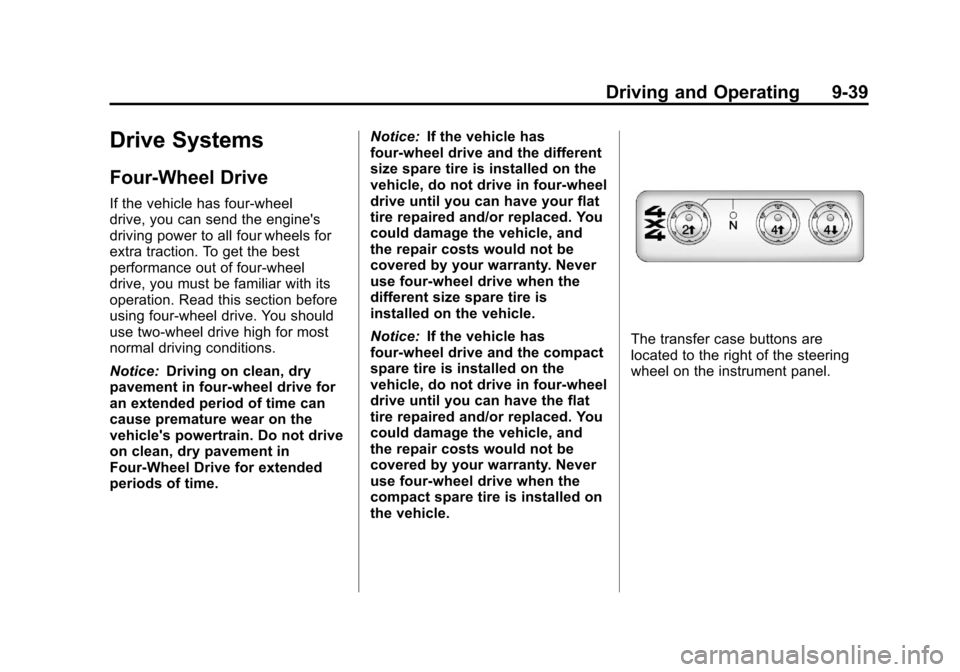
The transfer case buttons are
located to the right of the steering
wheel on the instrument panel.