2011 CHEVROLET CAMARO engine
[x] Cancel search: enginePage 235 of 414

Black plate (33,1)Chevrolet Camaro Owner Manual - 2011
Driving and Operating 9-33
Tap the left control to downshift, and
the right control to upshift. A Driver
Information Center (DIC) message
indicates the gear the vehicle is in.
SeeDriver Information Center (DIC)
on page 5‑25.
When in Tap Shift mode with a
V8 model, the driver can exit
Tap Shift by holding the right
(upshift) control for two seconds.
The transmission will return to
automatic shifting.
On V8 models, the driver may
choose to briefly enter Tap Shift
mode while in D (Drive). Tapping
either the upshift or downshift
control will place the transmission
in Tap Shift mode. The driver may
then exit Tap Shift mode by holding
the upshift control for two seconds.
The system will return to automatic
shifting after 10 seconds of cruising
at a steady speed, or when the
vehicle comes to a stop. While using the Tap Shift feature,
the vehicle will have firmer, quicker
shifting for increased performance.
You can use this for sport driving
or when climbing or descending
hills, to stay in gear longer, or to
downshift for more power or engine
braking. The transmission will
only allow you to shift into gears
appropriate for the vehicle speed
and engine Revolutions Per Minute
(RPM). The transmission will not
automatically shift to the next higher
gear if the engine RPM is too high.
If shifting is prevented for any
reason, the message SHIFT
DENIED will appear in the DIC,
indicating that the transmission
has not shifted gears. While in the
Tap Shift mode, the transmission
will not automatically downshift on
hard acceleration.
When coasting to a stop, the
V6 transmission will automatically
downshift to 1 (First) gear, and the
V8 transmission will automatically
downshift to 2 (Second) gear.
A 1 (First) gear start can be selected
using the Tap Shift controls on
V8 models. When accelerating from
a stop, the transmissions will hold
these gears until the driver manually
selects higher gears using the Tap
Shift controls.
When accelerating the vehicle
from a stop in snowy and icy
conditions, you may want to shift
into 2 (Second) gear. A higher gear
ratio allows you to gain more
traction on slippery surfaces.
Page 236 of 414
Black plate (34,1)Chevrolet Camaro Owner Manual - 2011
9-34 Driving and Operating
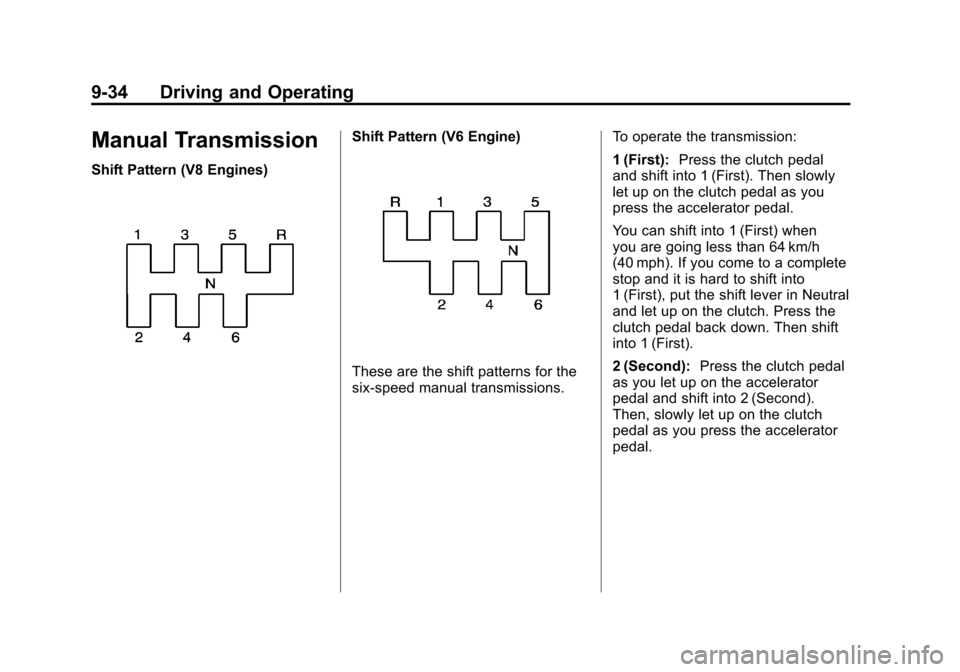
Manual Transmission
Shift Pattern (V8 Engines)
Shift Pattern (V6 Engine)
These are the shift patterns for the
six-speed manual transmissions.To operate the transmission:
1 (First):
Press the clutch pedal
and shift into 1 (First). Then slowly
let up on the clutch pedal as you
press the accelerator pedal.
You can shift into 1 (First) when
you are going less than 64 km/h
(40 mph). If you come to a complete
stop and it is hard to shift into
1 (First), put the shift lever in Neutral
and let up on the clutch. Press the
clutch pedal back down. Then shift
into 1 (First).
2 (Second): Press the clutch pedal
as you let up on the accelerator
pedal and shift into 2 (Second).
Then, slowly let up on the clutch
pedal as you press the accelerator
pedal.
Page 237 of 414

Black plate (35,1)Chevrolet Camaro Owner Manual - 2011
Driving and Operating 9-35
3 (Third), 4 (Fourth), 5 (Fifth),
and 6 (Sixth):Shift into 3 (Third),
4 (Fourth), 5 (Fifth), and 6 (Sixth) the
same way you do for 2 (Second).
Slowly let up on the clutch pedal as
you press the accelerator pedal.
To stop, let up on the accelerator
pedal and press the brake pedal.
Just before the vehicle stops, press
the clutch pedal and the brake
pedal, and shift to Neutral.
Neutral: Use this position when
you start or idle the engine.
The shift lever is in Neutral when
it is centered in the shift pattern,
not in any gear.
R (Reverse): To back up, press
down the clutch pedal and shift
into R (Reverse). On V8 models,
apply pressure to get the lever
past 5 (Fifth) and 6 (Sixth) into
R (Reverse). Let up on the clutch
pedal slowly while pressing the
accelerator pedal.One to Four Shift Light
Message (V8 Only)
Driver Information Center
When this message comes on,
you can only shift from 1 (First) to
4 (Fourth) instead of 1 (First) to
2 (Second). The message will be
displayed in the Driver Information
Center. You must complete the shift into
4 (Fourth) to turn off this feature.
This helps you get the best possible
fuel economy.
After shifting to 4 (Fourth), you may
downshift to a lower gear if you
prefer.
Notice:
Forcing the shift lever
into any gear except 4 (Fourth)
when the 1 TO 4 SHIFT message
comes on may damage the
transmission. Shift only from
1 (First) to 4 (Fourth) when the
message comes on.
This message will come on when:
.The engine coolant temperature
is higher than 76°C (169°F),
.The vehicle is going 24 to
31 km/h (15 to 19 mph) and
.The vehicle is at 21 percent
throttle or less.
Page 238 of 414

Black plate (36,1)Chevrolet Camaro Owner Manual - 2011
9-36 Driving and Operating
Brakes
Antilock Brake
System (ABS)
This vehicle has the Antilock Brake
System (ABS), an advanced
electronic braking system that
helps prevent a braking skid.
When the engine is started and the
vehicle begins to drive away, ABS
checks itself. A momentary motor or
clicking noise might be heard while
this test is going on, and it might
even be noticed that the brake
pedal moves a little. This is normal.If there is a problem with ABS, this
warning light stays on. SeeAntilock
Brake System (ABS) Warning Light
on page 5‑21.
If driving safely on a wet road
and it becomes necessary to slam
on the brakes and continue braking
to avoid a sudden obstacle, a
computer senses that the wheels
are slowing down. If one of the
wheels is about to stop rolling,
the computer will separately work
the brakes at each wheel.
ABS can change the brake pressure
to each wheel, as required, faster
than any driver could. This can help
the driver steer around the obstacle
while braking hard. As the brakes are applied, the
computer keeps receiving updates
on wheel speed and controls
braking pressure accordingly.
Remember: ABS does not change
the time needed to get a foot up to
the brake pedal or always decrease
stopping distance. If you get too
close to the vehicle in front of you,
there will not be enough time to
apply the brakes if that vehicle
suddenly slows or stops. Always
leave enough room up ahead to
stop, even with ABS.
Using ABS
Do not pump the brakes. Just hold
the brake pedal down firmly and let
ABS work. You might hear the ABS
pump or motor operating and feel
the brake pedal pulsate, but this is
normal.
Page 240 of 414

Black plate (38,1)Chevrolet Camaro Owner Manual - 2011
9-38 Driving and Operating
Brake Assist
This vehicle has a brake assist
feature designed to assist the
driver in stopping or decreasing
vehicle speed in emergency driving
conditions. This feature uses the
stability system hydraulic brake
control module to supplement
the power brake system under
conditions where the driver has
quickly and forcefully applied the
brake pedal in an attempt to quickly
stop or slow down the vehicle.
The stability system hydraulic brake
control module increases brake
pressure at each corner of the
vehicle until the ABS activates.
Minor brake pedal pulsation or
pedal movement during this time
is normal and the driver should
continue to apply the brake pedal
as the driving situation dictates.
The brake assist feature will
automatically disengage when
the brake pedal is released or
brake pedal pressure is quickly
decreased.
Ride Control Systems
Traction Control
System (TCS)
The vehicle has a Traction Control
System (TCS) that limits wheel spin.
The system utilizes engine and
braking controls to control wheel
spin during acceleration at all
driving speeds for maximum driver
control regardless of conditions.
When the system senses impending
wheel slip during acceleration, it
signals the throttle control to reduce
drive wheel torque. Under extreme
situations, such as going from
pavement to ice during acceleration,
the system will selectively apply
the brakes to maintain control.
The system may be heard or felt
while it is working, but this is
normal.The TCS/StabiliTrak warning light
flashes when the traction control
system is limiting wheel spin.
The TCS/StabiliTrak warning light
comes on solid if there is a problem
with the traction control system.
SeeTraction Control System (TCS)/
StabiliTrak
®Light on page 5‑22 for
more information. If the light stays
on, see your dealer for service.
When the TCS/StabiliTrak warning
light is on, the system will not limit
wheel spin. Adjust your driving
accordingly.
Page 243 of 414

Black plate (41,1)Chevrolet Camaro Owner Manual - 2011
Driving and Operating 9-41
Engine Drag Control (EDC)
EDC improves vehicle stability by
sensing if there is a difference in
speed between the free rolling front
wheels and the rear drive wheels
that often occurs when the driver
takes their foot off the accelerator
pedal on slippery surfaces (snow,
ice, etc.). When this is detected,
EDC sends more torque to the rear
wheels to make sure all four wheels
are spinning at similar speeds,
making the vehicle more stable.
Competitive Driving Mode
Competitive Driving Mode and
Launch Control are systems
designed to allow increased
performance while accelerating
and/or cornering. This is
accomplished by regulating
and optimizing engine and brake
performance. These modes are
for use at a closed course race
track and are not intended for
use on public roads. They will
not compensate for a driver’s
inexperience or lack of familiarity
with the race track. Drivers who
prefer to allow the system to have
more control of the engine and
brake systems are advised to turn
StabiliTrak on. See Competitive
Driving on page 9‑7 for more
information. Notice:
Do not attempt to shift
when the drive wheels are
spinning and do not have
traction. This may cause damage
to the transmission. Damage
caused by misuse of the vehicle
is not covered by the vehicle
warranty. See the warranty book
for additional information.
Competitive Driving Mode
In Competitive Driving Mode, the
StabiliTrak System helps maintain
directional control of the vehicle
by selective brake application
and control of engine torque.
The Traction Control System (TCS)
helps control wheel spin and
Launch Control is available.
Adjust your driving style to account
for the available engine power.
See “Launch Control” later in this
section.
Page 244 of 414

Black plate (42,1)Chevrolet Camaro Owner Manual - 2011
9-42 Driving and Operating
This light is on when the vehicle is
in the Competitive Driving Mode.
On vehicles with a V8 engine,
this optional handling mode can
be selected by pressing the
StabiliTrak/TCS button on the
console quickly two times.
STABILITRAK COMPETITIVE
MODE displays in the Driver
Information Center (DIC).
SeeRide Control System
Messages on page 5‑38.
When the StabiliTrak button is
pressed again, or the vehicle is
restarted, the StabiliTrak and TCS
systems are on.
Launch Control (V8 with
Manual Transmission
Models Only)
A Launch Control feature is
available, within Competitive
Driving Mode on vehicles with a
manual transmission, to allow the
driver to achieve high levels of
vehicle acceleration in a straight
line. Launch Control is a form of
traction control that manages tire
spin while launching the vehicle.
This feature is intended for use
during closed course race events
where consistent zero to sixty
and quarter mile times are
desirable.
Launch Control is only available
when the following criteria are met:
1. Competitive Driving Mode is selected.
2. The vehicle is not moving.
3. The steering wheel is pointing straight. 4. The clutch is pressed and the
vehicle is in first gear.
5. The accelerator pedal is rapidly applied to wide open throttle.
The Launch Control feature will
initially limit engine speed as
the driver rapidly applies the
accelerator pedal to wide open
throttle. A smooth, quick release
of the clutch, while maintaining
the fully pressed accelerator pedal,
will manage wheel slip. Complete
shifts as described in Manual
Transmission on page 9‑34.
After the vehicle is launched,
the system continues in
Competitive Mode.
Competitive Driving Mode and
Launch Control are systems
designed for a closed course race
track and not intended for use on
public roads. The systems are not
intended to compensate for lack of
driver experience or familiarity with
the race track.
Page 250 of 414

Black plate (48,1)Chevrolet Camaro Owner Manual - 2011
9-48 Driving and Operating
Fuel
Use of the recommended fuel
is an important part of the proper
maintenance of this vehicle. To help
keep the engine clean and maintain
optimum vehicle performance, we
recommend the use of gasoline
advertised as TOP TIER Detergent
Gasoline.
Look for the TOP TIER label on the
fuel pump to ensure gasoline meets
enhanced detergency standards
developed by auto companies.
A list of marketers providing
TOP TIER Detergent Gasoline can
be found at www.toptiergas.com.
The eighth digit of the Vehicle
Identification Number (VIN) shows
the code letter or number that
identifies the vehicle's engine.
The VIN is at the top left of the
instrument panel. SeeVehicle
Identification Number (VIN) on
page 12‑1.
Recommended Fuel
If the vehicle has the 3.6L V6 engine
(VIN Code D), use regular unleaded
gasoline with a posted octane
rating of 87 or higher. If the octane
rating is less than 87, an audible
knocking noise, commonly referred
to as spark knock, might be heard
when driving. If this occurs, use
a gasoline rated at 87 octane or
higher as soon as possible. If heavy
knocking is heard when using
gasoline rated at 87 octane or
higher, the engine needs service.
If the vehicle has the 6.2L V8
engine (VIN Code W) or the 6.2L
V8 engine (VIN Code J), use
premium unleaded gasoline with
a posted octane rating of 91 or
higher. For best performance, use
premium unleaded gasoline with
a posted octane rating of 93.