2011 CADILLAC SRX ignition
[x] Cancel search: ignitionPage 61 of 498

Black plate (27,1)Cadillac SRX Owner Manual - 2011
Keys, Doors and Windows 2-27
If conditions prevent the window
from closing and the window
continues to auto-reverse, it is
possible to close the window with
the ignition in ON/RUN/START by
holding the window switch in the
partially or fully pulled up position.
Release of the switch from the
partially pulled up position will
cause the window to stop. Release
of the switch from the fully pulled up
position will activate the express-up
and related obstacle detection
features.
Overload
If the windows are repeatedly
operated within a short time, the
window operation is disabled for a
short time.
Window Lockout
o(Window Lockout): The window
lockout switch is on the driver door.
This feature prevents the rear
passenger windows from operating,
except from the driver position.
Press the switch to turn the lockout
feature on or off. An indicator light
shows the feature is on.
Sun Visors
Pull the sun visor down to block
glare. Detach the sun visor from
the center mount to pivot to the side
window, or to extend along the rod if
available.
Page 62 of 498
Black plate (28,1)Cadillac SRX Owner Manual - 2011
2-28 Keys, Doors and Windows
Roof
Sunroof
On vehicles with a sunroof, the
switches are on the overhead
console.
The sunroof only operates when
the ignition is in ON/RUN/START
or ACC/ACCESSORY, or in
Retained Accessory Power (RAP).
SeeIgnition Positions on page 9‑18
and Retained Accessory Power
(RAP) on page 9‑22.
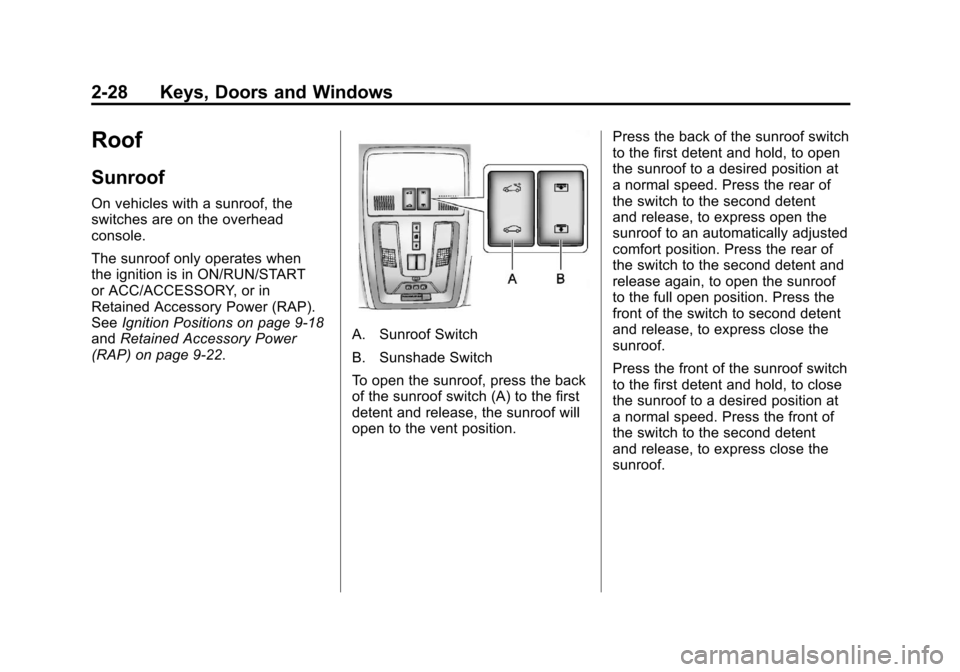
A. Sunroof Switch
B. Sunshade Switch
To open the sunroof, press the back
of the sunroof switch (A) to the first
detent and release, the sunroof will
open to the vent position. Press the back of the sunroof switch
to the first detent and hold, to open
the sunroof to a desired position at
a normal speed. Press the rear of
the switch to the second detent
and release, to express open the
sunroof to an automatically adjusted
comfort position. Press the rear of
the switch to the second detent and
release again, to open the sunroof
to the full open position. Press the
front of the switch to second detent
and release, to express close the
sunroof.
Press the front of the sunroof switch
to the first detent and hold, to close
the sunroof to a desired position at
a normal speed. Press the front of
the switch to the second detent
and release, to express close the
sunroof.
Page 69 of 498

Black plate (5,1)Cadillac SRX Owner Manual - 2011
Seats and Restraints 3-5
To adjust the lumbar support, see
Lumbar Adjustment on page 3‑7.
Memory Seats
On vehicles with the memory
feature, the“1”and “2”buttons on
the outboard side of the driver seat
are used to manually save and
recall the positions of the driver
seat, outside mirrors, and adjustable
throttle and brake pedal positions,
if available. These manually stored
positions are referred to as Button
Memory positions. The vehicle will also automatically
save driver seat, outside mirror,
and adjustable throttle and brake
pedal positions to the current
driver Remote Keyless Entry (RKE)
transmitter when the ignition is
turned off. These automatically
stored positions are referred
to as RKE Memory positions.
See
Remote Keyless Entry (RKE)
System Operation on page 2‑4 for
more information.
Storing Button Memory Positions
To save positions into Button
Memory:
1. Adjust the driver seat, seatback recliner, both outside
mirrors, and adjustable pedals,
if available, to the desired driving
positions.
2. Press and release the MEM (Memory) button.
3. Press “1”until a beep sounds.
4. Repeat Steps 1 through 3 for a second driver using “2.”Recalling Button Memory
Positions
To recall the manually saved
Button Memory positions, press
and hold
“1”or“2.” The driver seat,
outside mirrors, and adjustable
pedals, if available, move to the
positions stored to those buttons
when pressed. Releasing “1”or“2”
before the stored positions are
reached stops the recall.
If something has blocked the
driver seat and/or the adjustable
pedals, if available, while recalling
a memory position, the recall may
stop. Remove the obstruction; then
press and hold the appropriate
manual control for the memory item
that is not recalling for two seconds.
Try recalling the memory position
again by pressing the appropriate
memory button. If the memory
position is still not recalling, see
your dealer for service.
Page 70 of 498

Black plate (6,1)Cadillac SRX Owner Manual - 2011
3-6 Seats and Restraints
Recalling RKE Memory Positions
(Memory Remote Recall)
The Memory Remote Recall feature
can recall the driver seat, outside
mirrors, and adjustable pedals,
if available, to previously stored
RKE Memory positions when
entering the vehicle.
Every time the ignition is
placed in OFF, the positions
of the driver seat, outside mirrors,
and adjustable pedals, if available,
are automatically stored to the RKE
transmitter that was used to start
the vehicle. These positions are
called RKE Memory positions and
may be different than the previously
mentioned Button Memory positions
saved to the“1”or“2” buttons. To automatically recall RKE
Memory positions, unlock the driver
door with the RKE transmitter, and
open the driver door. On vehicles
with Keyless Access, opening the
driver door when an RKE transmitter
is present will activate the RKE
Memory recall. If the driver door
is already open, pressing the
RKE transmitter
Kbutton will also
activate the RKE Memory recall.
The driver seat, outside mirrors,
and pedals, if available, will move to
the previously saved RKE Memory
positions.
This feature is turned on or off using
the vehicle personalization menu.
See “Memory Remote Recall”
under Vehicle Personalization on
page 5‑40 for more information. To stop recall movement, press
one of the memory, power mirror,
or power seat controls, or the
adjustable pedal switch, if available.
If something has blocked the
driver seat and/or the adjustable
pedals, if available, while recalling
a memory position, the recall
may stop. Remove the obstruction;
then press and hold the appropriate
manual control for the memory item
that is not recalling for two seconds.
Try recalling the memory position
again by opening the driver door
and pressing the RKE transmitter
K
button. If the memory position is
still not recalling, see your dealer
for service.
Page 71 of 498

Black plate (7,1)Cadillac SRX Owner Manual - 2011
Seats and Restraints 3-7
Easy Exit Driver Seat
This feature moves the seat
rearward allowing the driver more
room to exit the vehicle.
To activate, place the ignition in
OFF and open the driver door. If the
driver door is already open, placing
the ignition in OFF will activate the
easy exit driver seat.
This feature is turned on or off
using the vehicle personalization
menu. See“Easy Exit Driver Seat”
under Vehicle Personalization on
page 5‑40 for more information. To stop recall movement, press one
of the memory, power seat controls,
or the adjustable pedal switch,
if available.
If something has blocked the driver
seat while recalling the exit position,
the recall may stop. Remove the
obstruction; then press and hold
the power seat control rearward for
two seconds. Try recalling the exit
position again. If the exit position is
still not recalling, see your dealer for
service.Lumbar Adjustment
Power Lumbar
If available, press and hold the front
or rear of the control to increase or
decrease lumbar support. Release
the control when the seatback
reaches the desired level of lumbar
support.
Page 74 of 498

Black plate (10,1)Cadillac SRX Owner Manual - 2011
3-10 Seats and Restraints
Heated Front Seats
{WARNING
If you cannot feel temperature
change or pain to the skin, the
seat heater may cause burns
even at low temperatures.
To reduce the risk of burns,
people with such a condition
should use care when using
the seat heater, especially for
long periods of time. Do not
place anything on the seat that
insulates against heat, such as
a blanket, cushion, cover or
similar item. This may cause
the seat heater to overheat.
An overheated seat heater may
cause a burn or may damage
the seat.
If available, the buttons are near the
climate controls on the instrument
panel. To operate, the ignition must
be in ON/RUN/START.
Press
LorMto heat the driver
or passenger seat cushion and
seatback. Press the button once for the
highest setting. With each press
of the button, the heated seat
will change to the next lower
setting, and then to the off setting.
The lights indicate three for the
highest setting and one for the
lowest.
The passenger seat may take
longer to heat up.
Remote Start Heated Seats
When it is cold outside, the
heated seats can be turned on
automatically during a remote
vehicle start. The heated seats
will be canceled when the ignition
is turned on. Press the button to
use the heated seats after the
vehicle is started.
The heated seat indicator lights on
the button do not turn on during a
remote start.
Page 75 of 498

Black plate (11,1)Cadillac SRX Owner Manual - 2011
Seats and Restraints 3-11
The temperature performance of an
unoccupied seat may be reduced.
This is normal.
The heated seats will not turn on
during a remote start unless the
heated seat feature is enabled in
the vehicle personalization menu.
SeeRemote Vehicle Start on
page 2‑10 and“Remote Start
Auto Heated Seats” underVehicle
Personalization on page 5‑40 for
more information.
Heated and Ventilated
Front Seats
{WARNING
If you cannot feel temperature
change or pain to the skin,
the seat heater may cause
burns even at low temperatures.
See the Warning under Heated
Front Seats on page 3‑10.
If available, the buttons are near the
climate controls on the instrument
panel. To operate, the ignition must
be in ON/RUN/START.
Press
Mto heat the seat or{to
cool the seat.
Press the button once for the
highest setting. With each press of
the button, the seat will change to
the next lower setting, and then to
the off setting. The lights indicate
three for the highest setting and
one for the lowest. The passenger seat may take
longer to heat up.
Remote Start Heated and
Ventilated Seats
During a remote start, the heated or
ventilated seats can be turned on
automatically. They are canceled
when the ignition is turned on.
Press the button to use the heated
or ventilated seats after the vehicle
is started.
The heated or ventilated seat
indicator lights on the button do
not turn on during a remote start.
The temperature performance of an
unoccupied seat may be reduced.
This is normal.
The heated or ventilated seats
will not turn on during a remote
start unless they are enabled in the
vehicle personalization menu. See
Remote Vehicle Start on page 2‑10
and
“Remote Start Auto Heated
Seats” or“Remote Start Auto Seat
Cool” under Vehicle Personalization
on page 5‑40 for more information.
Page 77 of 498

Black plate (13,1)Cadillac SRX Owner Manual - 2011
Seats and Restraints 3-13
To raise the seatback:
1. Lift the lever on top of theseatback. Raise the seatback
and release the lever. The rear
seatback lock indicator (A)
extends when the seatback is
unlocked.
2. Push the seatback rearward until it locks in the upright
position. The rear seatback lock
indicator (A) retracts when the
seatback is locked in place.
3. Make sure the rear safety belts are not twisted or caught
between the seat cushion and
the seatback.
Reclining the Seatbacks
To recline the seatback:
1. Lift and hold the lever on top ofthe seatback. The rear seatback
lock indicator (A) extends when
the seatback is unlocked. 2. Tilt the seatback rearward, and
then release the lever when
the seatback is in the desired
position. The rear seatback lock
indicator (A) retracts when the
seatback is locked in place.
Heated Rear Seats
{WARNING
If you cannot feel temperature
change or pain to the skin,
the seat heater may cause
burns even at low temperatures.
See the Warning under Heated
Front Seats on page 3‑10.
On vehicles with rear outboard
heated seats, the buttons are on
the Rear Seat Audio (RSA) panel.
With the ignition in ON/RUN/START,
press
LorMto heat the left or
right seat cushion and seatback.
An indicator on the RSA display
appears when this feature is on.
Press the button once for the
highest setting. With each press of
the button, the heated seat changes
to the next lower setting, and then
the off setting. Three lights indicate
the highest setting, and one light
indicates the lowest.