2011 CADILLAC ESCALADE ESV radio
[x] Cancel search: radioPage 245 of 548

Black plate (43,1)Cadillac Escalade/Escalade ESV Owner Manual - 2011
Infotainment System 7-43DVD Distortion Video distortion can occur when
operating cellular phones, scanners,
CB radios, Global Position Systems
(GPS)*, two-way radios, mobile fax
machines, or walkie talkies.
It might be necessary to turn off the
DVD player when operating one of
these devices in or near the vehicle.
*Excludes the OnStar ®
System.
Cleaning the RSE Overhead
Console When cleaning the RSE overhead
console surface, use only a clean
cloth dampened with clean water.
Cleaning the Video Screen When cleaning the video screen,
use only a clean cloth dampened
with clean water. Use care when
directly touching or cleaning the
screen, as damage could result. Rear Seat Entertainment
(RSE) System
(Headrest DVD) Vehicles with an RSE system
include two head restraint video
display screens with integrated DVD
players, auxiliary inputs, two
wireless headphones, and a remote
control. This system works
independently from the vehicle's
Overhead DVD RSE system. See
Rear Seat Entertainment (RSE)
System (Overhead) on page 7 ‑ 33 or
Rear Seat Entertainment (RSE)
System (Headrest DVD) on
page 7 ‑ 43 for information about the
Overhead DVD RSE system.
The vehicle has a feature called
Retained Accessory Power (RAP).
With RAP, the RSE system can be
played even after the ignition is
turned off. See Retained Accessory
Power (RAP) on page 9 ‑ 35 for more
information. Video Display Screens
The video display screens are
located on the backside of each
head restraint.
Notice: Avoid directly touching
the video screen, as damage can
occur. See “ Cleaning the Video
Screens ” later in this section for
more information.
Page 248 of 548

Black plate (46,1)Cadillac Escalade/Escalade ESV Owner Manual - 2011
7-46 Infotainment System AV INPUT: (Audio/Video Input
Jack): The audio/video input jack
is located below the video display
screen and allows viewing of
auxiliary sources such as portable
DVD players, game stations,
or video cameras, on each screen. .
Video Input — The yellow
connector is used for video
input. .
L Audio — The white connector
is used for the left side audio. .
R Audio — The red connector is
used for the right side audio.
Level Lock and Release Latch:
The viewing angle of the video
screen can be adjusted by releasing
the latch and gently moving the
screen. Then lock it into a secure
position. Vehicle Speakers Audio from the DVD player or
an auxiliary device can be heard
through the vehicle speakers or the
wireless/wired headphones, while
the radio is tuned to one of the six
frequencies selected on the Sound
Around portion of the system ’ s
remote control. See “ Remote
Control ” later in this section.
Only one audio source can be heard
through the vehicle ’ s speakers at a
time. The audio source being used
is specified by the A/V (audio/video)
source selected on the driver side
head restraint video display screen.
To turn the RSE system audio
output to the vehicle ’ s speakers,
press Sound Around ON, on the
system ’ s remote control. The audio
from the RSE system can be
heard through the wireless/wired
headphones and the vehicle ’ s
speakers at the same time. The
volume on the radio can vary when
switching between the radio, CD,
DVD, MP3, or an auxiliary device. Wireless Headphones The two wireless headphones
included with the Headrest DVD
RSE system will only work with the
Headrest DVD RSE system and are
marked for channel 3 and 4. The
wireless headphones must be
used within a line of sight of the
transmitter that is located above
the video display screen.
3 ‐ 4 Channel Selector: This is
located on the right earpiece.
Either Channel 3 or 4 can be
selected with the channel
selector. The driver side monitor
is designated as Channel 3, and
the passenger side as Channel 4.
Set the channel selector switch
according to the video display
screen being viewed. The message,
“ To listen to this monitor tune your
headphones to Channel 3 (or 4) ”
displays for five seconds then
disappears when the video display
screen is turned on.
Page 251 of 548

Black plate (49,1)Cadillac Escalade/Escalade ESV Owner Manual - 2011
Infotainment System 7-49SOUND AROUND SELECT: Press
to select an FM transmitter channel.
The SOUND AROUND SELECT
lets the DVD audio play over the
vehicle ’ s sound system by tuning
the radio to one of the six FM
frequencies listed below. .
CH1 : 88.3MHz .
CH2 : 88.7MHz .
CH3 : 89.1MHz .
CH4 : 89.5MHz .
CH5 : 89.9MHz .
CH6 : 90.3MHz
MENU: Press to enter the DVD
disc menu while the disc is playing.
Q ,
R ,
q ,
r (Navigation Arrows):
Press to navigate through menus.
ENTER: Press to enter a selected
function or to begin playback of
the disc. REPEAT
7 : Press to repeat part
or all of a chapter, title, track, or the
entire disc after using the A ‐ B
button to setup repeat preset
sections.
RETURN
8 : This button is not
used with the system.
A ‐ B: This button is used to setup
repeat preset sections. Press this
button once while the disc is playing
to select the starting position. Press
a second time to select the end
position. Press a third time to turn
the function off. To view the preset
section, press
7 .
AUTO MEMORY: This button is not
used with the system.
SEARCH/SKIP: This button is not
used with the system.
ERASE/ADD: This button is not
used with the system.
R-S: This button is not used with
the system. TITLE: Press to enter the disc
title mode. The title feature is
disc-specific, and may not be
available on all discs.
SUBTITLE: Press to change
the subtitle language to another
available language or to turn
subtitles off.
ANGLE: Press to select a different
viewing angle for discs that are
recorded with different camera
angles.
AUDIO: Press to select a different
language for discs that are recorded
with different languages.
0 ‐ 9 (Numbers): The numbers
located on the lower left side of the
remote control can be used to enter
numbered menu options, channels,
or track numbers.
GOTO: Press to enter the GOTO
menu to choose a desired title,
chapter, track, or song inside
the disc.
Page 260 of 548

Black plate (58,1)Cadillac Escalade/Escalade ESV Owner Manual - 2011
7-58 Infotainment System Handle CDs and DVDs carefully.
Store them in their original cases or
other protective cases and away
from direct sunlight and dust. The
DVD player scans the bottom
surface of the disc. If the surface of
a CD or DVD is damaged, such as
cracked, broken, or scratched, the
CD or DVD may not play properly or
not at all. If the surface of a CD or
DVD is soiled, take a soft, lint free
cloth or dampen a clean, soft cloth
in a mild, neutral detergent solution
mixed with water, and clean it. Make
sure the wiping process starts from
the center to the edge.
Do not touch the bottom side of a
CD or DVD while handling it; this
could damage the surface. Pick up
CDs or DVDs by grasping the outer
edges or the edge of the hole and
the outer edge. Rear Seat Audio (RSA)
System Vehicles with this feature allow
the rear seat passengers to listen
to and control any of the music
sources: radio, CD, DVD, or other
auxiliary sources. The rear seat
passengers can control the same
music sources the front seat
passengers are listening to (dual
control) or a different source. For
example, rear seat passengers can
listen to and control a CD through
the headphones, while the driver
listens to the radio through the
speakers. The rear seat passengers
have control of the volume for each
set of headphones.
The radio functionality is controlled
by both the RSA and the front radio,
only one band can be tuned to at
one time. Changing the band on the
RSA or the front radio will change
band on the other system. RSA functions can be operated
even when the main radio is off.
Audio can be heard through wired
headphones (not included) plugged
into the jacks on the RSA. If the
vehicle has this feature, audio can
also be heard on Channel 2 of the
wireless headphones.
The audio system allows the rear
speakers to continue playing even
when the RSA audio is active
through the headphones.
To listen to an iPod or portable
audio device through the RSA,
attach the iPod or portable audio
device to the auxiliary input (if
available), located below the RSA.
Turn the iPod on, then choose the
auxiliary input with the RSA SRCE
button. An iPod ®
or portable audio
device can be connected to the front
auxiliary jack or the USB port.
Page 261 of 548
Black plate (59,1)Cadillac Escalade/Escalade ESV Owner Manual - 2011
Infotainment System 7-59
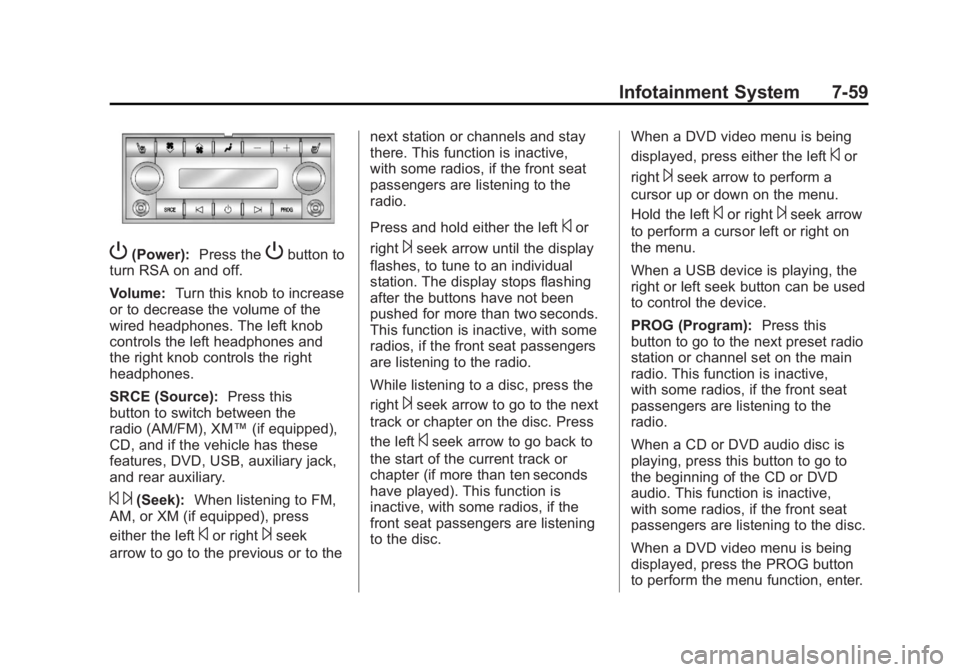
P (Power): Press the
P button to
turn RSA on and off.
Volume: Turn this knob to increase
or to decrease the volume of the
wired headphones. The left knob
controls the left headphones and
the right knob controls the right
headphones.
SRCE (Source): Press this
button to switch between the
radio (AM/FM), XM ™ (if equipped),
CD, and if the vehicle has these
features, DVD, USB, auxiliary jack,
and rear auxiliary.
© ¨ (Seek): When listening to FM,
AM, or XM (if equipped), press
either the left
© or right
¨ seek
arrow to go to the previous or to the next station or channels and stay
there. This function is inactive,
with some radios, if the front seat
passengers are listening to the
radio.
Press and hold either the left
© or
right
¨ seek arrow until the display
flashes, to tune to an individual
station. The display stops flashing
after the buttons have not been
pushed for more than two seconds.
This function is inactive, with some
radios, if the front seat passengers
are listening to the radio.
While listening to a disc, press the
right
¨ seek arrow to go to the next
track or chapter on the disc. Press
the left
© seek arrow to go back to
the start of the current track or
chapter (if more than ten seconds
have played). This function is
inactive, with some radios, if the
front seat passengers are listening
to the disc. When a DVD video menu is being
displayed, press either the left
© or
right
¨ seek arrow to perform a
cursor up or down on the menu.
Hold the left
© or right
¨ seek arrow
to perform a cursor left or right on
the menu.
When a USB device is playing, the
right or left seek button can be used
to control the device.
PROG (Program): Press this
button to go to the next preset radio
station or channel set on the main
radio. This function is inactive,
with some radios, if the front seat
passengers are listening to the
radio.
When a CD or DVD audio disc is
playing, press this button to go to
the beginning of the CD or DVD
audio. This function is inactive,
with some radios, if the front seat
passengers are listening to the disc.
When a DVD video menu is being
displayed, press the PROG button
to perform the menu function, enter.
Page 262 of 548

Black plate (60,1)Cadillac Escalade/Escalade ESV Owner Manual - 2011
7-60 Infotainment System
Navigation Using the Navigation
System This section presents basic
information needed to operate the
navigation system.
Use the buttons located on the
navigation system along with the
available touch-sensitive screen
buttons on the navigation screen to
operate the system. See Overview
on page 7 ‑ 3 for more information.
Once the vehicle is moving, various
functions are disabled to reduce
driver distractions. Navigation Buttons The following buttons are located on
the navigation system:
O /
n (Power/Volume):
1. Press to turn the system on
and off.
2. Turn to increase or decrease the
volume to the audio system.
3. Press and hold for more than
two seconds to turn off the
navigation system, the Rear
Seat Entertainment (RSE), and
Rear Seat Audio (RSA). If the
vehicle has not been tuned off,
the RSE and the RSA can be
turned back on by pressing this
knob and continues play of the
last active source.
X (Eject): Press to eject the
CD/DVD Disc. See CD/DVD Player
on page 7 ‑ 19 . w (Tune): Turn to go to the next
or previous frequency or disc track
or chapter. See CD/DVD Player on
page 7 ‑ 19 or MP3 on page 7 ‑ 28 for
more information.
AUDIO: Press to display the audio
screen. Press to switch between
AM, FM, or XM, if equipped, DISC,
or AUX (Auxiliary), or press on the
screen button. See CD/DVD Player
on page 7 ‑ 19 , MP3 on page 7 ‑ 28 ,
and Auxiliary Devices on page 7 ‑ 31
for more information.
FAV (Favorite): Press to access
the preset stations. See “ Storing
Radio Station Presets ” under,
Overview on page 7 ‑ 3 .
5 (Phone): See the OnStar ®
(if equipped) owner guide and
Bluetooth (if equipped) for more
information.
e (Sound): Press to access the
Sound menu to adjust the treble,
midrange, bass, fade, balance, and
Digital Signal Processing (DSP).
Page 263 of 548

Black plate (61,1)Cadillac Escalade/Escalade ESV Owner Manual - 2011
Infotainment System 7-61
y z (Scan Up/Down): Press to
scan the tracks/chapters up or down
on a disc.
y © ¨ z (Seek) (Previous/
Next): Press the up or down arrows
to go to the next or previous station.
Press and hold either arrow for
more than two seconds. The radio
goes to a station, plays for a few
seconds, then goes to the next
station.
NAV (Navigation): Press to view
the vehicle's current position on the
map screen. Each press of this
button cycles through Full Map and
the tab that displays the current
audio source (AM, FM, XM (if
equipped), CD, etc.). Full Map
displays the screen in full map view. Selecting the audio tab splits the
screen between the map screen
and the current audio source
screen menu.
RPT (Repeat): Press to repeat the
last voice guidance prompt.
DEST (Destination): Press to
access the Destination Entry
screen. From this screen, you can
select from several options to plan a
route by entering destination points.
CONFIG (Configure): Press to
adjust several of the system's
features and preferences.
Touch-Sensitive Screen
Buttons Touch-sensitive screen buttons are
located on the screen. When a
screen button has been selected, a
beep sounds. Screen buttons are
highlighted when a feature is
available. Alpha-Numeric Keyboard Letters of the alphabet, symbols,
punctuation, and numbers, when
available, displays on the navigation
screen as an alpha or numeric
keyboard. The alpha keyboard
displays when the system requires
entry of a city or street name.
All characters are touch-sensitive
screen buttons. Press a character to
select it.
A-Y (Accent Alphabet): Select to
enter letters with accent symbols.
This button may toggle to A-Z.
A-Z (Alphabet): Select to enter
letters from the alphabet. This
button may toggle to A-Y.
0-9 (Numbers): Select to enter
numbers.
Page 281 of 548

Black plate (79,1)Cadillac Escalade/Escalade ESV Owner Manual - 2011
Infotainment System 7-79Previous Destinations
Previous OnStar Destination
Downloads are saved under
Previous Destinations in the
navigation system where they
can be accessed or saved to the
address book.
Important Notes regarding OnStar
Destination Download: .
If the navigation system is
turned off when the destination
download is attempted, the
navigation system will
automatically turn on and
display the OnStar Destination
Download Screen. The radio will
remain on after the download
occurs. .
If OnStar downloads a
destination and the address
is not found in the mapping
disc ’ s database and routing by
coordinates is not available, the
GO and Map buttons gray out
and routing will not be available.
Press the blue OnStar button for
further assistance. .
The Call button grays out when
there is no phone number
available for your destination
and while connected to OnStar. Map Destination Screen Functions
If the map screen is used to show
destination, it will have map screen
capabilities such as GO, Mark,
Zoom, Scroll, etc. The address is
shown at the top of the screen.
Destination Map Screen