2011 AUDI S8 ignition
[x] Cancel search: ignitionPage 81 of 302

the stored position as soon as you switch on
the ignition.
Starting and stopping
the engine
Starting the engine
This button switches on the ignition and
starts the engine.
Fig. 80 Center console: S TART ENGINE S TOP b utton
" Step on the brake pedal¢&_ .
.. Press on the !START ENGINE STOP I button
¢ fig. 80 -the engine w ill start .
By pressing the
I START ENGINE STOP I button
without depressing the brake pedal, the igni tion is on and switched off by pressing it
again.
After a cold engine is started, there may be a
brief period of increased noise because oil
pressure must first build up in the hydraulic
valve adjusters. This is normal and not a cause
for concern.
If the engine should not start immediately,
the starting process is automatically stopped
after a short time. Repeat starting procedure.
Driver message in the instrument cluster
display
Press brake pedal to start engine
This message appears if you press the
I START ENGINE S TOP I button to start the en
gine and do not depress the brake pedal. The
engine can only be started if the brake pedal is depressed.
!! Convenience key: Is key not in the vehi
cle?
On the road 79
This message appears along with thee sym
bol if the master key is removed from the ve
hicle with the eng ine running.
It is intended
to remind you (e.g . when changing drivers)
not to continue the journey without the mas
ter key.
If the master key is no longer in the veh icle,
you cannot switch on the ignition after stop
ping the engine and you also cannot start the
engine again . Moreover, you cannot lock the
vehicle from the outside with the key.
Shift to P, otherwise vehicle can roll away.
Doors do not lock if lever is not in
P.
This message appears for safety reasons
along with an audible warning tone if the
P
selector lever position is not engaged when
stopping the engine with the
I START ENGINE STOP I button. Select the P se
lector lever position . Otherwise the vehicle
cou ld roll and it cannot be locked .
Key not recognised. Hold back of key against
marked area . See owner's manual.
If the indicator light turns on and this mes
sage appears, there is a malfunction
¢ page 80.
Steering lock
The steering locks when you turn the engine
off using the
I START ENGINE STOP I button
and open the driver's door. The locked steer ing helps prevent vehicle theft.
A WARNING
- Never allow the engine to run in confined
spaces - danger of asphyx iation.
- Never turn off the engine until the vehi
cle has come to a complete stop.
- The brake booster and power steering
only work when the engine is running. If
the engine is off, you have to use more
force when steering or braking. Because
you cannot steer and brake as you usual
ly would, this could lead to crashes and
serious injuries.
Page 82 of 302

80 On the road
(D Note
-Avoid hig h engine rpm, fu ll throttle and
heavy engine loads unti l the engine has
reached operating temperat ure -other
wise you risk eng ine damage.
- The engine cannot be started by pushing
or towing the vehicle.
- If the engine has been under heavy load
for an extended period, heat b uilds up in
the engine compartment after the en
gine is switched off - there is a risk of
damaging the engine . Allow the eng ine
to run at idle for about 2 minutes before
switching it off.
@ Tips
If you open the driver's door with the igni
tion on, a buzzer sounds and the message
Igniti on is on appears in the instrument
cluster display. Sw itch the ignition off .
Stopping the engine
• Bring your vehicle to a complete stop.
.. Move the se lector lever to the
P or N pos i
t ion .
.. Pre ss the I STAR T ENGINE ST OP I button
r:> page 79, fig. 80 .
Emergency off
If necessary, the engine can be switched off
with the selector lever in the
R , D or S posi
tions . The engine stops if you press the
I S TAR T ENGINE ST OP ! button at speeds be low
6 mph (10 km/h).
A WARNING
- Never turn off the eng ine unti l the vehi
cle has come to a complete stop.
- The brake booster and power steer ing
only work when the engine is runn ing .
If
the engine is off, you have to use more
force when steering or braking. Because
you cannot steer and brake as you usua l
ly wo uld, this could lead to crashes and
serious injuries. -
For safety reasons, you should a lways
park your vehicle w ith the selector lever
in P . Otherwise, the vehicle could inad
vertently roll away .
- After the engine has been switched off,
the radiator fan can cont inue to run for
up to 10 minutes -even with the ignition
sw itched off. It can also sw itch on again
after some time if the coolant tempera
ture rises as the result ofa heat bu ildup
or if the engine is hot and the engine
compartment is additionally heated by
the sun's rays .
(D Note
Do not stop the eng ine immedia tely after
hard o r extended driving. Keep the engine
running for approximate ly two minutes to
prevent excessive heat bui ld-up.
Starting the engine if there is a
malfunction
It may not be possible to start the engine un
der certain circumstances, for example if the
battery in the vehicle key is drained, if inter
ference is affected the key or if there is a sys
tem malfunction.
"' ij
:c
-- --- -~
Fig . 81 Ce nter co nsole/master key: start ing the e ngin e
i f there is a malfunct ion
Requirement: The message K ey not recog
niz ed . Hold back of ke y again st ma rked are a.
See o wner's manual.
must appear and the in
dicator light
m must switch on .
.. Hold the master key vertically in the loca
tion indicated
y >>) <=> fig . 81.
• Press the brake pedal r=> & in Starting the
engine on page 79 .
IJ>,
Page 83 of 302

.. Press the !START ENGINE STOPI button. The
engine will start.
.. Drive to your author ized Audi dealer imme
diately to have the malfunction corrected .
@ Tips
You can view the message again by press
ing the
! START ENGINE STOPI button.
Electromechanical
parking brake
Operation
The electromechanical parking brake replaces
the hand brake.
Fig. 82 Center console: Park ing brake
.. Pull on the switch<®> c> fig . 82 @to apply
the parking brake. The indicator light in the
switch illuminates.
.. Step on the brake pedal or the accelerator
pedal and press the switch <®> at the same
t ime to release the parking brake. The indi
cator light in the switch goes out.
Your vehicle is equipped with an electrome
chan ical parking brake. The parking brake is
designed to prevent the vehicle from roll ing
un intent ionally and replaces the hand brake.
In addition to the normal functions of a tradi
tional hand brake, the electromechanical parking brake provides various convenience
and safety functions.
When starting from rest
-The integral starting assist helps you when
driving by automatically releasing the park
i ng brake
c> page 82, Starting from rest.
On the road 81
- When start ing on inclines, the starting as
sist prevents the vehicle from unintentional
ly rolling back. The braking force of the
parking brake is not released until sufficient
driving force has been built up at the
wheels.
Emergency brake function
An emergency brake ensures that the vehicle
can be slowed down even if the
normal brakes
fail
c> page 83, Emergency braking.
Indicator lights
-If the parking brake is closed with the igni
tion
switched on the indicator lights come
on - (USA mode ls)/ . (Canada models)
in the instrument cluster and the switch.
- If the parking brake is closed with the igni
tion
switched off the indicator lights come
on - (USA models)/ . (Canada models)
in the instrument cluster and the switch for
about 20 seconds .
A WARNING
Do not press the accelerator pedal inadver
tently if the veh icle is stationary but the
engine is running and a gear is selected .
Otherwise the vehi cle w ill start to move
immediately and could result in a crash.
(D Note
If the symbol . in the display or the indi
cator light
11111 (USA models)/ . (Cana
da models) in the instrument cluster flash
es, there is a malfunction in the brake sys
tem. Please refer to the detailed descrip
tion of the indicator lights
c>page 14.
- If the indicator light -(USA mod-
els)/ . (Canada models) or
Im turns
on, there may be a malfunction in the
parking brake
c> page 15.
{I) Tips
-Yo u can app ly the parking brake at any
time -even with the ignition switched
off. The ignition must be on in order to
release the parking brake.
Page 84 of 302
82 On the road
-Occasiona l noises when the parking
brake is applied and re leased are norma l
and are not a cause for concern .
- When the vehicle is parked, the parking
brake goes through a se lf-test cycle at
regular intervals. Any assoc iated noises
are norma l.
Parking
Various rules apply to prevent the parked ve
hicle from rolling away accidentally.
P ar king
,. Stop the vehicle w ith the foot brake.
,. Pull the switch© to apply the parking
brake.
,. Se lect the
P se lector lever position
9 page 112.
,. Turn the eng ine off q _&. .
In addition on incline s and grad es
,. Turn the steering whee l so that your vehicle
wi ll ro ll against the curb in case it should
start to move .
A WARNING
-When you leave your veh icle -even if on
ly briefly -always take the ignition key
with you. This applies particularly when children remain in the veh icle. Otherw ise
the ch ildren could sta rt t he engine, re
lease the p arking brake or operate e lec
trical equipment (e .g. power windows) .
T he re is the risk of an accident.
- When the vehicle is loc ked, no one -par
t icu la rly not children sho uld remain in
the vehicle . Locked doors make it more
difficult for emergency workers to get in
to the vehicle -putt ing lives at risk.
Start ing from rest
The starting assist function ensures that the
parking brake is released automatically upon starting.
Stopping and appl ying par kin g brake
,. Pull the switch© to apply the parking
brake.
St arting and automatic ally rel easi ng the
parking b rake
,. When you start to dr ive as usual, the park
ing brake is automat ically released and your
veh icle beg ins to move.
When stopping at a traffic signal or stopping in city traffic, the parking brake can be ap
plied . The vehicle does not have to be held
with the footbrake . The parking brake elimi
nates the tendency to creep w ith a dr ive range
engaged. As soo n as you d rive off as usual,
the pa rking brake is re leased automatically
and the vehicle s tarts to move.
Sta rting on slopes
When starting on inclines, the starting assist
prevents the veh icle from u nintent ionally roll
i ng back. The braking fo rce of the par kin g
brake is not re leased unti l su ff ic ient d riving
f orce has been built up a t the wheels.
(D Tips
Fo r safety reasons, the pa rking bra ke is re
l eased automatically o nly when t he d riv
er's safety belt is engaged in the buckle.
Starting off with a trailer
To prevent rolling back unintentionally on an
incline, do the following:
,. Keep the sw itch(®) pulled and depress the
accelerator. The pa rking brake stays applied
and p revents the vehicle from roll ing back
ward .
,. You can release the switch© once you are
sure that you are developing enough for
ward momentum at the whee ls as you de
press the acce lerator.
Page 87 of 302

fig. 84 is replaced with a white symbol. The
saved speed remains the same.
Presetting your speed
You con preset your desired speed while the
vehicle is not moving .
.,. Swit ch on the ignition .
.,. Pull lever into posit ion @ ~
page 84,
fig . 83 .
... Press the lever in the 0 or 0 direction to
increase or decrease your speed .
.,. Re lease the lever to save that speed.
This function makes it possible, for example,
to save the speed you want before driving on
the highway . Once on the highway, activate
the cruise control by pull ing the lever toward
@.
Switching the system off
Temp orar y de activation
.,. Press the brake pedal, or
... Press the lever into pos it ion @ (not clicked
into p lace)
c:;, page 84, fig . 83, or
.,. Drive for longe r than 5 minutes at more
than 5 mph (10 km/h) above the sto red
speed.
Switching off compl etely
.,. Press lever into position @(clicked into
place), or
.,. Switch the ign ition off.
The system reta ins the saved speed if you de
activate the cr uise control tempo rarily . To re
sume the saved speed, release the brake ped
a l and pull the lever to position@.
Sw itch ing the ign ition off erases the saved
speed .
A WARNING
You should only return to the saved speed
if it is not too fast for the current traffic
condi tions - risk of an ac ciden t!
On th e ro ad 85
Page 93 of 302
Adaptive cruise control and braking guard 91
Setting the distance and driving
program
Applies to vehicles: with adaptive cruise co ntrol
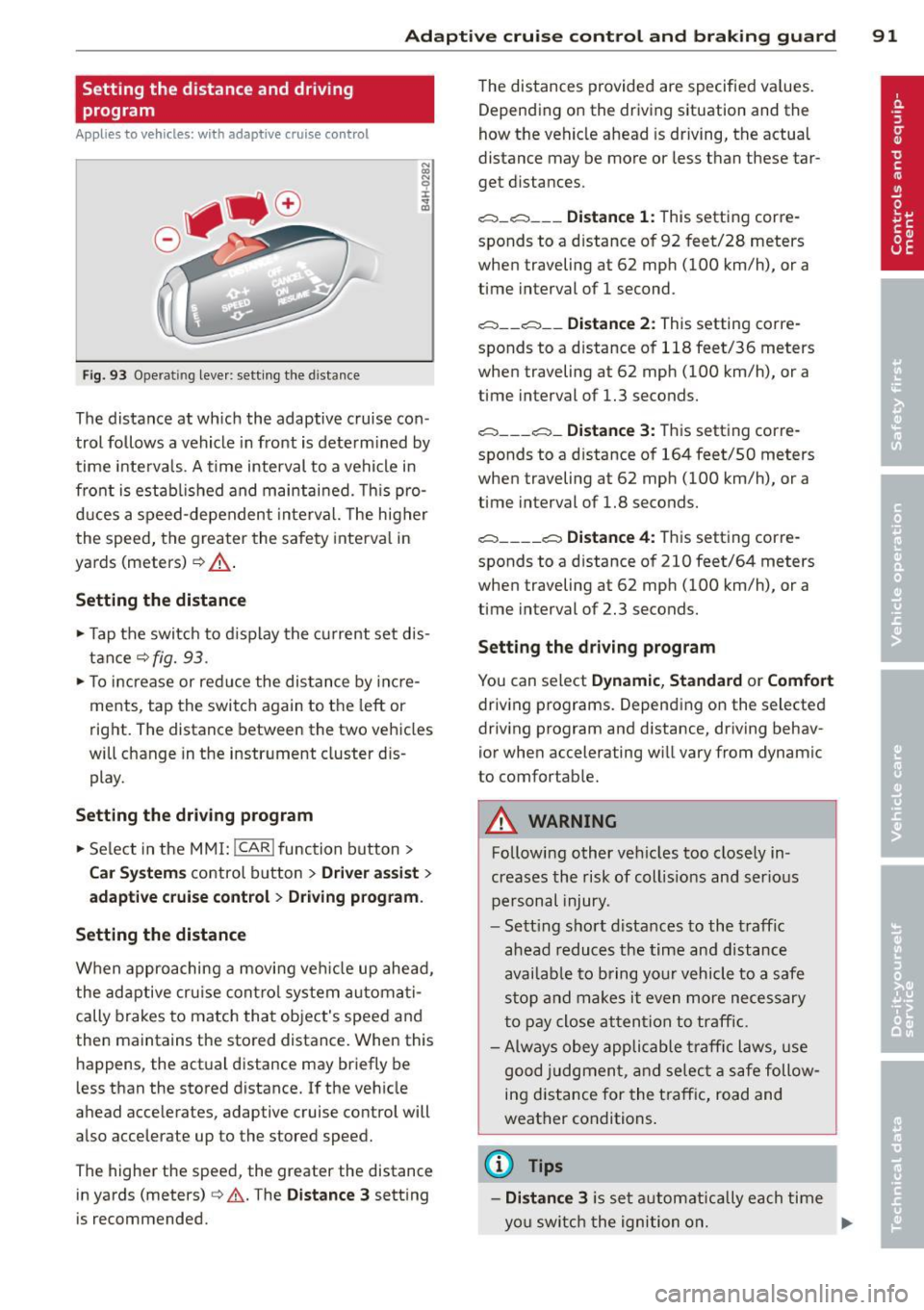
Fig. 93 Operating leve r: sett ing the distance
The distance at which the adaptive cruise con
trol follows a vehicle in front is determined by
time interva ls. A time interval to a vehicle in
front is estab lished and maintained. This pro
duces a speed-dependent inte rval. The higher
the speed, the greater the safety interval in
yards (meters)¢ ,&.
Setting the distance
~ Tap the switch to d isplay the current set dis
tance
¢fig. 93.
~ To increase or reduce the distance by incre
ments, tap the switch again to the left or
right. The distance between the two vehicles
will change in the instrument cluster dis
play.
Setting the driving program
~ Select in the MMI: !CAR ! function button >
Car Systems control button > Driver assist >
adaptive cruise control > Driving program .
Setting the distance
When approaching a movi ng veh icle up ahead,
the adaptive cruise contro l system automati
cally brakes to match that object's speed and
then maintains the stored distance. When this happens, the actual distance may briefly be
less than the stored distance. If the veh icle
ahead accelerates, adaptive cruise control will
also accelerate up to the stored speed.
The higher the speed, the greater the distance
in yards (meters) ¢&. . The
Distance 3 setting
is recommended. The distances
provided are specified va lues.
Depending on the driving situation and the
how the vehicle ahead is driving, the actual
distance may be more or less than these tar
get distances.
,;:::::;, _c::::, ___ Distance 1: This setting corre-
sponds to a distance of 92 feet/28 meters
when traveling at 62 mph (100 km/h), or a
time interval of 1 second.
,;:::::;, __ c::::, __ Distance 2: This setting corre
sponds to a distance of 118 feet/36 meters
when traveling at 62 mph (100 km/h), or a
t ime interval of 1.3 seconds.
,;:::::;, ___ ,;:::::;,_ Distance 3: This setting corre-
sponds to a distance of 164 feet/SO meters
when traveling at 62 mph (100 km/h), or a
time interval of 1.8 seconds.
,;:::::;, ____ c::::, Distance 4: This setting corre-
sponds to a distance of 210 feet/64 meters
when traveling at 62 mph (100 km/h), or a
t ime interval of 2.3 seconds.
Setting the driving program
You can select Dynamic, Standard or Comfort
driving programs. Depending on the selected
driving program and distance, driving behav
ior when accelerating will vary from dynamic
to comfortable.
.&_ WARNING
Following other vehicles too closely in
creases the risk of coll is ions and ser ious
personal injury.
- Sett ing short d istances to the traffic
ahead reduces the time and distance
availab le to bring your vehicle to a safe
stop and makes it even more necessary
to pay close attention to traffic.
-
-Always obey applicable traffic laws, use
good judgment, and select a safe follow
ing d istance for the traff ic, road and
weather conditions .
(0 Tips
-Distance 3 is set automat ically ea ch time
you switch the ignition on. ..,.
Page 122 of 302

120 Advanced Parking System
Switching on and off
Applies to vehicles: with park ing system advanced
The rear view camera switches on automati
cally together with the acoustic and visual
park assist when you put the vehicle in re
verse.
Fig. 128 Ce nter console: Park ing system swi tc h
Fig. 129 MMI disp lay: v isual distance d isplay
Switching on
,. Switch the MMI on
,. Act ivate
comfort or auto mode in Audi dr ive
select
¢page 106.
,. Shift into reverse or
,. Press the switch
P,qi in the center console
¢
fig. 128 . A short confirmation tone
sounds and the ind icator light in the sw itch
lights up.
Switching between the rear view camera
and visual display
,. Press the Graphic control button
¢
page 121, fig . 130 ® to see the visual
display .
,. Press the
Rearview control button to see the
rear view ca mer a image
¢ fig . 129 .
Switching off
,. Drive faster than 6 mph (10 km/h), or ,.
press the switch
P,#A or
,. switch off the ignition.
Segments in the visual display
The red segments in front of and behind the
vehicle ¢
fig. 129 help yo u to determine the
distance between you and an obstacle. As
your vehicle comes closer to the obstacle, the segments move closer to the vehicle . The col
li sion area has been reached when the next to
last segment is displayed . Do not continue
driv ing farther ¢
A in General Information
on page
119!
A WARNING
- The MMI display cannot show, or cannot
adequately show, ce rtain objects (such as
small posts or grating), recesses in the
g round and protruding parts on another
car .
- Only use the rear view camera to assist
you if it shows a good, clear pict ure. For
examp le, the image may be affected by
the sun shining into the lens, dirt on the
lens or if there is a defect.
- Use the rear view camera on ly with the
rea r lid comp lete ly closed . Make su re any
objects you may have mounted on the
rear lid do not block the rear view cam
era.
(D Tips
- The sensors must be kept clean and free
of snow and ice for the park assist to op
erate.
- If your vehicle is near an obstacle, an ad
ditional visual indicator appears in the
rearview camera image. This superim
posed image is there to help you to de
termined which area of the vehicle is af
fected .
- You can change the volume and pitch of
the signals as well as the display
¢page 122.
-What appears in the display is time-de
layed .
Page 125 of 302

Off -when the parking system is switched off,
only audible signals are given.
Warning tones
Front volume -front sensor vo lume
Rear volume -rear sensor volume
Front frequency -front sensor frequency
Rear frequency -rear sensor frequency
Music volume while parking -when the park
ing system is switched on, the volume of the
active audio source is lowered.
The newly adjusted value is briefly heard from
the signal generator.
(D Tips
- The warning tones can also be adjusted
directly by the v isual display or the pic
ture from the rear v iew camera. Simp ly
press the
Settings control button.
- Changed settings are activated when
parking system is switched on aga in.
- The settings are automatically stored
and ass igned to the remote control key.
Error messages
App lies to vehicles: with parking system advanced
There is an error in the system if the LED on
the
P' #A switch is blinking and you hear a con
tinuous alarm for a few seconds afte r switch
ing on the parking system or when the park
ing system is a lready act ivated. Have your au
thorized Audi dealer correct the error.
(D Tips
If the error is not corrected before you
sw itch off the ignition, when you switch on
the parking system again, the LED in the
P,#A switch will blink.
Advanced Parking System 123