2011 AUDI S8 ignition
[x] Cancel search: ignitionPage 63 of 302

Head restraints
Adjusting the head restraints
Head restraints that are adjusted according
to body size, along with the safety belt, offer
effective protection .
Fig. 58 Comfort head restraints: adjusting th e s ide
bolsters
Fig. 59 Outer rear seat: adjusting the h ead restraint
Adjust the head restraint so the upper edge is
as even as possible with the top of your head.
If that is not possible, try to adjust the head
restra int so that it is as close to this position
as possible <>
page 61.
Adjusting front head restraints
• To adjust the height of the front head re
stra ints, press/push the button©
<=>page 55, fig . 51 up/down o _& .
• Vehicles with recl ining rear seat : Grasp the
sides of the passenger 's head restraint w ith
both hands and s lide it upward /downwa rd.
Adjusting rear head restraints
The center rear head restra int is not adjusta
b le .
• Grasp the sides of the head restraint with
both hands and slide it upward until you feel
it click into place
o _A.
Seats and storage 61
• To lower the head restraints, press button -
small arrow -
<> fig. 59 and slide the head re
straint all the way down.
Adjusting the side bolsters*
• To adjust the side bolsters*, press them into
the desired position <>
fig. 58.
Refer to <> page 131, Proper adjustment of
head restraints
for guidelines on how to ad
just the height of the front head restraints to
suit the occupant's body size.
_&. WARNING
-Driving without head restraints or with
head restraints that are not properly ad
justed increases the risk of serious or fa
tal neck injury dramatically.
- Never adjust the driver's or front pas
senger's seat while the vehicle is moving.
If you do this while the vehicle is moving,
you will be out of position. Always adjust the driver's or front passenger's seat
when the vehicle is not mov ing.
- Be careful when adjusting the seat
height. Check to see that no one is in the
way, or ser ious injury could result!
- Because the seats can be electrically ad
justed with the ignition off, never leave
children unattended in the veh icle. Unsu
pervised use of the electric seat adjust
ments may cause serious injury.
- Read and heed all WARNINGS
<> page 131, Proper adjustment of head
restraints.
- Vehicles w ith a pass through in the cen
ter conso le have seating for four. The
long center console between the two
rear seats is
not a seating position.
Therefore, a safety belt is not provided.
(D Tips
-To prevent the head restraints from run
ning into the headliner, they ret ract au
tomatically when moving the seat for
ward or upward.
-
Page 66 of 302

64 Seat s a nd s tor ag e
Equipm ent that can be connected
Electrical devices can be connected to t he 115
volt socket in the vehicle. Power consumption
at the 115-volt socket must not exceed 150
watts (300 watts peak). Check the power con
sumption of the equipment on the model
p late.
LED on th e sock et
- The socket is ready for use when the LED is
green .
- If the L ED blinks red , the re is a malfunction .
The socket will switch off automatically due
to overcurrent or overheating. The socket
wi ll switch on again automatically after a
cool-down period. Any devices that are con
nected and switched on will activate again
automatically ¢,&. .
A WARNING
-The sockets and the electrical accessories
co nnected to them operate on ly when
the ignition is switched on . Incor rect us
age can lead to serious injuries or burns.
T o reduce the risk o f injuries, never leave
children unattended in the vehicle with
the vehicle key.
- Heavy equipment or plugs with integrat ed power supply units can damage the
socket and lead to injuries.
- Store all connected equipment securely
whi le the vehicle is moving so that they
cannot be thrown through the vehicle in
the event of a braking maneuver or an acc ident.
- Never spill any liqu ids on the socket. If
any moisture gets into the socket, make
certain that all the moisture has dried up
before using the socket aga in .
- Equipment that is connected to the vehi
cle socket can heat up more than it does
when connected to the public g rid.
- When using adapters and extension
cords, the ch ild safety for the 115-volt
socket is disabled and the socket is
live .
- Never insert anyth ing other than the
plug of a n appropriate elect rical accesso- ry into the socket, especially things that
conduct e lectr icity, e.g. meta l pens, kn it
ting needles, etc. into the contacts of the 115-volt socket.
- Turn the electrical equ ipment off if the
socket has switched off because of
over
heating .
(D Note
-Always follow the manufact urer's in
struct ions for all electrical accessories
you want to use with the electrical sock et!
- Do not connect lamps that contain a ne
on tube. For technical reasons the lamp
may be damaged.
- Do not connect any 230-volt equipment
to the 115-volt socket. The equipment may be damaged .
If necessary, check the
permissible voltage for the equipment
on the model labe l.
- In the case of some powe r packs, e .g . for
a laptop computer, the built-in ove rcur
rent shutoff prevents i t from being
swi tched on be cause of excessive sta rt
up c urrent. In this case, disconnect the
power pack from the consumer and re
connect it after about 10 seconds .
(D Tips
- Unshielded equipment may cause inte r
ference in the radio and the vehicle e lec
tronics.
- Some equipment may wo rk properly be
cause of the reduced power (wattage),
available from the socket.
Page 71 of 302

-Never exceed the maximum permissible
load carry ing capacity of the roof of your
vehicle, the perm issible axle weights and
the permiss ible total weight of your veh i
cle
~ page 2 79, Weights .
-Always drive slowly, avoid sudden brak
ing and maneuvers when transporting
cargo on the roof of your vehicle .
@) For the sake of the environment
Sometimes it may be easier to leave a roof
rack installed even though you are not us
ing it. Due to the increased a ir resistance
your vehicle will unnecessarily use more
fuel. Remove the roof rack if you are not
going to use it.
12-volt sockets
App lies to vehicles: 12-volt sockets
Electrical accessories can be connected to ev
ery 12 -volt socket.
Fig. 70 Sect io n of the trim panel of t he luggage com
p ar tm en t: 12 -v ol t so cke t
Fig . 71 R ear cente r c ons ole : 12 -vo lt s ocket
~ Open the socket cover ~ fig . 70 or ~ fig. 71.
~ Inse rt the plug o f the el ectrical device into
t h e socket.
S ea ts a nd s to rage 69
There is an additional 12 volt socket in the
front center console~
page 70, fig . 72.
T he 12 volt socke ts may be used for 12-volt
appliances with maximum consumpt ion of up
to 100 watts.
Before you purchase any accessories, always
read and follow the info rmation in
~ page 285 , Additional accessories and parts
replacement.
A WARNING
The sockets and the electrical accessories
connected to them operate only when the
ignition is switched on .1ncorrect usage
can lead to ser ious injuries or burns . To re
duce the risk of injuries, never leave chil
dren unattended in the vehicle w ith the ve
h icle key.
(D Note
To avoid damaging the socket, only use
plugs that fit properly .
- Never connect eq uipment that generates
electrical current, such as a solar panel
or battery charger, to the 12 volt socket .
Th is could damage the vehicle 's electri
cal system.
- The 12 volt socket sho uld only be used
for a short per iod of t i me as a powe r
so urce for electrical equipme nt. Please
use the elec trical sockets in the vehicle
when connecting equ ipment for longer
periods .
(D Tips
When the engine is off and ac ce ssories are
still plugged in and are on , the vehicle ba t
tery can still be drained .
Page 74 of 302

7 2 Seats and st o ra ge
Cooler
Introduction
Applies to vehicles: with cooler
Please clean the cooler before using it for the
first time~
page 216.
You can only switch on the cooler if
- the temperature in the luggage compart
ment is below 131 °F (55 °C). The cooler
switches off automatically if the tempera
ture in the luggage compartment exceeds 131 °F (55 °C) . Once the temperature falls
below 131 °F (55 °C) again, the cooler
swit ches on aga in automatically.
- the battery is adequately charged. The cool
er switches off automatically if the vehicle
ba ttery voltage fal ls below a minimum lev
el. This prevents the battery from d ischarg
i ng. The cooler switches back on again auto
matically when the battery voltage increases
again (e.g. after starting the engine).
The cooler coo ls to 42 .8
° F ( + 6 °c) and the
freezer cools to 2 1.2 °F (- 6 °C) in optimum
cooling cond itions. The cooling performance
is affected by the temperature in the luggage
compartment. The temperature inside the
cooler will be higher if the luggage compart
ment is hot.
.,&. WARNING
To avoid putting the occupa nts at any r isk,
please observe the following safety ru les:
- The maximum capacity is 2.5 kg (5 .5
lbs.).
- Never overload the cooler. This could cause injury in the event of a co llision o r
s u dden bra king.
- The coo le r li d must always be kept closed
wh ile you are driv ing. Make sure the re
taining catch is sec urely engaged . The
c o ntents of the coo le r could be thrown
forwar d into the passe nger comp art
ment in the event of a collision or u nder
s udden braking -risk of inj ury!
- Inflammable liq uids, g as canisters, etc.
must not be store d in the cooler -risk of explos
ion! This also includes any prod
ucts that might em it volati le or inflam
mable gases.
- Liquids w ill freeze at temperatures at or
be low 32 °F (0 °C) and may cause glass
bottles to burst!
(D Note
- The venti lation openings for the cooler
are located on the back pane l trim in the
luggage compartment and
must be kept
clear at a ll times.
- If the coo ler is not functioning properly,
switch it off to prevent furt her damage.
Have it checked by a qualified works hop.
Operation
Applies to vehicles: with coo ler
Fig. 75 Rear center armrest
The cooler is located in the rear cabi n behind
the center armrest or behind the sliding cover
(depending on the equipment fitted in your
vehicle). The cooler and freezer only work
when the ignition is on .
Opening / clos ing the co oler
.,. To open the coolbox, pull the re lease lever
@ qfig. 75.
.,. To close the coolbox, push the lid back into
its original position. You should hear the re
lease lever
(D engage if the lid is properly
closed.
Switching on /off
.,. Press button @ q fig. 75 to switch the cool
er on/off. The symbol in the button is lit
when t his function is activated. .,,_
Page 77 of 302
Warm and cold 7 5
Operation
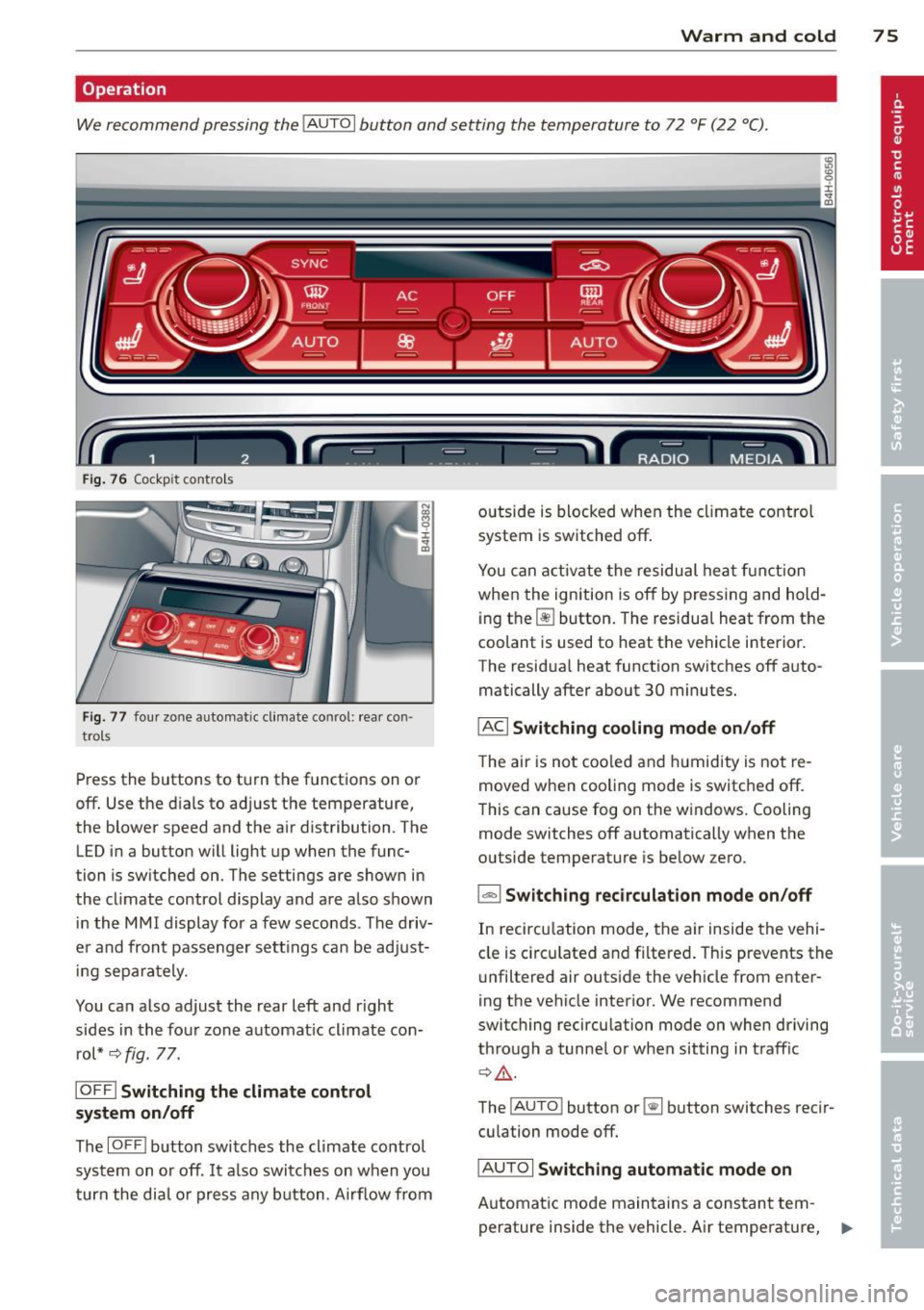
We recommend pressing the IAUTO I button and setting the temperature to 72 °F (22 °C) .
Fig. 7 6 Cockp it co ntrols
Fig. 77 four zo ne a utomat ic cl imat e co nr ol: rear con ·
tro ls
Press the buttons to turn the functions on or
off . Use the dials to adjust the temperature,
the blower speed and the air distribution . The
LED in a button will light up when the func
tion is sw itched on. The settings are shown in
the climate control display and are also shown in the MMI display for a few seconds . The driv
er and front passenger settings can be adjust ing separately.
You can also adjust the rear left and right
sides in the four zone automat ic climate con
rol*
~ fig. 77.
IOFF I Switching the climate control
system on/off
The IOFFI button switches the climate control
system on or off . It also switches on when you
turn the dial o r press any button . Airf low from outside
is blocked when the climate control
system is switched off.
You can activate the residual heat function
when the ignition is off by pressing and hold
i ng the ~ button . The residual heat from the
coolant is used to heat the vehicle interior.
The residua l heat function switches off auto
matically after about 30 minutes.
IAC I Switching cooling mode on/off
The air is not coo led and hum idity is not re
moved when cooling mode is switched off.
This can cause fog on the w indows. Cooling
mode switches off automatically when the
outside temperature is below zero.
l=-1 Switching recirculation mode on/off
In recircu lation mode, the air inside the vehi
cle is circu lated and filtered . This prevents the
unf iltered air outside the vehicle from enter
ing the vehicle interior. We recommend
switching recirculation mode on when driving
through a tunnel or when sitting in traff ic
~ A .
The !AU TO l button or~ button switches reci r
cu lation mode off.
IAUTOI Switching automatic mode on
Automat ic mode maintains a constant tem
perature inside the vehicle. Air temperature, .,..
Page 78 of 302

76 Warm and cold
airflow and air distribution are controlled au
tomatically.
Adjusting the temperature
Temperatures between 60 °F (+16 °() and
84 °F (+28 °C) can be set. Outside of this
range,
lo or hi wi ll appear in the climate con
trol system disp lay. At both of these settings,
the climate control system runs continuously
at maximum cooling or heating power. There
is no temperature regu lation.
~ Adjusting the airflow
You can adjust the airflow manually to suit
your needs. To have the airf low regulated au
tomatically, press the
! AUTO ! button.
~ Adjusting the air distribution
You can manually se lect the vents where the
air will flow. To have the air distribution regu
lated automatically, press the
IAUTOI button .
~ I lil* Adjusting Seat heating/
ventilation*
Pressing the button switches the seat heat
ing/ventilation on at the highest setting ( level
3). The L EDs indicate the temperature leve l.
To reduce the temperature, press the button
again. To switch the seat heating/ventilation
off, press the button repeatedly until the LED
turns off.
After 10 minutes, the seat heating/venti lation
automatically switches from level 3 to level 2.
I n vehicles without the four zone automatic
climate conrol *, buttons in the rear center
console control the seat heating for both out
er rear seats*.
~ Switch the defroster on/off
The winds hield and s ide windows are defrost
ed or cleared o f condensation as quickly as
possible. The maximum amo unt of air flows
mainly from the vents below the windshield.
Recirculation mode switches off. The tempera
ture is controlled automat ically.
The
IAUTOI button switches the defroster off.
~ Switching rear window heater on/off
T he rear window heater only operates when
the engine is running. It switches off auto
matically after 10 to 20 minutes, depending
on the outside temperature.
T o prevent the rear window heater from
switching off automatically , press and hold
the~ button for more than 3 seconds. This
r ema ins stored until the ignition is switched
off.
I SYNCI Synchronization*
When synchronization is switched on, the
same settings are applied to both the driver
and front passenger, except for the seat heat
ing/ventilation*. The rear seat is a lso
synchronized in vehicles with the four zone
automat ic climate conro l*. Synchron ization
switches off when the settings for the front
passenger side or rear* are adjusted.
You can also switch synchronization on by pressing and holding a dial. For example, if
you press and hold the dial on the front pas
senger side, the settings for that s ide are
transferred to the driver side. The same ap
plies to the rea r*.
Air vents
You can open or close the center and rear
vents in the cockpit and the vents in the rear
center console and door pillars using the
ridged thumbwheels. The levers adjust the di
rection of the airflow from the vents.
,&. WARNING
Do not use this setting for extended peri
ods of time. The windows could fog up
since no fresh air can enter the vehicle. If
the windows fog up, press the air recircula
tion button aga in immediately to switch
off the a ir recirculation function or select
defrost.
(D Note
To avoid damage to the heating elements
in the seats, do not kneel on the seats or
-
Page 79 of 302

place heavy loads on a small area of the
seat.
Setup
The climate control system setup is accessed
through the MMI.
.. Se lect : I CARI f u nct ion but ton> Car sy stem s
control b utton > AC .
Rear cabin settings*
When th is function is selected, all sett ings for
the rear can be adjusted through the climate con trol system in the cockpit. The cl ima te
con trol system setti ngs cannot be adjus ted in
the rear seat a t the same time . This func tion
switches off after a ce rtain period of time or
when one of the dials in the cockpit is press
ed.
Auto reci rculation*
The sens itivity level of the au tom atic rec i rcu
l ation mode can be set at v arious leve ls from
off to sensit ive . When recirculation mode ia:. !
is switched on, air recirculation is contro lled
automatically . You must press the~ button if
fog forms on the windows.
Footwell temperature
You ca n ad just the footwe ll tempe rat ur e so
that it is cooler or wa rmer.
AC mode
T he strengt h of t he airflow ca n be adjusted to
light, med ium o r strong.
Windshield heat*
When the defroster~ is switched o n and the
Auto sett ing is selected, the windshie ld de
froster is controll ed automatically .
Solar roof*
When the ignition is off, so lar-powered park
i n g vent ilation may switch o n, as long as
- there is sufficient sunlight,
- th e outside tempe ratu re is not too low,
- the center vents are open,
- the sun roof is clos ed o r til te d and
W arm and cold 77
- recirculation mode l""' I (climate control sys
tem) and
Auto ( M MI) are selected.
Pa rking ventila tion is cont rolled au toma tic ally
in the
Auto sett ing.
~ Steering wheel heating
App lies to vehicles : wi th hea ted s teering wheel
The steering wheel rim con be heated .
Fig. 7 8 Steeri ng col umn: steering w hee l h eating bu t
to n
.. Press the lil button to switc h steer ing whee l
heating on/off . Th e message
Ste ering wh eel
heating on! /Steering wheel heat ing off!
a p pears in the instr ument cluster d is pla y.
T he tempe rat ure is ma intained at a constant
l evel when steering whe el heat ing is sw itc hed
o n.
The steering wheel heating sett ings are stor
ed a utomat ically and assigne d to the remote
control key that is in use.
Page 80 of 302

78 On the road
On the road
Steering
Adjusting steering wheel position
The steering wheel position can be adjusted
for height and reach .
Fig. 79 Switch for steer ing wheel adjustment
First , adjust the driver's seat correctly .
• To adjust the height, press the switch up/
down. The steering column will continue
moving as long as you are pressing the
switch.
• To move the steering wheel forward or back,
press the switch forward/back . The steering
column will continue moving as long as you
are pressing the switch.
There must be at least 10 inches (25 cm) be
tween your chest and the center of the steer ing wheel. If you cannot sit more than 10 in
ches (25 cm) from the steering wheel, see if
adaptive equipment is available to help you
reach the pedals and increase the distance
from the steering wheel.
For detailed information on how to adjust the
driver's seat, see
Q page 55.
In vehicles with the memory function* , the
steering column settings are stored together
with the seat position.
A WARNING
Improper use of steering wheel adjust
ment and improper seating position can
cause serious personal injury. -
Adjust the steering wheel column only
when the vehicle is not moving to pre
vent loss of vehicle control.
- Adjust the driver's seat or steering wheel
so that there is a minimum of 10 inches
(25 cm) between your chest and the
steering wheel
Q page 128, fig . 136 . If
you cannot maintain this minimum dis
tance, the airbag system cannot protect
you properly.
- If physical limitations prevent you from
sitt ing 10 inches (25 cm) or more from
the steering wheel, check with your au
thorized Audi dealer to see if adaptive equipment is available.
- If the steering wheel is aligned with your
face, the supplemental driver's airbag
cannot provide as much protection in an
accident. Always make sure that the
steering wheel is aligned with your
chest.
- Always hold the steering wheel with your
hands at the 9 o'clock and 3 o'clock posi
tions to reduce the risk of personal injury
if the driver's airbag deploys.
- Never hold the steering wheel at the 12
o'clock position or with your hands inside
the steering wheel rim or on the steering
wheel hub. Holding the steering wheel
the wrong way can cause serious injuries
to the hands, arms and head if the driv
er's airbag deploys.
Easy entry feature
The easy entry feature makes it easier to en
ter and exit the vehicle by automatically ad
justing the steering wheel.
• Select in the MMI: ICARlfunction button>
Car systems control button > Vehicle set·
tings > Seats > Driver's seat> Easy entry >
On.
When the easy entry feature is turned on, the
steering wheel moves up to the park position
when you switch off the ignition. After you en-
ter the vehicle, the steering wheel moves to .,..