2011 AUDI A5 COUPE wheel
[x] Cancel search: wheelPage 124 of 362

ffl..__A_ d_a_ p :...... t_iv _ e_ c_r _u _i_s _e _ c..;.,o _n_ t..;., r _o.;.__ l ___________________________________________ _
Adaptive cruise control
Speed and distance control system
Applies to veh icl es : w it h adaptive c ruise contro l
Description
The adaptive cruise control driver assistan ce program is a
combined speed and distance control system .
Fig. 112 Front
bum per : Po sitio n of
r a d ar sen sor
Any speed betwee n about 20 mph (30 km/h) and about 95 mph
( 1 50 km/ h) can be set and held with the adaptive cruise control. The
system also regu lates a pre-set distance from the vehicle ahead
w ith in the limits of the system described.
Driv ing c an be more relaxed, particularly o n long tr ips on inter states
or on other highways that a re generally straig ht.
How does it work?
Yo u ca n operate the adaptive c ruise contro l using the leve r o n the
steer ing wheel column:::,
page 125, "H ow is the speed sto red? " and
=:> pag e 12 7, "How is the distance (time interval) set?".
Driver information
Important info rmation is brought up in the speedometer and in the
instrumen t clust er dis play as the ve hicl e is be ing driven :::,
page 128,
"Driver in format ion ".
What is important for you to know
The adaptive cru ise cont rol is set with system-specified lim its, that is,
a s a driver, yo u will h ave to adju st the speed and dist an ce to the
vehicle ahead in some instances :::,
page 132, "Driver inte rvention
promp t" and =>
page 133, "Sy stem limi ta tions ".
& WARNING
Improper u se of the adaptive cruise control can cause colli sion s,
othe r accidents and serious personal injury.
• Never drive at speeds that are too high for traffic, road and
weather condition s.
• Never follow the vehicle in front so closely that you cannot stop
your vehicle safel y. The adaptive cruise control cannot brake the
vehicle safely when you follow another vehicle too closely . Alway s
remember that the adapti ve cruise control has a braking power
that i s only about 25% of the vehicle 's maximum br aking ability,
the automatic b rak ing function cannot bring the vehicle to a stop.
• Never use adaptive cruise control on roads where you cannot
drive safely at a steady speed , including city , stop-and-go or heavy
traffi c, on winding roads or when road condition s are poor (for
example , on ice, gravel, in fog, heavy rain or on wet roads that
in crea se the risk of hydroplaning).
• The rada r sensor's
vis io n can be reduced by rain, snow and
heavy spray . This can re sult in vehicle s driving ahead being inade
qu ately detected or, in some circumstances , not detected at all. If
necessary, take action yourself! ..,
Page 137 of 362

Adaptive cruise control Ill ____________ ____,___ __ ____.
App lies to ve hicles : with a daptiv e cr uise c ontro l
Vehicles that are difficult to detect
OJ
Fig .128 Two-wheeled
vehicle driving ahead
Vehicles that are difficult to detect, e.g . two-wheeled vehicles ahead,
vehicles with h igh ground clearance, protrud ing load, are frequently
detected late or not at all, under some circumstances .•
A ppli es to ve hicl es: with ad apti ve c rui se cont rol
Stationary vehicles
ij - .--......i:;1 ... _;1,,1
Contro ls a nd e quip
m en t
u
Fig. 129 Turning and
stationary ve hicle
Vehicle OP-eration
Fig. 130 Sheering out
and stationary vehicle
If a vehicle that has been detected by the ACC system turns off or
sheers out, and there is a stationary veh icle ahead of that vehicle, the
ACC system does not respond to the stationary vehicle=> fig. 129 and
=> fig. 130. •
Audi braking guard
Applies to ve hicles: w ith ada ptiv e cr uise con trol
Description
Audi braking guard warns you of a threatening collision
with a vehicle ahead .
N
I
Fig. 131 Display in
the in strum ent cluster ...
Vehicle care Do-it-yourselt service iTechnical data
Page 153 of 362

Transmission -_______________ ___.
The transmiss ion is also equipped with tiptronic . It allows the driver
t o shift gea rs
manually if desired ~ page 155 . •
Applies to vehicles: wit h au tom atic tr ansm ission
Driving the automatic transmission
Starting the engine
- The se lector lever must be in N or P.
Starting off
- Press and hold the brake pedal.
Fi g. 14 5 Sh ift gat e on
the center con sole:
s e le ctor le ve r with
r e lea se b utton
- Press and ho ld the release button in the sel ector lever
handle a nd move the selector lever from
P or N to D and
release the but ton => &, .
- Wait briefly unti l the tran smission has shif ted (you will
feel a slight movement).
- Remove your foot from t he brake pedal and accelerate.
Rocking back and forth to become unstuck
- Shift o nly betwee n D and R when the ve hicle is at a full
stop and the engine is running at idle speed.
Con tro ls a nd e quip
m en t Vehicle
OP-eration
Stopping
-Press and hold the brake peda l unti l th e vehicle has come
to a complete stop.
- Keep the brake pedal depressed so that the veh icle can not
roll forward or backward while it is idling => &, .
- Once stopped,
do not depress t he accelerator pedal to rev
up the engine=> &,.
Parking
-Press and ho ld the brake peda l unt il the veh icle has come
to a compl ete stop .
- Set the parking brake firmly=>
page 117, "Parking" .
- Press and hold the release button in the selector lever
handle, move the selector lever into
P and then let go of
the release button=>&, .
The selector lever must be in Nor P. If one of the dr iv ing positions is
engaged a safety swi tch will prevent the eng ine from be ing started.
See also ~
page 112.
Before you move the selecto r lever from the P position, yo u must
always apply the brake pedal befo re and while depressing the button
in the handle of the selector lever .
& WARNING
• Unintended vehicle movement can c ause seriou s injur y.
- When th e selector l ever is in a driv ing po sition, the vehicl e
m ay creep , even at idle speed. Therefore do not relea se the
parking bra ke or foot brak e until you are ready to mov e,
because power is t ransmitted to the wheel s as soon as a dri ving
po sition i s engaged . ._
Vehicle care Do-it-yourselt service iTechnical data
Page 154 of 362

-Transmission •m ___________________ _
& WARNING (continued)
- Do not accelerate while selecting a driving position . At this
time the engine must be at idle speed so that undue stre ss is
not placed on the clutches in the transmission.
- Remember : Even when stopped briefly with the automatic
transmission in D,S or R , engine power is being transmitted to
the wheels . Your vehicle could " creep" forward or backward.
When stopped, keep the brake pedal fully depressed and use
the parking brake if necessary to keep the vehicle from rolling .
• If the selector lever is unintentionally mo ved into N while you
are driving, take your foot off the accelerator p edal and wait for
the engine to return to idle speed before selecting a driv ing posi
tion .
• Never shift into R or P when the vehicle is in motion.
• Never get out of the dr iver's seat when the engine is running.
• If you must get out of the vehicle, move the selector lever
secure ly into the P position and app ly the parking brake firmly.
• If the engine must remain running, never have any driving
position engaged when checking under the hood. Make sure the
selector lever has securely engaged and is locked in P with the parking brake firmly set=>
page 267, "Engine compartment ".
Otherwi se, any increase in engine speed may set the vehicle in
motion, even with the parking brake applied. •
Applie s to v ehicl es: wi th auto matic tra nsm issi on
Selector Lever positions
This section descri bes the se lector lever positions and
driving r ang es .
Fig. 146 Dis play in
the in strument clu ster :
selecto r leve r
in posi
ti on P
Th e sele cto r lever posi tio n engaged appears nex t to the se lec tor lever
as well as in the i nstr ument clus ter disp lay .
P -Park
In this selector lever position th e transmission is mechan ically
lo ck ed. En gage
P only whe n the ve hicl e is completely stopped=> &
in "Driving the automatic t ransm ission" on page 151.
To shift in or o ut o f p osit ion P, yo u must first press and hold the bra ke
peda l
and then press t he release button in t he selecto r leve r handle
w hil e moving the selector lever to or from
P. You can shif t out of this
position on ly w it h t he i gni tion o n.
R -Reverse
Th e transm ission will automa tica lly select the lowest gear ratio when
you sh ift into reverse.
Sele ct
R o nl y when t he ve hicle is at a full stop a nd t he e ng ine is
ru nning at idle speed=>
& in "Driving th e automat ic transm issio n"
on
page 151 . ...
Page 158 of 362

1111..__T_ r_a _ n_ s_m_ i _s_ s_ io_ n _____________________________________________________ _
Applie s to veh icles : wi th tiptro nic steer ing whe el
Steering wheel with tiptronic
The shift buttons on the steering wheel allow the driver to
shift gears manually.
F ig. 15 0 Steering
wh eel: Sh ift butt ons
- To downshift, touch the button on the left Q.
- To upshift , touch the button on the right G) .
The shift but tons are a ct ivated when the selec to r l ever is in D, Sor in
the manual shift program (t iptronic).
Of course, you can continue to use the manual shift program with the
selector lever on the cente r console. •
Applies to veh icles: w ith automat ic transm ission
Automatic transmission malfunction l
In the event of a system malfunction, the automatic transmission
switches to emergency operation mode.
Gearbox malfunction : you can continue driving
You can continue to dr ive the vehicle . See an authorized Audi dealer
or other qualifie d workshop at the next opportu nity.
Gearbo x malfunction : you can continue driving (limited
functionality)
T he re is a ser ious system malfunc tion:
• The program sh if ts only into certa in gea rs .
• T he engine may stall.
• It is not possible to restart the engine if it has been switched off.
• Continuing to d rive cou ld res ult in subseq uent damage .
0 Note
If the transmission switches to fail-safe mode, you sho uld take the
vehicle to an authorized Audi dea lership as soon as poss ible to have
t he con ditio n corre cted. •
Applies t o vehi cles: with au to m ati c transm iss ion
Emergency release of the selector lever
I f the vehi cle's power supply fails, the selector lever can
be released in an emergency.
Fig. 1 51 Removi ng
as htr ay in sert ..
Page 165 of 362
___________________________________________________ P_ a _ r_k :...:.; a..::s ...:s...: i..::s ...:t _ ___,J_
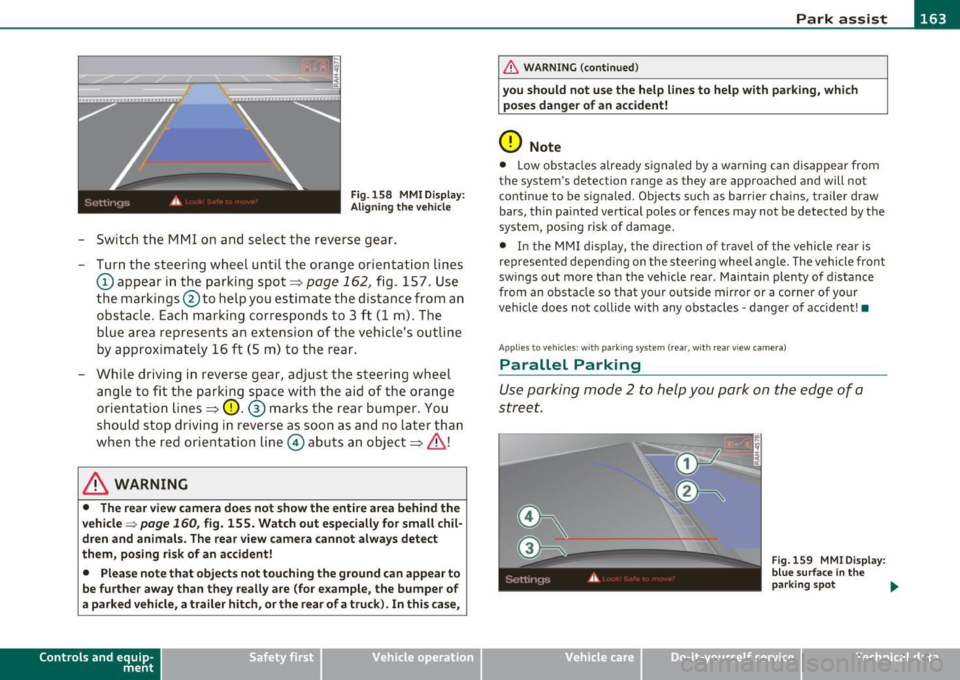
Fig. 158 MMI D isplay:
Ali gning the vehicl e
-Switch the MMI on and se lect the reverse gear .
- Turn the steering wheel until the orange orientation lines
(D appear in the parking spot=> page 162 , fig. 157. Use
the markings @to help you estimate the distance from an
obstac le. Each marking corresponds to 3 ft (1 m) . The
b lue ar ea represents an extension of the vehicle's outline
by approximately 16
ft (5 m) to the rear .
- While driving in reverse gear, adjust the steering wheel ang le to fit the parking space with the aid of the orange
orientation lines =>
0. ® marks the rear bumper . You
should stop driving in reverse as soon as and no la ter than
when the red orientation line© abuts an object=>& !
& WARNING
• The rear view came ra does not show the enti re area beh ind the
v ehicle =>
page 160, fig. 155. Watch out e spe cially fo r s mall chil ·
dren and animal s. The rear v iew cam era cannot alwa ys dete ct
them , posing ri sk of an accident!
• Plea se note that obje ct s not tou ching the groun d can appear to
be further awa y than th ey reall y are (for example , th e bum per of
a parked vehi cle, a trailer hit ch , or the r ear of a truck) . In thi s case ,
Con tro ls a nd e quip ·
m en t Vehicle
OP-eration
& WARNING (con tin ued)
you sh o uld not use the help lin es to help with p arking , whic h
po se s dang er of an accident!
0 Note
• Low obstacles a lready signaled by a wa rning c an disappear from
the sys tem's de te ct ion range as they are app roached and will no t
conti nue to be signaled . Objects such as barrier cha ins, trailer draw
bars, thin painted ve rtical poles or fences may not be detected by the
system , posing risk of damage.
• In the MMI display , the direc tion o f travel o f the vehicle rear is
represen ted depend ing on the steering whee l angle. The vehicle front
swings out more than the veh icle rear . Maintain plenty of distance
from an obstacle so that your outside mirror or a corner of your
vehicle does not collide with any obstacles -danger of accident !•
Ap plie s to veh icle s: with pa rk ing syst e m (r ea r, wi th rear vie w cam era)
Parallel P arking
Use parking mode 2 to help you park on the edge of a
street.
Vehicle care
Fig. 159 MMI Di spl ay :
blue surface In the
p arking s pot
~
Do-it-yourselt service iTechnical data
Page 166 of 362
1111....__P_ a_r_ k_ a_s_ s_ i_ s _t __________________________________________________ _
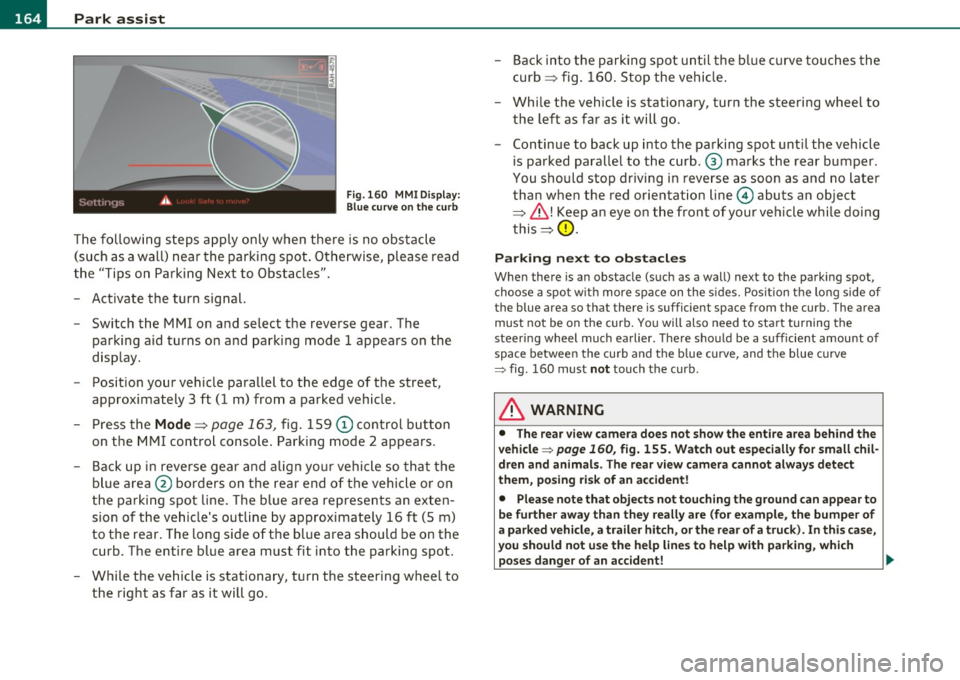
Fig.160 MMI Display:
Blue curve on the curb
The following steps apply only when there is no obstacle
(such as a wall) near the parking spot. Otherwise, please read
the "Tips on Parking Next to Obstacles".
- Activate the turn signal.
- Switch the MMI on and select the reverse gear. The
parking aid turns on and parking mode 1 appea rs on the
display.
- Position your vehicle parallel to the edge of the street,
approximately 3 ft (1 m) from a parked vehicle.
- Press the
Mode => page 163, fig. 159 (D control button
on the MMI control console. Parking mode 2 appears.
- Back up in reverse gear and align your vehicle so that the
blue area ® borders on the rear end of the vehicle or on
the parking spot line. The blue area represents an exten
sion of the vehicle's outline by approximately 16 ft (5 m)
to the rear. The long side of the blue area should be on the
curb. The entire blue area must fit into the parking spot.
- While the vehicle is stationary, turn the steering wheel to
the right as far as it will go. -
Back into the parking spot until the blue curve touches the
curb ::::> fig. 160. Stop the vehicle.
- While the vehicle is stationary , turn the steering wheel to
the left as far as it will go .
- Continue to back up into the parking spot until the vehicle
is parked parallel to the curb .® marks the rear bumper .
You should stop driving in reverse as soon as and no later
than when the red orientation line© abuts an object
=> & !Keep an eye on the front of your vehicle while doing
this =>
0.
Parking next to obstacles
When there is an obstacle (such as a wall) next to the parking spot,
choose a spot with more space on the sides. Position the long side of
the blue a rea so that the re is sufficient space from the curb. The area
must not be on the curb. You will also need to start turning the
steering wheel much earlier. There should be a sufficient amount of
space between the curb and the blue curve, and the blue curve
=> fig . 160 must not touch the curb .
& WARNING
• The rear view camera does not show the entire area behind the
vehicle => page
160, fig. 155. Watch out especially for small chil
dren and animals. The rear view camera cannot always detect
them, posing risk of an accident!
• Please note that objects not touching the ground can appear to
be further away than they really are (for example, the bumper of
a parked vehicle, a trailer hitch, or the rear of a truck). In this case,
you should not use the help lines to help with parking, which
poses danger of an accident! _,,,
Page 167 of 362

Park assist IIJII _________________________________ _____;.....:;_;_.:..:,____;;_ ____ _
0 Note
In the MMI display, the d irect ion of t ravel of the vehicle rear is rep re
sented depend ing on the steering wheel angle. The vehicle front
swi ngs ou t mo re t han t he ve hicle re ar. M ain tain ple nty of dist ance
from an obstacle so t hat your outs ide mirror or a corner of your
vehicle d oes no t collide with any o bstacles - dange r of accide nt!
[ i ) Tips
Th e left or right or ientat ion lines and s urfaces will be displ aye d,
depending on the tu rn signal being used. •
App lies to veh icles : with park ing syst em (rear, wit h rea r view cam era)
Adjusting the display and warning tones
The display and warning tones are adjusted in the radio
or fv1fv1 I*.
-Select : [CAR]> Parking system.
Display
• Off -
when the parking system is switched off, only aud ible sig nals
are given.
• On -when the pa rking system is switc hed on, the pic ture from the
rea r view camera is displayed.
Warning tones
• Rear volume -rear sensor vo lume
• Rear frequency -rear sensor frequency
• In-car entertainment fader -when the par kin g sys tem i s sw itched
on, the volume of the active audio source is lowered.
T he newly a djusted value is br iefly hear d from the signal generator .
T he settings are automatica lly stored and assigned to the remote
cont rol key.
Controls and equip
ment Safety first
& WARNING
•
Always make sure that the volume and frequency of the
warning tones i s adju sted so that you can easily hear the acou stic
distance signal even if the radio is playing , the air-conditioner
blower is on High or there is a high level of outside noise.
• Check the settings whenever someone else has driven the
vehicle before you.
[I] Tips
• Th e warning tones can also be ad justed directly from the rea r view
camera image . Simply p ress the
[Settings I* cont rol b utton .
• C han ged settings are a ctivat ed w hen parking assist is switched on
again .•
A pplies to v ehicl es: w ith park ing syst em (r e a r, wi th re ar view cam era)
Error messages
If a warni ng tone is aud ible fo r about five se conds when yo u turn on
the ignition, the re is a ma lfunction in t he system. Have the prob lem
co rrected by yo ur a utho rized Audi dea ler .
K eep the se nsors in the rear b umper clean and free from i ce s o th at
the acoustic pa rk assist system can function p roper ly .•
Vehicle care Technical data