2011 AUDI A5 CABRIOLET lock
[x] Cancel search: lockPage 86 of 364

Seats and storage
& WARN ING (con tin ue d)
• When you tran sport he avy objec ts, alw ays re membe r th at a
c hang e in the c enter of g ravity m ay result in a ch ange in th e
ve hicl e's handli ng char acte ris ti cs .
• Follo w all warnings =>
page 17 6, "Dr iving Safel y"
00 Tips
The tire pressure must be adjusted to the load -see the t ire pressure
sticker on the edge of the driver's door. •
Tie-down rings
The luggage compartment is equipped with four tie-down
rings to secure luggage and other items.
F ig. 88 Locat ion of
th e t ie-d ow n ring s in
t he lugg age com part
m ent
- Secure the cargo to the tie-down rings=> fig. 88 -Arrows -.
- Observe the safety notes=> page 185. •
Increasing the size of the luggage
compartment
The rear seat backrests can be folded forward either
separately or together.
Folding the backrest forward
F ig. 89 Luggage
co mp artme nt: release
l e v e r
Pull the release lever in the direction of the arrow to fold
the backrest forward.
Folding the backrest down
- Fold the backrest down until it latches securely => & .
& WARNING
The ba ckr es t mu st be securel y la tched so object s cannot slide
f o rw ard o ut of the luggage compa rtment during sudd en bra king .
0 Note
When fold ing the backrest forward, make sure the rear safety belts
are in the belt guides so they do not become pinched in the backrest
lock and damaged . Other objects should be removed from the rear
bench seat to protect the back rest from damage. •
Page 89 of 364

• Only use the c igarette ligh ter socket as a powe r source for e lec
tr ical a ccesso ries f or short dur ations. Use the socke ts * in the ve hicle
when a powe r so urce is needed fo r lo nger durations.
[I] Tips
When the eng ine is of f and accessories ar e st ill plugged in and are on,
the ve hicl e battery can sti ll be draine d.•
Storage
General overview
There are num er ous pla ce s to stor e item s in your v eh ic le .
Glove com par tm en t =>page 87
& WARNING
• Always remove objects from the instrument panel. Any items
not put away could slide around inside the vehicle while driving or
when accelerating or when applying the brake s or when driving
around a corner .
• When you are driving make sure that anything you may have
placed in the center console or other sto rage locat ions cannot fall
out into the footwells. In case of sudden braking you would not be
able to brake, depress the clutch or accelerate. •
Controls and equip
ment Safety first
Seats and storage
Glove compartment
Th
e g lov e comp artmen t is i llum inat ed and c an be lo cked.
To open glove compartment
Fig. 94 Glov e
c om partment
- Pull the h andl e i n th e dir e ct ion of t he arro w ~ fig . 9 4 and
swi ng th e co ver d own to o pen.
To close glove compartment
-Push t he gl ove co mpa rtment lid upward u ntil t he lock
engages.
T he re are holders for a pen and a pad of paper in the glove compart
me nt lid.
On t he right s ide in the glove compartment is a holder with the key
body into w hich t he eme rgency key mus t be clip ped to be able to start
the vehicle.
& WARNING
To reduce the risk of personal injury in an accident or sudden stop, always keep the glove compartment closed while driving. •
Vehicle care Technical data
Page 92 of 364
![AUDI A5 CABRIOLET 2011 Owners Manual Warm and cold
Button(s) Meaning Page
@) Air distribution :>page 92
--
~ Defrost :>page 92
~ Rear window defogger :>page 92
[AC]
Turn cooling system :>page 93 on/off
QJ :>page 103
al The](/manual-img/6/57571/w960_57571-91.png "AUDI A5 CABRIOLET 2011 Owners Manual Warm and cold
Button(s) Meaning Page
@) Air distribution :>page 92
--
~ Defrost :>page 92
~ Rear window defogger :>page 92
[AC]
Turn cooling system :>page 93 on/off
QJ :>page 103
al The")
Warm and cold
Button(s) Meaning Page
@) Air distribution :>page 92
--
~ Defrost :>page 92
~ Rear window defogger :>page 92
[AC]
Turn cooling system :>page 93 on/off
QJ :>page 103
al The regu lator is a lso used to set the fan speed, a ir dist ribut io n and seat
heating.
rn Tips
The grille on the controls=> page 89, fig. 95 must remain unob
structed and must not be taped over. Measuring sensors are located
beh ind it .•
A pplies to vehicle s: wit h delu xe auto mati c climate co ntro l
Turning the climate control system on and
off
- Briefly press the [ON] button, or press the [AUTO] button
to turn the climate control system
on .
-Press the [ OFF] button to turn the climate control system
off and to block the air supply from the outside .
The climate control system switches back on when a contro l button is
operated. •
App lies to veh icles: with del uxe auto matic climate contro l
Automatic mode !AUTO j
The standard operating mode for all times of the year.
Turning on automatic mode
-Set the temperature between 60°F (+16°() and 84°F
(+28°().
- Press the (AUTO] button.
Automatic mode ensures constant temperatu res in the interior and
dehumidif ies the air inside the vehicle. Air temperature, volume and
distr ibution are controlled automat ical ly to reach or ma intain the
desired interior temperature as quickly as possible . Fluctuations in
exte rior tempe rature and the effects of temperature from the posi
tion of the sun are compensated for automatically .
This operating mode works only in an adjustable temperature range
of 60°F ( +l6°C) to 84°F (+ 28°C) . If a temperature below 60°F
(+ 16°() is selected, LO appears in the display. At temperatures above
84°F (+28°() , HI is displayed. At both extreme sett ings, climate
control runs continuously at max imum cooling or heating power.
Th ere is no temperature regulation. •
Page 96 of 364
![AUDI A5 CABRIOLET 2011 Owners Manual Warm and cold
(I] Tips
If the climate control is running in cooling mode, air flows mainly
from ve nts @ and @. To achieve adequate cooling, you should never
close these vents c](/manual-img/6/57571/w960_57571-95.png "AUDI A5 CABRIOLET 2011 Owners Manual Warm and cold
(I] Tips
If the climate control is running in cooling mode, air flows mainly
from ve nts @ and @. To achieve adequate cooling, you should never
close these vents c")
Warm and cold
(I] Tips
If the climate control is running in cooling mode, air flows mainly
from ve nts @ and @. To achieve adequate cooling, you should never
close these vents completely. •
Applies to vehicles: wit h deluxe auto mati c climate c ontro l
Economical use of the climate control
system
Economical use of the climate control system helps save
fuel.
When the climate control system is working in cooling mode,
engine performance is reduced and fuel consumption is
affected. To keep the time the climate control system is on as
short as possible, you should do the following :
- To save fuel, turn off cooling mode by pressing the [AC]
button (indicator light goes out).
- In addition, if you open the window while driving, turn off cooling mode by pressing the
[AC] button (indicator light
goes out).
- If the vehicle is extremely hot due to the heat of the sun,
briefly open doors and windows.
For the sake of the environment
When you save fuel, you reduce emissions from the vehicle. •
App lies to veh ic les: with del uxe automatic climate control
Automatic recirculation
An air quality sensor detects increased concentrations of
pollutants in the outside air and automatically switches
to recirculation mode.
The basic climate control settings can be adjusted in the
radio or
MMI*.
- Select: Function button [CAR]> Climate control switch.
We recommend that you always keep automatic recirculation ON to
prevent polluted outside ai r from entering the vehicle interior.
If the
air quality sensor located in the climate control system detects
polluted outside air, the sensor decides whether the air pollution can
be reduced by the factory-installed pollutant filter or whether it is
necessary to switch to recirculation . With heavy concentrations of
pollutants, the climate control system is switched automatically to
recirculation mode and the supply of outside air is blocked . As soon
as the concentration of pollutants in the outside air drops, fresh air is
supplied to the vehicle interior again.
In the event tha t the windows fog up during au tomatic recircula tion,
press the[@] button immediately.
Under certain operating conditions, automatic recirculation is
switched off automatically. When outside temperatures are below
about SO
°F ( + 10 °(), automatic recirculation is limited to
30 seconds. When outside temperatures are below about 30
°F (-
1 °(), automatic recirculation is limited to 15 seconds .•
Page 99 of 364
![AUDI A5 CABRIOLET 2011 Owners Manual Button(s)
IOFFJ
!AU TO ]
-
Temperature regu-
lator 1 al
T emperat ure regu
lator 2a)
-
I~ 1b>
-
Meaning
Turns on and off
Automatic operation -
drivers side/ front pas
senger](/manual-img/6/57571/w960_57571-98.png "AUDI A5 CABRIOLET 2011 Owners Manual Button(s)
IOFFJ
!AU TO ]
-
Temperature regu-
lator 1 al
T emperat ure regu
lator 2a)
-
I~ 1b>
-
Meaning
Turns on and off
Automatic operation -
drivers side/ front pas
senger")
Button(s)
IOFFJ
!AU TO ]
-
Temperature regu-
lator 1 al
T emperat ure regu
lator 2a)
-
I~ 1b>
-
Meaning
Turns on and off
Automatic operation -
driver's side/ front pas
senger's side
-
Temperature selection -
dr ive r's side
T emperature selection -
front passenger 's side
-Fan - driver's side/ front
passenger's side
Recirculat ion mode
Air distribution - driver's
side / front passenger's
side
Defrost
Rear window defogger
T urns coo ling system on
and off
Page
:::> page97
:::> page97
--
=>page 98
:::> page98
=>page
99
:::> page 99
=>page 99
:::>page 100
=> page 100
Seat heating / seat ventila-
tion =>
page 103
--
-
a) The reg ulator is a lso used to se t the fan speed, ai r distrib u tion a nd seat
heati ng.
b) The sy mb ol m ay appe ar sli ght ly diffe re nt in s om e m od els .
[I] Tips
T he grille on the controls=> page 96, fig . 100 must remain unob
structed and must not be taped over . Measuring sensors are located
beh ind it. •
Controls and equip
ment Safety first
Warm and cold
App
lies to ve hicles : w ith de luxe a utomat ic cl imate contro l plu s
Turning the climate control on and off
-Briefly press [ OFF], or press [A UTO I to turn t he climate
co ntrol
on .
-Press the [ OFF ) button for at least 2 seconds to turn the
climate control
off an d to b lock t he air supp ly from t he
outside. " OFF" appears in the d isp lay.
Climate cont rol turns on again when you press t he temperature
regulator •
Applies to v ehicl es: wit h d elu xe a utom atic cl im ate co ntro l pl us
Automatic mode I AU TO]
The sta ndard operating mode for all times of the year .
Turning on automatic mode
-Set the temperature between 60 °F (+ 16 °() and 8 4 °F
(+28 °() .
-Press the [AUTO I b utton.
Automatic mode ens ures constant temperat ures in the in terio r and
dehumidifies the air inside the ve hicle . Air temperature, volume and
distribution are controlled automatica lly to reac h or ma inta in the
desired inte rior temperature as qu ic k ly as possible. F luctuations in
exterior temperatu re and t he effects of temperature from the posi
tion of the s un a re compensated for au toma tically.
Th is operating mode works o nly in an ad justab le temperatu re range
o f 6 0°F (+ 16 °() to 8 4°F ( +28° C). If a temperat ure below 60°F
( + 16°() is se lec ted,
LO appears in the display . At temperatures above
84° F (+28° (),
HI is displayed. At both extreme sett ings, climate
control runs continuously at max imum cooli ng or heating power .
Th ere is no temperat ure reg ulation .•
Vehicle care Technical data
Page 104 of 364

1111....__w __ a _r_ m __ a_n_ d_ c_ o _ l_d _______________________________________________ _
Applies to veh icles : wi th d eluxe automat ic clim ate cont rol pl us
Economical use of the climate control
system
Economical use of the climate control system helps save
fuel.
When the climate control system is working in cooling mode,
engine performance is reduced and fuel consumption is
affected. To keep the time the climate control system is on as
short as possible, you should do the following:
- To save fuel, turn off cooling mode by pressing the AC
button (indicator light goes out).
- In addition, if you open the window while driving, turn off
cooling mode by pressing the AC button (indicator light
goes out).
- If the vehicle is extremely hot due to the heat of the sun,
briefly open doors and windows.
~ For the sake of the environment
When you save fuel, you reduce emissions from the vehicle. •
Applies to vehicles: with deluxe automatic climate cont rol plus
Deluxe automatic climate control plus -
basic settings
The basic climate control settings can be adjusted in the
radio or MM!*.
-Select: Function button (CAR]> Climate control switch.
Automatic recirculation
An air quality sensor detects increased concentrations of pollutants
in the outside air and automatically switches to recirculation mode. We recommend that you always keep automatic
recirculation ON to
prevent polluted outside air from entering the vehicle interior.
If the
air quality sensor located in the climate control system detects
polluted outside air, the sensor decides whether the air pollution can
be reduced by the factory-installed pollutant filter or whether it is
necessary to switch to recirculation. With heavy concentrations of
pollutants, the climate control system is switched automatically to
recirculation mode and the supply of outside air is blocked. As soon
as the concentration of pollutants in the outside air drops, fresh air is
supplied to the vehicle interior again.
In the event that the windows fog up during automatic recirculation,
press the
l@I button immediately.
Under certain operating conditions, automatic recirculation is
switched off automatically. When outside temperatures are below
about 50
°F ( + 10 °(), automatic recirculation is limited to
30 seconds. When outside temperatures are below about 30
°F (-
1 °C), automatic recirculation is limited to 15 seconds .
Synchronization
After Synchronization is set to on, all of the subsequent climate
control settings (except for seat heating*) for the driver are trans
ferred to the front passenger .
Synchronization is canceled when settings are adjusted on the front
passenger's side .•
Page 107 of 364

___________________________________________________ O;,__ n_ t ;,__ h:...:e:.....:.. r..:o :...:a::.:... d.:.;___,J-
On the road
Steering
App lies to veh icles : w ith manu ally adjusta ble steering whe el
Manually adjustable steering wheel
Th e height and rea ch of th e st eer ing wh eel can b e
a dju sted.
Fir st, adj ust the drive r's s eat co rrec tly.
Fig . 108 Lever under
the steering colum n
-Pull th e lever=> fig. 10 8 -Ar row-=> &.
- Move the steeri ng w hee l to the des ired pos it ion.
- Pus h the lever aga inst the s tee ring column until it loc ks .
Th ere m ust be at leas t 10 inches (2 5 cm) be twee n you r chest a nd the
center of the steering whee l. If you cannot si t more than 10 inches
( 2 5 cm) from the s teer ing wheel, see if adaptive eq uipment is av ail
able to help you reach the p edals and inc rease t he distance from the
s teeri ng wheel.
F or det aile d info rmation on how to adju st the dr iver's sea t, see
=> page 78.
Con tro ls a nd e quip
m en t Vehicle
OP-eration The
steeri ng wh eel ca n be adju sted ev en wh en the ign ition is turn ed
off. For ve hicles with seat memory, the individual positions for the
stee ring wheel c an be st ored al ong wi th t he sea t positi on .
& WARNING
Improper use of steering wheel adjustment and improper seating
position can cause serious personal injury .
• Adjust the steer ing wheel column only when the vehicle is not
moving to prevent loss of vehicle control.
• Adjust the dri ver's seat or steering wheel so that there is a
minimum of 10 inches (25 cm) between your chest and the
steering wheel=>
page 178, fig. 178 . If you cannot maintain this
minimum distance , the airbag system cannot protect you prop
erly .
• If physical limitations prevent you from sitting 10 inches (25
cm) or more from the steering wheel, check with your authorized
Audi dealer to see if adaptive equipment is available.
• If the steering wheel is al igned with your face, the supple
mental driver 's airbag cannot provide as much protection in an
accident . Always make sure that the steering wheel is aligned with
your chest.
• Always hold the steering wheel with your hands at the 9 o 'clock
and 3 o'clock positions to reduce the risk of personal injury if the
driver's airbag deploys .
• Never hold the steering wheel at the 12 o'clock po sition or with
your hands inside the steering wheel
rim or on the steer ing wheel
hub. Holding the stee ring wheel the wrong way can cause serious
injur ies to the hands, arms and head if the driver's airbag
deploys. •
Vehicle care Do-it-yourselt service iTechnical data
Page 108 of 364
ffl..__O_ n_ t_h _e_ r_o _ a_ d _________________________________________________ _
Ignition Lock and ignition switch
Starting engine with the key
The ignition is switched on and the engine started with
the ignition key.
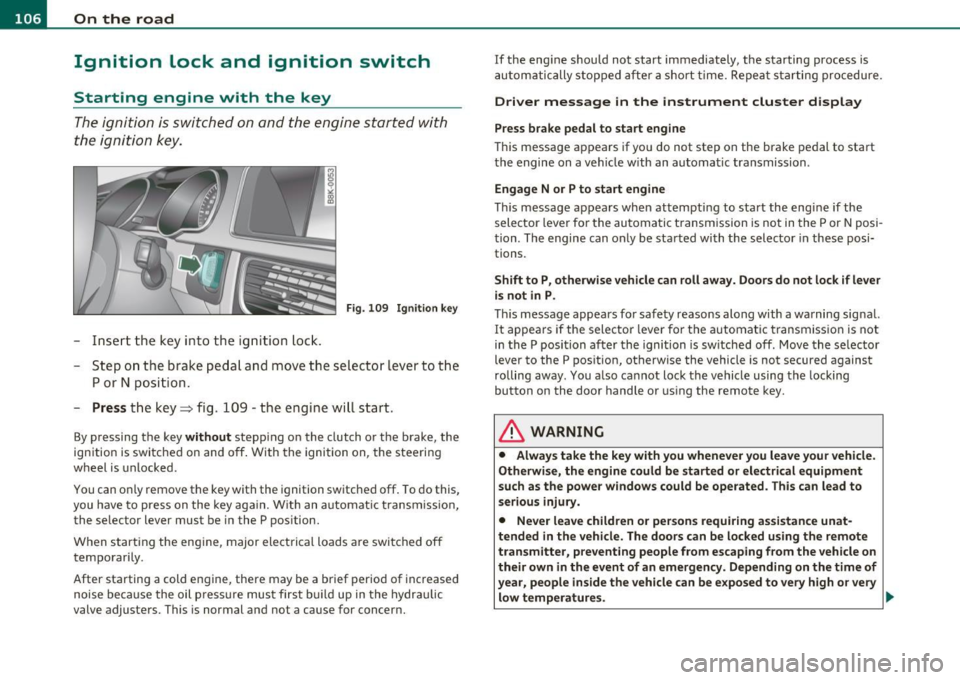
F ig. 10 9 Igniti on k ey
-Inse rt the key in to the ig n ition lock.
- Step on th e brake pedal and mov e th e selec tor lev er to th e
P or N posi tion.
- Press the key => fig. 109 -the engine wi ll start .
By pressing the key without stepp ing on the clutch or the b rake, the
i gn itio n is switc hed on and o ff . With the ignition on, the steeri ng
w heel is unlocked.
You can o nly remove the key with the i gnition switc hed off . To do this,
you have to press on the key ag ain. Wi th an a utomat ic transm iss io n,
the se lector lever must be in the P pos ition.
W hen s tarting the eng ine, major electrica l loads a re swi tched off
temporarily .
After startin g a cold eng ine, there may be a brief period of increased
noise be cause the oil p ress ure mu st firs t b uild up in t he hydr auli c
valve adjuste rs. This is normal and not a cause for concern. If the eng
ine s hould not start immediately, the starting process is
a u tom atically st op ped aft er a sh ort t ime. Re peat sta rtin g p ro cedu re.
Driver message in the instrument cluster display
Press brake pedal to start engine
T h is message ap pears i f yo u do not step on the brake pedal to start
t he engine on a vehicle w ith an au toma tic transmission .
Engage N or P to start engine
This message appea rs when at tempti ng to start the eng ine if the
sele ctor lever fo r the au tomatic t ransm ission is no t in the P or N po si·
t ion . The engine can on ly be sta rted wi th the selecto r in these posi
tions.
Shift to P , otherwise vehicle can roll away. Doors do not lock if lever
is not in P .
This message app ears fo r sa fe ty reasons along with a wa rning sig nal.
It appea rs if the selector lever for t he automat ic transm iss io n is not
in the P posi tion af ter the ignition is sw itched off . M ov e t he se lector
lever to the P pos itio n, ot herw ise the vehicle is not secured against
rolling away . You a lso ca nnot lo ck th e ve hi cle u sing the locking
button on the door hand le or us ing the remote key.
& WARNING
• Always take the key with you whenever you leave your vehicle.
Otherwise, the engine could be started or electrical equipment
such a s the power windows could be operated . This can lead to
serious in jury.
• Never leave children or per sons requiring assistan ce unat
tended in the vehicle. The doors can be locked u sing the remote
transmitter, p reventing people from escaping from the vehicle on
their own in the event of an emergency. Depending on the time of
year, people inside the vehicle can be exposed to very high or very low temperatures. ..,