2011 AUDI A5 CABRIOLET ignition
[x] Cancel search: ignitionPage 40 of 364

Opening and closing
Opening and closing
Keys
Key set
B
Fig. 25 Key se t
© Master key with remote control and integrated
mechanical key
You can centra lly lock and un lock your vehicle and start the engine
w ith the master key w ith remote cont ro l. A mecha nica l key is inte
grated in the master key=>
page 40.
@ Emergency key
The emergency key is not intended for constan t use. It should on ly be
used in an emergency. Keep it in a safe place and do not car ry it on
your key ring.
Key replacement
If you lose a key, cont act your autho riz e d Audi de aler immedia tely to
have the
lost key d isab led. Be sure to bri ng all your keys with you.
Data in the master key
Dur ing d riving, service and maintenance-relevant data is cont in u
ously s tore d on yo ur ma ster key. Your Audi service adviser can re ad out this data a
nd tell you about th e wo rk your ve hicle needs. This
applies also to vehicles with convenience key*.
Personal comfort sett ings
If two peop le use one vehicle, it is recommended that each person
always uses "their own" mas ter key. When t he ignition is t urne d off
or when the vehicle is locked, pe rsonal convenience settings for the
followi ng systems a re stored and assig ned to the remote maste r key.
• Climate control
• Centra l lo cki ng sy stem
• Seat memory*
• Parki ng system *
• Audi s ide ass ist*
• Audi dr ive select *
Th e s tored se ttings a re au toma ticall y recalled when you unlock t he
veh icle, when yo u ope n the doo rs o r whe n you turn on the ign ition.
& WARNING
• Do not leave your vehicle unattended with the key in the igni
tion lo ck . Entry by unauthorized per sons could endanger you or
result in theft or damage the vehicle. Always lock all doors and
take the key.
• Do not leave children unattended in the vehicle, especially with
acce ss to vehicle key s. Unguarded acce ss to the keys provides chil
d ren the opportunity to start the engine and/or activate vehicle
system s such as the power windows et c. Un supervised operation
of any vehicle system by children can result in serious injury .
• Do not remove the key from the ignition lock until the vehicle
has come to a complete stop. Otherwise the steer ing column lock
could suddenly engage -cau sing the ri sk of an accident.
~
Page 42 of 364

Opening and closing
-Pull the mechanical key ® out of the master key.
- Press the release button©=>
page 39, fig. 28 on the
battery holder and at the same time pull the battery
holder out of the master key in the direction of the arrow.
- Install the new battery CR 2032 with the"+" sign facing
down.
- Push the battery holder carefully into the master key.
- Install the mechanical key.
<£> For the sake of the environment
Dispose of dead batteries properly so as not to pollute th e environ
ment.
(I] Tips
Th e replacement battery must be the same specification as the
original. •
Removing the mechanical key
-Press the release button©=> fig. 29.
Fig. 29 Remote
master key: Removing
the mechanical key
-Pull the mechanical key ® out of the master key.
Using the mechanical key, you can
• Lock and unlock* the storage compartment on the passenger's
side ~
page 87.
• Lock and unlock the vehicle manually =:> page 45 if this should not
be possible with the master key .•
Emergency unlocking of the ignition key
In the event of malfunctions in the electrical system, it
may happen that you cannot remove the ignition key.
Fig. 30 Ignition
switch with ignition
key
If you are unable to remove the ignition key, for example
because the vehicle battery is discharged, proceed as follows:
- Press the release button©=> fig. 30 for example with a
ball point pen and pull the mechanical key ® out of the
master key.
- Lock the vehicle using the mechanical key=>
page 45.
-Have the electrical system inspected by an authorized Audi
dealership. •
Page 43 of 364

Starting the vehicle with the emergency
key
I,; N 9
" :g
Fig. 31 Glove
compartment: Adapter
for emergency key
Fig. 32 Insert emer
gency key into the
adapter
- Take the adapter for the emergency key out of the glove
box ~ fig. 31.
- Push the emergency key~ fig. 32 fully into the adapter.
Make sure that the Audi rings are facing up.
- Press the emergency key in the adapter down until it
latches audibly.
- Insert the adapter with the emergency key forward into
the ign ition switch. The engine can now be started as
usual. •
Contro ls a nd e quip
m en t Vehicle
OP-eration
Opening and closing
Electronic immobilizer
The immobilizer helps to prevent unauthorized use of
your vehicle.
A computer chip inside your key automatically deactivates the elec
tronic immob ilizer when you insert the key in the ignition lock, or on
vehicles with Convenience key*, when the key is inside the vehicle .
When you remove the key from the ignition lock, or on vehicles with
Convenience key, when you remove the key from the vehicle, the elec
tronic immobilizer is automat ica lly activated once again.
& WARNING
Always take the key with you when you leave the vehicle. The key
can disarm the electronic engine immobilizer and permit an unau
thorized person to start the engine and enable operation of the
vehicle systems such as power window or power top leading to
serious personal injury .
[ i ] Tips
• Th e vehicle cannot be started if an unauthorized key is used. The
vehicle may not start if another rad io device such as a key for another
vehicle or a transponder is located on the key ring.
• For Declarat ion of Compliance to United S tates FCC and Industry
Canada regulations =>
page 346. •
Power locking system
General description
The power locking system locks or unlocks all doors and
the rear lid simultaneously.
You can lock and unlock the vehicle cent rally . You have the following
choices: .,_
Vehicle care Do-it-yourselt service Technical data
Page 44 of 364

Opening and closing
• Remote master key~ page 43
• Door hand les wi th co nve nien ce key* ~ page 44,
• Lock cyli nder at the dr iver's door~ page 45, or
• Power locking swi tch inside~
pag e 46.
Selective unlocking
When they are closed, the door and rear lid are locked. When
unloc kin g, you ca n set in the radio or in the MMI* whethe r
only the
dr iver 's door or the entire veh icle s hou ld be unlocked~
page 43.
Automatic locking
The automat ic lock ing feature locks all the vehicle doors and the rear
lid when you d rive f aster th an 9 mph (15 km/h).
The car is unlocked agai n once t he ignition key is removed . In add i
tion , the vehicle can be u nlocked if the open ing function in the power
loc king system switch o r at one of th e door levers is a ctuated. The
Auto Lock function can be turned o n and off i n the ra dio or in the
MMI * ~ page 43.
Add itionally, in the event of a crash with a irbag deployme nt the doors
are au tomatically u nlocked to allow access to the vehi cle.
Anti-theft alarm warning system
If the anti -the ft ala rm warn ing sys tem detec ts a break -in into t he
vehicle, acoustic and v isual warning s ignals are triggered .
T he anti-theft warning system is activated a utomat ica lly when you
lock the vehicle . It is deactivated w hen u nlocking using the
remote
key ,
with the mechanical key , and when you switch o n the ignition.
Th e alarm also turns off whe n the alarm cycle has ex pire d.
Turn signals
W hen you unlock the vehicle, the t urn s ignals f lash twice, when you
loc k it once. If they do not flash, one of the doors, the rear lid or the
hood is not locked .
Unintentionally locking yourself out
In the following cases the re safeguards to prevent yo u locking yo ur
remote maste r key in the vehicle:
• The veh icle does not lock with the central lock ing switch
~ page 4 6 if the d rive r's doo r is open.
• On vehicles with convenience key*, if the most recently used
maste r key is in the luggage compartment , th e re ar lid is au tomati
cally unlocked again after it is closed
~ page 47.
Do not lock yo ur vehicle wi th the remote master key u nti l all doo rs
and the rear lid are closed. In th is way you avoid locking yourself out
accidentally .
& WARNING
• When you leave the vehicle, always remove the ignition key
and take it w ith you. This will prevent passengers (children, for
example) from a ccidentally being locked in the vehicle should
they accidentally press the power locking switch in the front doors.
• Do not leave children inside the veh icle unsupervised. In an
emergency it would be impossible to open the doors from the
outs ide w ithout the key .
W Tips
• In the event of a cras h w it h ai rbag deployme nt all locked doo rs
w ill be a utomat ically un locked to give access to the vehi cle o ccupants
from the outside .
• If the power lo cking system should mal func tion, you c an lock the
dr iver 's door using the mechanical key~
page 47.
• If the power locking sys tem sho uld fail, yo u ca n s till open t he fuel
tank flap in a n emergency ~
page 278.
• You a re well advised not to keep valuables i nside a n un attended
vehicle, v isib le or not. Even a properly locked vehicle cannot provide
t he se cu rity of a sa fe. .,_
Page 48 of 364
Opening and closing
-Tur n the me chanical key i n th e lo ck of the d river's door to
the lock position @=> & in "General descr iption" on
pag e 41.
If the power locki ng system f ail s, there is eme rge ncy locki ng for the
passenger 's door=>
page 47.
& WARNING
Read and follow all WARNINGS=> & in "General descript ion" on
page 41.
[IJ Tips
• After the ignit ion is swi tched on, the power locking sys tem swi tch
and the unlocking button for the rear lid
c;:; i n the door are enabled .•
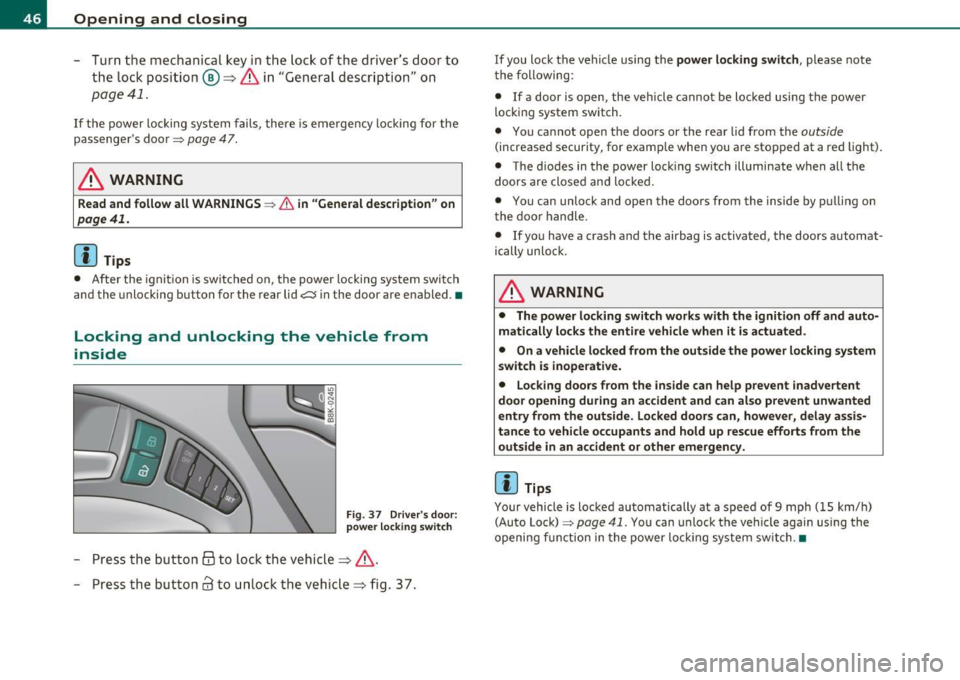
Locking and unlocking the vehicle from
inside
Fig . 37 D river 's door :
power lo cking switch
- Press the b utto n @ to lo ck the vehicl e=> & .
- Press the but ton
63 to u nloc k the veh icle => fig. 37.
If you lock the vehicle using the power locking switch , please note
t he following:
• If a door is open, the veh icle cannot be locked using the power
loc kin g system switch.
• You ca nnot open the doors or the rear lid from the
outside
(increased security, for examp le when you are sto pped at a red light).
• The diodes in the power loc king switch ill uminate when a ll the
doors are close d an d lock ed .
• You can unlock and open the doors from the inside by p ulling on
t he doo r handle .
• If yo u have a crash and the airbag is activated, the doors automat
ically unlo ck.
& WARNING
• The power locking switch works with the ignition off and auto
matically locks the entire vehicle when it is actuated .
• On a vehicle locked from the outside the power locking system
switch is inoperati ve.
• Locking doors from the inside can help prevent inadvertent
door opening during an accident and can al so prevent unwanted
entry from the outside. Locked doors can, however, delay assis
tance to vehicle occupants and hold up rescue efforts from the outside in an accident or other emergency .
[IJ Tips
Your vehicle is loc ked automatically at a speed of 9 mph ( 15 km/h)
(Auto Lock)=>
page 41. You can unlock t he vehicle again using the
openi ng f unction in the power loc king system sw itch. •
Page 50 of 364

Opening and closing
& WARNING (continued)
compartment and pull the lid shut, becoming trapped and unable
to get out. To reduce the risk of personal injury, never let children
play in or around your vehicle. Always keep the rear lid as well as
the vehicle doors closed when not in use.
• Always ensure that no one is within range of the rear lid when
it is moving, in particular close to the hinges -fingers or hands can
be pinched .
[ i J Tips
• When the vehicle is locked, the rear lid can be opened separately
by pressing the button
-c::5 on the master key. When you close the rear
lid again, it locks automatically .
• If the rear lid is open or not properly closed when the ignition is
turned on, the door and rear lid warning~
page 20 appears in the
instrument cluster display. •
Emergency unlocking of the
luggage compartment lid
There is on emergency release for the rear lid .
Fig. 40 Rear lid: Lock
cylinder
- Remove the mechanical key from the master key
=>
page 40.
- Insert the key in the lock cylinder and turn it in the direc
tion of the arrow .•
Power windows
Controls
The driver can control all power windows.
Fig. 41 Section of the
driver 's door: Controls
Fig. 42 Center
console: central power
window switch
All power window switches=> fig. 41 are provided with a two-
position function: •
Page 51 of 364

Opening the windows
-Press th e switc h to the first stop and hold it u ntil the
win dow re aches t he desire d pos ition.
- Press the sw itc h br iefly to the
second stop t o a uto mat i
ca lly open t he w indow .
Closing the windows
-Pu ll t he swi tch to the first stop an d hold it unti l the
w indow reaches the desi red pos ition .
- Pull t he swi tch briefly to th e
second stop to auto mat ica lly
cl ose the wi ndow.
Power window switches
© Dr iver's door
® Passenger's door
© Left re ar door
@ Righ t rea r doo r
You can open or close all the windows with the switch=> page
48,
fig. 42.
& WARNING
• Do not leav e children unattended in the vehicle, especially with
access to vehicle keys. Unsupervised use of the keys can result in
s tarting of the engine and use of vehicle systems such as power
windows, etc. which could result in serious injury .
• Remember -you can still open or close the power window s for
about ten minutes after the ignition is switched off . Only when
either of the doors are opened are the power window s switched
off.
• Be careful when closing the window s. Check to see that no one
is in the
way, or serious injury could result!
Controls and equip
ment Safety first
Opening and closing
& WARNING
(co ntinued )
• Alway s remove the ignit ion key whenever you leave your
vehicle .
• If you lock your vehicle from the out side, no one, es pecially
children, should remain in the vehicle.
• Do not stick anything on the windows or the windshield th at
may interfere w ith the drive r's field of vision.
[I] Tips
• Whe n you open the doors , the windows automat ica lly lowe r about
1 0mm .
• After the ignition has been switched off, the w indows can still be
opene d or close d for about 10 min utes. The w indow reg ulators a re
no t sw itched until the driver 's or passenger's door is opened .•
Convenience opening /closing
The wind ows can be opene d and closed wit h the mecha n
ical key or the e mergen cy k ey.
Fig. 4 3 Key turn s for
o pen ing a nd closing ...
Vehicle care Technical data
Page 54 of 364

Power top
• A message in the instrument cluster display will alert you if a
protection function was activated or if there is a malfunction
=>page 52.
• The power top can also be operated manually if there is a malfunc
tion=>
page 57, "Power top emergency operation" . Have you autho
rized Audi dealer correct the cause of the malfunction as soon as
possible .
• If parking the vehicle with the power top open, remember that the
vehicle interior will not be protected from the weather or from unau
thorized entry. Closing the power top before leaving the vehicle is
recommended. If you leave items in the vehicle, lock them in the
trunk .•
Power top operation
The indicator light monitors the power top.
The . indicator light illuminates for approximately 2 seconds when
the ignition switches on to check the function and then goes out
again. The indicator light also:
• illuminates when the power top opens or closes.
• blinks if the power top switch is operated but the conditions for
opening or closing the power top are not met . A warning message
also appears in the instrument cluster display=>
page 52, "E rror
message in the instrument cluster display" .
• if the power top did not open or close completely.
[ i J Tips
The indicator light stays on if the power top was opened manually. •
Error message in the instrument cluster
display
An error message appears if the power top cannot open
or close.
Several conditions must be met for the power top to open or close
automatically.
An error message in the instrument cluster display indicates if one of
the conditions is not met or there is a malfunction.
Power top: please close rear lid
The luggage compartment lid must be closed when the power top is
opening or closing. This error message appears in the instrument
cluster display if the luggage compartment lid is not closed.
Storage bay not lowered. Please remove
obstruction
The power top storage bay must lower when the power top is
opening. This error message appears in the instrument cluster
display if the storage bay is not lowered . If the storage bay does not
lower automatically because of objects in the luggage compartment,
remove the objects that are in the way from the storage bay area.
Otherwise, you can operate the power top storage bay manually
=>page 55.
Power top: cannot be used
This error message appears if the convertible cannot open or close
automatically because of safety reasons or if there is a malfunction.
The following causes are possible:
• Vehicle speed too high: Power top operation is deactivated and an
error message appears if the vehicle speed is too high. Reduce the
vehicle speed and operate the switch again to open or close the power
top.
• Battery voltage too low: The power top cannot be operated if the
battery voltage is too low. This ensures there will be enough battery
~