Page 518 of 614
CONT INUED
Insert the dipstick all the way into
the transmission securely as
shown in the illustration.
Remove the dipstick and check
the f luid level. It should be
between the upper and lower
marks.
Remove the dipstick (yellow loop)
f rom the transmission, and wipe it
with a clean cloth.
Check the f luid level with the engine
at normal operating temperature.
Park the vehicle on level ground.
Start the engine, let it run until the
radiator f an comes on, then shut
of f the engine. For accurate
results, wait about 60 seconds (but
no longer than 90 seconds) bef ore
doing step 2.
1.
2.3.
4.
Automatic Transmission
T ransmission Fluid
Maint enance
515
UPPER MARK
LOWER MARK
DIPSTICK
10/07/29 12:47:56 31TK4620_520
2011 TL
Page 519 of 614

Insert the dipstick all the way back
into the transmission securely as
shown in the illustration.
If the level is below the lower
mark, add f luid into the f iller hole
to bring it to the level between the
upperandlowermarks.
Pour the f luid slowly and caref ully
so you do not spill any. Clean up
any spill immediately; it could
damage components in the engine
compartment.
Always use Acura ATF DW-1
(automatic transmission f luid). The transmission should be drained
and ref illed with new f luid according
to the Maintenance Minder (see
page ).
If you are not sure how to check and
add f luid, contact your dealer.
5.
6.
497
T ransmission Fluid
516
TM
Use only Acura ATF DW-1 (automatic
transmission f luid). Do not mix with
other transmission f luids.
Using transmission f luid other than
Acura ATF DW-1 may cause
deterioration in transmission operation
and durability, and could result in
damage to the transmission.
Damage resulting f rom the use of
transmission f luid other than Acura
AT F DW-1 is not covered by the Acura
new vehicle warranty.
10/07/29 12:48:03 31TK4620_521
2011 TL
Page 521 of 614
Reinstall the under cover, tighten the
mounting bolt securely, then put the
holding clips back in place. Make
sure the under cover is installed
under the edge of the f ront bumper.
If Acura MTF is not available, you
may use an SAE 10W-30 or 10W-40
viscosity motor oil with the API
Certif ication Seal that says ‘‘FOR
GASOLINE ENGINES’’ as a
temporary replacement. However,
motor oil does not contain the proper
additives, and continued use can
cause stiffer shifting. Replace as
soon as it is convenient.The transmission should be drained
and ref illed with new f luid according
to the Maintenance Minder (see
page ).
If you are not sure how to check and
add f luid, contact your dealer.
497
T ransmission Fluid
518
TM
10/07/29 12:48:17 31TK4620_523
2011 TL
Page 525 of 614
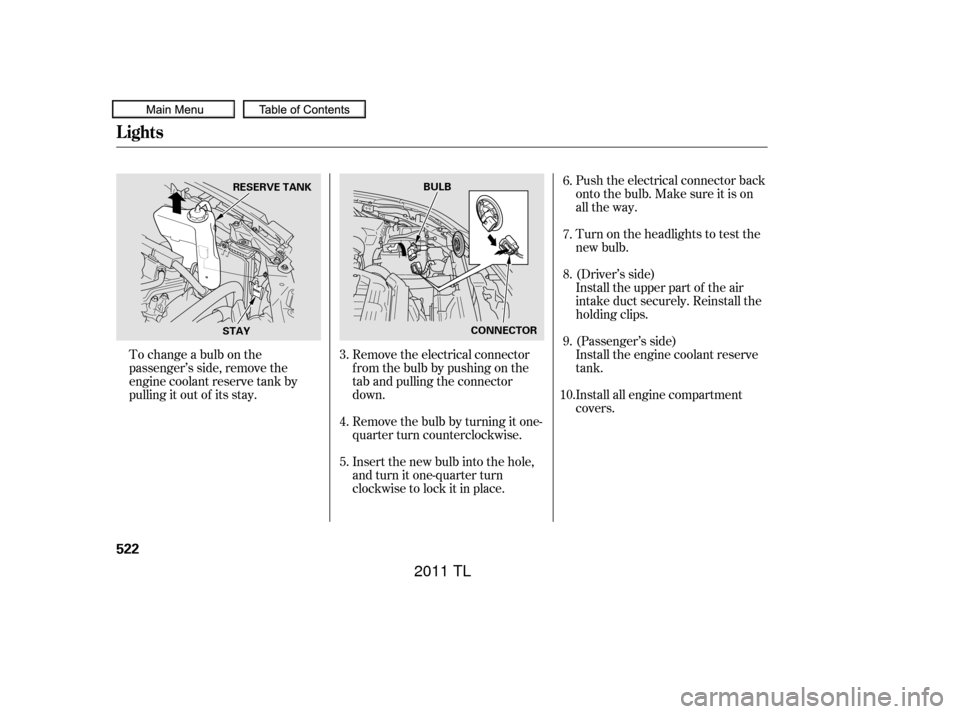
Push the electrical connector back
onto the bulb. Make sure it is on
all the way.
Remove the electrical connector
f rom the bulb by pushing on the
tab and pulling the connector
down.
Remove the bulb by turning it one-
quarter turn counterclockwise.
Insert the new bulb into the hole,
and turn it one-quarter turn
clockwise to lock it in place.
To change a bulb on the
passenger’s side, remove the
engine coolant reserve tank by
pulling it out of its stay. Turn on the headlights to test the
new bulb.
Install the upper part of the air
intake duct securely. Reinstall the
holding clips. (Driver’s side)
Install all engine compartment
covers. Install the engine coolant reserve
tank. (Passenger’s side)
4.
5. 6.
7.
8.
3. 9.
10.
Lights
522
RESERVE TANK BULB
CONNECTOR
STAY
10/07/29 12:48:54 31TK4620_527
2011 TL
Page 527 of 614
Remove the socket from the
headlight assembly by turning it
one-quarter turn counterclockwise.Start the engine. If you are
replacing a driver’s side bulb, turn
the steering wheel all the way to
theright.If youarereplacinga
passenger’s side bulb, turn the
steering wheel to the lef t. Turn of f
the engine.
Remove the bulb by pulling it
straight out of its socket. Install the new bulb in the socket
by pushing it straight in the socket
until it bottoms.
Insert the socket into the
headlight assembly. Turn it
clockwise to lock it in place.
Turn on the lights to make sure
the new bulb is working.
Push the under cover in place and
set the spoiler and inner f ender
cover in the original position.
Install the bolts and tighten them
securely. Put the holding clip, and
lock it by pushing on its center.
4.
5. 6.
7.
8.
1.
9. Replacing a Front T urn Signal/
Parking L ight Bulb
Lights
524
SOCKET
BULB
10/07/29 12:49:08 31TK4620_529
2011 TL
Page 529 of 614

Install the new bulb in the socket.
Turn it clockwise to lock it in place.
Insert the socket into the light
assembly. Turn it clockwise to
lock it in place.Your vehicle uses halogen light
bulbs. When replacing a bulb, handle
it by its plastic case, and protect the
glass from contact with your skin or
hard objects. If you touch the glass,
clean it with denatured alcohol and a
clean cloth. Start the engine. If you are
replacing a driver’s side bulb, turn
the steering wheel all the way to
the right. If you are replacing a
passenger’s side bulb, turn the
steering wheel to the left. Turn off
the engine.
The fog lights were properly aimed
when your vehicle was new. If you
regularly carry heavy items in the
trunk, readjustment may be
required. Adjustment should be
done by your dealer or another
qualified technician.
Turn on the lights to make sure
the new bulb is working.
Push the under cover in place and
set the spoiler and inner f ender
cover in the original position.
Install the bolts and tighten them
securely. Put the holding clip, and
lock it by pushing on its center.
6.
7.
8.
9.
1.
Replacing a Front Fog L ight Bulb
Lights
526
Halogen bulbs get very hot when lit. Oil,
perspiration, or a scratch on the glass
can cause the bulb to overheat and
shatter.
10/07/29 12:49:24 31TK4620_531
2011 TL
Page 531 of 614
Remove the nuts f rom the stud
bolts with a socket or wrench.
Open the trunk.
Remove the screw in the center of
theholdingcliponthesideof the
trunk lining. Pull the lining back.
Insert the new bulb into the hole,
and turn it one-quarter turn
clockwise to lock it in place.
Push the electrical connector back
onto the bulb. Make sure it is on
all the way.
Turn on the f og lights to test the
new bulb.
Push the under cover in place and
set the spoiler and inner f ender
cover in the original position.
Install the bolts and tighten them
securely. Put the holding clip, and
lock it by pushing on its center.
1.
2.
6.
7.
8.
9.
Lights
Replacing Rear Bulbs
528
SCREW
NUTS
10/07/29 12:49:41 31TK4620_533
2011 TL
Page 555 of 614
Tighten the wheel nuts securely in
the same crisscross pattern. Have
the wheel nut torque checked at
the nearest automotive service
f acility.
Tighten the wheel nuts to:
Remove the center cap before
storing the f lat tire in the trunk
well.
Lower the vehicle to the ground,
and remove the jack.
Put on the spare tire. Put the
wheel nuts back on f inger-tight,
then tighten them in a crisscross
pattern with the wheel nut wrench
until the wheel is f irmly against
the hub. Do not try to tighten the
wheel nuts f ully.
12.
13.
14.
15.
Changing a Flat Tire
552
94 lbf·ft (127 N·m , 13 kgf·m)
10/07/29 12:52:47 31TK4620_557
2011 TL