Page 266 of 614
Connect the USB f lash memory
device to the USB adapter cable
correctly and securely.
When the USB f lash memory device
is connected, the USB indicator is
showninthedisplay. Each time you press the TITLE
button, the display mode shows you
in sequence, the f older name, the f ile
name, the artist name, the album
name, the song name, or name of f
(which turns off the text display).
Pull out the USB connector f rom
the holder. The display shows up to 16
characters (including spaces) of the
selected data. If the text data has
more than 16 characters, you will see
the first 16 characters and the
indicator in the display. Press
andholdtheTITLEbuttonuntilthe
next 16 characters are shown.
1. 2.
CONT INUED
Connecting a USB
Flash Memory Device T ext Data Display Function
Playing a USB Flash Memory Device (Models without navigation system)
Features
263
USB ADAPTER CABLEUSB ADAPTER CABLE
USB CONNECTOR
10/07/29 12:14:04 31TK4620_268
2011 TL
Page 343 of 614
Do not connect your iPod using a
hub.
Do not keep the iPod and dock
connector cable in the vehicle.
Direct sunlight and high heat will
damage it.
Do not use an extension cable
between the USB adapter cable
equipped with your vehicle and
your dock connector.
We recommend backing up your
data bef ore playing it.
Some devices cannot be powered
or charged via the USB adapter. If
this is the case, use the accessory
adapter to supply power to your
device.Unclip the USB connector by
pulling it up, and pull out the USB
adapter cable in the console
compartment.
Connect your dock connector to
the iPod correctly and securely.
Install the dock connector to the
USB adapter cable securely.
1.
2.
3.
Playing an iPod(Models with navigation system)
Connect ing an iPod
340
NOTE:
USB ADAPTER CABLE
USB CONNECTOR
USB ADAPTER CABLE
DOCK CONNECTOR
10/08/03 20:54:24 31TK4620_345
2011 TL
Page 351 of 614

�Î
�Î
This audio system can select and
play the audio f iles on a USB f lash
memory device with the same
controls used f or the disc player. To
play a USB f lash memory device,
connect it to the USB adapter cable
in the console compartment, then
press the HDD/AUX button until
you see ‘‘USB’’ in the display. The
power mode must be ACCESSORY
or ON.
The audio system reads and plays
the audio f iles on the USB f lash
memory device in MP3, WMA or
AAC formats. The USB flash
memory device limit is up to 700
f olders or up to 15000 f iles. Only AAC f ormat f iles recorded
with iTunes are playable on this
audio unit.
Some USB f lash memory devices
(such as devices with security lock-
out f eatures, etc.) will not work in
this audio unit. The recommended USB f lash
memory devices are 256 MB or
higher, and f ormatted with the FAT
f ile system. Some digital audio
players may be compatible as well.
Your vehicle has the engine start/
stop button instead of an ignition
switch. For more information on how
to select the power mode, see . Do not use a device such as a card
reader or hard drive as it or your
f iles may be damaged.
Do not connect your USB f lash
memory device using a hub.
Do not use an extension cable to
the USB adapter cable equipped
with your vehicle.
Do not keep a USB f lash memory
device in the vehicle. Direct
sunlight and high heat will damage
it.
We recommend backing up your
data bef ore playing a USB f lash
memory device.
:
To Play a USB
Flash Memory Device
Playing a USB Flash Memory Device (Models with navigation system)
348
NOTE:
10/07/29 12:25:22 31TK4620_353
page 178
2011 TL
Page 353 of 614
Unclip the USB connector by
pulling it up, and pull out the USB
adapter cable in the console
compartment.Connect the USB f lash memory
device to the USB adapter cable
correctly and securely.When the USB device is connected
andtheUSBmodeisselectedonthe
audio system, the USB indicator is
showninthecenterdisplay.Italso
shows the f older and f ile numbers.
Pressing the AUDIO button displays
the USB indicator, the f older and f ile
names,andtheelapsedtimeinthe
navigation screen.
1. 2.
Playing a USB Flash Memory Device (Models with navigation system)
Connecting a USB
Flash Memory Device
350
USB ADAPTER CABLE
USB CONNECTOR
USB ADAPTER CABLE
10/07/29 12:25:36 31TK4620_355
2011 TL
Page 380 of 614

The security system helps to protect
your vehicle and valuables f rom thef t.
The horn sounds and a combination
of headlights, parking lights, side
marker lights and taillights f lash if
someone attempts to break into your
vehicle or remove the audio unit.
This alarm continues f or 2 minutes,
then the system resets. To reset an
activated system before the 2
minutes have elapsed, unlock the
driver’s door with the key or use the
remote transmitter/keyless access
remote.
You can also turn off an activated
system by grabbing either f ront door
handle while carrying the keyless
access remote to unlock the door.
To enter the clock setting, turn
the selector knob to select ‘‘SET,’’
then press the knob. The display
will return to the menu item
display.
Press either the RETURN or
SETUPbuttontogobacktothe
normal display.
The security system automatically
sets 15 seconds after you lock the
doors, hood, and trunk. For the
system to activate, you must lock the doors f rom the outside with the key,
driver’s lock tab, master door lock
switch, or remote transmitter
(keyless access remote on models
with keyless access system). The
security system indicator on the
instrument panel starts blinking
immediately to show you the system
is setting itself .
11. 10.
CONT INUED
On models with keyless access system
Security System
Setting the Clock, Security System
Features
377
SECURITY SYSTEM INDICATOR
A/T model is shown.
10/07/29 12:29:10 31TK4620_382
2011 TL
Page 381 of 614
�Î
�Î
With the system set, you can still
open the trunk with the remote
transmitter/keyless access remote
without triggering the alarm. The
alarm will sound if the trunk is
opened with the trunk release button
on the driver’s door, the trunk
release handle behind the trunk
pass-through cover, or the
emergency trunk opener.
Use the remote transmitter/
keyless access remote to quickly
check that the hood, the trunk, and
all doors are closed. Push the lock
button twice within 5 seconds.
There should be an audible
confirmation beep. The security system will not set if
the hood, trunk, or any door is not
f ully closed. If the system will not set,
turn the ignition switch to the ON
(II) position, and check the
indicators on the multi-information
display. Close any door or the trunk
indicated on the display. Check the
hood visually since it is not part of
the display, and shut it if necessary.
Do not attempt to alter this system
or add other devices to it.
Models equipped with the
keyless access system have an
engine start/stop button instead
of an ignition switch. ON Mode
is the equivalent of ON (II). For
more inf ormation, see pagesand .
Once the security system is set,
opening any door (without using the
key or the remote transmitter/
keyless access remote), the hood, or
the trunk will cause the alarm to
activate. It will also activate if the
audio unit is removed f rom the
dashboard or the wiring is cut.
You can also set the security system
by pressing the lock button on either
f ront door handle while carrying the
keyless access remote.
:
178 181
On models with keyless access system
Security System
378
NOTE:
10/07/29 12:29:16 31TK4620_383
2011 TL
Page 389 of 614

�·�µ
�µ
The HomeLink
Universal
Transceiver built into your vehicle
canbeprogrammedtooperateupto
three remote controlled devices
around your home, such as garage
doors, lighting, or home security
systems.
Bef ore programming your
HomeLink to operate a garage door
opener, conf irm that the opener has
an external entrapment protection
system, such as an ‘‘electronic eye,’’
or other saf ety and reverse stop
f eatures.
If your garage door was
manuf actured bef ore April 1, 1982,
you may not be able to program
HomeLink to operate it. These units
do not have safety features that
cause the motor to stop and reverse
it if an obstacle is detected during
closing, increasing the risk of injury.
Do not use HomeLink with any garage door opener that lacks saf ety
stop and reverse f eatures.
Units manuf actured between April 1,
1982 and January 1, 1993 may be
equipped with saf ety stop and
reverse f eatures. If your unit does
not have an external entrapment
protection system, an easy test to
conf irm the f unction and
perf ormance of the saf ety stop and
reverse f eature is to lay a 2 4
under the closing door. The door
should stop and reverse upon
contacting the piece of wood.
As an additional safety feature,
garage door openers manuf actured
af ter January 1, 1993 are required to
have external entrapment protection
systems, such as an electronic eye,
which detect an object obstructing
the door.
Refer to the safety information that
came with your garage door openerto test that the safety features are
f unctioning properly. If you do not
have this information, contact the
manuf acturer of the equipment.
Bef ore programming HomeLink to a
garage door or gate opener, make
sure that people and objects are out
of thewayof thedevicetoprevent
potential injury or damage.
When programming a garage door
opener, park just outside the garage.
If you just
received your vehicle and have not
trained any of the buttons in
HomeLink bef ore, you should erase
any previously learned codes bef ore
training the first button. To do this,
press and hold the two outside
buttons on the HomeLink
transceiver for about 10 20 seconds,
until the red indicator f lashes.
Release the buttons, then proceed to
step 1.
General Saf ety Inf ormation
Important Saf ety PrecautionsT raining HomeL ink
HomeL inkUniversal Transceiver
Bef ore you begin
386
10/07/29 12:30:20 31TK4620_391
2011 TL
Page 396 of 614
�Î
�Î
CONT INUED
BluetoothHandsFreeL ink(Models without navigation system)
Features
393
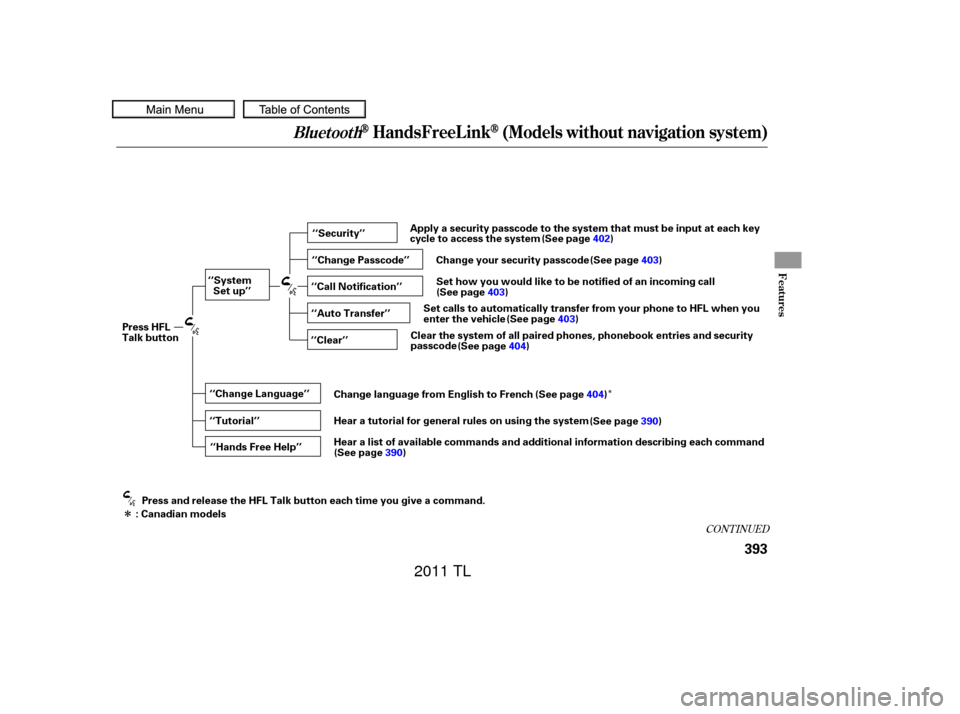
‘‘Change Language’’‘‘Hands Free Help’’
‘‘System
Set up’’
‘‘Tutorial’’ ‘‘Clear’’
‘‘Auto Transfer’’ ‘‘Call Notification’’ ‘‘Security’’
‘‘Change Passcode’’
Press HFL
Talk button
Press and release the HFL Talk button each time you give a command.
: Canadian models (See page
402)
Apply a security passcode to the system that must be input at each key
cycle to access the system
Change your security passcode (See page 403)
Set how you would like to be notified of an incoming call
(See page 403)
Set calls to automatically transfer from your phone to HFL when you
enter the vehicle (See page403)
Clear the system of all paired phones, phonebook entries and security
passcode (See page 404)
Change language from English to French (See page404)
Hear a tutorial for general rules on using the system (See page390)
Hear a list of available commands and additional information describing each command (See page 390)
10/07/29 12:31:18 31TK4620_398
2011 TL


