Page 28 of 724
28
Pictorial indexInstrument panel
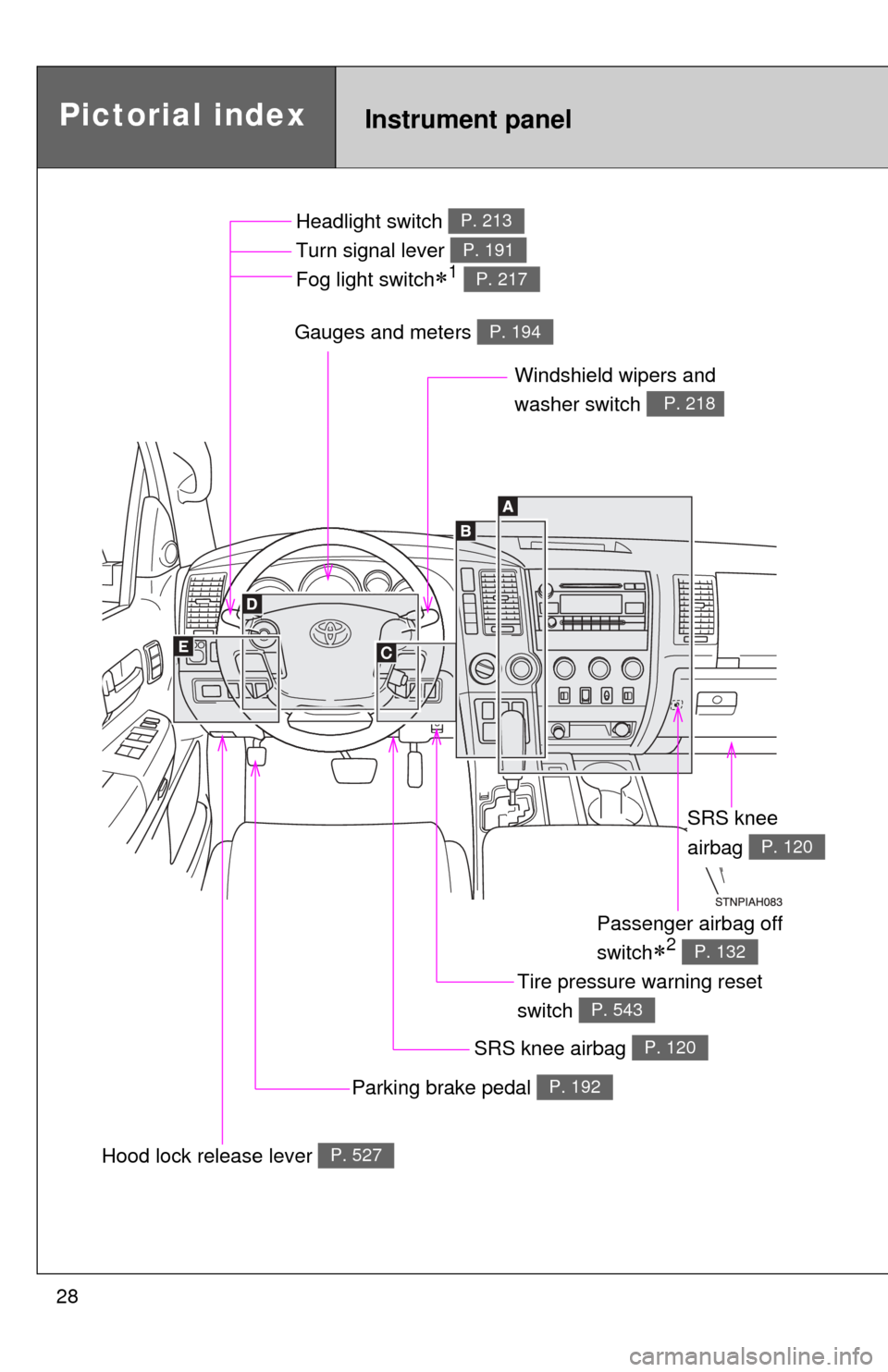
Headlight switch
Turn signal lever
Fog light switch
1
P. 213
P. 191
P. 217
Windshield wipers and
washer switch
P. 218
Parking brake pedal P. 192
Gauges and meters P. 194
Hood lock release lever P. 527
Tire pressure warning reset
switch
P. 543
Passenger airbag off
switch
2 P. 132
SRS knee
airbag
P. 120
SRS knee airbag P. 120
Page 70 of 724
70
1-3. Adjustable components (seats, mirrors, steering wheel)
Driving position memor y (driver’s seat)
: If equipped
Your preferred driving position (the position of the driver’s seat,
steering wheel and outside rear view mirrors) can be entered into the
computer’s memory and recalle d with the touch of a button.
Two different driving positions can be entered into memory.
■ Entering a position into memory
Check that the shift lever is set in P.
Turn the engine switch to the ON position.
Adjust the driver’s seat, steering wheel, and outside rear
view mirrors to the desired positions.
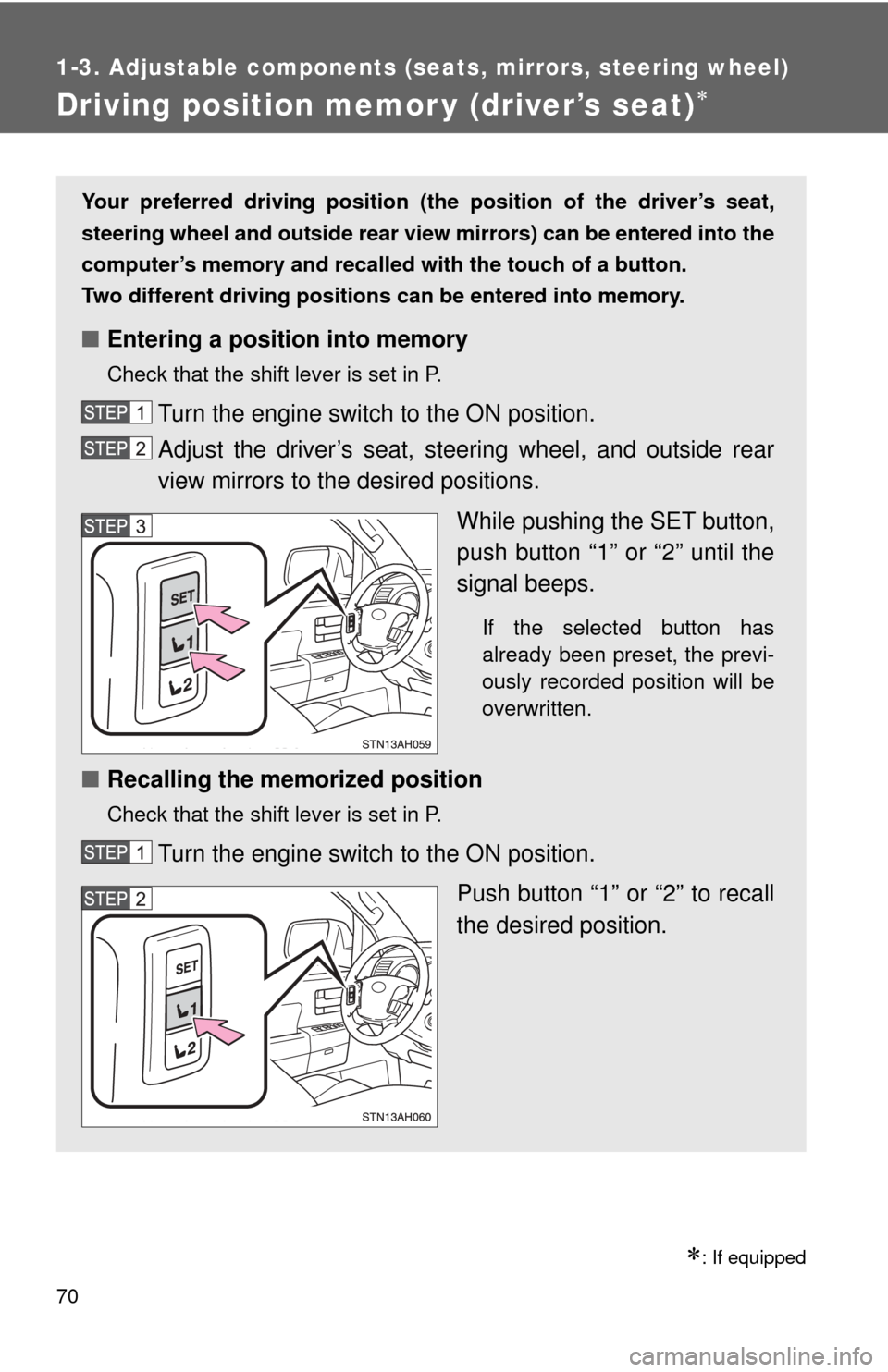
While pushing the SET button,
push button “1” or “2” until the
signal beeps.
If the selected button has
already been preset, the previ-
ously recorded position will be
overwritten.
■Recalling the memorized position
Check that the shift lever is set in P.
Turn the engine switch to the ON position.
Push button “1” or “2” to recall
the desired position.
Page 72 of 724
72 1-3. Adjustable components (seats, mirrors, steering wheel)
■Retained accessory power
Each memorized position (except for the tilt and telescopic steering column)
can be activated within 30 seconds after the driver’s door is opened, even if
the key is not in the engine switch.
■ If any position memory button is pushed while the adjustments are
being made
The operation will stop. To reactivate the system, push the button (“1” or “2”)
again.
■ If the battery is disconnected
The memorized positions must be reset because the computer’s memory is
erased when the battery is disconnected.
CAUTION
■Seat adjustment caution
Take care during seat adjustment that the seat does not strike the rear pas-
senger or squeeze your body against the steering wheel.
If this happens, you can stop the movement by pressing another seat posi-
tion memory button.
Page 194 of 724
194
2-2. Instrument cluster
Gauges and meters
Vehicles with multi-information display
The following gauges, meters and displays illuminate when the
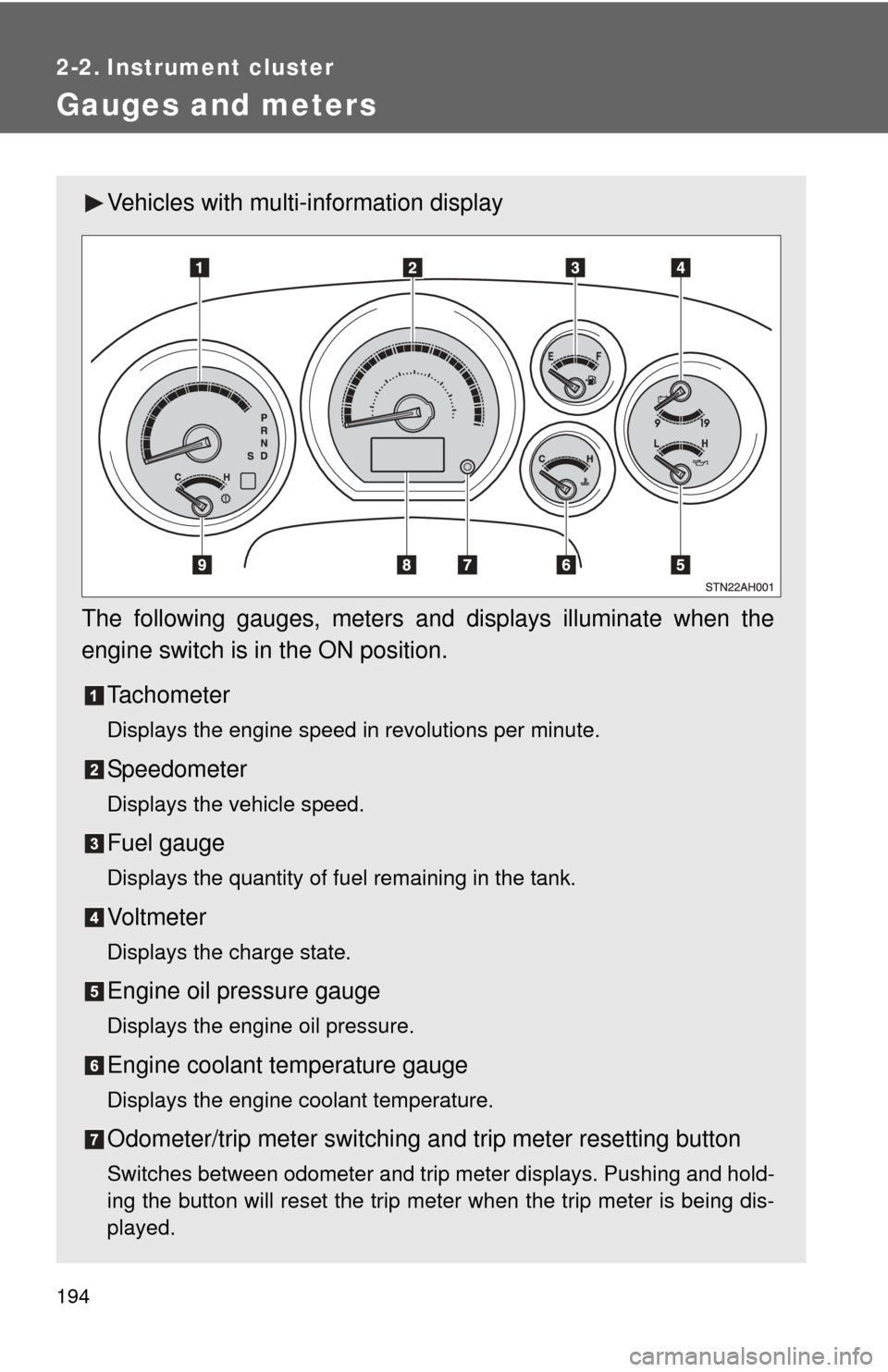
engine switch is in the ON position. Tachometer
Displays the engine speed in revolutions per minute.
Speedometer
Displays the vehicle speed.
Fuel gauge
Displays the quantity of fuel remaining in the tank.
Vo l t m e t e r
Displays the charge state.
Engine oil pressure gauge
Displays the engine oil pressure.
Engine coolant temperature gauge
Displays the engine coolant temperature.
Odometer/trip meter switching and trip meter resetting button
Switches between odometer and trip meter displays. Pushing and hold-
ing the button will reset the trip meter when the trip meter is being dis-
played.
Page 197 of 724
197
2-2. Instrument cluster
2
When driving
Fuel gauge
Displays the quantity of fuel remaining in the tank.
Voltmeter (if equipped)
Displays the charge state.
Engine oil pressure gauge (if equipped)
Displays the engine oil pressure.
Engine coolant temperature gauge
Displays the engine coolant temperature.
Odometer/trip meter switching and trip meter resetting button
Switches between odometer and trip meter displays. Pushing and hold-
ing the button will reset the trip meter when the trip meter is being dis-
played.
Odometer/trip meter
Odometer:
Displays the total distance the vehicle has been driven.
Trip meter:
Displays the distance the vehicle has been driven since the meter was
last reset. Trip meters A and B can be used to record and display differ-
ent distances independently.
Automatic transmission fluid temperature gauge (if equipped)
Displays the automatic transmission fluid temperature.
Page 198 of 724
198 2-2. Instrument cluster
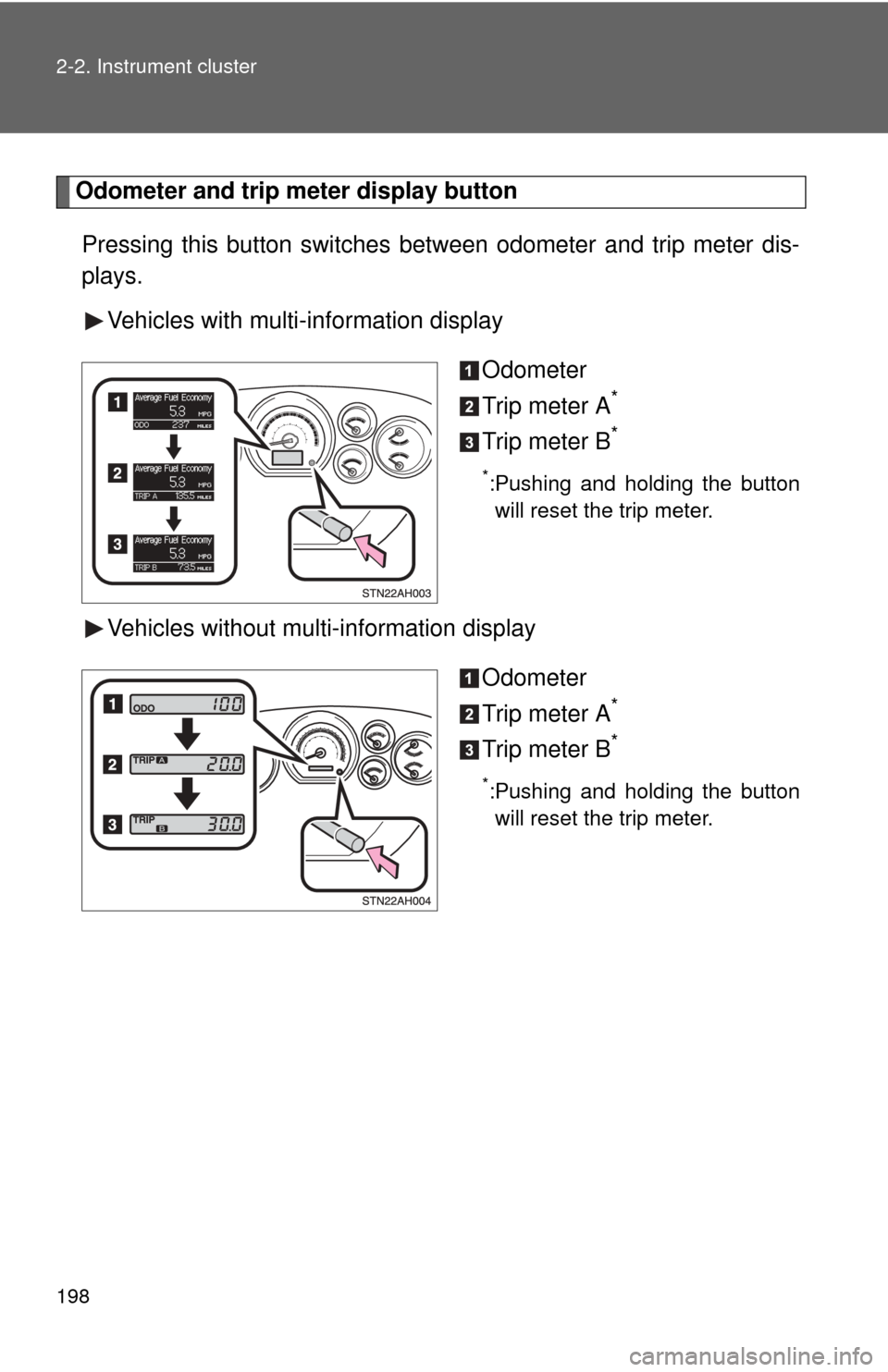
Odometer and trip meter display button
Pressing this button switches between odometer and trip meter dis-
plays.
Vehicles with multi-information display
Odometer
Trip meter A
*
Trip meter B*
*:Pushing and holding the buttonwill reset the trip meter.
Vehicles without multi-information display
Odometer
Trip meter A
*
Trip meter B*
*:Pushing and holding the buttonwill reset the trip meter.
Page 205 of 724
205
2-2. Instrument cluster
2
When driving
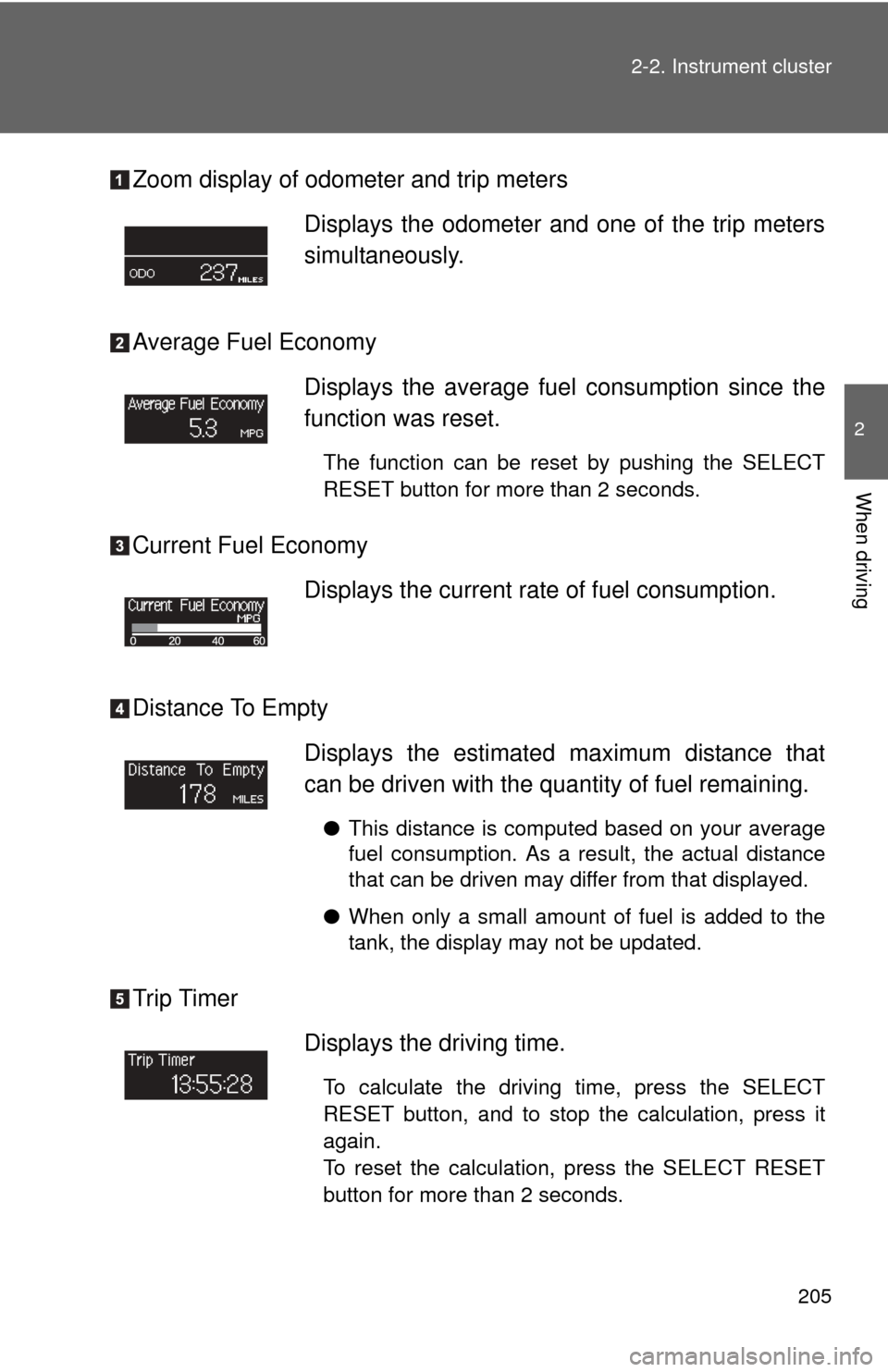
Zoom display of odometer and trip meters
Average Fuel Economy
Current Fuel Economy
Distance To Empty
Trip Timer
Displays the odometer and one of the trip meters
simultaneously.
Displays the average fuel
consumption since the
function was reset.
The function can be reset by pushing the SELECT
RESET button for more than 2 seconds.
Displays the current rate of fuel consumption.
Displays the estimated maximum distance that
can be driven with the quantity of fuel remaining.
● This distance is computed based on your average
fuel consumption. As a result, the actual distance
that can be driven may differ from that displayed.
● When only a small amount of fuel is added to the
tank, the display may not be updated.
Displays the driving time.
To calculate the driving time, press the SELECT
RESET button, and to stop the calculation, press it
again.
To reset the calculation, press the SELECT RESET
button for more than 2 seconds.
Page 206 of 724
206 2-2. Instrument cluster
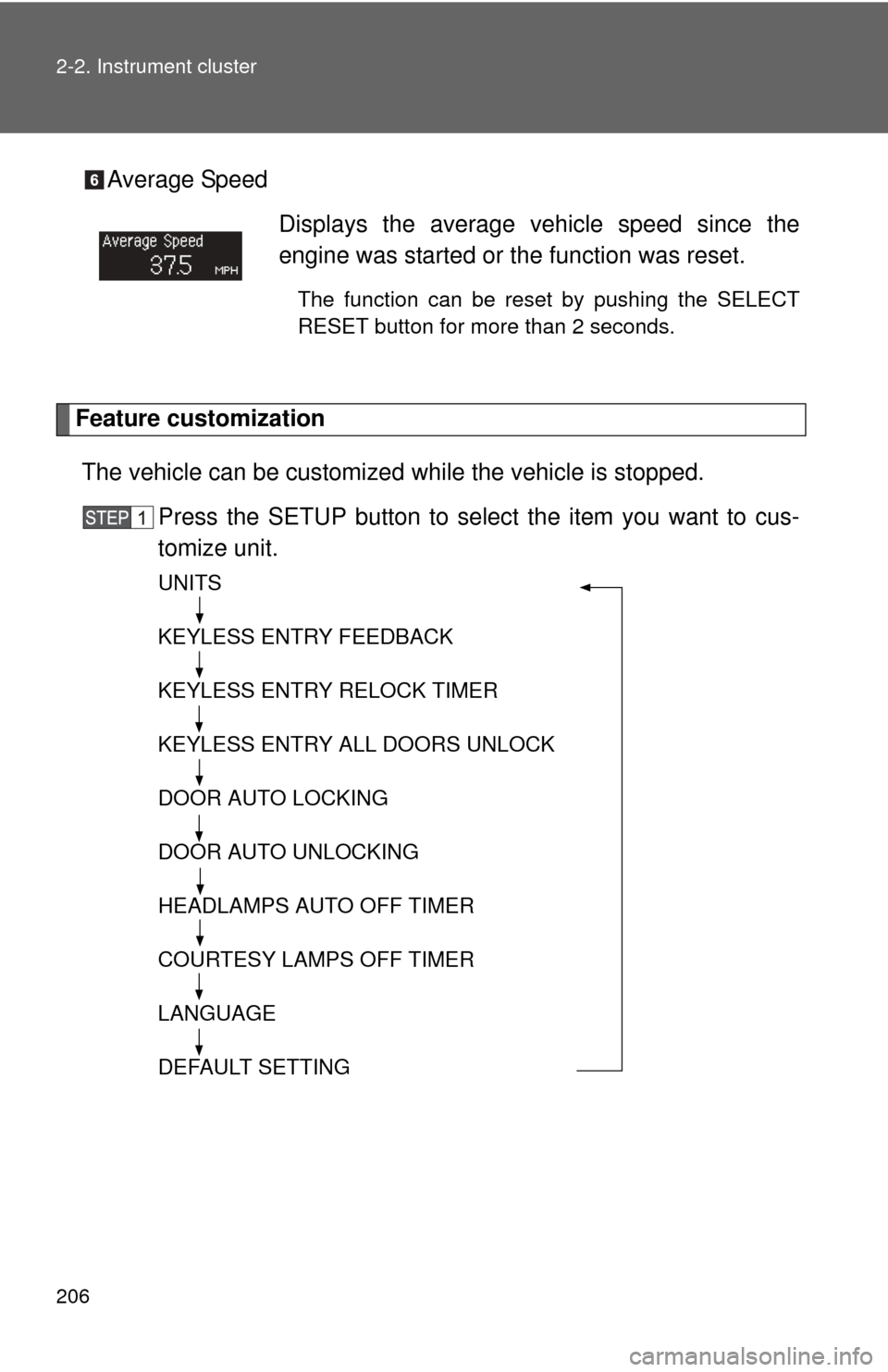
Average Speed
Feature customizationThe vehicle can be customized while the vehicle is stopped.
Press the SETUP button to select the item you want to cus-
tomize unit.
UNITS
KEYLESS ENTRY FEEDBACK
KEYLESS ENTRY RELOCK TIMER
KEYLESS ENTRY ALL DOORS UNLOCK
DOOR AUTO LOCKING
DOOR AUTO UNLOCKING
HEADLAMPS AUTO OFF TIMER
COURTESY LAMPS OFF TIMER
LANGUAGE
DEFAULT SETTING
Displays the average vehicle speed since the
engine was started or the function was reset.
The function can be reset by pushing the SELECT
RESET button for more than 2 seconds.