Page 226 of 513
226
3-1. Using the air conditioning system and defogger
Automatic air conditioning system
Using the automatic modePress .
The air conditioning system begins to operate. Air outlets and fan
speed are automatically adjusted according to the temperature set-
ting.
Press “” on to increase the temperature and “ ” to
decrease the temperature.
Air outlets and fan speed for the driver and passenger seats may be
set separately depending on the temperature setting.
Airflow and outlets are automatica lly adjusted according to the tem-
perature setting.
Fan speed Air conditioning
on/off switch
Changes the air outlets used
Off
Driver's side
temperature control
Automatic mode
Windshield defogger
Outside air or
recirculated air modeAir flow display
Micro dust and pollen filter Passenger’s side
temperature control
STEP 1
STEP 2
: If equipped
Page 229 of 513
229
3-1. Using the air conditioning system
and defogger
3
Interior features
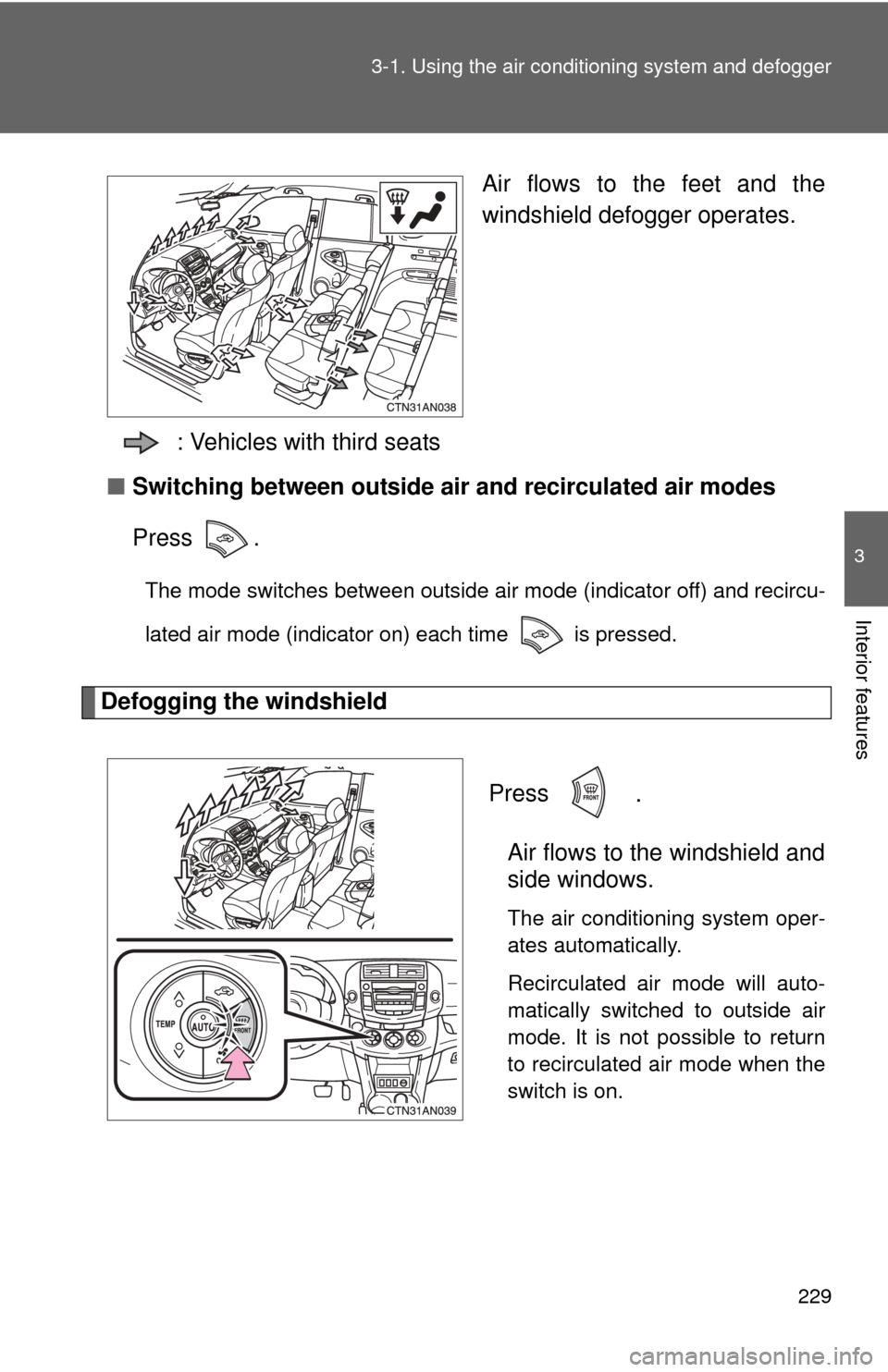
Air flows to the feet and the
windshield defogger operates.
: Vehicles with third seats
■ Switching between outside air and recirculated air modes
Press .
The mode switches between outside air mode (indicator off) and recircu-
lated air mode (indicator on) each time is pressed.
Defogging the windshield
Press
.
Air flows to the windshield and
side windows.
The air conditioning system oper-
ates automatically.
Recirculated air mode will auto-
matically switched to outside air
mode. It is not possible to return
to recirculated air mode when the
switch is on.
Page 230 of 513
230 3-1. Using the air conditioning system and defogger
Micro dust and pollen filter
Press .
Outside air mode will be switched
to recirculated air mode. Pollen is
removed from the air and the air
flows to the upper part of the
body.
Usually the system will turn off
automatically after approximately
3 minutes.
To stop the operation, pressagain.
Adjusting the position of the air outlets
Front outlets (center) Direct air flow to the left or right,
up or down.
Page 231 of 513
231
3-1. Using the air conditioning system
and defogger
3
Interior features
Front outlets (right and left sides)
Direct air flow to the left or right,
up or down.
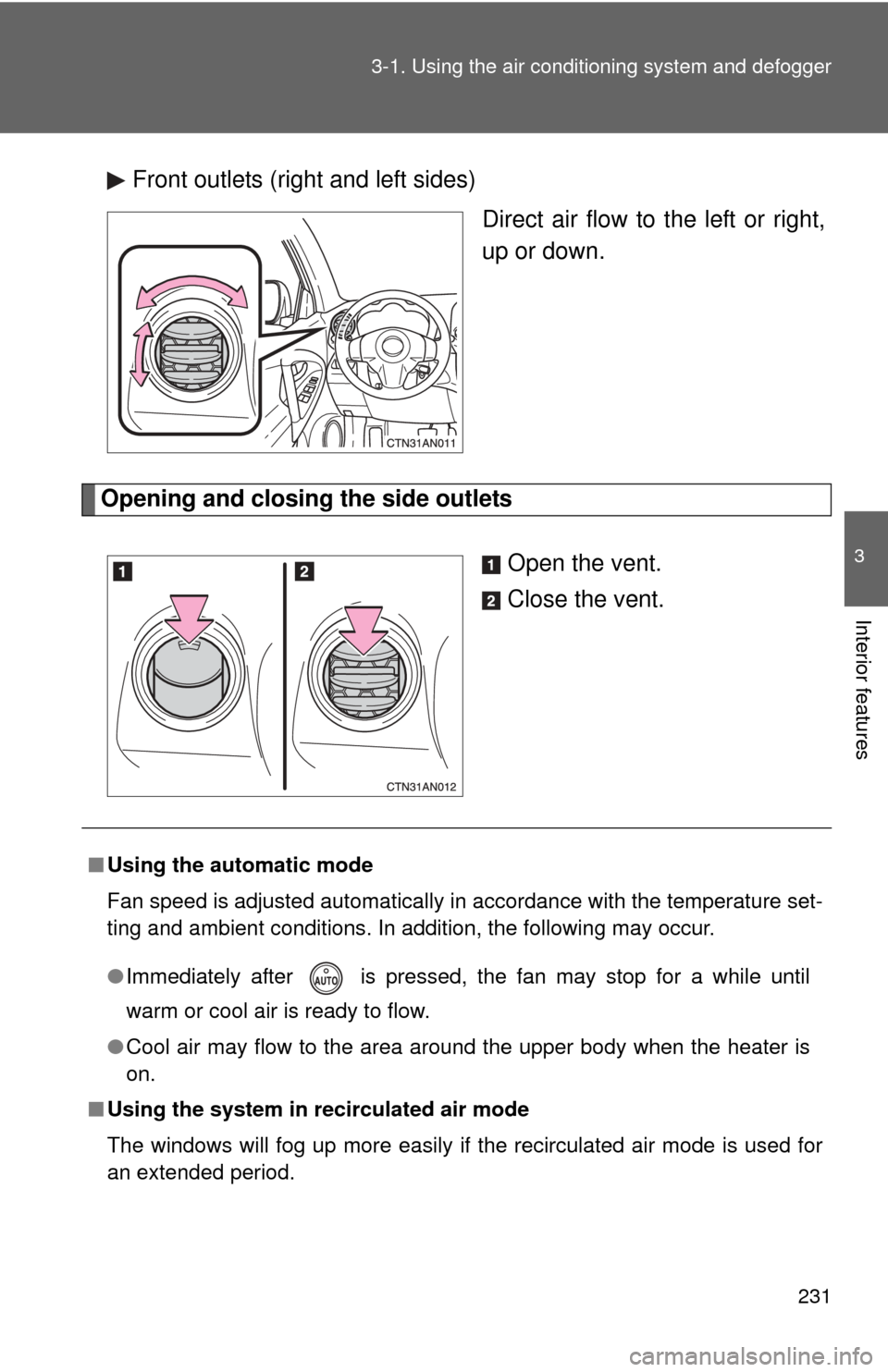
Opening and closing the side outlets
Open the vent.
Close the vent.
■Using the automatic mode
Fan speed is adjusted automatically in accordance with the temperature set-
ting and ambient conditions. In addition, the following may occur.
●Immediately after is pressed, the fan may stop for a while until
warm or cool air is ready to flow.
● Cool air may flow to the area around the upper body when the heater is
on.
■ Using the system in recirculated air mode
The windows will fog up more easily if the recirculated air mode is used for
an extended period.
Page 232 of 513

232 3-1. Using the air conditioning system and defogger
■Switching between outside air and recirculated air modes
Recirculated air mode or outside air mode may be automatically switched to
in accordance with the temperature setting and the inside temperature.
■ Window defogger feature
Recirculated air mode may automatically switch to outside air mode in situa-
tions where the windows need to be defogged.
■ When outside temper ature approaches 32F (0 C)
The air conditioning system may not operate even when is pressed.
■ When
is selected for the air outlets used
For your driving comfort, air flowing to the feet may be warmer than air flow-
ing to the upper body depending on the position of the temperature setting.
■ Micro dust and pollen filter
●In order to prevent the windows from fogging up when the outside air is
cold, the following may occur.
• Outside air mode is not switched to recirculated air mode.
• The air conditioning system operates automatically.
• The operation is canceled after 1 minute.
● In rainy weather, the windows may fog up. Press .
■ When the indicator light on flashes
Press
and turn off the air conditioning system before turning it on once
more. There may be a problem in the ai r conditioning system if the indicator
light keep flashing. Turn the air conditioning system off and have it inspected
by your Toyota dealer.
■ Air conditioning odors
●During use, various odors from inside and outside the vehicle may enter
into and accumulate in the air conditioning system. This may then cause
odor to be emitted from the vents.
● To reduce potential odors from occurring:
• It is recommended that the air conditioning system be set to outside air
mode prior to turning the vehicle off.
• The start timing of the blower may be delayed for a short period of time immediately after the air conditioning system is started in automatic
mode.
Page 234 of 513
234
3-1. Using the air conditioning system and defogger
Rear window and outside rear view mirror defoggers
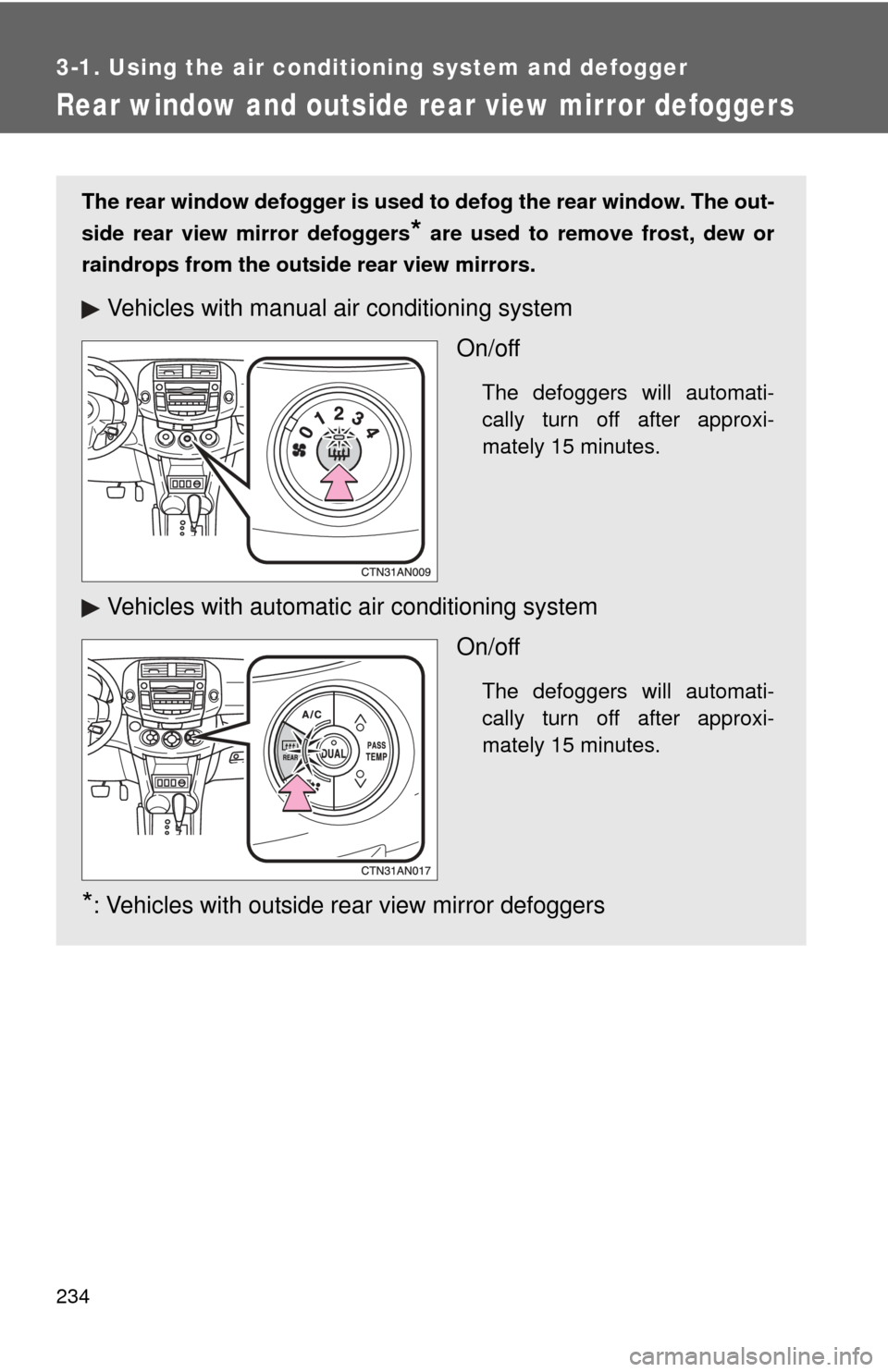
The rear window defogger is used to defog the rear window. The out-
side rear view mirror defoggers
* are used to remove frost, dew or
raindrops from the outside rear view mirrors.
Vehicles with manual air conditioning system
On/off
The defoggers will automati-
cally turn off after approxi-
mately 15 minutes.
Vehicles with automatic air conditioning systemOn/off
The defoggers will automati-
cally turn off after approxi-
mately 15 minutes.
*: Vehicles with outside rear view mirror defoggers
Page 236 of 513
236
3-1. Using the air conditioning system and defogger
Windshield wiper de-icer
■The de-icer can be operated when
Vehicles without smart key system
The engine switch is in the “ON” position.
Vehicles with smart key system
The “ENGINE START STOP” switch is in IGNITION ON mode.
CAUTION
■ When the windshield wiper de-icer is on
Do not touch the glass at the lower part of the windshield or to the side of the
front pillars as the surfaces can become very hot and burn you.
This feature is used to prevent i ce from building up on the wind-
shield and wiper blades.
On/off
The de-icer will automatically
turn off after approximately 15
minutes.
: If equipped
Page 244 of 513
243
3-2. Using the audio system
3
Interior features
■
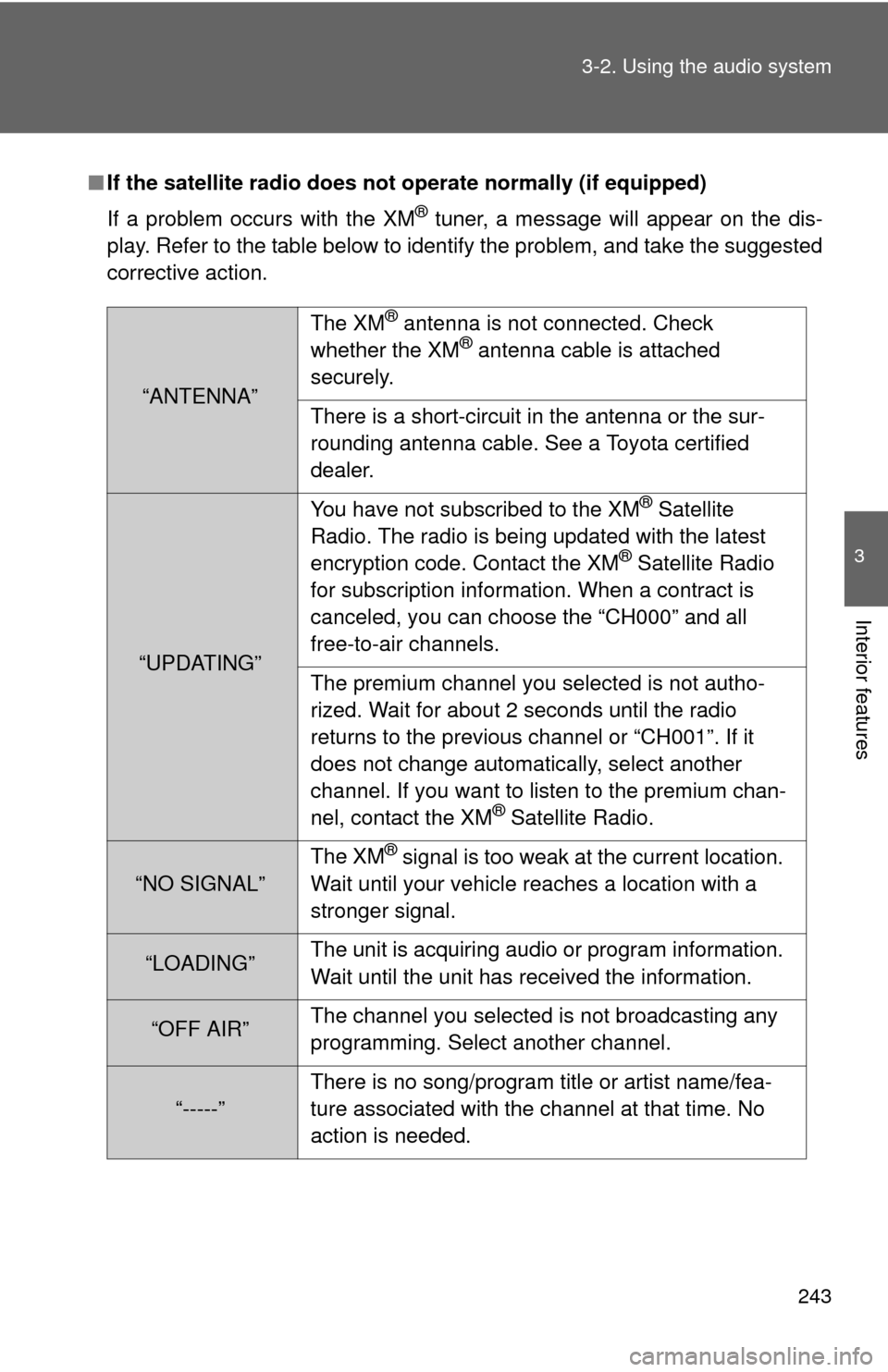
If the satellite radio does not operate normally (if equipped)
If a problem occurs with the XM
® tuner, a message will appear on the dis-
play. Refer to the table below to identify the problem, and take the suggested
corrective action.
“ANTENNA” The XM
® antenna is not connected. Check
whether the XM® antenna cable is attached
securely.
There is a short-circuit in the antenna or the sur-
rounding antenna cable. See a Toyota certified
dealer.
“UPDATING” You have not subscribed to the XM
® Satellite
Radio. The radio is being updated with the latest
encryption code. Contact the XM
® Satellite Radio
for subscription information. When a contract is
canceled, you can choose the “CH000” and all
free-to-air channels.
The premium channel you selected is not autho-
rized. Wait for about 2 seconds until the radio
returns to the previous channel or “CH001”. If it
does not change automatically, select another
channel. If you want to listen to the premium chan-
nel, contact the XM
® Satellite Radio.
“NO SIGNAL” The XM
® signal is too weak at the current location.
Wait until your vehicle reaches a location with a
stronger signal.
“LOADING” The unit is acquiring audio or program information.
Wait until the unit has received the information.
“OFF AIR”The channel you selected is not broadcasting any
programming. Select another channel.
“-----”There is no song/program title or artist name/fea-
ture associated with the channel at that time. No
action is needed.