Page 86 of 513
86 1-4. Opening and closing the windows and moon roof
■When the moon roof does not close normally
Perform the following procedure:
●If the moon roof closes but then re-opens slightly
Stop the vehicle.
Press and hold the “TILT UP” switch.*
1
The moon roof will close, reopen and pause for approximately 10
seconds.*2 Then it will close again, tilt up and pause for approxi-
mately 1 second. Finally, it will tilt down, open and close.
Check to make sure that the moon roof is completely closed and
then release the switch.
● If the moon roof tilts down but then tilts back up
Stop the vehicle.
Press and hold the “TILT UP” switch*
1 until the moon roof moves
into the tilt up position and stops.
Release the “TILT UP” switch once and then press and hold the
“TILT UP” switch again.*
1
The moon roof will pause for approximately 10 seconds in the tilt up
position.*2 Then it will adjust slightly and pause for approximately 1
second. Finally, it will tilt down, open and close.
Check to make sure that the moon roof is completely closed and
then release the switch.
*
1:If the switch is released at the incorrect time, the procedure will have to be performed again from the beginning.
*
2:If the switch is released after the above mentioned 10 second pause, automatic operation will be disabled. In that case, press
and hold the “TILT UP” switch, and the moon roof will tilt up and
pause for approximately 1 second. Then it will tilt down, open
and close. Check to make sure that the moon roof is completely
closed and then release the switch.
If the moon roof does not fully close even after performing the above proce-
dure correctly, have the vehicle inspected by your Toyota dealer.
STEP 1
STEP 2
STEP 3
STEP 1
STEP 2
STEP 3
STEP 4
Page 133 of 513

When driving2
133
2-1. Driving proceduresDriving the vehicle............ 134
Engine (ignition) switch (vehicles with smart
key system).................... 143
Engine (ignition) switch (vehicles without smart
key system).................... 147
Automatic transmission................... 150
Turn signal lever .............. 153
Parking brake ................... 154
Horn ................................. 155
2-2. Instrument cluster Gauges and meters ......... 156
Indicators and warning lights .............................. 159
Trip information display............................ 162
2-3. Operating the lights and wipers
Headlight switch ............... 165
Fog light switch ................ 168
Windshield wipers and washer ........................... 169
Rear window wiper and washer ........................... 171 2-4. Using other driving
systems
Cruise control ................... 172
Rear view monitor system ........................... 175
Driving assist systems ..... 180
Hill-start assist control ...... 187
Downhill assist control system ........................... 189
Four-wheel drive lock switch ............................. 192
2-5. Driving information Utility vehicle precautions .................... 193
Cargo and luggage .......... 198
Vehicle load limits ............ 204
Winter driving tips ............ 206
Trailer towing ................... 210
Dinghy towing .................. 218
Page 145 of 513
145
2-1. Driving procedures
2
When driving
■
Steering lock release
■ If the engine does not start
The engine immobilizer system may not have been deactivated. ( P. 92)
■ When the “ENGINE START STOP” sw itch indicator flashes in amber
The system may be malfunctioning. Have the vehicle inspected by your
Toyota dealer immediately.
■ Auto power off function
If the vehicle is left in ACCESSORY mode for more than an hour with the
shift lever in P, the “ENGINE START STOP” switch will automatically turn
OFF.
■ Electronic key battery depletion
P. 3 2
■ When the electronic key battery is discharged
P. 381
■ Conditions affecting operation
P. 3 0
■ Note for the entry function
P. 3 2
Make sure that the steering wheel lock is
released.
To release the steering wheel lock, gently
turn the wheel left or right while pressing
the “ENGINE START STOP” switch.
When the steering wheel lock does not
release, the “ENGINE START STOP”
switch indicator will flash green.
Page 150 of 513
150
2-1. Driving procedures
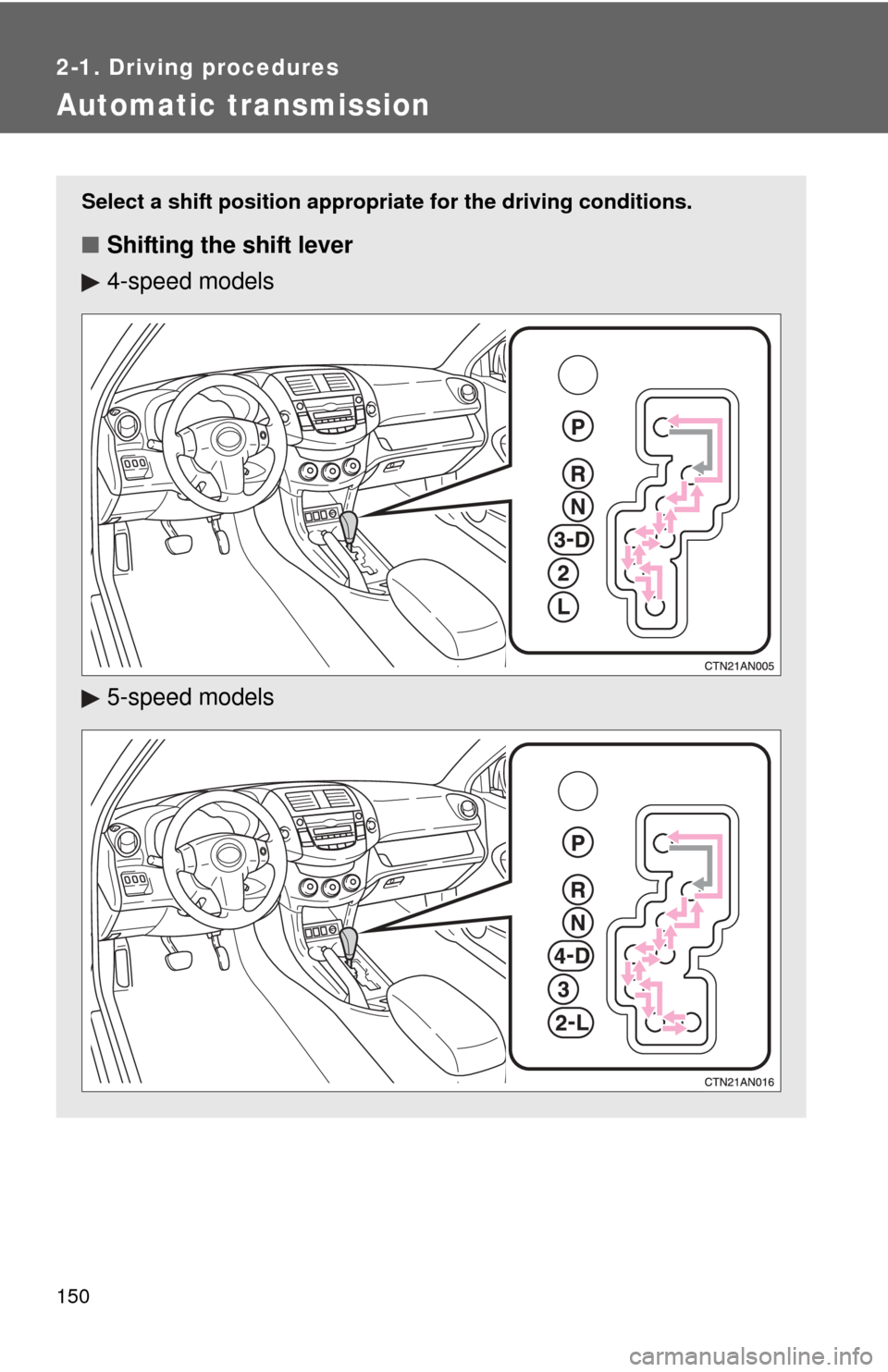
Automatic transmission
Select a shift position appropriate for the driving conditions.
■Shifting the shift lever
4-speed models
5-speed models
Page 157 of 513
157
2-2. Instrument cluster
2
When driving
Instrument panel light control
The brightness of the instrument panel lights can be adjusted.
Brighter
Darker
When the headlight switch is
turned on, the brightness will
be reduced slightly unless the
control dial is turned fully up.
Trip information display
P. 162
Automatic transmission shift position indicator lights
P. 150
Odometer/trip meterOdometer
Displays the total distance the vehicle has been driven.
Trip meter
Displays the distance the vehi cle has been driven since the
meter was last reset. Trip meters A and B can be used to
record and display different distances independently.
Odometer/trip meter switching and trip meter resetting button
Switches between odometer and trip meter displays. Pushing and hold-
ing the button will reset the trip meter when the trip meter is being dis-
played.
Page 165 of 513
165
2
When driving
2-3. Operating the lights and wipers
Headlight switch
Turning on the high beam headlightsWith the headlights on, push
the lever forward to turn on the
high beams.
Pull the lever back to the center
position to turn the high beams
off.
Pull the lever toward you to
turn on the high beams.
Release the lever to turn them off.
You can flash the high beams
with the headlights on or off.
The headlights can be operated manually or automatically.
The side marker, park-
ing, tail, license plate
and instrument panel
lights turn on.
The headlights and all
lights listed above turn
on.
The headlights and
parking lights turn on
and off automatically.
(When the “ENGINE
START STOP” switch
or the engine switch is
in ON)
U.S.A. Canada
(if equipped)
Page 166 of 513

166 2-3. Operating the lights and wipers
■Daytime running light system (if equipped)
To make your vehicle more visible to other drivers, the headlights turn on
automatically (at a reduced intensity) whenever the engine is started and the
parking brake is released. Daytime running lights are not designed for use at
night.
■ Headlight control sensor (with au tomatic light control system)
■ Automatic light off system
Vehicles without smart key system:
The headlights and tail lights turn off 30 seconds after driver’s door is
opened and closed if the engine switch has been turned to “ACC” or “LOCK”
position.
To turn the lights on again, turn the engine switch to the “ON” position, or
turn the headlight switch off and then back to or .
Vehicles with smart key system:
The headlights and tail lights turn off 30 seconds after driver’s door is
opened and closed if the “ENGINE START STOP” switch has been turned to
ACCESSORY mode or turned OFF.
To turn the lights on again, turn the “ENGINE START STOP” switch to IGNI-
TION ON mode, or turn the headlight switch off and then back to or
.
■ Customization that can be co nfigured at Toyota dealer
Settings (e.g. light sensor sensitivity) can be deactivated.
(Customizable features P. 488)
The sensor may not function properly if
an object is placed on the sensor, or any-
thing that blocks the sensor is affixed to
the windshield.
Doing so interferes with the sensor
detecting the level of ambient light and
may cause the automatic headlight sys-
tem to malfunction.
Page 170 of 513
170 2-3. Operating the lights and wipers
■The windshield wipers and washer can be operated when
Vehicles without smart key system
The engine switch is in the “ON” position.
Vehicles with smart key system
The “ENGINE START STOP” switch is in IGNITION ON mode.
■ If no windshield washer fluid sprays
Check that the washer nozzles are not blocked and if there is washer fluid in
the windshield washer fluid reservoir.
NOTICE
■When the windshield is dry
Do not use the wipers, as they may damage the windshield.
■ When there is no washer fluid spray from the nozzle
Damage to the washer fluid pump may be caused if the lever is pulled
toward you and held continually.
■ When a nozzle is blocked
Do not try to clear it with a pin or other object. The nozzle will be damaged.
Wash/wipe operation
Wipers operate automatically.