Page 300 of 616

300 3-2. Using the audio system
PRIUS_U (OM47668U) U.S.A.
■If the satellite radio does not operate normally
If a problem occurs with the XM
® tuner, a message will appear on the dis-
play. Refer to the table below to identify the problem, and take the suggested
corrective action.
ANTENNA
The XM® antenna is not connected. Check
whether the XM® antenna cable is attached
securely.
There is a short-circuit in the antenna or the sur-
rounding antenna cable. See a Toyota certified
dealer.
UPDATING You have not subscribed to XM
® Satellite Radio.
The radio is being updated with the latest encryp-
tion code. Contact XM
® Satellite Radio for sub-
scription information. When a contract is canceled,
you can choose “CH000” and all free-to-air chan-
nels.
The premium channel you selected is not autho-
rized. Wait for about 2 seconds until the radio
returns to the previous channel or “CH001”. If it
does not change automatically, select another
channel. If you want to listen to the premium chan-
nel, contact XM
® Satellite Radio.
NO SIGNAL The XM
® signal is too weak at the current location.
Wait until your vehicle reaches a location with a
stronger signal.
LOADING The unit is acquiring audio or program information.
Wait until the unit has received the information.
OFF AIRThe channel you selected is not broadcasting any
programming. Select another channel.
Page 304 of 616
304 3-2. Using the audio system
PRIUS_U (OM47668U) U.S.A.
Loading a CDs■ Loading a single CD
Type A
Press .
Insert a CD when the indicator on the slot turns from amber
to green.
Type B
Insert a CD.
■ Loading multiple CDs (type A only)
Press and hold until you hear a beep.
Insert a CD when the indicator on the slot turns from amber to
green.
The indicator on the slot turns to amber when the CD is inserted.
Insert the next CD when the indicator on the slot turns from
amber to green again.
Repeat the procedure for the remaining CDs.
To cancel the operation, press .
STEP1
STEP2
STEP1
STEP2
STEP3
Page 305 of 616
305
3-2. Using the audio system
3
Interior features
PRIUS_U (OM47668U) U.S.A.
Ejecting CDs
■ Ejecting a CD
Type A
To select the CD to be ejected, press ( DISC) or
(DISC ).
The number of the CD selected is shown on the display.
Press and remove the CD.
Type B
Press and remove the CD.
■ Ejecting all CDs (type A only)
Press and hold until you hear a beep, then remove the CDs.
Selecting a CD (with a CD changer)
■ To select a CD to play
Press ( DISC) or (DISC ) until the desired CD num-
ber appears on the display.
■ To scan loaded CDs
Press and hold until you hear a beep.
The first 10 seconds of the first track on each CD will be played.
Press once again when the desired CD is reached.
STEP1
STEP2
STEP1
STEP2
Page 306 of 616
306 3-2. Using the audio system
PRIUS_U (OM47668U) U.S.A.
Selecting a trackPress “ ” to move up or “ ” to move down using until the
desired track number appears on the display.
Fast forwarding and rewinding tracks
Press and hold (rewind) or (fast forward).
Scanning a CD Press .
The first 10 seconds of each track will be played.
Press once again when the desired track is
reached.
Random playback■ Current CD
To u c h ( R A N D ) .
Tracks are played in random order until the button is pressed once
again.
■All CDs (with a CD changer)
Press and hold (RAND) until you hear a beep.
Tracks on all loaded CDs are played in random order until the button is
pressed once again.
STEP1
STEP2
Page 311 of 616
311
3-2. Using the audio system
3
Interior features
PRIUS_U (OM47668U) U.S.A.
Playing back MP3 and WMA discs
Loading and ejecting MP3 and WMA discsRefer to the section entitled “Using the CD player” for details.
( P. 303)
Selecting a CD (with a CD changer)
Refer to the section entitled “Using the CD player” for details.
( P. 303)
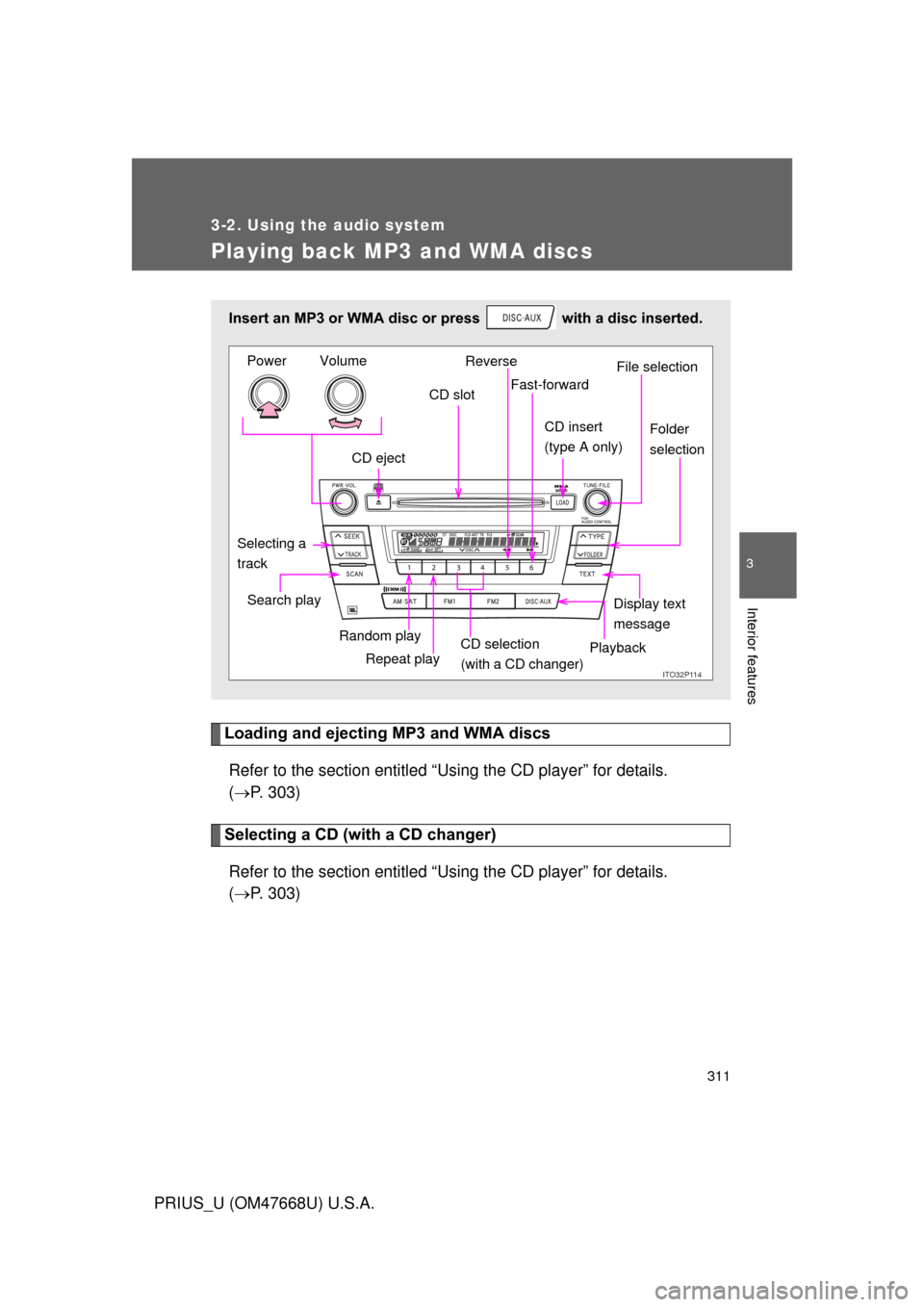
Insert an MP3 or WMA disc or press with a disc inserted.
ITO32P11Q
CD eject CD slot
CD insert
(type A onlyF
Display text
message
Search play
Repeat play
Selecting a
track
Reverse
Fast-forward
Playback
CD selection
(with a CD changer)
Random playFile selection
Folder
selection
Volume
Power
Page 442 of 616

442 4-3. Do-it-yourself maintenance
PRIUS_U (OM47668U) U.S.A.
Installing tire pressure warning valves and transmittersWhen replacing tires or wheels, ti re pressure warning valves and
transmitters must also be installed.
When new tire pressure warning valves and transmitters are
installed, new tire pressure warn ing valve and transmitter ID codes
must be registered in the tire pres sure warning computer and tire
pressure warning system must be initialized. Have tire pressure
warning valve and transmitter ID codes registered by Toyota dealer.
( P. 444)
Initializing the tire pressure warning system
■ The tire pressure warning system must be initialized in the fol-
lowing circumstances
●When rotating the tires on vehicles differing with front and rear
tire inflation pressures.
● When changing the tire inflation pressure by changing traveling
speed or load weight, etc.
● When changing the tire size.
When the tire pressure warning system is initialized, the current
tire inflation pressure is set as the pressure benchmark.
■ The tire pressure warning system
Your Toyota is equipped with a tire pressure warning system that
uses tire pressure warning valves and transmitters to detect low
tire inflation pressure before serious problems arise. (P. 499)
The compact spare tire is not equipped with a tire pressure
warning valve and transmitter.
Page 445 of 616

445
4-3. Do-it-yourself maintenance
4
Maintenance and care
PRIUS_U (OM47668U) U.S.A.
■
Tire life
Any tire over 6 years old must be checked by a qualified technician even if
they have seldom or never been used or damage is not obvious.
■ If the tread wears down below 0.16 in. (4 mm) on snow tires
The effectiveness of snow tires is lost.
■ Low profile tires (vehic les with 17-inch tires)
Generally, low profile tires will wear more rapidly and tire grip performance
will be reduced on snowy and/or icy roads when compared to standard tires.
Be sure to use snow tires or tire chains on snowy and/or icy roads and drive
carefully at a speed appropriate for road and weather conditions.
■
Maximum load of tire
Check that the maximum load of the re placement tire is greater than 1/2
of the Gross Axle Weight Ratings (GAWR) of either the front axle or the
rear axle, whichever is greater.
For the GAWR, see the Certification
Label. For the maximum load of the
tire, see the load limit at maximum cold
tire inflation pressure mentioned on the
sidewall of the tire.( P. 572)
Page 446 of 616

446 4-3. Do-it-yourself maintenance
PRIUS_U (OM47668U) U.S.A.
■Tire types
1 Summer tiresSummer tires are high-speed performance tires best suited to highway
driving under dry conditions. Since summer tires do not have the same
traction performance as snow tire s, summer tires are inadequate for
driving on snow-covered or icy ro ads. For driving on snow-covered
roads or icy roads, the use of snow tires is recommended. When
installing snow tires, be sure to replace all four tires.
2 All season tires All season tires are designed to provide better traction in snow and to
be adequate for driving in most winter conditions, as well as for use
year round. All season tires, however, do not have adequate traction
performance compared with snow tires in heavy or loose snow. Also,
all season tires fall short in acceleration and handling performance
compared with summer tires in highway driving.
3Snow tires
For driving on snow-covered roads or icy roads, we recommend using
snow tires. If you need snow tires, select tires of the same size, con-
struction and load capacity as the or iginally installed tires. Since your
vehicle has radial tires as original equipment, make sure your snow
tires also have radial construction. Do not install studded tires without
first checking local regulations for possible restriction. Snow tires
should be installed on all wheels. ( P. 261)