2010 SKODA ROOMSTER steering wheel
[x] Cancel search: steering wheelPage 101 of 231

Communication
100
CommunicationMultifunction steering wheel*Operate radio und navigation on the multifunction steering wheel
The buttons for setting the basic functions of the factory-fitted radio and navigation
system are located on the multifunction steering wheel* fig. 100 .
You can of course operate the radio and navi gation at the appliance. You will find a
description in the operating instructions of your radio.
If the side lights are switched on, the buttons on the multifunction steering wheel are
also illuminated except the symbols
and
.
By pressing or turning the buttons, yo u can carry out the following functions.
Fig. 100 Multifunction steering wheel:
control buttons
Button
Action
Radio, traffic information
CD / MP3
Navigation
press briefly
a)
Switch off/on tone
press for a long
period of time
a)
Swich the unit on / off
turn upwards
Increase volume
turn downwards
Decrease volume
press briefly
Changing to the next stored radio station
Changing to the next stored traffic information Interrupting the traffic report
Changing to the next title
press button for a
long time
Interruption of the traffic report
fast forward
press briefly
Changing to the previously stored radio station
Changing to the previously stored traffic information Interrupting the traffic report
Changing to the previous title
press button for a
long time
Interruption of the traffic report
fast rewind
A1A1A1A1A2A2A3A3
s16g.4.book Page 100 Wednesda y, February 10, 2010 3:53 PM
Page 102 of 231

Communication101
Using the system
Safety
Driving Tips
General Maintenance
Breakdown assistance
Praktik
Technical Data
The buttons apply for the respective operating mode of the current radio or navigation
system.
Note
The loudspeakers in the vehicle are matched to a power output of the radio and
navigation system of 4x 20°W.
For the equipment sound system*, the loudspeakers are matched to a power
output of the amplifier of 4x40°W + 6x20 W.
Mobile phones and tw o-way radio systemsThe installation of a mobile phone and two-way radio system in a vehicle should be
carried out by a specialist garage.
Mobile phones send and receive radio waves during a conversation as well as in
standby mode. Radio waves can be harmful to the human body if their frequency
exceeds certain limit values.
Škoda Auto permits the operation of mobile phones and two-way radio systems with
a professionally installed external aerial and a maximum transmission power of up to
10 watts.
It is essential that you inform a specialist garage about the possibilites to assemble and
operate mobile phones and two-way radio sets which have a power output of more
than 10 W. They will inform you which technical possibilities exist for retrofitting
mobile phones.
When using a mobille phone inside the vehicl e, which is not inserted into the phone
adapter, and thus has no connection to the external aerial, the electromagnetic radia-
tion can exceed the current limit value. We therefore recommend to operate a mobile
phone in the vehicle only when it is conne cted to an external aerial via the phone
adapter. This improves the quality of the connection.
Operation of mobile phones or two-way ra dio systems may interfere with functioning
of the electronic systems of your vehicle. The reasons for this may be:
no external aerial,
external aerial incorrectly installed,
transmission power gr eater than 10 watts.
WARNING
If a mobile phone or a two-way radio system is operated in the vehicle
without using a special external aerial or an external aerial which has been
incorrectly installed, this can increase the strength of the electromagnetic field
in the interior of the vehicle.
Please concentrate fully at all times on your driving!
You must not install two-way radio systems, mobile phones or mounts on
the covers of the airbags or within the immediate deployment range of airbags.
This might result in injuries to the occupants in the event of an accident.
Never leave a mobile phone on a seat, on the dash panel or in another area,
from which it can be thrown during a sudden braking manoeuver, an accident
or a collision. In this case, the occupants of the vehicle might be injured.Note
Observe the country-specific regulations for the use of mobile phones in vehicles.Universal telephone preinstallation GSM II*IntroductionThe universal telephone preinstallation GSM II is a built-in “handsfree-system”, it
provides a voice operated convenience mode via the multifunction steering wheel* or
the navigation system*.
All communication between a telephone and the handsfree-system of your vehicle
can only be established with the help of the Bluetooth
® technology. The adapter*
serves only for charging the telephone and fo r transmitting the signal to the external
aerial of the vehicle.
a)On vehicles which are equipped with the universal telephone prei nstallation GSM II, pressing the button only allows to operate the telephone.
A1
s16g.4.book Page 101 Wednesday, February 10, 2010 3:53 PM
Page 103 of 231

Communication
102
To ensure an optimum signal transmission, always leave the telephone with the
adapter* in the telephone mount.
Furthermore the volume can be changed indivi dually during the call at any time with
the button for setting the radio* or navigation system* or with the buttons on the
multifunction steering wheel*.
WARNING
Pay attention primarily to the traffic situation! As the driver you are fully
responsible for road safety. Use the teleph one system only to such an extent, so
that you are in full control of your vehicle at any time.
Note
Please also refer to the additional instructions page 101.
Should you have any questions, please contact an authorised Škoda Service
Par tner.
Phone PhonebookA phone phonebook is part of the mobile ph one preinstallation with voice control. In
the phone phonebook there are 2 500 free memory locations available. This phone
phonebook can be used in line with the mobile telephone.
After the first connection of the telephone, the system begins to load the phone book
from the phone and the SIM card into the memory of the control unit.
Each time the telephone has established a new connection with the handsfree-system,
an update of the relevant phone book is performed. The updating can take a few
minutes. During this time the phone book, which was stored after the last update was
completed, is available. Newly stored te lephone numbers are only shown after the
updating has ended.
If the number of contacts loaded exceed s 2 500, the phone book is not complete.
If a telephone event (e.g. incoming or outgoing call, dialogue of the voice control)
occurs during the updating pr ocedure, the updating is interrupted. After the telephone
event has ended, the updating starts anew.
Note
It a yellow or red warning symbol lights up in the information display, the menu phone-
book cannot be selected.Connection of the mobile phone with the handsfree-systemIn order to connect a mobile phone with the handsfree-system, it is necessary to
connect the telephone to the handsfree-system. Detailed information on this is
provided in the operating instructions of your mobile phone. The following steps must
be carried out for the connection:
– Activate the Bluetooth
® in your telephone and the visibility of the mobile phone.
– Switch on the ignition.
– Select the menu Phone - Phone search in the information display and wait until
the control unit has ended the search.
– Select your mobile phone in the menu of the units found.
–Confirm the PIN (as standard 1234).
– If the hands-free system announces (as standard Skoda UHV) on the display of the
mobile phone, enter the PIN (as standard 1234) within 30 seconds and wait until
the connection is established.
11)
– After ending the connection, confirm in the information display that a new user profile was created.
If no more free space is available for creating a new user profile, delete an existing user
profile.
If you have not managed to connect your mobile phone with the hands-free system
within 3 minutes after switching on the ignition, switch the ignition off and then again
on. The visibility of the hands-free system is established again for 3 minutes. The visi-
bility of the Bluetooth
® device is automatically switched off if the vehicle starts off or
if the mobile phone connects to the device.
11)Some mobile phones have a menu, in which the authorization for establishing a Bluetooth
®
connection is performed via the input of a code. If the input for the authorization is necessary, it
must always be performed when re-e stablishing the Bluetooth connection.
s16g.4.book Page 102 Wednesday, February 10, 2010 3:53 PM
Page 105 of 231
Communication
104Caution
Taking the mobile phone out of the adapter du ring the call can lead to interruption of
the connection. When taking out the mobile phone, the connection to the factory-
fitted antenna is interrupted, this reduces the quality of the transmitting and receiving
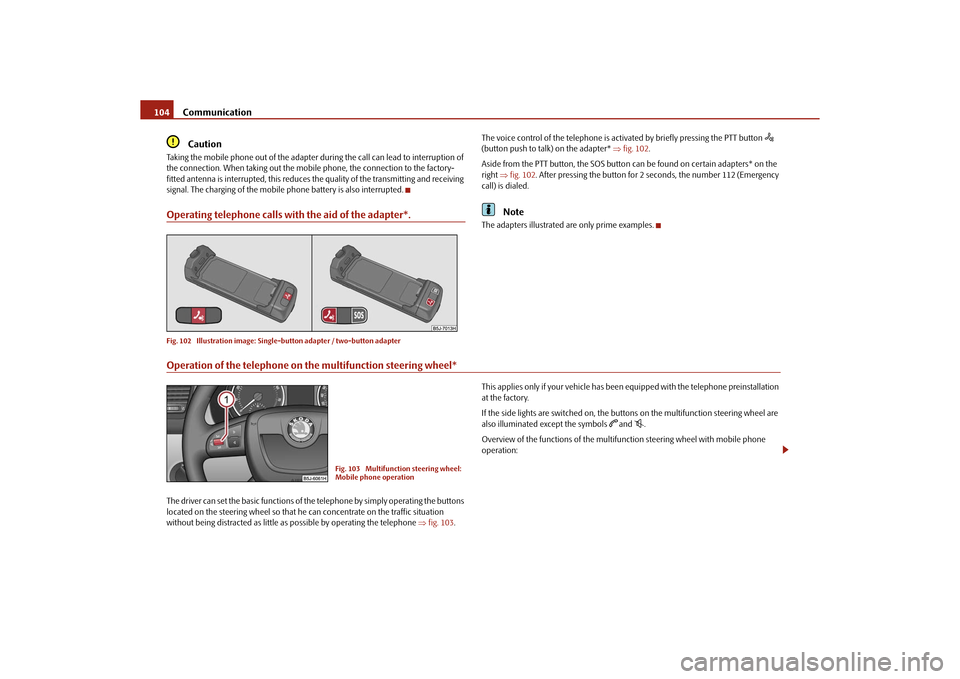
signal. The charging of the mobile phone battery is also interrupted.Operating telephone calls with the aid of the adapter*.Fig. 102 Illustration image: Single -button adapter / two-button adapter
The voice control of the telephone is acti vated by briefly pressing the PTT button
(button push to talk) on the adapter* fig. 102 .
Aside from the PTT button, the SOS button can be found on certain adapters* on the
right fig. 102 . After pressing the button for 2 seconds, the number 112 (Emergency
call) is dialed.
Note
The adapters illustrated are only prime examples.
Operation of the telephone on the multifunction steering wheel*The driver can set the basic functions of the telephone by simply operating the buttons
located on the steering whee l so that he can concentrate on the traffic situation
without being distracted as little as possible by operating the telephone fig. 103 . This applies only if your vehicle has been equipped with the telephone preinstallation
at the factory.
If the side lights are switched on, the buttons on the multifunction steering wheel are
also illuminated except the symbols
and
.
Overview of the functions of the multifunction steering wheel with mobile phone
operation:
Fig. 103 Multifunction steering wheel:
Mobile phone operation
s16g.4.book Page 104 Wednesda y, February 10, 2010 3:53 PM
Page 107 of 231

Communication
106
Settings
In the menu Settings you can select the following menu points:
Phone book
Update
List
Surname
First name
Ring tone
Back
Return in the basic menu of the telephone.
Voice controlDialogueThe period, in which the telephone system is ready to receive voice commands and
carry out the voice commands, is called DI ALOGUE. The system gives audible feedback
and guides you if necessary th rough the relevant functions.
You can end the dialogue at any time by pressing the PTT button
on the adapter*
page 104, fig. 102 or on the multifunction steering wheel* (press for a long period
of time to start or briefly press to end) page 104 or end it with the voice command
CANCEL .
When receiving an incoming call, the dialog ue is immediately interrupted and you can
accept the call by pressing the button
on the multifunction steering wheel* or by
pressing the button for receiving a call directly on your telephone.
If a voice command is not detected, the system answers with “ Sorry?” and a new entry
can be performed. After the 2nd error the system repeats the aid. After the 3rd error
the answer “Cancel ” is given and the dialogue is ended.
Optimum understanding of the voice commands depends on the following
factors:
Speak with a normal tone of voice withou t intonation and excessive voice pauses.
Avoid insufficient articulation.
Close the doors and windows in order to re duce or stop disturbing exterior noise.
It is recommended to speak louder at higher speeds, so that the tone of your voice
is louder than the increased surrounding noise.
During the dialogue avoid additional noise in the vehicle, e.g. simultaneously
talking occupants.
Do not speak, if the syst em makes an announcement.
The microphone for voice control is directed to the driver. Therefore, the device
may respond less well to commands of the front passenger.
Voice commandsThe voice control is possible in the following languages:
Czech, English, German, French, Italian, Spanish, Russian, Portuguese and Dutch.
Voice commands for operating the telephone control unit
After giving the command DIAL NUMBER, the system requests the entry of a tele-
phone number. The telephone number can be entered as an interconnected spoken
Voice command
Action
HELP
After this command the system repeats all possible
commands.
CALL XYZ
With this command you call up the contact from the
phone book page 107.
DIAL NUMBER
After this command a phone number can be entered
which establishes a connection to the requested party.
REDIAL
After this command the system selects the last selected
number.
MUSIC
Play music from the mobile phone or another paired
device.
OTHER OPTIONS
Selection for setting Bluetooth
®, dialogue etc.
CANCEL
The dialogue is ended.
s16g.4.book Page 106 Wednesda y, February 10, 2010 3:53 PM
Page 111 of 231

Passive Safety
110
Ensure that all the windows offer a good visibility to the outside.
Safely attach the items of luggage page 62, “Loading the luggage compartment”.
Ensure that no objects can obstruct the pedal.
Adjust the mirror, the front seat and the head restraint to match your body size.
Point out to your occupants that the head restraints must be adjusted to match
their body size.
Protect the children in suitable child seats with correctly fastened seat belts
page 126, “Transporting children safely”.
Adopt the correct seated position. Also in form your occupants to adopt the correct
seated position.
Fasten the seat belt correctly. Also inform your occupants to properly fasten the
seat belts page 115, “How are seat belts correctly fastened?”.
What influences the driving safety?
The driving safety is primarily determined by the style of driving and the
personal behaviour of all the occupants.The driver is fully responsible for himself an d his occupants. If your driving safety is
effected, you place yourself and the oncomi ng traffic at risk. Please refer to the
following guidelines.
Do not get distracted from concentrating on the traffic situation, e.g. by your occu-
pants or mobile phone calls.
Never drive when your driving ability is impaired, e.g. through medication, alcohol,
drugs.
Keep to the traffic regulations and the permissible speed limit.
Adjust the driving speed at all times to the road condition as well as to the traffic
and weather conditions.
Take regular breaks on long journe ys - at the latest every two hours.
Correct seated positionCorrect seated position for the driver
Correct seated position for the driver is important for safe and relaxed
driving.Fig. 104 The correct distance of the driver from the steering wheel / the correct head restraint
adjustment for the driverFor your own safety and to reduce the risk of injury in the event of an accident, we
recommend the following setting.
Adjust the steering wheel so that the distance between the steering wheel and your
chest is at least 25 cm fig. 104 .
Position the driver seat in the forward/back direction so that you are able to fully
press the pedals with your legs at a slight angle.
Adjust the seat backrest so that you are able to reach the highest point of the
steering wheel with your arms at a slight angle.
Adjust the head restraint so that the top edge of the head restraint is at the same
level as the upper part of your head fig. 104 on the right.
Fasten the seat belt correctly page 115, “How are seat belts correctly fastened?”.
Driver seat adjustment page 57, “Adjusting the front seats”.
WARNING
The front seats and the head restraints must always be adjusted to match
the body size of the seat occupant as well as the seat belts must always be
s16g.4.book Page 110 Wednesda y, February 10, 2010 3:53 PM
Page 112 of 231

Passive Safety111
Using the system
Safety
Driving Tips
General Maintenance
Breakdown assistance
Praktik
Technical Data
correctly fastened in order to provide an optimal protection for you and your
occupants.
The driver must maintain a distance of
at least 25 cm to the steering wheel
page 110, fig. 104 . Not maintaining this minimum distance will mean that
the airbag system will not be able to properly protect you - hazard!
When driving, hold the st eering wheel with both hands firmly on the outer
edge in the 9 o'clock and 3 o'clock po sition. Never hold the steering wheel
firmly in the 12 o'clock position or in another way (e.g. in the middle of the
steering wheel or at the inner steering wheel edge). In such cases, injuries to the
arms, the hands and the head can occur when the driver airbag is deployed.
The seat backrests must not be angled too far back when driving otherwise
this will affect proper operation of the se at belts and of the airbag system - risk
of injury!
Ensure that there are no objects in the footwell as any objects may get
behind the pedals during a driving or braking manoeuvre. You would then no
longer be able to operate the clutch, to brake or accelerate.
Correct seated position for the front passenger
The fro n t p assen ger must mai n tai n a d i stan ce of a t l ea st 25 c m from th e
dash panel so that the airbag offers him the greatest possible safety it is
deployed.For the safety of the front passenger and to reduce the risk of injury in the event of an
accident, we recommend the following setting.
Adjust the front passenger seat as far as possible to the rear.
Adjust the head restraint so that the top edge of the head restraint is at the same
level as the upper part of your head page 110, fig. 104 on the right.
Fasten the seat belt correctly page 115, “How are seat belts correctly fastened?”.
In exceptional cases the front pass enger airbag can be deactivated page 124,
“Deactivating airbags”.
Adjusting the passenger seat page 57, “Adjusting the front seats”.
WARNING
The front seats and the head restraints must always be adjusted to match
the body size of the seat occupant as well as the seat belts must always be
correctly fastened in order to provide an optimal protection for you and your
occupants.
The front passenger must maintain a distance of at least 25 cm to the dash
panel. Not maintaining this minimum distance will mean that the airbag
system will not be able to properly protect you - hazard!
Always keep your feet in the footwel l when the vehicle is being driven -
never place your feet on the instrument panel, out of the window or on the
surfaces of the seats. You will be exposed to increased risk of injury if it becomes
necessary to apply the brake or in the ev ent of an accident. If an airbag is
deployed, you may suffer fatal injuries wh en adopting an incorrect seated posi-
tion!
The seat backrests must not be angled too far back when driving otherwise
this will affect proper operation of the se at belts and of the airbag system - risk
of injury!
Correct seated position for the occupants on the rear seats
Occupants on the rear seats must sit upright, keep the feet in the foot-
well and must have their se at belts correctly fastened.To reduce the risk of injury in the event of a sudden braking manoeuvre or an accident,
the occupants on the rear seats must observe the following.
Adjust the head restraints so that the top edge of the head restraints is at the same
level as the upper part of your head page 110, fig. 104 on the right.
Fasten the seat belt correctly page 115, “How are seat belts correctly fastened?”.
If you are transporting page 126, “Transporting children safely” children in the
vehicle, please use a suitable child restraint system.
WARNING
The head restraints must always be adjusted to match the body size, in order
to offer an optimal protection for you and your occupants.
WARNING (continued)
s16g.4.book Page 111 Wednesda y, February 10, 2010 3:53 PM
Page 115 of 231

Seat belts
114
The speed of the vehicle is, nevertheless, the most important factor. Doubling the
speed of the vehicle from 25 km/h up to 50 km/hour increases the kinetic energy four
times.
The common opinion that it is possible to su pport your body in a minor accident with
your hands, is incorrect. Even in a collision at only a low speed, the forces acting on the
body are such that it is no longer possible to support your body.
Even if you only drive at a speed within the range from 30 km/hour to 50 km/hour, the
forces which are produced on your body in the event of an accident can easily exceed
10.000 N (Newton). This equals a weight of one tonne (1 000 kg).
In the event of a frontal collision, occupant s of the car not wearing a seat belt, are
thrown forward and strike in an uncontrolled way parts of the interior of the car, such
as steering wheel, da sh panel, windscreen, page 113, fig. 106 . The occupants of a
vehicle who have not fastened their seat belts may even be thrown out of the vehicle.
This can result in fatal injuries.
It is also important that rear seat occupants fasten their seat belts as they will otherwise
be thrown through the vehicle in an uncontr olled manner in the event of an accident
A rear seat passenger who has not fastened the s eat bel t i s a dang er not o nl y to hims elf
but also for those seated at the front page 113, fig. 106 on the right.Important safety information regarding the use of seat beltsThe correct use of the seat belts cons iderably reduces the risk of injury!
WARNING
The belt webbing must not be jammed in-between at any point or twisted,
or chafe against any sharp edges.
It is important that the belt webbing is properly routed if the seat belts are
to offer their maximum protection page 115, “How are seat belts correctly
fastened?”.
No two persons (also not children) should ever use a single seat belt
together.
The maximum protection which seat belts can offer is only achieved if you
are correctly seated page 110, “Correct seated position”.
The belt webbing must not run across solid or fragile objects (e.g. specta-
cles, ball-point pens, keys etc.) as this may be a cause of injuries.
Bulky, loose clothing (e.g. a winter coat over a jacket) does not allow you to
be correctly seated and impairs proper operation of the seat belts.
It is prohibited to use clamps or other objects to adjust seat belts (e.g. for
shortening the belts for smaller persons).
The lock tongue should only be inserted into the lock which is the correct
one for your seat. Wrong use of the safety belt will reduce its capacity to protect
and the risk of injury increases.
The seat backrests must not be tilted too far to the rear otherwise the seat-
belts can lose their effectiveness.
The belt webbing must always be ke pt clean. Soiled belt webbing may
impair proper operation of the inertia reel page 157, “Seat belts”.
The slot of the belt tongue must not be blocked by paper or similar objects
otherwise the belt tongue will not lock in place properly.
Inspect the seat belts regula rly to ensure they are in good condition. If you
find seat belts which have damage to the belt, the seat belt connections, to the
inertia reel or to the lock, the relevant safety belt must be replaced by a
specialist garage.
The seat belts must not be removed or changed in any way. Do not make an
attempt to repair the seat belts yourself.
Damaged seat belts which have been subjected to stress in an accident and
were therefore stretched, must be replaced - this is best done by a specialist
garage. The anchorage points of the belts must also be inspected. The
anchorage points for the belts should also be checked.
In certain countries it is possible to use seat belts which differ in terms of
their operation from the seat belts which are described on the pages which
follow.WARNING (continued)
s16g.4.book Page 114 Wednesda y, February 10, 2010 3:53 PM