2010 Seat Altea light
[x] Cancel search: lightPage 98 of 310

Unlocking and locking
96
Note•While the driver's door is open, the vehicle can not be locked with the
remote control. This avoids the user from forgetting his key inside the vehicle.•If the driver's door is unlocked with the key shaft, only the driver's door is
unlocked, the rest of the doors remain locked. When the ignition is switched
on, the door "safe" deadlock is deactivated (although the doors remain
locked) and the central locking button is activated. See ⇒page 104.•If the central locking or anti-theft alarm are faulty, the driver's door
warning lamp remains lit for approx. 30 seconds after locking the vehicle.•For anti-theft security, only the driver's door is fitted with a lock cylinder.Safety system “Safe*”
The "safe" deadlock makes it more difficult to break into the
vehicle because the door release lever and the central locking
button are not active (depending upon country).Activating deadlock
– Press once the locking button on the remote control. or
–Turn the key once in the driver's door lock to lock. A warning lamp
in the driver door flashes to indicate the "safe" deadlock is
working. The warning lamp flashes for approx. two seconds at
short intervals and then more slowly. Deactivating deadlock when the vehicle is locked
–Press
twice the locking button on the remote control within
two seconds. The vehicle is locked without activating the dead-
lock. The driver's door warning lamp flashes for approx. two
seconds and then goes out. After approx. 30 seconds it starts
flashing again.
The doors can be unlocked and opened from the inside if the "safe" deadlock
has not been activated. You will have to pull the door release lever once.
When the "safe" deadlock is off, the antitheft alarm* ⇒page 104 remains
active. The vehicle interior monitoring system* and the anti-tow system are
deactivated*.
WARNING
Nobody should remain in the vehicle if the anti-tow system deadlock mech-
anism has been activated. It is not possible to open the doors from the
inside. Locked doors could make it more difficult to assist vehicle occu-
pants in the event of an accident. People could become trapped inside in an
emergency.Selective unlocking system*
T hi s sy ste m all o w s t o u nl o c k ei t h e r j u st t h e d r iv e r ' s d o o r o r a ll
the vehicle.Using the remote control, press the unlock button on the remote once. The
“Safe” system for all the vehicle is deactivated, only the driver's door is
unlocked and both the alarm and the light indicator are also turned off.
altea_EN Seite 96 Mittwoch, 26. August 2009 6:00 18
Page 99 of 310

Unlocking and locking97
Safety First
Operating instructions
Practical tips
Technical Data
Unlocking all doors and the boot
The unlock button on the remote must be pressed twice so that all doors
and the boot can be opened.
Press twice within 2 seconds to deactivate the “Safe” system for all vehicle,
to unlock all doors and to use the boot. The indicator and the alarm (only vehi-
cles fitted with one) are turned off.
Automatic speed dependent locking and unlocking system*
This is a safety system which prevent the access to the vehicle
from the outside when it is running (for example, when
stopped at a traffic light).Locking
The doors and the boot are automatically locked when vehicle speed exceeds
15 km/h.
If the vehicle is stopped and one of the doors is opened, when the vehicle
moves off again and exceeds a speed of 15 km/h, the unlocked door(s) will
be locked once more.
Unlocking
The driver's door automatically unlocks when the key is removed from the
ignition.
Each door can be unlocked and opened independently from the inside (for
example, when a passenger gets out of it). To do it, simply operate the lever
inside the door.
WARNING
The door handles must not be operated when the vehicle is running: the
door would open.
Automatic locking system for involuntary unlocking*
It is an anti-theft system and prevents the unintentional
unlocking of the vehicle.If the vehicle is unlocked and any of the doors (including the tailgate) are
opened within 30 seconds, it gets re-locked automatically. This function
prevents the vehicle from remaining unlocked if the unlock button is pressed
by mistake.Emergency unlocking systemIf the airbags are triggered during an accident, the vehicle gets unlocked,
except for the boot. It is possible to lock the vehicle from inside with the
central locking, after turning the ignition off and back on again.
If the doors must be locked from the outside, see “Emergency locking of the
doors”.
altea_EN Seite 97 Mittwoch, 26. August 2009 6:00 18
Page 100 of 310
Unlocking and locking
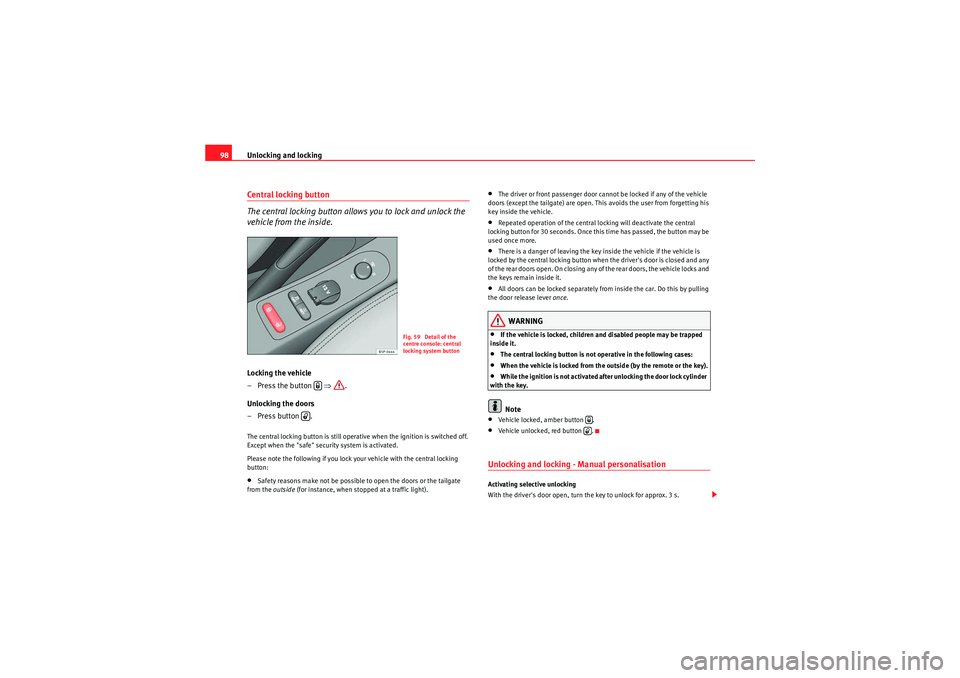
98Central locking button
The central locking button allows you to lock and unlock the
vehicle from the inside.Locking the vehicle
– Press the button ⇒.
Unlocking the doors
– Press button .The central locking button is still operative when the ignition is switched off.
Except when the "safe" security system is activated.
Please note the following if you lock your vehicle with the central locking
button:•Safety reasons make not be possible to open the doors or the tailgate
from the outside (for instance, when stopped at a traffic light).
•The driver or front passenger door cannot be locked if any of the vehicle
doors (except the tailgate) are open. This avoids the user from forgetting his
key inside the vehicle.•Repeated operation of the central locking will deactivate the central
locking button for 30 seconds. Once this time has passed, the button may be
used once more.•There is a danger of leaving the key inside the vehicle if the vehicle is
locked by the central locking button when the driver's door is closed and any
of the rear doors open. On closing any of the rear doors, the vehicle locks and
the keys remain inside it.•All doors can be locked separately from inside the car. Do this by pulling
the door release lever once .WARNING
•If the vehicle is locked, children and disabled people may be trapped
inside it.•The central locking button is not operative in the following cases:•When the vehicle is locked from the outside (by the remote or the key).•While the ignition is not activated after unlocking the door lock cylinder
with the key.Note
•Vehicle locked, amber button .•Vehicle unlocked, red button .Unlocking and locking - Manual personalisation Activating selective unlocking
With the driver's door open, turn the key to unlock for approx. 3 s.
Fig. 59 Detail of the
centre console: central
locking system button
altea_EN Seite 98 Mittwoch, 26. August 2009 6:00 18
Page 108 of 310

Unlocking and locking
106Ta i l g a t eUnlocking and locking
The operation of the tailgate opening system is electric. It is
activated by using the handle on the tailgate
Opening the tailgate
– Pull on the release lever and lift the tailgate ⇒fig. 66. The tail-
gate will then open.
Closing the tailgate
– Grip the tailgate by one of the two handles on the interior lining and close it, using a light movement.The system may or may not operate depending on the situation of the vehicle.
If the tailgate is locked then it cannot be opened, however if it is unlocked
then the opening system is operative and the boot may be opened.
To the locking / unlocking status, press the button or the button on
the remote control key.
A warning appears in the instrument panel if the tailgate is open or not prop-
erly closed.* An audible warning is also given if the tailgate is open when the
car is driven faster than 6 km/h*.
Fig. 66 Tailgate: opening
from the outside
Fig. 67 Detail of the
inside of the tailgate:
hand grip
A1
altea_EN Seite 106 Mittwoch, 26. August 2009 6:00 18
Page 115 of 310

Lights and visibility113
Safety First
Operating instructions
Practical tips
Technical Data
Lights and visibilityLightsSwitching lights on and off
Switching on the side lights
–Turn the light switch ⇒ fig. 73 to position
.
Switching on dipped headlights
– Turn the light switch to position
.
Switching off the lights
– Turn the light switch to position 0. Switching on the fog lights*
– Pull the switch out of position
or to the first stop. The
symbol
in the light switch lights up.
Switching on the rear fog lights (vehicles with front fog lights)
– Pull the switch out of position
or to the second stop
⇒ . A warning lamp lights up in the control panel.
Switching on the rear fog lights (vehicles with no front fog lights)
– Pull the light switch from position
to the last stop. A warning
lamp lights up in the instrument panel.
WARNING
Never drive with just the side lights on. Risk of accident. The side lights are
not bright enough to illuminate the road ahead and to ensure that other
road users are able to see you. Always use your dipped headlights if it is
dark or if visibility is poor.
Note
•The dipped beam headlights will only work with the ignition on. The side
lights come on automatically when the ignition is turned off.•If the lights are left on after the key has been taken out of the ignition lock,
a buzzer will sound while the driver door remains open. This is a reminder to
switch the lights off.•The rear fog light is so bright that it can dazzle drivers behind you. You
should use the rear fog light only when visibility is very poor.
Fig. 73 Detailed view of
dash panel: lights, fog
light and rear fog light
control
altea_EN Seite 113 Mittwoch, 26. August 2009 6:00 18
Page 116 of 310

Lights and visibility
114•If you are towing a trailer equipped with a rear fog light on a vehicle with
a factory-fitted towing bracket , the rear fog light on the car will automatically
be switched off.•The use of the lighting described here is subject to the relevant statutory
requirements.•Depending on weather conditions (very cold or wet), the front and rear
lights and the indicators may be temporarily misted. This has no influence on
the life expectancy of the lighting system. The lights will soon demist when
they are switched on.Automatic lighting*Activation
– Rotate the switch to the position “Auto”, this indication will light up. Deactivation
– Turn the light switch to 0.
Automatic lighting
If automatic headlight control is switched on, dipped headlights are automat-
ically switched on by a light-sensitive sensor if you drive into a tunnel, for
example.
The motorway function switches on the dipped headlights when the vehicle
is driven at over 140 km/h for a few seconds and it switches the lights off
when the vehicle is driven at less than 65 km/h for a few minutes.
The rain sensor switches on the dipped headlights when the windscreen
wipers have been operating continuously for a few seconds and it switches
the lights off when the continuous or intermittent wipe is switched off for
some minutes ⇒
page 127.
When the automatic dipped light control is connected but the dipped lights
are off, the warning lamp
lights up on the light control ⇒fig. 74 . If the
automatic control switches on the dipped lights, the instrument and control
lighting is also switched on.
WARNING
•If automatic headlight control is switched on, the headlights will not be
switched on in fog or heavy rain. Therefore, the dipped beam must be
switched on manually.Note
•For those vehicles with the automatic headlight system, when the key is
removed from the ignition, the acoustic signal will only sound if the light
control is in the position
or if the vehicle is not fitted with the coming
home function.
Fig. 74 Automatic
lighting
altea_EN Seite 114 Mittwoch, 26. August 2009 6:00 18
Page 117 of 310

Lights and visibility115
Safety First
Operating instructions
Practical tips
Technical Data
•If the daylight driving automatic light function is switched on, the fog
lights or rear fog light cannot be switched on in addition.•The use of the lighting described here is subject to the relevant statutory
requirements.•Do not put stickers on the windscreen in front of the sensor. This may
cause disruptions or faults in the automatic lighting system.•To avoid damage to the tail lights, the lights mounted on the tailgate go
off when the tailgate is opened (according to country).Daytime lights*
The daytime light reduces the risk of accidents by increasing
the visibility of the vehicle. The daytime running lights are
enabled automatically when the ignition is switched on. It is
automatically switched off when the side lights are turned on.Daytime lights (halogen lamps)
19)
The daytime lights increase road safety in vehicles fitted with halogen lamps.
These include the dipped, side and registration plate lights.
The daytime lights are switched on each time the ignition is turned on if the
light setting is in position 0 or
. Depending upon the model, a control
lamp
on the light control switch or the lighting up of the instrument panel
will indicate that the daytime lighting is on.
It is not possible for the driver to switch the daytime lights on or off. Please
contact a qualified workshop if you wish to deactivate the lights. Daytime lights (bi-xenon lamps)
The daytime lights increase road safety in vehicles fitted with bi-xenon lamps.
The lights are built-in separately to the headlights and are switched on each
time the ignition is turned on if the light setting is in position
0 or
.
Automatic control of the dipped light in combination with the daytime
lighting (bi-xenon headlamps)
If the dipped light control and the daytime lighting are activated at the same
time, the dipped lights and the instrument panel lighting will automatically
come on as required (e.g. on entering a tunnel) and the daytime lights will go
off. When the automatic dipped light control switches off the dipped lights
(e.g. on coming out of the tunnel), the daytime lights come back on.
Activating the daytime lights*
With the ignition switched off, move the indicator and main beam lever
upwards and back (right indicator and headlamp flash) and hold in this posi-
tion.
Switch on the ignition for 3 seconds while holding this position. The daytime
lights are activated and can be switched on.
Deactivating the daytime lights
With the ignition switched off, move the indicator and main beam lever
upwards and back (left indicator and headlamp flash) and hold in this posi-
tion.
Switch on the ignition for 3 seconds while holding this position. The daytime
lights are deactivated and can not be switched on.
Deactivating daytime lights (bi-xenon lamps)
With the ignition switched off, move the indicator and main beam lever
upwards and back (left indicator and headlamp flash).
Switch on the ignition for 3 seconds. The daytime lights are deactivated and
can not be switched on.
19)It is only available in some countries or as an optional extra
altea_EN Seite 115 Mittwoch, 26. August 2009 6:00 18
Page 118 of 310

Lights and visibility
116Activating daytime lights (bi-xenon lamps)
With the ignition switched off, move the indicator and main beam lever
upwards and back (left indicator and headlamp flash).
Switch on the ignition for 3 seconds. The daytime lights are activated and can
be switched on.
Note
Please observe any relevant legal requirements which may apply in your
country.Coming home / leaving home function*
The Coming Home function is controlled manually. The
Leaving Home function is controlled with a photo sensor.If the Coming Home or Leaving Home function is connected, the front side
and dipped lights, the tail lights and the registration plate light will light up
to provide assistance.
Coming home function
The Coming Home function is activated by switching off the ignition and
briefly flashing the lights. When the driver's door is opened, the Coming
Home lighting comes on. If the driver's door is already open when the lights
are flashed briefly, the Coming Home lighting comes on immediately.
When the last door of the vehicle or the tailgate is closed, the Coming Home
function starts and the switching off the headlights is delayed.
The Coming Home lighting switches off in the following cases:•On completion of the time period established for the delay in switching off
the lights after all the vehicle doors and the tailgate have been closed.
•If, 30 seconds after being connected, any doors or the tailgate remain
open.•If the light switch is turned to position
.
•If the ignition is switched on.
Leaving home function
The Leaving Home function is activated when the vehicle is unlocked if:•the light control is in position
and
•the photo sensor detects “darkness”.
The Leaving Home lighting switches off in the following cases:•If the time period for the delay in switching off the headlamps has ended•If the vehicle is locked again.•If the light switch is turned to position
.
•If the ignition is switched on.Note
The setting for the delay in switching off the headlamps in the Coming Home
and Leaving Home function can be changed or the function can be connected
or disconnected in the menu Lights and visibility ⇒ page 76.•If the ignition key is removed while the lights are on, and the lights are
flashed briefly and the driver's door opened, no acoustic signal is heard, as
when the Coming Home function is on, the lights are automatically switched
off after a period of time (except when the light switch is in position
or
.
altea_EN Seite 116 Mittwoch, 26. August 2009 6:00 18