Page 78 of 212
72 Instruments
Picture no: 12099s.tif.
Time display in odometer 3
To switch between trip odometer and time
display 3 give reset knob a short press.
When the vehicle lights are on, the
brightness of the display can be adjusted
using the right-hand adjuster wheel k
below the light switch 387. Setting the time
On the clock display, press the setting knob
on the instrument for approx. 2 seconds.
The flashing value is set by pressing briefly.
Press for about 2 seconds again to switch
to the next setting and at the end to exit
setting mode.
Page 84 of 212
78 Instruments
Picture no: 16711t.tif
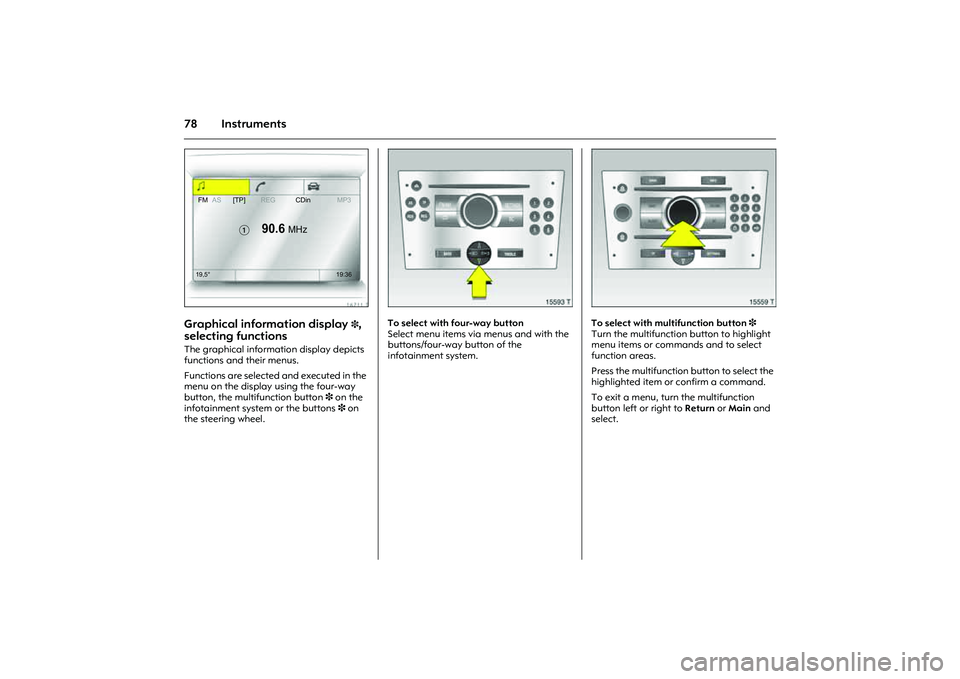
Graphical information display
3,
selecting functions
The graphical information display depicts
functions and their menus.
Functions are selected and executed in the
menu on the display using the four-way
button, the multifunction button 3 on the
infotainment system or the buttons 3 on
the steering wheel.
Picture no: 15593t.tif
To select with four-way button
Select menu items via menus and with the
buttons/four-way button of the
infotainment system.
Picture no: 15559t.tif
To select with multifunction button 3
Turn the multifunction button to highlight
menu items or commands and to select
function areas.
Press the multifunction button to select the
highlighted item or confirm a command.
To exit a menu, turn the multifunction
button left or right to Return or Main and
select.
FMAS[TP]REGCDinMP3
�
90.6
MHz
19,5° 19:36
Page 85 of 212
79
Instruments
Picture no: 14034s.tif
To select with steering wheel buttons 3
Select menu options via the menus using
the buttons.
Picture no: 16711t.tif
Function ranges
Each function has a main page, which is
selected from the upper row of the display
(not in Infotainment system CD 30):
zAudio,
zNavigation 3,
zTelephone 3.
For audio, navigation 3 and telephone
functions 3, see infotainment system
instructions.
Picture no: 16712t.tif
System settings
The settings are accessed via the
Settingsmenu.
Press the Main button 3 (not found on all
infotainment systems) on the infotainment
system (call up main display).
Press the Settings button on the
infotainment system. For Infotainment
system CD 30, no menu may be selected.
The Settings menu opens.
FMAS[TP]REGCDinMP3
�
90.6
MHz
19,5° 19:36
7
Settings 19,5° 19:36
Time, Date19:36
Language
Units 10 . 07 . 2004
Contrast
Day / Night
6 Ign. logic
Page 89 of 212
83
Instruments
Adjustable wiper interval
To set the wiper interval to a value between
2 and 15 seconds:
Lever to interval operation $, lever to §,
wait for required interval delay, Level to
interval operation again $.
The selected interval will remain stored
until the next time it is changed or until the
ignition is switched off.
After switching on the ignition and moving
the lever up, $ the interval is set to
7seconds.
Picture no: 14056h.tif
Windscreen washer system
Pull the lever towards the steering wheel.
Washer fluid sprays onto the windscreen
and the windscreen wipers switch on for a
few sweep movements.
Picture no: 14057h.tif
Rear window wiper 3 and rear window
washer system 3
Push the lever forwards. The rear window
wiper swipes in timed interval mode. Switch
off by pulling the lever towards the steering
wheel.
If the stalk is held forwards, washer fluid is
sprayed on the rear window.
Page 91 of 212
85
Lighting
Picture no: 18475s.tif
Main beam, headlamp flash Push stalk forward to switch from dipped
beam to main beam.
To switch to dipped beam, push lever down
again.
To operate the headlamp flash, pull stalk
towards steering wheel. The main beam is
switched on for as long as the the stalk is
held in this position.
Picture no: 14054h.tif
Turn signal lamps If the stalk is moved past the resistance
point, the turn signal lamp remains on.
When the steering wheel moves back
toward the straight-ahead position, the
turn signal lamp is automatically
deactivated.
Touch turn signal operation: press lever
until resistance can be felt and release
again.
The turn signal lamps are switched off
manually by moving the lever back to the
middle position.
Reversing lamps The reversing lamps come on when the
ignition is on and reverse gear is engaged.
Lever upwards = Right turn signal
Lever downwards = Left turn signal
Page 93 of 212
87
Lighting
Picture no: 13719s.tif
Headlamp range adjustment
? 3
Rotate the adjuster wheel to the required
position to adjust the dipped beam range
to vehicle loading and prevent dazzling. Combo
Combo van
Picture no: 13722s.tif
Instrument illumination
k
Illumination comes on with the exterior
lights. Brightness can be adjusted using the
adjuster wheel.
Information display illumination
3
Information display illumination comes on
when the ignition or infotainment system is
switched on. Brightness can be adjusted
using the adjuster wheel.
0 = Front seats occupied
1 = All seats occupied
2 = All seats occupied and luggage
compartment load
3 = Driver’s seat occupied and
luggage compartment load
0 = Seats occupied
1 = Seats occupied and half load in
load compartment
2 = Seats occupied and full load in
load compartment
3 = Driver’s seat occupied and full
load in load compartment
Page 96 of 212
90 Infotainment systemInfotainment system
Radio reception
3
Radio reception may be disrupted by
static, noise, distortion or loss of reception
due to
zChanges in distance from the
transmitter,
zmulti-path reception due to reflection
and
zshadowing. Infotainment system
3
The infotainment system is operated as
described in the operating instructions.
Picture no: 14034s.tif
Steering wheel remote control
3
The functions of the infotainment system3
and the information display can be
operated on the steering wheel.
Further information 378 and the
infotainment system instructions. Radio reception 3................................ 90
Infotainment system 3........................ 90
Steering wheel remote control 3........ 90
AUX input 3......................................... 91
Mobile telephones and radio
equipment (CB) 3............................. 91
Page 106 of 212

100 Driving and operationDriving and operation
Manual transmission
automated
3
The Easytronic transmission permits
manual (manual mode) or automatic gear
shifting (automatic mode), both with
automatic clutch control.
Picture no: 12478s.tif
Transmission display
Shows the mode and current gear.
If the Winter programme is activated, T is
illuminated. Manual transmission automated3... 100
Manual transmission ........................... 105
Driving hints ......................................... 106
Saving Fuel, Protecting the
Environment ...................................... 108
Fuels, refuelling .................................... 110
Catalytic converter, engine exhaust .. 114
Hydraulic brake system ...................... 118
Anti-lock Braking System (ABSu)3 119
Hand brake .......................................... 120
Brake assist .......................................... 120
Wheels, tyres ........................................ 121
Roof racks 3......................................... 125
Towing equipment 3........................... 126
Caravan/trailer towing ........................ 126