Page 239 of 594
3-154 Features and controls
3
Information screen (With ignition switch in the
“OFF” position)
N00555300095
Each time you lightly press the multi-information meter
switch, the display screen switches in the following order.
1-
Odometer/Trip odometer
2-
Odometer/Trip odometer
3- Service reminder
4- Redisplay of a warning display screen
When there is no
warning display
When there is a
warning display
BK0105501US.book 154 ページ 2009年8月10日 月曜日 午前10時32分
Page 240 of 594

Features and controls
3-155
3
Odometer/Trip odometer
N00555400083
Each time you lightly press the multi-information meter
switch, the display screen switches.
Odometer/tripmeter → Odometer/tripmeter → Service
reminder → Redisplay of a warning display screen → Odome-
ter/tripmeter .
Odometer
Shows the total distance traveled.
Trip odometer
Shows the distance traveled between two points.�
To reset the trip odometer
To return the display to 0, hold down the multi-information
meter switch for about 2 seconds or more. Only the currently
displayed value will be reset.
Example
If tripmeter is displayed, only tripmeter will be reset.
NOTE�
If there is no warning display, the switching sequence is:
odometer/tripmeter → odometer/tripmeter → ser-
vice reminder → odometer/tripmeter .
�
Both tripmeters and can count up to 9999.9
miles/kilometers.
When a tripmeter goes past 9999.9 miles/kilometers, it
returns to 0.0 miles/kilometers.
�
When disconnecting the battery terminal, the memories of
tripmeter displays and are cleared, and their dis-
plays return to “0.0 miles/kilometers”.
Service reminder
N00555500013
Shows the distance and number of months until the next peri-
odic inspection.
Refer to “Service reminder” on page 3-168.
Usage examples for tripmeter , tripmeter
It is possible to measure two currently traveled distances,
from home using tripmeter and from a particular point
on the way using tripmeter .
BK0105501US.book 155 ページ 2009年8月10日 月曜日 午前10時32分
Page 244 of 594

Features and controls
3-159
3
Service reminderWhen the time for periodic inspection arrives, “PERIODIC
INSPECTION” is displayed for a few seconds after the screen
that is initially displayed when the ignition switch is turned
“ON”. Refer to “Service reminder” on page 3-168.S-AWC control mode display screen
N00561900012
The S-AWC operation status is displayed.
Refer to “S-AWC control mode” on page 3-118.
“!” Warning display screen (With ignition switch
in the “ON” position)
N00556000015
This is displayed when you press the multi-information meter
switch and switch the warning display screen.
This mark is also displayed if there is another warning other
than the one displayed.
When the cause of the warning display is eliminated, the “!”
warning goes out automatically.NOTE�
When the “!” warning is displayed, the warning display
screen can be redisplayed on the information screen.
Refer to “Information screen (With ignition switch in the
“OFF” position)” on page 3-154.
Refer to “Information screen (With ignition switch in the
“ON” position)” on page 3-160.
“Active Stability Control (ASC) OFF” display
screen
N00556100061
This is displayed when the Active Stability Control (ASC) is
turned “OFF” with the “ASC OFF” switch.
Also, if an abnormal condition is occurred in the ASC while
driving, the “ASC OFF” display illuminates.
Refer to “ASC OFF switch” on page 3-128.
BK0105501US.book 159 ページ 2009年8月10日 月曜日 午前10時32分
Page 245 of 594

3-160 Features and controls
3
Information screen (With ignition switch in the
“ON” position)
N00556200147
Each time you lightly press the multi-information meter
switch, the display screen switches in the following order.
NOTE�
While driving, the function setting screen is not displayed
even if you operate the multi-information meter switch.
Always park the vehicle in a safe place before operating.
Refer to “Changing the function settings (With ignition
switch in the “ON” position)” on page 3-171.
�
When there is information to be announced, such as a sys-
tem fault, the tone sounds and the screen display is
switched.
Refer to “Interrupt display screen (With ignition switch in
the “ON” position)” on page 3-165.
When there is no warning display
When there is a
warning display
1-
Odometer/Trip odometer
2-
Odometer/Trip odometer
3- Service reminder
4- Driving range display, momentary fuel consumption display
5- Average fuel consumption display, momentary fuel con-
sumption display
6- Average speed display, momentary fuel consumption display
7- S-AWC operation display
8- Function setting screen
9- Redisplay of a warning display screen
BK0105501US.book 160 ページ 2009年8月10日 月曜日 午前10時32分
Page 246 of 594

Features and controls
3-161
3
Odometer/Trip odometerThe operation method is the same as when the ignition switch
is in the “OFF” position.
For further details, refer to “Odometer/Trip odometer” on page
3-155.Service reminderShows the distance and number of months until the next peri-
odic inspection.
Refer to “Service reminder” on page 3-168.Engine coolant temperature displayShows the engine coolant temperature.
If the coolant becomes hot, “ ” will blink.
Pay careful attention to the engine coolant temperature display
while you are driving.
Driving range displayShows the approximate driving range (how many more miles
or kilometers you can drive). When this driving range falls
below 30 miles (50 km), “---” is displayed.
Refuel as soon as possible.NOTE�
The driving range is determined based on the fuel con-
sumption data. This may vary depending on the driving
conditions and habits. Treat the distance displayed as just
a rough guideline.
�
When you refuel, the driving range display is updated.
However, if you only add a small amount of fuel, the cor-
rect value will not be displayed. Fill to a full tank when-
ever possible.
�
When your vehicle is stopped on an extremely steep hill,
the driving range value may, change. This is due to the
movement of fuel in the tank and does not indicate any
breakdown.
�
The display setting can be changed to the preferred units
(miles or km).
Refer to “Changing the function settings (With ignition
switch in the “ON” position)” on page 3-171.
CAUTION
!�
If the engine is overheating, “ ” will blink. In this
case, the bar graph is on the red zone. Immediately
park the vehicle in a safe place and take the required
measures. Refer to “Engine overheating” on page 6-
6.
BK0105501US.book 161 ページ 2009年8月10日 月曜日 午前10時32分
Page 253 of 594

3-168 Features and controls
3
Fuel tank filler door markThe arrow (A) indicates that the fuel tank filler door is located
on the left side of the vehicle. (Refer to “Filling the fuel tank”
on page 1-4)Fuel remaining warning displayWhen the fuel level runs low, the information screen switches
to the interrupt display of the fuel remaining warning display
and the mark (B) on the fuel remaining display flashes. If the
warning display appears, refuel as soon as possible.NOTE�
On hills or curves, the display may be incorrect due to the
movement of fuel in the tank.
Service reminder
N00556700139
Displays the approximate time until the next recommended
periodic inspection. “---” is displayed when the inspection time
has arrived.NOTE�
The service reminder time can be modified by your autho-
rized Mitsubishi Motors dealer to adjust for severe usage,
etc. Refer to “Severe maintenance schedule” in your vehi-
cle’s Warranty and Maintenance Manual. For further
information, please contact your authorized Mitsubishi
Motors dealer.
1. Shows the time until the next periodic inspection.
NOTE�
Shows the distance in units of 100 miles (100 km) and the
time in units of 1 month.
BK0105501US.book 168 ページ 2009年8月10日 月曜日 午前10時32分
Page 254 of 594

Features and controls
3-169
3
2. This informs you that a periodic inspection is due. Contact
an authorized Mitsubishi Motors dealer or a repair facility
of your choice to have the system checked.
At that time, when the ignition switch is switched from
the “OFF” position to the “ON” position, “PERIODIC
INSPECTION” is displayed for a few seconds on the
information screen.
3. After your vehicle is inspected at an authorized Mitsubishi
Motors dealer, it displays the time until the next periodic
inspection.
To reset The “---” display can be reset while the ignition switch is in the
“OFF” position. When the display is reset, the time until the
next periodic inspection is displayed and the warning display is
no longer displayed when the ignition switch is switched from
the “OFF” position to the “ON” position.
1. When you lightly press the multi-information meter
switch, the information screen switches to the service
reminder display screen.
BK0105501US.book 169 ページ 2009年8月10日 月曜日 午前10時32分
Page 268 of 594
Features and controls
3-183
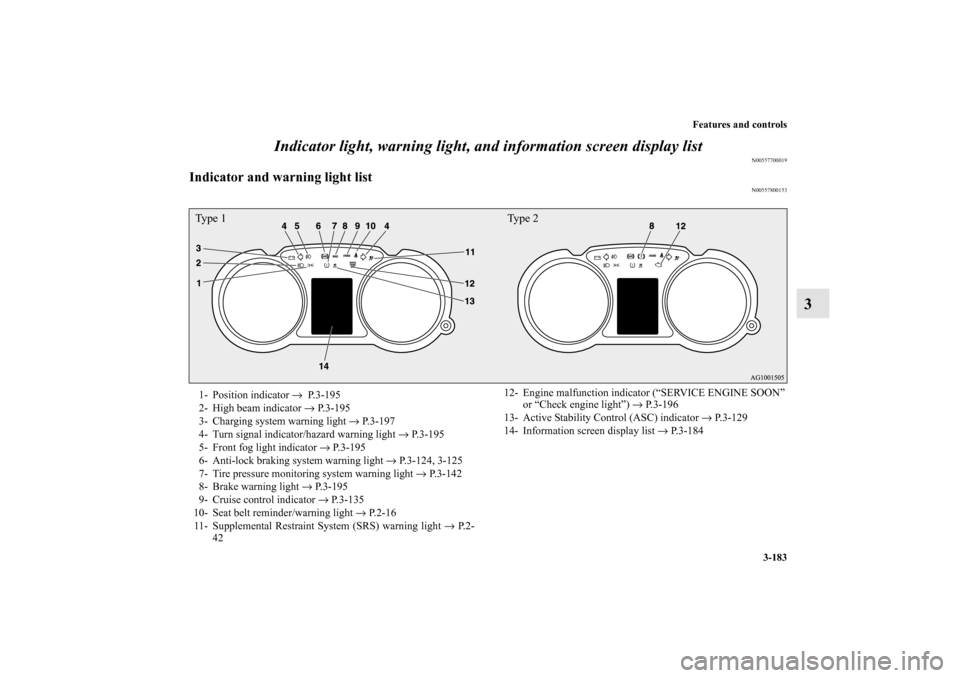
3 Indicator light, warning light, and information screen display list
N00557700019
Indicator and warning light list
N00557800153
Type 1 Type 21- Position indicator → P. 3 - 1 9 5
2- High beam indicator → P.3-195
3- Charging system warning light → P.3-197
4- Turn signal indicator/hazard warning light → P.3-195
5- Front fog light indicator → P.3-195
6- Anti-lock braking system warning light → P.3-124, 3-125
7- Tire pressure monitoring system warning light → P.3-142
8- Brake warning light → P.3-195
9- Cruise control indicator → P.3-135
10- Seat belt reminder/warning light → P.2-16
11- Supplemental Restraint System (SRS) warning light → P. 2 -
4212- Engine malfunction indicator (“SERVICE ENGINE SOON”
or “Check engine light”) → P.3-196
13- Active Stability Control (ASC) indicator → P.3-129
14- Information screen display list → P.3-184
BK0105501US.book 183 ページ 2009年8月10日 月曜日 午前10時32分