5-68 Comfort controls
5Steering wheel remote control switch
(if so
equipped)N00714800338
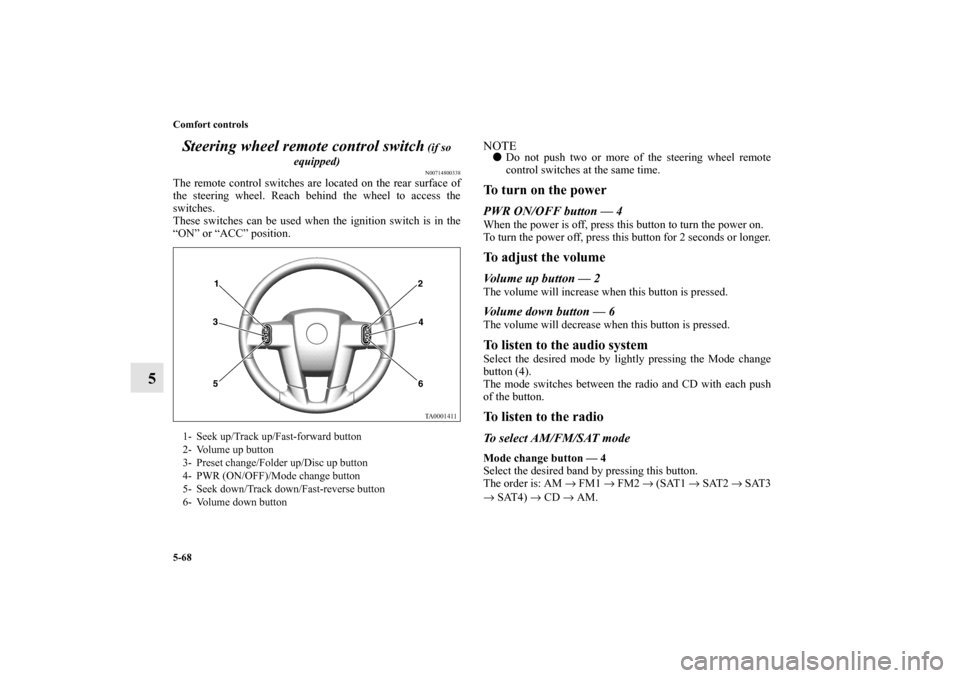
The remote control switches are located on the rear surface of
the steering wheel. Reach behind the wheel to access the
switches.
These switches can be used when the ignition switch is in the
“ON” or “ACC” position.
NOTE�Do not push two or more of the steering wheel remote
control switches at the same time.To turn on the powerPWR ON/OFF button — 4When the power is off, press this button to turn the power on.
To turn the power off, press this button for 2 seconds or longer.To adjust the volumeVolume up button — 2The volume will increase when this button is pressed.Volume down button — 6The volume will decrease when this button is pressed.To listen to the audio systemSelect the desired mode by lightly pressing the Mode change
button (4).
The mode switches between the radio and CD with each push
of the button.To listen to the radioTo select AM/FM/SAT modeMode change button — 4
Select the desired band by pressing this button.
The order is: AM → FM1 → FM2 → (SAT1 → SAT2 → SAT3
→ SAT4) → CD → AM.
1- Seek up/Track up/Fast-forward button
2- Volume up button
3- Preset change/Folder up/Disc up button
4- PWR (ON/OFF)/Mode change button
5- Seek down/Track down/Fast-reverse button
6- Volume down button
BK0102600US.book 68 ページ 2009年3月30日 月曜日 午後2時2分
Comfort controls
5-71
5
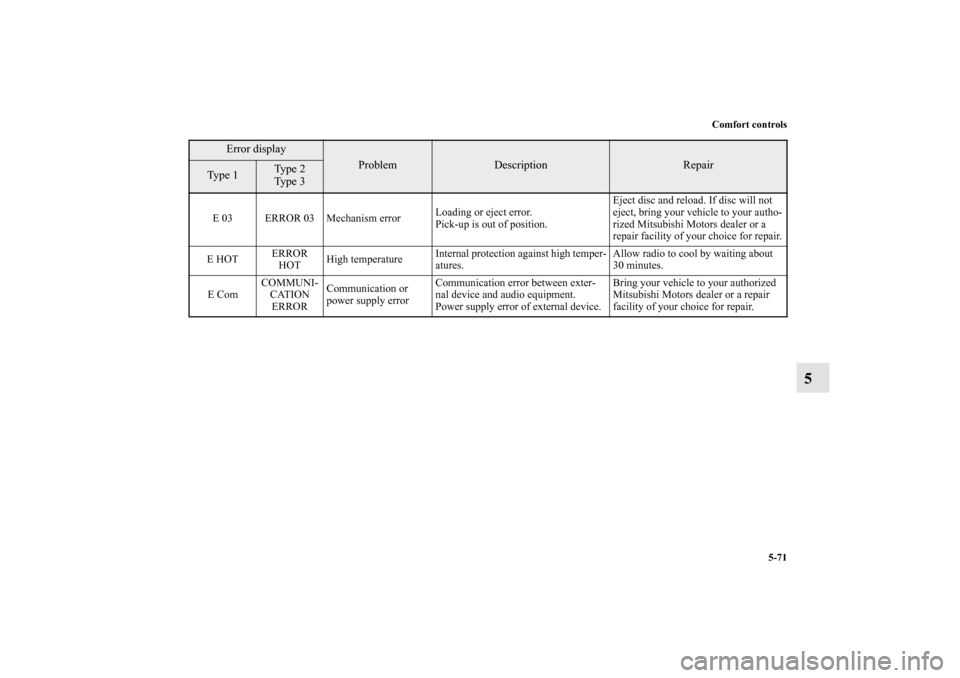
E 03 ERROR 03 Mechanism errorLoading or eject error.
Pick-up is out of position.Eject disc and reload. If disc will not
eject, bring your vehicle to your autho-
rized Mitsubishi Motors dealer or a
repair facility of your choice for repair.
E HOTERROR
HOTHigh temperatureInternal protection against high temper-
atures.Allow radio to cool by waiting about
30 minutes.
E ComCOMMUNI-
CATION
ERRORCommunication or
power supply errorCommunication error between exter-
nal device and audio equipment.
Power supply error of external device.Bring your vehicle to your authorized
Mitsubishi Motors dealer or a repair
facility of your choice for repair.
Error display
Problem
Description
Repair
Type 1
Ty p e 2
Ty p e 3
BK0102600US.book 71 ページ 2009年3月30日 月曜日 午後2時2分
Comfort controls
5-73
5
NOTE�Reception may not be possible in a place where the signal is interrupted by a tunnel, by the roof of a garage or other structure,
by woods, or by a tall building. At such times, the audio is muted. This behavior does not indicate a fault.
�Reception conditions may vary according to the angle of the satellite used for the satellite radio service.
�Reception may deteriorate if a luggage carrier is attached to the roof or snow collects on the antenna.
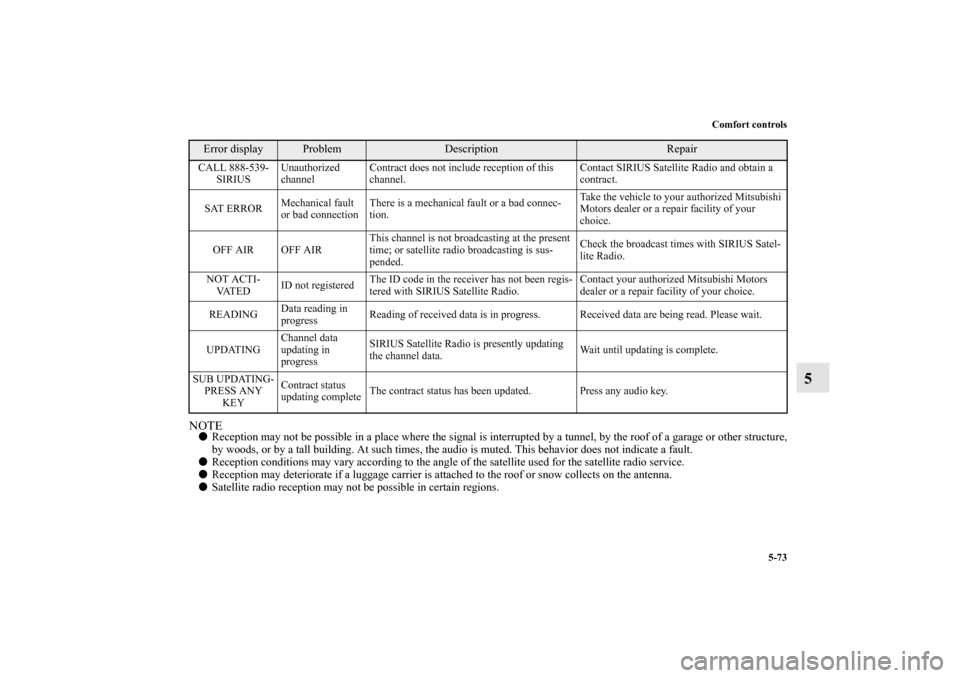
�Satellite radio reception may not be possible in certain regions.CALL 888-539-
SIRIUSUnauthorized
channelContract does not include reception of this
channel.Contact SIRIUS Satellite Radio and obtain a
contract.
SAT ERRORMechanical fault
or bad connectionThere is a mechanical fault or a bad connec-
tion.Take the vehicle to your authorized Mitsubishi
Motors dealer or a repair facility of your
choice.
OFF AIR OFF AIRThis channel is not broadcasting at the present
time; or satellite radio broadcasting is sus-
pended.Check the broadcast times with SIRIUS Satel-
lite Radio.
NOT ACTI-
VAT E DID not registeredThe ID code in the receiver has not been regis-
tered with SIRIUS Satellite Radio.Contact your authorized Mitsubishi Motors
dealer or a repair facility of your choice.
READINGData reading in
progressReading of received data is in progress. Received data are being read. Please wait.
UPDATINGChannel data
updating in
progressSIRIUS Satellite Radio is presently updating
the channel data.Wait until updating is complete.
SUB UPDATING-
PRESS ANY
KEYContract status
updating completeThe contract status has been updated. Press any audio key.Error display
Problem
Description
Repair
BK0102600US.book 73 ページ 2009年3月30日 月曜日 午後2時2分
Comfort controls
5-75
5
�In the following circumstances, moisture can form on
compact discs and inside the audio system, preventing
normal operation.
• When there is high humidity (for example, when it is
raining).
• When the temperature suddenly rises, such as right after
the heater is turned on in cold weather.
In this case, wait until the moisture has had time to dry
out.
�When the CD player is subjected to violent vibrations,
such as during off-road driving, the tracking may not
work.
�When storing compact discs, always store them in their
separate cases. Never place compact discs in direct sun-
light, or in any place where the temperature or humidity is
high.
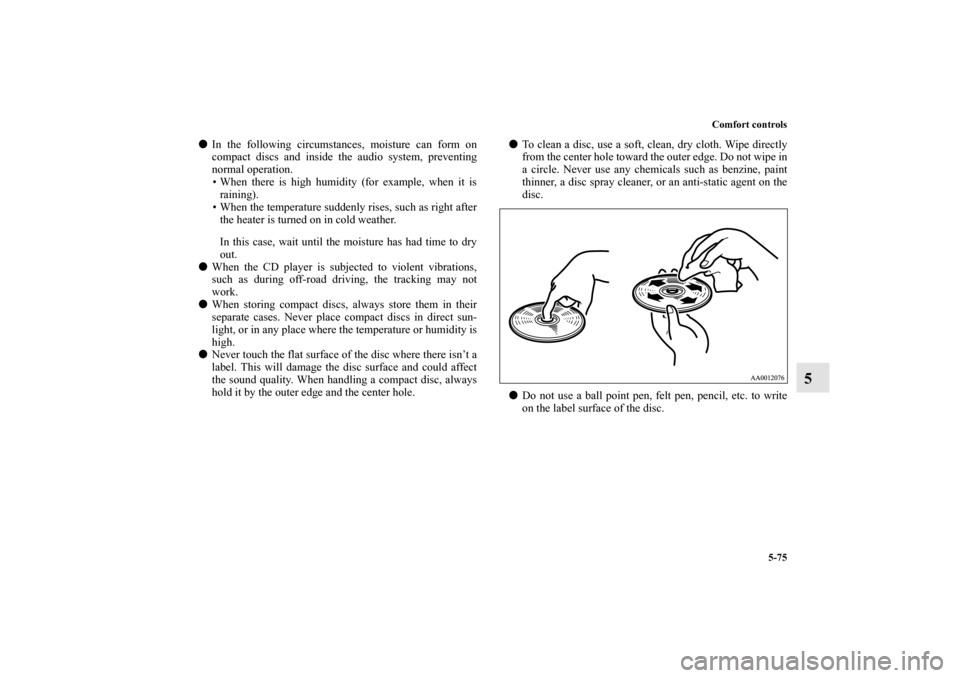
�Never touch the flat surface of the disc where there isn’t a
label. This will damage the disc surface and could affect
the sound quality. When handling a compact disc, always
hold it by the outer edge and the center hole.�To clean a disc, use a soft, clean, dry cloth. Wipe directly
from the center hole toward the outer edge. Do not wipe in
a circle. Never use any chemicals such as benzine, paint
thinner, a disc spray cleaner, or an anti-static agent on the
disc.
�Do not use a ball point pen, felt pen, pencil, etc. to write
on the label surface of the disc.
BK0102600US.book 75 ページ 2009年3月30日 月曜日 午後2時2分