Page 354 of 514

Comfort controls
5-35
5
To listen to the radio
N00735000825
1. Press the PWR switch (1) to turn the audio system on and
off. The system turns on in the last mode used.
2. Press the RADIO button (3) to select the desired band
(AM/FM1/FM2).
3. Press the SEEK button (4 or 5) to tune to a station, or
press one of the memory select buttons (2) to tune in to a
station memorized for that button.To tune the radioAutomatic tuning
1. After pressing the SEEK button (4 or 5), reception of the
selected station will begin.
2. Press the SCAN button (6). SCAN indicator (8) will come
on and the radio will tune consecutively to each available
station for about 5 seconds per station. If you want to stop
scanning, press the SCAN button again.
The frequency display of the current station blinks once
per second during SCAN.
Manual tuning
The frequency changes every time the TUNE/FOLDER switch
(7) is turned.
Turn the switch to select the desired station. To enter frequencies into the memoryAs many as 6 AM and 12 FM stations can be entered into the
memory.To store a frequency in the memory, follow these steps:
1. Press the SEEK button (4 or 5), or turn the
TUNE/FOLDER switch (7) to tune to the frequency you
wish to keep in the memory.
2. Press one of the memory select buttons (2) until it beeps.
The sound will be momentarily interrupted while the fre-
quency is being entered into the memory. The number of
the button matching the entry in the memory as well as the
frequency are displayed.
3. The preset memory setting is retrieved by pressing the
button and then releasing it within about 2 seconds.
NOTE�Disconnecting the battery cables erases all the radio sta-
tion settings stored in the memory.
BK0102600US.book 35 ページ 2009年3月30日 月曜日 午後2時2分
Page 356 of 514

Comfort controls
5-37
5
To listen to a CD
N00735500976
1. Press the CD button (5) and the CD mode will be selected,
starting a playback.
2. To adjust the volume and tone, refer to “To adjust the vol-
ume” on page 5-31 and “To adjust the tone” on page 5-32.
3. To stop the CD, turn off the power by pressing the PWR
switch (1) or switch to the other mode by pressing the
RADIO button (4).NOTE�For information concerning the handling of the compact
discs, refer to “Handling of compact discs” on page 5-74.
To listen an MP3 CDThis player allows you to play MP3 (MPEG Audio Layer-3)
files recorded on CD-ROMs, CD-Rs (recordable CDs), and
CD-RWs (rewritable CDs) in ISO9660 Level 1/Level 2, Joliet,
and Romeo formats. Each disc may have a maximum of 16
trees, 100 folders, and 255 files per disc.
Push the CD button (5) if an MP3 CD is already in the slot.
The display shows “READING”, then playback will begin.
The folder number and the track number will appear on the dis-
play.
BK0102600US.book 37 ページ 2009年3月30日 月曜日 午後2時2分
Page 357 of 514
5-38 Comfort controls
5
NOTE�While listening to a disc on which CD-DA (CD-Digital
Audio) and MP3 files have both been recorded, you can
switch between reading of the CD-DA and reading of the
MP3 files by pressing the CD button for 2 seconds or
longer (until you hear a beep).
�With a disc that contains both CD-DA and MP3 files, the
CD-DA files are automatically played first.
�The playback sound quality differs depending on the
encoding software and the bit rate. For details, refer to the
user manual of your encoding software.
�Depending on file/folder configurations on a disc, it may
take some time before playback starts.
�MP3 encode software and writing software are not sup-
plied to this unit.
�You may encounter trouble in playing an MP3 recorded
with certain writing software or CD recorders (CD-R/RW
drivers).
�If you record too many folders or files other than MP3
onto a disc, it may take some time before playback starts.
�This unit does not record MP3 files.
�For information concerning CD-Rs/RWs, refer to “Notes
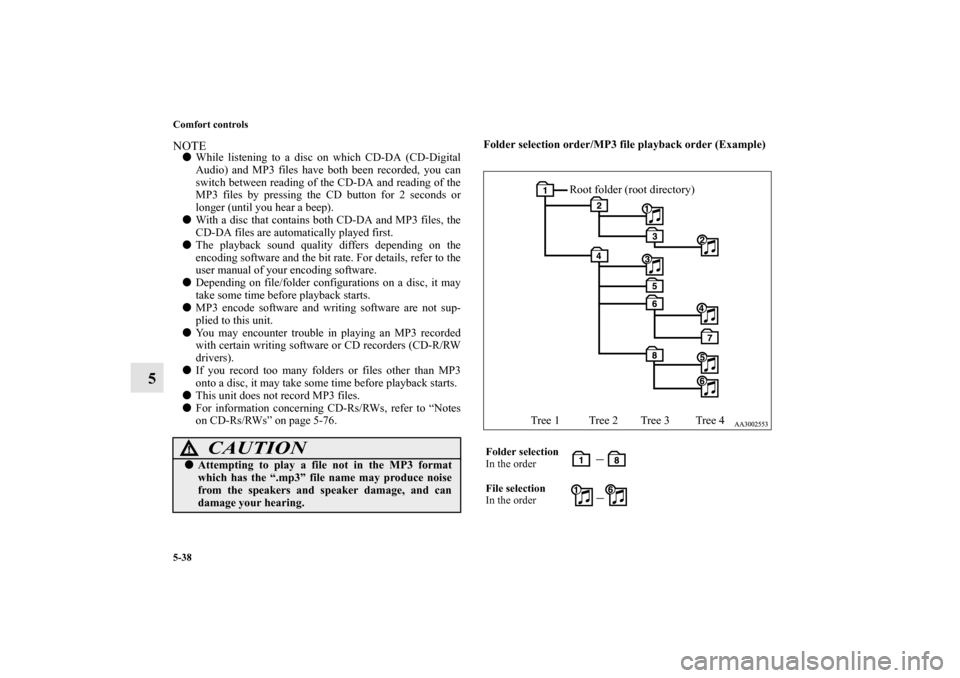
on CD-Rs/RWs” on page 5-76.Folder selection order/MP3 file playback order (Example)
CAUTION
!�Attempting to play a file not in the MP3 format
which has the “.mp3” file name may produce noise
from the speakers and speaker damage, and can
damage your hearing.
Folder selection
In the order
File selection
In the order
Root folder (root directory)
Tree 1 Tree 2 Tree 3 Tree 4
BK0102600US.book 38 ページ 2009年3月30日 月曜日 午後2時2分
Page 362 of 514
Comfort controls
5-43
5 AM/FM electronically tuned radio with CD autochanger-Type 2 (if so equipped)
AM/FM/Satellite electronically tuned radio with CD autochanger-Type 3 (if so equipped)
N00734300775
Volume and tone control panel
N00711900660
1- PWR (On-Off) switch
2- VOL (Volume control) knob
3- Memory select buttons
4- AUDIO switch
5- Display
BK0102600US.book 43 ページ 2009年3月30日 月曜日 午後2時2分
Page 363 of 514

5-44 Comfort controls
5
To adjust the volume
N00712000349
VOL (Volume control) Turn the VOL knob (2) clockwise to increase the volume;
counterclockwise to decrease the volume.
The status will be displayed in the display (5).NOTE�The volume control mode will shut off automatically if
either the radio or CD mode is selected, or if no adjust-
ment is made within about 2 seconds.
To adjust the tone
N00712100630
1. Press the AUDIO switch (4) repeatedly to select your
desired sound customization setting to change. The order
is: SUB GAIN → BASS → MID → TREBLE → FADER
→ BALANCE → SOUND FIELD → EQ TYPE →
SOUND PRESET → Sound customization mode off.
The status will be displayed in the display (5).
QUICK ACCESS MODE
To access the sound customization features quickly, push
and hold the AUDIO switch (4), then turn the switch
clockwise or counterclockwise to access your desired
sound customization setting. Release the switch to adjust
the setting.Example
BK0102600US.book 44 ページ 2009年3月30日 月曜日 午後2時2分
Page 364 of 514

Comfort controls
5-45
5
2. Turn the AUDIO switch (4) either clockwise or counter-
clockwise to adjust the sound customization features.SUB GAIN (Subwoofer tone control) To select the desired subwoofer GAIN level. BASS (Bass tone control) To select the desired bass level.
MID (Midrange tone control) To select the desired midrange level. TREBLE (Treble tone control) To select the desired treble level. FADER (Front/Rear balance control) To balance the volume from the F (front) and the R (rear)
speakers. BALANCE (Left/Right balance control) To balance the volume from the L (left) and the R (right)
speakers.SOUND FIELD (Sound field type select)To select the desired sound field.
Mode
Adjusting operation
Clockwise
Counterclockwise
SUB GAIN Increase Decrease
BASS Increase Decrease
MID Increase Decrease
TREBLE Increase Decrease
FA D E RMore sound from
the rear speakers More sound from
the front speakers
BALANCEMore sound from
the right speakers More sound from
the left speakers
SOUND FIELDNORMAL → STU-
DIO → CLUB →
CONCERTCONCERT →
CLUB→ STUDIO
→ NORMAL
EQ TYPENONE → POP →
ROCK →
R+B/R&B →
COUNTRYCOUNTRY→
R+B/R&B →
ROCK → POP →
NONE
SOUND PRESET — —
Sound field type
Description
NORMALOptimized for accurate vocal and instrument
reality.
STUDIOPlaces the listener in the control room of a
recording studio with a crisp and accurate
forward placed sound stage.
CLUBPlaces the listener in the music at a dance or
jazz club with sound coming from all direc-
tions.
CONCERTUtilizing sound reflections in the Digital
Signal Processor, CONCERT gives the
impression that the listener is at concert hall
performance.
BK0102600US.book 45 ページ 2009年3月30日 月曜日 午後2時2分
Page 365 of 514
5-46 Comfort controls
5
EQ TYPE (Equalizer type select)To select the desired equalizer type.SOUND PRESETS (sound setting storage)6 different sound settings can be stored into memory in the
“SOUND PRESET” mode. For example:To store your current sound settings into memory, follow these
steps:
1. Go to the “SOUND PRESET” setting (preset button lights
will be flashing).
2. Push one of the memory select buttons (3) for more than 2
seconds.
To recall the sound settings that are stored in memory, follow
these steps:
1. Go to the “SOUND PRESET” setting (preset button lights
will be flashing).
2. Push your desired memory select button (3) for less than 2
seconds.
NOTE�The sound customization adjust mode will automatically
shut off when either the radio or CD is selected, or if no
adjustment is made within 7 seconds.
�If the AUDIO switch (4) is pushed and held for more than
2 seconds during the audio adjust mode, it will change to
“Hold” mode. The selected audio mode will be held until
the AUDIO switch (4) is pushed for more than 2 seconds
again.
EQ type
Description
NONE Sounds good for all types of music.
POP Tight bass and high frequency sound
ROCKTuned for hard rock and heavy metal with
powerful drums, guitars, and vocals.
R+B/R&B Deep bass punch and well-defined vocals
COUNTRY Enhanced main vocals
Settings
Preset 1
Preset 2
Preset 3
SUB GAIN -9 dB -3 dB +3 dB
BASS +1 0 0
MID 0 0 0
TRE +2 +1 0
FADE 0 0 0
BAL 0 0 0
FIELD CLUB NORMAL STUDIO
TYPE POP COUNTRY ROCK
BK0102600US.book 46 ページ 2009年3月30日 月曜日 午後2時2分
Page 366 of 514
Comfort controls
5-47
5
Speed Compensated Volume function
N00752200170
Speed Compensated Volume function is a feature that automat-
ically adjusts the VOL, BASS, MID, and TREBLE settings in
accordance with the vehicle speed. It is possible to turn this
function ON-OFF using the following methods:
1. If you are presently pushing the AUDIO switch (4) and
making a tone adjustment, finish making the tone adjust-
ment.
2. Push the AUDIO switch (4) for at least about 2 seconds.
The system will switch to MENU mode and the characters
“SCV Select” will be shown on the display.
3. Turn the AUDIO switch (4) clockwise to the turn the
function ON. Turn it counterclockwise to turn the function
OFF.NOTE�The MENU mode will automatically shut off when either
the radio or CD is selected or if none of the switches are
moved for 7 seconds.
BK0102600US.book 47 ページ 2009年3月30日 月曜日 午後2時2分