2010 MERCEDES-BENZ SLS COUPE radio
[x] Cancel search: radioPage 9 of 361
Trim strips
..................................... 285
Windows ........................................ 283
Wiper blades .................................. 283
Care products .................................... 280
CD Cop yprotection ............................. 167
Disc ............................................... 167
General information .......................167
Multisession .................................. 166
Playback options ........................... 178
Selecting amedium ....................... 175
Selecting atrack ............................ 176
CD/DVD
Ejecting .......................................... 170
Loading .......................................... 168
CD player/CD changer
Operating (on-board computer) .....235
Central locking
Key ................................................ 200
Central unlocking
Key ................................................ 200
Centre
Entering ........................................... 98
Centre console
Lowe rsection .................................. 30
Uppe rsection .................................. 29
Changing awheel
see Flat tyre
Changing bulbs
Headlamps .................................... .323
Tai llamp ........................................ 324
Changing direction ............................112
Announcement phase ....................112
Change of direction phase .............112
Preparation phase .........................112
Character entry ................................... 64
Charge maintenance socket ............264
Children In the vehicle ................................... 40
Restraint system .............................. 41
Child seat
Automatic recognition .....................42
Automatic recognition (malfunc-
tion) ............................................... 307
Child sea tlock ................................. 45
Display message ............................ 291Recommendations
...........................45
Suitable positions ............................ 44
Child seat lock ..................................... 45
Cigarette lighter ................................ 260
Cleaning agents ................................. 280
Cockpit Overview .......................................... 23
COMAND
Basi cfunction s................................ 67
Components .................................... 55
Switching on/off .............................. 67
COMAND controller .............................59
COMAND control panel .......................57
COMAND display ................................. 55
Cleaning ......................................... 284
Cleaning instructions .......................57
Setting ............................................. 72
COMAND operating system ................ 55
Constant headlamp mode see Daytime driving lights ..............238
Control menu
Showing/hiding ............................. 193
Convenience closing feature ............219
Convenience opening feature ..........219
Coolant Checking the leve l......................... 269
Display message ............................ 299
Mixture ratio .................................. 351
Copy protection (CD/DVD) ...............167
Country Selecting .......................................... 93
Crosshair
Hiding .............................................. 84
Crosshair position
Saving ...................................... 84, 127
Cruise control .................................... 243
Display message ............................ 293
Cup holder ......................................... 258
Current fuel consumption (on-
board computer) ............................... 233 D
DAB Sub-programme ............................. 165
DAB radio mode
Switching to ................................... 1586
Index BA 197 ECE RE 2010/6a; 1; 2, en-GB
sabbae uV ersion: 3.0.3.6
2010-05-07T14:19:43+02:00 - Seite 6
Page 14 of 361
LINGUATRONIC
Individualisatio n............................... 74
Settings ........................................... 73
Luggage net
Front-passenger footwell ...............259 M
Main-beam headlamps Display message ............................ 301
Maintenance
Battery ........................................... 334
Manual drive program ......................229
Map Adjusting the map scal e.................. 83
Arrival time/distance to destina-
tion .................................................. 88
Calling up ....................................... 103
Centring on vehicle or destination
position ............................................ 84
Information on map .........................88
Map displa y..................................... 84
Moving ............................................. 83
RDS-TMC displays .........................120
Showing geo-coordinates ................89
Showing road names .......................89
Map orientation ................................... 84
Setting ............................................. 84
Map scale
Setting ............................................. 83
Matt paintwork
Cleaning ......................................... 282
Media Interface
Metadata ....................................... 187
MP3 player. ................................... 184
Media Interface mode .......................183
Connectio noption s....................... 183
Media Interface operation
Basi cmenu .................................... 186
Select file ....................................... 186
Switching ....................................... 185
Media list ........................................... 175
Memory card (on-board computer) .235
Memory function ............................... 210
Menu Menu overview .............................. 232
Menu (on-board computer) ...............232
AMG ............................................... 241 Audi
o............................................. 235
Navigation ..................................... 234
Service .......................................... .237
Settings ......................................... 238
Telephone ...................................... 236
Trip ................................................ 232
Menu item
Selecting .......................................... 64
Menu overview
Address book ................................. 151
Bluetooth ®
telephony .................... 133
CD/DVD audio and MP3 mode ...... 172
Convenience telephony .................135
DAB radio mode ............................ .160
MUSIC REGISTER ........................... 180
Navigation ........................................ 81
Radio mode ................................... 160
Video DVD ..................................... 193
Menu system
Showing/hiding .......................83, 194
Mercedes-Benz Contact ....................156
Message see Display message .....................289
see Warning and indicator lamps ...308
Mirrors
Sun visor ........................................ 259
see Exterior mirrors or Rear-view mirror
Mobile phone ..................................... 260
Authorisation ................................. 129
Connecting (Bluetooth ®
interface) .129
Connecting (convenience teleph-
ony) ............................................... 133
De-authorisation ............................ 131
External authorisation ....................131
Installatio n..................................... 347
Telephone menu (on-board com-
puter) ............................................. 236
Modifying the programming
Key ................................................ 200
Motorway information ........................89
MP3 Bit/sampling rates ......................... 166
Copyright ....................................... 167
Disc ............................................... 166
File systems ................................... 166
Formats ......................................... 166 Index
11 BA 197 ECE RE 2010/6a; 1; 2, en-GB
sabbaeu Version: 3.0.3.6 2010-05-07T14:19:43+02:00 - Seite 11
Page 16 of 361
Deleting an entry
........................... 139
Importing an entry from the
mobile phone to the address
book .............................................. 141
PIN
Entering ......................................... 133
Plastic trim
Cleaning ......................................... 285
Playback options ..............178, 183, 189
Postcode Entering ........................................... 95
Power windows
see Side windows
Previous destinations .......................126
Pulling away ...................................... 220R
RACE START ....................................... 226
RACETIMER (on-board computer) ....241
Radio Selecting a statio n(on-board
computer) ...................................... 235
Radio mode
Radio Data System ........................164
Switching to ................................... 158
Range
Calling up (on-board computer) .....233
RDS
Switching on/off ........................... 164
RDS (Radio Data System) .................164
Interrupting an announcement ......164
RDS-TMC traffic reports
Displaying ...................................... 120
Read-aloud function ..........................122
Automatic ...................................... 123
Read-aloud speed
Setting ............................................. 73
Rear aerofoil ...................................... 261
Rear foglamp Display message ............................ 301
Rear-view mirror
Adjusting ....................................... 207
Anti-dazzle mode (automatic) ........209
Dipping (automatic) .......................208
Dipping (manual) ........................... 208
Rear window heating ........................256Rear wing
Display message .................... 305, 306
Redials ................................................ 145
Refuelling ........................................... 266
Remote control Garage door opene r....................... 262
Programming (garage door
opener) .......................................... 262
Reserve fuel ....................................... 349
Display message ............................ 305
Fuel tank ........................................ 349
Warning lamp ................................. 312
Resetting
Factory settings ............................... 78
Restraint system
For children ..................................... 41
See SRS ........................................... 35
Rev counter ........................................ 230
Reversing camera ............................. 250
Cleaning ......................................... 284
Showing/hiding the image .............. .70
Switching on .................................. 250
Reversing lamps
Display message ............................ 301
Road
Entering ........................................... 97
Route
see Route guidance .......................234
Route browser ................................... 118
Route calculation .............................. 101
Route guidance .................................. 111
Cancel ........................................... 119
Continu e........................................ 119
Destination reached ......................115
Following a vehicle transportation ...79
Lane recommendations .................113
Off-road ......................................... 115
On-board computer .......................234
Route mode
Setting ............................................. 85
Route options
Setting ............................................. 86
Route type
Setting ............................................. 85 Index
13 BA 197 ECE RE 2010/6a; 1; 2, en-GB
sabbae uV ersion: 3.0.3.6
2010-05-07T14:19:43+02:00 - Seite 13
Page 19 of 361
Tone settings
Trebl eand bass ............................... 68
Total distance recorder ....................233
Tow-away protection ..........................49
Towing ........................................ 339, 341
Towing eye Fitting ............................................ 341
Removing ....................................... 341
Town
Entering ........................................... 94
Traffic announcements on ...............164
Traffic jam function ........................... 117
Traffic Programme Switching traffic announcements
on/off ............................................ 164
Transferring acall (convenience
telephone) .......................................... 146
Transmission oil Temperature gauge (on-board
computer) ...................................... 241
Transmission output (maximum)
Telephone/two-way radio ..............347
Transport (vehicle) ............................341
Trim strips Cleaning ......................................... 285
Trip computer
On-board computer .......................232
Trip meter .......................................... 233
Resetting (on-board computer) ......234
True Image™ ........................................ 68
Turn signal Display message ............................ 300
Two-way radio
Installatio n..................................... 347
Type identification plate
see Vehicle identification plate ......348
Tyre grip ............................................. 278
Tyre pressure ..................................... 272
Calling up (on-board computer) .....273
Display message ............................ 304
Tyre pressure monitor
Warning lamp ................................. 311
Tyres
Direction of rotatio n...................... 272
General notes ................................ 270
Technical data ............................... 354
Tyre tread .......................................... .272 U
Unladen weight ................................. 352
Unlocking Emergency unlocking ..................... 322
Updating
Map software ................................... 89
Upshift indicator ............................... 229
USB devices Connecting to the Media Inter-
face ............................................... 184
Folders and playlists ......................187
Using the telephone ..........................144
Multi-function steering wheel ..........62 V
Variable Speedtronic ........................246
vCards Receiving ....................................... 137
Vehicle
Emergency unlocking ..................... 322
Individual settings (on-board com-
puter) ............................................. 238
Leaving parked up .........................321
Towing ........................................... 341
Transporting .................................. 341
Unlocking (key ).............................. 200
Vehicle battery .................................. 334
Vehicle dimensions ...........................352
Vehicle electronics ...........................346
Vehicle identification number
(VIN) ................................................... 348
Vehicle identification plate ..............348
Vehicle position Saving ...................................... 83, 127
Vehicle tool kit .................................. 288
Vehicle weights ................................. 352
Video DVD Fast forward/rewind ..................... .194
Operation ....................................... 190
Pause function ............................... 195
Picture settings .............................. 195
Selecting a film/title ..................... .195
Selecting a scene/chapter ............195
Stop function ................................. 194
Video mode
Automatic picture shutoff ..............190 16
Index BA 197 ECE RE 2010/6a; 1; 2, en-GB
sabbae uV ersion: 3.0.3.6
2010-05-07T14:19:43+02:00 - Seite 16
Page 20 of 361
Volume
Adjusting ......................................... 67
Phone call s...................................... 67
Traffi cannouncements ....................67 W
Warning and indicator lamps ABS (yellow) ................................... 308
ESP ®
........................................ 47, 308
ESP ®
OFF ....................................... 309
ESP ®
Sport .................................... 309
LIM (cruise control) ........................ 244
LIM (variable Speedtronic) .............246
Tyr ep ressure monitor ...................311
Warning tone ..................................... 312
Warning triangle ................................ 288
Washer fluid Display message ............................ 305
Washer fluid reservoir ..............270, 352
Filling capacity ............................... 352
Waveband
Switching (radio )............................ 160
Wearing seat belts ............................210
Wheel bolts Tightening torque ........................... 332
Wheel chock
Use ................................................ 329
Wheels
General notes ................................ 270
Interchanging ................................. 275
Windows
Cleaning ......................................... 283
see Side windows
Windscreen washe rfluid .................. 352
Topping up ..................................... 270
Windscreen washer system .....270, 352
Windscreen wipers ...........................217
Malfunction ................................... .317
Replacing the wiper blades ............325
Winte rdriving ............................ 275, 276
Winter tyres ....................................... 275
Limiting the speed (on-board com-
puter) ............................................. 248
Wiper blades
Cleaning ......................................... 283
Replacing ....................................... 325 Index
17 BA 197 ECE RE 2010/6a; 1; 2, en-GB
sabbae uV ersion: 3.0.3.6
2010-05-07T14:19:43+02:00 - Seite 17
Page 57 of 361
At
ag lance Operating safety
G
Risk of accident
Your attention must always be focused on the
traffic conditions.
Only use COMAN Dorthe telephone when the
road and traffic conditions permit.
Bear in mind that, at a speed of only
50 km/h, your vehicle covers a distance of
nearly 14 mper second. The navigation sys-
tem will not provide you with information
about stop signs, give-way signs, traffic regu-
lations or road safety features. It is up to you
to pay attention to these while driving the
vehicle. Only enter a new destination when
the vehicle is stationary.
This radio can be operated by anyone in
accordance with the relevant EC directive.
The equipment corresponds to curren tEuro-
pean and harmonised national standards.
This guarantees that the equipmen tconforms
to the relevant specifications regarding elec-
tromagnetic compatibility.
As a result, interference caused by your
equipment to other electrical/electronic
equipment and interference to your equip-
ment caused by other electrical/electronic
equipment can be largely prevented.
The equipment is approved by the vehicle
manufacturer in accordance with European
Automotive EMC Directive 95/54/EC. This
means that the equipment in your vehicle is
authorised for use accordin gto the given reg-
ulations. The equipment does not require cer-
tification
The equipment conforms to the relevant
equipment-specific EMC specifications in
accordance with the following European
standards:
EN 55013
EN 55020 Correct use Observe the following information when using
COMAND:
R
the safety notes in this manual
R national road traffic regulations
i Improper work on electronic components
or other systems (such as radio, DVD
changer*) and their software may result in
malfunction or failure. Even systems that
have not been modified could be affected
because the electronic systems are con-
nected. Electronics malfunctions can seri-
ously compromise the operational safety of
your vehicle.
i Only have work on or changes to elec-
tronic components carried out at a quali-
fied specialist workshop which has the nec-
essary specialist knowledge and tools to
carry out the work. Daimler recommends
that you use a Mercedes-Benz Service
Centre for this purpose. In particular, work
relevant to safety or on safety-related sys-
tems must be carried out at a qualified spe-
cialist workshop.
Function restrictions while the vehicle
is in motion For safety reasons, some COMAND functions
are restricted or unavailable while the vehicle
is in motion
.You will notice this, for example,
because you will either not be able to select
certain menu items or because COMAND will
display a message to that effect. 54
At
ag lanceCOMAND APS
*optional
BA 197 ECE RE 2010/6a; 1; 2, en-GB
sabbaeu
Version: 3.0.3.6 2010-05-07T14:19:43+02:00 - Seite 54
Page 58 of 361
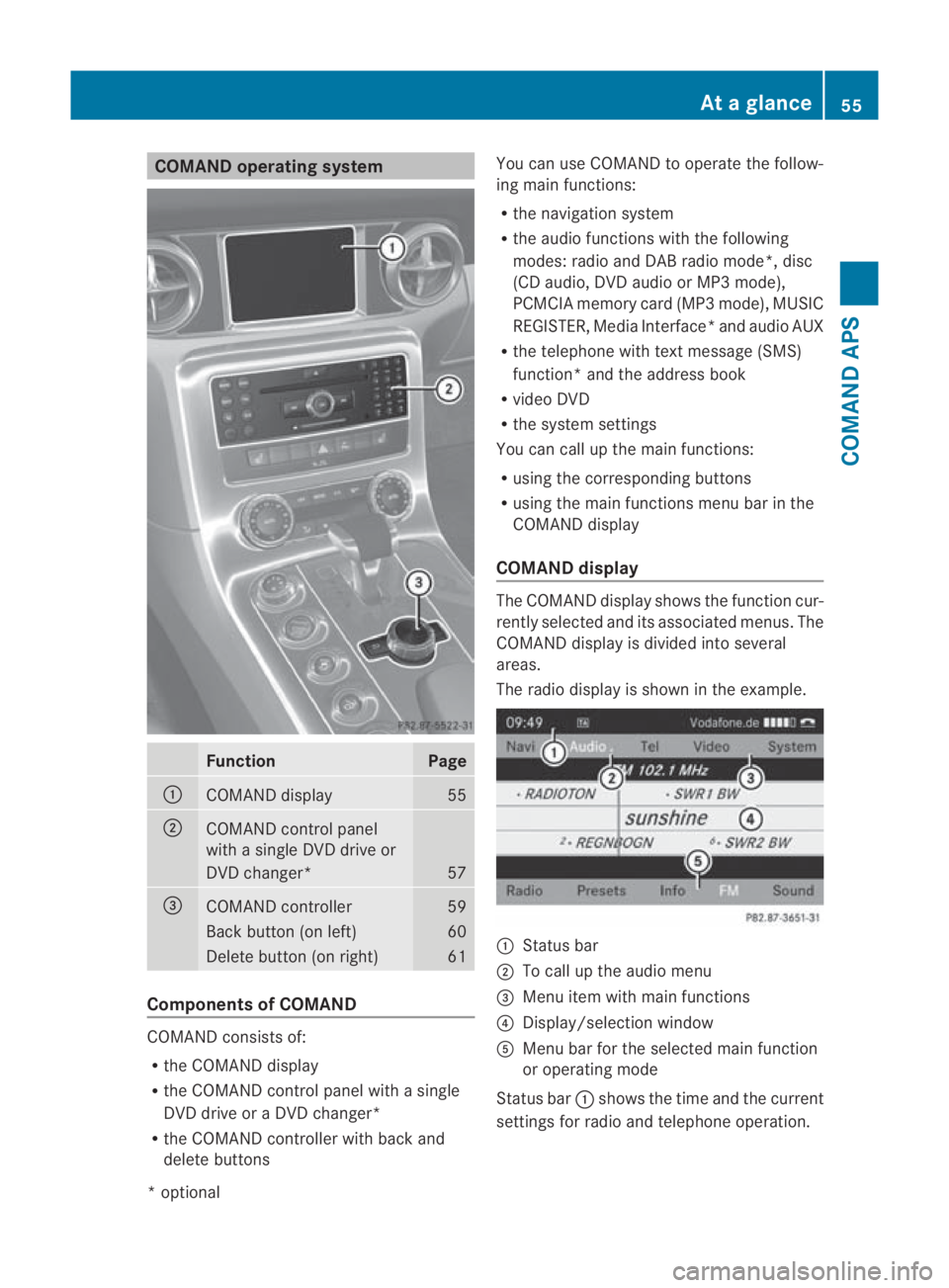
COMAND operating system
Function Page
0001
COMAND display 55
0002
COMAND control panel
with a single DV
Ddrive or
DVD changer* 57
0015
COMAND controller 59
Back button (on left) 60
Delete button (on right) 61
Components of COMAND
COMAND consists of:
R
the COMAND display
R the COMAND control panel with a single
DVD drive or a DVD changer*
R the COMAND controller with back and
delete buttons You can use COMAND to operate the follow-
ing main functions:
R the navigation system
R the audio functions with the following
modes :radio and DA Bradio mode*, disc
(CD audio, DV Daudio or MP3 mode),
PCMCI Amemory card (MP3 mode), MUSIC
REGISTER, Media Interface* and audio AUX
R the telephone with textm essage (SMS)
function *and the address book
R video DVD
R the system settings
You can call up the main functions:
R using the corresponding buttons
R using the main functions menu bar in the
COMAND display
COMAND display The COMAND display shows the functio
ncur-
rently selected and its associated menus. The
COMAND display is divided int oseveral
areas.
The radio display is shown in the example. 0001
Status bar
0002 To call up the audio menu
0015 Menu item with main functions
0014 Display/selection window
0012 Menu bar for the selected main function
or operating mode
Status bar 0001shows the time and the current
settings for radio and telephone operation. At
ag lance
55COMAND APS
*optional
BA 197 ECE RE 2010/6a; 1; 2, en-GB
sabbaeu Version: 3.0.3.6 2010-05-07T14:19:43+02:00 - Seite 55 Z
Page 59 of 361
Small triangle
0002indicates tha tthe audio
menu can be called up (Y page 157).
You can call up the desired main function
from menu bar 0015.
Select the function with the COMAND con-
troller (Y page 59).
In the example, the Audio main function is set
to radio mode and display/selection win-
dow 0014is active.
i The layout of the menus may vary depend-
ing on the equipment in the vehicle. The
menus for a fully equipped vehicle are
shown in these operating instructions. 56
At
ag lanceCOMAND APS
BA 197 ECE RE 2010/6a; 1; 2, en-GB
sabbaeu Version: 3.0.3.6 2010-05-07T14:19:43+02:00 - Seite56