2010 MERCEDES-BENZ SLS COUPE heating
[x] Cancel search: heatingPage 12 of 361
F
Fast forward/rewind ................176, 194
Faul tmessage
see Display message .....................289
Fire extinguisher ............................... 289
First-aid kit ......................................... 289
Flat tyre Equipment ..................................... 325
Preparing the vehicle .....................325
TIREFIT kit ...................................... 326
Floormat ............................................ .264
Folders Selecting (MP3 mode )................... 176
Fording ............................................... 278
Frequencies Telephone ...................................... 347
Frequency entry
Manual .......................................... .162
Front airbag ......................................... 38
Front-passenger airbag ....................... 38
Fron tpassenge rkneebag ................... 39
Fuel ..................................................... 349
Loss ............................................... 314
Petrol ............................................. 267
Fuel consumption
Current (on-board computer) .........233
Notes ............................................. 349
Fuel filler flap
Opening/closing ............................ 266
Fuel gauge ............................................ 25
Fuel level Calling up the range (on-board
computer) ...................................... 233
Gauge .............................................. 25
Fuel line
Malfunction ................................... .314
Fuel tank
Defect ............................................ 314
Function restrictions
Addres sbook ........................ 151, 154
Music Register ............................... 183
Using the telephone ....................... 128
Video DVD mode ........................... 191
Fuse allocation chart ........................342
Fuse box Front-passenger footwell ...............342
Rea r............................................... 342Fuses
.................................................. 342 G
Garage door Opening/closing (with the remote
control) .......................................... 263
Garage door opener ..........................262
Clearing the memory .....................264
Programming the remote control ...262
Gear indicator .................................... 227
Gearshift program SETUP (on-board computer) ..........241
Genuine parts .................................... 346
Glove compartment ..........................257
Locking and unlocking (sepa-
rately) ............................................ 257
Gracenote ®
Media Database ............177 H
Hands-free microphone Switching on/off ........................... 146
Headbag ............................................... 40
Headlamp cleaning system ..............270
Headlamps Cleaning ......................................... 283
Cleaning system ............................ 217
Misting up ...................................... 317
Heating
see Air conditioning
High-pressure cleaners ....................282
Hill start assist .................................. 221
Home address see My address
HomeLink ®
see Garage door opener
House number
Entering ........................................... 99 I
Ignition lock ............................... 203, 258
Immobiliser .......................................... 49
Indicator and warning lamps ...........308
Air conditioning (malfunction) ........307
Automatic child sea trecognition
(malfunction) ................................. 307
Engine diagnostics .........................310 Index
9 BA 197 ECE RE 2010/6a; 1; 2, en-GB
sabbae uV ersion: 3.0.3.6
2010-05-07T14:19:43+02:00 - Seite 9
Page 16 of 361
Deleting an entry
........................... 139
Importing an entry from the
mobile phone to the address
book .............................................. 141
PIN
Entering ......................................... 133
Plastic trim
Cleaning ......................................... 285
Playback options ..............178, 183, 189
Postcode Entering ........................................... 95
Power windows
see Side windows
Previous destinations .......................126
Pulling away ...................................... 220R
RACE START ....................................... 226
RACETIMER (on-board computer) ....241
Radio Selecting a statio n(on-board
computer) ...................................... 235
Radio mode
Radio Data System ........................164
Switching to ................................... 158
Range
Calling up (on-board computer) .....233
RDS
Switching on/off ........................... 164
RDS (Radio Data System) .................164
Interrupting an announcement ......164
RDS-TMC traffic reports
Displaying ...................................... 120
Read-aloud function ..........................122
Automatic ...................................... 123
Read-aloud speed
Setting ............................................. 73
Rear aerofoil ...................................... 261
Rear foglamp Display message ............................ 301
Rear-view mirror
Adjusting ....................................... 207
Anti-dazzle mode (automatic) ........209
Dipping (automatic) .......................208
Dipping (manual) ........................... 208
Rear window heating ........................256Rear wing
Display message .................... 305, 306
Redials ................................................ 145
Refuelling ........................................... 266
Remote control Garage door opene r....................... 262
Programming (garage door
opener) .......................................... 262
Reserve fuel ....................................... 349
Display message ............................ 305
Fuel tank ........................................ 349
Warning lamp ................................. 312
Resetting
Factory settings ............................... 78
Restraint system
For children ..................................... 41
See SRS ........................................... 35
Rev counter ........................................ 230
Reversing camera ............................. 250
Cleaning ......................................... 284
Showing/hiding the image .............. .70
Switching on .................................. 250
Reversing lamps
Display message ............................ 301
Road
Entering ........................................... 97
Route
see Route guidance .......................234
Route browser ................................... 118
Route calculation .............................. 101
Route guidance .................................. 111
Cancel ........................................... 119
Continu e........................................ 119
Destination reached ......................115
Following a vehicle transportation ...79
Lane recommendations .................113
Off-road ......................................... 115
On-board computer .......................234
Route mode
Setting ............................................. 85
Route options
Setting ............................................. 86
Route type
Setting ............................................. 85 Index
13 BA 197 ECE RE 2010/6a; 1; 2, en-GB
sabbae uV ersion: 3.0.3.6
2010-05-07T14:19:43+02:00 - Seite 13
Page 17 of 361
S
Safety notes Using the telephone ....................... 128
Seat
Correct driver's seat position ........213
Storing settings ............................. 210
Seat adjustment ................................ 203
Seat belt Fastening ....................................... 210
Seat belts
Warning lamp ........................ 212, 311
Seat covers
Cleaning ......................................... 285
Seat heating ....................................... 205
Seats Adjusting (bucket seat) ..................205
Adjusting (electrically). ..................204
Adjusting (manually). .....................204
Seat adjustment ............................ 205
Seat ventilation
Malfunction indicator lamp ............307
Selector lever
Display message ............................ 291
Sensors
Cleaning ......................................... 284
Service indicator
see ASSYST PLUS service interval
displa y........................................... 279
Service products ............................... 349
Brake fluid ..................................... 351
Coolant .......................................... 351
Engine oil ....................................... 350
Fuel ................................................ 349
Windscreen washer fluid ................352
Settings
Calling up a stored setting .............210
Factory (on-board computer) .........240
On-board computer .......................238
SETUP (on-board computer) .............241
Sidebag ................................................ 39
Side windows Convenience closing ......................219
Convenience opening ....................219
Fault .............................................. 318
Opening/closing ............................ 218
Snow chains ...................................... 276
Socket ................................................ 260Sound
Switching on/off .............................. 67
Sound Modus ....................................... 68
Soun dsettings .................................... .67
Balance ............................................ 68
Special destination
Category ........................................ 106
Entering ......................................... 106
Entering using the map ..................110
Special destination icon
Setting ............................................. 85
Special destination list .....................109
Spee dlimiter
SPEEDTRONIC ............................... 245
Speedometer
Digital speedometer (on-board
computer) ...................................... 233
Selecting the display unit (on-
board computer) ............................ 238
Speedtronic ....................................... 245
Display message ............................ 293
Permanent ..................................... 247
Variabl e......................................... 246
SRS (Supplemental Restraint Sys-
tem) ...................................................... 35
Display message ............................ 304
Warning lamp ........................... 35, 309
Standard display (on-board com-
puter) ................................................. .233
Station list ......................................... 161
Station pre-sets ................................. 162
Stations Saving ............................................ 163
Tuning in ........................................ 161
Station search ................................... 162
Steering wheel Adjusting ....................................... 206
Adjusting (electrically). ..................207
Adjusting (manually). .....................206
Buttons (on-board computer) ......... 230
Storing settings ............................. 210
Steering wheel boss
Cleaning ......................................... 284
Steering wheel gearshift paddles ....227
Stowage compartment Rear stowage compartment ........... 258 14
Index BA 197 ECE RE 2010/6a; 1; 2, en-GB
sabbae uV ersion: 3.0.3.6
2010-05-07T14:19:43+02:00 - Seite 14
Page 25 of 361
Exterio
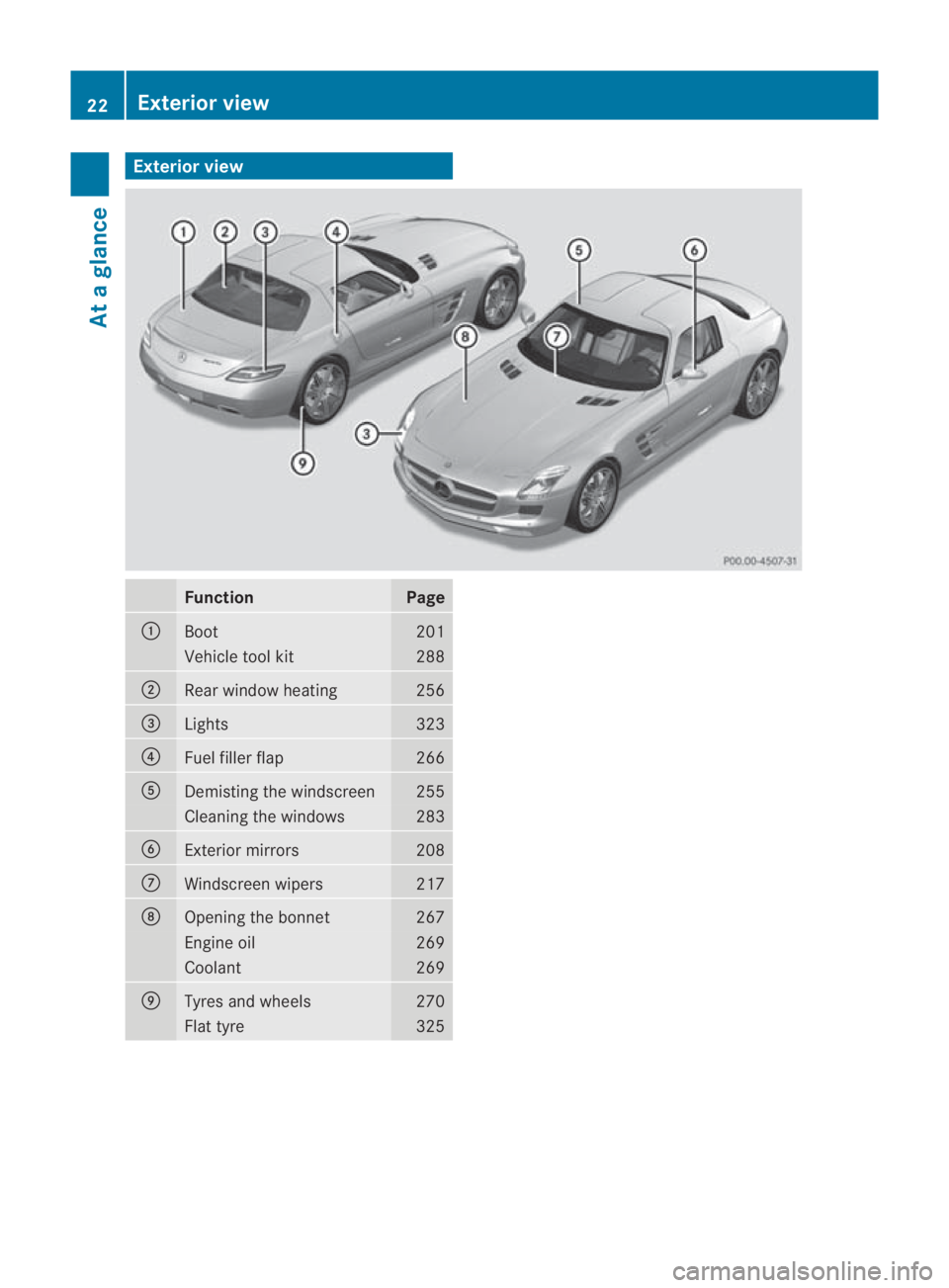
rview Function Page
0001
Boot 201
Vehicle tool kit 288
0002
Rear window heating 256
0015
Lights 323
0014
Fuel filler flap 266
0012
Demisting the windscreen 255
Cleaning the windows 283
0013
Exterior mirrors 208
000A
Windscreen wipers 217
000B
Opening the bonnet 267
Engine oil 269
Coolant 269
000C
Tyres and wheels 270
Flat tyre 32522
Exterior viewAt a glance
BA 197 ECE RE 2010/6a; 1; 2, en-GB
sabbaeu Version: 3.0.3.6 2010-05-07T14:19:43+02:00 - Seite22
Page 32 of 361
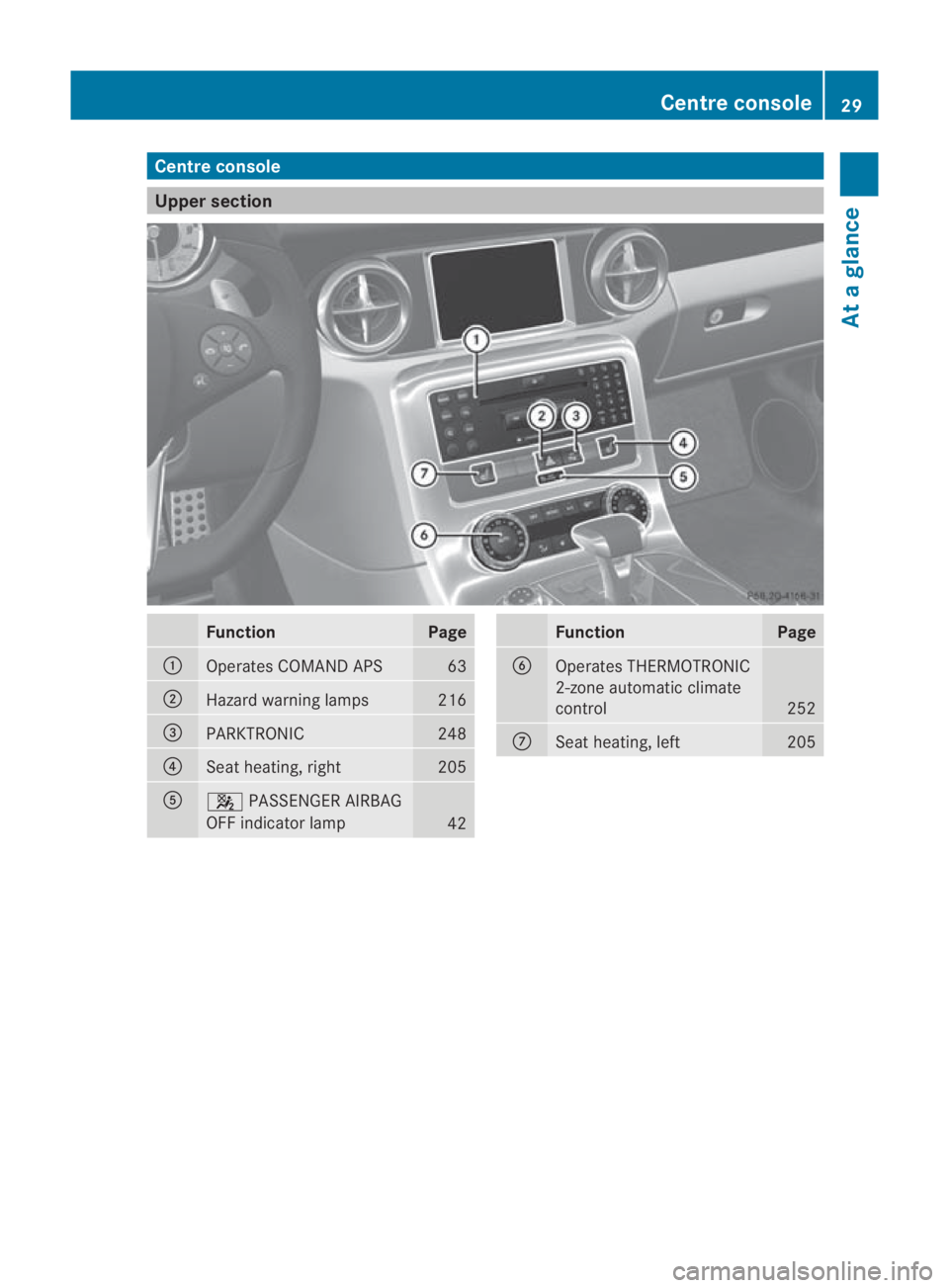
Centre console
Upper section
Function Page
0001
Operates COMAND APS 63
0002
Hazard warning lamps 216
0015
PARKTRONIC 248
0014
Seat heating, right 205
0012
000A
PASSENGER AIRBAG
OFF indicator lamp 42 Function Page
0013
Operates THERMOTRONIC
2-zone automatic climate
control
252
000A
Seat heating, left 205Centre console
29At a glance
BA 197 ECE RE 2010/6a; 1; 2, en-GB
sabbaeu Version: 3.0.3.6
2010-05-07T14:19:43+02:00 - Seite 29
Page 95 of 361
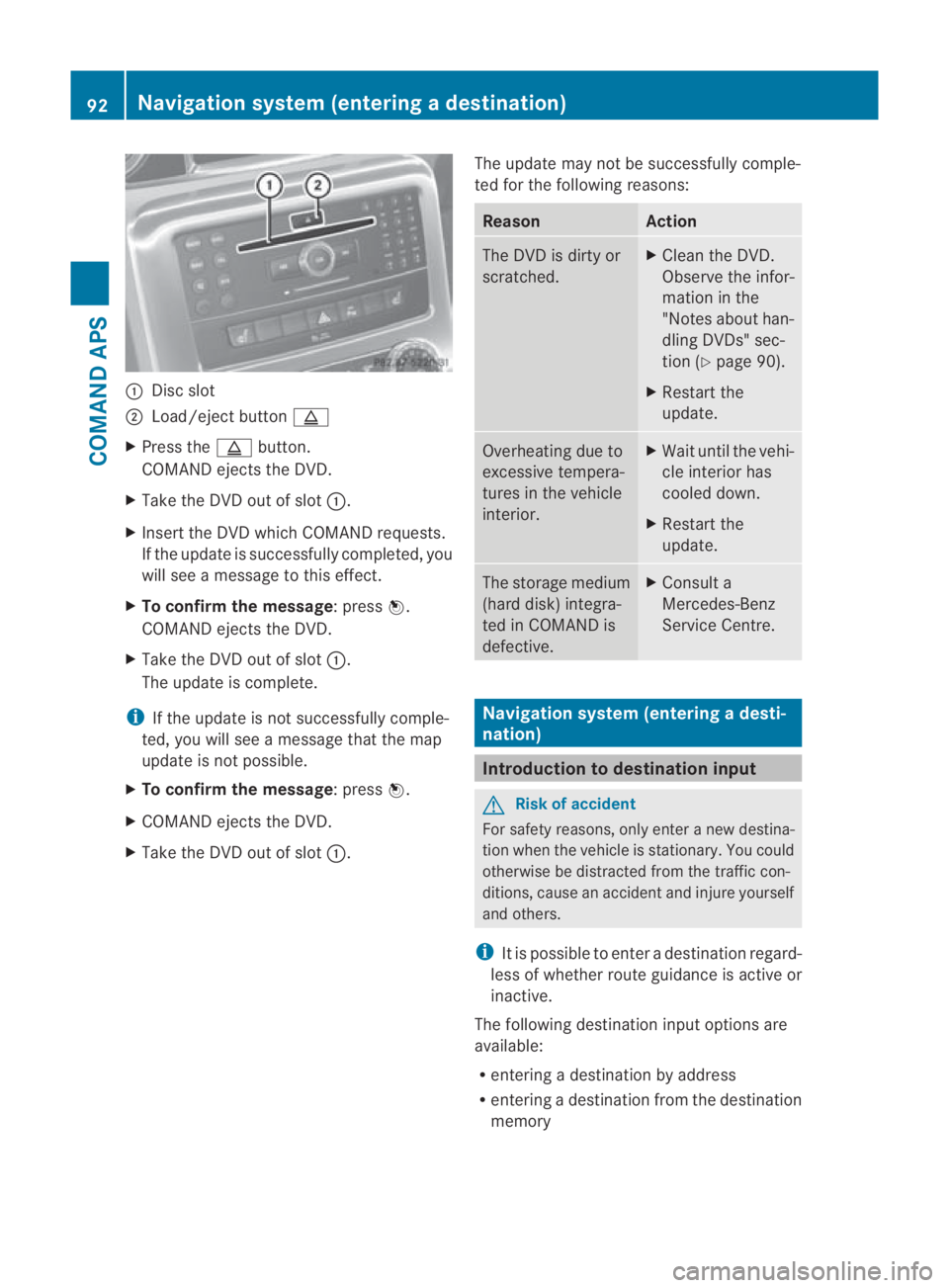
0001
Discslot
0002 Load/eject button 0017
X Press the 0017button.
COMAND ejects the DVD.
X Take the DVD out of slot 0001.
X Insert the DVD which COMAND requests.
If the update is successfully completed, you
will see a message to this effect.
X To confirm the message:p ress0017.
COMAND ejects the DVD.
X Take the DVD out of slot 0001.
The update is complete.
i If the update is not successfully comple-
ted, you will see a message that the map
update is not possible.
X To confirm the message:p ress0017.
X COMAND ejects the DVD.
X Take the DVD out of slot 0001.The update may not be successfully comple-
ted for the following reasons: Reason Action
The DVD is dirty or
scratched. X
Clean the DVD.
Observe the infor-
mation in the
"Notes about han-
dling DVDs" sec-
tion (Y page 90).
X Restart the
update. Overheating due to
excessive tempera-
tures in the vehicle
interior. X
Waitu ntil the vehi-
cle interio rhas
cooled down.
X Restart the
update. The storage medium
(hard disk) integra-
ted in COMAND is
defective. X
Consult a
Mercedes-Benz
Service Centre. Navigation system (entering
adesti-
nation) Introduction to destination input
G
Risk of accident
For safety reasons, onl yenter a new destina-
tio nw hen the vehicle is stationary. You could
otherwise be distracted from the traffic con-
ditions, cause an accident and injure yourself
and others.
i It is possible to enter a destination regard-
less of whether route guidance is active or
inactive.
The following destination input options are
available:
R entering a destination by address
R entering a destination from the destination
memory 92
Navigation system (entering
adestination)COMAND APS
BA 197 ECE RE 2010/6a; 1; 2, en-GB
sabbaeu Version: 3.0.3.6 2010-05-07T14:19:43+02:00 - Seite 92
Page 207 of 361
G
Risk of injury
Make sure that nobody can become trapped
whe nyou adjust the seat.
Observe the notes concerning the airbag sys-
tem.
Secure children as recommended; see the
"Children in the vehicle" section.
! To avoid damage to the seats and the seat
heating, observe the following information:
R do not allow the seats to come into pro-
longed or excessive contact with any
type of fluid.
R if the seat covers are damp or wet, do not
switch on the seat heating. The seat
heating should also not to be used to dry
the seats.
R clean the seat covers as recommended;
see the " Interior care" section.
R do not transport heavy loads on the
seats. Do not place sharp objects on the
seat cushions, e.g. knives, nails or tools.
The seats should only be occupied by
passengers, if possible.
R do not cover the seat heating with insu-
lating materials while in operation, e.g.
covers, coats, bags, seat covers, child
seats or booster seats.
! When you move the seats, make sure that
there are no objects in the footwell or
behind the seats. Otherwise, you could
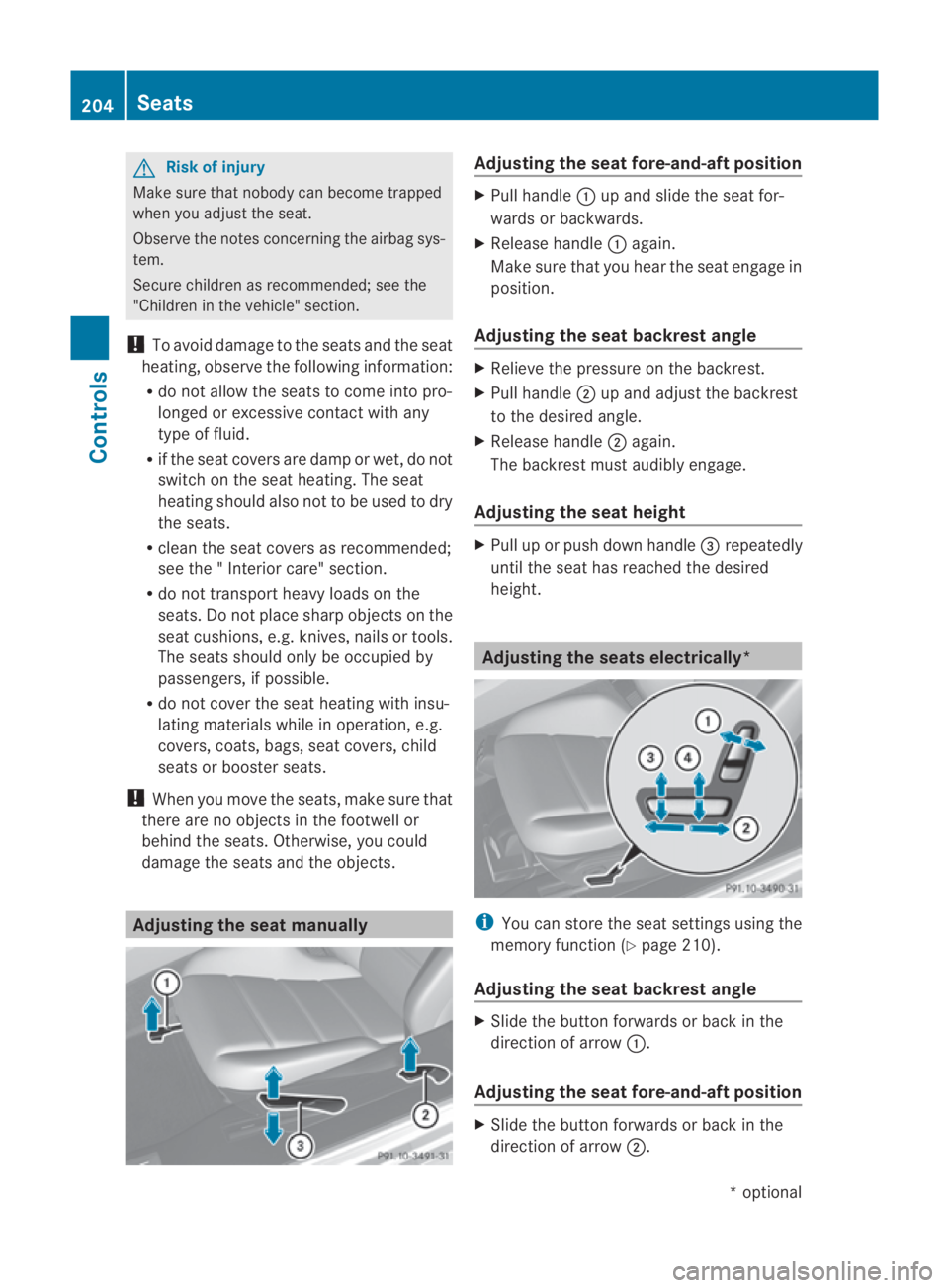
damage the seats and the objects. Adjusting the seat manually Adjusting the seat fore-and-aft position
X
Pull handle 0001up and slide the seat for-
wards or backwards.
X Release handle 0001again.
Make sure that you hear the seat engage in
position.
Adjusting the seat backrest angle X
Relieve the pressure on the backrest.
X Pull handle 0002up and adjust the backrest
to the desired angle.
X Release handle 0002again.
The backrest must audibly engage.
Adjusting the seat height X
Pull up or push down handle 0015repeatedly
until the seat has reached the desired
height. Adjusting the seats electrically*
i
You can store the seat settings using the
memory function (Y page 210).
Adjusting the seat backrest angle X
Slide the button forwards or back in the
direction of arrow 0001.
Adjusting the seat fore-and-aft position X
Slide the button forwards or back in the
direction of arrow 0002.204
SeatsControls
*o
ptional
BA 197 ECE RE 2010/6a; 1; 2, en-GB
sabbaeu
Version: 3.0.3.6 2010-05-07T14:19:43+02:00 - Seite 204
Page 208 of 361
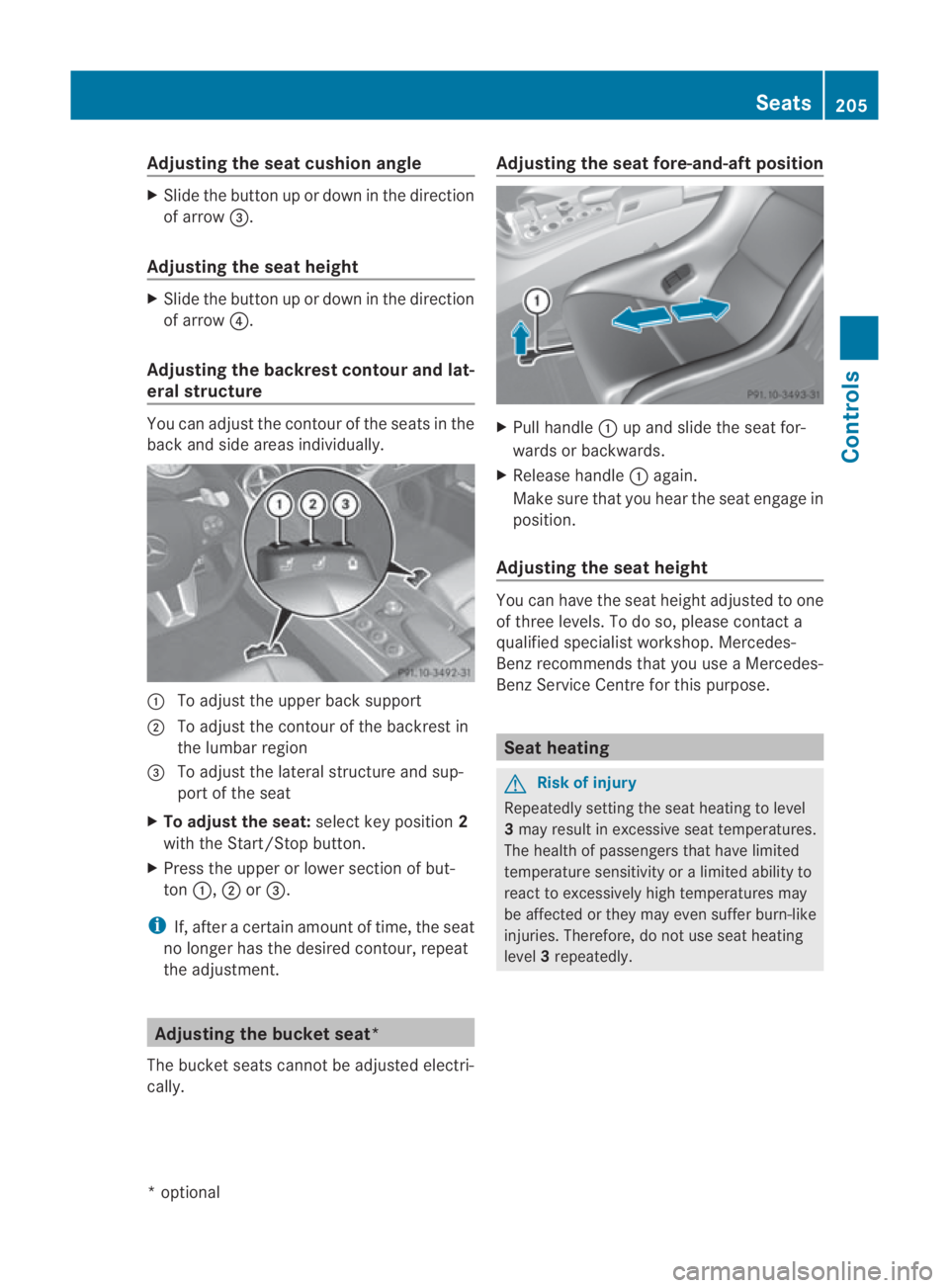
Adjusting the sea
tcushio nangle X
Slide the button up or down in the direction
of arrow 0015.
Adjusting the seat height X
Slide the button up or down in the direction
of arrow 0014.
Adjusting the backrest contour and lat-
eral structure You can adjust the contour of the seats in the
back and side areas individually. 0001
To adjust the upper back support
0002 To adjust the contour of the backrest in
the lumbar region
0015 To adjust the lateral structure and sup-
port of the seat
X To adjust the seat: select key position2
with the Start/Stop button.
X Press the upper or lower section of but-
ton 0001, 0002or0015.
i If, after a certain amount of time, the seat
no longer has the desired contour, repeat
the adjustment. Adjusting the bucket seat*
The bucket seats cannot be adjusted electri-
cally. Adjusting the seat fore-and-aft position
X
Pull handle 0001up and slide the seat for-
wards or backwards.
X Release handle 0001again.
Make sure that you hear the seat engage in
position.
Adjusting the seat height You can have the seat height adjusted to one
of three levels. To do so, please contact a
qualified specialist workshop. Mercedes-
Benz recommends that you use a Mercedes-
Benz Service Centre for this purpose.
Seat heating
G
Risk of injury
Repeatedly setting the seat heating to level
3 may result in excessive seat temperatures.
The health of passengers that have limited
temperature sensitivity or a limited ability to
react to excessively high temperatures may
be affected or they may even suffer burn-like
injuries. Therefore, do not use seat heating
level 3repeatedly. Seats
205Controls
*optional
BA 197 ECE RE 2010/6a; 1; 2, en-GB
sabbaeu
Version: 3.0.3.6 2010-05-07T14:19:43+02:00 - Seite 205 Z