2010 MERCEDES-BENZ GLK350 4MATIC check engine
[x] Cancel search: check enginePage 10 of 344
Electronic Traction Systemsee ETS/4-ETS
Emergency, in case of
First aid kit ..................................... 260
Flat tire .......................................... 312
Hazard warning flasher ....................90
Roadside Assistance ................ 20, 203
Towing the vehicle .........................321
Emergency calls
Tele Aid .......................................... 201
Telephone ...................................... 161
Emergency operations
Remote door lock (Tele Aid) ........... 205
Remote door unlock (Tele Aid) .......204
Emergency Tensioning Device
see ETD
Emission control ............................... 249
Information label ............................ 329
System warranties ...........................19
Engine
Break-in recommendations ............212
Cleaning ......................................... 253
Compartment ................................ 214
Malfunction indicator lamp ............295
Messages in the multifunction
display ........................................... 279
Number .......................................... 329
Starting ............................................ 98
Turning off ..................................... 102
Engine (Technical data)
see Vehicle specification
Engine coolant
see Coolant
Engine oil
Adding ........................................... 216
Additives ........................................ 336
Checking level ............................... 215
Consumption ................................. 215
Messages in the multifunction
display ........................................... 282
Oil dipstick ..................................... 215
Recommended engine oils and oil
filter ............................................... 335
ESP ®
(Electronic Stability
Program) .............................................. 61
ETS/4-ETS ....................................... 62Messages in the multifunction
display ........................... 271, 272, 274
Trailer stabilization ........................... 63
Warning lamp ................................. 293
ETD (Emergency Tensioning
Device) ................................................. 51
Safety guidelines ............................. 39
ETS/4-ETS (Electronic Traction
System) ................................................ 62
Express operation
Panorama roof ............................... 185
Power windows ................................ 95
Exterior lamp switch ........................... 87
Exterior rear view mirrors .................. 84
Fold-in function ................................ 86
Parking position ............................... 85
Power-folding ................................... 85
Switching fold-in function on or
off .................................................. 124
Exterior view of vehicle ...................... 26
F
Fastening the seat belts ..................... 49
First aid kit ......................................... 260
Flat tire ............................................... 312
Lowering the vehicle ......................317
Mounting the spare wheel .............312
Preparing the vehicle .....................312
Spare wheel ........................... 312, 333
Floormats ........................................... 209
Fluids
Automatic transmission fluid .........334
Brake fluid ..................................... 334
Capacities ...................................... 334
Engine coolant ............................... 334
Engine oil ....................................... 334
Power steering fluid .......................334
Washer and headlamp cleaning
system ........................................... 335
Fog lamps ............................................. 89
Messages in the multifunction
display ................................... 283, 285
Fold-in function for exterior rear
view mirrors ........................................ 86
Four-wheel drive see All-wheel drive (4MATIC)
8IndexX204_AKB; 3; 23, en-USd2ureepe,Version: 2.11.8.12009-07-16T19:16:58+02:00 - Seite 8
Page 18 of 344
Gasoline additives .......................... 337
Identification labels .......................328
Premium unleaded gasoline ...........336
Rims and tires ................................ 331
Spare wheel ................................... 333
Vehicle specification GLK 350 .......330
Vehicle specification
GLK 350 4MATIC ........................... 330
Washer and headlamp cleaning
system ................................... 335, 339
Technical data (dimensions)
see Vehicle specification
Technical data (electrical system)
see Vehicle specification
Technical data (engine)
see Vehicle specification
Technical data (weights)
see Vehicle specification
Tele Aid ............................................... 200
Emergency calls ............................. 201
Information button .........................203
Initiating an emergency call
manually ........................................ 202
Messages in the multifunction
display ........................................... 275
Remote door lock .......................... 205
Remote door unlock ......................204
Roadside Assistance button ..........203
Search & Send ............................... 204
SOS button .................................... 202
Stolen Vehicle Recovery Services ..205
System self-test ............................. 201
Telephone .................................... 29, 155
Answering/ending a call ................117
Call lists ......................................... 164
Emergency calls “911” ..................161
Hands-free microphone ...................32
Making calls ................................... 165
Menu ............................................. 117
Operation ....................................... 117
Phone book ........................... 117, 162
Redialing ........................................ 118
Temperature
Coolant .......................................... 109
Interior temperature ......................180
Outside .......................................... 110
Tether anchorage points
see Children in the vehicle Tie-down rings ................................... 188
Tightening torque
Wheels ........................................... 317
Time setting ....................................... 121
TIN (Tire Identification Number) ...... 241
Tire and Loading Information
placard ............................................... 227
Tire and loading terminology ........... 239
Tire Identification Number see TIN
Tire inflation pressure
Checking ........................................ 221
Important notes on ........................220
Label on the inside of fuel filler
flap ................................................ 220
Placard on driver’s door B-pillar .....227
Tire labeling ....................................... 235
Tire load rating .................................. 240
Tire ply composition and material
used .................................................... 241
Tire pressure loss warning system . 222
Tires ........................................... 218, 331
Advanced Tire Pressure
Monitoring System (Advanced
TPMS) ............................................ 224
Air pressure ................................... 219
Care and maintenance ...................232
Cleaning ......................................... 233
Direction of rotation, spinning .......231
Important notes on tire inflation
pressure ........................................ 220
Inflation pressure ........................... 221
Information placard .......................227
Inspection ...................................... 232
Labeling ......................................... 235
Load index ............................. 235, 240
Load rating .................................... 240
Messages in the multifunction
display ................................... 268, 288
Ply composition and material
used ............................................... 241
Problems under-/overinflation ......221
Retreads ........................................ 218
Rims and tires (technical data) ......331
Rotation ......................................... 234
Service life ..................................... 232
Sizes .............................................. 331
Snow chains .................................. 24216IndexX204_AKB; 3; 23, en-USd2ureepe,Version: 2.11.8.12009-07-16T19:16:58+02:00 - Seite 16
Page 39 of 344
GWarning!
The SRS self-check has detected a
malfunction when the SRS indicator lamp
6
R does not come on at all
R fails to go out after approximately
4 seconds after the engine was started
R comes on after the engine was started or
while driving
For your safety, we strongly recommend that
you contact an authorized Mercedes-Benz
Center immediately to have the system
checked. Otherwise the SRS may not be
activated when needed in an accident, which
could result in serious or fatal injury. The SRS
might also deploy unexpectedly and
unnecessarily which could also result in injury
as well.
In addition, improper work on the SRS creates
a risk of rendering the SRS inoperative or
causing unintended air bag deployment. Work
on the SRS must therefore only be performed
by qualified technicians. Contact an
authorized Mercedes-Benz Center.
If it is necessary to modify an air bag system
to accommodate a person with disabilities,
contact an authorized Mercedes-Benz Center.
USA only: Call our Customer Assistance
Center at 1-800-FOR-MERCedes
(1-800-367-6372) for details.
Air bags
GWarning!
Air bags are designed to reduce the potential
of injury and fatality in certain
R frontal impacts (front air bags)
R side impacts (side impact air bags and
window curtain air bags)
R rollovers (window curtain air bags)
However, no system available today can
completely eliminate injuries and fatalities.
Deployment of the air bags temporarily
releases a small amount of dust from the air
bags. This dust, however, is neither harmful
to your health, nor does it indicate a fire in the
vehicle. The dust might cause some
temporary breathing difficulty for people with
asthma or other breathing trouble. To avoid
this, you may wish to get out of the vehicle as
soon as it is safe to do so. If you have any
breathing difficulty but cannot get out of the
vehicle after the air bag inflates, then get fresh
air by opening a window or door.GWarning!
To reduce the risk of injury when the front air
bags inflate, it is very important for the driver
and front passenger to always be in a properly
seated position and to wear their respective
seat belt.
For maximum protection in the event of a
collision always be in normal seated position
with your back against the seat backrest.
Fasten your seat belt and make sure it is
properly positioned on your body.
Since the air bag inflates with considerable
speed and force, a proper seating position
and correct positioning of the hands on the
steering wheel will help to keep you at a safe
distance from the air bag. Occupants who are
not wearing their seat belt, are not seated
properly or are too close to the air bag can be
seriously injured or killed by an air bag as it
inflates with great force instantaneously:
R Sit with the seat belt properly fastened in a
position that is as upright as possible with
your back against the seat backrest.
R Move the driver’s seat as far back as
possible, still permitting proper operation
of vehicle controls. The distance from the
center of the driver’s chest to the center of
the air bag cover on the steering wheel
must be at least 10 inches (25 cm) or more.
You should be able to accomplish this by
adjusting the seat and steering wheel. If
Occupant safety37Safety and securityX204_AKB; 3; 23, en-USd2ureepe,Version: 2.11.8.12009-07-16T19:16:58+02:00 - Seite 37Z
Page 78 of 344
Starter switch positions
SmartKey
GObserve Safety notes, see page 53.
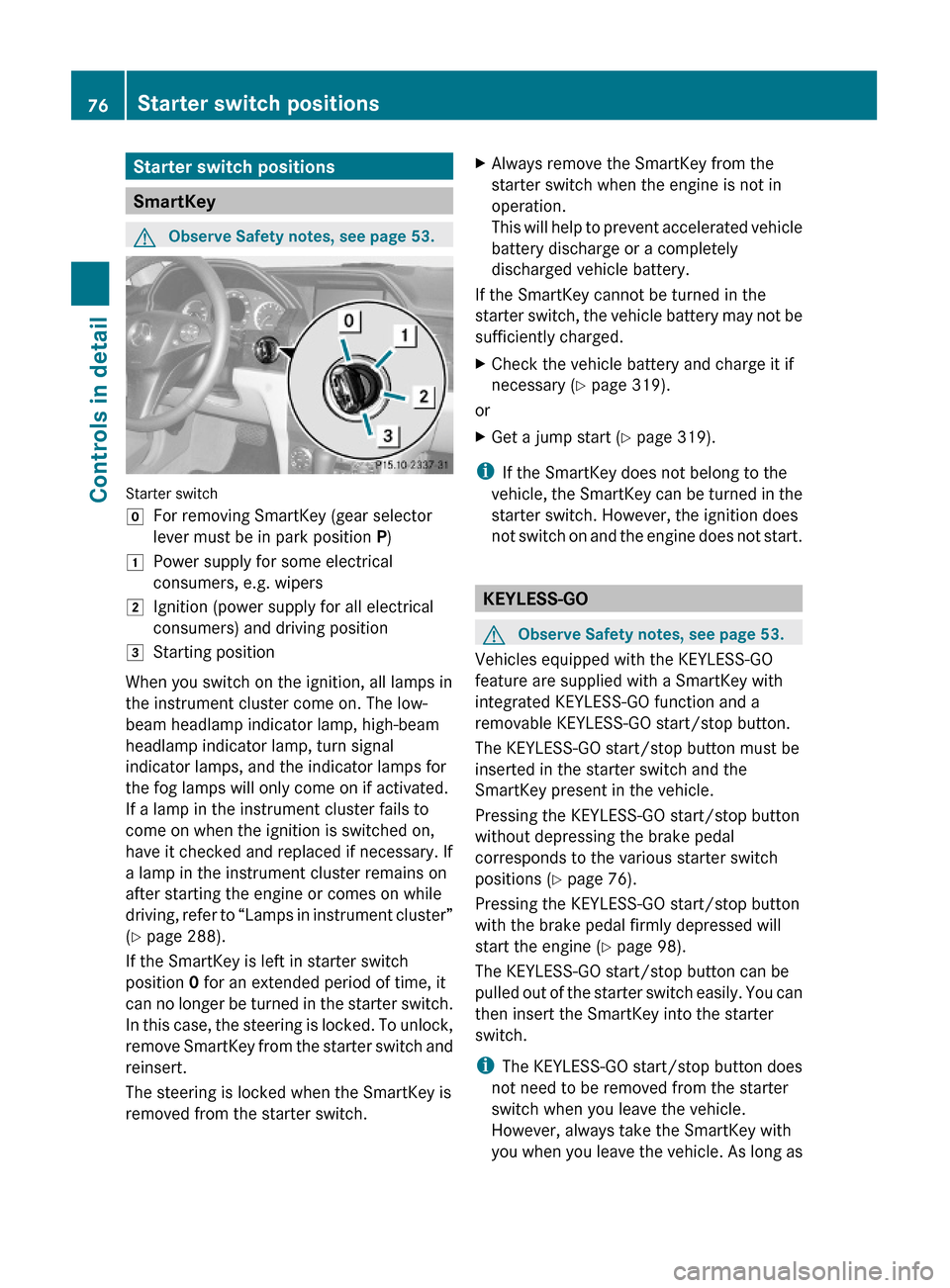
Starter switch
gFor removing SmartKey (gear selector
lever must be in park position P)
1Power supply for some electrical
consumers, e.g. wipers
2Ignition (power supply for all electrical
consumers) and driving position
3Starting position
When you switch on the ignition, all lamps in
the instrument cluster come on. The low-
beam headlamp indicator lamp, high-beam
headlamp indicator lamp, turn signal
indicator lamps, and the indicator lamps for
the fog lamps will only come on if activated.
If a lamp in the instrument cluster fails to
come on when the ignition is switched on,
have it checked and replaced if necessary. If
a lamp in the instrument cluster remains on
after starting the engine or comes on while
driving, refer to “Lamps in instrument cluster”
(Y page 288).
If the SmartKey is left in starter switch
position 0 for an extended period of time, it
can no longer be turned in the starter switch.
In this case, the steering is locked. To unlock,
remove SmartKey from the starter switch and
reinsert.
The steering is locked when the SmartKey is
removed from the starter switch.
XAlways remove the SmartKey from the
starter switch when the engine is not in
operation.
This will help to prevent accelerated vehicle
battery discharge or a completely
discharged vehicle battery.
If the SmartKey cannot be turned in the
starter switch, the vehicle battery may not be
sufficiently charged.
XCheck the vehicle battery and charge it if
necessary (Y page 319).
or
XGet a jump start (Y page 319).
iIf the SmartKey does not belong to the
vehicle, the SmartKey can be turned in the
starter switch. However, the ignition does
not switch on and the engine does not start.
KEYLESS-GO
GObserve Safety notes, see page 53.
Vehicles equipped with the KEYLESS-GO
feature are supplied with a SmartKey with
integrated KEYLESS-GO function and a
removable KEYLESS-GO start/stop button.
The KEYLESS-GO start/stop button must be
inserted in the starter switch and the
SmartKey present in the vehicle.
Pressing the KEYLESS-GO start/stop button
without depressing the brake pedal
corresponds to the various starter switch
positions (Y page 76).
Pressing the KEYLESS-GO start/stop button
with the brake pedal firmly depressed will
start the engine (Y page 98).
The KEYLESS-GO start/stop button can be
pulled out of the starter switch easily. You can
then insert the SmartKey into the starter
switch.
iThe KEYLESS-GO start/stop button does
not need to be removed from the starter
switch when you leave the vehicle.
However, always take the SmartKey with
you when you leave the vehicle. As long as
76Starter switch positionsControls in detail
X204_AKB; 3; 23, en-USd2ureepe,Version: 2.11.8.12009-07-16T19:16:58+02:00 - Seite 76
Page 79 of 344
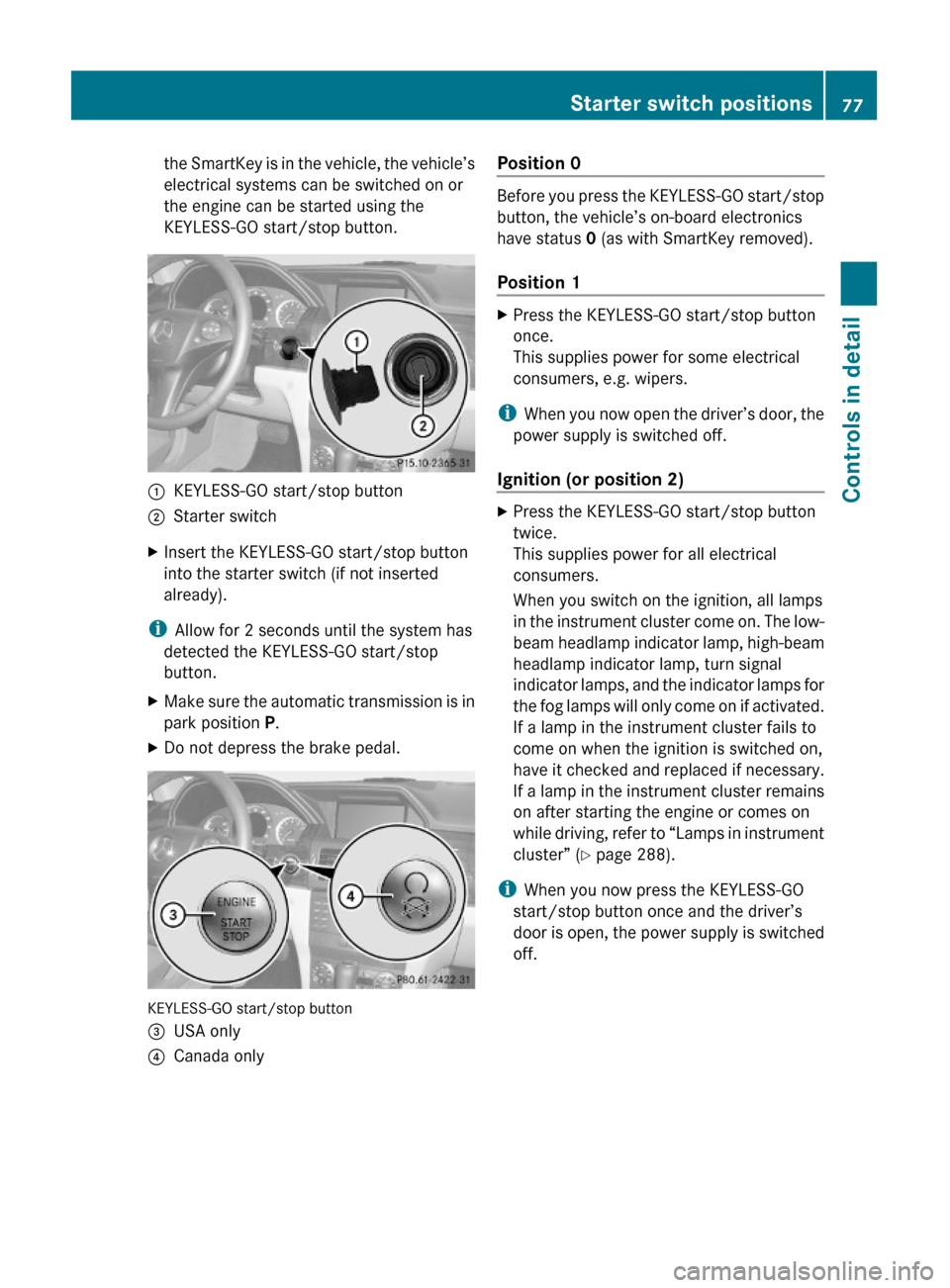
the SmartKey is in the vehicle, the vehicle’s
electrical systems can be switched on or
the engine can be started using the
KEYLESS-GO start/stop button.
:KEYLESS-GO start/stop button;Starter switchXInsert the KEYLESS-GO start/stop button
into the starter switch (if not inserted
already).
iAllow for 2 seconds until the system has
detected the KEYLESS-GO start/stop
button.
XMake sure the automatic transmission is in
park position P.
XDo not depress the brake pedal.
KEYLESS-GO start/stop button
=USA only?Canada onlyPosition 0
Before you press the KEYLESS-GO start/stop
button, the vehicle’s on-board electronics
have status 0 (as with SmartKey removed).
Position 1
XPress the KEYLESS-GO start/stop button
once.
This supplies power for some electrical
consumers, e.g. wipers.
iWhen you now open the driver’s door, the
power supply is switched off.
Ignition (or position 2)
XPress the KEYLESS-GO start/stop button
twice.
This supplies power for all electrical
consumers.
When you switch on the ignition, all lamps
in the instrument cluster come on. The low-
beam headlamp indicator lamp, high-beam
headlamp indicator lamp, turn signal
indicator lamps, and the indicator lamps for
the fog lamps will only come on if activated.
If a lamp in the instrument cluster fails to
come on when the ignition is switched on,
have it checked and replaced if necessary.
If a lamp in the instrument cluster remains
on after starting the engine or comes on
while driving, refer to “Lamps in instrument
cluster” (Y page 288).
iWhen you now press the KEYLESS-GO
start/stop button once and the driver’s
door is open, the power supply is switched
off.
Starter switch positions77Controls in detailX204_AKB; 3; 23, en-USd2ureepe,Version: 2.11.8.12009-07-16T19:16:58+02:00 - Seite 77Z
Page 97 of 344
Problems with wipers
! If anything blocks the wipers (leaves,
snow, etc.), switch them off immediately.
For safety reasons, do the following before
attempting to remove any blockage:
R Stop the vehicle in a safe location.
R Remove the SmartKey from the starter
switch.
or
R Turn off the engine by pressing the
KEYLESS-GO start/stop button and
open the driver’s door (with the driver’s
door open, starter switch is in position
0 , same as with SmartKey removed from
starter switch).
R Engage the parking brake.
R Remove blockage.
R Turn the wipers on again.
If the windshield wipers fail to function at
all with the combination switch in position
Ä or Å ,
R set the combination switch to the next
higher wiper speed
R have the windshield wipers checked at
the nearest authorized Mercedes-Benz
Center
Power windows
Opening and closing
The door windows are opened and closed
electrically. The switches for all door windows
are located on the driver’s door control panel.
The switches for the respective door windows
are located on the front passenger door and
on the rear doors.
i Operating the rear door windows from
the rear is not possible when you activate
the override switch ( Y page 58).
GObserve Safety notes, see page 53.GWarning!
When opening or closing the door windows,
make sure there is no danger of anyone being
harmed by the opening/closing procedure.
The door windows are equipped with the
express operation and automatic reversal
function. If in express operation mode a door
window encounters an obstruction that
blocks its path, the automatic reversal
function will stop the door window and open
it slightly.
The door windows operate differently when
the switch is pulled and held. See the “Closing
when a door window is blocked” section in
this chapter for details.
The closing of the door windows can be
immediately halted by releasing the switch or,
if the switch was pulled past the resistance
point and released, by either pressing or
pulling the respective switch.
If a door window encounters an obstruction
that blocks its path in a circumstance where
you are closing the door windows by pressing
and holding button & on the SmartKey the
automatic reversal function will not operate.
Activate the override switch when children
are riding in the back seats of the vehicle. The
children may otherwise injure themselves,
e.g. by becoming trapped in the door window
opening.
GWarning!
Do not keep any part of your body up against
the window pane when opening a window. The
downward motion of the pane may pull that
part of your body down between the window
pane and the door frame and trap it there. If
there is a risk of entrapment, release the
switch and pull it to close the window.
i You can also open or close the door
windows using the SmartKey, see
“Summer opening feature” ( Y page 97)
Power windows95Controls in detailX204_AKB; 3; 23, en-USd2ureepe,Version: 2.11.8.12009-07-16T19:16:58+02:00 - Seite 95Z
Page 103 of 344
idle speed. If your foot is not firmly on the
brake pedal, the vehicle could accelerate
quickly forward or in reverse. You could lose
control of the vehicle and hit someone or
something. Only shift into gear when the
engine is idling normally and when your right
foot is firmly on the brake pedal.
! Only shift the automatic transmission into
reverse gear R or park position P when the
vehicle is stopped. Otherwise the
automatic transmission could be damaged.XDepress the brake pedal.
The gear selector lever lock is released.XShift the automatic transmission into drive
position D or reverse gear R.
i
Shifting the automatic transmission out of
park position P is only possible with the
brake pedal depressed.
Only depressing the brake pedal releases
the gear selector lever lock.
XWait for the gear selection process to
complete before setting the vehicle in
motion.XIf engaged, release the parking brake.XRelease the brake pedal.XCarefully depress the accelerator pedal.
After a cold start, the automatic transmission
shifts at a higher engine speed. This allows
the catalytic converter to reach its operating
temperature earlier.
For more information on driving, see “Driving
instructions” ( Y page 243).
Problems while driving
The engine runs erratically and misfires
R An ignition cable may be damaged.
R The engine electronics may not be
operating properly.
R Unburned gasoline may have entered the
catalytic converter and damaged it.
XGive very little gas.XHave the problem checked at an authorized
Mercedes-Benz Center as soon as possible.
The coolant temperature is above
248‡ (120†)
The coolant is too hot and is no longer cooling
the engine.
XStop the vehicle in a safe location as soon
as possible.XTurn off the engine immediately.XAllow the engine and coolant to cool off.XCheck the coolant level and add coolant if
necessary ( Y page 216).
In case of accident
If the vehicle is leaking fuel:
XDo not start the engine under any
circumstances.XExit the vehicle at a safe distance from the
roadway.XNotify local fire and/or police authorities.
If the extent of the damage cannot be
determined:
XContact an authorized Mercedes-Benz
Center or call Roadside Assistance.
If no damage on major assemblies, fuel
system, and engine mount can be
determined:
XStart the engine in the usual manner.
Parking
GWarning!
Do not park this vehicle in areas where
combustible materials such as grass, hay or
leaves can come into contact with the hot
exhaust system. These materials could be
ignited and cause a vehicle fire.
Driving and parking101Controls in detailX204_AKB; 3; 23, en-USd2ureepe,Version: 2.11.8.12009-07-16T19:16:58+02:00 - Seite 101Z
Page 110 of 344
range indicator disappears from the
multifunction display.
The automatic transmission will shift from
the current gear range directly into drive
position D.
Shifting into optimal gear range
XPress and hold the gear selector lever to
the left in the D- direction.
The automatic transmission will select the
gear range suited for optimal acceleration
and deceleration automatically. This will
involve shifting down one or more gears.
Emergency operation (limp-home
mode)
If vehicle acceleration becomes less
responsive or sluggish or the automatic
transmission no longer shifts, the automatic
transmission is most likely operating in limp-
home (emergency operation) mode. In this
mode only second gear and reverse gear R
can be selected.
XStop the vehicle in a safe location.XShift the automatic transmission into park
position P.XTurn off the engine.XWait at least 10 seconds before restarting.XRestart the engine.XShift the automatic transmission into drive
position D (for second gear) or reverse gear
R .XHave the automatic transmission checked
at an authorized Mercedes-Benz Center as
soon as possible.
Transfer case
This section applies to vehicles equipped with
all-wheel drive (4MATIC) only. Both the front
and rear axles are powered at all times when
the vehicle is being operated.
! Only conduct operational or performance
tests on a two-axle dynamometer. If such
tests are necessary, contact an authorized
Mercedes-Benz Center. You could
otherwise seriously damage the brake
system or the transfer case which is not
covered by the Mercedes-Benz Limited
Warranty.
! Because the ESP ®
operates
automatically, the engine and ignition must
be shut off (SmartKey in starter switch
position 0 or 1) when
R the parking brake is being tested on a
brake test dynamometer
R towing the vehicle with the front or rear
axle raised (not permissible for vehicles
with 4MATIC)
Active braking action through the ESP ®
may otherwise seriously damage the brake
system which is not covered by the
Mercedes-Benz Limited Warranty.
Instrument cluster
Introduction
For a full view illustration of the instrument
cluster, see “Instrument cluster”
( Y page 28).
GWarning!
No messages will be displayed if either the
instrument cluster or the multifunction
display is inoperative.
As a result, you will not be able to see
information about your driving conditions,
such as
R speed
R outside temperature
R warning/indicator lamps
R malfunction/warning messages
R failure of any systems
Driving characteristics may be impaired.
108Instrument clusterControls in detail
X204_AKB; 3; 23, en-USd2ureepe,Version: 2.11.8.12009-07-16T19:16:58+02:00 - Seite 108