Page 140 of 407
WARNING!
To avoid serious injury or death:
•Only devices designed for use in this type of
outlet should be inserted into any 12 Volt outlet.(Continued)
WARNING! (Continued)
•Do not touch with wet hands.
•Close the lid when not in use and while driving
the vehicle.
•If this outlet is mishandled, it may cause an
electric shock and failure.
CAUTION!
•Many accessories that can be plugged in draw
power from the vehicle’s battery, even when not in
use (i.e., cellular phones, etc.). Eventually, if
plugged in long enough, the vehicle’s battery will
discharge sufficiently to degrade battery life
and/or prevent the engine from starting.(Continued)
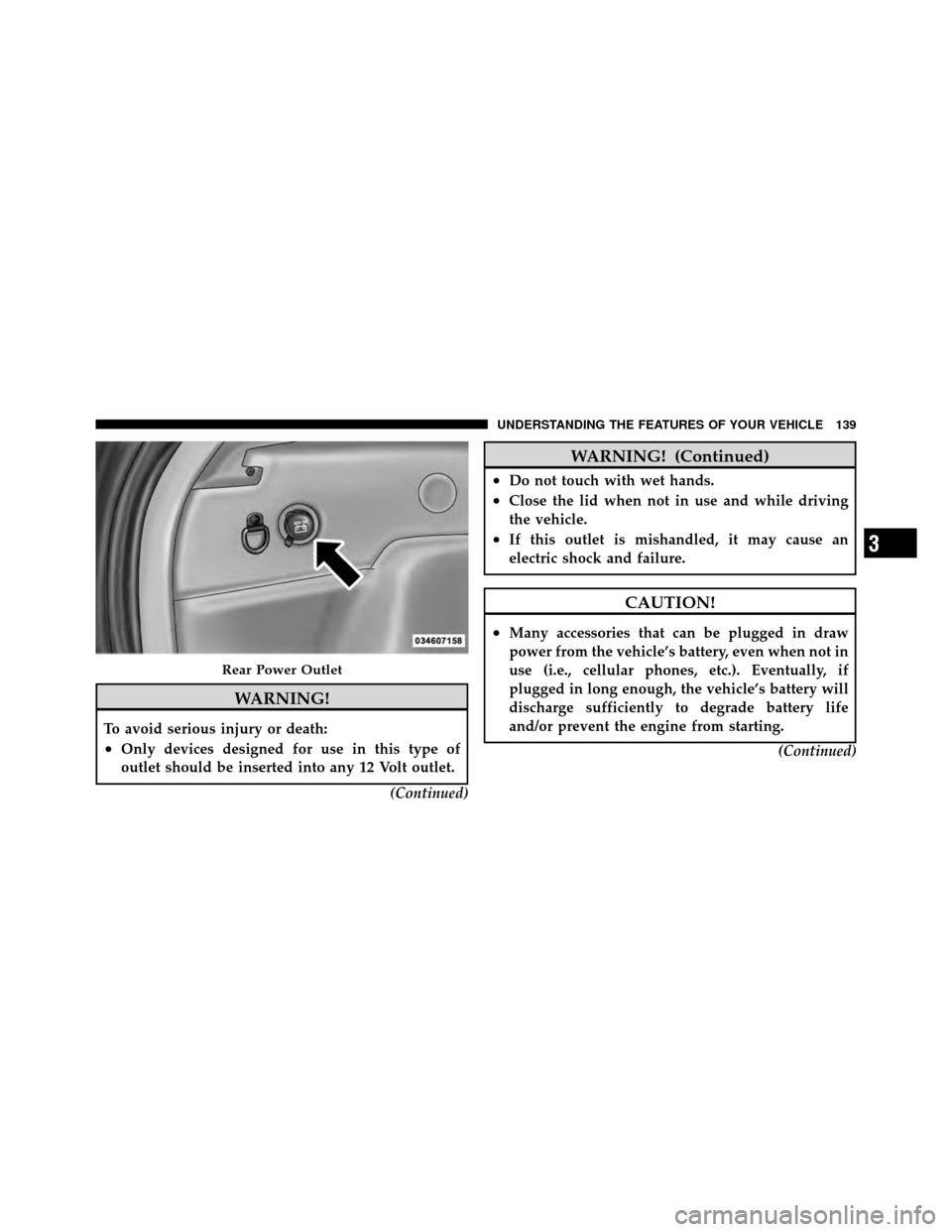
Rear Power Outlet
3
UNDERSTANDING THE FEATURES OF YOUR VEHICLE 139
Page 141 of 407
CAUTION! (Continued)
•Accessories that draw higher power (i.e., coolers,
vacuum cleaners, lights, etc.) will degrade the
battery even more quickly. Only use these inter-
mittently and with greater caution.
•After the use of high power draw accessories, or
long periods of the vehicle not being started (with
accessories still plugged in), the vehicle must be
driven a sufficient length of time to allow the
generator to recharge the vehicle’s battery.
POWER INVERTER — IF EQUIPPED
There is a 115 Volt, 150 Watt inverter outlet located on the
back of the center console to convert DC current to AC
current. This outlet can power cellular phones, electron-
ics and other low power devices requiring power up to
150 Watts. Certain high-end video games, such as Play-
station3 and XBox360 will exceed this power limit, as will
most power tools.
140 UNDERSTANDING THE FEATURES OF YOUR VEHICLE
Page 150 of 407

Rotate the switch upward to the “On” position to
activate the rear wiper.
NOTE: The rear wiper operates in an intermittent mode
only.
Rotate the switch upward to the “washer” position
to activate that rear washer. The washer pump will
continue to operate as long as the lever or ring is
engaged. Upon release, the wipers will cycle two times
before returning to the set position.
If the rear wiper is operating when the ignition is turned
OFF, the wiper will automatically return to the “park”
position if power accessory delay is active. Power acces-
sory delay can be cancelled by opening the door; if this
happens, the rear wiper will stop at its current position
and will not go to “park”. If the liftgate flipper glass is open, connection to the rear
window wiper is interrupted preventing activation of the
rear wiper blade. When the liftgate flipper glass is closed,
the rear wiper switch, or the ignition switch, needs to be
turned OFF and ON to restart the rear wiper.
Rear Window Defroster
The rear window defroster button is located on the
climate control panel. Press this button to turn on
the rear window defroster and the heated outside mirrors
(if equipped). An indicator in the button will illuminate
when the rear window defroster is on. The rear window
defroster automatically turns off after approximately
10 minutes. For an additional five minutes of operation,
press the button a second time.
NOTE: To prevent excessive battery drain, use the rear
window defroster only when the engine is operating.
3
UNDERSTANDING THE FEATURES OF YOUR VEHICLE 149
Page 172 of 407
•1/4 Mile (if equipped with Performance Pages)
•Instantaneous G-Force (if equipped with Performance
Pages)
•Peak G-Force (if equipped with Performance Pages)
•RKE BATTERY LOW
•VEHICLE NOT IN PARK
•IGNITION POSITION
•PRESS BRAKE TO START
•INSERT KEY
•TURN TO ON
Trip Functions
Press and release the MENU button until one of the
following Trip Functions displays in the EVIC:
•Distance To Empty
•Trip A
•Trip B
•Elapsed Time
•Service Distance
•Engine Oil Pressure
•Engine Oil Temperature
•Display Units of Measure In
Press the SCROLL button to cycle through all the Trip
Computer functions.
The Trip Functions mode displays the following informa-
tion:
•Distance To Empty (DTE)
Shows the estimated distance that can be traveled with
the fuel remaining in the tank. This estimated distance is
determined by a weighted average of the instantaneous
4
UNDERSTANDING YOUR INSTRUMENT PANEL 171
Page 212 of 407
•Connecting an iPod�to the AUX port located in the
radio faceplate, plays media, but does not use the UCI
feature to control the connected device.
Connecting The iPod�
Use the provided connection cable to connect an iPod� to
the vehicle’s 16–pin connector port (which is located in
the glove compartment on some vehicles). Once the
iPod� is connected and synchronized to the vehicle’s UCI
system (iPod� may take a few seconds to connect), the
iPod� starts charging and is ready for use by pressing
radio switches, as described below.
NOTE:
•You may have to remove the connector pin protection
cap from the 16–pin connector port, prior to connect-
ing the cable.
•If the iPod� battery is completely discharged, it may
not communicate with the UCI system until a mini-
mum charge is attained. Leaving the iPod� connected
to the UCI system may charge it to the required level.
Using This Feature
By using the provided connection cable to connect an
iPod� to the vehicle’s UCI 16–pin connector port:
•The iPod� audio can be played on the vehicle’s sound
system, providing metadata (artist, track title, album,
etc.) information on the radio display.
•The iPod� can be controlled using the radio buttons to
Play, Browse, and List the iPod� contents.
•The iPod�battery charges when plugged into the UCI
connector (if supported by the specific iPod� device)
Controlling The iPod�Using Radio Buttons
To get into the UCI (iPod�) mode and access a connected
iPod�, press the “AUX” button on the radio faceplate.
4
UNDERSTANDING YOUR INSTRUMENT PANEL 211
Page 240 of 407
Extreme Cold Weather (Below�20°F or�29°C)
To ensure reliable starting at these temperatures, use of
an externally powered electric engine block heater (avail-
able from your authorized dealer) is recommended.
If Engine Fails To Start
WARNING!
•Never pour fuel or other flammable liquids into
the throttle body air inlet opening in an attempt to
start the vehicle. This could result in a flash fire
causing serious personal injury.
(Continued)
WARNING! (Continued)
•Do not attempt to push or tow your vehicle to get
it started. Vehicles equipped with an automatic
transmission cannot be started this way. Unburned
fuel could enter the catalytic converter and once
the engine has started, ignite and damage the
converter and vehicle. If the vehicle has a dis-
charged battery, booster cables may be used to
obtain a start from a booster battery or the battery
in another vehicle. This type of start can be dan-
gerous if done improperly. Refer to “Jump Start-
ing” in “What to Do In Emergencies” for further
information.
5
STARTING AND OPERATING 239
Page 285 of 407

E85 Usage In Non-Flex Fuel Vehicles
Non-FFV vehicles are compatible with gasoline contain-
ing 10% ethanol (E10). Gasoline with higher ethanol
content may void the vehicle’s warranty.
If a Non-FFV vehicle is inadvertently fueled with E85
fuel, the engine will have some or all of these symptoms:
•operate in a lean mode
•OBD II “Malfunction Indicator Light” on
•poor engine performance
•poor cold start and cold driveability
•increased risk for fuel system component corrosion
To fix a Non-FFV vehicle inadvertently fueled once with
E85 perform the following:
•drain the fuel tank (see your authorized dealer)
•change the engine oil and oil filter
•disconnect and reconnect the battery to reset the
engine controller memory
More extensive repairs will be required for prolonged
exposure to E85 fuel.
MMT In Gasoline
MMT is a manganese-containing metallic additive that is
blended into some gasoline to increase octane. Gasoline
blended with MMT provides no performance advantage
beyond gasoline of the same octane number without
MMT. Gasoline blended with MMT reduces spark plug
life and reduces emissions system performance in some
vehicles. The manufacturer recommends that gasoline
without MMT be used in your vehicle. The MMT content
of gasoline may not be indicated on the gasoline pump,
therefore, you should ask your gasoline retailer whether
the gasoline contains MMT. It is even more important to
look for gasoline without MMT in Canada, because MMT
284 STARTING AND OPERATING
Page 303 of 407
HAZARD WARNING FLASHERS
The Hazard Warning flasher switch is located on the
switch bank just above the climate controls.Press the switch to turn on the Hazard Warning
flasher. When the switch is activated, all directional
turn signals will flash on and off to warn oncoming
traffic of an emergency. Press the switch a second time to
turn off the Hazard Warning flasher.
This is an emergency warning system and should not be
used when the vehicle is in motion. Use it when your
vehicle is disabled and is creating a safety hazard for
other motorists.
If it is necessary to leave the vehicle to go for service, the
Hazard Warning flasher will continue to operate with the
ignition key removed and the vehicle locked.
NOTE: With extended use, the Hazard Warning flasher
may run down your battery.
IF YOUR ENGINE OVERHEATS
In any of the following situations, you can reduce the
potential for overheating by taking the appropriate ac-
tion.
•On the highways — Slow down.
•In city traffic — While stopped, shift the transmission
to NEUTRAL, but do not increase the engine idle
speed.
302 WHAT TO DO IN EMERGENCIES