2010 JAGUAR XFR rjb
[x] Cancel search: rjbPage 252 of 3039

DTC Description Possible Causes Action U3000-44
Control Module - Data
memory failure
EEPROM, External
RAM access failure
Suspect the TSD, check and install a new TSD as
required, refer to the new module/component
installation note at the top of the DTC Index U3000-48
Control Module -
Supervision software
failure
Supervision software
failure
Re-configure the TSD using the manufacturer approved
diagnostic system U3000-4B
Control Module - Over
temperature
Touch panel backlight
- high temperature
detected
Allow the system to cool, clear the DTC and
check/monitor system for re-occurrence. If DTC re-occurs
suspect the TSD. Check and install a new TSD as
required, refer to the new module/component
installation note at the top of the DTC Index U3000-55
Control Module - Not
configured
Incorrect Car
Configuration
Parameters received
Check/amend Car Configuration File using the
manufacturer approved diagnostic system U3000-87
Control Module -
Missing message
Car Configuration File
not received
Check RJB for related DTCs and refer to relevant DTC
Index. Check CAN and MOST networks, carry out the
CAN and MOST network tests using the manufacturer
approved diagnostic system U3000-98
Control Module -
Component or system
over temperature
TSD internal
temperature over
limit
Allow the system to cool, clear the DTC and
check/monitor system for re-occurrence. If DTC re-occurs
suspect the TSD. Check and install a new TSD as
required, refer to the new module/component
installation note at the top of the DTC Index U3003-16
Battery Voltage -
Circuit voltage below
threshold
Circuit voltage below
threshold
Carry out any pinpoint tests associated with this DTC
using the manufacturer approved diagnostic system U3003-17
Battery Voltage -
Circuit voltage above
threshold
Circuit voltage above
threshold
Carry out any pinpoint tests associated with this DTC
using the manufacturer approved diagnostic system
Page 279 of 3039

Published: 12-May-2014
General Information - Diagnostic Trouble Code (DTC) Index DTC: Telephone
Module (TEL)
Description and Operation
Telephone Module
CAUTION: Diagnosis by substitution from a donor vehicle is NOT acceptable. Substitution of control modules does not
guarantee confirmation of a fault, and may also cause additional faults in the vehicle being tested and/or the donor vehicle.
NOTES:
If a control module or a component is suspect and the vehicle remains under manufacturer warranty, refer to the Warranty
Policy and Procedures manual, or determine if any prior approval programme is in operation, prior to the installation of a new
module/component.
Generic scan tools may not read the codes listed, or may read only 5-digit codes. Match the 5 digits from the scan tool to
the first 5 digits of the 7-digit code listed to identify the fault (the last 2 digits give extra information read by the
manufacturer-approved diagnostic system).
When performing voltage or resistance tests, always use a digital multimeter accurate to three decimal places, and with
an up-to-date calibration certificate. When testing resistance always take the resistance of the digital multimeter leads into
account.
Check and rectify basic faults before beginning diagnostic routines involving pinpoint tests.
Inspect connectors for signs of water ingress, and pins for damage and/or corrosion.
If DTCs are recorded and, after performing the pinpoint tests, a fault is not present, an intermittent concern may be the
cause. Always check for loose connections and corroded terminals.
Check DDW for open campaigns. Refer to the corresponding bulletins and SSMs which may be valid for the specific
customer complaint and carry out the recommendations as required.
The table below lists all Diagnostic Trouble Codes (DTCs) that could be logged in the Telephone Module. For additional
diagnosis and testing information, refer to the relevant Diagnosis and Testing section in the workshop manual.
For additional information, refer to: Cellular Phone (415-00 Information and Entertainment System - General Information, Diagnosis and Testing).
DTC Description Possible Causes Action B1A56-13 Antenna - Circuit open
Bluetooth antenna circuit
- open circuit
Refer to the electrical circuit diagrams and check blue
tooth antenna circuit for open circuit B1D79-84
Microphone Input -
Signal below
allowable range
Signal amplitude <
minimum
Refer to the electrical circuit diagrams and test
microphone input circuit for short/open circuit. Check
integrated audio module for related DTCs and refer to
relevant DTC Index U1A00-88
Private
Communication
Network - Bus off
Bluetooth phone module
internal communications
failure
Suspect the module. Check and install a new
telephone module as required, refer to the new
module/component installation note at the top of the
DTC Index U2100-00
Initial Configuration
Not Complete - No
sub type information
Initial configuration not
complete
Re-configure the RJB using the manufacturer approved
diagnostic system. If DTC remains, carry out CAN
network integrity tests using the manufacturer
approved diagnostic system U2101-00
Control Module
Configuration
Incompatible - No sub
type information
Configuration
incompatible
Re-configure the RJB using the manufacturer approved
diagnostic system. If DTC remains, suspect the
telephone module. Check and install a new telephone
Page 280 of 3039

DTC Description Possible Causes Action module as required, refer to the new
module/component installation note at the top of the
DTC Index U3000-44
Control Module - Data
memory failure
Data memory failure
Re-configure the telephone module. If the DTC
remains, suspect the telephone module. Check and
install a new telephone module as required, refer to
the new module/component installation note at the
top of the DTC Index U3000-45
Control Module -
Program memory
failure
Program memory failure
Re-configure the telephone module. If the DTC
remains, suspect the telephone module. Check and
install a new telephone module as required, refer to
the new module/component installation note at the
top of the DTC Index U3000-55
Control Module - Not
configured
Incorrect car
configuration data
received
Re-configure the RJB using the manufacturer approved
diagnostic system. Clear DTC and re-test. If the DTC
remains suspect the telephone module. Check and
install a new module as required, refer to the new
module/component installation note at the top of the
DTC Index U3000-98
Control Module -
Component or system
over temperature
Component or system
over temperature
Check for additional DTCs and refer to DTC Index.
Clear DTC and re-test/monitor condition for
re-occurrence U3003-62
Battery Voltage -
Signal compare failure
Mis-match in battery
voltage, of 2 volts or
more, between
telephone module and
RJB
Carry out any pinpoint tests associated with this DTC
using the manufacturer approved diagnostic system
Page 442 of 3039

Published: 11-May-2011
Wheels and Tires - Wheels and Tires - System Operation and Component Description
Description and Operation
Control Diagram
NOTE: A = Hardwired; F = RF Transmission; N = Medium speed CAN bus; W = LF Transmission
Item Description 1 Battery 2 Megafuse (250A) 3 CJB (central junction box) 4 RJB (rear junction box) 5 TPMS receiver 6 Tire pressure sensors
Page 647 of 3039
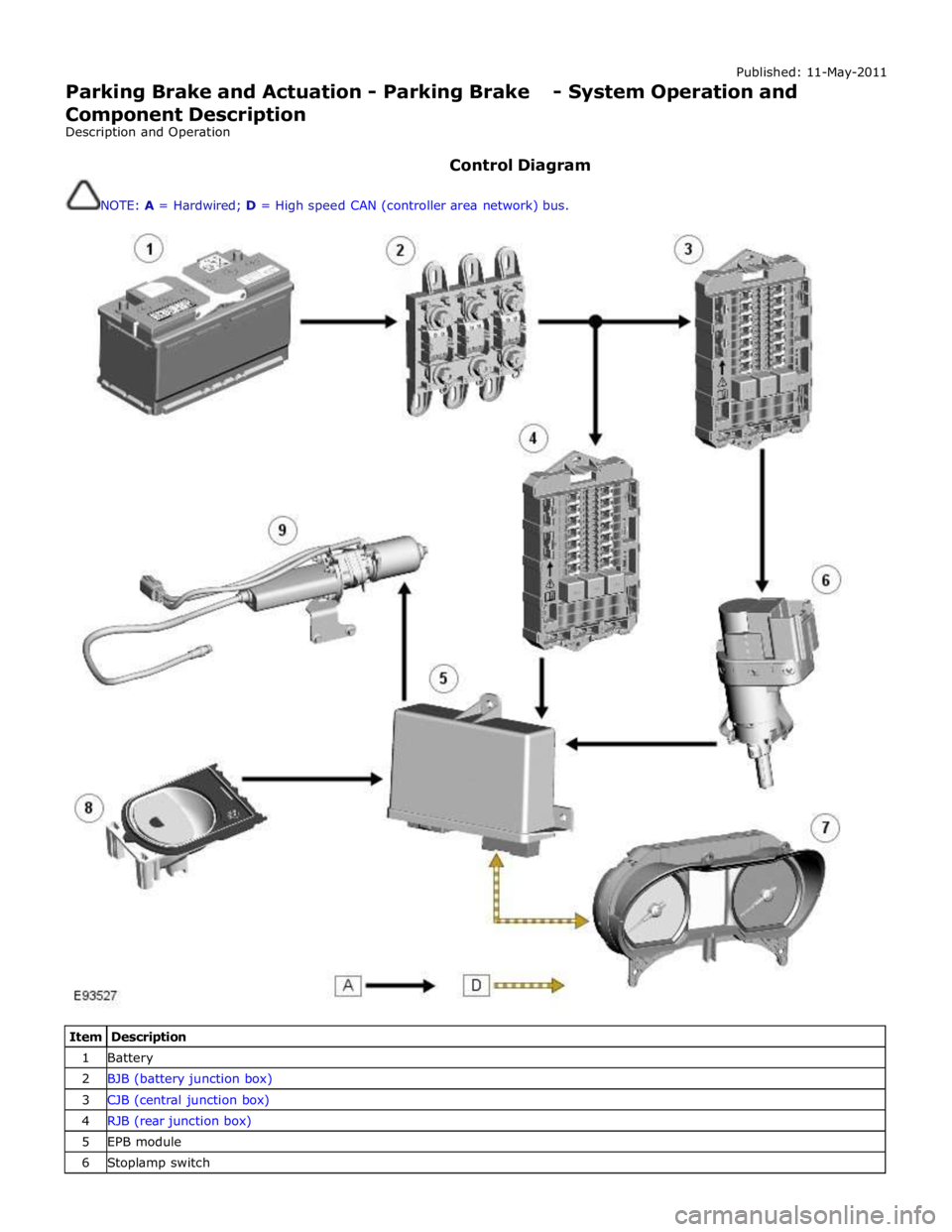
Published: 11-May-2011
Parking Brake and Actuation - Parking Brake - System Operation and
Component Description
Description and Operation
Control Diagram
NOTE: A = Hardwired; D = High speed CAN (controller area network) bus.
Item Description 1 Battery 2 BJB (battery junction box) 3 CJB (central junction box) 4 RJB (rear junction box) 5 EPB module 6 Stoplamp switch
Page 694 of 3039

7 Brake fluid level switch 8 LH rear wheel speed sensor 9 RH rear wheel speed sensor 10 RJB (rear junction box) 11 High mounted stop lamp 12 LH stop lamp 13 RH stop lamp 14 Diagnostic socket 15 TCM (transmission control module) 16 Electronic parking brake module 17 ECM (engine control module) 18 Instrument cluster 19 ABS (anti-lock brake system) module 20 JaguarDrive selector module 21 Adaptive damping control module 22 Adaptive speed control module 23 Yaw rate and lateral acceleration sensor 24 Roof opening panel motor/module 25 Brake booster vacuum sensor (3.0L vehicles only) 26 Steering angle sensor
Anti-Lock Brake System System Operation
ABS controls the speed of all road wheels to ensure optimum wheel slip when braking at the adhesion limit. The wheels are prevented from locking to retain effective steering control of the vehicle.
The brake pressures are modulated separately for each wheel. Rear brake pressures are controlled to maintain rear stability on
split friction surfaces.
Dynamic Stability Control
DSC (dynamic stability control) uses brakes and powertrain torque control to assist in maintaining the yaw stability of the
vehicle. While the ignition is energized the DSC function is permanently enabled, unless selected off using the DSC switch.
DSC enhances driving safety in abrupt maneuvers and in under-steer or over-steer situations that may occur in a bend. The
ABS module monitors the yaw rate and lateral acceleration of the vehicle, steering input and individual wheel speeds, then selectively applies individual brakes and signals for powertrain torque adjustments to reduce under-steer or over-steer
conditions.
In general:
In an under-steer situation the inner wheels are braked to counteract the yaw movement towards the outer edge of the
bend.
In an over-steer situation the outer wheels are braked to prevent the rear end of the vehicle from pushing towards the
outer edge of the bend.
The ABS module monitors the tracking stability of the vehicle using inputs from the wheel speed sensors, the steering angle sensor, and the yaw rate and lateral acceleration sensor. The tracking stability is compared with stored target data. Whenever
the tracking stability deviates from the target data, the ABS module intervenes by applying the appropriate control strategy. The following interactions occur in an intervention situation:
High speed CAN signal to the ECM, to reduce engine torque. Application of braking to the appropriate corner of the vehicle.
Trac DSC
TracDSC is an alternative setting of DSC with reduced system interventions. With TracDSC engaged, traction may be somewhat
increased, although stability may be reduced compared to normal DSC. TracDSC is intended for use only on dry tarmac, by
suitably experienced drivers and should not be selected for other surfaces or by drivers with insufficient skill and training to
operate the vehicle safely with the TracDSC function engaged.
The less restrictive TracDSC setting may be preferred, for example, by expert drivers engaged in high performance driving on
dry Tarmac surfaces such as tracks and circuits.
Switching between DSC and Trac DSC:
Page 778 of 3039

Published: 20-May-2014
Steering Column - Steering Column - System Operation and Component Description
Description and Operation
Control Diagram
NOTE: A = Hardwired; D = High speed CAN bus; N = Medium speed CAN bus
Item Description 1 Battery 2 BJB (battery junction box) - Megafuse (175A) 3 RJB (rear junction box) 4 Electric steering column lock 5 High Speed CAN (controller area network) bus to other vehicle systems 6 CJB (central junction box)
Page 1585 of 3039
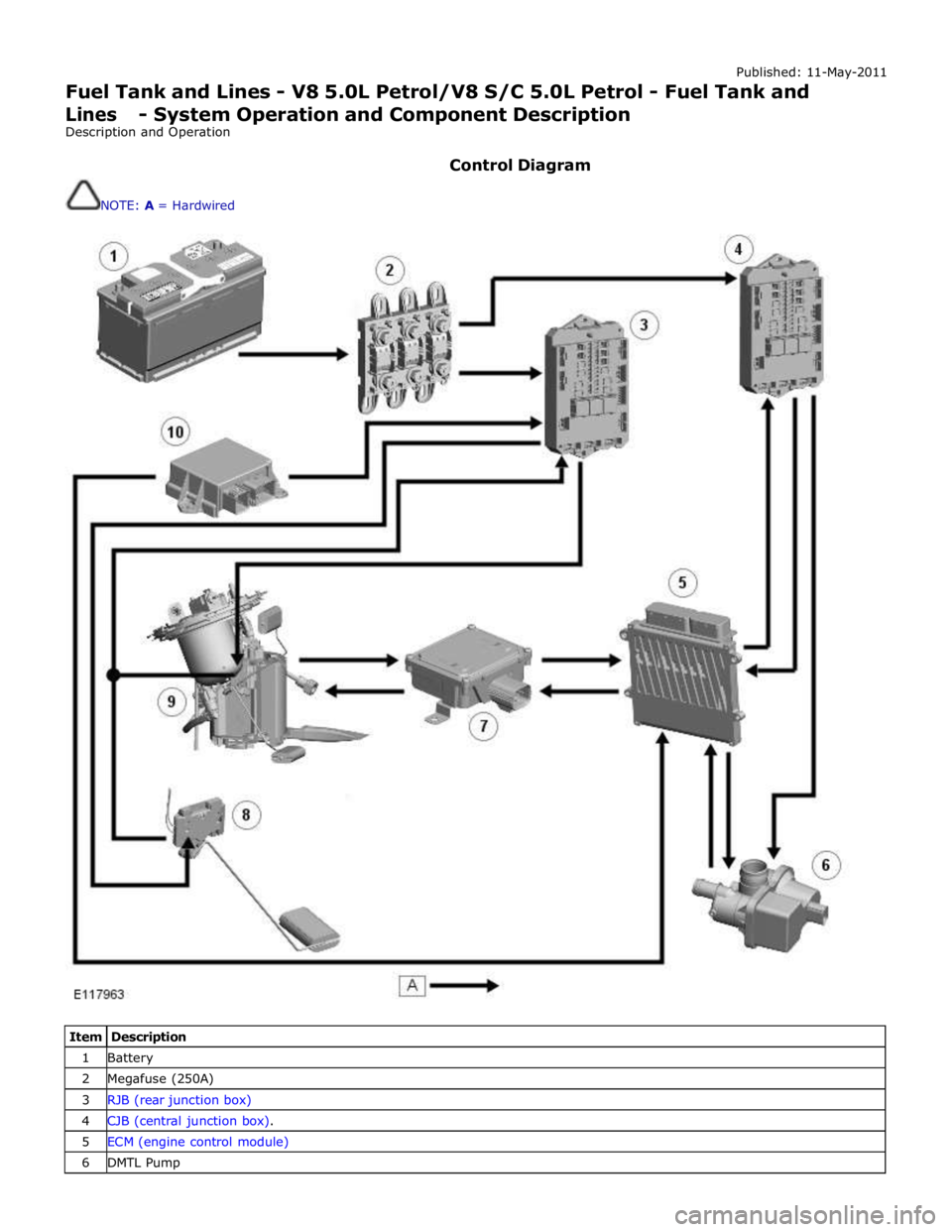
Published: 11-May-2011
Fuel Tank and Lines - V8 5.0L Petrol/V8 S/C 5.0L Petrol - Fuel Tank and Lines - System Operation and Component Description
Description and Operation
Control Diagram
NOTE: A = Hardwired
Item Description 1 Battery 2 Megafuse (250A) 3 RJB (rear junction box) 4 CJB (central junction box). 5 ECM (engine control module) 6 DMTL Pump