2010 JAGUAR XFR ABS
[x] Cancel search: ABSPage 1798 of 3039

DTC Description Possible Cause Action B100962
Ignition
Authorisation
LS CAN fault
CJB ignition, power and
ground supply circuits - short,
open circuit
Instrument cluster power and
ground supply circuits - short,
open circuit
Incorrect CJB or instrument
cluster installed
Target SID synchronization
error following re-programming
Noise/EMC related error Carry out any pinpoint tests associated with this DTC using
the manufacturer approved diagnostic system. Check CAN
communications between CJB and instrument cluster. Refer
to the electrical circuit diagrams and check CJB ignition,
power and ground supply circuits for short, open circuit and
instrument cluster power and ground supply circuits for short,
open circuit. Check correct CJB and instrument cluster
installed. Perform the Immobilisation application from the
Set-up menu using the manufacturer approved diagnostic
system. Check CAN network for interference/EMC related
issues B100987
Ignition
Authorisation
CJB ignition, power and
ground supply circuits - short,
open circuit
LS CAN fault
Instrument cluster power and
ground supply circuits - short,
open circuit
Low battery voltage <9 volts Carry out any pinpoint tests associated with this DTC using
the manufacturer approved diagnostic system. Refer to the
electrical circuit diagrams and check CJB ignition, power and
ground supply circuits for short, open circuit and instrument
cluster power and ground supply circuits for short, open
circuit. Check CAN communications between CJB and
instrument cluster. Check battery is in serviceable condition
and fully charged B100A62
Fuel Pump
Authorisation
LS CAN fault
RJB power and ground supply
circuits - short, open circuit
Instrument cluster power and
ground supply circuits - short,
open circuit
Incorrect RJB or instrument
cluster installed
Target SID synchronization
error following re-programming
Noise/EMC related error Carry out any pinpoint tests associated with this DTC using
the manufacturer approved diagnostic system. Check CAN
communications between RJB and instrument cluster. Refer
to the electrical circuit diagrams and check RJB power and
ground supply circuits for short, open circuit and instrument
cluster power and ground supply circuits for short, open
circuit. Check correct RJB and instrument cluster installed.
Perform the Immobilisation application from the Set-up menu
using the manufacturer approved diagnostic system. Check
CAN network for interference/EMC related issues B100A64
Fuel Pump
Authorisation
Target SID synchronization
error following re-programming
RJB power and ground supply
circuits - short, open circuit
LS CAN fault Carry out any pinpoint tests associated with this DTC using
the manufacturer approved diagnostic system. Perform the
Immobilisation application from the Set-up menu using the
manufacturer approved diagnostic system. Refer to the
electrical circuit diagrams and check RJB power and ground
supply circuits for short, open circuit. Check CAN
communications between RJB and instrument cluster B100A87
Fuel Pump
Authorisation
RJB power and ground supply
circuits - short, open circuit
LS CAN fault
Instrument cluster power and
ground supply circuits - short,
open circuit
Low battery voltage <9 volts Carry out any pinpoint tests associated with this DTC using
the manufacturer approved diagnostic system. Refer to the
electrical circuit diagrams and check RJB power and ground
supply circuits for short, open circuit and instrument cluster
power and ground supply circuits for short, open circuit.
Check CAN communications between RJB and instrument
cluster. Check battery is in serviceable condition and fully
charged B100B67
Column Lock
Ground
Authorisation
Algorithm based failure-signal
is incorrect after the event
Instrument cluster power and
ground supply circuits - short,
open circuit
LS CAN fault
RJB power and ground supply
circuits - short, open circuit
Vehicle speed present when
attempting to power ESCL
Engine speed present when
attempting to power ESCL
PowerMode status > 4 when
attempting to perform lock
action If a non start issue has not been identified, clear the DTC
and check vehicle starts correctly. If a non start issue has
been identified run the manufacturers approved diagnostic
system Start Authorisation Application. Carry out any
pinpoint tests associated with this DTC using the
manufacturer approved diagnostic system. Refer to the
electrical circuit diagrams and check RJB power and ground
supply circuits for short, open circuit and instrument cluster
power and ground supply circuits for short, open circuit.
Check CAN communications between RJB and instrument
cluster. Check for invalid vehicle speed signal from
ABS/instrument cluster gateway. Check for invalid engine
speed signal from ECM/instrument cluster gateway. Check for
invalid signal from CJB B100B87
Column Lock
Ground
Authorisation
Instrument cluster power and
ground supply circuits - short,
open circuit
LS CAN fault
RJB power and ground supply
circuits - short, open circuit Carry out any pinpoint tests associated with this DTC using
the manufacturer approved diagnostic system. Refer to the
electrical circuit diagrams and check RJB power and ground
supply circuits for short, open circuit and instrument cluster
power and ground supply circuits for short, open circuit.
Check CAN communications between RJB and instrument
cluster
Page 1799 of 3039

DTC Description Possible Cause Action B100C67
Column Lock
Supply
Authorisation
Instrument cluster power and
ground supply circuits - short,
open circuit
LS CAN fault
CJB power and ground supply
circuits - short, open circuit
Vehicle speed present when
attempting to power ESCL
Engine speed present when
attempting to power ESCL
PowerMode status > 4 when
attempting to perform lock
action Carry out any pinpoint tests associated with this DTC using
the manufacturer approved diagnostic system. Refer to the
electrical circuit diagrams and check CJB power and ground
supply circuits for short, open circuit and instrument cluster
power and ground supply circuits for short, open circuit.
Check CAN communications between CJB and instrument
cluster. Check for invalid vehicle speed signal from
ABS/instrument cluster gateway. Check for invalid engine
speed signal from ECM/instrument cluster gateway. Check for
invalid signal from CJB B100C87
Column Lock
Supply
Authorisation
Instrument cluster power and
ground supply circuits - short,
open circuit
LS CAN fault
CJB power and ground supply
circuits - short, open circuit Carry out any pinpoint tests associated with this DTC using
the manufacturer approved diagnostic system. Refer to the
electrical circuit diagrams and check CJB power and ground
supply circuits for short, open circuit and instrument cluster
power and ground supply circuits for short, open circuit.
Check CAN communications between CJB and instrument
cluster B100D62
Column Lock
Authorisation
CAN fault
ESCL power and ground supply
circuits - short, open circuit
Instrument cluster power and
ground supply circuits - short,
open circuit
Incorrect ESCL or instrument
cluster installed
Target SID synchronization
error following re-programming
Noise/EMC related error Carry out any pinpoint tests associated with this DTC using
the manufacturer approved diagnostic system. Check CAN
communication between Electronic Steering Column Lock and
instrument cluster. Refer to the electrical circuit diagrams
and check Electronic Steering Column Lock power and ground
supply circuits for short, open circuit and Instrument cluster
power and ground supply circuits for short, open circuit.
Check correct Electronic Steering Column Lock and instrument
cluster installed. Perform the Immobilisation application from
the Set-up menu using the manufacturer approved diagnostic
system. Check CAN network for interference/EMC related
issues B100D64
Column Lock
Authorisation
Algorithm based failure-signal
plausibility failure
CAN fault
ESCL power and ground supply
circuits - short, open circuit
Instrument cluster power and
ground supply circuits - short,
open circuit If the customer has not reported a non start issue, clear the
DTC and check vehicle starts correctly. If a non start issue
has been reported run the manufacturers approved
diagnostic system Start Authorisation Application and follow
the actions required for this DTC. Carry out any pinpoint
tests associated with this DTC using the manufacturer
approved diagnostic system. Check CAN communication
between Electronic Steering Column Lock and instrument
cluster (check transmission out speed, vehicle speed, engine
speed, gear position and powermode signals to Electronic
Steering Column Lock). Refer to the electrical circuit
diagrams and check Electronic Steering Column Lock power
and ground supply circuits for short, open circuit and
Instrument cluster power and ground supply circuits for
short, open circuit. B100D87
Column Lock
Authorisation -
Missing message
Missing message
CAN fault
No response from electric
steering column lock control
module, instrument cluster,
central junction box Battery
voltage at electric
steering column lock control
module too low
Electric steering column lock
control module, instrument
cluster, central junction box
fault
Clear DTC, repeatedly lock and unlock car using the
key fob and retest. Check for related DTCs and refer
to the relevant DTC index
If the fault is cleared, notify the customer that the
steering column lock may fail to unlock if the vehicle
is parked with a high steering angle or with the road
wheel against a curb. If the column lock is failing to
disengage, the customer may be able to rectify this
by rotating the steering wheel while pressing the
engine start button
If fault persists, complete a CAN network integrity
test using the manufacturers approved diagnostic
system. Alternatively, refer to the electrical circuit
diagrams and check CAN circuits between the central
junction box, the instrument cluster and the
electronic steering column lock. Refer to the electrical
circuit diagrams and check the central junction box,
the instrument cluster and the electronic steering
column lock power and ground supply circuits for short
circuit to ground, short circuit to power, open circuit,
high resistance. Repair circuit(s) as required. Clear
DTC, perform an on demand self-test and retest
If fault persists, check that the vehicle battery supply
voltage is between 9-16 volts. Rectify as required
Page 1804 of 3039

DTC Description Possible Cause Action B1D3615
Turn Indicator
Switch
Direction indicator switch
circuit - short to power, open
circuit Carry out any pinpoint tests associated with this DTC using
the manufacturer approved diagnostic system. Refer to the
electrical circuit diagrams and check direction indicator
switch circuit for short to power, open circuit B1D3711
Wiper Switch
Connection Circuit
Flick wipe switch circuit - short
to ground Refer to the electrical circuit diagrams and check flick wipe
switch circuit for short to ground B1D3715
Wiper Switch
Connection Circuit
Flick wipe switch circuit - short
to power, open circuit Carry out any pinpoint tests associated with this DTC using
the manufacturer approved diagnostic system. Refer to the
electrical circuit diagrams and check flick wipe switch circuit
for short to power, open circuit C111064
Power steering
Calibration Data
Invalid VAPS curve loaded Re-configure the instrument cluster as new to download
VAPS curve data P063511
Power Steering
Control Circuit
VAPS ignition supply circuit -
short to ground Refer to the electrical circuit diagrams and check VAPS
ignition supply circuit for short to ground P063512
Power Steering
Control Circuit
VAPS ignition supply circuit -
short to power Refer to the electrical circuit diagrams and check VAPS
ignition supply circuit for short to power P063513
Power Steering
Control Circuit
VAPS ignition supply circuit -
open circuit Refer to the electrical circuit diagrams and check VAPS
ignition supply circuit for open circuit P063522
Power Steering
Control Circuit
First valid received speed
value above threshold Check ABS module for DTCs and refer to relevant DTC Index P063544
Power Steering
Control Circuit
Data memory failure Re-configure the instrument cluster as new to download
VAPS curve data U000188
High Speed CAN
Communication
Bus
Bus Off Carry out any pinpoint tests associated with this DTC using
the manufacturer approved diagnostic system. Carry out CAN
network integrity test using the manufacturer approved
diagnostic system. Refer to the electrical circuit diagrams
and check HS CAN network to instrument cluster U001088
Medium Speed
CAN
Communication
Bus
Bus Off Carry out any pinpoint tests associated with this DTC using
the manufacturer approved diagnostic system. Carry out CAN
network integrity test using the manufacturer approved
diagnostic system. Refer to the electrical circuit diagrams
and check MS CAN network to instrument cluster U010000
Lost
Communication
With ECM/PCM “A”
Loss of CAN communication
with ECM Carry out any pinpoint tests associated with this DTC using
the manufacturer approved diagnostic system. Check ECM for
DTCs and refer to the relevant DTC Index U010100
Lost
Communication
with TCM
Loss of CAN communication
with TCM Carry out any pinpoint tests associated with this DTC using
the manufacturer approved diagnostic system. Check TCM for
DTCs and refer to the relevant DTC Index U010300
Lost
Communication
With Gear Shift
Module
Loss of CAN communication
with transmission shift module Carry out any pinpoint tests associated with this DTC using
the manufacturer approved diagnostic system. Check
transmission shift module for DTCs and refer to the relevant
DTC Index U010400
Lost
Communication
With Cruise
Control Module
Loss of CAN communication
with speed control module Carry out any pinpoint tests associated with this DTC using
the manufacturer approved diagnostic system. Check speed
control module for DTCs and refer to the relevant DTC Index U012100
Lost
Communication
With Anti-Lock
Brake System
(ABS) Control
Module
Loss of CAN communication
with ABS module Carry out any pinpoint tests associated with this DTC using
the manufacturer approved diagnostic system. Check ABS
module for DTCs and refer to the relevant DTC Index U012700
Lost
Communication
With Tire
Pressure Monitor
Module
Loss of CAN communication
with tire pressure monitoring
module Carry out any pinpoint tests associated with this DTC using
the manufacturer approved diagnostic system. Check tire
pressure monitoring module for DTCs and refer to the
relevant DTC Index U012800 Lost
Loss of CAN communication Carry out any pinpoint tests associated with this DTC using Communication the manufacturer approved diagnostic system. Check parking With Park Brake with parking brake module
brake module for DTCs and refer to the relevant DTC Index Control Module
Page 1823 of 3039
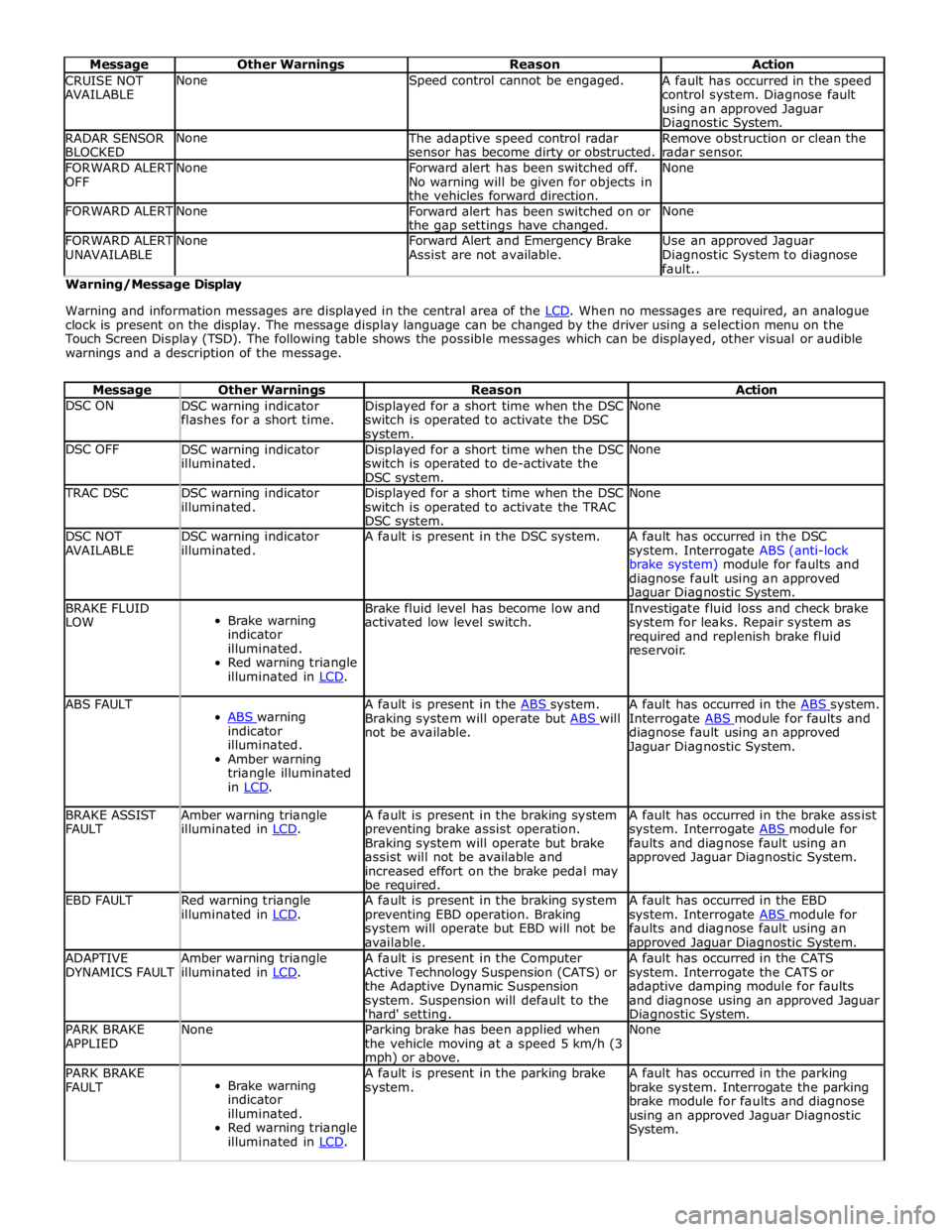
Message Other Warnings Reason Action CRUISE NOT
AVAILABLE None Speed control cannot be engaged.
A fault has occurred in the speed
control system. Diagnose fault
using an approved Jaguar Diagnostic System. RADAR SENSOR
BLOCKED None
The adaptive speed control radar
sensor has become dirty or obstructed. Remove obstruction or clean the
radar sensor. FORWARD ALERT
OFF None
Forward alert has been switched off.
No warning will be given for objects in
the vehicles forward direction. None FORWARD ALERT None
Forward alert has been switched on or
the gap settings have changed. None FORWARD ALERT
UNAVAILABLE None
Forward Alert and Emergency Brake
Assist are not available. Use an approved Jaguar
Diagnostic System to diagnose
fault.. Warning/Message Display
Warning and information messages are displayed in the central area of the LCD. When no messages are required, an analogue clock is present on the display. The message display language can be changed by the driver using a selection menu on the
Touch Screen Display (TSD). The following table shows the possible messages which can be displayed, other visual or audible
warnings and a description of the message.
Message Other Warnings Reason Action DSC ON
DSC warning indicator
flashes for a short time. Displayed for a short time when the DSC
switch is operated to activate the DSC system. None DSC OFF
DSC warning indicator
illuminated. Displayed for a short time when the DSC
switch is operated to de-activate the
DSC system. None TRAC DSC
DSC warning indicator
illuminated. Displayed for a short time when the DSC
switch is operated to activate the TRAC
DSC system. None DSC NOT
AVAILABLE DSC warning indicator
illuminated. A fault is present in the DSC system.
A fault has occurred in the DSC
system. Interrogate ABS (anti-lock
brake system) module for faults and
diagnose fault using an approved Jaguar Diagnostic System. BRAKE FLUID
LOW
Brake warning
indicator
illuminated.
Red warning triangle
illuminated in LCD. Brake fluid level has become low and
activated low level switch. Investigate fluid loss and check brake
system for leaks. Repair system as
required and replenish brake fluid
reservoir. ABS FAULT
ABS warning indicator
illuminated.
Amber warning
triangle illuminated
in LCD. A fault is present in the ABS system. Braking system will operate but ABS will not be available. A fault has occurred in the ABS system. Interrogate ABS module for faults and diagnose fault using an approved
Jaguar Diagnostic System. BRAKE ASSIST
FAULT Amber warning triangle
illuminated in LCD. A fault is present in the braking system
preventing brake assist operation.
Braking system will operate but brake
assist will not be available and
increased effort on the brake pedal may
be required. A fault has occurred in the brake assist
system. Interrogate ABS module for faults and diagnose fault using an
approved Jaguar Diagnostic System. EBD FAULT
Red warning triangle
illuminated in LCD. A fault is present in the braking system
preventing EBD operation. Braking
system will operate but EBD will not be
available. A fault has occurred in the EBD
system. Interrogate ABS module for faults and diagnose fault using an approved Jaguar Diagnostic System. ADAPTIVE
DYNAMICS FAULT Amber warning triangle
illuminated in LCD. A fault is present in the Computer
Active Technology Suspension (CATS) or
the Adaptive Dynamic Suspension
system. Suspension will default to the
'hard' setting. A fault has occurred in the CATS
system. Interrogate the CATS or
adaptive damping module for faults
and diagnose using an approved Jaguar Diagnostic System. PARK BRAKE
APPLIED None
Parking brake has been applied when
the vehicle moving at a speed 5 km/h (3 mph) or above. None PARK BRAKE
FAULT
Brake warning
indicator
illuminated.
Red warning triangle
illuminated in LCD. A fault is present in the parking brake
system. A fault has occurred in the parking
brake system. Interrogate the parking
brake module for faults and diagnose
using an approved Jaguar Diagnostic
System.
Page 1828 of 3039
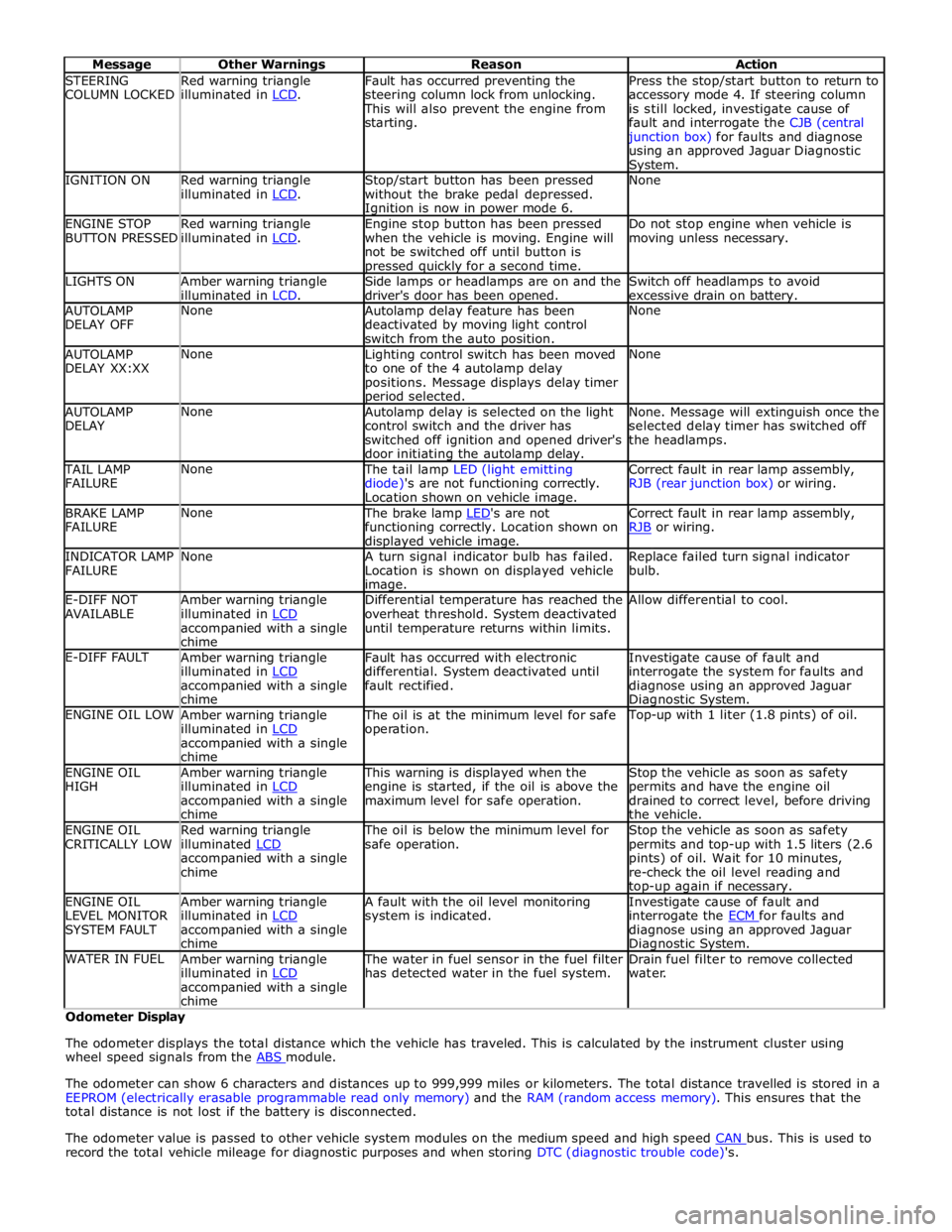
STEERING
COLUMN LOCKED Red warning triangle
illuminated in LCD. Fault has occurred preventing the
steering column lock from unlocking. This will also prevent the engine from
starting. Press the stop/start button to return to
accessory mode 4. If steering column
is still locked, investigate cause of
fault and interrogate the CJB (central junction box) for faults and diagnose
using an approved Jaguar Diagnostic System. IGNITION ON
Red warning triangle
illuminated in LCD. Stop/start button has been pressed
without the brake pedal depressed. Ignition is now in power mode 6. None ENGINE STOP
BUTTON PRESSED Red warning triangle
illuminated in LCD. Engine stop button has been pressed
when the vehicle is moving. Engine will
not be switched off until button is pressed quickly for a second time. Do not stop engine when vehicle is
moving unless necessary. LIGHTS ON
Amber warning triangle
illuminated in LCD. Side lamps or headlamps are on and the
driver's door has been opened. Switch off headlamps to avoid
excessive drain on battery. AUTOLAMP
DELAY OFF None
Autolamp delay feature has been
deactivated by moving light control
switch from the auto position. None AUTOLAMP
DELAY XX:XX None
Lighting control switch has been moved
to one of the 4 autolamp delay
positions. Message displays delay timer period selected. None AUTOLAMP
DELAY None
Autolamp delay is selected on the light
control switch and the driver has
switched off ignition and opened driver's
door initiating the autolamp delay. None. Message will extinguish once the
selected delay timer has switched off
the headlamps. TAIL LAMP
FAILURE None The tail lamp LED (light emitting
diode)'s are not functioning correctly.
Location shown on vehicle image. Correct fault in rear lamp assembly,
RJB (rear junction box) or wiring. BRAKE LAMP
FAILURE None The brake lamp LED's are not functioning correctly. Location shown on displayed vehicle image. Correct fault in rear lamp assembly,
RJB or wiring. INDICATOR LAMP
FAILURE None
A turn signal indicator bulb has failed.
Location is shown on displayed vehicle image. Replace failed turn signal indicator
bulb. E-DIFF NOT
AVAILABLE Amber warning triangle
illuminated in LCD accompanied with a single
chime Differential temperature has reached the
overheat threshold. System deactivated
until temperature returns within limits. Allow differential to cool. E-DIFF FAULT
Amber warning triangle
illuminated in LCD accompanied with a single
chime Fault has occurred with electronic
differential. System deactivated until
fault rectified. Investigate cause of fault and
interrogate the system for faults and
diagnose using an approved Jaguar Diagnostic System. ENGINE OIL LOW
Amber warning triangle
illuminated in LCD accompanied with a single
chime The oil is at the minimum level for safe
operation. Top-up with 1 liter (1.8 pints) of oil. ENGINE OIL
HIGH Amber warning triangle
illuminated in LCD accompanied with a single
chime This warning is displayed when the
engine is started, if the oil is above the
maximum level for safe operation. Stop the vehicle as soon as safety
permits and have the engine oil
drained to correct level, before driving
the vehicle. ENGINE OIL
CRITICALLY LOW Red warning triangle
illuminated LCD accompanied with a single
chime The oil is below the minimum level for
safe operation. Stop the vehicle as soon as safety
permits and top-up with 1.5 liters (2.6
pints) of oil. Wait for 10 minutes,
re-check the oil level reading and top-up again if necessary. ENGINE OIL
LEVEL MONITOR
SYSTEM FAULT Amber warning triangle
illuminated in LCD accompanied with a single
chime A fault with the oil level monitoring
system is indicated. Investigate cause of fault and
interrogate the ECM for faults and diagnose using an approved Jaguar Diagnostic System. WATER IN FUEL
Amber warning triangle
illuminated in LCD accompanied with a single
chime The water in fuel sensor in the fuel filter
has detected water in the fuel system. Drain fuel filter to remove collected
water. Odometer Display
The odometer displays the total distance which the vehicle has traveled. This is calculated by the instrument cluster using
wheel speed signals from the ABS module.
The odometer can show 6 characters and distances up to 999,999 miles or kilometers. The total distance travelled is stored in a
EEPROM (electrically erasable programmable read only memory) and the RAM (random access memory). This ensures that the
total distance is not lost if the battery is disconnected.
The odometer value is passed to other vehicle system modules on the medium speed and high speed CAN bus. This is used to record the total vehicle mileage for diagnostic purposes and when storing DTC (diagnostic trouble code)'s.
Page 1839 of 3039

DTC Description Possible Causes Action Refer to the electrical circuit diagrams and check the
left side harness between the left side mirror and left
hand module U023300
Lost
Communication
With Side Obstacle
Detection Control
Module - Right
CAN bus circuit fault
Harness fault between
right side mirror and right
side module
Refer to the electrical circuit diagrams and check the
power and ground connections to the module. Using
the manufacturer approved diagnostic system,
complete a CAN network integrity test. Refer to the
electrical circuit diagrams and check the CAN network
between the left Blind Spot Monitoring System Module
and the right Blind Spot Monitoring System Module
Refer to the electrical circuit diagrams and check the
right side harness between the right side mirror and
right hand module U030000
Internal Control
Module Software
Incompatibility
RJB car configuration data
is not compatible with the
Blindspot Monitoring
module Check RJB for related DTCs and refer to the relevant DTC
Index. Clear DTCs and re-test. If DTC still logged, re-configure
the RJB using the manufacturer approved diagnostic system.
Clear DTCs and re-test. If DTC still logged, re-configure the
Blindspot Monitoring module using the manufacturer approved
diagnostic system. Clear DTC and re-test, if still logged
suspect the Blindspot Monitoring module. Check and install a
new module as required, refer to the new module/component
installation note at the top of the DTC Index U041568
Invalid Data
Received From
Anti-Lock Brake
System Control
Module
Event information Check ABS module for related DTCs and correct function, refer
to the relevant DTC Index U042268
Invalid Data
Received From Body
Control Module
Event information Check CJB for related DTCs and correct function, refer to the
relevant DTC Index U042368
Invalid Data
Received From
Instrument Panel
Control Module
Event information Check instrument cluster for related DTCs and correct function,
refer to the relevant DTC Index U210000
Initial Configuration
Not Complete
No configuration has been
previously set Check RJB for related DTCs and refer to the relevant DTC
Index U210100
Control Module
Configuration
Incompatible
Data sent from RJB is
invalid Check RJB for related DTCs and refer to the relevant DTC
Index. Check/amend Car Configuration File using the
manufacturer approved diagnostic system U300044 Control Module
Data memory failure Cycle the ignition and check if the DTC is still logged. If DTC
remains suspect the module, refer to the new
module/component installation note at the top of the DTC
Index U300047 Control Module
Watchdog/safety Micro
controller failure Cycle the ignition and check if the DTC is still logged. If DTC
remains suspect the module, refer to the new
module/component installation note at the top of the DTC
Index U300049 Control Module
Internal electronic failure Clear DTC, cycle ignition and retest. If fault persists, check
and install a new Blindspot Monitoring module as required,
refer to the new module/component installation note at the top of the DTC Index U300281
Vehicle
Identification
Number
Vehicle/component mis-
match. Corrupt VIN
data being transmitted,
suspect module previously
installed to other vehicle Check RJB has not been previously installed to other vehicle.
Install original/new module as required, refer to the new
module/component installation note at the top of the DTC
Index. Check RJB for DTCs and refer to the relevant DTC Index U300362 Battery Voltage
Mis-match in battery
voltage, of 2 volts or
more, between Blindspot
Monitoring module and RJB Carry out any pinpoint tests associated with this DTC using
the manufacturer approved diagnostic system
Page 1848 of 3039
information from other systems:
ABS (anti-lock brake system) module - Road speed signal
TCM (transmission control module) - Reverse gear engaged signal
Trailer module - Trailer attached to vehicle
The module also outputs messages on the medium speed CAN bus which are received by the integrated audio module. The integrated audio module processes these messages and converts them into Media Orientated System Transport (MOST) signals
which are passed to the audio system power amplifier. These signals are then used by the power amplifier to emit the
applicable warning tones from the front or rear audio speakers when an object is detected by the front or rear parking aid
sensors. A warning tone can also be emitted to alert the driver to a fault in the parking aid system.
The control module has a diagnostic connection via the medium speed CAN bus to enable faults to be retrieved using the
Jaguar approved diagnostic equipment. Additionally an on-board diagnostic routine within the control module constantly
monitors the system and alerts the driver to a system fault by emitting a 3 second continuous tone through the rear audio
system speakers when the ignition is switched on. If front parking aid sensors are fitted, the control switch LED will also flash
6 times.
Parking Aid Sensors
Four ultrasonic sensors are located in the front (if fitted) and rear bumpers.
Each sensor has a three pin connector which mates with a bumper harness, which in turn is connected to the main body
harness. Three pins provide for power supply, ground and signal lines to and from the parking aid module.
The parking aid module controls the operation of each sensor using a digital output on the signal line. The module controls the
sensor in one of two modes; combined transmitter and receiver mode or receiver mode only.
Parking Aid Switch
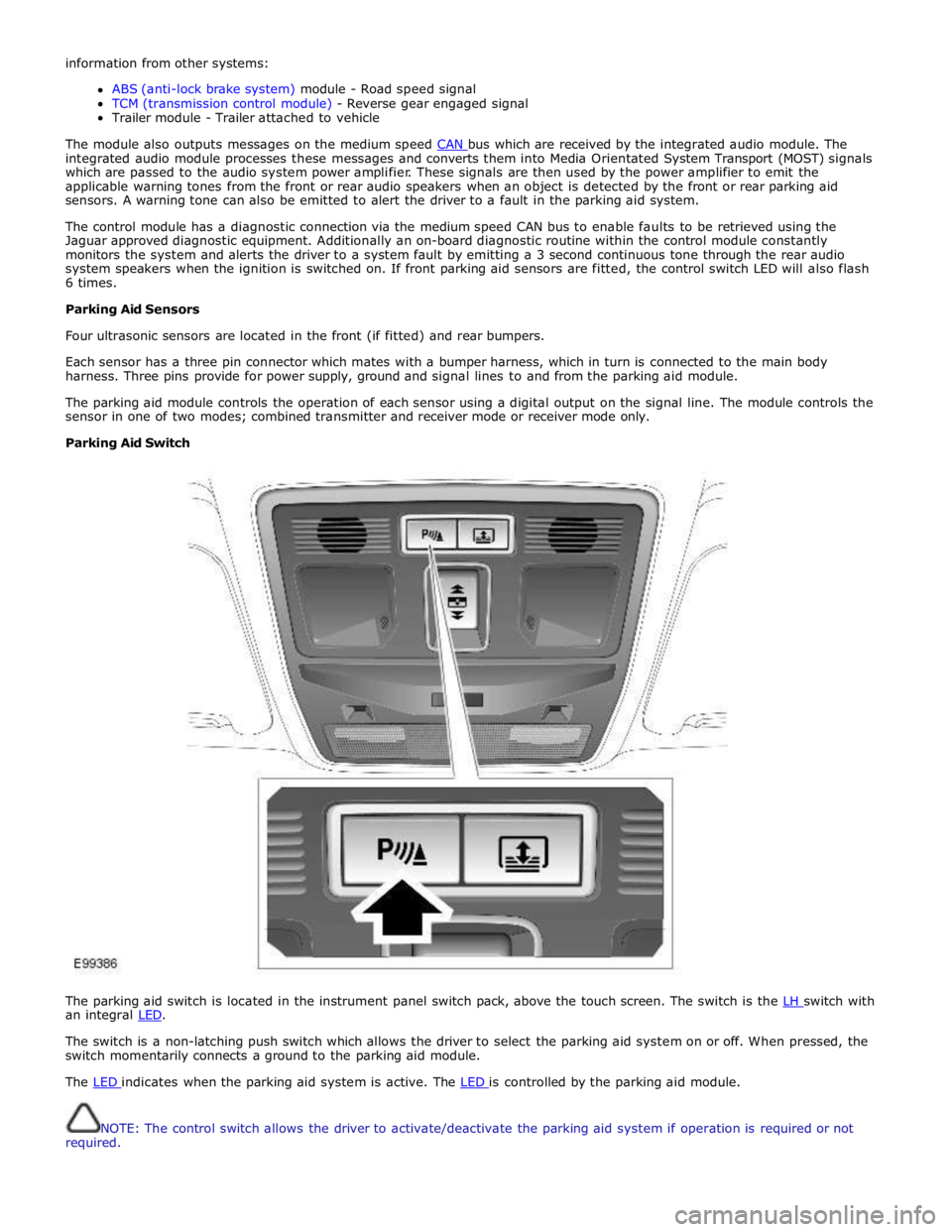
The parking aid switch is located in the instrument panel switch pack, above the touch screen. The switch is the LH switch with an integral LED.
The switch is a non-latching push switch which allows the driver to select the parking aid system on or off. When pressed, the
switch momentarily connects a ground to the parking aid module.
The LED indicates when the parking aid system is active. The LED is controlled by the parking aid module.
NOTE: The control switch allows the driver to activate/deactivate the parking aid system if operation is required or not
required.
Page 1856 of 3039
Parking Aid - Proximity Camera
Diagnosis and Testing
Principles of Operation Published: 30-Apr-2014
For a detailed description of the rear view camera system, refer to the relevant Description and Operation section of the
workshop manual.
Inspection and Verification
CAUTION: Diagnosis by substitution from a donor vehicle is NOT acceptable. Substitution of control modules does not
guarantee confirmation of a fault, and may also cause additional faults in the vehicle being tested and/or the donor vehicle.
NOTES:
If a control module or a component is suspect and the vehicle remains under manufacturer warranty, refer to the Warranty
Policy and Procedures manual, or determine if any prior approval programme is in operation, prior to the installation of a new
module/component.
When performing voltage or resistance tests, always use a digital multimeter accurate to three decimal places, and with
an up-to-date calibration certificate. When testing resistance always take the resistance of the digital multimeter leads into
account.
Check and rectify basic faults before beginning diagnostic routines involving pinpoint tests.
1. Verify the customer concern
2. Visually inspect for obvious signs of damage and system integrity
Visual Inspection
Mechanical Electrical
Touch screen
Rear view camera
Fuses
Wiring harnesses and connectors
Touch screen
Rear view camera
3. If an obvious cause for an observed or reported concern is found, correct the cause (if possible) before proceeding to
the next step
4. If the cause is not visually evident, verify the symptom and refer to the Symptom Chart, alternatively check for
Diagnostic Trouble Codes (DTCs) and refer to the DTC Index
5. Check DDW for open campaigns. Refer to the corresponding bulletins and SSMs which may be valid for the specific
customer complaint and carry out the recommendations as required
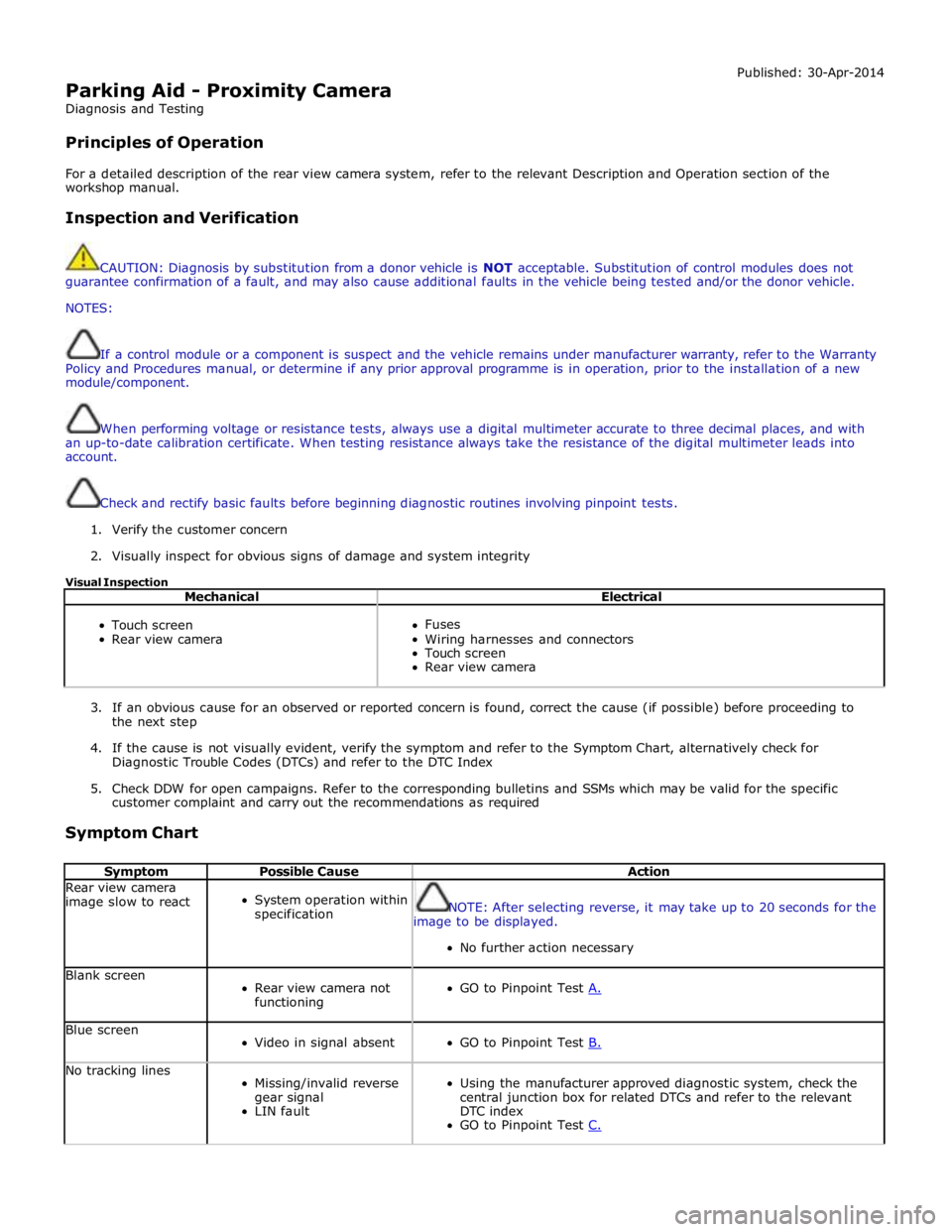
Symptom Chart
Symptom Possible Cause Action Rear view camera
image slow to react
System operation within
specification
NOTE: After selecting reverse, it may take up to 20 seconds for the
image to be displayed.
No further action necessary Blank screen
Rear view camera not
functioning
GO to Pinpoint Test A. Blue screen
Video in signal absent
GO to Pinpoint Test B. No tracking lines
Missing/invalid reverse
gear signal
LIN fault
Using the manufacturer approved diagnostic system, check the
central junction box for related DTCs and refer to the relevant
DTC index
GO to Pinpoint Test C.