Page 82 of 441
If equipped
Canadian models only
This indicator comes on when the
security system is set. See page
f or more inf ormation on the
security system.
This indicator comes on f or a f ew
seconds when you turn the ignition
switch to the ON (II) position. It
remindsyouthatitistimetotake
your vehicle in f or scheduled
maintenance. The maintenance main
items and sub items will be displayed
in the inf ormation display. See page
f or more inf ormation on the
maintenance minder.
This indicator goes of f when your
dealer resets it after completing the
required maintenance service. This indicator comes on when the washer f luid level is low. Add washer
f luid when you see this indicator
(see page ).
341
354264
Security System Indicator
Maintenance Minder
Indicator Washer Level Indicator
Instrument Panel Indicators
Inst rument s and Cont rols
67
SECURITY SYSTEM INDICATOR
WASHER LEVEL INDICATOR
Table of Contents
Page 83 of 441
Gauges
68
SELECT/RESET KNOB
TACHOMETER
OUTSIDE TEMPERATURE INDICATOR
INFORMATION DISPLAY
SPEEDOMETER
TRIP METER
TEMPERATURE GAUGE
FUEL GAUGE
U.S. model is shown. INSTANT FUEL ECONOMY
ODOMETER/AVERAGE FUEL EC ONOMY/
CHECK FUEL CAP MESSAGE
Table of Contents
Page 85 of 441
This display shows the instant f uel
economy you are getting.When either of the trip meters (trip
A or B) is displayed, your vehicle’s
average f uel economy since you last
resetthattripmetercanbeshown
on the inf ormation display (mpg on
U.S. models and l/100 km on
Canadian models). This number is
updated once per 10 seconds. To see
the average f uel economy, press and
release the select/reset knob
repeatedly.
When you reset a trip meter, the
average f uel economy f or that trip
meter also resets.This display shows the estimated
distance you can travel on the fuel
remaining in the tank.
This distance is estimated f rom the
f uel economy you have achieved
over the last f ew miles (kilometers),
so it will vary with changes in speed,
traffic condition, etc.
It shows the number of mpg (U.S.)
or l/100 km (Canada). Range (Estimated Distance)
Instant Fuel Economy Average Fuel Economy
Gauges
70
U.S. model is shown
INSTANT FUEL ECONOMY
Table of Contents
Page 87 of 441

�¶�¶�µ�µ�µ�µ�µ�µ�µ�µ
The temperature sensor is in the
f ront bumper. Theref ore, the
temperature reading can be af f ected
by heat ref lection f rom the road
surf ace, engine heat, and the
exhaust f rom surrounding traf f ic.
This can cause an incorrect
temperature reading when your
speed is under 19 mph (30 km/h).
If the outside temperature is
incorrectly displayed, you can adjust
it up to 5°F in U.S. models ( 3°C
in Canadian models) warmer or
cooler.
The sensor delays the display update
until it reaches the correct outside
temperature. This may take several
minutes.
In certain weather conditions,
temperature readings near f reezing
(32°F, 0°C) could mean that ice is
f orming on the road surf ace.
To adjust the outside temperature
display, press and hold the select/
reset knob f or 10 seconds. The
display changes as shown above.
Select the outside temperature
indicator by turning the select/reset
knob. The display begins to blink.
Pushthesameknobtoenterthis
setting, then turn it to adjust the
temperature. The f ollowing
sequence will appear f or each: 0, 1, 2,
3, 4, 5, 5, 4, 3, 2, 1, 0 (U.S.)
or 0, 1, 2, 3, 3, 2, 1, 0 (Canada). When it reaches the desired value,
push the select/reset knob to enter
the setting. You should see the new
outside temperature displayed.
The temperature must be
stabilized bef ore doing this
procedure.
Gauges
72
NOTE:
Table of Contents
Page 90 of 441
�µ
�µ
�µ �µ
�µ �µ �µ
�µ �µ
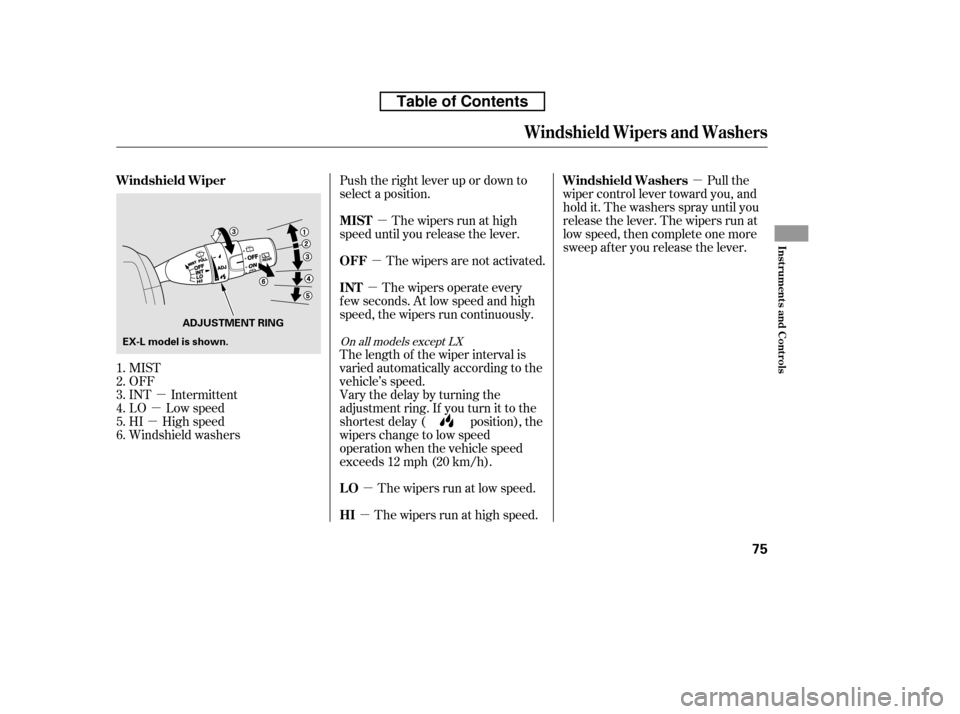
MIST
OFF
INT Intermittent
LO Low speed
HI High speed
Windshield washers Pull the
wiper control lever toward you, and
hold it. The washers spray until you
release the lever. The wipers run at
low speed, then complete one more
sweep after you release the lever.
The wipers run at high speed. The wipers run at low speed.
Vary the delay by turning the
adjustment ring. If you turn it to the
shortest delay ( position), the
wipers change to low speed
operation when the vehicle speed
exceeds 12 mph (20 km/h).
The length of the wiper interval is
varied automatically according to the
vehicle’s speed.
The wipers operate every
f ew seconds. At low speed and high
speed, the wipers run continuously. The wipers are not activated.
Push the right lever up or down to
select a position.
The wipers run at high
speed until you release the lever.
1.2.3.4.5.6.
On all models except LX
Windshield Wiper Windshield Washers
HI
LO
INT
OFF
MIST
Windshield Wipers and Washers
Inst rument s and Cont rols
75
ADJUSTMENT RING
EX-L model is shown.
Table of Contents
Page 91 of 441
�Î
�Î
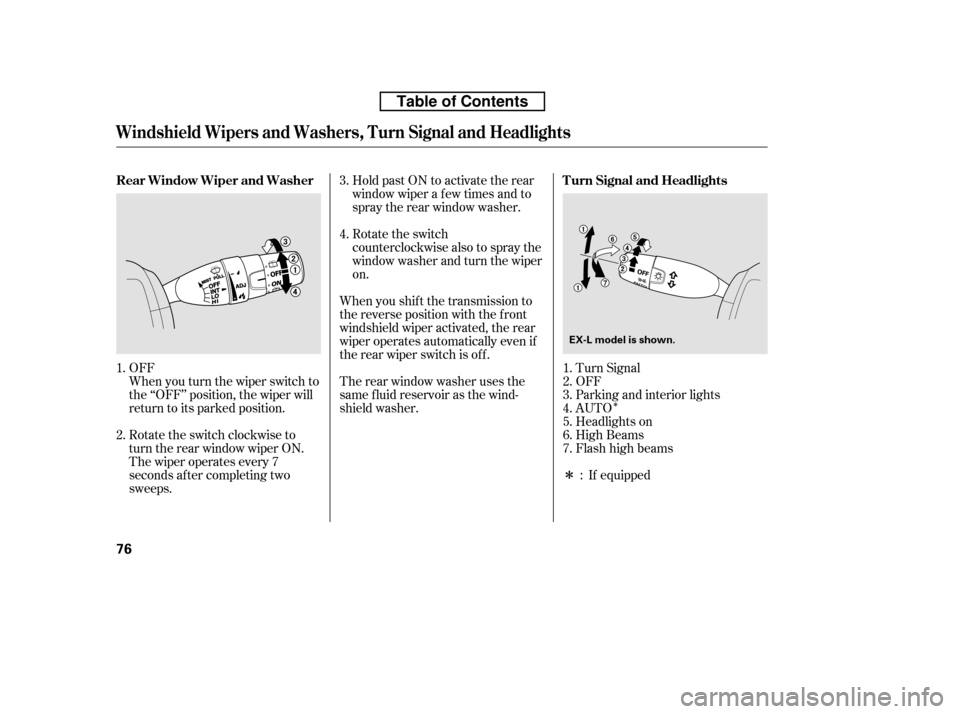
When you turn the wiper switch to
the ‘‘OFF’’ position, the wiper will
return to its parked position.
OFF
Turn Signal
OFF
Parking and interior lights
AUTO
Headlights on
High Beams
Flashhighbeams
Rotate the switch
counterclockwise also to spray the
window washer and turn the wiperon.
When you shif t the transmission to
the reverse position with the f ront
windshield wiper activated, the rear
wiper operates automatically even if
the rear wiper switch is of f .
Therearwindowwasherusesthe
same f luid reservoir as the wind-
shield washer. Hold past ON to activate the rear
window wiper a f ew times and to
spray the rear window washer.
The wiper operates every 7
seconds af ter completing two
sweeps.
Rotate the switch clockwise to
turn the rear window wiper ON.
If equipped
4.
3.
1. 2. 1. 2.3.4.5.6.7.
:
Turn Signal and Headlights
Rear Window Wiper and Washer
Windshield Wipers and Washers, Turn Signal and Headlights
76
EX-L model is shown.
Table of Contents
Page 92 of 441
�µ
�µ �µ�µ
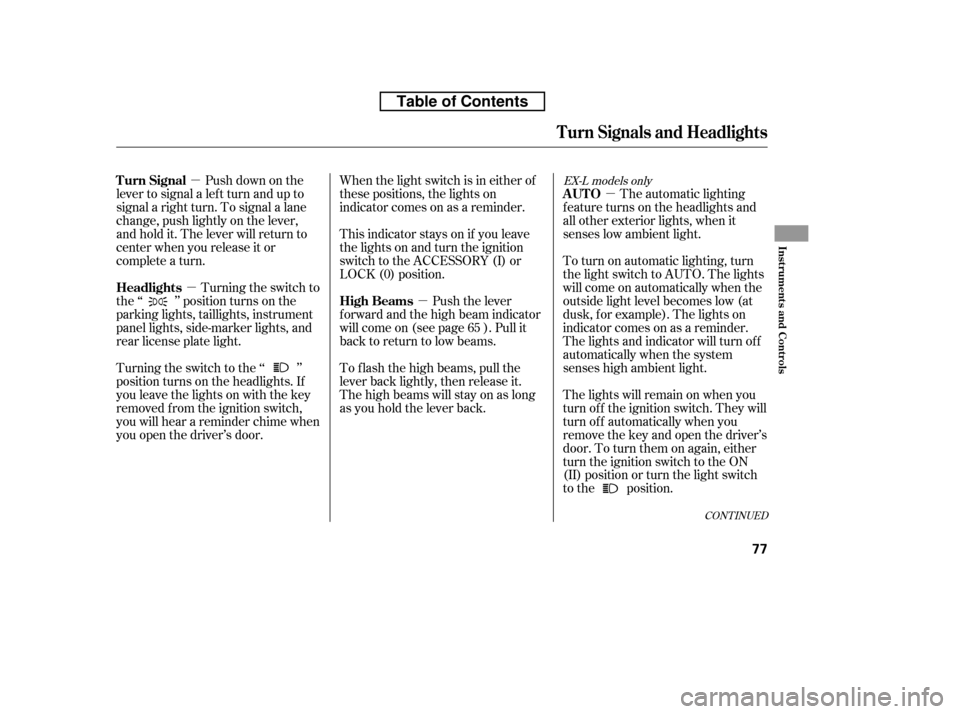
Push down on the
lever to signal a lef t turn and up to
signal a right turn. To signal a lane
change, push lightly on the lever,
and hold it. The lever will return to
center when you release it or
complete a turn.
Turning the switch to
the ‘‘ ’’ position turns on the
parking lights, taillights, instrument
panel lights, side-marker lights, and
rear license plate light.
Turning the switch to the ‘‘ ’’
position turns on the headlights. If
you leave the lights on with the key
removed f rom the ignition switch,
you will hear a reminder chime when
you open the driver’s door. When the light switch is in either of
these positions, the lights on
indicator comes on as a reminder.
This indicator stays on if you leave
the lights on and turn the ignition
switch to the ACCESSORY (I) or
LOCK (0) position.
Push the lever
f orward and the high beam indicator
will come on (see page ). Pull it
back to return to low beams.
To f lash the high beams, pull the
lever back lightly, then release it.
The high beams will stay on as long
as you hold the lever back. The automatic lighting
f eature turns on the headlights and
all other exterior lights, when it
senses low ambient light.
To turn on automatic lighting, turn
the light switch to AUTO. The lights
will come on automatically when the
outside light level becomes low (at
dusk, f or example). The lights on
indicator comes on as a reminder.
The lights and indicator will turn of f
automatically when the system
senses high ambient light.
The lights will remain on when you
turn of f the ignition switch. They will
turn of f automatically when you
remove the key and open the driver’s
door. To turn them on again, either
turn the ignition switch to the ON
(II) position or turn the light switch
to the position.
65
CONT INUED
EX-L models onlyTurn Signal
Headlights
High BeamsAUTO
Turn Signals and Headlights
Inst rument s and Cont rols
77
Table of Contents
Page 102 of 441
Locks all doors and tailgate when theshif t lever is moved out of the Park (P)position.
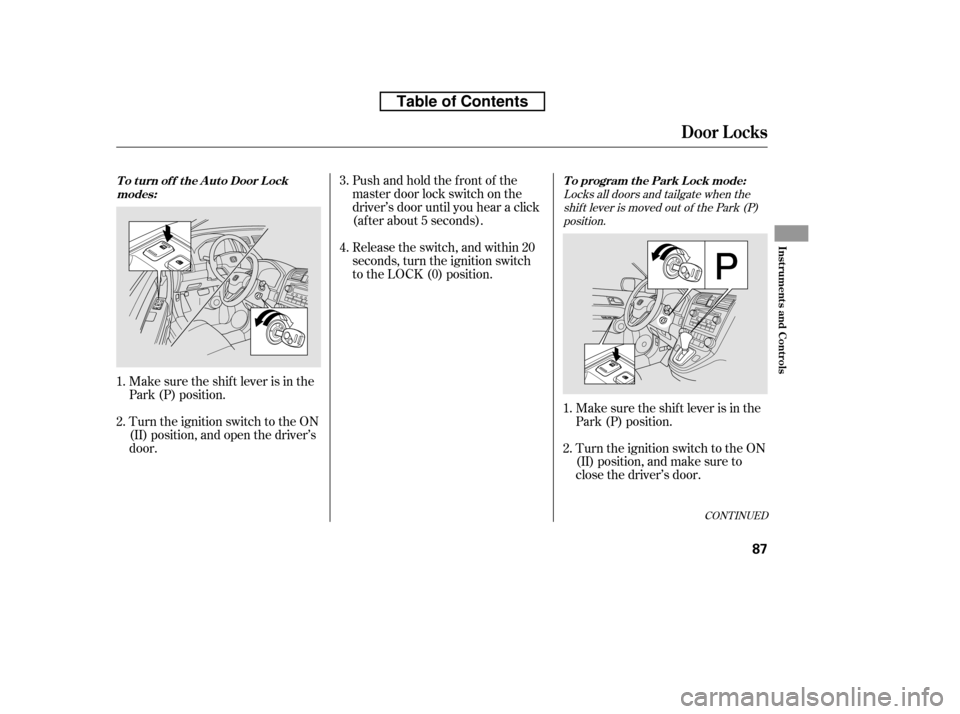
Make sure the shif t lever is in the
Park (P) position.
Turn the ignition switch to the ON
(II) position, and make sure to
close the driver’s door.
Turn the ignition switch to the ON
(II) position, and open the driver’s
door. Pushandholdthefrontof the
master door lock switch on the
driver’s door until you hear a click
(af ter about 5 seconds).
Make sure the shif t lever is in the
Park (P) position. Release the switch, and within 20
seconds, turn the ignition switch
to the LOCK (0) position.
1. 2.
1.2. 4.
3.
CONT INUED
To program the Park Lock mode:
T o t urn of f t he A ut o Door L ock
modes:
Door L ocks
Inst rument s and Cont rols
87
Table of Contents