2010 FORD MUSTANG reset
[x] Cancel search: resetPage 34 of 318
Saving presets automatically:Autoset allows you to set the strongest
local radio stations without losing your original manually set preset
stations for AM/FM1/FM2.
To activate the autoset feature:Press MENU repeatedly until AUTO
PRESET ON/OFF appears in the display. Use
SEEKto toggle
AUTO PRESET to ON, and either wait five seconds for the search to
initiate or press OK to immediately initiate the search. If you press
another control within those five seconds, the search will not initiate.
The 10 strongest stations will be filled and the station stored in preset 1
will begin playing.
If there are fewer than 10 strong stations, the system will store the last
one in the remaining presets.
RDS Radio
Available only in FM mode. This feature allows you to search
RDS-equipped stations for a certain category of music format: CLASSIC,
COUNTRY, JAZZ/RB, ROCK, etc.
To activate:Press MENU repeatedly until RDS (ON/OFF) appears in the
display. Use
SEEKto toggle RDS ON/OFF. When RDS is OFF,
you will not be able to search for RDS equipped stations or view the
station name or type.
CAT (Category) / FOLD
(Folder):This feature allows you
to select from various music
categories.
To change RDS categories:Press MENU repeatedly until RDS ON/OFF
appears in the display. Use
SEEKto toggle RDS between
ON/OFF. Press CAT. PRESS UP OR DOWN TO CHANGE RDS
CATEGORY will appear in the display. Press
SEEKto scroll
through all possible categories. When the desired category appears in the
display, press
SEEKto find the next station playing that
selection or press SCAN for a brief sampling of all stations playing that
category of music.
CD/MP3 Player
CD:Press to enter CD/MP3 mode. If
a disc is already loaded into the
system, CD/MP3 play will begin
where it ended last. If no CD is loaded, NO DISC will appear in the
display.
2010 05+ Mustang(197)
Owners Guide, 1st Printing
USA(fus)
Entertainment Systems
34
Page 35 of 318
LOAD:
For a single CD system–This
control is not operational. To load a
CD, simply insert the disc, label side up, into the CD slot.
For a CD6 system–Press LOAD. When the display reads SELECT
SLOT, choose the desired slot number using memory presets 1–6. When
the display reads LOAD CD #, load the desired disc, label side up. If you
do not choose a slot within five seconds, the system will choose for you.
Once loaded, the first track will begin to play.
To auto load up to six discs–Press and hold LOAD until the display
reads AUTOLOAD #. Load the desired disc, label side up. The system
will prompt you to load discs for the remaining available slots. Insert the
discs, one at a time, label side up, when prompted. Once loaded, the disc
in preset #1 will begin to play.
Press the number preset buttons (1–6) to choose the disc you want to
play.
/Play/Pause:Press to
play/pause a track when playing a
CD.
EJECT:
For a single CD system–press
EJECT to eject the CD.
For a CD6 system–press EJECT and select the desired CD slot by
pressing the corresponding memory preset number. The display will read
EJECTING #. When the system has ejected the CD, the display will read
REMOVE CD #. Remove the CD. If you do not remove the CD, the
system will reload the disc.
To auto eject all loaded discs–Press and hold EJECT. The system will
eject all discs and prompt you when to remove them.
SEEK:Press
SEEKto
access the previous/next track.
CAT (Category) / FOLD
(Folder):
In MP3 mode only–Press
CAT/FOLD and then
press
SEEKto access the previous/next folder.
2010 05+ Mustang(197)
Owners Guide, 1st Printing
USA(fus)
Entertainment Systems
35
Page 36 of 318
SCAN:Press for a brief sampling of
all tracks on the current disc or
MP3folder.
DIRECT:
In CD mode–Press DIRECT. The
display will read DIRECT TRACK
MODE SELECT TRACK. Enter the desired track number using the
memory preset buttons (0–9). The system will then begin playing that
track.
In MP3 folder mode–Press DIRECT and the memory preset buttons
(0–9) of the desired folder. The system will advance to that specific
folder.
TEXT:
In MP3 mode only–Press TEXT
repeatedly to view Album (AL),
Folder (FL), Song (SO) and Artist (AR) in the display, if available.
In TEXT MODE:Sometimes the display requires additional text to be
displayed. When theindicatorisactive,press TEXT and then
press
SEEKto view the additional display text.
COMPRESSION:Press MENU repeatedly until COMPRESSION ON/OFF
appears in the display. Use
SEEKto toggle between ON/OFF.
When COMPRESSION is ON, the system will bring the soft and loud CD
passages together for a more consistent listening level.
SHUFFLE:Press MENU repeatedly until SHUFFLE ON/OFF appears in
the display. Use
SEEKto toggle between ON/OFF. If you wish to
engage shuffle mode right away, press
SEEKto begin random
play. Otherwise, random play will begin when the current track is
finished playing. The system will only shuffle the disc currently playing.
Satellite Radio (if equipped)
Satellite radio is available only with a valid SIRIUS radio
subscription. Check with your authorized dealer for availability.
SIRIUS:Press repeatedly to access
satellite radio mode, if equipped.
Press repeatedly to cycle through
SAT1, SAT2 and SAT3 modes.
2010 05+ Mustang(197)
Owners Guide, 1st Printing
USA(fus)
Entertainment Systems
36
Page 37 of 318
TUNE:Turn to go to the next /
previous available SIRIUS satellite
station.
DIRECT:Press DIRECT then enter
the desired channel (i.e. 002) using
the memory preset buttons (0–9). If
you only enter one digit, press OK
and the system will go to that satellite channel. If you enter three digits,
the system will automatically go to that channel, if available. You may
cancel your entry by pressing DIRECT. If an invalid station number is
entered, INVALID CHANNEL will appear in the display and the system
will continue playing the current station.
SEEK:Press
SEEKto seek
to the previous/next channel. If a
specific category is selected, (Jazz,
Rock, News, etc.),
press
SEEKto seek to the previous/next channel in the selected
category. Press and hold
SEEKto fast seek through the
previous/next channels.
SCAN:Press SCAN for a brief
sampling of all available SIRIUS
satellite channels. If a specific
category is selected, (Jazz, Rock, News, etc.) press SCAN for a brief
sampling of all available SIRIUS satellite channels within the selected
category.
MEMORY PRESETS (0–9):There
are 30 available presets, 10 each for
SAT1, SAT2 and SAT3. To save
satellite channels in your memory presets, tune to the desired channel
then press and hold a memory preset number (0–9) until sound returns.
TEXT:Press and release to display
the artist and song title. While in
TEXT MODE, press again to scroll
through the Artist (AR), Song (SO), Channel (CH) and Category (CA).
In TEXT MODE:Sometimes the display requires additional text to be
displayed. When theindicatorisactive,press TEXT and then
press
SEEKto view the additional display text.
2010 05+ Mustang(197)
Owners Guide, 1st Printing
USA(fus)
Entertainment Systems
37
Page 39 of 318
OK. The song will appear in the display for confirmation. Press OK
again and the display will read SONG DELETED. If you do not want
to delete the currently listed song, press
SEEKto select either
RETURN or CANCEL.
Note:If there are no songs presently saved, the display will read NO
SONGS.
c. DELETE ALL SONGS:Press OK to delete all song’s from the
system’s memory. The display will read ARE YOU SURE ? Press OK to
confirm deletion of all saved songs and the display will read ALL
DELETED.
Note:If there are no songs presently saved, the display will read NO
SONGS.
d. DISABLE ALERTS/ENABLE ALERTS:Press OK to
enable/disable the satellite alert status which alerts you when your
selected songs are playing on a satellite radio channel. (The system
default is disabled.) SONG ALERTS ENABLED/DISABLED will appear
in the display. The menu listing will display the opposite state. For
example, if you have chosen to enable the song alerts, the menu
listing will read DISABLE as the alerts are currently on, so your other
optionistoturnthemoff.
•CHANNEL LOCKOUT MENU-Press OK to enter the Channel
Lockout menu. Press the
SEEKto scroll through the following
options:
a. LOCK/UNLOCK THIS CHANNEL:Press OK when
LOCK/UNLOCK THIS CHANNEL is displayed and the display will read
ENTER PIN. Enter your four-digit PIN number (initial PIN is 1234)
and the system will lock/unlock the channel and CHANNEL LOCKED
or UNLOCKED will be displayed.
Note:you must be tuned to the specific channel you want to
lock/unlock when using this feature.
b. CHANGE PIN:Press OK when CHANGE PIN is displayed. The
display will read ENTER OLD PIN. Enter your current (old) PIN
number and when the system accepts your entry it will display
ENTER NEW PIN. Enter your new four-digit PIN and the system will
save the new PIN and PIN SAVED will display.
c. UNLOCK ALL CHANNELS:Press OK when UNLOCK ALL
CHANNELS is displayed and the display will read ENTER PIN. Enter
your four-digit PIN and the system will unlock all channels and the
display will read CHANNEL UNLOCKED.
d. RESET PIN:Press OK when RESET PIN is displayed. The display
will read ARE YOUR SURE. Press OK again to automatically reset the
2010 05+ Mustang(197)
Owners Guide, 1st Printing
USA(fus)
Entertainment Systems
39
Page 40 of 318
PIN number to its initial password setting (1234). PIN RESET TO
DEFAULT PIN will be displayed.
e. RETURN:Press OK when RETURN is displayed and the system
will exit back to the satellite radio menu.
Sound Adjustments
Press SOUND repeatedly to cycle
through the following features:
BASS:Press
SEEKto
adjust the level of bass.
TREBLE:Press
SEEKto adjust the level of treble.
BALANCE:Press
SEEKto adjust the audio between the left
(L) and right (R) speakers.
FADE:Press
SEEKto adjust the audio between the back (B)
and front (F) speakers.
SPEED COMPENSATED VOLUME:With this feature on, radio volume
automatically gets louder with increasing vehicle speed to compensate
for road and wind noise.
The default setting isoff.
Use
SEEKto adjust between SPEED OFF and levels1–7:
Increasing the level from 1 (lowest setting) to 7 (highest setting) allows
the radio volume to automatically change slightly with vehicle speed to
compensate for road and wind noise.
Recommended level is1–3;SPEED OFF turns the feature off and level 7
is the maximum setting.
DSP MODE (if equipped):Press
SEEKto choose between
STEREO SURROUND mode and STEREO mode.
2010 05+ Mustang(197)
Owners Guide, 1st Printing
USA(fus)
Entertainment Systems
40
Page 48 of 318
•Terrain: Hills, mountains, tall buildings, bridges, tunnels, freeway
overpasses, parking garages, dense tree foliage and thunderstorms can
interfere with your reception.
•Station overload: When you pass a ground based broadcast repeating
tower, a stronger signal may overtake a weaker one and result in an
audio mute.
Unlike AM/FM audible static, you will hear an audio mute when there is
a satellite radio signal interference. Your radio display may display NO
SIGNAL to indicate the interference.
SIRIUS satellite radio service:SIRIUS Satellite Radio is a subscription
based satellite radio service that broadcasts music, sports, news and
entertainment programming. A service fee is required in order to receive
SIRIUS service. Vehicles that are equipped with a factory installed
SIRIUS Satellite Radio system include:
•Hardware and limited subscription term, which begins on the date of
sale or lease of the vehicle.
•Use of online media player providing access to all SIRIUS music
channels over the internet using any computer connected to the
internet (U.S. customers only)
For information on extended subscription terms, contact SIRIUS at
1–888–539–7474.
Note:SIRIUS reserves the unrestricted right to change, rearrange, add
or delete programming including canceling, moving or adding particular
channels, and its prices, at any time, with or without notice to you. Ford
Motor Company shall not be responsible for any such programming
changes.
Satellite Radio Electronic Serial Number (ESN):This 12-digit
Satellite Serial Number is needed to activate, modify or track your
satellite radio account. You will need this number when communicating
with SIRIUS. While in Satellite Radio mode, you can view this number on
the radio display by pressing the SIRIUS and Preset 1 buttons at the
same time.
2010 05+ Mustang(197)
Owners Guide, 1st Printing
USA(fus)
Entertainment Systems
48
Page 49 of 318
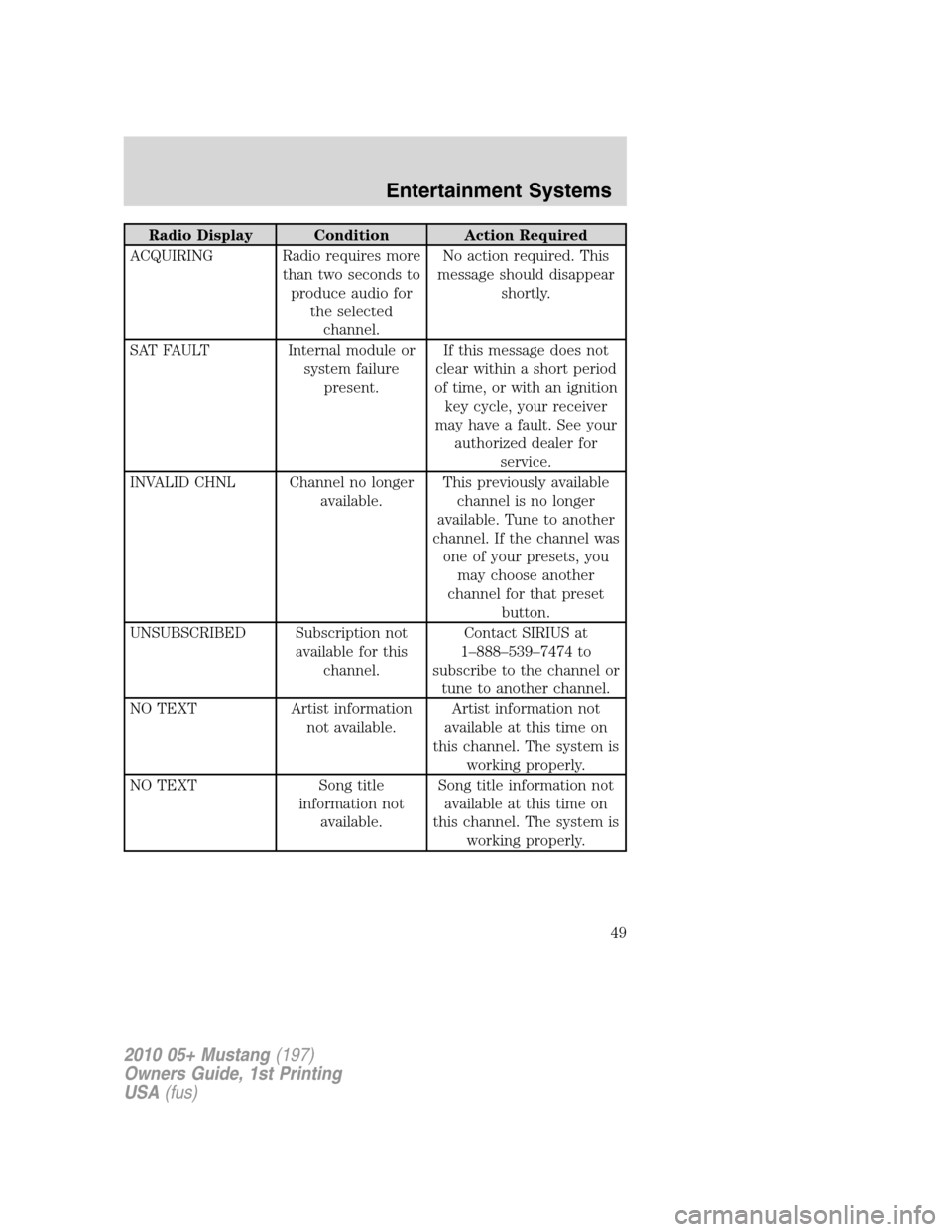
Radio Display Condition Action Required
ACQUIRING Radio requires more
than two seconds to
produce audio for
the selected
channel.No action required. This
message should disappear
shortly.
SAT FAULT Internal module or
system failure
present.If this message does not
clear within a short period
of time, or with an ignition
key cycle, your receiver
may have a fault. See your
authorized dealer for
service.
INVALID CHNL Channel no longer
available.This previously available
channel is no longer
available. Tune to another
channel. If the channel was
one of your presets, you
may choose another
channel for that preset
button.
UNSUBSCRIBED Subscription not
available for this
channel.Contact SIRIUS at
1–888–539–7474 to
subscribe to the channel or
tune to another channel.
NO TEXT Artist information
not available.Artist information not
available at this time on
this channel. The system is
working properly.
NO TEXT Song title
information not
available.Song title information not
available at this time on
this channel. The system is
working properly.
2010 05+ Mustang(197)
Owners Guide, 1st Printing
USA(fus)
Entertainment Systems
49