Page 147 of 530
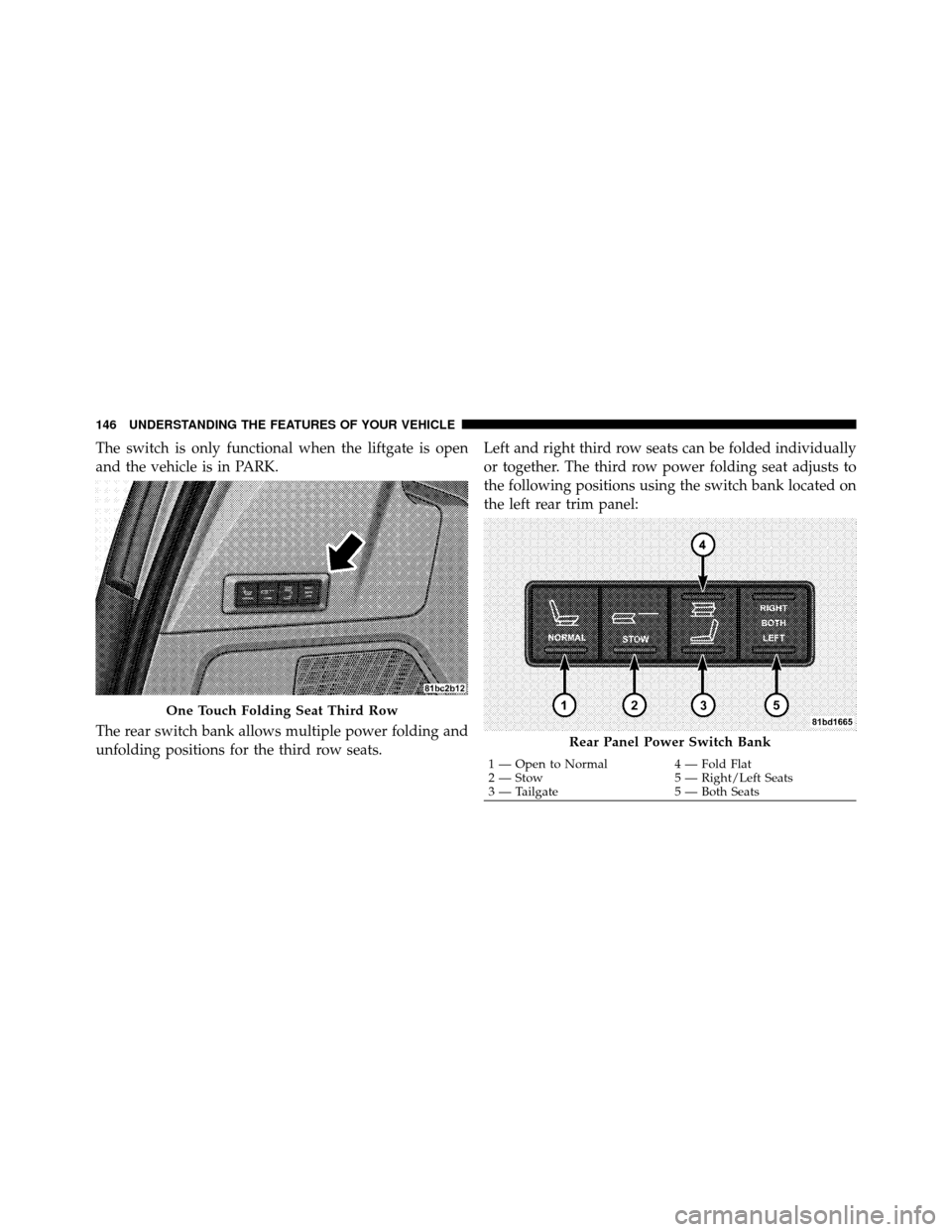
The switch is only functional when the liftgate is open
and the vehicle is in PARK.
The rear switch bank allows multiple power folding and
unfolding positions for the third row seats.Left and right third row seats can be folded individually
or together. The third row power folding seat adjusts to
the following positions using the switch bank located on
the left rear trim panel:
One Touch Folding Seat Third Row
Rear Panel Power Switch Bank
1 — Open to Normal
4 — Fold Flat
2 — Stow 5 — Right/Left Seats
3 — Tailgate 5 — Both Seats
146 UNDERSTANDING THE FEATURES OF YOUR VEHICLE
Page 149 of 530
To Unfold Third Row Seats
1. Pull up on the assist strap to lift the seat out of the
storage bin and push the seat forward until the anchors
latch.
2. Pull release strap marked “1” to unlock the recliner.
3. Pulling strap “3” releases the seatback to return to its
full upright position.
4. Adjust the head restraint to the desired position.
WARNING!
In a collision, you or others in your vehicle could be
injured if seats are not properly latched to their floor
attachments. Always be sure the seats are fully
latched.
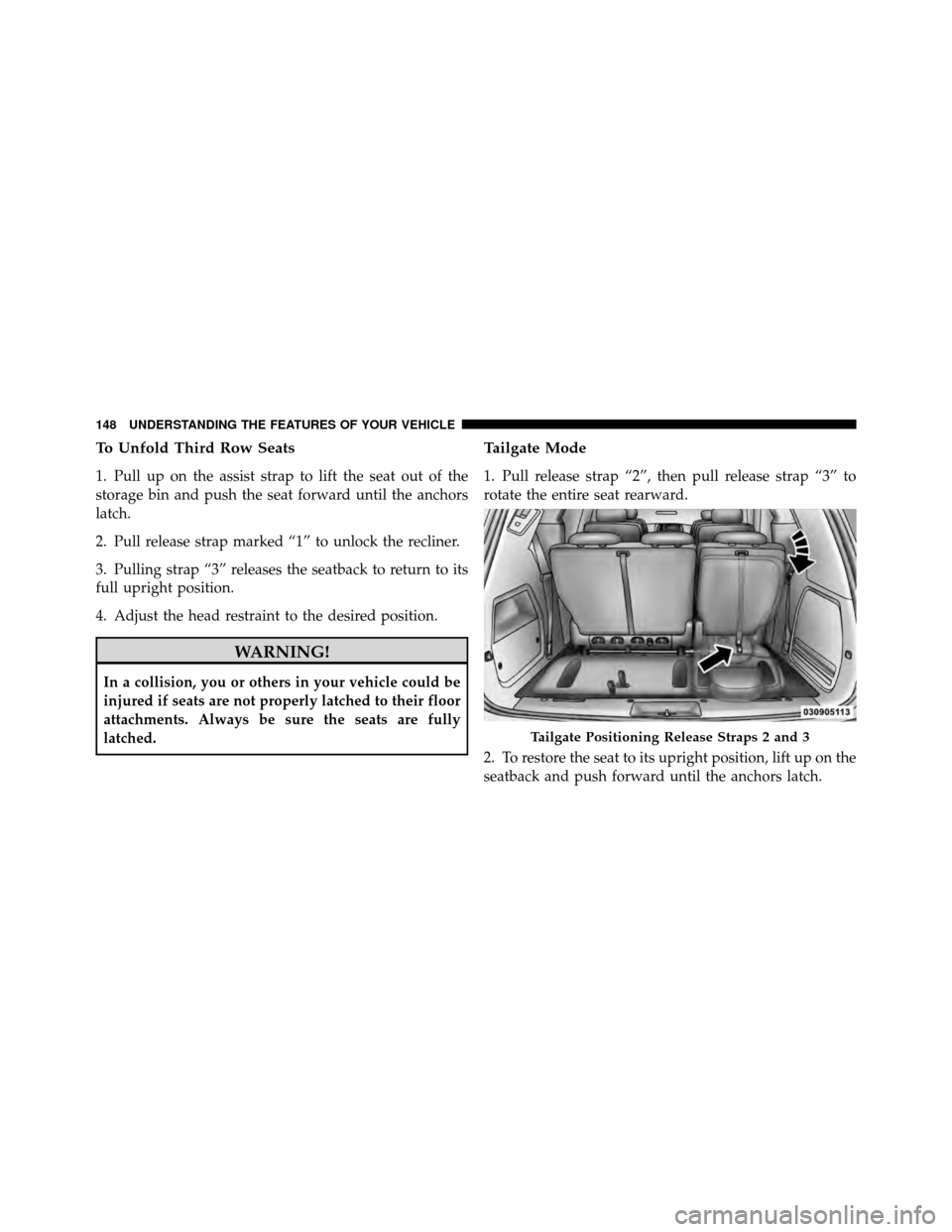
Tailgate Mode
1. Pull release strap “2”, then pull release strap “3” to
rotate the entire seat rearward.
2. To restore the seat to its upright position, lift up on the
seatback and push forward until the anchors latch.
Tailgate Positioning Release Straps 2 and 3
148 UNDERSTANDING THE FEATURES OF YOUR VEHICLE
Page 156 of 530
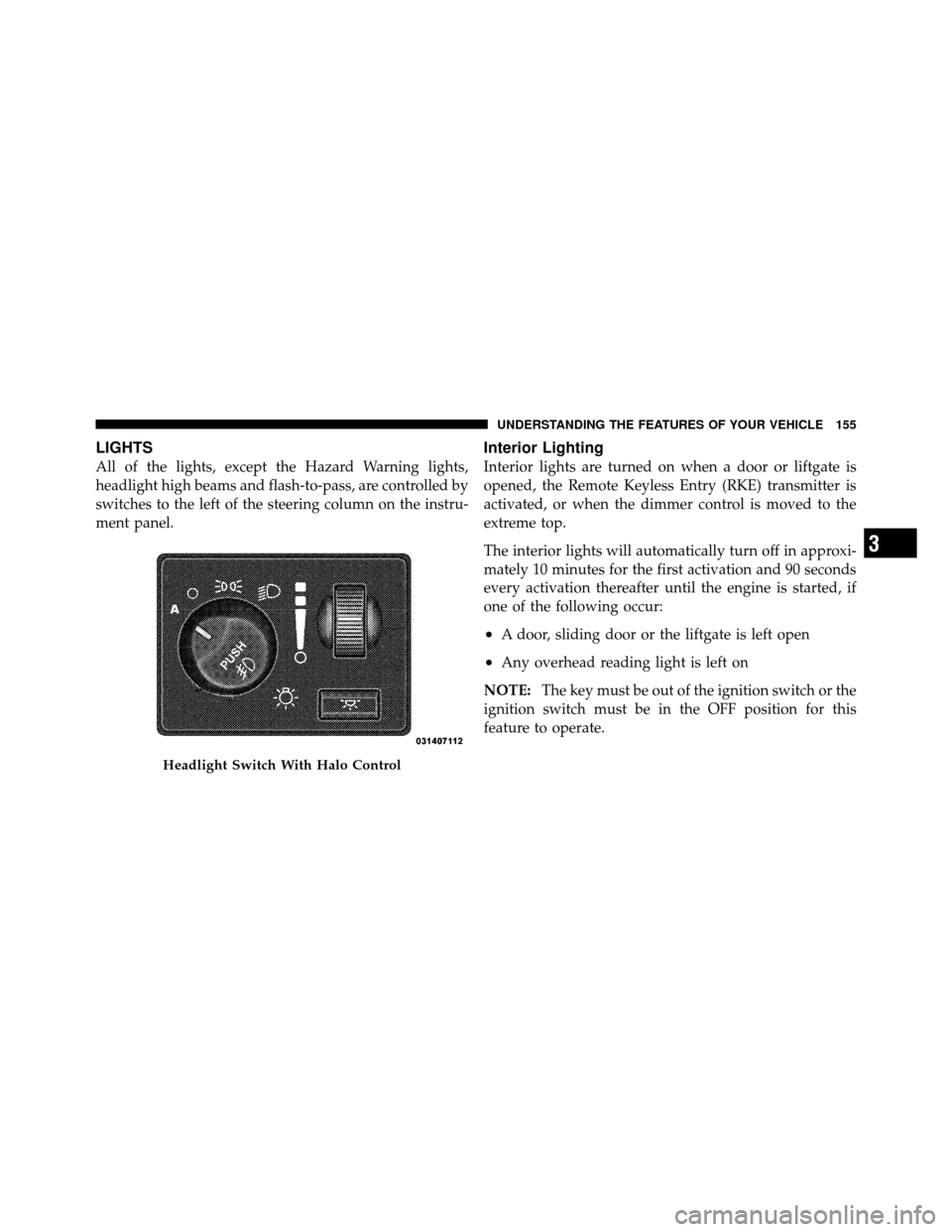
LIGHTS
All of the lights, except the Hazard Warning lights,
headlight high beams and flash-to-pass, are controlled by
switches to the left of the steering column on the instru-
ment panel.
Interior Lighting
Interior lights are turned on when a door or liftgate is
opened, the Remote Keyless Entry (RKE) transmitter is
activated, or when the dimmer control is moved to the
extreme top.
The interior lights will automatically turn off in approxi-
mately 10 minutes for the first activation and 90 seconds
every activation thereafter until the engine is started, if
one of the following occur:
•A door, sliding door or the liftgate is left open
•Any overhead reading light is left on
NOTE: The key must be out of the ignition switch or the
ignition switch must be in the OFF position for this
feature to operate.
Headlight Switch With Halo Control
3
UNDERSTANDING THE FEATURES OF YOUR VEHICLE 155
Page 157 of 530
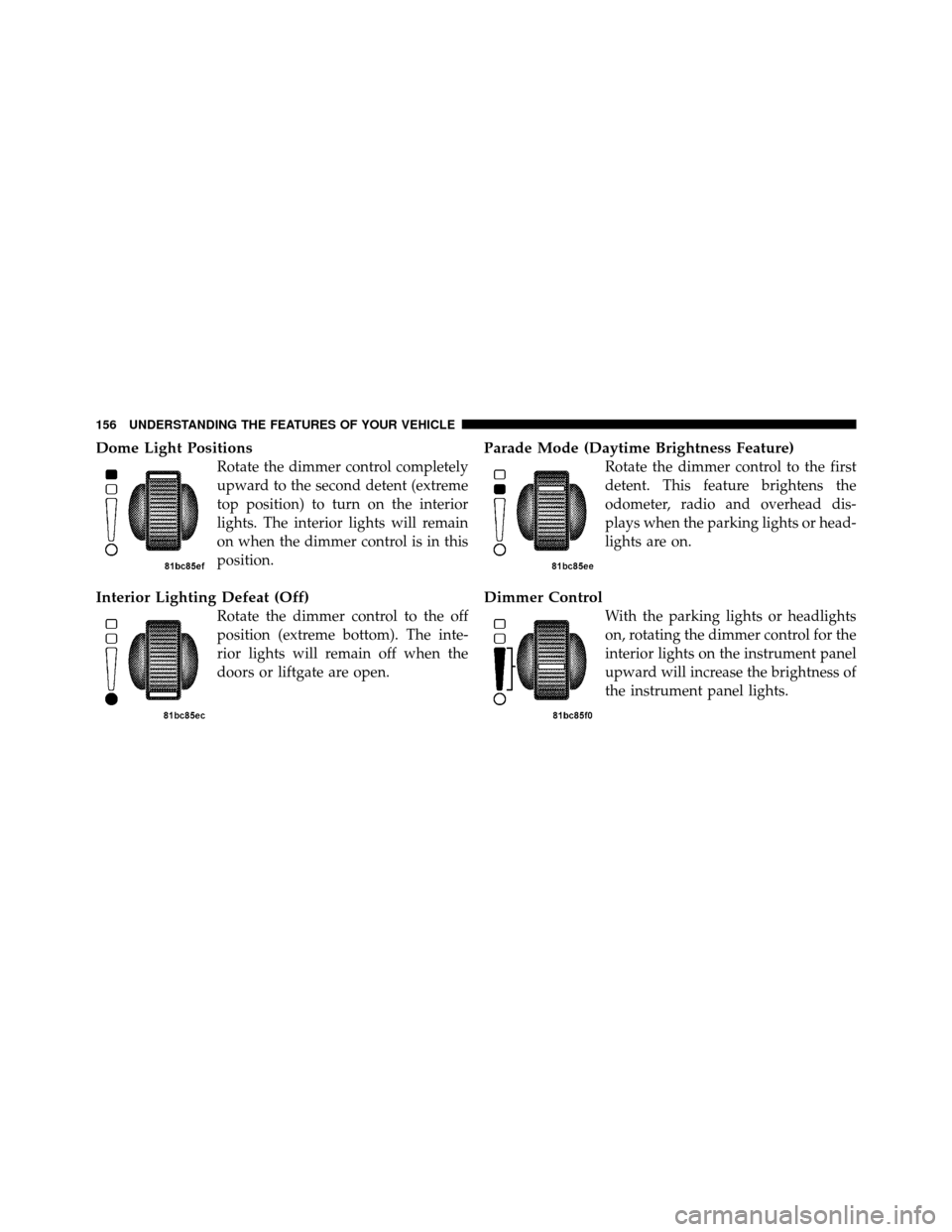
Dome Light Positions
Rotate the dimmer control completely
upward to the second detent (extreme
top position) to turn on the interior
lights. The interior lights will remain
on when the dimmer control is in this
position.
Interior Lighting Defeat (Off)
Rotate the dimmer control to the off
position (extreme bottom). The inte-
rior lights will remain off when the
doors or liftgate are open.
Parade Mode (Daytime Brightness Feature)
Rotate the dimmer control to the first
detent. This feature brightens the
odometer, radio and overhead dis-
plays when the parking lights or head-
lights are on.
Dimmer Control
With the parking lights or headlights
on, rotating the dimmer control for the
interior lights on the instrument panel
upward will increase the brightness of
the instrument panel lights.
156 UNDERSTANDING THE FEATURES OF YOUR VEHICLE
Page 170 of 530
To Activate
Push the ON/OFF button (located in the end of the lever)
once, and the cruise indicator light (located in the mes-
sage window of the odometer) will illuminate, showing
that the Electronic Speed Control system is on. To turn
the Electronic Speed Control system off, push the ON/
OFF button a second time, and both the Electronic Speed
Control system and indicator will turn off.
WARNING!
Leaving the Electronic Speed Control system on
when not in use is dangerous. You could accidently
set the system or cause it to go faster than you want.
You could lose control and have an accident. Always
leave the Electronic Speed Control system off when
you are not using it.
To Set At A Desired Speed
Turn the Electronic Speed Control ON. When the vehicle
has reached the desired speed, press the SET lever
downward and then release. Lift your foot off the accel-
erator and the vehicle will operate at the selected speed.
Deactivating Electronic Speed Control
A soft tap on the brake pedal or pulling the Electronic
Speed Control lever (CANCEL) toward you will deacti-
vate the Electronic Speed Control without erasing the set
speed memory. Pushing the ON/OFF button to the OFF
position or turning OFF the ignition erases the set speed
memory.
Resuming Speed
To resume a previously set speed, raise the Electronic
Speed Control lever (RESUME ACCEL) upward, and
release. Resume can be used at any speed above 25 mph
(40 km/h).
3
UNDERSTANDING THE FEATURES OF YOUR VEHICLE 169
Page 184 of 530

“check entire surroundings” displayed across the top of
the screen. After five seconds this note will disappear.
5. When the vehicle is shifted out of REVERSE, the rear
camera mode is exited and the audio screen appears
again.
OVERHEAD CONSOLES
Front Overhead Console
Two versions of the overhead console are available. The
base front overhead console model featured fixed incan-
descent courtesy/reading lights, flip-down sunglass stor-
age and conversation mirror. The premium front over-
head console model features a LED focused light that
illuminates the instrument panel cupholders, Infrared
Automatic Temperature Control Sensor (ATC equipped
only), two swiveling LED lights, flip-down sunglass
storage, conversation mirror, optional power sliding door
switches and an optional power liftgate switch.NOTE:
Premium sunroof console models include all of
above except sunglass storage.
Front Premium Overhead Console Features
1 — Cupholder LED 4 — Storage/Mirror
2 — ATC Sensor 5 — Switch Bank
3 — Interior Lights
3
UNDERSTANDING THE FEATURES OF YOUR VEHICLE 183
Page 185 of 530
Courtesy/Interior Lighting
At the forward end of the console are two courtesy lights
(standard dome light has two buttons). The lights turn on
when a front door, a sliding door or the liftgate is opened.
If your vehicle is equipped with Remote Keyless Entry
(RKE) the lights will also turn on when the UNLOCK
button on the RKE transmitter is pressed.
The courtesy lights also function as reading lights. Press
in on each lens to turn these lights on while inside the
vehicle. Press a second time to turn each light off. You
may adjust the direction of these lights by pressing the
outside ring, which is identified with four directional
arrows (LED lamps only).
The area around the instrument panel cupholders is also
illuminated from a light in the overhead console (pre-
mium console only). This light is turned on when the
headlight switch is on, and will adjust in brightness when
the dimmer control is rotated up or down.
Sunglass Storage (non-sunroof only)
At the rear of the front overhead console, a compartment
is provided for the storage of two pairs of sunglasses.
From the closed position, press the door over-travel latch
to open the compartment. The door will slowly rotate to
the full open position. From this position, the door can be
fully closed or, by rotating upward about 3/4 of the way
and releasing, positioned for conversation mirror use.
From the�conversation mirror� position, the door can
only be closed. To return to the full open position, the
door must first be closed and then opened by pressing
the over-travel latch again to release.
NOTE: The front overhead console supplied with fac-
tory sunroof, incorporates a sunroof switch.
Rear Overhead Consoles — If Equipped
The rear overhead storage system is available in two
versions: with or without sunroof.
184 UNDERSTANDING THE FEATURES OF YOUR VEHICLE
Page 186 of 530
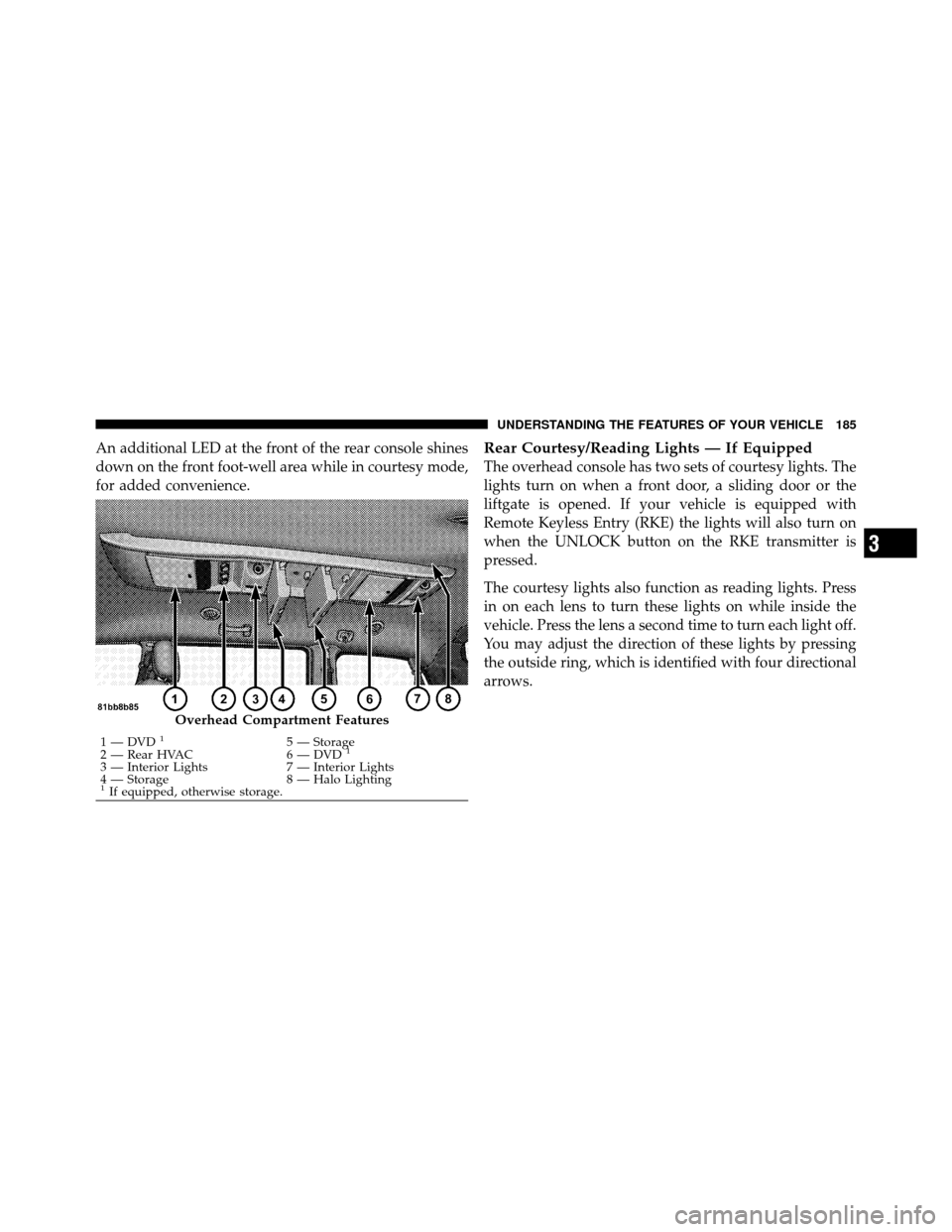
An additional LED at the front of the rear console shines
down on the front foot-well area while in courtesy mode,
for added convenience.Rear Courtesy/Reading Lights — If Equipped
The overhead console has two sets of courtesy lights. The
lights turn on when a front door, a sliding door or the
liftgate is opened. If your vehicle is equipped with
Remote Keyless Entry (RKE) the lights will also turn on
when the UNLOCK button on the RKE transmitter is
pressed.
The courtesy lights also function as reading lights. Press
in on each lens to turn these lights on while inside the
vehicle. Press the lens a second time to turn each light off.
You may adjust the direction of these lights by pressing
the outside ring, which is identified with four directional
arrows.
Overhead Compartment Features
1 — DVD15 — Storage
2 — Rear HVAC 6 — DVD1
3 — Interior Lights 7 — Interior Lights
4 — Storage 8 — Halo Lighting
1If equipped, otherwise storage.
3
UNDERSTANDING THE FEATURES OF YOUR VEHICLE 185