Page 154 of 436
UNDERSTANDING YOUR INSTRUMENT PANEL
CONTENTS
�Instrument Panel Features ............... 156
� Instrument Cluster .................... 157
� Instrument Cluster Descriptions ........... 158
� Electronic Vehicle Information Center (EVIC) . . 169
▫ Electronic Vehicle Information Center (EVIC)
Displays ........................... 171
▫ Engine Oil Change Indicator System ....... 172
▫ Trip Functions ...................... 173
▫ Performance Features ................. 175 ▫
Keyless Go Display — If Equipped ........ 178
▫ Driver-Selectable Surround Sound (DSS) –
If Equipped ........................ 179
▫ Compass Display .................... 180
▫ System Warnings
(Customer Information Features) ......... 182
▫ Personal Settings
(Customer-Programmable Features) ....... 182
4
Page 155 of 436

�Media Center 730N/430 (RER/REN/RBZ) —
AM/FM Stereo Radio And CD/DVD/HDD/
NAV — If Equipped .................... 185
▫ Operating Instructions — Voice Command
System — If Equipped ................. 186
▫ Operating Instructions —
Uconnect™ phone — If Equipped ........ 186
▫ Clock Setting Procedure — RBZ Radio ..... 186
▫ Clock Setting Procedure —
RER/REN Radio ..................... 188
� Media Center 130 (RES) — AM/FM Stereo
Radio With CD Player (MP3 AUX Jack) ....... 190
▫ Operating Instructions — Radio Mode ..... 190
▫ Operation Instructions — CD Mode For CD
And MP3 Audio Play ................. 193 ▫
Notes On Playing MP3 Files ............ 196
▫ Operation Instructions - Auxiliary Mode .... 198
� Media Center 130 (RES/RSC) — AM/FM
Stereo Radio With CD Player (MP3 AUX Jack)
And Sirius Radio ...................... 199
▫ Operating Instructions — Radio Mode ..... 199
▫ Operation Instructions — CD Mode For CD
And MP3 Audio Play ................. 205
▫ Notes On Playing MP3 Files ............ 207
▫ List Button (CD Mode For MP3 Play) ...... 210
▫ Info Button (CD Mode For MP3 Play) ...... 210
� Universal Consumer Interface (UCI) —
If Equipped .......................... 211
▫ Connecting The iPod� ................. 212
154 UNDERSTANDING YOUR INSTRUMENT PANEL
Page 156 of 436
▫Using This Feature ................... 212
▫ Controlling The iPod� Using Radio
Buttons ........................... 213
▫ Play Mode ......................... 213
▫ List Or Browse Mode ................. 214
� Uconnect™ Multimedia (Satellite Radio) —
If Equipped (REN/REQ/RER/RES Radios
Only) ............................... 216
▫ System Activation .................... 216
▫ Electronic Serial Number/Sirius
Identification Number (ESN/SID) ......... 217
▫ Selecting Uconnect™ Multimedia (Satellite)
Mode ............................. 217
▫ Satellite Antenna ..................... 217
▫ Reception Quality .................... 218 ▫
Operating Instructions - Uconnect™
Multimedia (Satellite) Mode ............. 218
▫ Operating Instructions - Uconnect™ phone
(If Equipped) ....................... 220
� Kicker� High Performance Sound System With
Driver-Selectable Surround (DSS) –
If Equipped .......................... 221
� Remote Sound System Controls —
If Equipped .......................... 222
� CD/DVD Disc Maintenance .............. 223
� Radio Operation And Cellular Phones ....... 224
� Climate Controls ...................... 224
▫ Manual Air Conditioning And Heating
System ............................ 224
▫ Operating Tips ...................... 229
4
UNDERSTANDING YOUR INSTRUMENT PANEL 155
Page 157 of 436
INSTRUMENT PANEL FEATURES
1 — Air Outlets5 — Heated Seat Switch9 — Ignition Switch
2 — Instrument Cluster 6 — ESP OFF Switch10 — Trunk Release Button
3 — Glove Compartment 7 — Hazard Warning Switch11 — Headlight Switch
4 — Radio 8 — Climate Control
156 UNDERSTANDING YOUR INSTRUMENT PANEL
Page 158 of 436
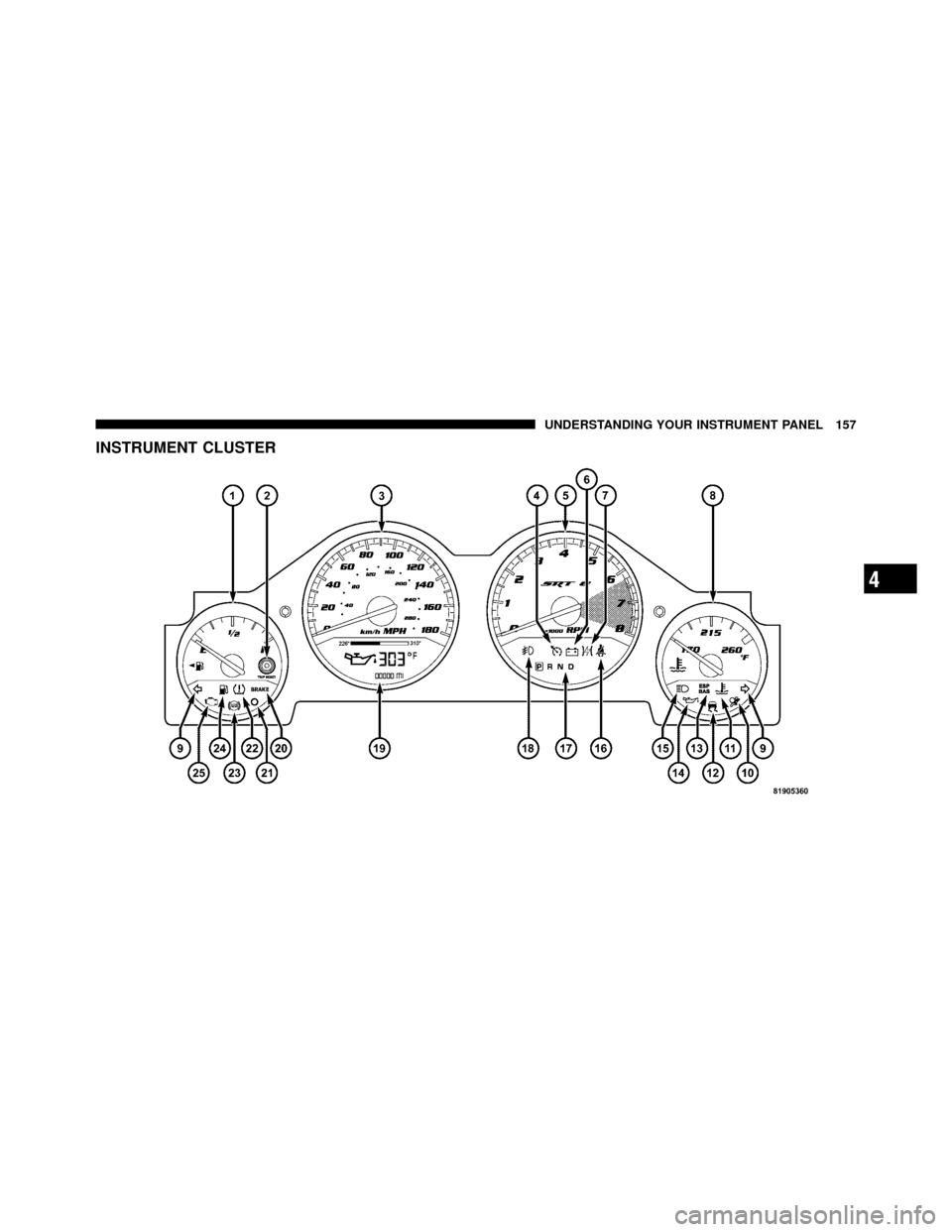
INSTRUMENT CLUSTER
4
UNDERSTANDING YOUR INSTRUMENT PANEL 157
Page 159 of 436

INSTRUMENT CLUSTER DESCRIPTIONS
1. Fuel Gauge
The pointer shows the level of fuel in the fuel tank when
the ignition switch is in the RUN position.
2. Trip Odometer Button
Press this button to change the display from odometer to
either of two trip odometer settings. The letter “A” or “B”
will appear when in the trip odometer mode. Push in and
hold the button for two seconds to reset the trip odometer
to 0 miles (km). The odometer must be in TRIP mode to
reset it.
3. Speedometer
Indicates vehicle speed.
4. Electronic Speed Control Indicator LightThis light will turn on when the electronic
speed control is on. 5. Tachometer
The red segments indicate the maximum permissible
engine revolutions per minute (RPM x 1000) for each gear
range. Ease up on the accelerator before reaching the red
area.
6. Charging System Warning Light
This light shows the status of the electrical charg-
ing system. The light should turn on when the
ignition switch is first placed in RUN and remain on
briefly as a bulb check. If the light stays on or turns on
while driving, turn off some of the vehicle’s non-essential
electrical devices (i.e., radio) or slightly increase engine
speed (if at idle). If the light remains on, it means that the
charging system is experiencing a problem. See your
local authorized dealer to obtain service immediately.
If jump starting is required, refer to “Jump Starting
Procedures” in “What To Do In Emergencies”.
158 UNDERSTANDING YOUR INSTRUMENT PANEL
Page 160 of 436

7. Electronic Throttle Control (ETC) Warning LightThis light will turn on briefly as a bulb check
when the ignition switch is placed in RUN. This
light will also turn on while the engine is
running if there is a problem with the Elec-
tronic Throttle Control (ETC) system.
If the light comes on while the engine is running, safely
bring the vehicle to a complete stop as soon as possible,
place the shift lever in PARK, and cycle the ignition key.
The light should turn off. If the light remains lit with the
engine running, your vehicle will usually be drivable.
However, see an authorized dealer for service as soon as
possible.
If the light is flashing when the engine is running,
immediate service is required. In this case, you may
experience reduced performance, an elevated/rough idle
or engine stall, and your vehicle may require towing. Also, have the system checked by an authorized dealer if
the light does not come on during starting.
8. Temperature Gauge
The temperature gauge shows engine coolant tempera-
ture. Any reading within the normal range indicates that
the engine cooling system is operating satisfactorily.
The gauge pointer will likely indicate a higher tempera-
ture when driving in hot weather, up mountain grades,
or when towing a trailer. It should not be allowed to
exceed the upper limits of the normal operating range.
4
UNDERSTANDING YOUR INSTRUMENT PANEL 159
Page 161 of 436

CAUTION!
Driving with a hot cooling system could damage
your vehicle. If the temperature gauge reads 240°F
(116°C) or greater, pull over and stop the vehicle. Idle
the vehicle with the air conditioner turned off until
the pointer drops back into the normal range 200–
230°F (93–110°C). If the pointer remains at 240°F
(116°C) or greater and you hear a chime, turn the
engine OFF immediately and call for service.
WARNING!
A hot engine cooling system is dangerous. You or
others could be badly burned by steam or boiling
coolant. You may want to call a service center if your
vehicle overheats. If you decide to look under the
hood yourself, refer to “Maintaining Your Vehicle”
and follow the warnings under the Cooling System
Pressure Cap paragraph.
9. Turn Signal Indicators The arrow will flash with the exterior turn signal
when the turn signal lever is operated.
NOTE:
•A continuous chime will sound if the vehicle is driven
more than 1 mile (1.6 km) with either turn signal on.
•Check for an inoperative outside light bulb if either
indicator flashes at a rapid rate.
160 UNDERSTANDING YOUR INSTRUMENT PANEL