Page 119 of 436
WARNING!
Driving a vehicle with the head restraints removed or
improperly adjusted could cause serious injury or
death in the event of a collision. The head restraints
should always be checked prior to operating the
vehicle and never adjusted while the vehicle is in
motion. Always adjust the head restraints when the
vehicle is in PARK.
Heated Seats
The driver seat and front passenger seat are heated. The
heaters provide the same heat level for both cushion and
seatback. The controls for each heater are located near the
bottom center of the instrument panel.After placing the ignition in the ON position, you can
choose from High, Low or Off heat settings. Amber
indicator lights in each switch indicate the level of heat in
use. Two indicator lights will illuminate for High, one for
Low and none for Off.
Heated Seat Switch
118 UNDERSTANDING THE FEATURES OF YOUR VEHICLE
Page 123 of 436
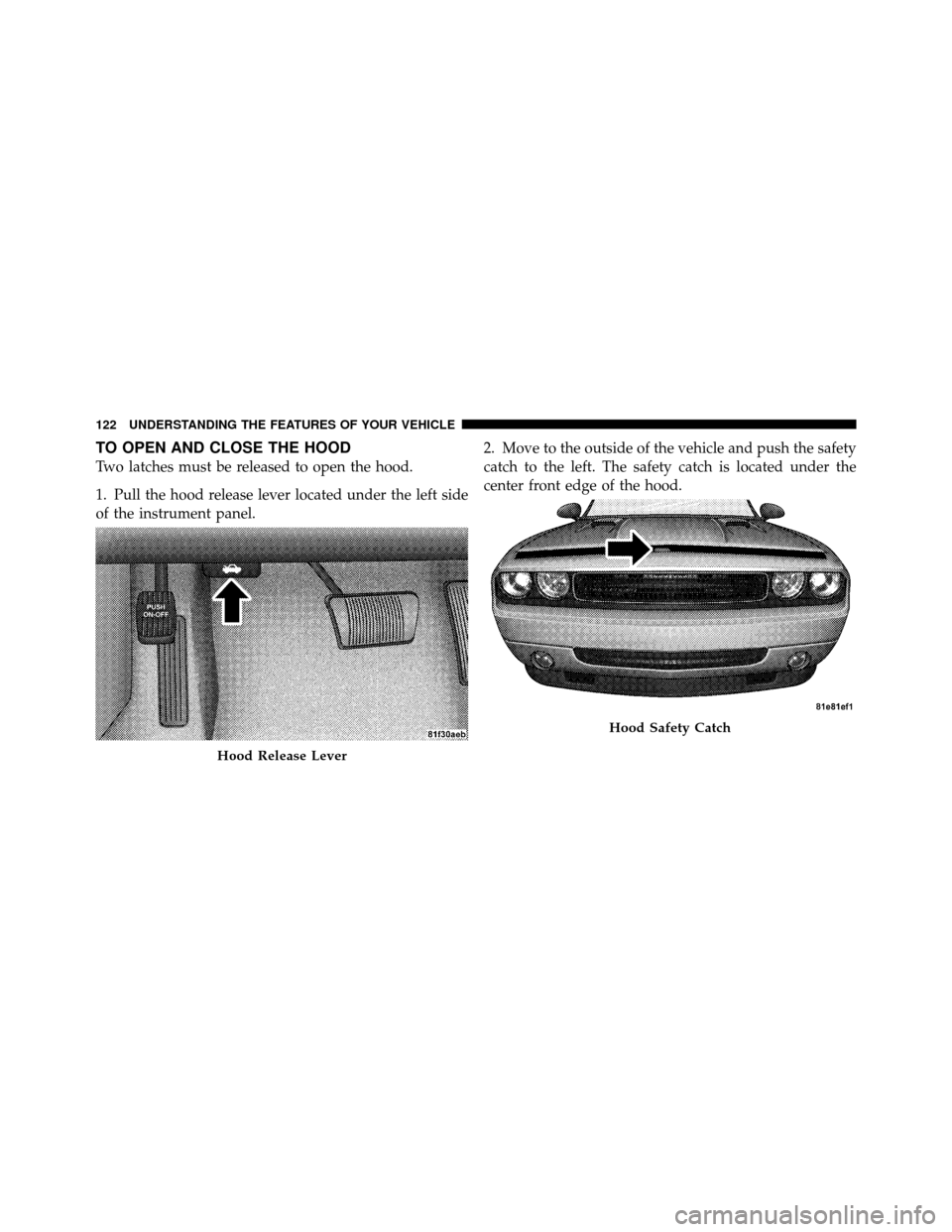
TO OPEN AND CLOSE THE HOOD
Two latches must be released to open the hood.
1. Pull the hood release lever located under the left side
of the instrument panel.2. Move to the outside of the vehicle and push the safety
catch to the left. The safety catch is located under the
center front edge of the hood.
Hood Release Lever
Hood Safety Catch
122 UNDERSTANDING THE FEATURES OF YOUR VEHICLE
Page 124 of 436
CAUTION!
To prevent possible damage, do not slam the hood to
close it. Lower the hood until it is open approxi-
mately 6 in (15 cm), and then drop it. This should
secure both latches. Never drive your vehicle unless
the hood is fully closed, with both latches engaged.
WARNING!
Be sure the hood is fully latched before driving your
vehicle. If the hood is not fully latched, it could open
when the vehicle is in motion and block your vision.
Failure to follow this warning could result in serious
injury or death.
LIGHTS
Headlights and Parking Lights
The headlight switch is located on the left side of the
instrument panel. This switch controls the operation of the
headlights, parking lights, instrument panel lights, instru-
ment panel light dimming, interior lights and fog lights.
Headlight Switch
3
UNDERSTANDING THE FEATURES OF YOUR VEHICLE 123
Page 125 of 436

Rotate the headlight switch clockwise to the first detent
for parking light and instrument panel light operation.
Turn it to the second detent for headlight, parking light
and instrument panel light operation.
Automatic Headlights
This system automatically turns the headlights on or off
according to ambient light levels. To turn the system on,
rotate the headlight switch counterclockwise to the A
(AUTO) position. When the system is on, the headlight
time delay feature is also on. This means the headlights
will stay on for up to 90 seconds after placing the ignition
in the OFF position. To turn the Automatic system off,
move the headlight switch out of the AUTO position.
NOTE:The engine must be running before the head-
lights will come on in the automatic mode.
Headlights On with Wipers
(Available with Automatic Headlights Only)
When this feature is active, the headlights will turn on
approximately 10 seconds after the wipers are turned on
if the headlight switch is placed in the AUTO position. In
addition, the headlights will turn off when the wipers are
turned off if they were turned on by this feature.
The Headlights On with Wipers feature can be enabled or
disabled. Refer to “Electronic Vehicle Information Center
(EVIC)/Customer-Programmable Features” in “Under-
standing Your Instrument Panel” for further information.
Headlight Time Delay
This feature provides the safety of headlight illumination
for up to 90 seconds when leaving your vehicle in an
unlit area.
124 UNDERSTANDING THE FEATURES OF YOUR VEHICLE
Page 126 of 436

To activate the delay feature, place the ignition in the OFF
position while the headlights are still on. Then, turn off
the headlights within 45 seconds. The delay interval
begins when the headlight switch is turned off.
If you turn the headlights or parking lights, or place the
ignition in the RUN position, the system will cancel the
delay.
If you turn the headlights off before the ignition, they will
turn off in the normal manner.
NOTE:The lights must be turned off within 45 seconds
of placing the ignition in the OFF position to activate this
feature.
The Headlight delay time is programmable. Refer to
“Electronic Vehicle Information Center (EVIC)/
Customer-Programmable Features” in “Understanding
Your Instrument Panel” for further information.Daytime Running Lights — If Equipped
The high beam headlights will come on as Daytime
Running Lights whenever the ignition is placed in the
RUN position, the headlights are off and the parking
brake is released. The headlight switch must be used for
normal nighttime driving.
Lights-On Reminder
If the headlights or parking lights are on after the ignition
is placed in the OFF position, a chime will sound to alert
the driver when the driver’s door is opened.
Fog Lights
The front fog light switch is built into the head-
light switch. To activate the front fog lights, turn
on the parking lights or the low beam headlights
and press the headlight switch. To turn off the front fog
lights, either press the headlight switch again or turn off
the headlight switch.
3
UNDERSTANDING THE FEATURES OF YOUR VEHICLE 125
Page 130 of 436

Interior Lights
The interior lights come on when a door is opened.
To protect the battery, the interior lights will turn off
automatically 10 minutes after the ignition is placed in
the OFF position. This will occur if the interior lights
were switched on manually or are on because a door is
open. This includes the glove box light, but not the trunk
light. To restore interior light operation, either place the
ignition in the RUN position or cycle the light switch.
Dimmer Control
The dimmer control is part of the
headlight switch and is located on the
left side of the instrument panel. With
the parking lights or headlights on,
rotating the dimmer control upwardwill increase the brightness of the instrument panel lights
and, if so equipped, the lighting in the door map pockets,
door handles and cupholders.
Dome Light Position
Rotate the dimmer control completely upward to the
second detent to turn on the interior lights. The interior
lights will remain on when the dimmer control is in this
position.
Interior Light Defeat (OFF)
Rotate the dimmer control to the extreme bottom off
position. The interior lights will remain off when the
doors are open.
Parade Mode (Daytime Brightness Feature)
Rotate the dimmer control upward to the first detent.
This feature brightens all text displays such as the
odometer, Electronic Vehicle Information Center (EVIC),
and radio when the parking lights or headlights are on.
3
UNDERSTANDING THE FEATURES OF YOUR VEHICLE 129
Page 133 of 436
The Headlights On with Wipers feature can be enabled or
disabled. Refer to “Electronic Vehicle Information Center
(EVIC)/Personal Settings (Customer-Programmable Fea-
tures)” in “Understanding Your Instrument Panel” for
further information.
TILT/TELESCOPING STEERING COLUMN
This feature allows you to tilt the steering column
upward or downward. It also allows you to lengthen or
shorten the steering column. The tilt/telescoping control
handle is located below the steering wheel at the end of
the steering column.To unlock the steering column, pull the control handle
outward. To tilt the steering column, move the steering
wheel upward or downward as desired. To lengthen or
shorten the steering column, pull the steering wheel
outward or push it inward as desired. To lock the steering
column in position, push the control handle inward until
fully engaged.
Tilt Steering Column
132 UNDERSTANDING THE FEATURES OF YOUR VEHICLE
Page 148 of 436
time for this feature is programmable. Refer to “Elec-
tronic Vehicle Information Center (EVIC)/Personal Set-
tings (Customer-Programmable Features)” in “Under-
standing Your Instrument Panel” for further information.
Sunroof Fully Closed
Press the switch forward and release to ensure that the
sunroof is fully closed.
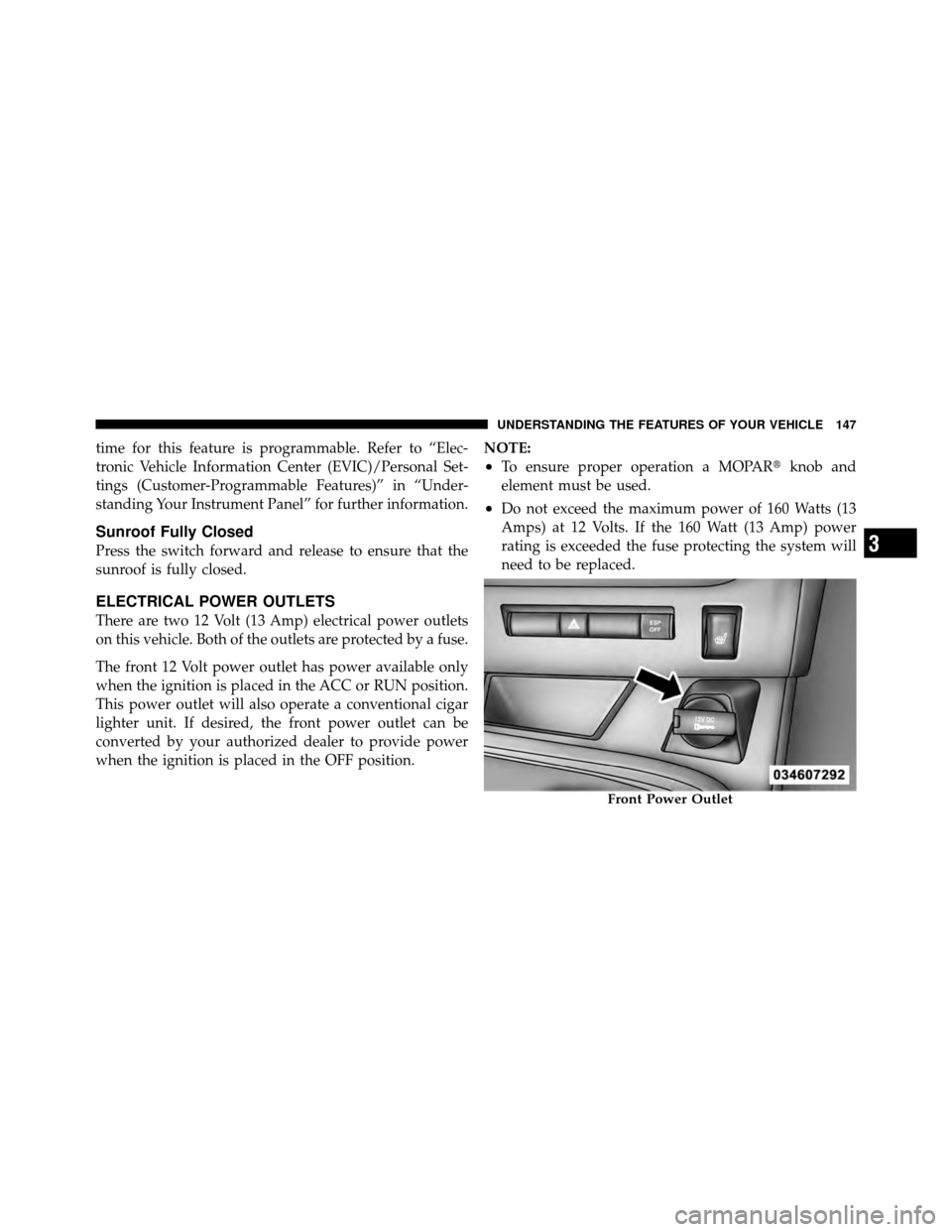
ELECTRICAL POWER OUTLETS
There are two 12 Volt (13 Amp) electrical power outlets
on this vehicle. Both of the outlets are protected by a fuse.
The front 12 Volt power outlet has power available only
when the ignition is placed in the ACC or RUN position.
This power outlet will also operate a conventional cigar
lighter unit. If desired, the front power outlet can be
converted by your authorized dealer to provide power
when the ignition is placed in the OFF position.NOTE:
•To ensure proper operation a MOPAR�
knob and
element must be used.
•Do not exceed the maximum power of 160 Watts (13
Amps) at 12 Volts. If the 160 Watt (13 Amp) power
rating is exceeded the fuse protecting the system will
need to be replaced.
Front Power Outlet
3
UNDERSTANDING THE FEATURES OF YOUR VEHICLE 147