2010 CHEVROLET IMPALA trunk
[x] Cancel search: trunkPage 7 of 432

Instrument Panel..............................................1-2
Initial Drive Information....................................1-4
Remote Keyless Entry (RKE) System................1-4
Remote Vehicle Start......................................1-4
Door Locks....................................................1-5
Trunk Release...............................................1-5
Windows.......................................................1-6
Seat Adjustment.............................................1-6
Second Row Seats.........................................1-8
Head Restraint Adjustment...............................1-8
Safety Belt....................................................1-9
Sensing System for Passenger Airbag...............1-9
Mirror Adjustment.........................................1-10
Steering Wheel Adjustment............................1-11
Interior Lighting............................................1-11
Exterior Lighting...........................................1-12
Windshield Wiper/Washer...............................1-13
Climate Controls...........................................1-14Vehicle Features.............................................1-15
Radio(s)......................................................1-15
Satellite Radio..............................................1-16
Portable Audio Devices ..................................1-16
Steering Wheel Controls . . ..............................1-17
Bluetooth
®
...................................................1-17
Cruise Control..............................................1-18
Power Outlets..............................................1-18
Performance and Maintenance.........................1-19
Traction Control System (TCS).......................1-19
Electronic Stability Control (ESC)....................1-19
Tire Pressure Monitor....................................1-20
Engine Oil Life System ..................................1-20
Fuel E85 (85% Ethanol) . . ..............................1-20
Driving for Better Fuel Economy . . ...................1-21
Roadside Assistance Program........................1-21
OnStar
®
......................................................1-22
Section 1 In Brief
1-1
Page 9 of 432

A.Outlet Adjustment on page 4-20.
B. Remote Trunk Release Button. SeeTrunk on
page 3-12.
C.Turn Signal/Multifunction Lever on page 4-4.
D.Instrument Panel Cluster on page 4-22.
E.Hazard Warning Flashers on page 4-3.
F.Driver Information Center (DIC) on page 4-37.
G.Passenger Airbag Status Indicator on page 4-25.
H.Audio System(s) on page 4-57.
I.Exterior Lamps on page 4-9.
J.Instrument Panel Brightness on page 4-11.
K.Traction Control System (TCS) on page 5-7
(If Equipped).L.Tilt Wheel on page 4-3.
M.Cruise Control on page 4-6.
N.Hood Release on page 6-13.
O.Horn on page 4-3.
P.Audio Steering Wheel Controls on page 4-84
(If Equipped).
Q.Ignition Positions on page 3-20.
R.Climate Control System on page 4-16.
S.Accessory Power Outlet(s) on page 4-15.
T. Center Console Shift Lever (If Equipped).
SeeShifting Into Park on page 3-28.
U.Glove Box on page 3-42.
1-3
Page 10 of 432

Initial Drive InformationThis section provides a brief overview about some of
the important features that may or may not be on your
specific vehicle.
For more detailed information, refer to each of the
features which can be found later in this owner manual.Remote Keyless Entry (RKE)
SystemThe RKE transmitter is used to remotely lock and
unlock the doors from up to 60 m (195 feet) away from
the vehicle.
Press
K
to unlock the
driver door. Press again
within five seconds to
unlock all remaining doors.Press
Q
to lock all doors.
Lock and unlock feedback can be personalized.
Press and hold
V
for approximately one second to
open the trunk.
Press
L
and release to locate the vehicle.
Press
L
and hold for more than two seconds to sound
the panic alarm.
Press
L
again to cancel the panic alarm.
SeeKeys on page 3-3andRemote Keyless Entry
(RKE) System Operation on page 3-4.
Remote Vehicle StartWith this feature the engine can be started from outside
of the vehicle.Starting the Vehicle1. Aim the RKE transmitter at the vehicle.
2. Press
Q
.
3. Immediately after completing Step 2, press and
hold
/
until the turn signal lamps flash.
When the vehicle starts, the parking lamps will turn
on and remain on as long as the engine is running.
The doors will be locked and the climate control system
may come on.
1-4
Page 11 of 432

The engine will continue to run for 10 minutes. Repeat
the steps for a 10-minute time extension. Remote
start can be extended only once.Canceling a Remote StartTo cancel a remote start:•
Aim the RKE transmitter at the vehicle and press
and hold
/
until the parking lamps turn off.
•
Turn on the hazard warning flashers.
•
Turn the ignition switch out of LOCK/OFF position
and then back to LOCK/OFF.
SeeRemote Vehicle Start on page 3-7.
Door LocksFrom outside the vehicle, use the key in the door or the
Remote Keyless Entry (RKE) transmitter to lock or
unlock the vehicle. From the inside, pull up or push
down on the manual door lock knobs.
SeeDoor Locks on page 3-9.
Power Door LocksPower door lock switches are located on the front doors
near the handle.Q
:Press the bottom of the switch to lock all doors.
K
:Press the top of the switch to unlock all doors.
For more information, see:•
Power Door Locks on page 3-10.
•
Delayed Locking on page 3-10.
Trunk ReleaseIn addition to the trunk release button on the RKE
transmitter, there is a remote release
G
button
located on the left side of the instrument panel.
For more information seeTrunk on page 3-12.
1-5
Page 107 of 432

Keys...............................................................3-3
Remote Keyless Entry (RKE) System................3-4
Remote Keyless Entry (RKE) System
Operation . . .................................................3-4
Remote Vehicle Start......................................3-7
Doors and Locks.............................................3-9
Door Locks....................................................3-9
Power Door Locks........................................3-10
Delayed Locking...........................................3-10
Automatic Door Lock.....................................3-10
Programmable Automatic Door Unlock.............3-11
Rear Door Security Locks..............................3-11
Lockout Protection........................................3-12
Trunk . . . . . . ....................................................3-12
Windows........................................................3-14
Power Windows............................................3-15
Sun Visors...................................................3-16
Theft-Deterrent Systems..................................3-16
Content Theft-Deterrent.................................3-17
PASS-Key
®
III+ Electronic Immobilizer.............3-18
PASS-Key
®
III+ Electronic Immobilizer
Operation . . ...............................................3-18Starting and Operating Your Vehicle................3-19
New Vehicle Break-In....................................3-19
Ignition Positions..........................................3-20
Retained Accessory Power (RAP)...................3-21
Starting the Engine.......................................3-21
Engine Coolant Heater ..................................3-23
Automatic Transmission Operation...................3-24
Parking Brake..............................................3-27
Shifting Into Park..........................................3-28
Shifting Out of Park......................................3-29
Parking Over Things That Burn.......................3-30
Engine Exhaust............................................3-31
Running the Vehicle While Parked..................3-32
Mirrors...........................................................3-33
Manual Rearview Mirror.................................3-33
Automatic Dimming Rearview Mirror................3-33
Outside Power Mirrors . . .................................3-34
Outside Convex Mirror . . .................................3-34
Outside Heated Mirrors ..................................3-34
Universal Home Remote System......................3-35
Universal Home Remote System Operation
(With Three Round LED)............................3-35
Section 3 Features and Controls
3-1
Page 111 of 432

Q
(Lock):Press to lock all the doors. If enabled through
the Driver Information Center (DIC), the parking lamps
flash once to indicate locking has occurred. If enabled
through the DIC, the horn chirps when
Q
is pressed again
within five seconds. SeeDIC Vehicle Customization on
page 4-51for additional information.
Pressing
Q
may arm the content theft-deterrent system.
SeeContent Theft-Deterrent on page 3-17.
"
(Unlock):Press once to unlock the driver door. If
"
is
pressed again within five seconds, all remaining doors
unlock. The interior lamps come on and stay on for
20 seconds or until the ignition is turned on. If enabled
through the DIC, the parking lamps flash twice to indicate
unlocking has occurred. SeeDIC Vehicle Customization
on page 4-51.
Pressing
"
on the RKE transmitter disarms the content
theft-deterrent system. SeeContent Theft-Deterrent on
page 3-17.
V
(Remote Trunk Release):Press and hold for
about one second to unlock the trunk. The transmission
must be in P (Park).
L
(Vehicle Locator/Panic Alarm):Press and release
to locate the vehicle. The turn signal lamps flash and the
horn sounds three times. Press and hold
L
for more
than two seconds to activate the panic alarm. The turn
signal lamps flash and the horn sounds repeatedly for
30 seconds. The alarm turns off when the ignition is
turned to ON/RUN or
L
is pressed again. The ignition
must be in LOCK/OFF for the panic alarm to work.
Programming Transmitters to the
VehicleOnly RKE transmitters programmed to the vehicle will
work. If a transmitter is lost or stolen, a replacement
can be purchased and programmed through your
dealer/retailer. When the replacement transmitter is
programmed to the vehicle, all remaining transmitters
must also be programmed. Any lost or stolen transmitters
no longer work once the new transmitter is programmed.
Each vehicle can have up to eight transmitters
programmed to it. See “Remote Key” underDIC
Operation and Displays on page 4-37.
3-5
Page 118 of 432

To open a rear door when the security lock is on, do the
following:
1. Unlock the door using the Remote Keyless Entry
(RKE) transmitter, if the vehicle has one, the
power door lock switch, or by lifting the rear door
manual lock.
2. Open the door from the outside.
To cancel the rear door security lock:
1. Unlock the door and open it from the outside.
2. Insert the key into the security lock slot and turn it
so the slot is in the vertical position.
3. Do the same for the other rear door.Lockout ProtectionThis feature helps prevent you from locking the doors
while the key is in the ignition. Always remember to take
your key with you when exiting the vehicle.
If the lock switch is pressed on the door that is open
and the key is in the ignition, all of the doors will
lock and then the open door will unlock. A chime sounds
continuously until the driver door is closed.
Trunk
{
WARNING:
Exhaust gases can enter the vehicle if it is driven
with the liftgate, trunk/hatch open, or with any
objects that pass through the seal between the
body and the trunk/hatch or liftgate. Engine
exhaust contains Carbon Monoxide (CO) which
cannot be seen or smelled. It can cause
unconsciousness and even death.
If the vehicle must be driven with the liftgate, or
trunk/hatch open:
•
Close all of the windows.
•
Fully open the air outlets on or under the
instrument panel.
•
Adjust the Climate Control system to a setting
that brings in only outside air and set the fan
speed to the highest setting. See Climate
Control System in the Index.
•
If the vehicle is equipped with a power liftgate,
disable the power liftgate function.
For more information about carbon monoxide, see
Engine Exhaust on page 3-31.
3-12
Page 119 of 432
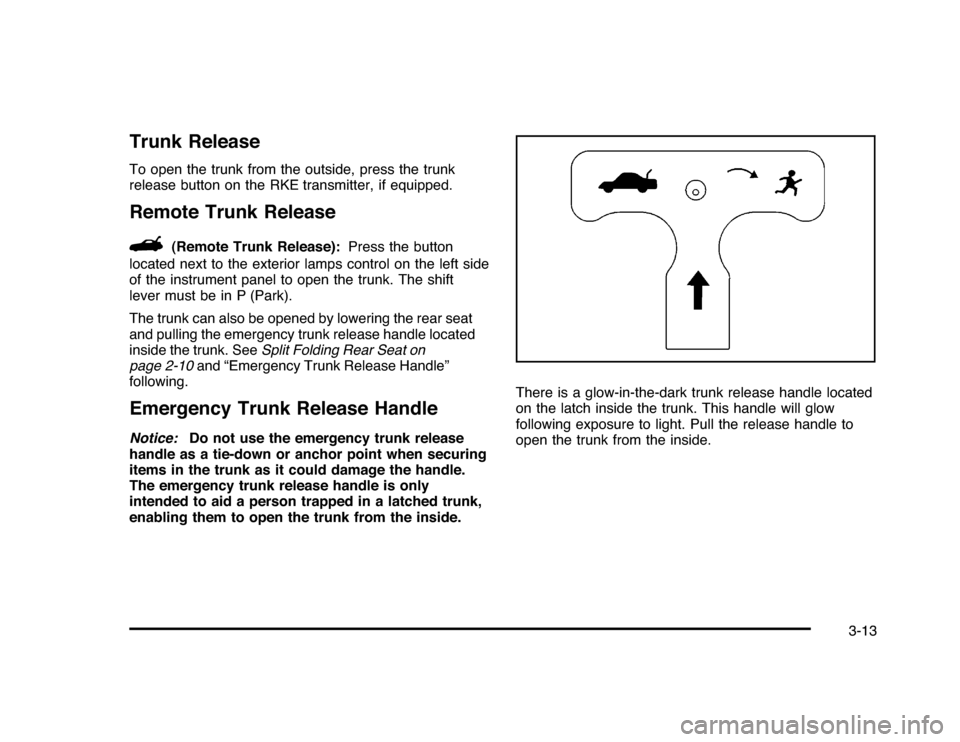
Trunk ReleaseTo open the trunk from the outside, press the trunk
release button on the RKE transmitter, if equipped.Remote Trunk Release
G
(Remote Trunk Release):Press the button
located next to the exterior lamps control on the left side
of the instrument panel to open the trunk. The shift
lever must be in P (Park).
The trunk can also be opened by lowering the rear seat
and pulling the emergency trunk release handle located
inside the trunk. SeeSplit Folding Rear Seat on
page 2-10and “Emergency Trunk Release Handle”
following.
Emergency Trunk Release HandleNotice:Do not use the emergency trunk release
handle as a tie-down or anchor point when securing
items in the trunk as it could damage the handle.
The emergency trunk release handle is only
intended to aid a person trapped in a latched trunk,
enabling them to open the trunk from the inside.There is a glow-in-the-dark trunk release handle located
on the latch inside the trunk. This handle will glow
following exposure to light. Pull the release handle to
open the trunk from the inside.
3-13