2010 CHEVROLET IMPALA maintenance
[x] Cancel search: maintenancePage 170 of 432
Outlet AdjustmentUse the thumbwheel located below or to the side of the
outlet, to change the direction of the air flow.Operation Tips•
Clear away any ice, snow or leaves from the air
inlets at the base of the windshield that may
block the flow of air into the vehicle.
•
Use of non-GM approved hood deflectors may
adversely affect the performance of the system.
•
Keep the path under the front seats clear of objects
to help circulate the air inside the vehicle more
effectively.
•
If the airflow seems low when the fan is at the
highest setting, the passenger compartment
air filter, if equipped, may need to replaced.
For more information, seePassenger Compartment
Air Filter on page 4-20andScheduled Maintenance
on page 7-3.
•
If fogging reoccurs while in vent or bi-level modes
with mild temperature throughout the vehicle, turn
on the air conditioner to reduce windshield fogging.
Passenger Compartment Air FilterThe vehicle has a passenger compartment particulate
air filter. It is located in the engine compartment,
below the air inlet grille on the passenger side.
The filter traps most of the pollen from air entering
the climate control system. It needs to be changed
periodically to ensure system performance. For
information on how often to change the passenger
compartment air filter, seeScheduled Maintenance
on page 7-3.
To change the passenger compartment air filter:
1. Turn off the ignition when the windshield wipers are
in the up position.
2. Raise the vehicle hood.
3. Pull back the hood weatherstrip from the
passengers side of the vehicle halfway to center.
4-20
Page 171 of 432
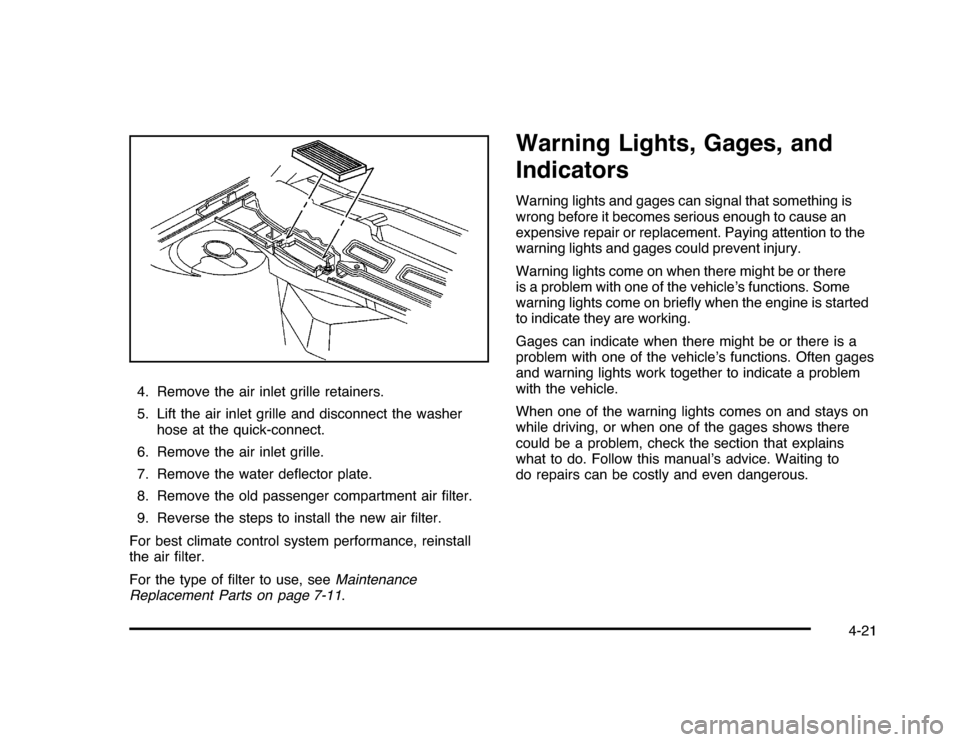
4. Remove the air inlet grille retainers.
5. Lift the air inlet grille and disconnect the washer
hose at the quick-connect.
6. Remove the air inlet grille.
7. Remove the water deflector plate.
8. Remove the old passenger compartment air filter.
9. Reverse the steps to install the new air filter.
For best climate control system performance, reinstall
the air filter.
For the type of filter to use, seeMaintenance
Replacement Parts on page 7-11.
Warning Lights, Gages, and
IndicatorsWarning lights and gages can signal that something is
wrong before it becomes serious enough to cause an
expensive repair or replacement. Paying attention to the
warning lights and gages could prevent injury.
Warning lights come on when there might be or there
is a problem with one of the vehicle’s functions. Some
warning lights come on briefly when the engine is started
to indicate they are working.
Gages can indicate when there might be or there is a
problem with one of the vehicle’s functions. Often gages
and warning lights work together to indicate a problem
with the vehicle.
When one of the warning lights comes on and stays on
while driving, or when one of the gages shows there
could be a problem, check the section that explains
what to do. Follow this manual’s advice. Waiting to
do repairs can be costly and even dangerous.
4-21
Page 182 of 432

If the check engine light comes on and stays on, while
the engine is running, this indicates that there is an
OBD II problem and service is required.
Malfunctions often are indicated by the system before
any problem is apparent. Being aware of the light
can prevent more serious damage to the vehicle.
This system assists the service technician in correctly
diagnosing any malfunction.
Notice:If the vehicle is continually driven with
this light on, after a while, the emission controls
might not work as well, the vehicle’s fuel economy
might not be as good, and the engine might not
run as smoothly. This could lead to costly repairs
that might not be covered by the vehicle warranty.
Notice:Modifications made to the engine,
transmission, exhaust, intake, or fuel system of the
vehicle or the replacement of the original tires with
other than those of the same Tire Performance
Criteria (TPC) can affect the vehicle’s emission
controls and can cause this light to come on.
Modifications to these systems could lead to
costly repairs not covered by the vehicle warranty.
This could also result in a failure to pass a required
Emission Inspection/Maintenance test. See
Accessories and Modifications on page 6-3.This light comes on during a malfunction in one of
two ways:
Light Flashing:A misfire condition has been detected.
A misfire increases vehicle emissions and could
damage the emission control system on the vehicle.
Diagnosis and service might be required.
To prevent more serious damage to the vehicle:
•
Reduce vehicle speed.
•
Avoid hard accelerations.
•
Avoid steep uphill grades.
•
If towing a trailer, reduce the amount of cargo being
hauled as soon as it is possible.
If the light continues to flash, when it is safe to do so,
stop the vehicle. Find a safe place to park the vehicle.
Turn the key off, wait at least 10 seconds, and restart
the engine. If the light is still flashing, follow the previous
steps and see your dealer/retailer for service as soon
as possible.
4-32
Page 184 of 432
Emissions Inspection and Maintenance
ProgramsSome state/provincial and local governments have or
might begin programs to inspect the emission control
equipment on the vehicle. Failure to pass this inspection
could prevent getting a vehicle registration.
Here are some things to know to help the vehicle pass
an inspection:•
The vehicle will not pass this inspection if the check
engine light is on with the engine running, or if the
key is in ON/RUN and the light is not on.
•
The vehicle will not pass this inspection if the OBD II
(on-board diagnostic) system determines that critical
emission control systems have not been completely
diagnosed by the system. The vehicle would be
considered not ready for inspection. This can happen
if the battery has recently been replaced or if the
battery has run down. The diagnostic system is
designed to evaluate critical emission control
systems during normal driving. This can take several
days of routine driving. If this has been done and the
vehicle still does not pass the inspection for lack of
OBD II system readiness, your dealer/retailer can
prepare the vehicle for inspection.
Oil Pressure Light
{
WARNING:
Do not keep driving if the oil pressure is low.
The engine can become so hot that it catches fire.
Someone could be burned. Check the oil as soon
as possible and have the vehicle serviced.
Notice:Lack of proper engine oil maintenance
can damage the engine. The repairs would not be
covered by the vehicle warranty. Always follow
the maintenance schedule in this manual for
changing engine oil.
4-34
Page 190 of 432

Vehicle Information Menu Items
T
(Vehicle Information):Press this button to scroll
through the following menu items:
Oil LifePress the vehicle information button until OIL LIFE
REMAINING displays. This display shows an estimate of
the oil’s remaining useful life. If you see 99% OIL LIFE
REMAINING on the display, that means 99% of the
current oil life remains. The engine oil life system will alert
you to change the oil on a schedule consistent with your
driving conditions.
When the remaining oil life is low, the CHANGE ENGINE
OIL SOON message will appear on the display. See
“CHANGE ENGINE OIL SOON” underDIC Warnings
and Messages on page 4-44. You should change the
oil as soon as possible. SeeEngine Oil on page 6-15.
In addition to the engine oil life system monitoring the
oil life, additional maintenance is recommended in the
Maintenance Schedule in this manual. SeeScheduled
Maintenance on page 7-3for more information.
Remember, you must reset the OIL LIFE yourself after
each oil change. It will not reset itself. Also, be careful not
to reset the OIL LIFE accidentally at any time other than
when the oil has just been changed. It cannot be reset
accurately until the next oil change. To reset the engine
oil life system, seeEngine Oil Life System on page 6-18.
UnitsPress the vehicle information button until UNITS
displays. This display allows you to select between
English or Metric units of measurement. Once in this
display, press the set/reset button to select between
ENGLISH or METRIC units.Tire PressureOn vehicles with the Tire Pressure Monitor System
(TPMS), the pressure for each tire can be viewed in the
DIC. The tire pressure will be shown in either pounds per
square inch (psi) or kilopascals (kPa). Press the vehicle
information button until the DIC displays FRONT TIRES
PSI (kPa) LEFT ## RIGHT ##. Press the vehicle
information button again until the DIC displays REAR
TIRES PSI (kPa) LEFT ## RIGHT ##.
If a low tire pressure condition is detected by the system
while driving, a message advising you to add air to a
specific tire will appear in the display. SeeInflation - Tire
Pressure on page 6-59andDIC Warnings and Messages
on page 4-44for more information.
If the tire pressure display shows dashes instead of a
value, there may be a problem with your vehicle. If this
consistently occurs, see your dealer/retailer for service.
4-40
Page 194 of 432
DIC Warnings and MessagesMessages are displayed on the DIC to notify the driver
that the status of the vehicle has changed and that some
action may be needed by the driver to correct the
condition. Multiple messages may appear one after
another. Some messages may not require immediate
action, but you can press the set/reset button to
acknowledge that you received the message and clear
it from the DIC display. Pressing any of the DIC buttons
also acknowledges and clears any messages. Some
messages cannot be cleared from the DIC display
because they are more urgent. These messages require
action before they can be cleared. You should take any
messages that appear on the display seriously and
remember that clearing the messages will only make
the messages disappear, not correct the problem.
The following are the possible messages that can be
displayed and some information about them.AUTOMATIC LIGHT CONTROL OFFThis message displays when the automatic headlamps
are turned off. SeeExterior Lamps on page 4-9for
more information.AUTOMATIC LIGHT CONTROL ONThis message displays when the automatic headlamps
are turned on. SeeExterior Lamps on page 4-9for
more information.
BATTERY SAVER ACTIVEThis message displays when the system detects that
the battery voltage is dropping beyond a reasonable
level. The battery saver system starts reducing certain
features of the vehicle that you may be able to notice.
At the point that the features are disabled, this message
is displayed. It means that the vehicle is trying to
save the charge in the battery.
Turn off all unnecessary accessories to allow the battery
to recharge.
The normal battery voltage range is 11.5 to 15.5 volts.CHANGE ENGINE OIL SOONThis message displays when service is required for the
vehicle. See your dealer/retailer. SeeEngine Oil on
page 6-15andScheduled Maintenance on page 7-3
for more information.
Acknowledging the CHANGE ENGINE OIL SOON
message will not reset the OIL LIFE REMAINING.
That must be done at the OIL LIFE screen under the
vehicle information menu. See “Oil Life” underDIC
Operation and Displays on page 4-37andEngine Oil
Life System on page 6-18.
4-44
Page 270 of 432
Leaving After Parking on a Hill1. Apply and hold the brake pedal while you:
•
start the engine,
•
shift into a gear, and
•
release the parking brake.
2. Let up on the brake pedal.
3. Drive slowly until the trailer is clear of the chocks.
4. Stop and have someone pick up and store the
chocks.
Maintenance When Trailer TowingThe vehicle needs service more often when pulling a
trailer. SeeScheduled Maintenance on page 7-3for more
information. Things that are especially important in traileroperation are automatic transmission fluid, engine oil,
belts, cooling system and brake system. It is a good idea
to inspect these before and during the trip.
Check periodically to see that all hitch nuts and bolts
are tight.
Engine Cooling When Trailer TowingThe cooling system may temporarily overheat during
severe operating conditions. SeeEngine Overheating on
page 6-29.Changing a Tire When Trailer TowingIf the vehicle gets a flat tire while towing a trailer,
be sure to secure the trailer and disconnect it from the
vehicle before changing the tire.
5-34
Page 272 of 432

Tire Pressure Monitor System.........................6-60
Tire Pressure Monitor Operation.....................6-62
Tire Inspection and Rotation . ..........................6-65
When It Is Time for New Tires.......................6-67
Buying New Tires.........................................6-68
Different Size Tires and Wheels......................6-69
Uniform Tire Quality Grading..........................6-70
Wheel Alignment and Tire Balance..................6-71
Wheel Replacement......................................6-71
Tire Chains . . . ...............................................6-73
If a Tire Goes Flat........................................6-74
Changing a Flat Tire.....................................6-75
Removing the Spare Tire and Tools................6-76
Removing the Flat Tire and Installing the
Spare Tire................................................6-77
Storing a Flat or Spare Tire and Tools................6-83
Compact Spare Tire......................................6-86
Appearance Care............................................6-87
Interior Cleaning...........................................6-87
Fabric/Carpet . ..............................................6-88
Leather.......................................................6-89
Instrument Panel, Vinyl, and Other Plastic
Surfaces . . . ...............................................6-90
Care of Safety Belts......................................6-90Weatherstrips...............................................6-90
Washing Your Vehicle...................................6-91
Cleaning Exterior Lamps/Lenses . . ...................6-91
Finish Care..................................................6-92
Windshield and Wiper Blades.........................6-92
Aluminum Wheels.........................................6-93
Tires...........................................................6-93
Sheet Metal Damage.....................................6-94
Finish Damage.............................................6-94
Underbody Maintenance................................6-94
Chemical Paint Spotting.................................6-94
Vehicle Identification......................................6-95
Vehicle Identification Number (VIN).................6-95
Service Parts Identification Label . . ...................6-95
Electrical System............................................6-95
Add-On Electrical Equipment..........................6-95
Headlamp Wiring..........................................6-96
Windshield Wiper Fuses................................6-96
Power Windows and Other Power Options.......6-96
Fuses and Circuit Breakers . . . . . .......................6-96
Instrument Panel Fuse Block..........................6-96
Underhood Fuse Block..................................6-97
Capacities and Specifications........................6-100
Section 6 Service and Appearance Care
6-2